ashiq-ali/k8s-security-hardening
GitHub: ashiq-ali/k8s-security-hardening
基于 Ansible 的 Kubernetes 集群自动化安全加固项目,涵盖 CIS 基准合规、RBAC 审计、运行时威胁检测与网络隔离。
Stars: 0 | Forks: 0
# k8s-security-hardening
[](LICENSE)
[](https://ansible.com)
[](https://kubernetes.io)
[](https://cisecurity.org)
## 架构
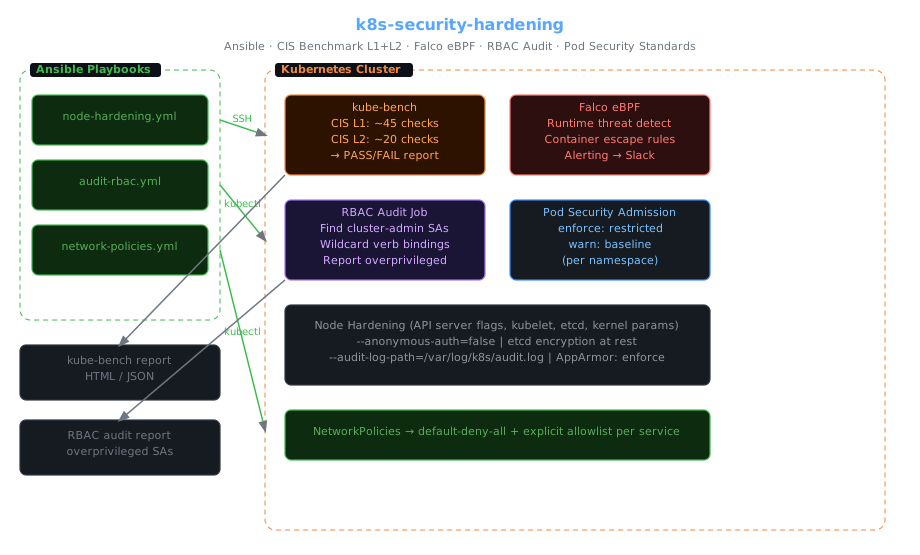
```
Ansible Control Node
├── playbooks/node-hardening.yml ──SSH──► K8s Nodes
├── playbooks/audit-rbac.yml ──K8s──► ┌─ Kubernetes Cluster ──────────────────┐
└── playbooks/network-policies.yml ──K8s──► │ kube-bench (CIS L1 + L2) │
│ Falco eBPF (syscall threat detection) │
│ RBAC Audit Job (overprivileged SAs) │
│ Pod Security Admission (PSA labels) │
│ NetworkPolicies (deny-all + allowlist)│
└───────────────────────────────────────┘
│
CIS Scan Report (HTML/JSON)
RBAC Audit Report
Falco Runtime Alerts → Slack
```
## 目录
- [涵盖内容](#what-this-covers)
- [前置条件](#prerequisites)
- [快速开始](#quick-start)
- [CIS Benchmark 加固](#cis-benchmark-hardening)
- [RBAC 审计](#rbac-audit)
- [Falco 运行时安全](#falco-runtime-security)
- [Pod 安全标准](#pod-security-standards)
- [网络策略](#network-policies)
- [运行 CIS 扫描](#running-the-cis-scan)
- [Inventory 设置](#inventory-setup)
- [安全态势检查清单](#security-posture-checklist)
- [故障排除](#troubleshooting)
## 涵盖内容
CKS 认证涵盖六个领域。此仓库实现了所有这些领域:
| CKS 领域 | 实现 |
|-----------|----------------|
| 集群设置 | `node-hardening.yml` — API server 标志、etcd 加密、审计日志 |
| 集群加固 | `audit-rbac.yml` — 过高权限的 SA 检测、namespace 隔离 |
| 系统加固 | `node-hardening.yml` — AppArmor 配置文件、seccomp、host path 限制 |
| 最小化微服务漏洞 | `pod-security/` — PSA Restricted 配置文件、禁止 root 容器 |
| 供应链安全 | Manifest 扫描钩子、镜像策略 webhook 引用 |
| 监控、日志记录和运行时安全 | Falco 规则 — 可疑 syscall、容器逃逸尝试 |
## 前置条件
| 工具 | 版本 |
|------|---------|
| Ansible | ≥ 2.14 |
| Python | ≥ 3.10(在控制节点上) |
| kubectl | ≥ 1.28(需要集群管理员权限) |
| SSH 访问 | 到 K8s 节点(用于节点级别的加固) |
安装 Ansible collections:
```
ansible-galaxy install -r requirements.yml
```
## 快速开始
```
# 1. Clone
git clone https://github.com/ashiq-ali/k8s-security-hardening
cd k8s-security-hardening
# 2. 配置 inventory
cp inventory/example-hosts.ini inventory/hosts.ini
# 编辑 hosts.ini — 添加你的 control-plane 和 worker 节点 IP
# 3. 运行 CIS 节点加固
ansible-playbook playbooks/node-hardening.yml \
-i inventory/hosts.ini \
--become \
--ask-become-pass
# 4. 审计 RBAC
ansible-playbook playbooks/audit-rbac.yml \
-i inventory/hosts.ini
# 5. 应用 network policies
ansible-playbook playbooks/network-policies.yml \
-i inventory/hosts.ini \
--extra-vars "target_namespace=production"
# 6. 运行 CIS 扫描报告
./scripts/cis-scan.sh
```
## CIS Benchmark 加固
`playbooks/node-hardening.yml` 应用 CIS Kubernetes Benchmark Level 1 和 Level 2 控制。
### 加固内容
**API Server (`roles/cis-benchmark/tasks/apiserver.yml`):**
```
# 应用的 kube-apiserver flags(通过 kubeadm config 或 static pod manifest)
--anonymous-auth=false
--audit-log-path=/var/log/kubernetes/audit.log
--audit-log-maxage=30
--audit-log-maxbackup=10
--audit-log-maxsize=100
--authorization-mode=Node,RBAC
--encryption-provider-config=/etc/kubernetes/encryption.yaml # etcd at-rest encryption
--tls-min-version=VersionTLS12
--admission-plugins=NodeRestriction,PodSecurity
```
**Kubelet (`roles/cis-benchmark/tasks/kubelet.yml`):**
```
--anonymous-auth=false
--authorization-mode=Webhook
--client-ca-file=/etc/kubernetes/pki/ca.crt
--protect-kernel-defaults=true
--read-only-port=0 # Disable unauthenticated read-only port
--streaming-connection-idle-timeout=5m
```
**etcd (`roles/cis-benchmark/tasks/etcd.yml`):**
```
--auto-tls=false
--peer-auto-tls=false
--cert-file=/etc/kubernetes/pki/etcd/server.crt
--key-file=/etc/kubernetes/pki/etcd/server.key
--peer-cert-file=/etc/kubernetes/pki/etcd/peer.crt
```
**OS 级别加固:**
- 禁用 swap(K8s 要求,同时也是安全卫生的做法)
- 设置内核参数:`net.ipv4.conf.all.accept_redirects=0`、`net.ipv4.ip_forward=1`
- 限制 `/proc` 文件系统权限
- 启用 AppArmor 并设置为 enforce 模式
### 在检查模式下运行(不作更改)
```
ansible-playbook playbooks/node-hardening.yml \
-i inventory/hosts.ini \
--check --diff
```
## RBAC 审计
`playbooks/audit-rbac.yml` 识别具有过高权限的服务账号和 RBAC 绑定:
```
ansible-playbook playbooks/audit-rbac.yml -i inventory/hosts.ini
```
该 playbook 部署了一个 Job (`manifests/rbac-audit/audit-job.yaml`),报告内容如下:
```
RBAC Audit Report — 2024-01-15
━━━━━━━━━━━━━━━━━━━━━━━━━━━━━━━━━━━━━━━━━━━━━━━━━━━━━
⚠️ CRITICAL: ServiceAccount default/my-app has cluster-admin
Binding: ClusterRoleBinding/my-app-admin
Recommendation: Scope to specific namespace + verbs
⚠️ HIGH: ServiceAccount kube-system/coredns can list secrets cluster-wide
Binding: ClusterRoleBinding/coredns
Recommendation: Restrict to ConfigMaps only
✅ OK: ServiceAccount default/api-service — minimal RBAC
✅ OK: ServiceAccount monitoring/prometheus — metrics-reader only
Summary: 2 critical, 1 high, 0 medium, 14 OK
```
### 手动 RBAC 审计命令
```
# 查找所有授予 cluster-admin 的 ClusterRoleBindings
kubectl get clusterrolebindings -o json | \
jq '.items[] | select(.roleRef.name=="cluster-admin") | .metadata.name'
# 查找具有 wildcard verb 权限的 service accounts
kubectl get clusterroles -o json | \
jq '.items[] | select(.rules[].verbs[] == "*") | .metadata.name'
# 查找未使用的 service accounts(没有 pod 使用它们)
./scripts/cis-scan.sh --check unused-service-accounts
```
## Falco 运行时安全
`roles/falco-rules/` 通过 Helm 安装 Falco,并部署针对 Kubernetes 特定威胁的自定义规则。
### 安装 Falco
```
helm repo add falcosecurity https://falcosecurity.github.io/charts
helm upgrade --install falco falcosecurity/falco \
--namespace falco --create-namespace \
--set driver.kind=ebpf \
--set falcosidekick.enabled=true \
--set falcosidekick.config.slack.webhookurl="$SLACK_WEBHOOK"
```
### 自定义规则 (`roles/falco-rules/templates/rules.yaml`)
```
- rule: Container Escape Attempt via Proc Mount
desc: Detect access to /proc/*/root which may indicate container escape
condition: >
spawned_process and
proc.name in (sh, bash, python, python3) and
fd.name startswith /proc and
fd.name endswith /root and
not proc.pname in (kubelet)
output: "Possible container escape (user=%user.name cmd=%proc.cmdline)"
priority: CRITICAL
tags: [container, escape]
- rule: Sensitive File Read in Container
desc: Detect reads of sensitive host files from within a container
condition: >
open_read and container and
fd.name in (/etc/shadow, /etc/passwd, /root/.ssh/authorized_keys)
output: "Sensitive file read (file=%fd.name container=%container.name)"
priority: WARNING
- rule: Unexpected Outbound Connection
desc: Container making unexpected outbound connections (possible C2)
condition: >
outbound and container and
not fd.rip in (allowed_egress_ips)
output: "Unexpected outbound (ip=%fd.rip container=%container.name)"
priority: NOTICE
- rule: Privileged Container Started
desc: A privileged container was started
condition: container.privileged=true
output: "Privileged container started (container=%container.name image=%container.image)"
priority: WARNING
```
告警通过 Falco Sidekick 路由到 Slack。被抑制的 namespace(kube-system 工具)会被加入白名单。
## Pod 安全标准
`manifests/pod-security-admission/` 跨 namespace 强制执行 PSA:
```
# 应用于所有 application namespaces
apiVersion: v1
kind: Namespace
metadata:
name: production
labels:
# Enforce: pods violating restricted policy are rejected
pod-security.kubernetes.io/enforce: restricted
pod-security.kubernetes.io/enforce-version: latest
# Warn: shows warnings for baseline violations
pod-security.kubernetes.io/warn: baseline
pod-security.kubernetes.io/warn-version: latest
```
**Restricted 配置文件强制要求:**
- `runAsNonRoot: true`
- `allowPrivilegeEscalation: false`
- `seccompProfile: {type: RuntimeDefault}`
- 无 `hostPID`、`hostNetwork`、`hostIPC`
- `capabilities: drop: [ALL]`
将 PSA 标签应用于 namespace:
```
ansible-playbook playbooks/network-policies.yml \
-i inventory/hosts.ini \
--extra-vars "target_namespace=production apply_psa=true"
```
## 网络策略
`manifests/network-policies/` 提供了基线 deny-all + explicit allow 模式。
```
# 应用 baseline(拒绝除 DNS 外的所有 ingress + egress)
kubectl apply -f manifests/network-policies/00-default-deny-all.yaml -n production
# 应用针对特定 service 的 allow rules
kubectl apply -f manifests/network-policies/allow-api-to-database.yaml -n production
```
策略结构:
```
# 00-default-deny-all.yaml — 首先应用
spec:
podSelector: {} # matches all pods in namespace
policyTypes: [Ingress, Egress]
egress:
- ports: [{port: 53}] # Allow DNS (required for service discovery)
```
白名单规则遵循显式许可原则:
```
# allow-api-to-database.yaml
spec:
podSelector:
matchLabels: {app: database}
ingress:
- from:
- podSelector:
matchLabels: {app: api-service}
ports:
- port: 5432
```
## 运行 CIS 扫描
`scripts/cis-scan.sh` 针对你的集群运行 [kube-bench](https://github.com/aquasecurity/kube-bench):
```
./scripts/cis-scan.sh
# 选项:
./scripts/cis-scan.sh --target master # Scan control plane only
./scripts/cis-scan.sh --target node # Scan worker nodes only
./scripts/cis-scan.sh --output html # Generate HTML report
./scripts/cis-scan.sh --benchmark gke # GKE-specific checks
```
示例输出:
```
[INFO] 1 Control Plane Components
[PASS] 1.1.1 Ensure that the API server pod specification file permissions are set to 644 or more restrictive
[PASS] 1.1.2 Ensure that the API server pod specification file ownership is set to root:root
[FAIL] 1.2.6 Ensure that the --kubelet-certificate-authority argument is set as appropriate
[WARN] 1.2.9 Ensure that the admission control plugin EventRateLimit is set
== Summary master ==
45 checks PASS
3 checks FAIL
5 checks WARN
0 checks INFO
```
## Inventory 设置
```
# inventory/hosts.ini
[control_plane]
cp1 ansible_host=10.0.1.10 ansible_user=ubuntu
[workers]
worker1 ansible_host=10.0.1.20 ansible_user=ubuntu
worker2 ansible_host=10.0.1.21 ansible_user=ubuntu
[k8s:children]
control_plane
workers
[k8s:vars]
ansible_ssh_private_key_file=~/.ssh/k8s-key
ansible_python_interpreter=/usr/bin/python3
```
对于无法通过 SSH 访问节点的 GKE/EKS,请使用 `--skip-tags node-ssh` 标志:
```
ansible-playbook playbooks/node-hardening.yml \
--skip-tags node-ssh # Applies only K8s API-level changes
```
## 安全态势检查清单
在任何集群投入生产之前,请针对该集群运行此检查清单:
- [ ] kube-bench CIS Level 1 — 全部 PASS(或记录在案的例外情况)
- [ ] kube-bench CIS Level 2 — 已审查并接受已知的失败项
- [ ] 除紧急情况专用账号外,没有具有 `cluster-admin` 权限的服务账号
- [ ] 生产 namespace 中没有具有通配符动词权限的服务账号
- [ ] 所有应用程序 namespace 都具有 PSA `restricted` 标签
- [ ] 所有 namespace 都具有 `default-deny-all` NetworkPolicy
- [ ] Falco 已部署并向 Slack 发送告警
- [ ] etcd 已进行静态加密(设置了 `--encryption-provider-config`)
- [ ] 启用了 API server 审计日志
- [ ] Kubelet 匿名认证已禁用(`--anonymous-auth=false`)
- [ ] 生产工作负载中没有 `hostPID`、`hostNetwork`、`hostIPC`
- [ ] 生产环境中镜像拉取策略设置为 `Always`(无过期的缓存镜像)
## 故障排除
**Ansible playbook 失败并提示 `Permission denied`**
确保传递了 `--become` 标志,并且 SSH 用户具有 sudo 权限。测试方法:
```
ansible all -i inventory/hosts.ini -m ping
ansible all -i inventory/hosts.ini -m command -a "whoami" --become
```
**强制执行 PSA 后 Pod 被拒绝**
```
# 检查哪个 PSA policy 失败
kubectl describe pod -n production
# 查找:“pod violates PodSecurity restrict”
# 修复 pod spec 或为该 namespace 放宽至 baseline
```
**Falco eBPF 驱动加载失败**
```
kubectl logs -n falco daemonset/falco | grep -i ebpf
# eBPF 需要 kernel ≥ 5.8 和 BTF (BPF Type Format)
# 检查:uname -r 和 ls /sys/kernel/btf/vmlinux
# 回退:使用 kernel module driver 替代 eBPF
helm upgrade falco falcosecurity/falco --set driver.kind=module
```
**网络策略阻止了合法流量**
```
# 使用 ephemeral pod 调试 NetworkPolicy
kubectl run debug --image=nicolaka/netshoot --rm -it -- bash
# 在内部:curl :
# 检查:kubectl describe networkpolicy -n
```
*旨在将 CKS 级别的 Kubernetes 安全加固应用于生产集群,基于现实世界的威胁建模和合规性要求。*
标签:Ansible, Anthropic, CIS基准, Docker镜像, Falco, GitHub Advanced Security, RBAC审计, 子域名突变, 安全加固, 应用安全, 敏感词过滤, 系统提示词, 逆向工具