tyrenker/Pythia-CTI
GitHub: tyrenker/Pythia-CTI
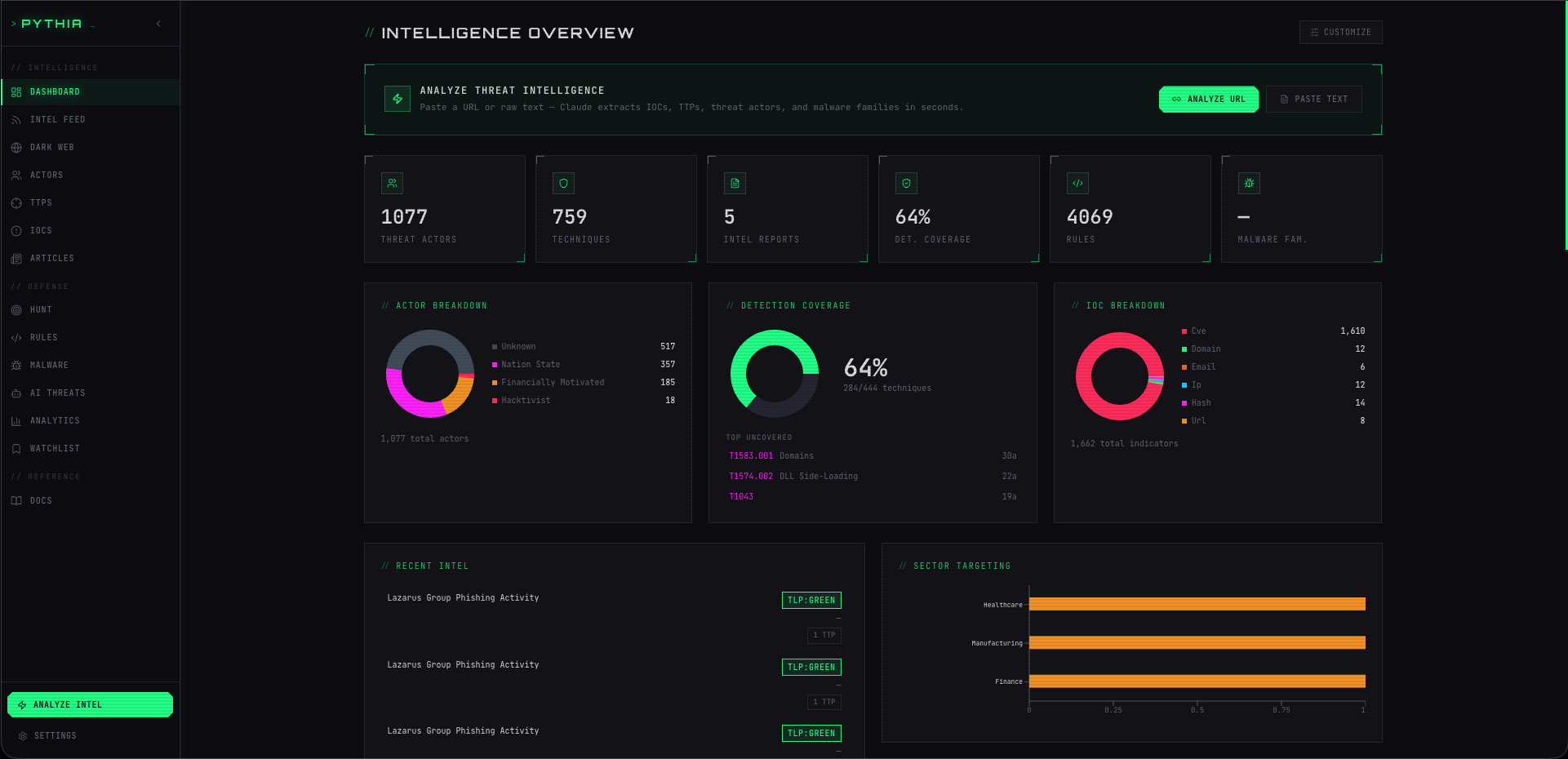
Pythia 是一个开箱即用的开源 CTI 平台,整合威胁情报管理、蜜罐攻击采集与 SIEM 检测规则自动部署的全流程能力。
Stars: 0 | Forks: 0

[](https://python.org)
[](https://fastapi.tiangolo.com)
[](https://sqlalchemy.org)
[](https://anthropic.com)
[](LICENSE)
以传达阿波罗神谕的德尔斐女祭司命名的 **Pythia**,能够摄取原始威胁情报,根据行业标准框架进行标准化,并通过简洁的 REST API 提供服务——其中包括连 CFO 都能轻松看懂的高管级 PDF 简报。
它在**首次克隆后即满载可用**:包含超过 1,180 个威胁行为者档案、759 个 MITRE ATT&CK 技术、1,600 多个已知被利用的 CVE,以及 16 个精选的 Sigma 检测规则(外加 14 个 Yara 规则)——无需爬取,无需注册账号,无需 SaaS 订阅。
它还可以作为**实时采集平台**运行:在 Pythia 旁部署一个 Cowrie SSH 蜜罐,真实的攻击者事件就会自动流入——并经由 GeoIP、ASN、AbuseIPDB 和 GreyNoise 数据进行富化,聚类为命名的攻击活动,最终转换为可直接部署到您的 SIEM(Wazuh、Splunk 或 Elastic)的 Sigma 规则。当规则触发时,告警会返回到 Pythia 的运维队列中,与原始攻击活动相关联,随时准备进行分诊处理。
## 它的功能
```
Blog post / vendor report / OSINT / Honeypot events
│
├─ POST /v1/parse ──────────────────────────────┐
│ │
│ ┌─────────────┐ │
│ │ Claude AI │ ← extracts actors, TTPs, │
│ │ Parser │ IoCs, CVEs, kill chain │
│ └─────┬───────┘ │
│ │ │
├─ POST /v1/honeypot/events/bulk ───────────────┤
Cowrie/T-Pot → forwarder → enrichment
│
▼ stored in SQLite
┌─────────────────────────────────────────────────────┐
│ Pythia Database │
│ 1,184 actors · 759 techniques · 1,600+ CVEs │
│ Kill Chain mapping · Diamond Model views │
│ Honeypot events · Campaigns · SIEM alerts │
└─────┬───────────────────────────────────────────────┘
│
┌─────┴────────────────────────────────┐
│ REST API /v1/ │
├──────────────────────────────────────┤
│ /actors threat actor profiles + TTPs │
│ /ttps ATT&CK + ATLAS techniques │
│ /iocs indicators of compromise │
│ /rules Sigma/Yara detection rules │
│ /hunts Threat hunt workbench & AI │
│ /threats ingested intel reports │
│ /reports PDF generation │
│ /parse Claude extraction endpoint │
│ /honeypot live attack events, campaigns, │
│ blocklist, TAXII/STIX export, │
│ WebSocket real-time stream │
│ /siem Wazuh/Splunk/Elastic rule deploy │
│ + alert triage queue │
└─────┬────────────────────────────────┘
│
┌─────┴──────────────────────────────────┐
│ Executive PDF Brief │ Kill chain grid · financial exposure
│ Tactical PDF Report │ Full TTP table · IoC list · Admiralty
│ Honeypot Campaign Report │ Attack timeline · credential patterns
└────────────────────────────────────────┘
```
## 内置情报
一个全新的克隆版本**即刻就能派上用场**——除了配置之外,无需任何设置。
| 数据集 | 来源 | 记录数 |
|---|---|---|
| 威胁行为者档案 | MISP Galaxy + ATT&CK + APT Groups Sheet (合并) | **1,184** |
| ATT&CK 技术 | MITRE ATT&CK STIX 2.1 — Enterprise + Mobile + ICS | **759** |
| 已知被利用的 CVE | CISA KEV 目录 | **1,602** |
| AI/ML 对抗性技术 | MITRE ATLAS | 完整目录 |
| Sigma 检测规则 | 精选 SigmaHQ 子集 | **16** |
随时从上游刷新:
```
pythia sync # refresh all sources
pythia sync attck misp-galaxy kev # selective refresh
```
## 集成的框架
| 框架 | 在 Pythia 中的用途 |
|---|---|
| **MITRE ATT&CK** (Enterprise, Mobile, ICS) | 技术分类体系、组织到 TTP 的映射、战术分类 |
| **Lockheed Martin Cyber Kill Chain** | 7 阶段攻击生命周期 — 将 ATT&CK 战术映射到 Kill Chain 阶段 |
| **Diamond Model** | 每个行为者的对手 / 能力 / 基础设施 / 受害者视图 |
| **MITRE ATLAS** | AI/ML 对抗性技术 — 模型逆向、prompt 注入、投毒 |
| **OWASP LLM Top 10 (2025)** | 从摄取的报告中提取针对 LLM 的特定弱点 |
| **Pyramid of Pain** | IoC 等级分类 — 哈希 → IP → 域名 → 制品 → 工具 → TTPs |
| **NATO Admiralty Code** | 每个 IoC 的来源可靠度 (A–F) × 信息可信度 (1–6) |
| **TLP** | 每条记录上的 WHITE / GREEN / AMBER / RED 标记 |
| **STIX 2.1** | 用于行为者、技术、关系和蜜罐 IOC 包的原生数据模型 |
## 快速开始
### Docker (推荐)
```
# Clone
git clone https://github.com/tyrenker/Pythia-CTI.git
cd pythia
# 配置
cp .env.example .env
# 设置 ANTHROPIC_API_KEY 以启用 Claude parser
# 设置 PYTHIA_API_KEY 为强随机字符串以用于 write endpoint auth
# 启动
docker compose up --build
```
首次启动会自动进行数据库播种(约 60 秒)。之后,API 将在 `http://localhost:8000` 上线。
### 通过 Docker 运行 CLI (推荐) 🐳
由于 WeasyPrint(驱动 Pythia 的 PDF 编译器的库)依赖于系统级的 C 共享库(`pango`、`cairo`、`harfbuzz` 等),在裸机 macOS 或 Windows 上直接运行 PDF 生成有时会因为缺少依赖而面临挑战。
**Docker 容器**预先打包了所有系统依赖和 Python 模块,并做到了开箱即用。
#### 直接通过 Docker 执行
要在容器内运行任何 Pythia 命令,只需在前面加上 `docker exec`:
```
# 列出数据库中已摄入的威胁报告
docker exec -it pythia pythia list threats
# 解析新的文章 URL 并将其摄入
docker exec -it pythia pythia ingest "https://www.huntress.com/blog/the-gentlemen-ransomware-defense-evasion-ttps"
# 生成精美的执行层 PDF 简报
docker exec -it pythia pythia report "c881d693" --template executive --output data/gentlemen_executive.pdf
```
#### 设置本地 CLI 别名 (两全其美) 🚀
为了让 Pythia 感觉像原生工具一样,并能在主机终端的任何位置通过输入 `pythia
` 来运行命令,请配置一个 shell 别名:
1. **对于 Zsh (macOS 默认):**
echo "alias pythia='docker exec -it pythia pythia'" >> ~/.zshrc && source ~/.zshrc
2. **对于 Bash (Linux):**
echo "alias pythia='docker exec -it pythia pythia'" >> ~/.bashrc && source ~/.bashrc
现在您可以直接在主机上的任何目录中运行简洁的 CLI 命令:
```
pythia list threats
pythia report "c881d693" --template executive --output data/executive_brief.pdf
```
*(所有生成的 PDF 都会写入 `./data` 文件夹,该文件夹会直接绑定挂载到您主机文件系统上!)*
### 本地运行 (不使用 Docker)
```
python3.11 -m venv .venv && source .venv/bin/activate
pip install -e ".[dev]"
pythia init-db
pythia sync # seed from public sources (~60s)
pythia serve --reload
```
## 加载合成数据 (用于 UI 演示和 Bug 测试)
如果您正在开发 UI 前端或进行本地演示,您可以使用一套全面、逼真且完全相互关联的合成网络威胁情报 (CTI) 记录来填充数据库。
此合成数据集会用极具视觉表现力的内容填充**每一个数据库表**,确保所有的前端统计卡片、Diamond 模型、行为者 Kill Chain 网格、最新动态和分析页面都不会是空白的,并且内容丰富。
### 如何运行
激活您的虚拟环境并从根目录运行脚本:
```
# 1. 填充数据库(安全地跳过现有的 synthetic data)
PYTHONPATH=src python3 scripts/load_synthetic_data.py
# 2. 从头擦除并重新加载 synthetic data(幂等重置)
PYTHONPATH=src python3 scripts/load_synthetic_data.py --reset
# 3. Dry-run(列出将要插入的内容而不进行写入)
PYTHONPATH=src python3 scripts/load_synthetic_data.py --dry-run
```
该脚本在本地 SQLite 数据库上运行用时不到 **1 秒**,并使用确定性的 UUID 映射,因此重复运行会被安全忽略。
## API 示例
**健康检查**
```
curl http://localhost:8000/v1/health
# {"status":"ok","version":"0.1.0"}
```
**查询威胁行为者**
```
curl http://localhost:8000/v1/actors/APT28
```
```
{
"id": "...",
"name": "APT28",
"aliases": ["Fancy Bear", "STRONTIUM", "Sofacy", "Pawn Storm"],
"country_code": "RU",
"sponsor_type": "nation-state",
"attck_group_id": "G0007",
"ttps": [...]
}
```
**行为者的 Kill Chain 拆解**
```
curl http://localhost:8000/v1/actors/APT28/killchain
```
```
{
"actor_name": "APT28",
"phases": {
"delivery": [{"technique_id": "T1566", "name": "Phishing", ...}],
"exploitation": [{"technique_id": "T1059", "name": "Command and Scripting Interpreter", ...}],
"installation": [...],
"command-and-control": [...],
"actions-on-objectives": [...]
}
}
```
**Diamond Model 视图**
```
curl http://localhost:8000/v1/actors/APT28/diamond
```
```
{
"adversary": {"name": "APT28", "country": "RU", "sponsor_type": "nation-state"},
"capability": {"technique_count": 71, "sample_techniques": ["T1566", "T1059", ...]},
"infrastructure": {"patterns": null, "known_tool_techniques": []},
"victim": {"sectors": [], "geographies": ["RU"]}
}
```
**摄取威胁情报文章**
```
curl -X POST http://localhost:8000/v1/parse \
-H "Content-Type: application/json" \
-d '{"url": "https://example.com/threat-report"}'
```
```
{
"report_id": "a3f2...",
"title": "New Lazarus Group Campaign Targets Finance Sector",
"tlp": "GREEN",
"status": "pending_review",
"parsed_data": {
"actors": [{"name": "Lazarus Group", "confidence": "B2"}],
"ttps": [{"technique_id": "T1566.001", "evidence": "...exact quote..."}],
"iocs": [{"type": "domain", "value": "malicious.example.com", "context": "..."}],
"killchain_phases": ["delivery", "exploitation", "actions-on-objectives"],
"business_impact_draft": {
"financial_range_usd": [500000, 5000000],
"operational": "Potential 2–5 day recovery window for affected systems",
"recommended_board_actions": [
"Activate incident response retainer",
"Notify cyber insurance carrier",
"Brief legal counsel on regulatory notification timelines"
]
}
}
}
```
**下载高管级 PDF 简报**
```
curl "http://localhost:8000/v1/reports/{report_id}/pdf?template=executive" \
--output brief.pdf
```
**浏览 Sigma 检测规则**
```
curl "http://localhost:8000/v1/rules?rule_type=sigma&technique_id=T1059&severity=high"
```
**蜜罐实时动态**
```
# 摄入 Cowrie event(由 forwarder 自动完成)
curl -X POST http://localhost:8000/v1/honeypot/events/bulk \
-H "X-API-Key: your-key" \
-H "Content-Type: application/json" \
-d '[{"eventid":"cowrie.login.failed","src_ip":"1.2.3.4","username":"root","password":"admin","timestamp":"2026-06-20T12:00:00Z"}]'
# 获取活跃的 campaigns
curl http://localhost:8000/v1/honeypot/campaigns?status=active
# 下载 IP blocklist(无需认证)
curl http://localhost:8000/v1/honeypot/feeds/blocklist.txt
# honeypot campaign IOCs 的 STIX 2.1 bundle
curl http://localhost:8000/v1/honeypot/taxii/honeypot-iocs
# 实时事件流(WebSocket)
wscat -c ws://localhost:8000/v1/honeypot/stream
```
**SIEM 状态和规则部署**
```
# 检查 SIEM 连接
curl http://localhost:8000/v1/siem/status
# 将所有活跃的检测规则部署到您的 SIEM
curl -X POST http://localhost:8000/v1/siem/rules/deploy-all \
-H "X-API-Key: your-key"
# 列出传入的 SIEM 告警
curl "http://localhost:8000/v1/siem/alerts?triage_status=new"
# 对告警进行 Triage
curl -X PATCH http://localhost:8000/v1/siem/alerts/{id}/triage \
-H "X-API-Key: your-key" \
-H "Content-Type: application/json" \
-d '{"triage_status":"true_positive","analyst_notes":"Confirmed Mirai botnet scanner","triaged_by":"analyst1"}'
```
## 核心工作流与用例
### 工作流 A:C 级高管简报 👔
* **目标:** 将技术性威胁报告转化为包含财务风险和建议的董事会行动的视觉化高级别摘要。
* **流程:**
1. **摄取原始的 OSIST 博客文章:**
pythia ingest "https://www.huntress.com/blog/the-gentlemen-ransomware-defense-evasion-ttps"
2. **获取简短报告 ID:**
pythia list threats
3. **生成高管级 PDF 简报:**
pythia report "c881d693" --template executive --output data/exec_brief_gentlemen.pdf
* **结果:** 一份 A4 大小的 PDF,包含高管摘要叙述、Lockheed Martin Cyber Kill Chain 覆盖矩阵、目标行业/国家,以及**建议的董事会行动**(财务风险敞口范围、运营停机时间、GDPR/HIPAA 下的监管风险敞口)。
### 工作流 B:取证与威胁狩猎 (SecOps) 🔍
* **目标:** 分析入侵事件,提取带有置信度评级的 IoC,并为您的 SIEM 生成高保真度的 Sigma 规则。
* **流程:**
1. **抓取并分析入侵帖子:**
pythia ingest "https://www.huntress.com/blog/slashandgrab-the-connectwise-screenconnect-vulnerability-explained-2"
2. **生成战术分析报告:**
pythia report "4f7cbb25" --template tactical --output data/tactical_report.pdf
* **结果:** 包含代码证据的 MITRE ATT&CK 技术,按 Pyramid of Pain 和 Admiralty Code 分类的 IoC,以及由 Claude 生成的 Sigma/Yara 规则。
### 工作流 C:威胁行为者画像与差距分析 📊
* **目标:** 研究特定的威胁行为者,查看其 Diamond Model 画像,并将 TTP 映射到 Kill Chain 阶段,以找出防御覆盖盲区。
* **流程:**
1. **本地查询行为者画像:**
pythia list actors "APT28"
2. **通过 API 查看 TTP 生命周期映射:**
curl http://localhost:8000/v1/actors/APT28/killchain
* **结果:** 完整的行为者档案,包含国家级从属关系、目标、Diamond Model 以及按 Kill Chain 阶段组织的历史 TTP。
### 工作流 D:交互式威胁狩猎工作台 (SecOps) 🎯
* **目标:** 发起一次范围明确的威胁狩猎,记录按 Admiralty Code 评级的观察结果,利用 AI 进行行为者归因,并生成适配 SIEM 的检测规则。
* **流程:**
1. **通过 UI 或 API 启动新的狩猎会话。** 定义一个假设、目标行业和动机焦点。
2. **记录观察结果:** 输入 IP、哈希或 ATT&CK 技术。工作台会将它们映射到 Pyramid of Pain 等级,并链接到行为者档案。
3. **运行 AI 行为者建议:** Claude 将观察结果与 1,180 多个行为者进行交叉比对,以寻找潜在的归因匹配。
4. **起草并推广检测规则:** 自动起草 Sigma/YARA/KQL 规则,并一键将其推送到全局检测库。
### 工作流 E:蜜罐收集与攻击活动分析 🍯
* **目标:** 部署一个 Cowrie SSH 蜜罐,自动富化攻击者事件并将其聚类为攻击活动,并从真实的互联网流量中生成可操作的 CTI。
* **架构:**
Internet → Cowrie SSH Honeypot (VPS)
│ JSON log tail
▼
honeypot-forwarder → POST /v1/honeypot/events/bulk
│
▼
Pythia (GeoIP + ASN + AbuseIPDB + GreyNoise enrichment)
│
Campaign clustering (every 15 min)
│
Auto-generated Sigma rules + CTI reports
* **流程:**
1. **启动蜜罐栈:**
docker compose -f docker-compose.yml -f docker-compose.honeypot.yml up -d
2. **在 UI 的 **Honeypot** 页面监控实时动态** —— 事件会在几秒钟内出现。
3. **查看攻击活动** —— 调度器将相关的攻击者 IP 聚类为命名的攻击活动(例如 `CAMPAIGN-2026-001`)。
4. **生成攻击活动 CTI 报告:**
curl -X POST http://localhost:8000/v1/honeypot/campaigns/{id}/generate-report \
-H "X-API-Key: your-key"
5. **将 IOC 作为 STIX 2.1 导出**以供下游工具使用,或者将 `/v1/honeypot/feeds/blocklist.txt` 拉取到您的防火墙中。
有关 VPS 部署说明,请参阅 [docs/honeypot-siem-setup.md](docs/honeypot-siem-setup.md)。
### 工作流 F:SIEM 规则部署与告警分诊 📡
* **目标:** 将 Pythia 的检测规则推送到 Wazuh、Splunk 或 Elastic,并在与蜜罐攻击活动相关联的统一队列中对 SIEM 告警进行分诊。
* **流程:**
1. **在 `.env` 中配置您的 SIEM**(参见下文的配置说明)。
2. **从 **Operations** 页面或通过 API 将所有活跃的规则部署**到 SIEM。
3. **当规则触发时,Wazuh 会通过 webhook 回传到** `/v1/siem/alerts/receive`。
4. **从 Operations → Alert Queue UI 对告警进行分诊**,当攻击者 IP 匹配到已知攻击活动时,将自动进行关联。
有关包含 webhook 集成脚本在内的完整 Wazuh 设置,请参阅 [docs/honeypot-siem-setup.md](docs/honeypot-siem-setup.md)。
## CLI
```
pythia version # version + ASCII logo
pythia serve [--host HOST] [--port PORT] # start API server
pythia sync [sources...] # refresh bundled intel
pythia init-db # create/migrate tables
pythia list actors # table of all actors
pythia list actors "Lazarus Group" # detail view for one actor
pythia list actors --json # raw JSON output
pythia list actors --output actors.json # write to file
pythia list threats # ingested intel reports
pythia list threats # detail view for one report
```
## 架构
```
src/pythia/
├── api/
│ ├── actors.py # /v1/actors — profiles, killchain, diamond, diff
│ ├── ttps.py # /v1/ttps — ATT&CK + ATLAS technique lookup
│ ├── iocs.py # /v1/iocs — indicator search + filtering
│ ├── rules.py # /v1/rules — Sigma/Yara detection rules
│ ├── threats.py # /v1/threats — ingested report feed
│ ├── reports.py # /v1/reports/{id}/pdf — PDF generation
│ ├── hunts.py # /v1/hunts — Threat hunt workbench (AI-assisted)
│ ├── parse.py # /v1/parse — Claude extraction endpoint
│ ├── honeypot.py # /v1/honeypot — event ingest, campaigns, blocklist, TAXII, WebSocket
│ └── siem.py # /v1/siem — rule deployment + alert triage
│
├── core/
│ ├── config.py # pydantic-settings, PYTHIA_* env vars
│ ├── db.py # SQLAlchemy engine + session (WAL mode, FK enforcement)
│ └── seed.py # MISP Galaxy, ATT&CK STIX, CISA KEV, ATLAS, Sigma pipeline
│
├── models/
│ ├── actor.py # ThreatActor
│ ├── attck.py # AttckTechnique
│ ├── ioc.py # IoC
│ ├── hunt.py # HuntSession, HuntFinding
│ ├── rule.py # DetectionRule (Sigma/Yara) + siem_rule_id, siem_deployed_at
│ ├── honeypot.py # HoneypotEvent, HoneypotCampaign, SiemAlert
│ └── ...
│
├── ingestion/
│ ├── claude_parser.py # Anthropic SDK → structured JSON
│ ├── honeypot_normalizer.py # Cowrie / Dionaea / Honeytrap / Mailoney → HoneypotEvent
│ ├── honeypot_enricher.py # GeoIP, ASN, AbuseIPDB, GreyNoise, VirusTotal
│ ├── cowrie_ttp_map.py # map attacker shell commands → ATT&CK TTP IDs
│ ├── campaign_detector.py # clustering job — groups events into campaigns
│ └── prompts/
│ ├── extract_intel.md
│ ├── hunt_suggest_actors.md
│ ├── hunt_refine_hypothesis.md
│ └── hunt_draft_detection.md
│
├── integrations/
│ └── siem/
│ ├── base.py # SiemClient ABC
│ ├── wazuh.py # Wazuh REST API client
│ ├── splunk.py # Splunk REST API client
│ ├── elastic.py # Elastic/OpenSearch client
│ └── factory.py # get_siem_client() — reads PYTHIA_SIEM_TYPE
│
├── detections/
│ ├── converters.py # Sigma → backend query format
│ └── honeypot_sigma.py # auto-generate Sigma rules from campaign data
│
└── reporting/
├── pdf.py # Jinja2 + WeasyPrint renderer
├── honeypot_report.py # campaign CTI report generator
└── templates/
├── base.html
├── executive.html
├── tactical.html
└── honeypot_daily.html
docker/
├── cowrie/ # Cowrie SSH honeypot config
└── honeypot-forwarder/ # log-tail agent that ships events to Pythia
data/
├── sigma/ # 16 curated Sigma rules (committed to repo)
└── seed/ # upstream license attribution
db/
└── pythia.db # SQLite — bind-mounted in Docker, gitignored
```
## 部署
Pythia 是**自托管、单分析师**模式。没有托管实例,没有公开 URL,没有 SaaS 层级。
| 景 | 命令 |
|---|---|
| 本地开发 | `pythia serve --reload` |
| Docker (持久化) | `docker compose up -d` |
| Docker + 蜜罐 | `docker compose -f docker-compose.yml -f docker-compose.honeypot.yml up -d` |
| Docker + SIEM (Wazuh) | `docker compose -f docker-compose.siem.yml up -d` |
| 选择性同步 | `pythia sync attck sigma` |
| 备份您的数据 | `cp db/pythia.db ~/backups/` |
默认情况下,服务器绑定到 `127.0.0.1:8000`。要在您的局域网中公开,请在 `.env` 中设置 `PYTHIA_HOST=0.0.0.0`。
有关蜜罐 VPS 部署和 SIEM webhook 设置,请参阅 [docs/honeypot-siem-setup.md](docs/honeypot-siem-setup.md)。
## 配置
将 `.env.example` 复制到 `.env` 并进行配置:
### 核心配置
| 变量 | 默认值 | 描述 |
|---|---|---|
| `ANTHROPIC_API_KEY` | — | `POST /v1/parse` 所必需的 (Claude 提取) |
| `PYTHIA_API_KEY` | `changeme` | 写入端点的 Auth header |
| `PYTHIA_DATABASE_URL` | `sqlite:///./pythia.db` | SQLAlchemy 数据库 URL |
| `PYTHIA_CLAUDE_MODEL` | `claude-sonnet-4-6` | 用于情报提取的 Claude 模型 |
| `PYTHIA_HOST` | `127.0.0.1` | 绑定地址 |
| `PYTHIA_PORT` | `8000` | 绑定端口 |
### 蜜罐收集
| 变量 | 默认值 | 描述 |
|---|---|---|
| `PYTHIA_HONEYPOT_INGEST_ENABLED` | `false` | 启用 `/v1/honeypot` 端点 |
| `PYTHIA_ENABLE_SCHEDULER` | `false` | 每 15 分钟运行一次攻击活动检测和每日报告 |
| `ABUSEIPDB_API_KEY` | — | AbuseIPDB 富化 (免费版:每天 1,000 次检查) |
| `GREYNOISE_API_KEY` | — | GreyNoise 社区富化 (免费) |
| `VIRUSTOTAL_API_KEY` | — | VirusTotal 富化 (免费版:每天 500 次请求) |
| `MAXMIND_DB_PATH` | — | 指向 `GeoLite2-City.mmdb` 的路径 (从 MaxMind 免费下载) |
| `MAXMIND_ASN_DB_PATH` | — | 指向 `GeoLite2-ASN.mmdb` 的路径 |
### SIEM 集成
| 变量 | 默认值 | 描述 |
|---|---|---|
| `PYTHIA_SIEM_TYPE` | — | `wazuh`、`splunk` 或 `elastic` (留空 = 禁用) |
| `PYTHIA_SIEM_URL` | — | SIEM API 的基础 URL |
| `PYTHIA_SIEM_USERNAME` | — | SIEM API 用户名 |
| `PYTHIA_SIEM_PASSWORD` | — | SIEM API 密码 |
| `PYTHIA_SIEM_API_TOKEN` | — | API token (仅限 Elastic/OpenSearch) |
## 交互式文档
服务器运行时,可通过以下地址获取完整的 OpenAPI 文档:
- **`http://localhost:8000/docs`** — Swagger UI (在浏览器中尝试端点)
- **`http://localhost:8000/redoc`** — ReDoc (更整洁的阅读格式)
## 数据来源与许可证
| 来源 | 许可证 | 用途 |
|---|---|---|
| [MISP Galaxy](https://github.com/MISP/misp-galaxy) | CC BY-SA 4.0 | 威胁行为者档案 |
| [MITRE ATT&CK](https://attack.mitre.org) | ATT&CK Terms of Use | 技术、组织、TTP 映射 |
| [MITRE ATLAS](https://atlas.mitre.org) | CC BY 4.0 | AI/ML 对抗性技术 |
| [CISA KEV](https://www.cisa.gov/known-exploited-vulnerabilities-catalog) | Public Domain | 已知被利用的 CVE |
| [SigmaHQ](https://github.com/SigmaHQ/sigma) | DRL 1.1 | 检测规则 |
完整署名请见 [`data/seed/SOURCES.md`](data/seed/SOURCES.md)。
**代码许可证:** MIT。捆绑的数据保留其上游许可证。
## 测试
```
pytest # run all tests
pytest -v # verbose — shows each test name
pytest tests/test_api.py # endpoint tests only
```
由 [Ty Renker](https://github.com/tyrenker) 构建 · MIT License
*“她一开口,帝国皆倾听。”*
标签:AV绕过, DLL 劫持, FastAPI, Python, SIEM集成, 大语言模型, 威胁情报, 安全运营, 开发者工具, 扫描框架, 无后门, 蜜罐, 证书利用, 请求拦截, 逆向工具