QuentinRSmith/Threat-Intelligence-for-SOC
GitHub: QuentinRSmith/Threat-Intelligence-for-SOC
该教程项目通过 TryHackMe 实战房间演示如何利用威胁情报强化安全运营 pipeline,涵盖 IOC 狩猎、防御控制和自动化检测规则的完整流程。
Stars: 1 | Forks: 0
# 针对 SOC 的威胁情报
我将通过一个 TryHackMe 房间,演示如何利用威胁情报来改进安全运营(Security Operations)pipeline。
# 简介
在这个房间中,我们将重点关注威胁情报如何强化安全运营 pipeline,以及如何跨团队有效地利用共享信息。我们还将介绍谁生产和消费威胁情报、不同类型的情报,以及如何应用它们来防范和检测恶意活动。
# 威胁情报源
威胁情报生产者负责收集、分析和共享威胁数据。他们通过网络监控、蜜罐和内部事件分析等方法收集信息,然后发布报告、安全公告和 IOC 源供他人使用。成为一名生产者需要庞大的数据集、强大的分析能力以及识别新兴威胁的资源。
威胁情报消费者利用生产者创建的情报来增强其安全态势。他们依赖共享数据来识别漏洞,利用 IOC 阻止或检测恶意活动,改善事件响应,并通过验证和共享有用的发现来进行协作。
一个组织是生产者还是消费者,取决于其资源、专业知识以及其安全团队在收集和应用威胁情报中所扮演的角色。
首先,我们将狩猎(hunt)并消费由威胁情报生产者提供的 IOC。
我们首先启动虚拟机(VPM)并登录
 我们现在将使用 uncoder.io,这是一个在线工具,可以将 Sigma 规则、IOC 列表和其他平台的查询语法转换为适用于 SIEM 和 XDR 执行的自定义狩猎查询。这款易于使用的工具可以协助我们狩猎以下待调查的 IOC。对于 IOC,该工具接受六种不同类型的 IOC,分别是:
IP
域名
URL
哈希值(Hashes)
电子邮件
文件
我们现在将使用 uncoder.io,这是一个在线工具,可以将 Sigma 规则、IOC 列表和其他平台的查询语法转换为适用于 SIEM 和 XDR 执行的自定义狩猎查询。这款易于使用的工具可以协助我们狩猎以下待调查的 IOC。对于 IOC,该工具接受六种不同类型的 IOC,分别是:
IP
域名
URL
哈希值(Hashes)
电子邮件
文件
 接下来,我们使用以下 IP 列表并将其上传到 Uncoder。粘贴 IOC 后,Uncoder 会自动还原被屏蔽(defanged)的 IP 并移除重复项,最终留下四个唯一的地址。
IP 列表:
135[.]181[.]103[.]89
185[.]224[.]126[.]215
185[.]224[.]128[.]215
171[.]24[.]136[.]15
171[.]22[.]136[.]15
195[.]133[.]40[.]108
103[.]190[.]37[.]169
103[.]170[.]37[.]169
103[.]190[.]37[.]169
185[.]224[.]128[.]215
107[.]175[.]202[.]151
107[.]175[.]202[.]158
195[.]133[.]40[.]108
107[.]175[.]202[.]158
109[.]206[.]240[.]194
接下来,我们使用以下 IP 列表并将其上传到 Uncoder。粘贴 IOC 后,Uncoder 会自动还原被屏蔽(defanged)的 IP 并移除重复项,最终留下四个唯一的地址。
IP 列表:
135[.]181[.]103[.]89
185[.]224[.]126[.]215
185[.]224[.]128[.]215
171[.]24[.]136[.]15
171[.]22[.]136[.]15
195[.]133[.]40[.]108
103[.]190[.]37[.]169
103[.]170[.]37[.]169
103[.]190[.]37[.]169
185[.]224[.]128[.]215
107[.]175[.]202[.]151
107[.]175[.]202[.]158
195[.]133[.]40[.]108
107[.]175[.]202[.]158
109[.]206[.]240[.]194
 我们得出以下结果:
 我们可以通过 Discover 功能在 Kibana 实例中使用该工具的运行结果。
我们将粘贴目标地址,并在 Elastic 中添加 2/14/23 - 2/17/23 的时间范围,得出以下结果:
我们可以通过 Discover 功能在 Kibana 实例中使用该工具的运行结果。
我们将粘贴目标地址,并在 Elastic 中添加 2/14/23 - 2/17/23 的时间范围,得出以下结果:
 从中,我们可以看到诸如与特定地址建立了多少连接等信息:
 我们可以看到受感染主机的 IP 地址:
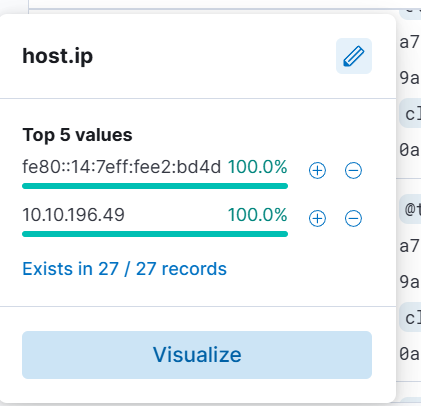 最后,我们可以看到 IP: 107.175.202.151 的目标端口:
 # 情报驱动的防御
现在在这个房间中:
你的组织已将自己定位为威胁情报的消费者,这意味着你的职责是利用来自可信来源的情报来部署安全控制措施,并防止环境中的威胁。利用这些来源提供的 IOC,你可以通过阻止或检测恶意活动来强化防御能力。
首先,我们可以简化威胁情报源中常见的 IOC 类型:
域名 – 通常与恶意托管、C2 服务器或垃圾邮件活动有关。
IP 地址 – 通常与已知的攻击源或恶意软件回调相关。
这些 IOC 构成了你为保护基础设施而应用的控制措施的基础。
**通过防火墙阻断 IP**
IP 阻断是一种常见的安全控制措施,它根据尝试建立连接的 IP 地址拦截入站或出站流量,通常通过防火墙规则来执行。虽然防火墙配置可能看起来很复杂,但阻断已知的恶意 IP 是有效的第一步。这样做有助于防止可能破坏服务或利用漏洞的入侵连接,同时也能阻止受感染的系统在执行恶意软件后连接到威胁行为者的基础设施。
接下来,我们将使用 SIEM 日志来狩猎任何涉及被你的 DNS Sinkhole 标记为恶意的域名的活动。从提供的域名 agrosaoxe[.]info 开始,通过将占位符替换为该域名和你的 sinkhole IP,使用下面的 KQL 模板运行搜索:
dns.question.name: "agrosaoxe.info"
dns.answers.data: "sinkhole_IP_here"
我们看到共产生了 11 条针对 agrosaoxe[.]info 的 DNS 查询
# 情报驱动的防御
现在在这个房间中:
你的组织已将自己定位为威胁情报的消费者,这意味着你的职责是利用来自可信来源的情报来部署安全控制措施,并防止环境中的威胁。利用这些来源提供的 IOC,你可以通过阻止或检测恶意活动来强化防御能力。
首先,我们可以简化威胁情报源中常见的 IOC 类型:
域名 – 通常与恶意托管、C2 服务器或垃圾邮件活动有关。
IP 地址 – 通常与已知的攻击源或恶意软件回调相关。
这些 IOC 构成了你为保护基础设施而应用的控制措施的基础。
**通过防火墙阻断 IP**
IP 阻断是一种常见的安全控制措施,它根据尝试建立连接的 IP 地址拦截入站或出站流量,通常通过防火墙规则来执行。虽然防火墙配置可能看起来很复杂,但阻断已知的恶意 IP 是有效的第一步。这样做有助于防止可能破坏服务或利用漏洞的入侵连接,同时也能阻止受感染的系统在执行恶意软件后连接到威胁行为者的基础设施。
接下来,我们将使用 SIEM 日志来狩猎任何涉及被你的 DNS Sinkhole 标记为恶意的域名的活动。从提供的域名 agrosaoxe[.]info 开始,通过将占位符替换为该域名和你的 sinkhole IP,使用下面的 KQL 模板运行搜索:
dns.question.name: "agrosaoxe.info"
dns.answers.data: "sinkhole_IP_here"
我们看到共产生了 11 条针对 agrosaoxe[.]info 的 DNS 查询
 接下来,我们看到 agrosaoxe[.]info 解析出的 IPv4 地址以及用于 DNS Sinkhole 的 IP 地址
 最后,我们看到连接到 sinkhole 域名导致了多少次命中,数量为 115
 # 情报驱动的检测
我们在本房间的下一个任务:
你已经成功部署了预防机制来缓解基础设施中已知的 IOC。为了最大化检测和响应能力,你现在的任务是提升工具的检测能力。
我们已经从上一个任务中开始利用威胁情报来防止恶意行为者的潜在入侵。现在,我们将利用威胁情报 IOC 来有效地了解我们的基础设施中是否正在发生可疑的事情。
在此任务中,我们将使用以下 Sigma 规则来狩猎 sinkhole 域名
该 Sigma 规则搜索解析为 0.0.0.0 的 DNS 查询,这通常表明该域名已被你的 DNS Sinkhole 阻断。在日志中看到这种解析结果可以预示着基于你的 sinkhole 配置,有人正尝试访问一个已知的恶意域名。
使用 Uncoder.io 将该 Sigma 规则转换为 ElastAlert 格式。将转换方向设置为 Sigma → ElastAlert,然后点击 Translate 以生成该规则的 ElastAlert 版本。
# 情报驱动的检测
我们在本房间的下一个任务:
你已经成功部署了预防机制来缓解基础设施中已知的 IOC。为了最大化检测和响应能力,你现在的任务是提升工具的检测能力。
我们已经从上一个任务中开始利用威胁情报来防止恶意行为者的潜在入侵。现在,我们将利用威胁情报 IOC 来有效地了解我们的基础设施中是否正在发生可疑的事情。
在此任务中,我们将使用以下 Sigma 规则来狩猎 sinkhole 域名
该 Sigma 规则搜索解析为 0.0.0.0 的 DNS 查询,这通常表明该域名已被你的 DNS Sinkhole 阻断。在日志中看到这种解析结果可以预示着基于你的 sinkhole 配置,有人正尝试访问一个已知的恶意域名。
使用 Uncoder.io 将该 Sigma 规则转换为 ElastAlert 格式。将转换方向设置为 Sigma → ElastAlert,然后点击 Translate 以生成该规则的 ElastAlert 版本。
 为了开始使用 ElastAlert,我使用提供的凭据通过 SSH 连接到机器,并导航到了 ~/elastalert 目录。该目录包含主 config.yaml 文件,该文件定义了 ElastAlert 如何连接到 Elasticsearch 实例,此外还有一个 rules 子目录,其中包含一个名为 sinkhole.yaml 的占位符规则。
 在将 Sigma 规则转换后,我用从 Uncoder.io 生成的 ElastAlert 规则替换了 sinkhole.yaml 的内容。在保存之前,我进行了两项必要的调整:
我删除了 description 行中从 Author: 开始的所有内容,以确保语法的有效性。
我将 index 的值从 winlogbeat-* 更新为 filebeat-*,以便规则能查询正确的数据源。
经过这些更改后,该规则定义了一个告警,每当 DNS 查询解析为 0.0.0.0(表明这是一个 sinkhole 域名)时就会触发。
配置好规则后,我返回到 ElastAlert 主目录,并使用一条命令执行了 ElastAlert,该命令从 2023 年 2 月 16 日开始评估,打印详细输出,并将结果写入 output.txt。我让该进程一直运行,直到 ElastAlert 报告其已完成初始查询周期(由显示命中数、匹配数和已发送告警数的摘要指示)。之后,我使用 CTRL+C 停止了该进程。
在将 Sigma 规则转换后,我用从 Uncoder.io 生成的 ElastAlert 规则替换了 sinkhole.yaml 的内容。在保存之前,我进行了两项必要的调整:
我删除了 description 行中从 Author: 开始的所有内容,以确保语法的有效性。
我将 index 的值从 winlogbeat-* 更新为 filebeat-*,以便规则能查询正确的数据源。
经过这些更改后,该规则定义了一个告警,每当 DNS 查询解析为 0.0.0.0(表明这是一个 sinkhole 域名)时就会触发。
配置好规则后,我返回到 ElastAlert 主目录,并使用一条命令执行了 ElastAlert,该命令从 2023 年 2 月 16 日开始评估,打印详细输出,并将结果写入 output.txt。我让该进程一直运行,直到 ElastAlert 报告其已完成初始查询周期(由显示命中数、匹配数和已发送告警数的摘要指示)。之后,我使用 CTRL+C 停止了该进程。
 这完成了用于检测 sinkholed DNS 活动的 ElastAlert 规则的设置、配置和执行。
# 总结
在之前的任务中,我们涵盖了威胁情报生产者和消费者之间的关键区别,以及为什么了解组织的需求和能力对于从情报中获取价值至关重要。我们还探讨了如何应用情报驱动的预防和检测,使用了 Sigma、Uncoder 和 ElastAlert 等工具来构建实用的检测逻辑。
总体而言,本房间重点关注了威胁情报如何通过改善检测能力和针对已知威胁的预防性控制,来强化安全运营中心(SOC)。在威胁不断演变的格局中,组织必须充分利用共享情报——无论是来自专门研究团队的生产,还是通过消费者的反馈进行的完善。通过协作和共享知识,我们可以共同改善每个组织的安全态势。
这完成了用于检测 sinkholed DNS 活动的 ElastAlert 规则的设置、配置和执行。
# 总结
在之前的任务中,我们涵盖了威胁情报生产者和消费者之间的关键区别,以及为什么了解组织的需求和能力对于从情报中获取价值至关重要。我们还探讨了如何应用情报驱动的预防和检测,使用了 Sigma、Uncoder 和 ElastAlert 等工具来构建实用的检测逻辑。
总体而言,本房间重点关注了威胁情报如何通过改善检测能力和针对已知威胁的预防性控制,来强化安全运营中心(SOC)。在威胁不断演变的格局中,组织必须充分利用共享情报——无论是来自专门研究团队的生产,还是通过消费者的反馈进行的完善。通过协作和共享知识,我们可以共同改善每个组织的安全态势。

最后,我们可以看到 IP: 107.175.202.151 的目标端口:
标签:IOC分析, TryHackMe笔记, 威胁情报, 安全运营, 开发者工具, 扫描框架, 网络安全, 越狱测试, 隐私保护