Tr00jan99/Snake-Tank-Security-Suite
GitHub: Tr00jan99/Snake-Tank-Security-Suite
一款零依赖、100% 便携的 Windows 安全审计与操作系统加固套件,基于 PowerShell 与 WPF 构建,支持离线环境下的漏洞扫描、一键加固与威胁检测。
Stars: 0 | Forks: 0
🐍 Snake Tank 便携安全工具套件
一个零依赖、100% 便携的 Windows 安全审计与加固套件。








## 📋 目录
- [关于](#-about)
- [功能](#-features)
- [快速开始](#-quick-start)
- [架构](#%EF%B8%8F-architecture)
- [模块](#-modules-deep-dive)
- [系统要求](#-system-requirements)
- [项目结构](#-project-structure)
- [测试](#-testing)
- [贡献](#-contributing)
- [免责声明](#%EF%B8%8F-disclaimer)
- [许可证](#-license)
## 🐍 关于
**Snake Tank 便携安全工具套件** 是一个完全使用原生 PowerShell 构建的自包含、零依赖的 Windows 安全审计与加固套件,并配备了现代化的 WPF (Windows Presentation Foundation) GUI。
专为**渗透测试人员**、**蓝队操作员**、**系统管理员**和**安全爱好者**设计——只需将文件夹复制到 USB 驱动器,插入任何 Windows 机器,即可立即审计、扫描和加固主机系统。无需安装。无需网络。无需借口。
### 为什么选择 Snake Tank?
| 传统工具 | Snake Tank |
|:---|:---|
| ❌ 需要 Python、.NET SDK 或 npm | ✅ 零依赖——仅使用 PowerShell |
| ❌ 需要网络才能安装包 | ✅ 100% 离线且适用于物理隔离环境 |
| ❌ 设置和配置复杂 | ✅ 双击 `.bat` 即可运行 |
| ❌ 仅限命令行界面 | ✅ 精美的现代深色主题 GUI |
| ❌ 用于不同任务的工具分散 | ✅ 多合一统一安全套件 |
## ✨ 功能
|
### 🛡️ 安全审计
- 24 项全面漏洞扫描
- CVSS 严重性评分 (Critical → Info)
- 实时安全分数计算
- 自动字母评级评估 (A-F)
- 加固合规性百分比跟踪
|
### 🔧 一键加固
- 弃用 SMBv1 协议
- 强制执行 Firewall 配置文件
- 激活 Windows Defender
- 强制执行 RDP NLA
- 控制打印后台处理程序和远程注册表
- 注册表级别的安全策略
|
|
### 🔍 威胁检测
- Windows Defender 主动威胁扫描
- 启发式文件分析引擎
- 启动项持久化异常检测
- 可疑脚本解释器标记
- 混淆 payload 模式匹配
|
### 🖥️ 操作系统深度审计器
- 10 阶段深度 Windows 操作系统检查
- 硬件拓扑提取 (CPU、RAM、GPU)
- 活动驱动程序与服务枚举
- CVE/CVSS 漏洞交叉引用
- 带有实时仪表板的操作系统强度评分
- 一键操作系统加固按钮
|
|
### 🌐 CVE 情报
- 按关键字或 ID 实时搜索 CVE
- 本地软件清单审计
- 已知漏洞交叉引用
- CVSS 评分标记与严重性映射
|
### 📊 报告与导出
- 精美的独立 HTML 安全报告
- 带有可视化图表的严重性细分
- 可复制的修复手动命令
- 实时诊断日志终端
|
## 🚀 快速开始
### 方式 1:双击启动(推荐)
```
📁 Portable_Toolkit/
└── 🖱️ Start_Snake_Tank.bat ← Double-click this!
```
### 方式 2:PowerShell 启动
```
# 导航至 toolkit 目录
cd "C:\Path\To\Portable_Toolkit"
# 启动并绕过 execution policy
powershell -NoProfile -ExecutionPolicy Bypass -File .\core\engine.ps1
```
### 方式 3:直接标签页启动
```
# 直接启动 Vulnerability Scanner
powershell -ExecutionPolicy Bypass -File .\core\engine.ps1 -Tab "Scanner"
# 直接启动 System Hardening
powershell -ExecutionPolicy Bypass -File .\core\engine.ps1 -Tab "Hardening"
# 直接启动 OS Deep Auditor
powershell -ExecutionPolicy Bypass -File .\core\engine.ps1 -Tab "OS"
```
### 快捷启动器
| 启动器 | 描述 |
|:---|:---|
| `Start_Snake_Tank.bat` | 主仪表板启动器 |
| `Snake_Tank_Scanner.bat` | 直接进入漏洞扫描器 |
| `Snake_Tank_Hardener.bat` | 直接进入系统加固 |
## 🏗️ 架构
```
┌─────────────────────────────────────────────────────────────┐
│ SNAKE TANK ENGINE │
│ │
│ ┌──────────┐ ┌──────────────────────────────────────┐ │
│ │ SIDEBAR │ │ CONTENT VIEWPORT │ │
│ │ │ │ │ │
│ │ Dashboard│ │ ┌────────────────────────────────┐ │ │
│ │ Scanner │ │ │ Active Module Page │ │ │
│ │ Hardening│ │ │ (Dashboard / Scanner / │ │ │
│ │ Threats │ │ │ Hardening / Threats / │ │ │
│ │ CVE │ │ │ CVE / OS Auditor / About) │ │ │
│ │ OS Audit │ │ │ │ │ │
│ │ About │ │ └────────────────────────────────┘ │ │
│ │ │ │ │ │
│ │ │ │ ┌────────────────────────────────┐ │ │
│ │ v1.0.0 │ │ │ DIAGNOSTIC LOG TERMINAL │ │ │
│ └──────────┘ │ └────────────────────────────────┘ │ │
│ └──────────────────────────────────────┘ │
└─────────────────────────────────────────────────────────────┘
Technology Stack:
├── PowerShell 5.1+ (Core Engine)
├── WPF / XAML (GUI Framework)
├── CIM / WMI (System Queries)
├── .NET Framework 4.x (Runtime)
└── Win32 API (Registry / Services)
```
## 🔬 模块深度解析
### 1️⃣ 系统仪表板
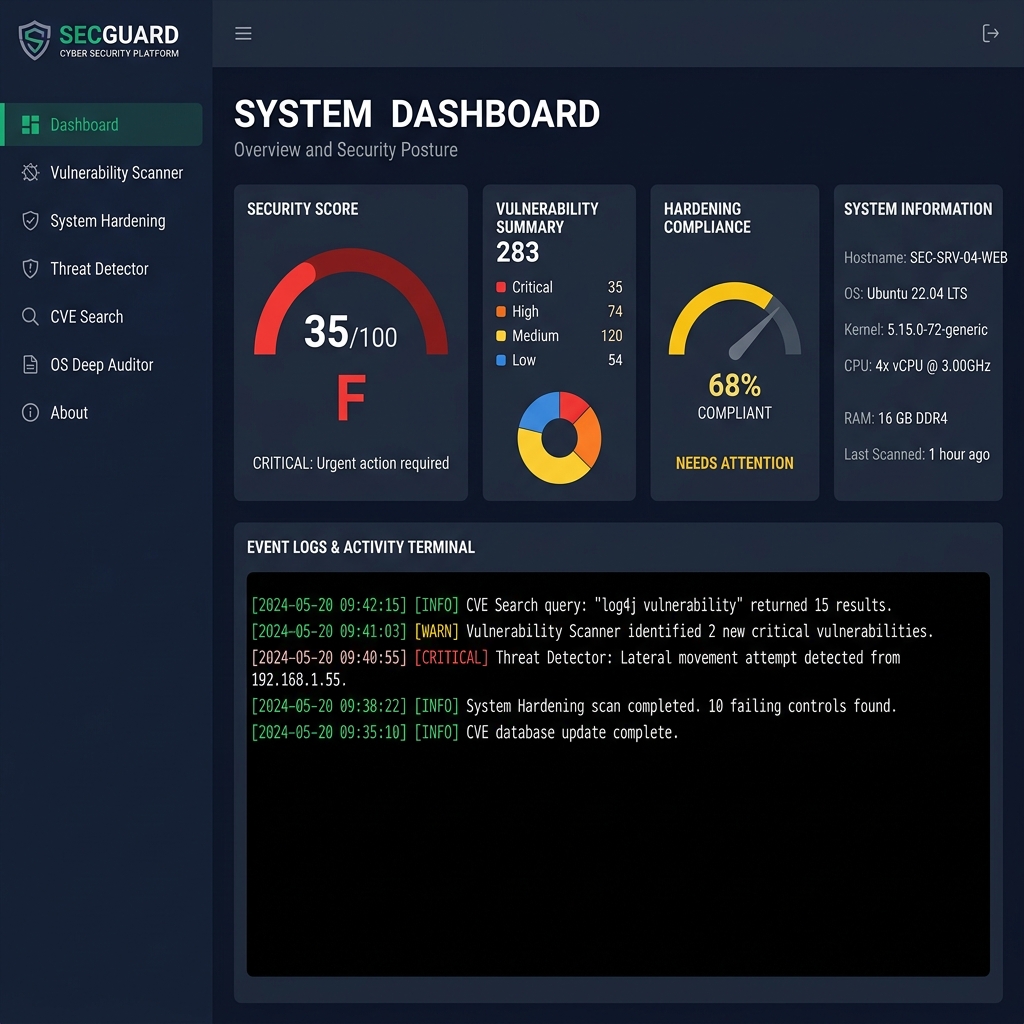
- **安全审计分数** —— 带有字母评级徽章的动态 0-100 分数
- **漏洞细分** —— 严重性标签计数 (Critical、High、Medium、Low)
- **加固合规性** —— 已加固子系统的百分比
- **主机配置** —— 操作系统、CPU、RAM、GPU、主板、网络详情
- **启动安全性** —— UEFI/Legacy、Secure Boot、Credential Guard (VBS)
### 2️⃣ 漏洞扫描器
| # | 检查项 | 类别 |
|:--|:------|:---------|
| 1 | Windows 操作系统构建合规性 | 系统 |
| 2 | 旧版 SMBv1 协议 | 网络 |
| 3 | Firewall 配置文件边界 | 网络 |
| 4 | Windows Defender 实时防护 | 防御 |
| 5 | RDP 网络级别身份验证 (NLA) | 访问 |
| 6 | 密码长度限制 | 身份 |
| 7 | 来宾账户状态 | 身份 |
| 8 | AlwaysInstallElevated 策略 | 权限 |
| 9 | 未加引号的服务路径 | 权限 |
| 10 | 启动项持久化异常 | 持久化 |
| 11 | UAC 同意提示 | 权限 |
| 12 | LLMNR 多播解析 | 网络 |
| 13 | LSA 凭据保护 | 防御 |
| 14 | RDP 默认端口暴露 | 网络 |
| 15 | PowerShell 脚本日志记录 | 审计 |
| 16 | WDigest 凭据缓存 | 防御 |
| 17 | AutoPlay/AutoRun 限制 | 系统 |
| 18 | 远程注册表服务 | 访问 |
| 19 | 本地管理员组成员身份 | 身份 |
| 20 | BitLocker 驱动器加密 | 防御 |
| 21 | 暴露的监听端口 | 网络 |
| 22 | 第三方 AV/EDR 软件 | 防御 |
| 23 | 匿名 SAM/SID 枚举 | 身份 |
| 24 | 旧版 TLS 1.0 和 1.1 协议 | 网络 |
### 3️⃣ 系统加固中心
每条加固规则包括:
- ✅ 易于阅读的漏洞描述
- ✅ 实时状态指示器 (VULNERABLE / HARDENED)
- ✅ 一键“立即加固”按钮
- ✅ 可复制的 PowerShell/注册表手动命令
- ✅ 执行后的实时状态验证
### 4️⃣ 威胁与病毒检测器
- **主动威胁扫描器** —— 查询 Windows Defender 以获取已知的活跃威胁
- **启发式猎手** —— 扫描常见的持久化文件夹以查找可疑模式:
- 启动目录中的脚本解释器
- 混淆的 PowerShell payload (Base64, `-enc`, `-nop`)
- 用户 Temp/AppData 目录中的批处理文件
- 启动路径中未经签名的可执行文件
### 5️⃣ CVE 搜索与软件审计
- 按关键字、软件名称或 CVE ID 搜索 CVE
- 自动提取本地软件清单
- 将已安装的应用程序与已知的 CVE 进行交叉引用
- 带有威胁描述的 CVSS 严重性标记
### 6️⃣ 操作系统深度审计器与硬件检查器
| 阶段 | 审计区域 | 详情 |
|:------|:-----------|:--------|
| 1 | 操作系统配置文件 | 产品名称、版本、架构、启动模式、Secure Boot |
| 2 | 硬件 | CPU 拓扑、RAM、制造商、系统型号 |
| 3 | 存储 | 逻辑分区、文件系统、容量、使用率 % |
| 4 | 网络 | IPv4 适配器、接口别名、连接状态 |
| 5 | 补丁 | 最新的 KB 安全更新、补丁合规性 |
| 6 | 账户 | 本地 SAM 账户、启用/禁用/锁定状态 |
| 7 | SMB 共享 | 暴露的非默认网络共享 |
| 8 | 驱动程序 | 运行中的内核模式系统驱动程序 |
| 9 | 服务 | 关键服务状态 (Defender、Spooler、WinRM) |
| 10 | CVE 映射 | 操作系统构建 → CISA KEV 漏洞利用交叉引用 |
**操作系统强度评分仪表板:**
| 分数 | 评级 | 状态 |
|:------|:------|:-------|
| 90-100 | 🟢 A | 高度安全 |
| 70-89 | 🟢 B | 已加固 |
| 50-69 | 🟡 C | 需要关注 |
| 0-49 | 🔴 F | 存在漏洞 |
## 💻 系统要求
| 要求 | 最低配置 | 推荐配置 |
|:---|:---|:---|
| **操作系统** | Windows 10 (1809+) | Windows 11 (22H2+) |
| **PowerShell** | 5.1 | 5.1 (内置) |
| **.NET Framework** | 4.7.2 | 4.8+ (内置) |
| **RAM** | 512 MB 可用 | 1 GB 可用 |
| **磁盘空间** | ~5 MB | ~5 MB |
| **权限** | 标准用户* | 管理员 |
| **网络** | 不需要 | 不需要 |
## 📁 项目结构
```
Portable_Toolkit/
│
├── 🚀 Start_Snake_Tank.bat # Main launcher (auto-elevates to Admin)
├── 🔍 Snake_Tank_Scanner.bat # Direct launcher → Vulnerability Scanner
├── 🔧 Snake_Tank_Hardener.bat # Direct launcher → System Hardening
│
├── core/
│ └── engine.ps1 # Core PowerShell/WPF engine (all-in-one)
│
├── assets/
│ ├── banner.png # Repository banner image
│ ├── screenshot_dashboard.png # Dashboard screenshot
│ ├── cybersecurity_dashboard.png # Additional asset
│ └── system_hardening_shield.png # Additional asset
│
├── test_harness.ps1 # Automated test suite (5-step validation)
├── presentation.html # Project presentation deck
└── README.md # You are here!
```
## 🧪 测试
Snake Tank 包含一个全面的自动化测试套件:
```
# 运行完整的 test suite
powershell -ExecutionPolicy Bypass -File .\test_harness.ps1
```
**测试覆盖率:**
| 步骤 | 测试项 | 验证内容 |
|:-----|:-----|:----------|
| 1 | GUI 引擎加载 | XAML 解析、WPF 窗口创建 |
| 2 | 漏洞扫描器 | 所有 24 项安全审计检查 |
| 3 | 加固验证器 | 所有加固规则的状态查询 |
| 4 | 报告生成器 | HTML 报告编译与文件输出 |
| 5 | 威胁与 CVE 引擎 | 启发式扫描器、威胁卡片、CVE 查找 |
## ⚠️ 免责声明
## 📄 许可证
该项目基于 **MIT License** 授权 —— 有关详细信息,请参阅 [LICENSE](LICENSE) 文件。
Built with 💚 by Snake Tank
Native PowerShell • Zero Dependencies • 100% Portable

标签:AI合规, IPv6, Libemu, Linux, PowerShell, WPF, 系统加固, 速率限制