luxmundi27/Security-Operations-Center-SOC-Projects-
GitHub: luxmundi27/Security-Operations-Center-SOC-Projects-
一套涵盖云原生 EDR、SIEM 工程、威胁狩猎与漏洞评估的安全运营中心实战实验与项目集合。
Stars: 0 | Forks: 0
# 安全运营中心(6 个 SOC 项目和实验)
## 安全运营中心实验、SIEM 工程、检测工程和威胁狩猎项目。
# 1) 云原生 EDR:使用 Microsoft Sentinel 进行自动化威胁响应
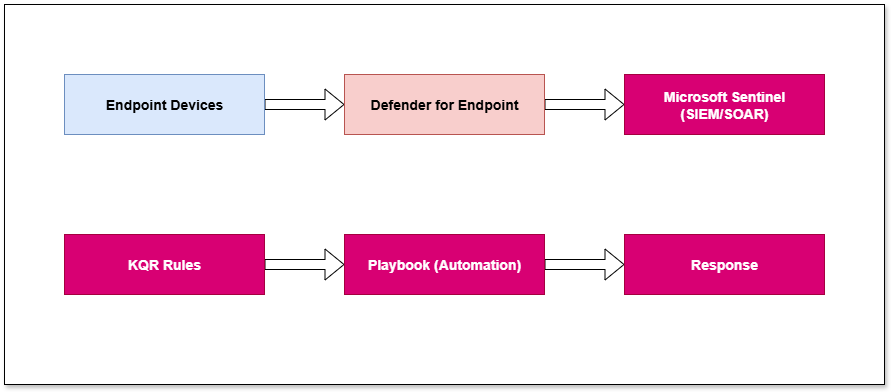 此图说明了从端点遥测到威胁检测和自动修复的无缝流程。它突出了以下关键组件:
- 端点:生成遥测和行为数据的设备
- Defender for Endpoint:提供深度的威胁情报和保护
- Microsoft Sentinel:集中管理日志、告警并编排响应
- KQL 规则与 Playbook:实现可自定义的检测和自动化
- 响应动作:隔离受陷设备并缓解威胁
## 描述
本项目展示了建立在 Microsoft Sentinel 之上的云原生端点检测与响应(EDR)解决方案,旨在跨分布式环境实时检测、调查和响应威胁。
利用 Microsoft Defender for Endpoint、基于 KQL 的分析和自动化 Playbook,该解决方案演示了如何在 Azure 中构建一个可扩展、智能且响应迅速的安全运营框架。
## 核心功能
此图说明了从端点遥测到威胁检测和自动修复的无缝流程。它突出了以下关键组件:
- 端点:生成遥测和行为数据的设备
- Defender for Endpoint:提供深度的威胁情报和保护
- Microsoft Sentinel:集中管理日志、告警并编排响应
- KQL 规则与 Playbook:实现可自定义的检测和自动化
- 响应动作:隔离受陷设备并缓解威胁
## 描述
本项目展示了建立在 Microsoft Sentinel 之上的云原生端点检测与响应(EDR)解决方案,旨在跨分布式环境实时检测、调查和响应威胁。
利用 Microsoft Defender for Endpoint、基于 KQL 的分析和自动化 Playbook,该解决方案演示了如何在 Azure 中构建一个可扩展、智能且响应迅速的安全运营框架。
## 核心功能
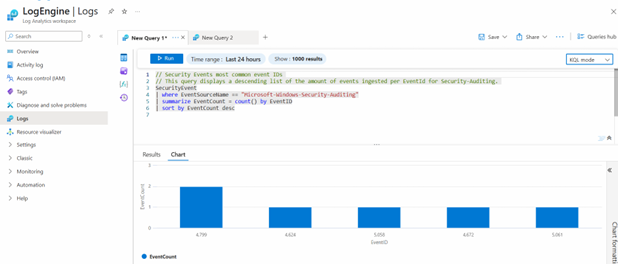 - 使用自定义和内置的 Sentinel 分析规则进行实时威胁检测
- 通过 Logic Apps 和 Sentinel Playbooks 实现自动化事件响应
- 与 Microsoft Defender for Endpoint 集成以丰富遥测数据
- 用于主动调查的威胁狩猎 Workbooks
- 适用于企业级部署的可扩展架构
## 使用的技术
- Microsoft Sentinel (SIEM + SOAR)
- Microsoft Defender for Endpoint
- Azure Logic Apps
- Kusto Query Language (KQL)
- Azure Monitor & Log Analytics
- PowerShell & Azure CLI(可选自动化)
## 使用场景
- 检测勒索软件和端点间的横向移动
- 自动隔离受陷设备
- 可视化端点威胁趋势和异常
- 集成威胁情报源以增强检测能力
# 2) 在模拟 SOC 实验室中使用 Splunk 进行 Windows 事件监控
### 没有 Splunk 的 SOC 实验室,各组件生成并保留各自的日志
- 使用自定义和内置的 Sentinel 分析规则进行实时威胁检测
- 通过 Logic Apps 和 Sentinel Playbooks 实现自动化事件响应
- 与 Microsoft Defender for Endpoint 集成以丰富遥测数据
- 用于主动调查的威胁狩猎 Workbooks
- 适用于企业级部署的可扩展架构
## 使用的技术
- Microsoft Sentinel (SIEM + SOAR)
- Microsoft Defender for Endpoint
- Azure Logic Apps
- Kusto Query Language (KQL)
- Azure Monitor & Log Analytics
- PowerShell & Azure CLI(可选自动化)
## 使用场景
- 检测勒索软件和端点间的横向移动
- 自动隔离受陷设备
- 可视化端点威胁趋势和异常
- 集成威胁情报源以增强检测能力
# 2) 在模拟 SOC 实验室中使用 Splunk 进行 Windows 事件监控
### 没有 Splunk 的 SOC 实验室,各组件生成并保留各自的日志
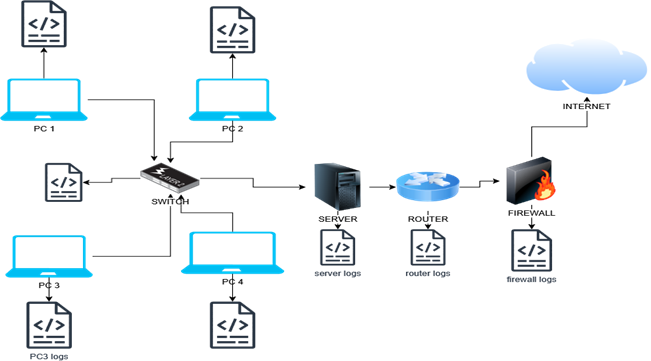 ## 项目目标
通过使用 Splunk ES 收集和监控系统日志,创建针对潜在安全事件(暴力破解尝试、登录失败等)的告警,并在仪表板上创建和可视化结果,从而模拟一个基础的 SOC 环境。
### 带有 Splunk Forwarders 将日志接入 Splunk ES 的 SOC 实验室
## 项目目标
通过使用 Splunk ES 收集和监控系统日志,创建针对潜在安全事件(暴力破解尝试、登录失败等)的告警,并在仪表板上创建和可视化结果,从而模拟一个基础的 SOC 环境。
### 带有 Splunk Forwarders 将日志接入 Splunk ES 的 SOC 实验室
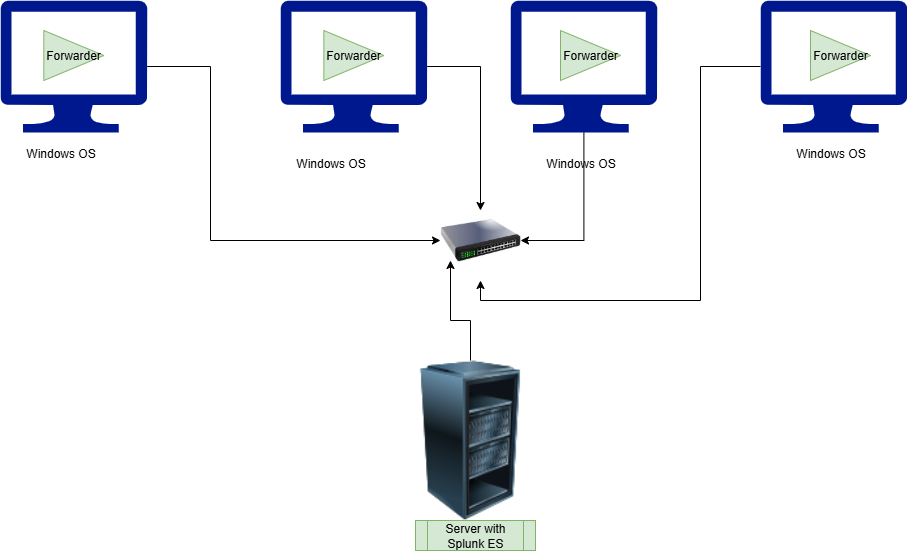 ### 使用的工具
- Splunk ES(本地安装)
- Splunk Forwarders(安装在虚拟机上)
- 安装了 Sysmon 的 Windows 10 虚拟机
项目任务与步骤
A) 设置 Splunk ES
- 在本地安装 Splunk
- 创建 Splunk 管理员账户
- 启用端口 8000 访问
B) 在 Windows 上安装和配置 Sysmon
- 使用 SwiftOnSecurity Sysmon 配置
- 记录关键活动,如进程创建、网络连接、文件创建
C) 将日志转发到 Splunk
- 使用 Splunk Universal Forwarders 将日志从虚拟机收集到 Splunk ES
- 将日志源索引和标记为 Windows 和 Sysmon
D) 创建仪表板
E) 设置检测告警
F) 模拟攻击
G) 记录你的发现
# 3) 使用 Python Streamlit 的暴力破解检测应用
## 截图
## 之前
### 使用的工具
- Splunk ES(本地安装)
- Splunk Forwarders(安装在虚拟机上)
- 安装了 Sysmon 的 Windows 10 虚拟机
项目任务与步骤
A) 设置 Splunk ES
- 在本地安装 Splunk
- 创建 Splunk 管理员账户
- 启用端口 8000 访问
B) 在 Windows 上安装和配置 Sysmon
- 使用 SwiftOnSecurity Sysmon 配置
- 记录关键活动,如进程创建、网络连接、文件创建
C) 将日志转发到 Splunk
- 使用 Splunk Universal Forwarders 将日志从虚拟机收集到 Splunk ES
- 将日志源索引和标记为 Windows 和 Sysmon
D) 创建仪表板
E) 设置检测告警
F) 模拟攻击
G) 记录你的发现
# 3) 使用 Python Streamlit 的暴力破解检测应用
## 截图
## 之前
 ## 之后:检查 IP 是否遭到暴力破解
 ## 目标
开发一款用户友好的应用程序,通过分析系统日志中的重复登录失败模式、访问异常或可疑用户行为,帮助识别潜在的暴力破解攻击。
## 解决的问题
• 入侵检测:标记过多的登录失败尝试,提示存在暴力破解企图
• 实时监控:支持跟踪实时日志或进行定期扫描以发现登录滥用
• 用户行为分析:提供有关登录频率、时间和 IP 活动的洞察
• 学习平台:提供一个安全的环境来探索暴力破解检测概念,而无需参与恶意活动
## 使用的工具与技术
|工具 | 作用 |
|-----------|-------------------------------------------------------------|
|Python |用于数据分析的核心后端脚本 |
|Streamlit |构建直观且交互式的前端 UI |
|pandas: |高效解析和分析日志文件 |
|re (Regex) |检测可疑模式,如重复的失败尝试 |
|datetime |跟踪时间戳并计算基于时间的异常 |
|socket |(可选)解析 IP 地址和端口(用于高级用例)|
## 功能特性
• 日志文件上传:接受 system-auth 或自定义日志进行分析
• 告警系统:检测到暴力破解模式时显示视觉标记
• 统计仪表板:显示失败尝试次数、标记的 IP、攻击高峰时间
• IP 查询(可选):解析位置或将常见来源加入黑名单
## 示例使用场景
• 网络安全课程的教育实验
• 供系统管理员审核登录安全的内部工具
• 大型 SIEM 系统的原型模块
# 4) 使用 Python 和 Streamlit 进行网络钓鱼检测
## 目标
开发一款用户友好的应用程序,通过分析系统日志中的重复登录失败模式、访问异常或可疑用户行为,帮助识别潜在的暴力破解攻击。
## 解决的问题
• 入侵检测:标记过多的登录失败尝试,提示存在暴力破解企图
• 实时监控:支持跟踪实时日志或进行定期扫描以发现登录滥用
• 用户行为分析:提供有关登录频率、时间和 IP 活动的洞察
• 学习平台:提供一个安全的环境来探索暴力破解检测概念,而无需参与恶意活动
## 使用的工具与技术
|工具 | 作用 |
|-----------|-------------------------------------------------------------|
|Python |用于数据分析的核心后端脚本 |
|Streamlit |构建直观且交互式的前端 UI |
|pandas: |高效解析和分析日志文件 |
|re (Regex) |检测可疑模式,如重复的失败尝试 |
|datetime |跟踪时间戳并计算基于时间的异常 |
|socket |(可选)解析 IP 地址和端口(用于高级用例)|
## 功能特性
• 日志文件上传:接受 system-auth 或自定义日志进行分析
• 告警系统:检测到暴力破解模式时显示视觉标记
• 统计仪表板:显示失败尝试次数、标记的 IP、攻击高峰时间
• IP 查询(可选):解析位置或将常见来源加入黑名单
## 示例使用场景
• 网络安全课程的教育实验
• 供系统管理员审核登录安全的内部工具
• 大型 SIEM 系统的原型模块
# 4) 使用 Python 和 Streamlit 进行网络钓鱼检测
 ## 描述
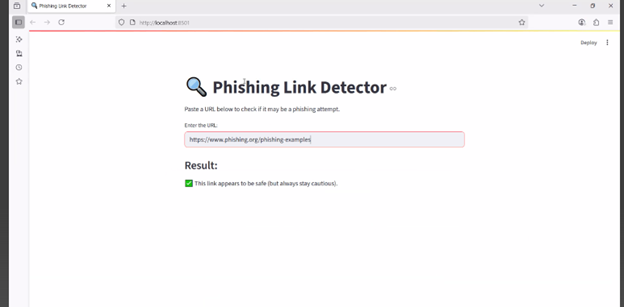
本项目展示了一个使用 Python 和 Streamlit 构建的轻量级且功能强大的网络钓鱼 URL 检测工具。目标是保护用户免遭网络钓鱼攻击的侵害
## 核心功能
- URL 输入和实时预测
- 使用 Streamlit 构建的简洁直观的 Web UI
# 目标
- 检测 URL 是网络钓鱼还是合法的
- 使用 Streamlit 构建易于使用的 Web UI
- 向用户普及常见的网络钓鱼指标
# 5) 键盘记录器检测
## 目标
使用 Python 和 Streamlit 构建一款教育工具,用于扫描计算机系统以寻找键盘记录器活动的迹象——重点关注可疑文件、进程和启动项。此应用程序可帮助用户在安全、负责任的学习环境中了解基本的安全卫生和恶意软件检测原理。
## 解决的问题
• 识别可疑文件:检测可能被键盘记录器工具植入的常见日志文件(例如 log.txt、keylog.txt)。
• 进程监控:标记名称与已知键盘记录软件相关的运行中进程。
• 启动项扫描:检查常见启动路径中是否存在可能在开机时静默运行的可执行文件。
• 教育见解:为学生提供接触威胁检测的实践机会,而无需参与有害的实践。
## 使用的工具与技术
### 工具
Python 核心脚本语言
Streamlit 交互式且直观的 GUI,用于实时扫描
os 文件系统导航和访问
psutil 进程监控和元数据提取
pathlib 处理和导航文件路径(可选升级)
## 功能特性
• 点击扫描界面,可快速部署
• 分类输出:文件、进程、启动项
• 颜色编码告警:红色(已检测到),绿色(无异常)
• 轻松自定义已知可疑指标的列表
# 6) 漏洞实验室
# SecureNet 漏洞评估
## 项目描述
结合使用自动化扫描工具和手动技术,在小型企业网络上对漏洞评估工作流进行真实模拟
## 描述
本项目展示了一个使用 Python 和 Streamlit 构建的轻量级且功能强大的网络钓鱼 URL 检测工具。目标是保护用户免遭网络钓鱼攻击的侵害
## 核心功能
- URL 输入和实时预测
- 使用 Streamlit 构建的简洁直观的 Web UI
# 目标
- 检测 URL 是网络钓鱼还是合法的
- 使用 Streamlit 构建易于使用的 Web UI
- 向用户普及常见的网络钓鱼指标
# 5) 键盘记录器检测
## 目标
使用 Python 和 Streamlit 构建一款教育工具,用于扫描计算机系统以寻找键盘记录器活动的迹象——重点关注可疑文件、进程和启动项。此应用程序可帮助用户在安全、负责任的学习环境中了解基本的安全卫生和恶意软件检测原理。
## 解决的问题
• 识别可疑文件:检测可能被键盘记录器工具植入的常见日志文件(例如 log.txt、keylog.txt)。
• 进程监控:标记名称与已知键盘记录软件相关的运行中进程。
• 启动项扫描:检查常见启动路径中是否存在可能在开机时静默运行的可执行文件。
• 教育见解:为学生提供接触威胁检测的实践机会,而无需参与有害的实践。
## 使用的工具与技术
### 工具
Python 核心脚本语言
Streamlit 交互式且直观的 GUI,用于实时扫描
os 文件系统导航和访问
psutil 进程监控和元数据提取
pathlib 处理和导航文件路径(可选升级)
## 功能特性
• 点击扫描界面,可快速部署
• 分类输出:文件、进程、启动项
• 颜色编码告警:红色(已检测到),绿色(无异常)
• 轻松自定义已知可疑指标的列表
# 6) 漏洞实验室
# SecureNet 漏洞评估
## 项目描述
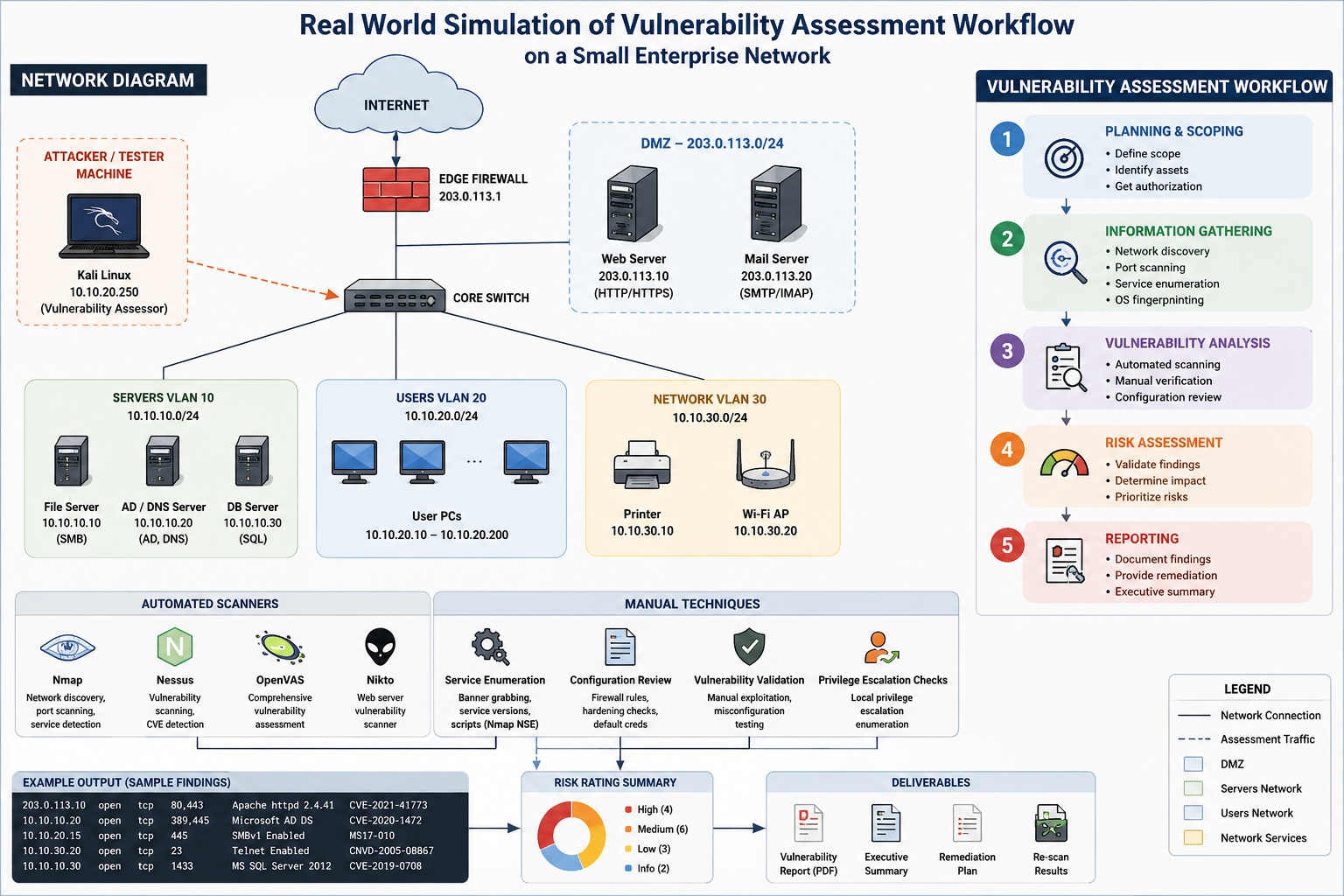
结合使用自动化扫描工具和手动技术,在小型企业网络上对漏洞评估工作流进行真实模拟
 ## 工具与技术
- Nessus Essential
- Nmap
- OpenVAS
- Kali Linux
- Ubuntu20.04
- Windows 10
- Wireshark
- Netcat
## 方法论
1. 资产发现:我使用 Nmap 扫描网络以发现活跃主机和服务
2. 扫描:我使用 Nessus Essential 和 OpenVAS 执行漏洞扫描。
3. 分析:使用 CVE CVSS 验证发现并评估风险
4. 缓解:应用补丁、禁用易受攻击的服务、更新防火墙规则。
5. 报告:我整理了包含屏幕截图和日志的执行摘要和技术报告。
## 工具与技术
- Nessus Essential
- Nmap
- OpenVAS
- Kali Linux
- Ubuntu20.04
- Windows 10
- Wireshark
- Netcat
## 方法论
1. 资产发现:我使用 Nmap 扫描网络以发现活跃主机和服务
2. 扫描:我使用 Nessus Essential 和 OpenVAS 执行漏洞扫描。
3. 分析:使用 CVE CVSS 验证发现并评估风险
4. 缓解:应用补丁、禁用易受攻击的服务、更新防火墙规则。
5. 报告:我整理了包含屏幕截图和日志的执行摘要和技术报告。
此图说明了从端点遥测到威胁检测和自动修复的无缝流程。它突出了以下关键组件:
- 端点:生成遥测和行为数据的设备
- Defender for Endpoint:提供深度的威胁情报和保护
- Microsoft Sentinel:集中管理日志、告警并编排响应
- KQL 规则与 Playbook:实现可自定义的检测和自动化
- 响应动作:隔离受陷设备并缓解威胁
## 描述
本项目展示了建立在 Microsoft Sentinel 之上的云原生端点检测与响应(EDR)解决方案,旨在跨分布式环境实时检测、调查和响应威胁。
利用 Microsoft Defender for Endpoint、基于 KQL 的分析和自动化 Playbook,该解决方案演示了如何在 Azure 中构建一个可扩展、智能且响应迅速的安全运营框架。
## 核心功能
- 使用自定义和内置的 Sentinel 分析规则进行实时威胁检测
- 通过 Logic Apps 和 Sentinel Playbooks 实现自动化事件响应
- 与 Microsoft Defender for Endpoint 集成以丰富遥测数据
- 用于主动调查的威胁狩猎 Workbooks
- 适用于企业级部署的可扩展架构
## 使用的技术
- Microsoft Sentinel (SIEM + SOAR)
- Microsoft Defender for Endpoint
- Azure Logic Apps
- Kusto Query Language (KQL)
- Azure Monitor & Log Analytics
- PowerShell & Azure CLI(可选自动化)
## 使用场景
- 检测勒索软件和端点间的横向移动
- 自动隔离受陷设备
- 可视化端点威胁趋势和异常
- 集成威胁情报源以增强检测能力
# 2) 在模拟 SOC 实验室中使用 Splunk 进行 Windows 事件监控
### 没有 Splunk 的 SOC 实验室,各组件生成并保留各自的日志
## 项目目标
通过使用 Splunk ES 收集和监控系统日志,创建针对潜在安全事件(暴力破解尝试、登录失败等)的告警,并在仪表板上创建和可视化结果,从而模拟一个基础的 SOC 环境。
### 带有 Splunk Forwarders 将日志接入 Splunk ES 的 SOC 实验室
### 使用的工具
- Splunk ES(本地安装)
- Splunk Forwarders(安装在虚拟机上)
- 安装了 Sysmon 的 Windows 10 虚拟机
项目任务与步骤
A) 设置 Splunk ES
- 在本地安装 Splunk
- 创建 Splunk 管理员账户
- 启用端口 8000 访问
B) 在 Windows 上安装和配置 Sysmon
- 使用 SwiftOnSecurity Sysmon 配置
- 记录关键活动,如进程创建、网络连接、文件创建
C) 将日志转发到 Splunk
- 使用 Splunk Universal Forwarders 将日志从虚拟机收集到 Splunk ES
- 将日志源索引和标记为 Windows 和 Sysmon
D) 创建仪表板
E) 设置检测告警
F) 模拟攻击
G) 记录你的发现
# 3) 使用 Python Streamlit 的暴力破解检测应用
## 截图
## 之前
## 之后:检查 IP 是否遭到暴力破解
## 目标
开发一款用户友好的应用程序,通过分析系统日志中的重复登录失败模式、访问异常或可疑用户行为,帮助识别潜在的暴力破解攻击。
## 解决的问题
• 入侵检测:标记过多的登录失败尝试,提示存在暴力破解企图
• 实时监控:支持跟踪实时日志或进行定期扫描以发现登录滥用
• 用户行为分析:提供有关登录频率、时间和 IP 活动的洞察
• 学习平台:提供一个安全的环境来探索暴力破解检测概念,而无需参与恶意活动
## 使用的工具与技术
|工具 | 作用 |
|-----------|-------------------------------------------------------------|
|Python |用于数据分析的核心后端脚本 |
|Streamlit |构建直观且交互式的前端 UI |
|pandas: |高效解析和分析日志文件 |
|re (Regex) |检测可疑模式,如重复的失败尝试 |
|datetime |跟踪时间戳并计算基于时间的异常 |
|socket |(可选)解析 IP 地址和端口(用于高级用例)|
## 功能特性
• 日志文件上传:接受 system-auth 或自定义日志进行分析
• 告警系统:检测到暴力破解模式时显示视觉标记
• 统计仪表板:显示失败尝试次数、标记的 IP、攻击高峰时间
• IP 查询(可选):解析位置或将常见来源加入黑名单
## 示例使用场景
• 网络安全课程的教育实验
• 供系统管理员审核登录安全的内部工具
• 大型 SIEM 系统的原型模块
# 4) 使用 Python 和 Streamlit 进行网络钓鱼检测
## 描述
本项目展示了一个使用 Python 和 Streamlit 构建的轻量级且功能强大的网络钓鱼 URL 检测工具。目标是保护用户免遭网络钓鱼攻击的侵害
## 核心功能
- URL 输入和实时预测
- 使用 Streamlit 构建的简洁直观的 Web UI
# 目标
- 检测 URL 是网络钓鱼还是合法的
- 使用 Streamlit 构建易于使用的 Web UI
- 向用户普及常见的网络钓鱼指标
# 5) 键盘记录器检测
## 目标
使用 Python 和 Streamlit 构建一款教育工具,用于扫描计算机系统以寻找键盘记录器活动的迹象——重点关注可疑文件、进程和启动项。此应用程序可帮助用户在安全、负责任的学习环境中了解基本的安全卫生和恶意软件检测原理。
## 解决的问题
• 识别可疑文件:检测可能被键盘记录器工具植入的常见日志文件(例如 log.txt、keylog.txt)。
• 进程监控:标记名称与已知键盘记录软件相关的运行中进程。
• 启动项扫描:检查常见启动路径中是否存在可能在开机时静默运行的可执行文件。
• 教育见解:为学生提供接触威胁检测的实践机会,而无需参与有害的实践。
## 使用的工具与技术
### 工具
Python 核心脚本语言
Streamlit 交互式且直观的 GUI,用于实时扫描
os 文件系统导航和访问
psutil 进程监控和元数据提取
pathlib 处理和导航文件路径(可选升级)
## 功能特性
• 点击扫描界面,可快速部署
• 分类输出:文件、进程、启动项
• 颜色编码告警:红色(已检测到),绿色(无异常)
• 轻松自定义已知可疑指标的列表
# 6) 漏洞实验室
# SecureNet 漏洞评估
## 项目描述
结合使用自动化扫描工具和手动技术,在小型企业网络上对漏洞评估工作流进行真实模拟
## 工具与技术
- Nessus Essential
- Nmap
- OpenVAS
- Kali Linux
- Ubuntu20.04
- Windows 10
- Wireshark
- Netcat
## 方法论
1. 资产发现:我使用 Nmap 扫描网络以发现活跃主机和服务
2. 扫描:我使用 Nessus Essential 和 OpenVAS 执行漏洞扫描。
3. 分析:使用 CVE CVSS 验证发现并评估风险
4. 缓解:应用补丁、禁用易受攻击的服务、更新防火墙规则。
5. 报告:我整理了包含屏幕截图和日志的执行摘要和技术报告。标签:AI合规, CTI, EDR, Kubernetes, Microsoft Sentinel, SIEM工程, 安全自动化响应, 安全运营中心, 红队行动, 网络映射, 脆弱性评估, 逆向工具