godaralokesh29/PulseGuard-AI
GitHub: godaralokesh29/PulseGuard-AI
一款基于 RAG 的 AI 事件响应系统,通过语义检索历史事件并由 LLM 生成缓解建议,帮助值班工程师快速处置生产故障。
Stars: 0 | Forks: 1
# PulseGuard - 项目概述
## 🎯 项目功能
**RAG of Fire** 是一个 **AI 驱动的事件响应系统**,它利用历史数据和机器学习自动分析生产事件并推荐缓解措施。
### 它解决的现实问题
当生产系统发生事件(如数据库超时、内存泄漏或 API 速率限制)时,您的值班工程师需要:
1. 了解正在发生什么(诊断)
2. 查找类似的过往事件(搜索历史知识)
3. 了解以前有效的方法(建议)
4. 迅速采取行动以将停机时间降至最低
**RAG of Fire 使这一切自动化。**
## 🏗️ 架构概述
### 三大主要组件
#### 1. **后端 (Python + FastAPI)**
- 处理事件分析的 REST API
- 连接到向量数据库 (ChromaDB) 进行语义搜索
- 预装了 10 个包含真实指标的历史事件
- 可以将新事件与过往事件进行匹配并推荐解决方案
#### 2. **前端 (Next.js + React)**
- 可视化事件的仪表板
- 搜索历史数据的表单
- 显示推荐建议和置信度得分
#### 3. **数据库**
- PostgreSQL:存储结构化事件数据
- ChromaDB:用于语义搜索的向量数据库(查找相似事件)
## 📊 “RAG”的含义
**RAG = Retrieval-Augmented Generation**
- **Retrieval (检索)**:从向量数据库中查找类似的过往事件
- **Augmented (增强)**:与当前事件数据相结合
- **Generation (生成)**:使用 LLM 创建个性化推荐
示例:
```
Current Incident: Database timeout, 450% spike
↓
Search vector DB for similar incidents
↓
Found: INC-2025-001 (database timeout, 450% spike, fixed by throttling 30%)
↓
LLM generates: "Recommend: Throttle database connections to 30%"
↓
Confidence: 95% (because we have exact match in history)
```
## 🧪 测试用例的作用
`test_system.py` 文件运行 7 个模拟真实生产事件的测试:
### 测试 1:数据库超时
```
error_type: "database_timeout"
spike_percentage: 450% # Database response time increased 4.5x
Expected: "Throttle connections to 30%"
```
**测试内容**:系统能否检测到数据库超时并建议进行连接节流?
### 测试 2:Kafka 消费者延迟
```
error_type: "kafka_consumer_lag"
spike_percentage: 320% # Message queue backed up
Expected: "Throttle consumers to 45%"
```
**测试内容**:系统能否检测到消息队列堆积并建议进行消费者节流?
### 测试 3:内存泄漏
```
error_type: "memory_leak"
spike_percentage: 280% # Memory usage increased 2.8x
Expected: "Throttle traffic to 20%"
```
**测试内容**:系统能否检测到内存压力并建议进行流量削减?
### 测试 4:流式异常
```
Reports streaming anomalies in real-time
```
**测试内容**:系统能否接收实时的异常数据?
### 测试 5-6:搜索与统计
```
Search historical RCA documents
Get statistics about stored incidents
```
**测试内容**:系统能否检索和汇总历史数据?
## 🔗 各组件集成方式
```
┌─────────────────┐
│ Frontend │
│ (Next.js) │
└────────┬────────┘
│ HTTP requests
↓
┌─────────────────────────────────────┐
│ Backend (FastAPI) │
│ - Decision Engine │
│ - Document Search │
│ - Streaming Anomalies │
└────────┬────────────────────────────┘
│
┌────┴─────┬────────────────┐
↓ ↓ ↓
┌────────┐ ┌──────────┐ ┌────────────┐
│PostgreSQL│ ChromaDB │ LLM Service │
│(DB Data) │(Vector │ (OpenAI or │
│ │Search) │ Mock) │
└──────────┴──────────┴─────────────┘
```
## 📝 集成点
### 需要集成的部分:
1. **LLM 服务**
- 目前使用的是模拟 LLM(确定性响应)
- 可以集成真正的 OpenAI/Anthropic API
- 位置:`backend/services/llm_engine.py`
2. **向量数据库**
- 目前使用的是 ChromaDB(内存运行,非常适合演示)
- 可以集成 Pinecone、Weaviate 等
- 位置:`backend/services/vector_db.py`
3. **真实数据库**
- 已定义 PostgreSQL 模型
- 需要连接到真实的 PostgreSQL 实例
- 位置:`backend/database/db.py`
4. **流处理管道**
- 目前使用的是 asyncio.Queue(模拟 Kafka/Flink)
- 可以集成真正的 Apache Kafka
- 位置:`backend/services/stream_processor.py`
5. **前端功能**
- 已创建基础的 Next.js UI
- 可以添加实时仪表板、高级过滤功能
- 位置:`app/` 和 `components/`
## ✅ 当前状态
- ✅ 核心逻辑正常运行
- ✅ 全部 7 个测试用例通过
- ✅ API 端点运行正常
- ✅ 后端成功启动
## 🔌 WebSocket 实时流
### 什么是 WebSocket?
浏览器与服务器之间的持久连接,允许进行**实时的、双向**通信。
### 在本项目中的工作原理
```
Browser Backend
| |
|-------- Connect via WebSocket ------|
| |
|<---- Real-time Decision Updates ----|
|<---- Anomaly Alerts ------------------|
|<---- System Events ------------------|
```
### 示例流程:实时事件通知
```
// Frontend (JavaScript)
const ws = new WebSocket('ws://localhost:8000/ws/incidents');
ws.onmessage = (event) => {
const message = JSON.parse(event.data);
if (message.type === 'decision') {
// Update dashboard in real-time
console.log('New Decision:', message.data);
// Display: "Database Timeout - Recommend: Throttle to 30%"
}
if (message.type === 'anomaly') {
// Show alert in UI
showAlert('Anomaly Detected: ' + message.data.error_type);
}
};
// Send ping to keep connection alive
setInterval(() => {
ws.send(JSON.stringify({ type: 'ping' }));
}, 30000);
```
### 通过 WebSocket 发送的内容
```
# Backend 生成决策
decision = {
"id": "dec_12345",
"matched_incident": "INC-2025-001",
"symptom": "Database response time increased 450%",
"recommended_action": "Throttle connections to 30%",
"confidence_score": 0.95,
"latency_ms": 245
}
# 广播到所有已连接的浏览器
await notification_service.ws_manager.broadcast({
"type": "decision",
"data": decision
})
```
**结果**:100 多个 Web 浏览器可以同时收到通知!⚡
## 💬 Slack 集成
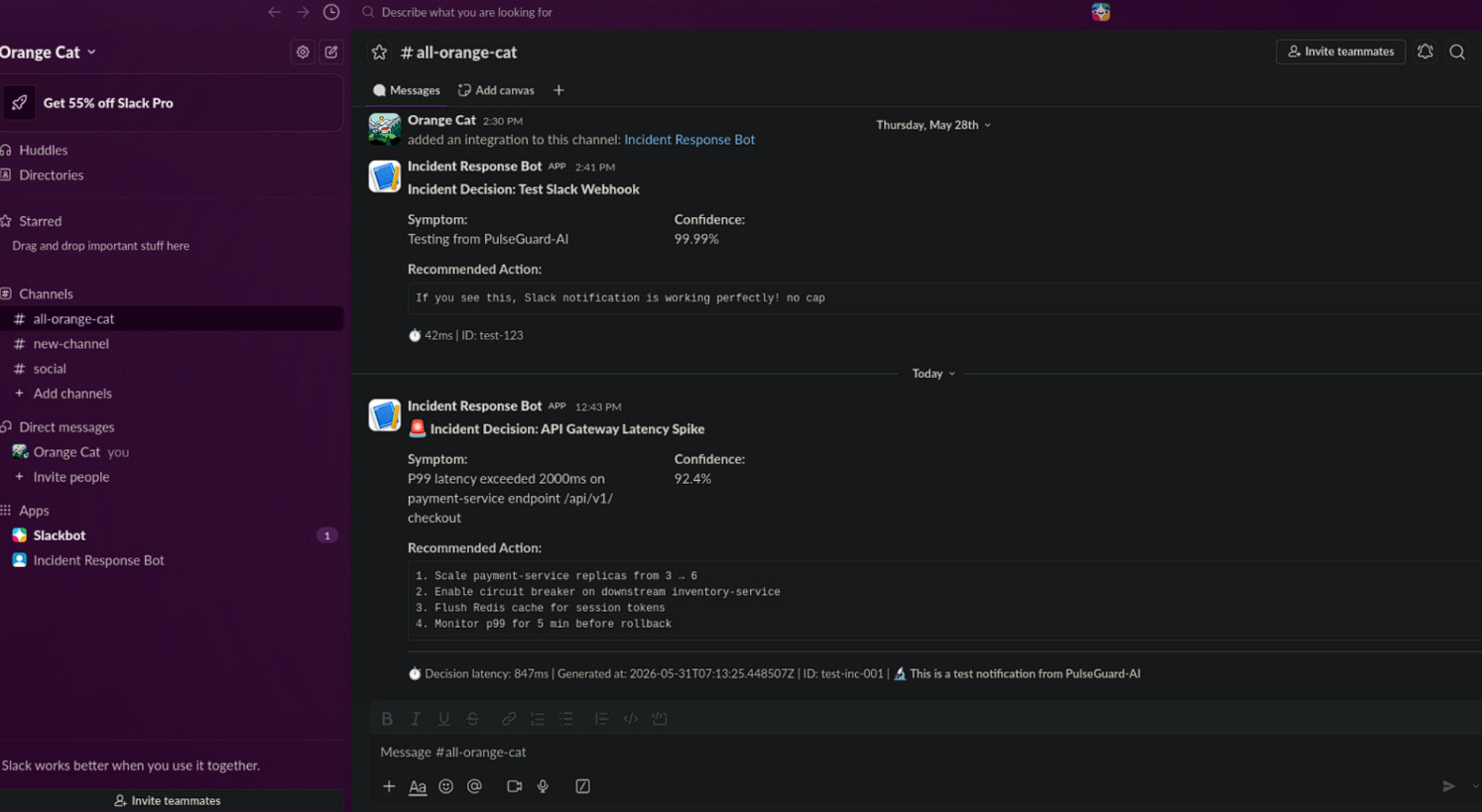 ### 什么是 Slack?
一个团队消息传递平台。Slack 集成意味着**系统会自动向您的 Slack 频道发送警报**。
### 工作原理
```
Backend detects incident
↓
Generates decision/recommendation
↓
Sends formatted message to Slack webhook
↓
Slack channel receives alert
↓
Team members see: "🚨 Database Timeout - Throttle to 30%"
```
### 设置 Slack(分步指南)
**第 1 步**:前往 https://api.slack.com/apps 并创建一个应用
- 名称:“Incident Response Bot”
**第 2 步**:启用 “Incoming Webhooks”
- 获取 webhook URL(格式如下):
```
https://hooks.slack.com/services/T00000000/B00000000/XXXXXXXXXXXXXXXXXXXXXXXX
```
**第 3 步**:添加到 `.env` 文件中
```
SLACK_WEBHOOK_URL=https://hooks.slack.com/services/T00000000/B00000000/XXXXXXXX
```
**第 4 步**:重启后端
```
uvicorn backend.main:app --reload
```
### Slack 消息示例
当检测到事件时,Slack 会收到:
```
━━━━━━━━━━━━━━━━━━━━━━━━━━━━━━━━━━━━━━━━
🚨 Incident Decision: INC-2025-001
━━━━━━━━━━━━━━━━━━━━━━━━━━━━━━━━━━━━━━━━
Symptom:
Database response time increased 450%
Confidence:
95%
Recommended Action:
Throttle connections to 30%
⏱️ 245ms | ID: dec_12345
```
### 代码:Slack 警报是如何发送的
```
# backend/services/notification.py
class SlackNotifier:
async def send_decision_alert(self, decision):
# Build a nice formatted message
payload = {
"text": "🚨 Incident Mitigation Decision Generated",
"blocks": [
{
"type": "header",
"text": {
"type": "plain_text",
"text": f"Incident Decision: {decision.matched_incident}"
}
},
{
"type": "section",
"text": {
"type": "mrkdwn",
"text": f"*Recommended Action:*\n```{decision.recommended_action}```"
}
}
]
}
# Send HTTP POST to Slack webhook
async with aiohttp.ClientSession() as session:
await session.post(self.webhook_url, json=payload)
```
## 🔄 完整工作流示例
### 真实生产事件流程
**场景**:生产环境数据库连接池耗尽
```
1. MONITORING SYSTEM
└─ Detects: Database response time 450% spike
└─ Sends to: POST /api/v1/decisions/stream-anomaly
2. BACKEND (Decision Engine)
├─ Searches vector DB for similar incidents
├─ Finds: INC-2025-001 (exact match!)
├─ Generates: "Throttle connections to 30%"
├─ Calculates: Confidence 95% (based on exact match)
└─ Creates Decision object
3. NOTIFICATION SERVICE
├─ WebSocket Broadcast:
│ └─ Sends to 42 browsers viewing dashboard
│ └─ Each browser shows alert immediately
│
└─ Slack Notification:
└─ Sends formatted alert to #incidents channel
└─ On-call engineer sees alert in Slack
4. TEAM RESPONSE
├─ Engineer reads: "Throttle to 30%"
├─ Executes: kubectl patch deployment...
├─ Database recovers: Response time back to normal
└─ Incident resolved ✅
```
### 代码执行路径
```
# 步骤 1:传入的异常
POST /api/v1/decisions/stream-anomaly {
"error_type": "database_timeout",
"spike_percentage": 450
}
# 步骤 2:生成决策 (backend/routes/decisions.py)
decision = await engine.generate_decision(...)
# 步骤 3:发送通知 (backend/services/notification.py)
await notification_service.notify_decision(
decision=decision,
channels=["websocket", "slack"] # Send to BOTH
)
# 步骤 4:结果
- 42 browsers: See live alert (WebSocket)
- Slack #incidents channel: Formatted message with recommendation
```
## 🎯 真实连接与模拟
目前您拥有:
| 组件 | 状态 | 功能描述 |
|-----------|--------|-------------|
| **WebSocket** | ✅ 正常工作 | 将实时事件流式传输到仪表板 |
| **Slack** | ✅ 待连接 | 配置后,会向 Slack 发送警报 |
| **LLM** | ✅ 模拟(可设为真实) | 生成推荐建议 |
| **Vector DB** | ✅ 正常工作 | 存储和搜索 10 个历史事件 |
| **PostgreSQL** | ⏳ 可选 | 可用于存储永久的事件记录 |
## 🚀 下一步
1. **验证后端是否正在运行**:`uvicorn backend.main:app --reload`
2. **运行测试**:`python test_system.py`
3. **检查 API**:访问 `http://localhost:8000/docs`
4. **可选 - 连接 Slack**:
- 从 Slack API 获取 webhook URL
- 添加到 `.env` 文件中
- 重启后端
- 尝试事件分析 - 警报将出现在 Slack 中!
5. **开发前端** 或 **与真实服务集成**
### 什么是 Slack?
一个团队消息传递平台。Slack 集成意味着**系统会自动向您的 Slack 频道发送警报**。
### 工作原理
```
Backend detects incident
↓
Generates decision/recommendation
↓
Sends formatted message to Slack webhook
↓
Slack channel receives alert
↓
Team members see: "🚨 Database Timeout - Throttle to 30%"
```
### 设置 Slack(分步指南)
**第 1 步**:前往 https://api.slack.com/apps 并创建一个应用
- 名称:“Incident Response Bot”
**第 2 步**:启用 “Incoming Webhooks”
- 获取 webhook URL(格式如下):
```
https://hooks.slack.com/services/T00000000/B00000000/XXXXXXXXXXXXXXXXXXXXXXXX
```
**第 3 步**:添加到 `.env` 文件中
```
SLACK_WEBHOOK_URL=https://hooks.slack.com/services/T00000000/B00000000/XXXXXXXX
```
**第 4 步**:重启后端
```
uvicorn backend.main:app --reload
```
### Slack 消息示例
当检测到事件时,Slack 会收到:
```
━━━━━━━━━━━━━━━━━━━━━━━━━━━━━━━━━━━━━━━━
🚨 Incident Decision: INC-2025-001
━━━━━━━━━━━━━━━━━━━━━━━━━━━━━━━━━━━━━━━━
Symptom:
Database response time increased 450%
Confidence:
95%
Recommended Action:
Throttle connections to 30%
⏱️ 245ms | ID: dec_12345
```
### 代码:Slack 警报是如何发送的
```
# backend/services/notification.py
class SlackNotifier:
async def send_decision_alert(self, decision):
# Build a nice formatted message
payload = {
"text": "🚨 Incident Mitigation Decision Generated",
"blocks": [
{
"type": "header",
"text": {
"type": "plain_text",
"text": f"Incident Decision: {decision.matched_incident}"
}
},
{
"type": "section",
"text": {
"type": "mrkdwn",
"text": f"*Recommended Action:*\n```{decision.recommended_action}```"
}
}
]
}
# Send HTTP POST to Slack webhook
async with aiohttp.ClientSession() as session:
await session.post(self.webhook_url, json=payload)
```
## 🔄 完整工作流示例
### 真实生产事件流程
**场景**:生产环境数据库连接池耗尽
```
1. MONITORING SYSTEM
└─ Detects: Database response time 450% spike
└─ Sends to: POST /api/v1/decisions/stream-anomaly
2. BACKEND (Decision Engine)
├─ Searches vector DB for similar incidents
├─ Finds: INC-2025-001 (exact match!)
├─ Generates: "Throttle connections to 30%"
├─ Calculates: Confidence 95% (based on exact match)
└─ Creates Decision object
3. NOTIFICATION SERVICE
├─ WebSocket Broadcast:
│ └─ Sends to 42 browsers viewing dashboard
│ └─ Each browser shows alert immediately
│
└─ Slack Notification:
└─ Sends formatted alert to #incidents channel
└─ On-call engineer sees alert in Slack
4. TEAM RESPONSE
├─ Engineer reads: "Throttle to 30%"
├─ Executes: kubectl patch deployment...
├─ Database recovers: Response time back to normal
└─ Incident resolved ✅
```
### 代码执行路径
```
# 步骤 1:传入的异常
POST /api/v1/decisions/stream-anomaly {
"error_type": "database_timeout",
"spike_percentage": 450
}
# 步骤 2:生成决策 (backend/routes/decisions.py)
decision = await engine.generate_decision(...)
# 步骤 3:发送通知 (backend/services/notification.py)
await notification_service.notify_decision(
decision=decision,
channels=["websocket", "slack"] # Send to BOTH
)
# 步骤 4:结果
- 42 browsers: See live alert (WebSocket)
- Slack #incidents channel: Formatted message with recommendation
```
## 🎯 真实连接与模拟
目前您拥有:
| 组件 | 状态 | 功能描述 |
|-----------|--------|-------------|
| **WebSocket** | ✅ 正常工作 | 将实时事件流式传输到仪表板 |
| **Slack** | ✅ 待连接 | 配置后,会向 Slack 发送警报 |
| **LLM** | ✅ 模拟(可设为真实) | 生成推荐建议 |
| **Vector DB** | ✅ 正常工作 | 存储和搜索 10 个历史事件 |
| **PostgreSQL** | ⏳ 可选 | 可用于存储永久的事件记录 |
## 🚀 下一步
1. **验证后端是否正在运行**:`uvicorn backend.main:app --reload`
2. **运行测试**:`python test_system.py`
3. **检查 API**:访问 `http://localhost:8000/docs`
4. **可选 - 连接 Slack**:
- 从 Slack API 获取 webhook URL
- 添加到 `.env` 文件中
- 重启后端
- 尝试事件分析 - 警报将出现在 Slack 中!
5. **开发前端** 或 **与真实服务集成**
### 什么是 Slack?
一个团队消息传递平台。Slack 集成意味着**系统会自动向您的 Slack 频道发送警报**。
### 工作原理
```
Backend detects incident
↓
Generates decision/recommendation
↓
Sends formatted message to Slack webhook
↓
Slack channel receives alert
↓
Team members see: "🚨 Database Timeout - Throttle to 30%"
```
### 设置 Slack(分步指南)
**第 1 步**:前往 https://api.slack.com/apps 并创建一个应用
- 名称:“Incident Response Bot”
**第 2 步**:启用 “Incoming Webhooks”
- 获取 webhook URL(格式如下):
```
https://hooks.slack.com/services/T00000000/B00000000/XXXXXXXXXXXXXXXXXXXXXXXX
```
**第 3 步**:添加到 `.env` 文件中
```
SLACK_WEBHOOK_URL=https://hooks.slack.com/services/T00000000/B00000000/XXXXXXXX
```
**第 4 步**:重启后端
```
uvicorn backend.main:app --reload
```
### Slack 消息示例
当检测到事件时,Slack 会收到:
```
━━━━━━━━━━━━━━━━━━━━━━━━━━━━━━━━━━━━━━━━
🚨 Incident Decision: INC-2025-001
━━━━━━━━━━━━━━━━━━━━━━━━━━━━━━━━━━━━━━━━
Symptom:
Database response time increased 450%
Confidence:
95%
Recommended Action:
Throttle connections to 30%
⏱️ 245ms | ID: dec_12345
```
### 代码:Slack 警报是如何发送的
```
# backend/services/notification.py
class SlackNotifier:
async def send_decision_alert(self, decision):
# Build a nice formatted message
payload = {
"text": "🚨 Incident Mitigation Decision Generated",
"blocks": [
{
"type": "header",
"text": {
"type": "plain_text",
"text": f"Incident Decision: {decision.matched_incident}"
}
},
{
"type": "section",
"text": {
"type": "mrkdwn",
"text": f"*Recommended Action:*\n```{decision.recommended_action}```"
}
}
]
}
# Send HTTP POST to Slack webhook
async with aiohttp.ClientSession() as session:
await session.post(self.webhook_url, json=payload)
```
## 🔄 完整工作流示例
### 真实生产事件流程
**场景**:生产环境数据库连接池耗尽
```
1. MONITORING SYSTEM
└─ Detects: Database response time 450% spike
└─ Sends to: POST /api/v1/decisions/stream-anomaly
2. BACKEND (Decision Engine)
├─ Searches vector DB for similar incidents
├─ Finds: INC-2025-001 (exact match!)
├─ Generates: "Throttle connections to 30%"
├─ Calculates: Confidence 95% (based on exact match)
└─ Creates Decision object
3. NOTIFICATION SERVICE
├─ WebSocket Broadcast:
│ └─ Sends to 42 browsers viewing dashboard
│ └─ Each browser shows alert immediately
│
└─ Slack Notification:
└─ Sends formatted alert to #incidents channel
└─ On-call engineer sees alert in Slack
4. TEAM RESPONSE
├─ Engineer reads: "Throttle to 30%"
├─ Executes: kubectl patch deployment...
├─ Database recovers: Response time back to normal
└─ Incident resolved ✅
```
### 代码执行路径
```
# 步骤 1:传入的异常
POST /api/v1/decisions/stream-anomaly {
"error_type": "database_timeout",
"spike_percentage": 450
}
# 步骤 2:生成决策 (backend/routes/decisions.py)
decision = await engine.generate_decision(...)
# 步骤 3:发送通知 (backend/services/notification.py)
await notification_service.notify_decision(
decision=decision,
channels=["websocket", "slack"] # Send to BOTH
)
# 步骤 4:结果
- 42 browsers: See live alert (WebSocket)
- Slack #incidents channel: Formatted message with recommendation
```
## 🎯 真实连接与模拟
目前您拥有:
| 组件 | 状态 | 功能描述 |
|-----------|--------|-------------|
| **WebSocket** | ✅ 正常工作 | 将实时事件流式传输到仪表板 |
| **Slack** | ✅ 待连接 | 配置后,会向 Slack 发送警报 |
| **LLM** | ✅ 模拟(可设为真实) | 生成推荐建议 |
| **Vector DB** | ✅ 正常工作 | 存储和搜索 10 个历史事件 |
| **PostgreSQL** | ⏳ 可选 | 可用于存储永久的事件记录 |
## 🚀 下一步
1. **验证后端是否正在运行**:`uvicorn backend.main:app --reload`
2. **运行测试**:`python test_system.py`
3. **检查 API**:访问 `http://localhost:8000/docs`
4. **可选 - 连接 Slack**:
- 从 Slack API 获取 webhook URL
- 添加到 `.env` 文件中
- 重启后端
- 尝试事件分析 - 警报将出现在 Slack 中!
5. **开发前端** 或 **与真实服务集成**标签:AIOps, AV绕过, ChromaDB, FastAPI, Petitpotam, 事故响应系统, 智能运维, 检索增强生成, 测试用例, 自动化攻击, 计算机取证, 软件成分分析, 逆向工具