ahmedmir221/Edge-to-Cloud-log-Analyzer
GitHub: ahmedmir221/Edge-to-Cloud-log-Analyzer
基于 LocalStack 和 Terraform 构建的事件驱动 serverless ETL 管道,用于实时摄取、解析边缘日志并输出 ML 就绪的结构化数据。
Stars: 0 | Forks: 0
# ⚡ 边缘到云端自动化日志 ETL Pipeline
一种企业级、事件驱动的 serverless 架构,旨在自动摄取、解析并实时分析边缘设备日志。完全以 Infrastructure as Code (IaC) 形式构建,并使用 LocalStack 在本地托管。
本项目作为 Machine Learning 工作流的基础数据工程层,提取原始的非结构化边缘日志,通过事件驱动的 microservice 进行转换,并将结构化分析结果加载到 NoSQL 数据库中,以供下游模型训练和可视化使用。
## 🏗️ 架构概述
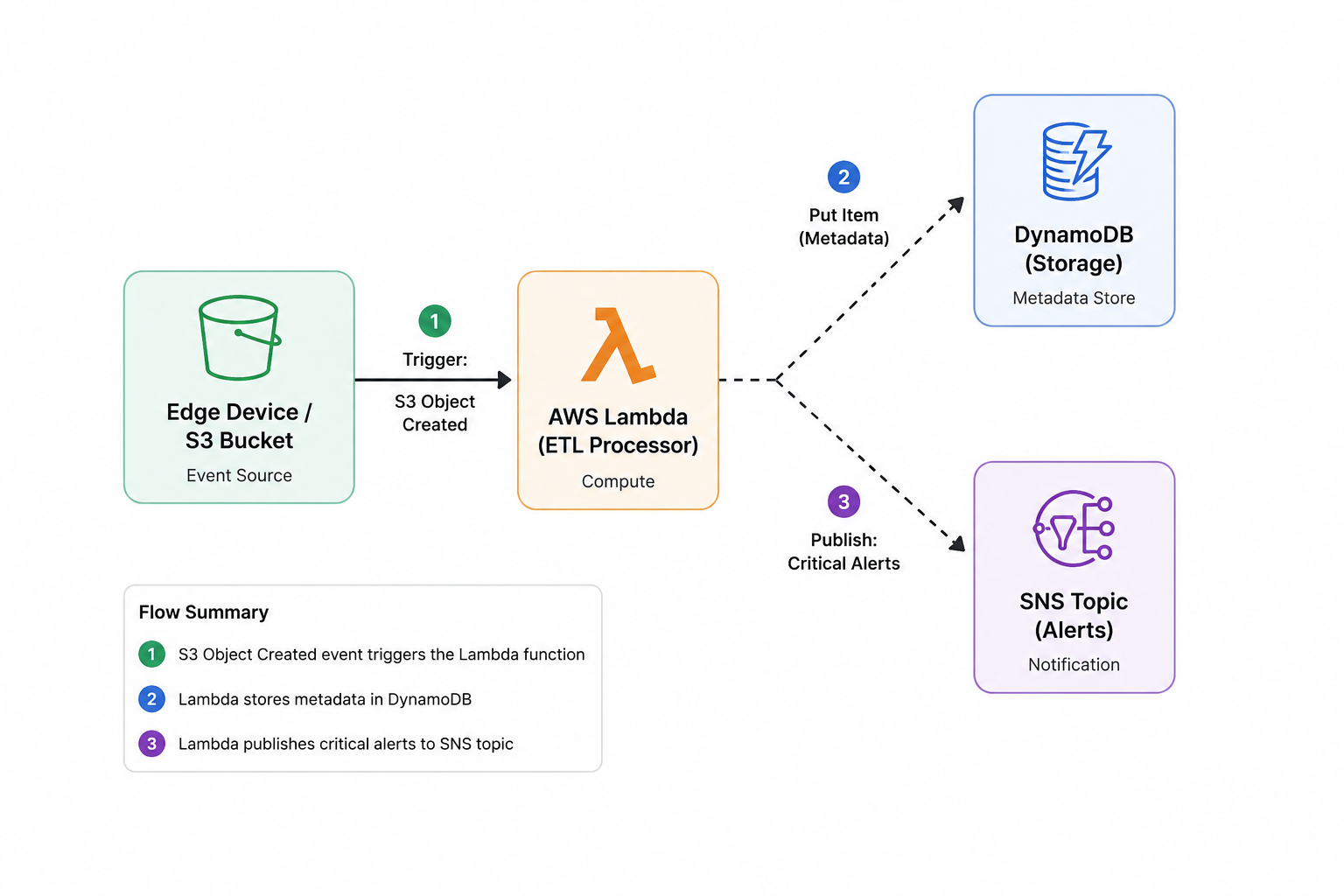
本项目使用 AWS 服务模拟实时 ETL (Extract, Transform, Load) 数据 pipeline。
1. **存储 (AWS S3):** 作为原始数据湖。边缘设备将 `.txt` 日志文件放入 `raw-edge-logs-ahmed` 存储桶中。
2. **神经系统 (S3 Event Notifications):** 立即检测 `s3:ObjectCreated:*` 事件,并在无需人工干预的情况下触发计算层。
3. **计算引擎 (AWS Lambda):** 一个 Python 3.10 microservice(`LogAnalyzerProcessor`)被唤醒,将原始文件下载到内存中,解析文本字符串,并执行数学异常检测(计算严重错误和警告的数量)。
4. **数据库 (AWS DynamoDB):** 解析后的结构化数据被加载到快速的 NoSQL 表(`EdgeLogAnalytics`)中,并由 `LogFileName` Hash Key 进行映射。
5. **告警系统 (AWS SNS):** 如果 pipeline 检测到达到严重阈值(单条日志中 >= 2 个错误),则会向 `critical-errors-topic` 发布自动警报,以便工程团队做出响应。
6. **数据提取:** 本地 Python 提取引擎查询 NoSQL 数据库,并将处理后的 JSON 报告编译成结构化的 CSV 数据集,随时可供 Pandas 或 ML 摄取。
## 🛠️ 技术栈
* **云端模拟:** LocalStack Pro(包含 Docker-in-Docker 配置)
* **Infrastructure as Code:** HashiCorp Terraform(由 `winget` 管理)
* **计算 / ETL 逻辑:** Python 3.10(`boto3`, `csv`, `datetime`)
* **使用的 AWS 服务:** S3, Lambda, DynamoDB, SNS, IAM, CloudWatch
* **CLI 工具:** `awslocal`, `docker`, `powershell`
## 🚀 快速开始与部署
### 1. 安装依赖
```
pip install boto3
```
### 2. 启动本地云端引擎
启动 LocalStack Pro 容器,确保主机的 Docker socket 已映射,以便 Lambda 能够启动隔离的执行环境:
```
docker run -d --name localstack-main -e LOCALSTACK_AUTH_TOKEN="" -p 4566:4566 -v /var/run/docker.sock:/var/run/docker.sock localstack/localstack-pro:latest
```
### 3. 打包计算逻辑
将 Python ETL 脚本压缩为部署包:
```
Compress-Archive -Path lambda_handler.py -DestinationPath function.zip -Force
```
### 4. 构建基础设施
初始化 AWS provider 并部署架构:
```
terraform init
terraform apply -auto-approve
```
## 🧪 测试端到端 Pipeline
要触发自动化 pipeline,请生成一个虚拟日志文件并将其推送到 S3 数据湖:
**1. 创建一个干净的、UTF-8 编码的日志文件:**
```
$logs = @"
[INFO] System booted successfully
[WARN] CPU temperature reaching 85C
[INFO] User authentication passed
[ERROR] Database connection timeout
[ERROR] Retrying connection... failed.
"@
[System.IO.File]::WriteAllText("$PWD\server_crash.txt", $logs)
```
**2. 摄取到 S3:**
```
awslocal s3 cp server_crash.txt s3://raw-edge-logs-ahmed/
```
**3. 验证 Pipeline 执行情况:**
检查引擎日志以查看 Lambda 执行和 SNS 警报分发:
```
docker logs --tail 20 localstack-main
```
检查 DynamoDB 表以验证 ETL 过程的 Load 阶段:
```
awslocal dynamodb scan --table-name EdgeLogAnalytics
```
**4. 为数据科学进行提取(CSV 导出):**
运行提取脚本,将所有处理过的报告从数据库中提取为 machine-learning-ready 格式:
```
python export_reports.py
```
## 🧠 技术挑战与基础设施解决方案
1. **Docker-in-Docker (DinD) Socket 隔离:**
* **问题:** Lambda 构建失败并出现权限错误。
* **解决方案:** 在主启动序列中映射 `-v /var/run/docker.sock:/var/run/docker.sock`,授予 LocalStack 管理同级 Lambda container 的权限。
* **业务影响:** 确保 CI/CD pipeline 具有可移植性,且不依赖于主机级别的操作系统权限。
2. **Windows UTF-16 编码陷阱:**
* **问题:** PowerShell 输出重定向 (`>`) 创建了 `UTF-16` 文件,导致基于 Linux 的 Lambda 中出现 `UnicodeDecodeError`。
* **解决方案:** 利用 `.NET` 类(`[System.IO.File]::WriteAllText`)强制执行云端标准的 UTF-8。
* **业务影响:** 无需人工干预编码,即可稳健处理来自异构边缘环境的数据。
3. **Terraform DNS 路由:**
* **问题:** 由于 Windows 无法路由 `.localhost` 子域名,导致出现 `no such host` 故障。
* **解决方案:** 在 Terraform 中强制设置 `s3_use_path_style = true`,强制执行稳定的、基于 IP 的路径路由。
4. **本地 API Endpoint 伪装:**
* **问题:** Terraform 尝试联系实时 AWS 生产服务器。
* **解决方案:** 在 provider 配置中,将 `dynamodb` 和 `sns` endpoint 显式映射到 `http://localhost:4566`,以对流量进行沙箱隔离。
5. **CloudWatch 变量解释:**
* **问题:** PowerShell 将 AWS 日志流语法 (`[$LATEST]`) 评估为系统变量。
* **解决方案:** 对所有 AWS CLI 查询使用单引号强制执行字面字符串解释。
## 📜 许可证
基于 MIT 许可证分发。查看 `LICENSE` 了解更多信息。
## 👤 关于作者
**Ahmed Mir** | 计算机工程毕业生 (GIKI) | Machine Learning 与云计算爱好者
* www.linkedin.com/in/ahmed-mir-247325139
"""
标签:AWS LocalStack, ECS, ETL管道, Terraform, 异常检测, 数据工程, 请求拦截, 边缘计算, 逆向工具