YumanBlazer/SOAR-EDR-Incident-Response-Lab
GitHub: YumanBlazer/SOAR-EDR-Incident-Response-Lab
该项目是一个结合 Tines SOAR 和 LimaCharlie EDR 的自动化事件响应实验室,实现了凭证窃取工具检测与人工审批终端隔离的完整闭环。
Stars: 0 | Forks: 0
# SOAR & EDR 事件响应自动化实验室
## 架构
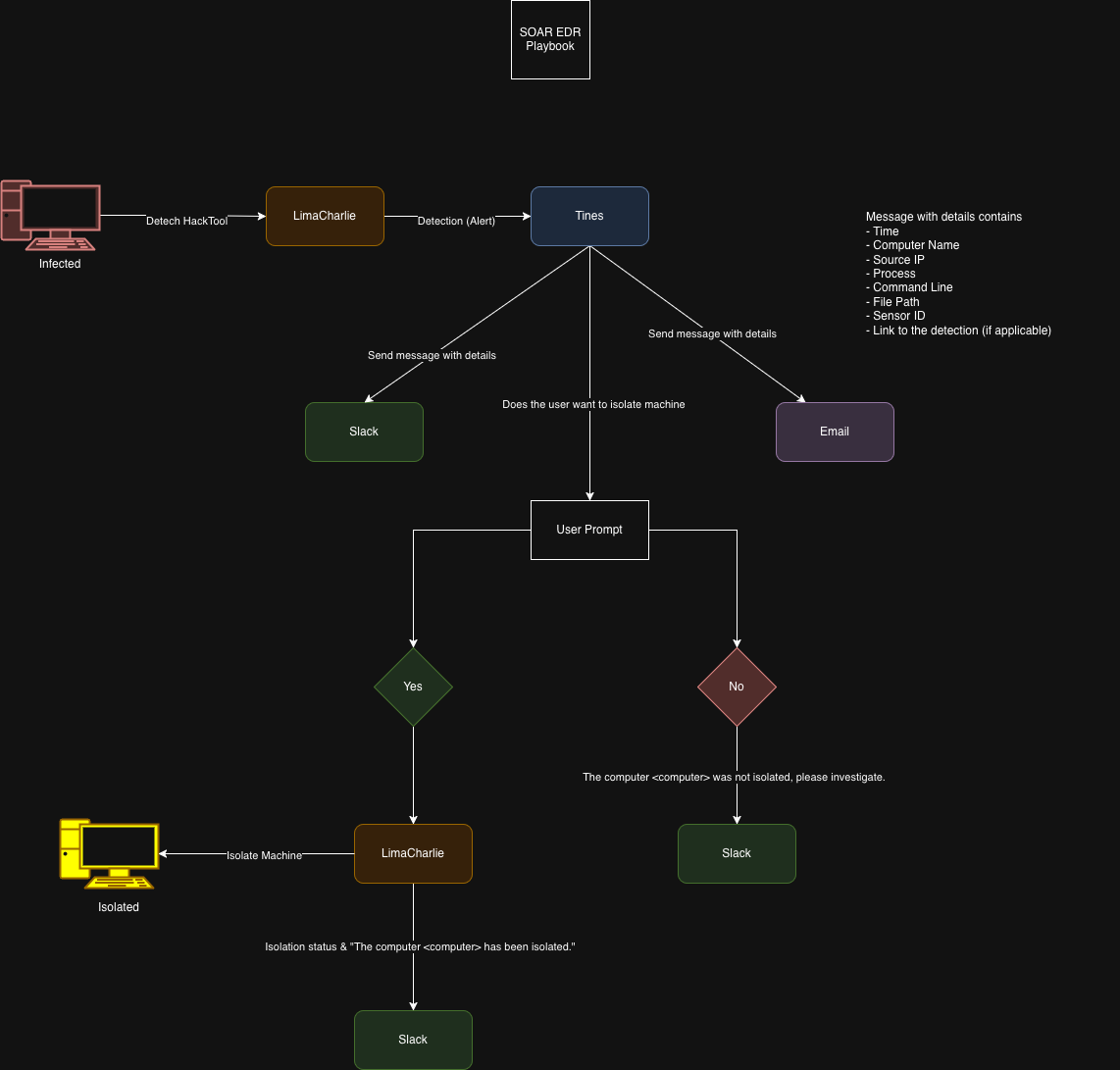
**数据流:**
```
Endpoint (Windows 11 VM)
↓ lazagne.exe executed
LimaCharlie Agent
↓ D&R rule fires → Detections webhook
Tines Webhook (Retrieve Detections)
↓ parallel
├── Slack alert ──────────────────────────────────────── analyst channel
├── Email alert ──────────────────────────────────────── audit trail
└── User Prompt (FormAgent) ─── Isolate? [Yes] / [No]
├── Yes → POST /isolation → GET /isolation → Slack confirmation
└── No → Slack "not isolated, please investigate"
```
## 技术栈
| 组件 | 工具 | 角色 |
|-----------|------|------|
| EDR | LimaCharlie | Endpoint 遥测 + D&R 规则 + sensor 隔离 API |
| SOAR | Tines | 工作流编排(10-agent story) |
| 通知 | Slack | 实时分析师警报 + 确认消息 |
| 通知 | Email | 通过 EmailAgent 保留审计追踪 |
| 测试 payload | LaZagne | 用作良性红队触发器的开源凭证收集器 |
| Endpoint | Windows 11 VM | 运行 LimaCharlie sensor 的目标机器 |
## 演示
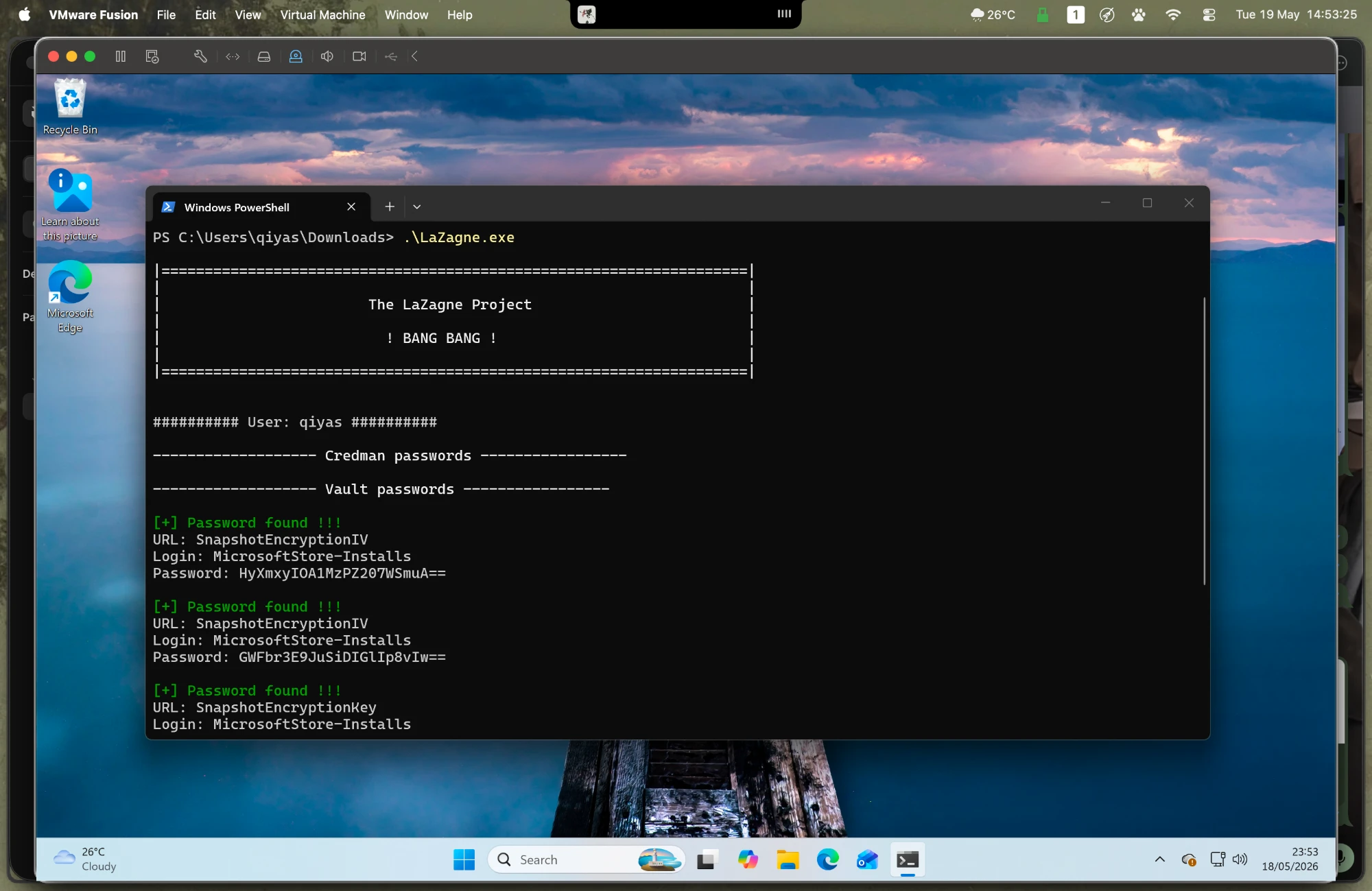
### 1. 攻击模拟 — LaZagne 在 Endpoint 上执行
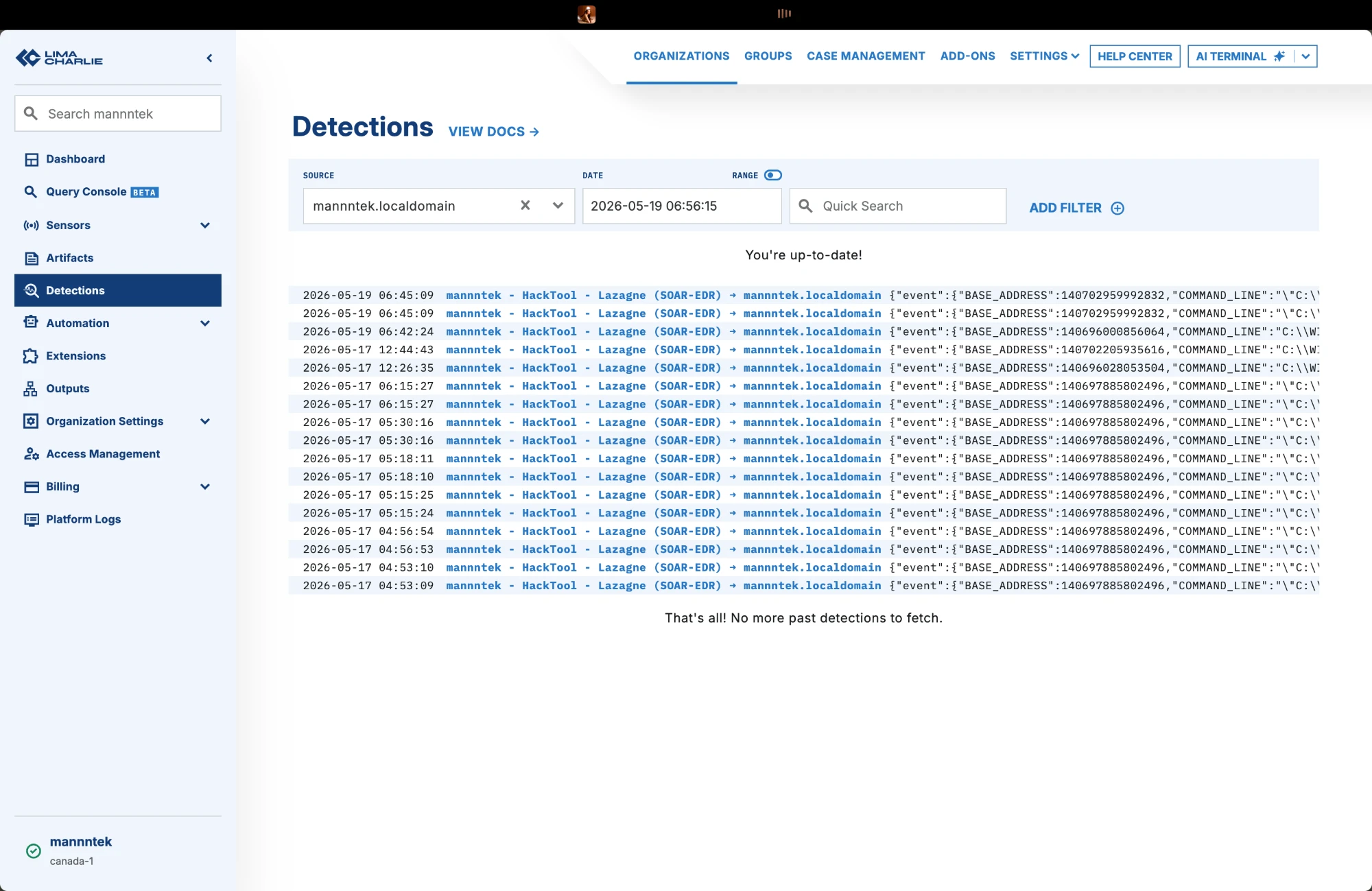
### 2. LimaCharlie — 触发检测
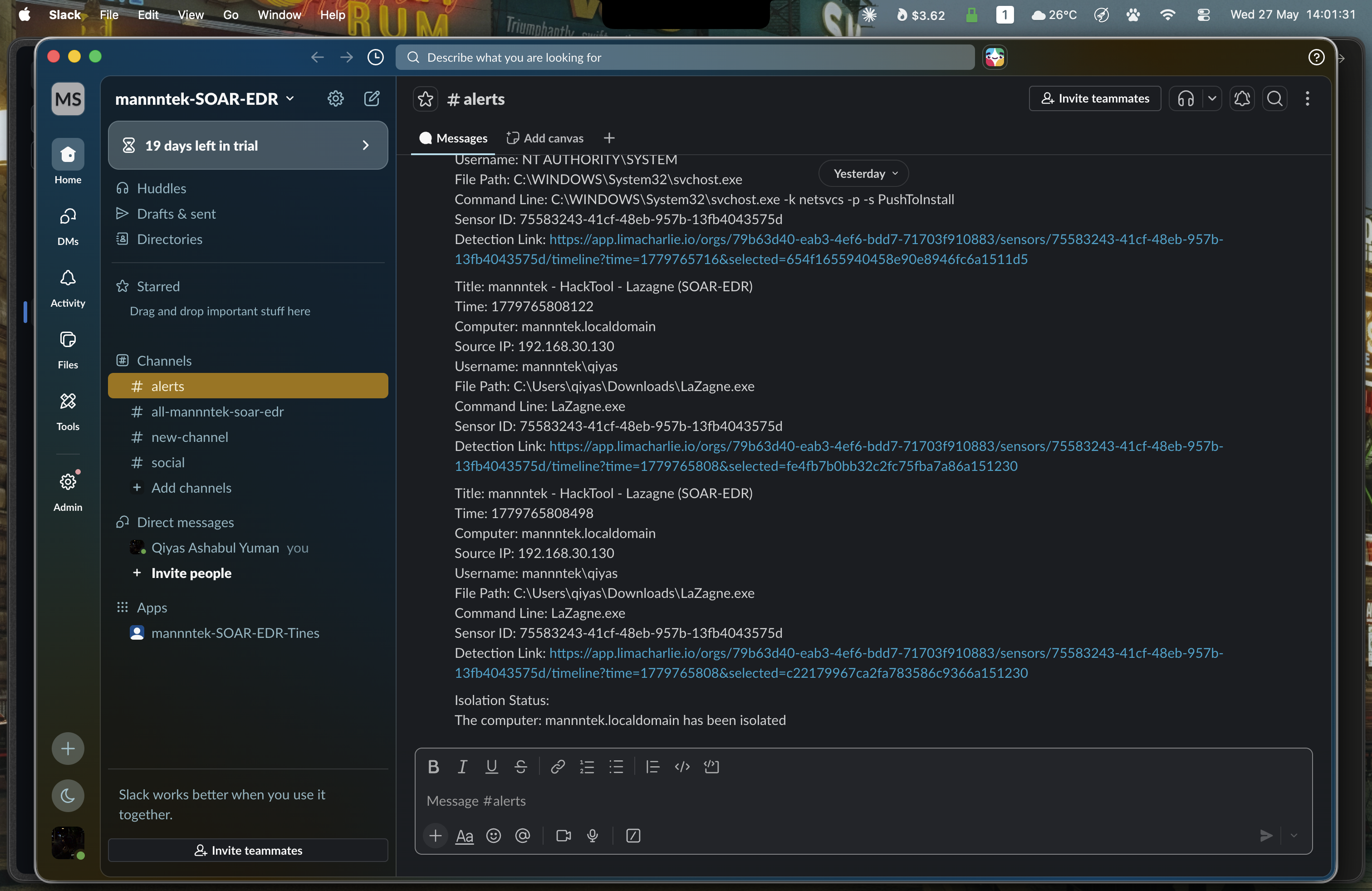
### 3. Slack — 收到初始警报
### 4. Tines — 分析师决策提示(Human-in-the-Loop)
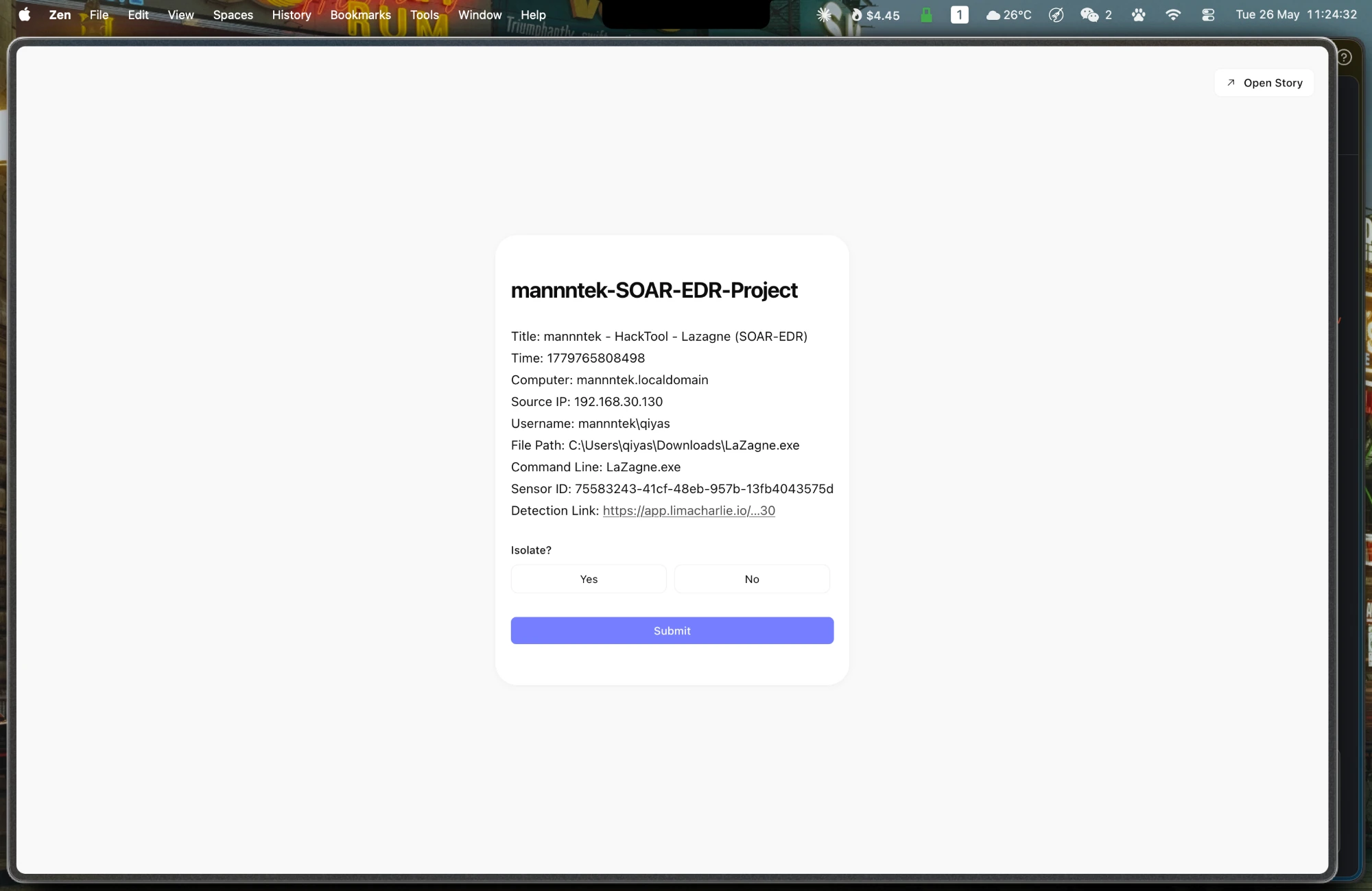
### 5. LimaCharlie — Sensor 已隔离
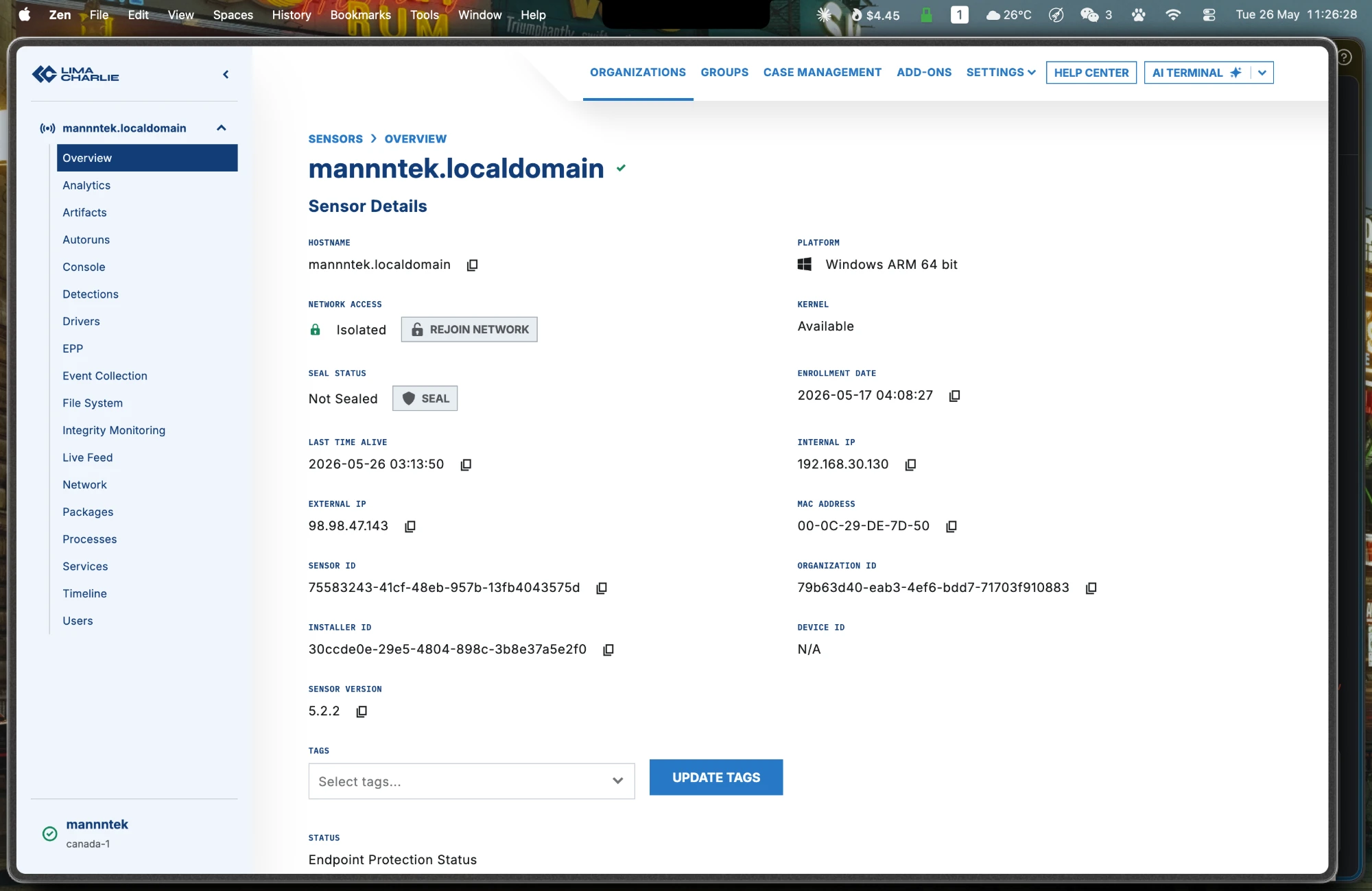
### 6. Tines — 完整 Storyboard
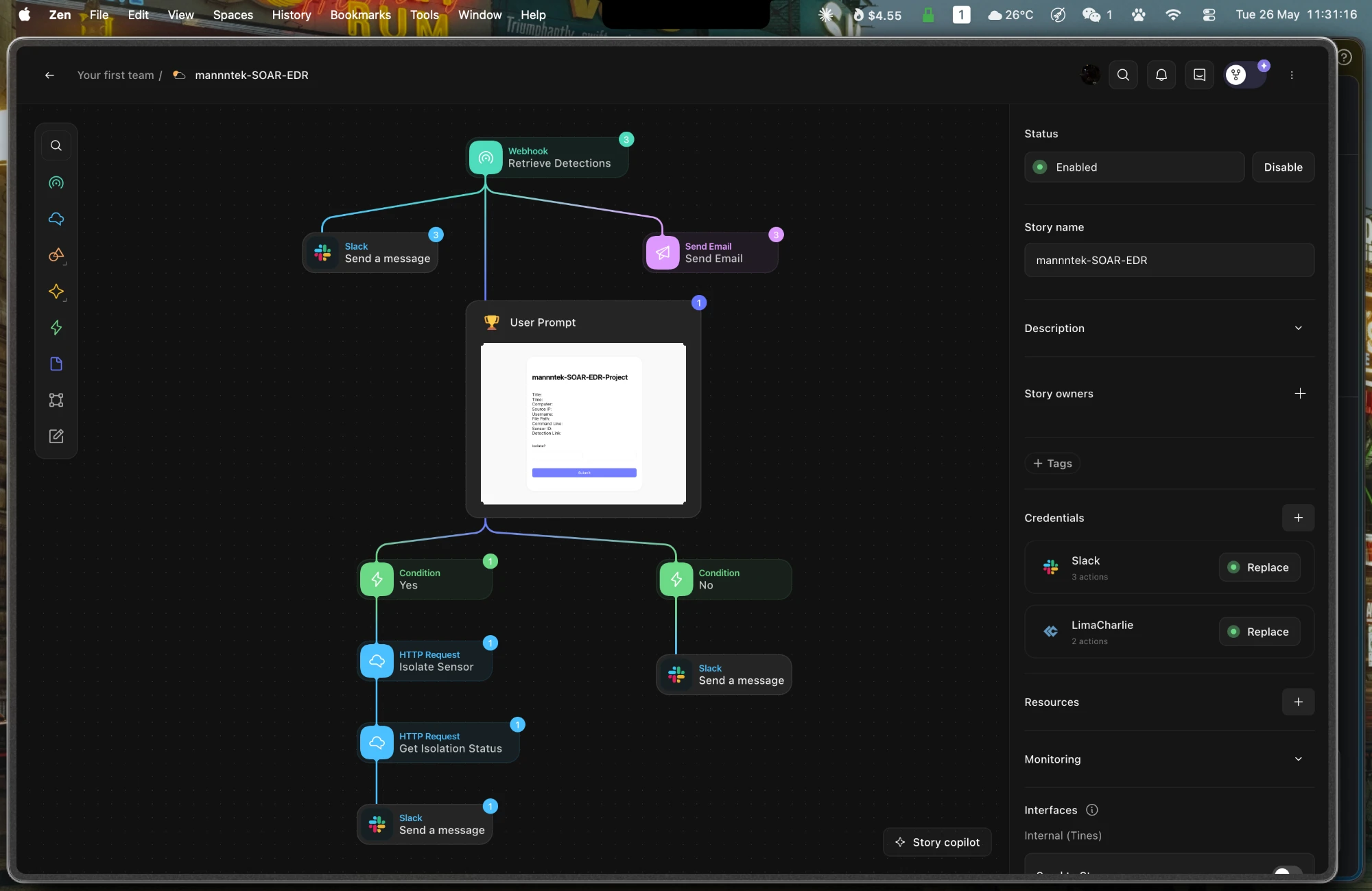
## Tines 工作流(10 个 Agent)
Story 名称:**`mannntek-SOAR-EDR`**
| # | Agent 类型 | 名称 | 用途 |
|---|-----------|------|---------|
| 0 | `WebhookAgent` | Retrieve Detections | 接收来自 LimaCharlie Outputs 的 JSON payload |
| 1 | `HTTPRequestAgent` | Send a message (Slack) | 向分析师频道发布初始检测警报 |
| 2 | `EmailAgent` | Send Email | 发送警报电子邮件以保留审计追踪 |
| 3 | `FormAgent` | User Prompt | 显示“Isolate?”布尔开关(是 / 否)+ 提交 |
| 4 | `TriggerAgent` | No | 当 `<>` == `"false"` 时路由 |
| 5 | `HTTPRequestAgent` | Send a message (Slack) | 向频道发布“未隔离”通知 |
| 6 | `TriggerAgent` | Yes | 当 `<>` == `"true"` 时路由 |
| 7 | `HTTPRequestAgent` | Isolate Sensor | `POST /v1/{sid}/isolation` 到 LimaCharlie API |
| 8 | `HTTPRequestAgent` | Send a message (Slack) | 向频道发布隔离确认信息 |
| 9 | `HTTPRequestAgent` | Get Isolation Status | `GET /v1/{sid}/isolation` — 验证隔离是否成功 |
**链接顺序:** `0→1`, `0→2`, `0→3`, `3→4`, `3→6`, `4→5`, `6→7`, `7→9`, `9→8`
## LimaCharlie D&R 规则
规则名称:**`mannntek-Lazagne-SOAR-EDR`**
保存位置:[`limacharlie/dnr-rule.yml`](limacharlie/dnr-rule.yml)
```
events:
- NEW_PROCESS
- EXISTING_PROCESS
op: and
rules:
- op: is windows
- op: or
rules:
- case sensitive: false
op: ends with
path: event/FILE_PATH
value: lazagne.exe
- case sensitive: false
op: ends with
path: event/COMMAND_LINE
value: all
- case sensitive: false
op: contains
path: event/COMMAND_LINE
value: lazagne
- case sensitive: false
op: is
path: event/HASH
value: dc06d62ee95062e714f2566c95b8edaabfd387023b1bf98a09078b84007d5268
- action: report
metadata:
author: mannntek
description: Detects Lazagne (SOAR-EDR Tool)
falsepositives:
- To the moon
level: medium
tags:
- attack.credential_access
name: mannntek - HackTool - Lazagne (SOAR-EDR)
```
## 警报和通知内容
### 初始 Slack / Email 警报
```
Title: <>
Time: <>
Computer: <>
Source IP: <>
Username: <>
File Path: <>
Command Line: <>
Sensor ID: <>
Detection Link: <>
```
### 隔离 API 调用
```
# 隔离 sensor
POST https://api.limacharlie.io/v1/<>/isolation
Authorization: Bearer <>
# 验证隔离
GET https://api.limacharlie.io/v1/<>/isolation
Authorization: Bearer <>
```
### Slack 确认消息
```
Isolation Status: <>
The computer: <> has been isolated
```
### Slack 未隔离消息
```
The computer: <> was not isolated, please investigate.
```
## 测试结果
| 指标 | 结果 |
|--------|--------|
| 检测触发 | 在 Windows 11 VM(ARM 64 位)上执行 `.\lazagne.exe` |
| 检测延迟 | < 500 ms |
| Slack 警报送达 | < 2 秒 |
| Email 警报送达 | < 5 秒 |
| 隔离执行 | 分析师批准后 < 2 秒 |
| 工作流成功率 | 所有测试运行中达到 100% |
## 关键经验总结
1. **SOAR 变量语法** — Tines 使用 `<>` liquid 风格引用,而不是 `{{ }}` 或 `${}`。
2. **API endpoint 准确性** — LimaCharlie 隔离使用 `POST /v1/{sid}/isolation`;使用 `GET` 访问相同的 URL 会返回当前隔离状态。
3. **过于宽泛的 D&R 规则会导致误报** — 单独使用 `ends with: all` 会匹配不相关的 Windows 进程(例如,`PushToInstall`)。规则应使用 AND 结合多个条件。
4. **破坏性操作需引入 Human-in-the-loop** — 带有明确“是/否”标签的布尔开关比单击按钮更能有效减少意外隔离。
5. **SOAR 中的凭证管理** — 将 API key 存储为命名的 credentials(`<>`、`<>`);切勿在 agent 选项中硬编码它们。
6. **审计追踪至关重要** — 并行发送 Slack + Email 可确保即使一个渠道不可用,也有可搜索的记录。
## 仓库结构
```
SOAR-EDR-Incident-Response-Lab/
├── README.md
├── limacharlie/
│ └── dnr-rule.yml # Detection & Response rule (YAML)
├── tines/
│ └── workflow-export.json # Full Tines story export (importable)
├── docs/
│ └── architecture.png # Drawio architecture diagram
└── screenshots/
├── 01-slack-alerts.webp
├── 02-limacharlie-sensor-isolated.webp
├── 03-tines-user-prompt.webp
├── 04-limacharlie-detections.webp
├── 05-lazagne-execution.webp
└── 06-tines-storyboard.webp
```
## 参考
- [LimaCharlie 文档](https://docs.limacharlie.io)
- [Tines 文档](https://docs.tines.com)
- [Slack API — chat.postMessage](https://api.slack.com/methods/chat.postMessage)
- [GitHub 上的 LaZagne](https://github.com/AlessandroZ/LaZagne)
- MITRE ATT&CK:[T1555 — 来自密码存储的凭证](https://attack.mitre.org/techniques/T1555/)
标签:EDR, SOAR, TGT, 安全运营, 扫描框架, 攻防演练, 脆弱性评估, 自动化响应, 速率限制