tiennesdm/CodeShield-AI
GitHub: tiennesdm/CodeShield-AI
一个由 AI 多智能体驱动的应用安全平台,集成了 SAST、SCA、密钥检测和自动修复能力,帮助团队自动化扫描代码漏洞并生成可视化报告。
Stars: 0 | Forks: 0
# CodeShield AI
**生产就绪的应用安全平台** — 多扫描器 SAST、密钥与依赖分析、Agentic AI“安全团队”、负责任 AI 治理,以及现代、完全响应式的 HTML 报告。




CodeShield AI 通过 ZIP 上传或 GitHub URL 导入代码,自动检测语言,并行运行相应的安全扫描器(由多智能体编排器协调),使用 AI 分类验证发现的问题,并生成结构化结果以及独立的 PDF/HTML 报告。
## 目录
- [功能](#features)
- [Agentic AI、LLM 提供商与负责任 AI](#agentic-ai-llm-providers--responsible-ai)
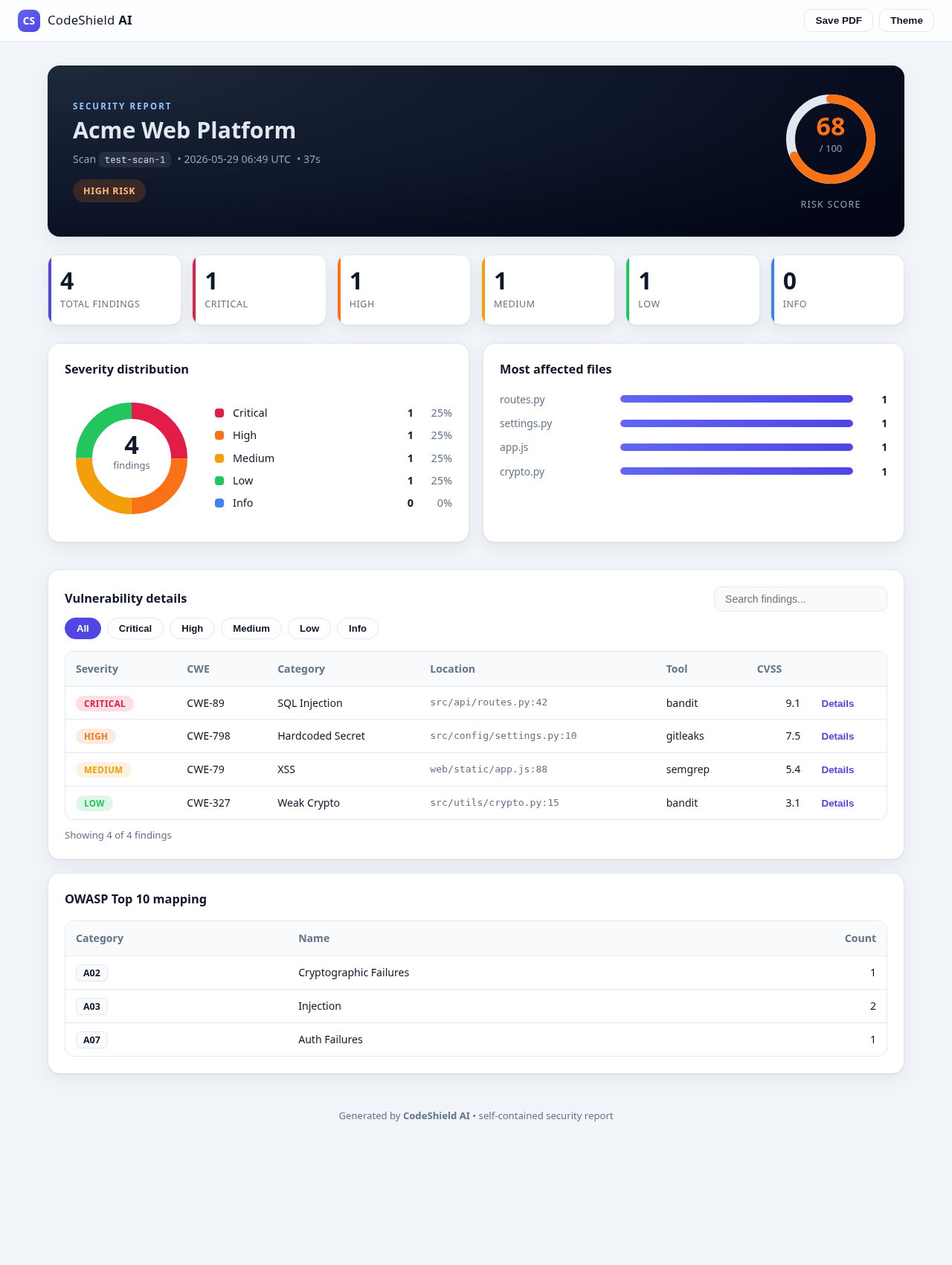
- [HTML 报告 UI](#html-report-ui)
- [架构](#architecture)
- [快速开始](#quick-start)
- [API 文档](#api-documentation)
- [扫描配置](#scan-configuration)
- [数据模型](#data-models)
- [可用的扫描器和检测项](#available-scanners-and-detections)
- [开发](#development)
- [许可证](#license)
## 功能
### 核心扫描
- **多语言**:Python、JavaScript/TypeScript、Java、Go、Ruby、PHP、C# 等
- **8 个集成的扫描器**:Semgrep、ESLint、Pylint、Bandit、PMD、Gitleaks、OWASP Dependency-Check 以及无依赖的自定义 AI 扫描器
- **异步与并行**:所有扫描均异步运行,并带有实时进度跟踪
- **语言自动检测**:根据检测到的语言选择扫描器
- **标准化输出**:将每个工具的输出标准化为通用的 `Vulnerability` 模型,并带有 CWE/OWASP 映射
- **优雅降级**:即使未安装某些工具,扫描也会继续进行
### 智能与自动化
- **多智能体编排器 (HAL)**:跨阶段协调 SAST / DAST / 密钥 / SCA / 污点 / LLM 智能体
- **通用 Git 与自定义分支支持**:克隆并扫描 GitHub、GitLab 和 Bitbucket 仓库的特定分支
- **AI 分流**:结合启发式算法与可选的 LLM 来减少误报
- **自动修复**:确定性和 LLM 辅助的修复,并提供统一差异对比
- **Agentic “AI 团队”**:基于角色的智能体(规划者、研究员、工程师、审查员、负责任 AI 官员)——见下文
- **负责任 AI 治理**:PII 脱敏、Prompt 注入防护、偏见筛查以及哈希链审计追踪
### 报告与交付
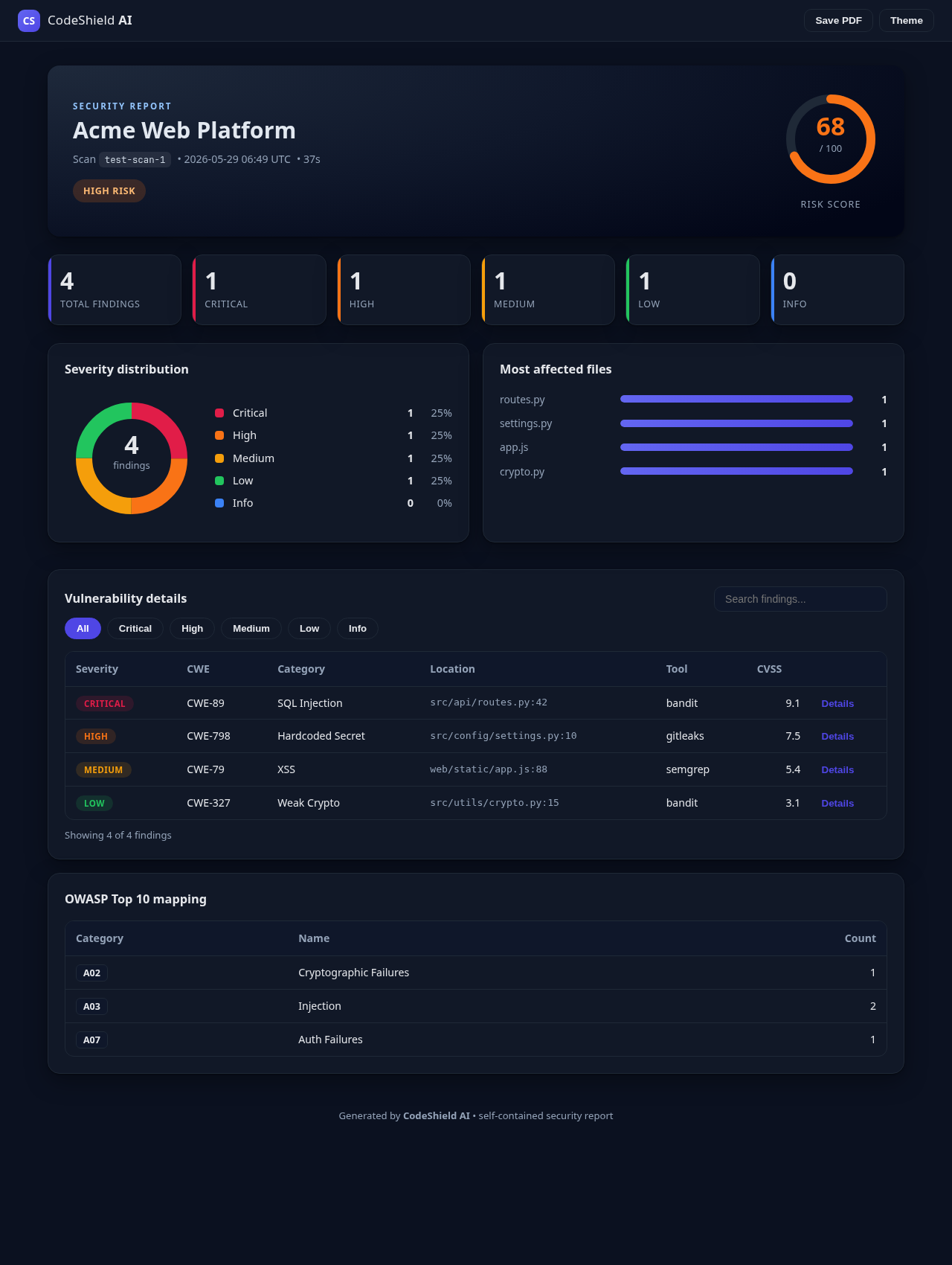
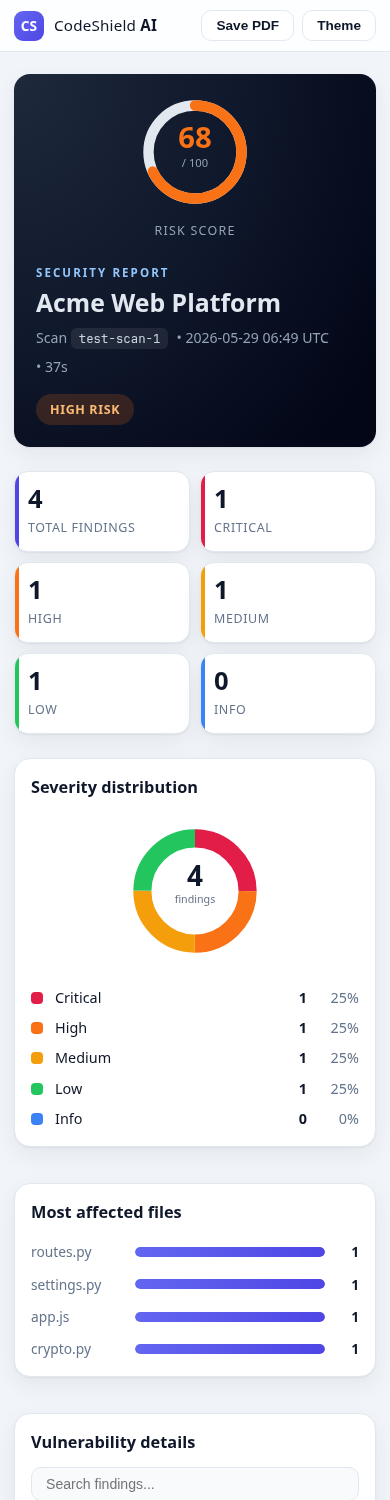
- **现代、响应式的 HTML 报告**(浅色/深色主题、内联 SVG 图表、搜索和过滤)——参见 [HTML 报告 UI](#html-report-ui)
- **PDF 报告**:包含图表、代码片段和 OWASP 矩阵
- **导出器**:SARIF、JSON、JUnit、HTML
- **CI/CD 生成器**:GitHub Actions、GitLab CI、Jenkins、Azure Pipelines
## Agentic AI、LLM 提供商与负责任 AI
除了安全扫描之外,该平台现在还包含一个通用的 **agentic
AI** 技术栈,并内置了负责任 AI。请参阅文档以获取完整设计:
- **[系统架构与数据流](docs/project_architecture.md)** — 包含完整图表(系统框图和时序执行图),详细介绍了 AIGovernor 和 LLM 提供商的集成。
- **[Agentic AI 架构](docs/AGENTIC_AI_ARCHITECTURE.md)** — AI 智能体团队的系统设计、图表和请求生命周期。
- **[负责任 AI](docs/RESPONSIBLE_AI.md)** — 原则到控制措施的映射、政策和模型卡片。
- **[AWS EC2 部署 + Claude CLI](docs/DEPLOYMENT_AWS_EC2.md)** — 实操设置。
三个可组合的子系统:
| 包 | 提供的功能 |
| --- | --- |
| `llm/` | 可插拔的 LLM 提供商层:**Claude CLI**、Anthropic API、OpenAI API 以及一个离线 mock —— 通过 `get_llm_provider()` / `CODESHIELD_LLM_PROVIDER` 进行选择。 |
| `governance/` | 负责任 AI 治理器,执行 **PII/密钥脱敏、Prompt 注入防护、偏见筛查、哈希链审计追踪** 以及声明式策略。 |
| `ai_team/` | 一个 Agentic **“AI 团队”**(规划者、研究员、工程师、审查员、负责任 AI 官员),通过协调来完成目标——每次 LLM 调用都通过治理器进行路由。 |
从终端运行一个受治理的 AI 团队(通过 mock 提供商支持离线运行):
```
python -m ai_team.cli "Design a secure rate limiter for our public API"
python -m ai_team.cli --provider claude_cli --strict "Audit our login flow"
```
或通过 API(挂载在主应用中):
```
GET /api/ai-team/info POST /api/ai-team/run
POST /api/governance/ask POST /api/governance/redact
POST /api/governance/inspect-prompt POST /api/governance/bias-scan
GET /api/governance/policy GET /api/governance/audit
```
配置:
| 变量 | 默认值 | 描述 |
|----------|---------|-------------|
| `CODESHIELD_LLM_PROVIDER` | 自动检测 | `claude_cli`、`anthropic_api`、`openai_api` 或 `mock` |
| `ANTHROPIC_API_KEY` | – | 用于 `anthropic_api` 的 API key |
| `OPENAI_API_KEY` | – | 用于 `openai_api` 的 API key |
## HTML 报告 UI
每次扫描都会导出为一份**独立的、完全响应式的 HTML 报告**(无外部/CDN 资源)。它包含一个风险仪表盘、严重性分布图(内联 SVG 环图)、受影响最多的文件、带有可展开详细信息和修复方法且支持搜索与严重性过滤的漏洞表、OWASP 映射、浅色/深色主题,以及一键**保存为 PDF** 功能。
| 桌面端 | 深色主题 | 移动端 |
| --- | --- | --- |
|  |
|  |
|  |
以编程方式生成报告:
```
from exporters.html_exporter import HTMLExporter
HTMLExporter().export_to_file(scan_result, "report.html")
```
或通过 API 生成:`GET /api/export/{scan_id}?format=html`。
## 架构
```
backend/
main.py # FastAPI entry point
requirements.txt # Python dependencies
scanner/
engine.py # Main scan orchestrator
language_detector.py # Language/framework detection
tool_runner.py # Generic tool execution
zip_handler.py # Secure ZIP extraction
github_handler.py # GitHub repo cloning
tools/
semgrep_scanner.py
eslint_scanner.py
pylint_scanner.py
bandit_scanner.py
pmd_scanner.py
gitleaks_scanner.py
dependency_check.py
custom_ai_scanner.py
parsers/
semgrep_parser.py
eslint_parser.py
pylint_parser.py
bandit_parser.py
pmd_parser.py
gitleaks_parser.py
dependency_parser.py
models/
vulnerability.py # Pydantic data models
report/
pdf_generator.py # PDF report generation
database/
json_db.py # JSON-based scan storage
utils/
config.py # Configuration management
logger.py # Structured logging
helpers.py # File utilities
constants.py # CWE/OWASP mappings
```
## 快速开始
### 前置条件
- Python 3.10+
- Git(用于克隆 GitHub 仓库)
### 安装
1. 克隆仓库:
```
git clone
|
以编程方式生成报告:
```
from exporters.html_exporter import HTMLExporter
HTMLExporter().export_to_file(scan_result, "report.html")
```
或通过 API 生成:`GET /api/export/{scan_id}?format=html`。
## 架构
```
backend/
main.py # FastAPI entry point
requirements.txt # Python dependencies
scanner/
engine.py # Main scan orchestrator
language_detector.py # Language/framework detection
tool_runner.py # Generic tool execution
zip_handler.py # Secure ZIP extraction
github_handler.py # GitHub repo cloning
tools/
semgrep_scanner.py
eslint_scanner.py
pylint_scanner.py
bandit_scanner.py
pmd_scanner.py
gitleaks_scanner.py
dependency_check.py
custom_ai_scanner.py
parsers/
semgrep_parser.py
eslint_parser.py
pylint_parser.py
bandit_parser.py
pmd_parser.py
gitleaks_parser.py
dependency_parser.py
models/
vulnerability.py # Pydantic data models
report/
pdf_generator.py # PDF report generation
database/
json_db.py # JSON-based scan storage
utils/
config.py # Configuration management
logger.py # Structured logging
helpers.py # File utilities
constants.py # CWE/OWASP mappings
```
## 快速开始
### 前置条件
- Python 3.10+
- Git(用于克隆 GitHub 仓库)
### 安装
1. 克隆仓库:
```
git clone
cd backend
```
2. 创建虚拟环境:
```
python -m venv venv
source venv/bin/activate # Linux/Mac
# 或
venv\Scripts\activate # Windows
```
3. 安装 Python 依赖项:
```
pip install -r requirements.txt
```
4. 安装安全扫描工具(可选 - 自定义 AI 扫描器无需安装任何工具即可运行):
```
# Semgrep
pip install semgrep
# Bandit
pip install bandit
# Pylint
pip install pylint
# ESLint (需要 Node.js)
npm install -g eslint
# PMD (从 https://pmd.github.io/ 下载)
# 下载并添加到 PATH
# Gitleaks (从 https://github.com/gitleaks/gitleaks 下载)
# 下载并添加到 PATH
# OWASP Dependency-Check
# 从 https://owasp.org/www-project-dependency-check/ 下载
```
### 运行服务器
```
# 带有自动重载的开发模式
uvicorn main:app --reload --host 0.0.0.0 --port 8000
# 生产模式
uvicorn main:app --host 0.0.0.0 --port 8000 --workers 4
```
API 将在 `http://localhost:8000` 提供
交互式 API 文档:
- Swagger UI:`http://localhost:8000/api/docs`
- ReDoc:`http://localhost:8000/api/redoc`
### 环境变量
| 变量 | 默认值 | 描述 |
|----------|---------|-------------|
| `APP_NAME` | CodeShield AI | 应用名称 |
| `DEBUG` | False | 调试模式 |
| `HOST` | 0.0.0.0 | 服务器绑定主机 |
| `PORT` | 8000 | 服务器端口 |
| `CORS_ORIGINS` | 前端 URL,localhost | 逗号分隔的 CORS 源 |
| `DATA_DIR` | ./data | 数据存储目录 |
| `TEMP_DIR` | ./tmp | 临时文件目录 |
| `MAX_UPLOAD_SIZE_MB` | 100 | 最大 ZIP 上传大小(MB) |
| `LOG_LEVEL` | INFO | 日志级别 |
## API 文档
### 健康检查
```
GET /api/health
```
返回服务状态和版本。
### 扫描端点
#### 上传 ZIP 文件
```
POST /api/scan/zip
```
表单数据:
- `file`(必填):包含源代码的 ZIP 文件
- `name`(选填):扫描名称
- `config`(选填):JSON 配置字符串
响应:
```
{
"scan_id": "abc12345",
"status": "running",
"message": "Scan started. Poll /api/scan/{scan_id}/status for progress."
}
```
#### 扫描 GitHub 仓库
```
POST /api/scan/github
```
请求体:
```
{
"source_type": "github",
"source_url": "https://github.com/user/repo",
"name": "My Project",
"config": {
"languages": ["python", "javascript"],
"severity_filters": ["CRITICAL", "HIGH", "MEDIUM"],
"tools": ["bandit", "semgrep", "custom_ai"],
"include_info": false,
"timeout_seconds": 600
}
}
```
#### 获取扫描状态
```
GET /api/scan/{scan_id}/status
```
#### 获取扫描结果
```
GET /api/scan/{scan_id}/results
```
查询参数:
- `severity`:按严重性过滤(CRITICAL、HIGH、MEDIUM、LOW、INFO)
- `category`:按类别过滤
- `tool`:按工具来源过滤
- `limit`:最大结果数(默认 100,最大 1000)
- `offset`:跳过 N 条结果
#### 下载 PDF 报告
```
GET /api/scan/{scan_id}/report/pdf
```
### 历史记录端点
#### 获取扫描历史列表
```
GET /api/history
```
查询参数:
- `limit`:最大结果数(默认 50)
- `offset`:跳过 N 条结果
- `status`:按状态过滤
#### 删除扫描
```
DELETE /api/history/{scan_id}
```
#### 对比扫描
```
POST /api/history/compare
```
请求体:
```
{
"scan_ids": ["scan1", "scan2"]
}
```
### 配置端点
#### 列出可用工具
```
GET /api/tools
```
#### 列出严重性级别
```
GET /api/severity-levels
```
#### 获取 OWASP Top 10
```
GET /api/owasp-top10
```
#### 获取全局统计数据
```
GET /api/stats
```
## 扫描配置
`config` 参数允许自定义扫描:
```
{
"languages": ["python", "javascript"],
"severity_filters": ["CRITICAL", "HIGH"],
"tools": ["bandit", "semgrep", "custom_ai"],
"include_info": false,
"max_file_size_mb": 10,
"timeout_seconds": 600
}
```
| 选项 | 类型 | 默认值 | 描述 |
|--------|------|---------|-------------|
| `languages` | string[] | 自动检测 | 覆盖语言检测 |
| `severity_filters` | string[] | 所有 | 仅报告这些严重级别 |
| `tools` | string[] | 自动选择 | 覆盖工具选择 |
| `include_info` | boolean | true | 包含 INFO 级别的发现 |
| `max_file_size_mb` | integer | 10 | 跳过大于此大小的文件 |
| `timeout_seconds` | integer | 600 | 单个工具的超时时间 |
## 数据模型
### Vulnerability
```
{
"id": "uuid",
"scan_id": "abc12345",
"file_path": "src/app.py",
"line_number": 42,
"column": 15,
"severity": "HIGH",
"category": "SQL Injection",
"cwe_id": "CWE-89",
"cwe_name": "SQL Injection",
"title": "Possible SQL injection vector",
"description": "User input directly used in SQL query",
"code_snippet": "cursor.execute(f'SELECT *...')",
"fix_suggestion": "Use parameterized queries",
"tool_source": "bandit",
"cvss_score": 7.5,
"owasp_category": "A03",
"confidence": "HIGH",
"created_at": "2024-01-15T10:30:00"
}
```
### Scan Result
```
{
"scan_id": "abc12345",
"name": "My Project",
"source_type": "zip",
"status": "completed",
"progress": 100,
"start_time": "2024-01-15T10:30:00",
"end_time": "2024-01-15T10:35:22",
"languages": ["python", "javascript"],
"total_files": 45,
"total_lines": 3250,
"scan_duration": 322,
"tools_used": ["bandit", "semgrep", "custom_ai"],
"vulnerabilities": [],
"stats": {
"total": 12,
"critical": 0,
"high": 3,
"medium": 5,
"low": 4,
"info": 0
},
"risk_score": 42
}
```
## 可用的扫描器和检测项
| 扫描器 | 语言 | 检测内容 |
|---------|-----------|---------|
| Semgrep | 多语言 | SQL injection、XSS、代码注入、密钥、不安全的加密 |
| ESLint | JS/TS/React | Eval 的使用、脚本 URL、调试代码、代码质量 |
| Pylint | Python | Eval/exec 的使用、裸 except、代码质量 |
| Bandit | Python | SQL injection、硬编码密码、弱加密、pickle、subprocess |
| PMD | Java | 硬编码 IP、弱加密、代码质量 |
| Gitleaks | 全部 | API key、密码、token、私钥、连接字符串 |
| Dependency-Check | 全部 | 依赖项中已知的 CVE |
| 自定义 AI | 全部 | 50+ 种正则表达式模式 + AST 分析,用于检测密钥、注入、XSS、SSRF、路径遍历、加密、CORS、ReDoS |
## 自定义 AI 扫描器模式
内置的自定义 AI 扫描器可检测:
### 密钥
- API key、access token、bearer token
- 密码和口令短语
- 私钥(RSA、DSA、EC)
- AWS access key 和密钥
- GitHub token
- 数据库连接字符串
### 注入
- SQL injection(字符串拼接、f-string、格式化)
- NoSQL injection
- 命令/OS 注入
- Eval/代码注入
- LDAP injection
- XPath injection
### XSS
- 基于 DOM 的 XSS(innerHTML、document.write)
- React dangerouslySetInnerHTML
- 基于模板的 XSS(Handlebars、Angular)
- 反射型 XSS
### 其他
- 路径遍历
- 不安全的加密(MD5、SHA1、DES、ECB)
- 不安全的随机数
- CORS 配置错误
- SSRF 模式
- JWT none algorithm
- CSRF 豁免
- 不安全的反序列化(pickle、yaml)
## 开发
### 运行测试
```
pytest tests/
```
### 代码格式化
```
black scanner/ models/ report/ database/ utils/ main.py
isort scanner/ models/ report/ database/ utils/ main.py
```
### 类型检查
```
mypy scanner/ models/ report/ database/ utils/
```
## 许可证
MIT 许可证
| | |
以编程方式生成报告:
```
from exporters.html_exporter import HTMLExporter
HTMLExporter().export_to_file(scan_result, "report.html")
```
或通过 API 生成:`GET /api/export/{scan_id}?format=html`。
## 架构
```
backend/
main.py # FastAPI entry point
requirements.txt # Python dependencies
scanner/
engine.py # Main scan orchestrator
language_detector.py # Language/framework detection
tool_runner.py # Generic tool execution
zip_handler.py # Secure ZIP extraction
github_handler.py # GitHub repo cloning
tools/
semgrep_scanner.py
eslint_scanner.py
pylint_scanner.py
bandit_scanner.py
pmd_scanner.py
gitleaks_scanner.py
dependency_check.py
custom_ai_scanner.py
parsers/
semgrep_parser.py
eslint_parser.py
pylint_parser.py
bandit_parser.py
pmd_parser.py
gitleaks_parser.py
dependency_parser.py
models/
vulnerability.py # Pydantic data models
report/
pdf_generator.py # PDF report generation
database/
json_db.py # JSON-based scan storage
utils/
config.py # Configuration management
logger.py # Structured logging
helpers.py # File utilities
constants.py # CWE/OWASP mappings
```
## 快速开始
### 前置条件
- Python 3.10+
- Git(用于克隆 GitHub 仓库)
### 安装
1. 克隆仓库:
```
git clone 标签:AI安全, C2, Chat Copilot, LNA, Python, SAST, 实时处理, 插件系统, 无后门, 盲注攻击, 自动化运维, 逆向工具, 错误基检测, 静态代码分析