Mangusben11/Threat-Hunting-Senario-Tor
GitHub: Mangusben11/Threat-Hunting-Senario-Tor
Stars: 0 | Forks: 0
 # Threat Hunt Report: Unauthorized TOR Usage
- [Scenario Creation](https://github.com/Mangusben11/threat-hunting-senario-tor/blob/main/threat-hunting-scenario-tor-event-creation.md)
## Platforms and Languages Leveraged
- Windows 11 Virtual Machines (Microsoft Azure)
- EDR Platform: Microsoft Defender for Endpoint
- Kusto Query Language (KQL)
- Tor Browser
## Scenario
Management suspects that some employees may be using TOR browsers to bypass network security controls because recent network logs show unusual encrypted traffic patterns and connections to known TOR entry nodes. Additionally, there have been anonymous reports of employees discussing ways to access restricted sites during work hours. The goal is to detect any TOR usage and analyze related security incidents to mitigate potential risks. If any use of TOR is found, notify management.
### High-Level TOR-Related IoC Discovery Plan
- **Check `DeviceFileEvents`** for any `tor(.exe)` or `firefox(.exe)` file events.
- **Check `DeviceProcessEvents`** for any signs of installation or usage.
- **Check `DeviceNetworkEvents`** for any signs of outgoing connections over known TOR ports.
## Steps Taken
### 1. Searched the `DeviceFileEvents` Table
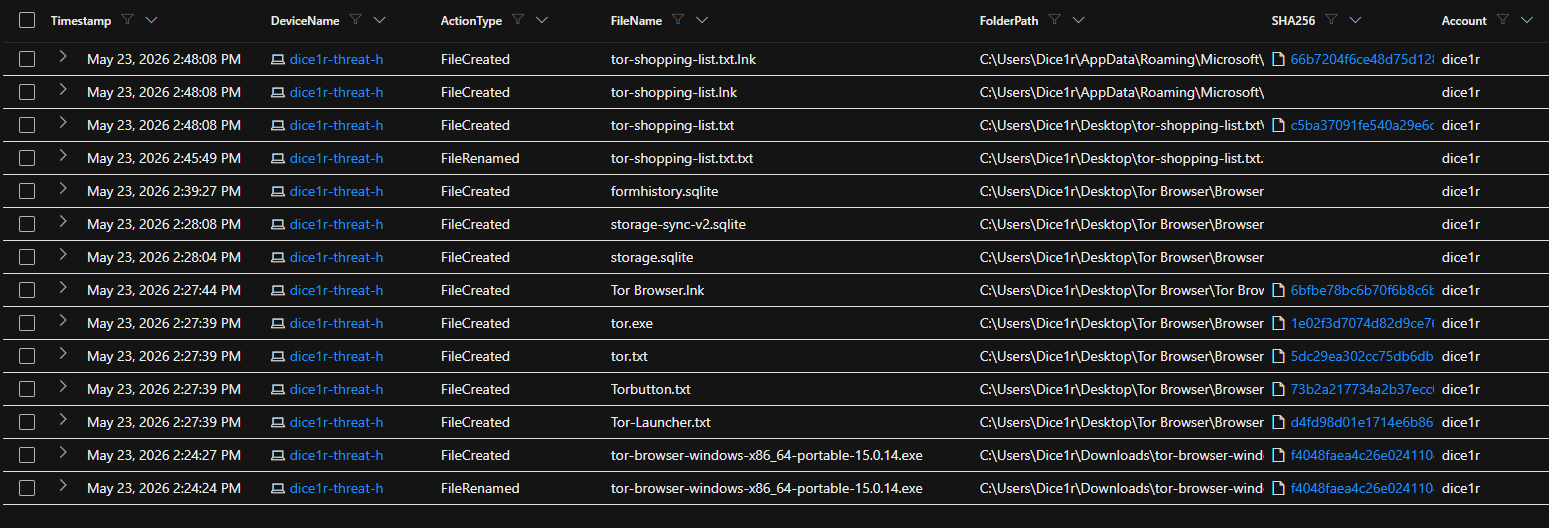
Searched for any file that had the string "tor" in it and discovered what looks like the user "dice1r" downloaded a TOR installer, did something that resulted in many TOR-related files being copied to the desktop, and the creation of a file called `tor-shopping-list.txt` on the desktop at `2026-05-23T21:48:08.8187134Z`. These events began at `2026-05-23T21:24:24.6546325Z`.
**Query used to locate events:**
DeviceFileEvents
| where DeviceName == "dice1r-threat-h"
| where InitiatingProcessAccountName == "dice1r"
| where FileName contains "TOR"
| where Timestamp >= datetime(2026-05-23T21:24:24.6546325Z)
| order by Timestamp desc
| project Timestamp, DeviceName, ActionType, FileName, FolderPath, SHA256, Account = InitiatingProcessAccountName
# Threat Hunt Report: Unauthorized TOR Usage
- [Scenario Creation](https://github.com/Mangusben11/threat-hunting-senario-tor/blob/main/threat-hunting-scenario-tor-event-creation.md)
## Platforms and Languages Leveraged
- Windows 11 Virtual Machines (Microsoft Azure)
- EDR Platform: Microsoft Defender for Endpoint
- Kusto Query Language (KQL)
- Tor Browser
## Scenario
Management suspects that some employees may be using TOR browsers to bypass network security controls because recent network logs show unusual encrypted traffic patterns and connections to known TOR entry nodes. Additionally, there have been anonymous reports of employees discussing ways to access restricted sites during work hours. The goal is to detect any TOR usage and analyze related security incidents to mitigate potential risks. If any use of TOR is found, notify management.
### High-Level TOR-Related IoC Discovery Plan
- **Check `DeviceFileEvents`** for any `tor(.exe)` or `firefox(.exe)` file events.
- **Check `DeviceProcessEvents`** for any signs of installation or usage.
- **Check `DeviceNetworkEvents`** for any signs of outgoing connections over known TOR ports.
## Steps Taken
### 1. Searched the `DeviceFileEvents` Table
Searched for any file that had the string "tor" in it and discovered what looks like the user "dice1r" downloaded a TOR installer, did something that resulted in many TOR-related files being copied to the desktop, and the creation of a file called `tor-shopping-list.txt` on the desktop at `2026-05-23T21:48:08.8187134Z`. These events began at `2026-05-23T21:24:24.6546325Z`.
**Query used to locate events:**
DeviceFileEvents
| where DeviceName == "dice1r-threat-h"
| where InitiatingProcessAccountName == "dice1r"
| where FileName contains "TOR"
| where Timestamp >= datetime(2026-05-23T21:24:24.6546325Z)
| order by Timestamp desc
| project Timestamp, DeviceName, ActionType, FileName, FolderPath, SHA256, Account = InitiatingProcessAccountName
 ### 2. Searched the `DeviceProcessEvents` Table
**Query used to locate event:**
DeviceProcessEvents
| where DeviceName == "dice1r-threat-h"
| where ProcessCommandLine contains "tor-browser-windows-x86_64-portable-15.0.14.exe"
| where Timestamp >= datetime(2026-05-23T21:24:24.6546325Z)
| project Timestamp, DeviceName, AccountName, ActionType, FileName, FolderPath, SHA256, ProcessCommandLine
### 2. Searched the `DeviceProcessEvents` Table
**Query used to locate event:**
DeviceProcessEvents
| where DeviceName == "dice1r-threat-h"
| where ProcessCommandLine contains "tor-browser-windows-x86_64-portable-15.0.14.exe"
| where Timestamp >= datetime(2026-05-23T21:24:24.6546325Z)
| project Timestamp, DeviceName, AccountName, ActionType, FileName, FolderPath, SHA256, ProcessCommandLine
 ### 3. Searched the `DeviceProcessEvents` Table for TOR Browser Execution
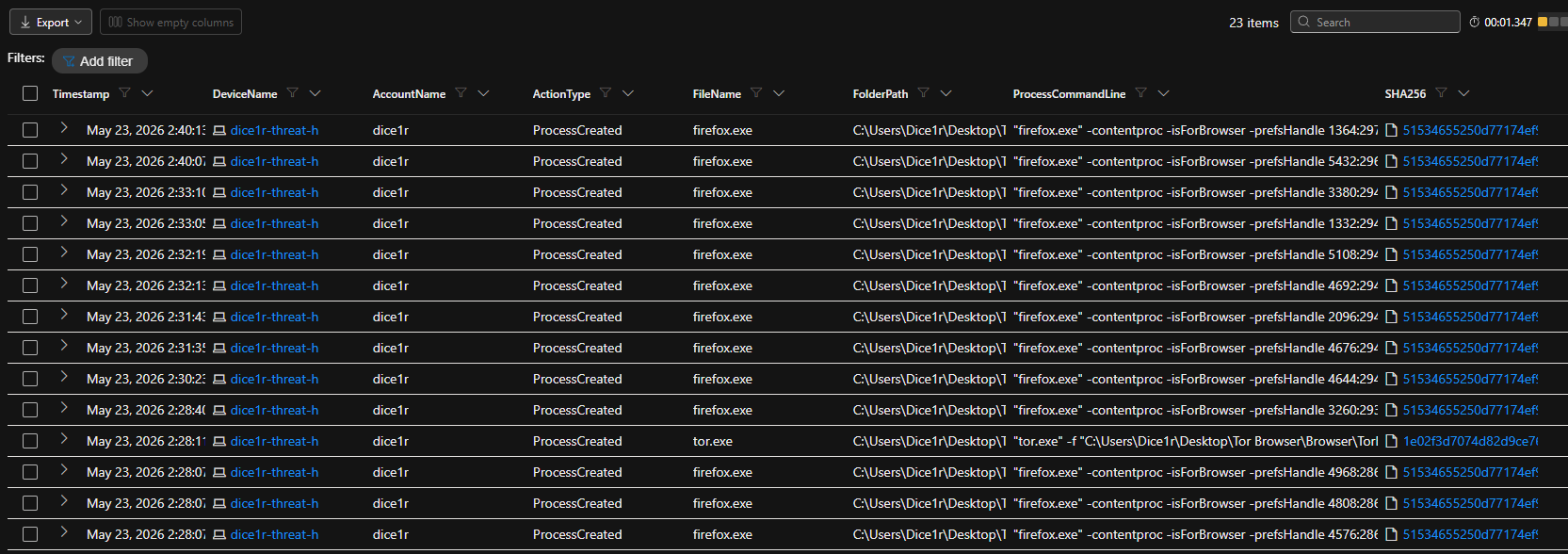
Searched for any indication that user "employee" actually opened the TOR browser. There was evidence that they did open it at `2024-11-08T22:17:21.6357935Z`. There were several other instances of `firefox.exe` (TOR) as well as `tor.exe` spawned afterwards.
**Query used to locate events:**
DeviceProcessEvents
| where DeviceName == "dice1r-threat-h"
| where FileName has_any ("tor.exe", "firefox.exe", "tor-browser.exe")
| where Timestamp >= datetime(2026-05-23T21:24:24.6546325Z)
| project Timestamp, DeviceName, AccountName, ActionType, FileName, FolderPath, SHA256, ProcessCommandLine
| order by Timestamp desc
### 3. Searched the `DeviceProcessEvents` Table for TOR Browser Execution
Searched for any indication that user "employee" actually opened the TOR browser. There was evidence that they did open it at `2024-11-08T22:17:21.6357935Z`. There were several other instances of `firefox.exe` (TOR) as well as `tor.exe` spawned afterwards.
**Query used to locate events:**
DeviceProcessEvents
| where DeviceName == "dice1r-threat-h"
| where FileName has_any ("tor.exe", "firefox.exe", "tor-browser.exe")
| where Timestamp >= datetime(2026-05-23T21:24:24.6546325Z)
| project Timestamp, DeviceName, AccountName, ActionType, FileName, FolderPath, SHA256, ProcessCommandLine
| order by Timestamp desc
 ### 4. Searched the `DeviceNetworkEvents` Table for TOR Network Connections
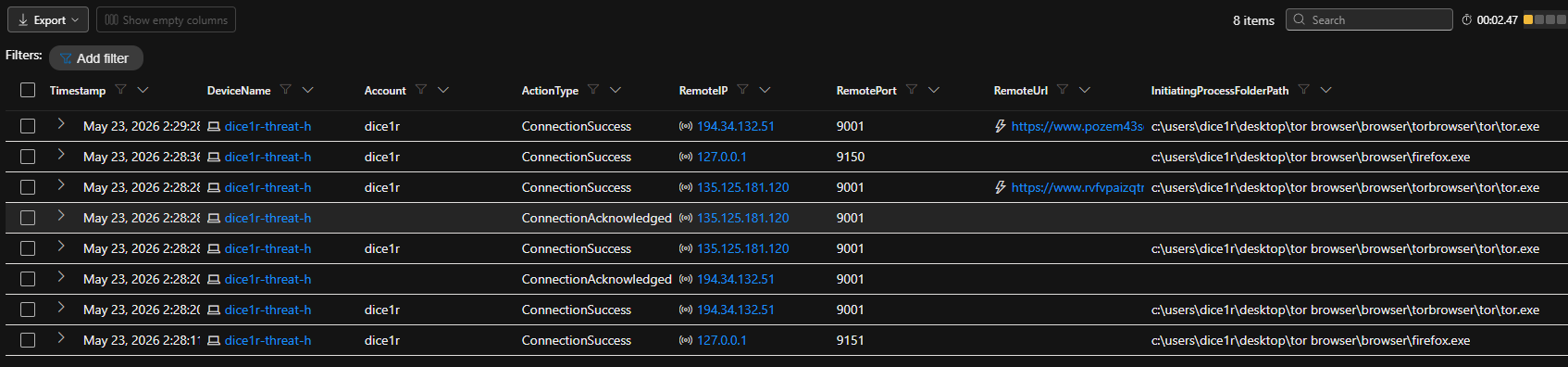
Searched for any indication the TOR browser was used to establish a connection using any of the known TOR ports. At `2026-05-23T21:28:20.7331763Z`, user "dice1r" on the "dice1r-threat-h" device successfully established a connection to the remote IP address `194.34.132.51` on port `9001`. The connection was initiated by the process `tor.exe`, located in the folder `c:\users\employee\desktop\tor browser\browser\torbrowser\tor\tor.exe`. There were a couple of other connections to sites over port `443`.
**Query used to locate events:**
DeviceNetworkEvents
| where DeviceName == "dice1r-threat-h"
| where RemotePort in (9001, 9002, 9030, 9040, 9050, 9051, 9150, 9151, 9001, 8118, 4711, 6523, 6524)
| where InitiatingProcessAccountName != "system"
| project Timestamp, DeviceName, Account = InitiatingProcessAccountName, ActionType, RemoteIP, RemotePort, RemoteUrl, InitiatingProcessFolderPath
| where Timestamp >= datetime(2026-05-23T21:24:24.6546325Z)
| order by Timestamp desc
### 4. Searched the `DeviceNetworkEvents` Table for TOR Network Connections
Searched for any indication the TOR browser was used to establish a connection using any of the known TOR ports. At `2026-05-23T21:28:20.7331763Z`, user "dice1r" on the "dice1r-threat-h" device successfully established a connection to the remote IP address `194.34.132.51` on port `9001`. The connection was initiated by the process `tor.exe`, located in the folder `c:\users\employee\desktop\tor browser\browser\torbrowser\tor\tor.exe`. There were a couple of other connections to sites over port `443`.
**Query used to locate events:**
DeviceNetworkEvents
| where DeviceName == "dice1r-threat-h"
| where RemotePort in (9001, 9002, 9030, 9040, 9050, 9051, 9150, 9151, 9001, 8118, 4711, 6523, 6524)
| where InitiatingProcessAccountName != "system"
| project Timestamp, DeviceName, Account = InitiatingProcessAccountName, ActionType, RemoteIP, RemotePort, RemoteUrl, InitiatingProcessFolderPath
| where Timestamp >= datetime(2026-05-23T21:24:24.6546325Z)
| order by Timestamp desc
 ## Chronological Event Timeline
### 14:24:27 — Tor Installer Downloaded
Action: FileCreated
### 14:27:27 — Silent Installation Executed
Action: ProcessCreated
dice1r ran the installer with the /S flag, suppressing all GUI prompts and installing silently.
Command: **"tor-browser-windows-x86_64-portable-15.0.14.exe" /S**
### 14:27:39–14:27:44 — Installation Files Extracted
Action: FileCreated (Multiple)
Tor Browser files extracted to C:\Users\Dice1r\Desktop\Tor Browser\
Key files: **tor.exe, Tor-Launcher.txt, Torbutton.txt, Tor Browser.lnk**
### 14:27:54–14:28:06 — Tor Browser Launched
Action: ProcessCreated / FileCreated
**firefox.exe** spawned along with child processes for tab isolation and GPU rendering. storage.sqlite created in the browser profile, confirming first-time initialization.
### 14:28:11–14:29:28 — Tor Network Connections Established
Action: ConnectionSuccess
Local loopback on 127.0.0.1:9151 confirmed proxy routing.
**tor.exe** connected to external relay 194.34.132.51:9001 and additional hosts over port 443.
### 14:30:23–14:40:13 — Active Browsing Session
Action: ProcessCreated / FileCreated
Multiple **firefox.exe** processes spawned consistent with multi-tab browsing. formhistory.sqlite created at 14:39:27, indicating active web form submissions.
### 14:48:08 — Suspicious File Created Post-Session
Action: FileCreated
dice1r created tor-shopping-list.txt on their Desktop. Corresponding .lnk shortcut generated in AppData\Roaming\Microsoft\Windows\Recent\
The filename **tor-shopping-list.txt** strongly suggests goal-directed Tor usage and warrants escalation.
## Summary
User dice1r silently installed the Tor Browser on the threat-hunt-lab device using the /S command-line flag to avoid detection, launched the browser, and established confirmed connections to external Tor relay nodes. During the session, the user actively submitted data through web forms. Upon concluding the session, a file named tor-shopping-list.txt was created on the Desktop — suggesting deliberate, goal-directed use of the Tor network rather than casual curiosity.
## Response Taken
Tor Browser usage was confirmed on device dice1r-threat-h by user dice1r. The device was isolated from the network and the user's direct manager was notified.
## Chronological Event Timeline
### 14:24:27 — Tor Installer Downloaded
Action: FileCreated
### 14:27:27 — Silent Installation Executed
Action: ProcessCreated
dice1r ran the installer with the /S flag, suppressing all GUI prompts and installing silently.
Command: **"tor-browser-windows-x86_64-portable-15.0.14.exe" /S**
### 14:27:39–14:27:44 — Installation Files Extracted
Action: FileCreated (Multiple)
Tor Browser files extracted to C:\Users\Dice1r\Desktop\Tor Browser\
Key files: **tor.exe, Tor-Launcher.txt, Torbutton.txt, Tor Browser.lnk**
### 14:27:54–14:28:06 — Tor Browser Launched
Action: ProcessCreated / FileCreated
**firefox.exe** spawned along with child processes for tab isolation and GPU rendering. storage.sqlite created in the browser profile, confirming first-time initialization.
### 14:28:11–14:29:28 — Tor Network Connections Established
Action: ConnectionSuccess
Local loopback on 127.0.0.1:9151 confirmed proxy routing.
**tor.exe** connected to external relay 194.34.132.51:9001 and additional hosts over port 443.
### 14:30:23–14:40:13 — Active Browsing Session
Action: ProcessCreated / FileCreated
Multiple **firefox.exe** processes spawned consistent with multi-tab browsing. formhistory.sqlite created at 14:39:27, indicating active web form submissions.
### 14:48:08 — Suspicious File Created Post-Session
Action: FileCreated
dice1r created tor-shopping-list.txt on their Desktop. Corresponding .lnk shortcut generated in AppData\Roaming\Microsoft\Windows\Recent\
The filename **tor-shopping-list.txt** strongly suggests goal-directed Tor usage and warrants escalation.
## Summary
User dice1r silently installed the Tor Browser on the threat-hunt-lab device using the /S command-line flag to avoid detection, launched the browser, and established confirmed connections to external Tor relay nodes. During the session, the user actively submitted data through web forms. Upon concluding the session, a file named tor-shopping-list.txt was created on the Desktop — suggesting deliberate, goal-directed use of the Tor network rather than casual curiosity.
## Response Taken
Tor Browser usage was confirmed on device dice1r-threat-h by user dice1r. The device was isolated from the network and the user's direct manager was notified.