jbanday808/Enterprise-Threat-Hunting
GitHub: jbanday808/Enterprise-Threat-Hunting
一个基于Splunk、Sysmon和MITRE ATT&CK构建的企业级威胁狩猎与恶意软件动态、静态分析隔离实验平台。
Stars: 0 | Forks: 0
# 🛡️ 高级企业威胁狩猎与恶意软件分析平台
## 📖 概述
本项目展示了一个企业级的威胁狩猎和恶意软件分析平台,使用了 VMware Workstation Pro、Windows 11 Enterprise、Red Hat Enterprise Linux (RHEL 10.2)、Splunk Enterprise、Sysmon、Microsoft Defender、Splunk Universal Forwarder、MalwareBazaar、Wireshark、PowerShell、NGINX、Cloudflare SSL、VS Code、WSL、Suricata、YARA、VirusTotal 和 MITRE ATT&CK。
该环境通过结合隔离的恶意软件分析、SIEM 监控、端点遥测收集、检测工程、事件响应、网络入侵检测、恶意软件修复验证、取证调查和端点恢复测试,模拟了真实的安全运营中心 (SOC)。
该平台在隔离的 VMware Host-Only 网络内安全地执行和分析恶意软件,同时通过 Sysmon、Suricata 和 Splunk Enterprise 仪表板收集端点遥测和安全事件。
本项目展示了实用的企业网络安全技能,包括:
- 🔥 威胁狩猎
- 🧪 恶意软件分析
- 📊 SIEM 工程
- 🛡️ 检测工程
- 🧠 SOC 运营
- 🚨 事件响应
- 🖥️ 端点检测与响应 (EDR)
- 🎯 MITRE ATT&CK 映射
- 📡 安全监控
- 📑 Windows 事件调查
- 🌐 网络入侵检测
- 📈 安全仪表板开发
- 🔍 日志分析
- 📋 威胁情报分析
## 🚀 安全特性
- 🔒 隔离的恶意软件分析实验室
- 🖥️ Sysmon 端点遥测
- 📊 SIEM 监控
- ⚙️ 进程创建监控
- 🔑 身份验证监控
- 🎯 MITRE ATT&CK 映射
- 🚨 威胁狩猎仪表板
- 🛡️ Microsoft Defender 检测验证
- 🧹 恶意软件修复验证
- 🧪 动态恶意软件分析
- 📦 静态恶意软件分析
- 🔍 事件响应工作流
- ✅ 端点恢复验证
- 🌐 网络流量监控
- 📡 Splunk 日志转发
- 🔥 LOLBins 检测
- 🧠 PowerShell 威胁狩猎
- 📈 安全事件关联
- 🚫 恶意软件遏制验证
- 🛠️ 注册表持久化检测
- 📋 威胁情报分析
- 🔐 安全的 HTTPS Splunk 部署
- 📑 Windows 安全事件监控
- ⚡ 实时威胁检测
- 🔎 恶意软件行为分析
- 📡 端点可见性收集
- 🛡️ Suricata IDS 监控
- 🌐 命令控制 (C2) 检测
- 🧬 威胁关联分析
- 📊 安全仪表板可视化
- 🧪 恶意软件沙箱测试
- 📂 IOC 分析
- 🔥 检测工程工作流
- 🧠 SOC 调查程序
### 🏗️ 架构图
#### 🖼️ 企业威胁狩猎架构
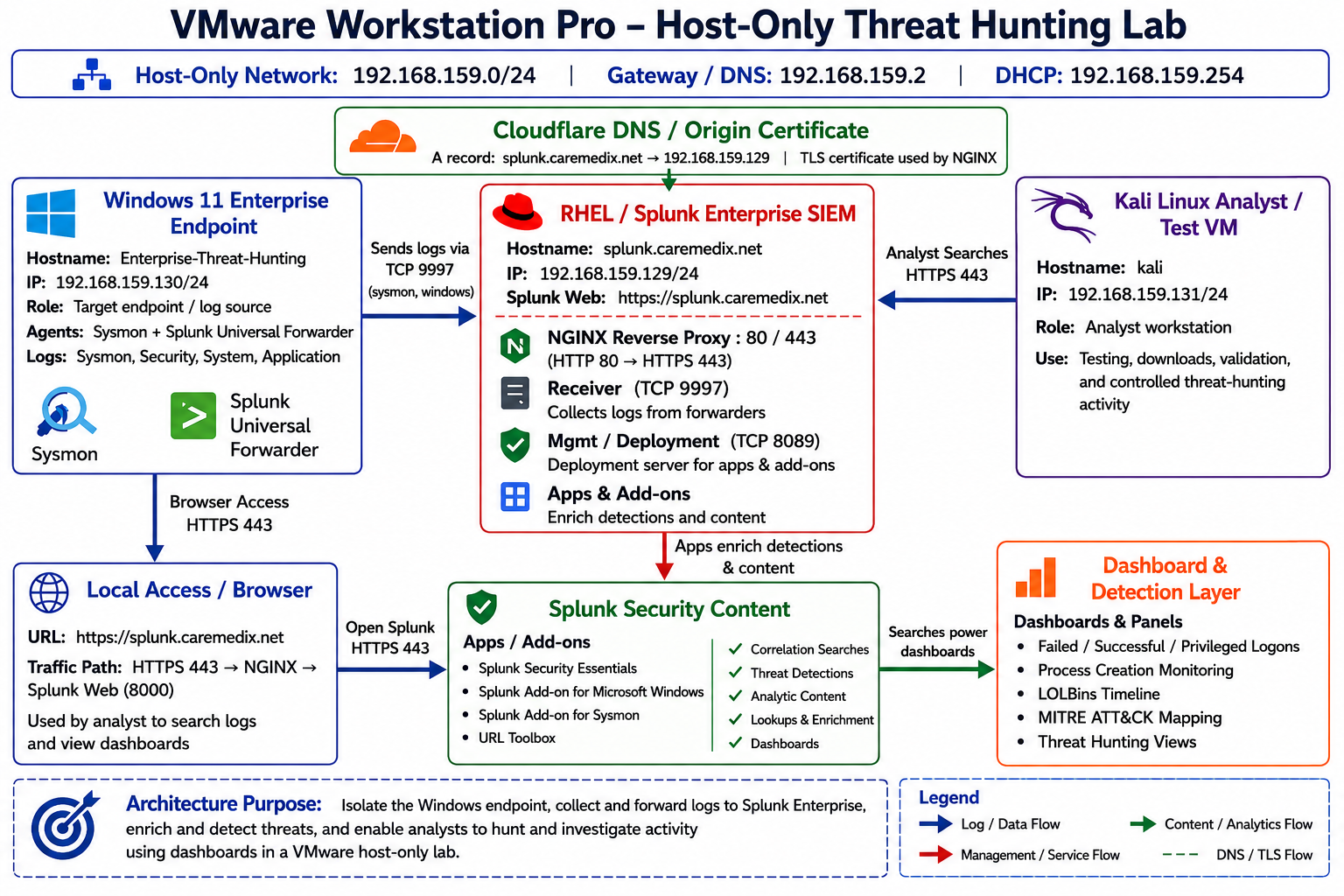
**图 1:** 企业级 VMware Host-Only 威胁狩猎实验室架构,展示了 Windows 11 遥测收集、Splunk Enterprise SIEM、Suricata IDS 监控、Cloudflare HTTPS 访问以及 SOC 仪表板可见性。
## 🧱 仓库结构
```
docs/
├── architecture-explanation.md
├── deployment-guide.md
├── detection-engineering.md
├── dynamic-analysis.md
├── incident-report.md
├── lessons-learned.md
├── mitigations.md
├── static-analysis.md
└── threat-hunting-report.md
screenshots/
├── architecture/
│ ├── Dynamic Analysis Diagram.png
│ ├── Static Analysis Diagram.png
│ ├── Threat Hunting Architecture.png
│ ├── detection-engineering-workflow.png
│ └── trickbot malware execution flow.png
│
├── dashboards/
│ ├── enterprise-threat-hunting-dashboard-01.png
│ └── enterprise-threat-hunting-dashboard_02.png
│
├── detections/
│ └── splunk-malware-detection.png
│
├── dynamic-analysis/
│ ├── quarantined-event.png
│ ├── splunk-malware-detection.png
│ ├── trickbot-malware.png
│ └── vmware-snapshot-recovery.png
│
├── kali/
│ └── kali-enterprise-network-configuration.png
│
├── powershell/
│ └── Get-MpComputerStatus.png
│
├── rhel/
│ ├── rhel-enterprise-network-configuration.png
│ └── splunkd 4475 troubleshooting.png
│
├── static-analysis/
│ ├── MalwareBazaar.png
│ ├── sqhbjans[.exe].png
│ └── virustotal-trickbot-analysis.png
│
├── vmware/
│ ├── Enterprise-SIEM-Platform VM.png
│ ├── Enterprise-Threat-Hunting VM.png
│ └── Kali 2026.1 VM.png
│
├── windows/
│ ├── sqhbjans[.exe].png
│ └── windows-11- enterprise-network-configuration.png.png
│
└── yara/
└── trickbot.yar.png
.gitignore
LICENSE
README.md
```
## 🖥️ 使用的技术
| 技术 | 用途 |
|---|---|
| VMware Workstation Pro | 虚拟化平台 |
| Windows 11 Enterprise | 恶意软件分析端点 |
| RHEL 10.2 | Splunk SIEM 服务器 |
| Splunk Enterprise | 安全监控 |
| Sysmon | 端点遥测收集 |
| Microsoft Defender | 恶意软件检测 |
| Splunk Universal Forwarder | 日志收集 |
| MalwareBazaar | 恶意软件样本库 |
| MITRE ATT&CK | 威胁映射 |
| NGINX | 反向代理 |
| Cloudflare SSL | HTTPS 安全 |
| PowerShell | 管理自动化 |
| Wireshark | 网络数据包分析 |
| VS Code | 配置与开发 |
| WSL | Linux 开发环境 |
| Suricata | 入侵检测系统 |
| Sysinternals Suite | Windows 监控 |
| PEStudio | 静态恶意软件分析 |
| Detect It Easy (DIE) | 恶意软件识别 |
| VirusTotal | 威胁情报 |
| YARA | 恶意软件特征检测 |
## 🔍 威胁狩猎能力
- 📡 端点遥测收集
- 🔥 实时安全监控
- 🧠 恶意软件行为分析
- 📈 SIEM 仪表板可视化
- 🛠️ PowerShell 活动监控
- 🚨 LOLBins 检测
- 🧬 MITRE ATT&CK 关联
- 🌐 网络连接分析
- 🔐 Windows 身份验证监控
- 🧹 恶意软件清理验证
- 📋 IOC 检测与分析
- ⚡ 进程注入检测
- 🧪 恶意软件沙箱测试
- 📊 威胁可视化仪表板
- 🔎 注册表持久化监控
- 🧾 事件日志调查
- 🛡️ 安全事件关联
- 📡 命令控制 (C2) 检测
- 🔥 可疑 PowerShell 监控
- 🧠 威胁情报关联
- 🌐 Suricata IDS 告警监控
- 📦 恶意软件哈希分析
- 🚫 网络入侵检测
- 🔥 检测工程验证
- 📊 SOC 调查工作流
## 🧪 恶意软件分析工作流
### 📦 静态恶意软件分析
静态分析阶段在不执行恶意软件样本的情况下对其进行检查。
#### 📋 静态分析活动
- 文件哈希分析
- PE 头部检查
- 字符串提取
- YARA 规则扫描
- VirusTotal 分析
- 熵分析
- 嵌入 URL 发现
- 注册表工件识别
- 导入表分析
- DLL 依赖检查
- 文件签名验证
#### 🛠️ 静态分析工具
- PEStudio
- Detect It Easy (DIE)
- Strings
- VirusTotal
- YARA
- HashCalc
### 🧪 动态恶意软件分析
动态分析阶段在隔离的 VMware 环境中安全地执行恶意软件。
#### 📋 动态分析活动
- 进程监控
- 注册表监控
- 网络流量分析
- 持久化检测
- PowerShell 监控
- LOLBins 检测
- 凭据访问检测
- 文件系统监控
- 内存分析
- 进程注入检测
- 服务创建检测
- C2 通信检测
- Suricata IDS 告警监控
#### 🛠️ 动态分析工具
- Sysmon
- Splunk Enterprise
- Wireshark
- Process Explorer
- Process Monitor
- TCPView
- Windows Defender
- Suricata
## 📊 检测工程
本项目包含企业级的 Splunk 检测规则,旨在识别可疑的端点活动、恶意软件执行、PowerShell 滥用、持久化机制、身份验证异常、LOLBins 活动以及命令控制通信。
检测规则针对 MITRE ATT&CK 技术进行了映射,以模拟真实环境下的 SOC 检测工程工作流。
## 📊 Splunk 仪表板
### 📈 安全监控面板
- 失败登录监控
- 成功登录监控
- 特权登录监控
- 进程创建监控
- LOLBins 检测
- 实时威胁时间线
- 热门进程活动
- MITRE ATT&CK 映射
- 失败登录时间线
- PowerShell 监控
- 注册表持久化检测
- 网络活动监控
- 恶意软件执行时间线
- Suricata IDS 告警
- C2 流量检测
- IOC 调查仪表板
- 检测工程仪表板
## 🛠️ Splunk 检测查询
### 🔍 进程创建监控
```
index=windows EventCode=4688
| table _time host Account_Name New_Process_Name Command_Line Parent_Process_Name
| sort -_time
```
### 🎯 MITRE ATT&CK PowerShell 检测
```
index=* powershell
| eval MITRE_Technique="T1059.001 - PowerShell"
| stats count by MITRE_Technique host source sourcetype
```
### 📊 热门进程活动
```
index=windows EventCode=4688
| top limit=10 New_Process_Name
```
### 🚨 失败登录检测
```
index=windows EventCode=4625
| stats count as "Failed Logins"
```
### ✅ 成功登录检测
```
index=windows EventCode=4624
| stats count as "Successful Logins"
```
### 🛠️ 注册表持久化检测
```
index=sysmon EventCode=13
| table _time host TargetObject Details
```
### 🧠 编码 PowerShell 检测
```
index=sysmon powershell.exe "*EncodedCommand*"
| table _time host CommandLine
```
### 🌐 Suricata IDS 告警
```
index=suricata
| stats count by alert.signature src_ip dest_ip
```
## 🧬 MITRE ATT&CK 技术
| 技术 ID | 技术名称 |
|---|---|
| T1059.001 | PowerShell |
| T1218 | 签名的二进制代理执行 |
| T1055 | 进程注入 |
| T1027 | 混淆的文件或信息 |
| T1547.001 | 注册表 Run 键 |
| T1105 | 入口工具传输 |
| T1082 | 系统信息发现 |
| T1016 | 网络发现 |
| T1057 | 进程发现 |
| T1049 | 系统网络连接发现 |
| T1071 | 应用层协议 |
| T1102 | Web 服务通信 |
## 🔥 恶意软件检测工作流
1. 📥 从 MalwareBazaar 下载恶意软件样本
2. 🔄 将恶意软件传输到隔离的 VMware 环境中
3. 🧪 安全地执行恶意软件样本
4. 📡 使用 Sysmon 收集遥测数据
5. 📊 将日志转发到 Splunk Enterprise
6. 🌐 使用 Suricata 监控网络活动
7. 🔍 分析可疑的进程行为
8. 🧠 监控 PowerShell 执行情况
9. 🌐 调查网络连接
10. 🎯 将活动与 MITRE ATT&CK 进行关联
11. 🛠️ 检测持久化机制
12. 🚫 遏制恶意软件活动
13. 🧹 验证修复程序
14. ♻️ 还原干净的 VMware 快照
15. ✅ 验证端点恢复情况
## 🛡️ 安全运营中心 (SOC) 工作流
1. 🔍 告警检测
2. 📊 威胁分析
3. 🚨 IOC 调查
4. 🧠 威胁验证
5. 🌐 网络流量调查
6. 🖥️ 端点调查
7. 🚫 威胁遏制
8. 🧹 恶意软件根除
9. ♻️ 端点恢复
10. ✅ 验证与报告
11. 📘 经验教训
## 🚨 事件响应工作流
### 📋 事件响应阶段
1. 🔍 检测
2. 📊 分析
3. 🚫 遏制
4. 🧹 根除
5. ♻️ 恢复
6. ✅ 验证
7. 📘 经验教训
## 🧹 恶意软件修复程序
- 终止恶意进程
- 移除持久化机制
- 封禁恶意 IP 地址
- 隔离恶意软件样本
- 还原干净的快照
- 验证端点完整性
- 验证 Splunk 遥测数据
- 确认注册表清理
- 验证网络隔离
- 移除临时工件
- 重新启用安全防护
- 验证 Suricata IDS 监控
## 📁 包含的截图
#### 🖼️ TrickBot 恶意软件执行流程
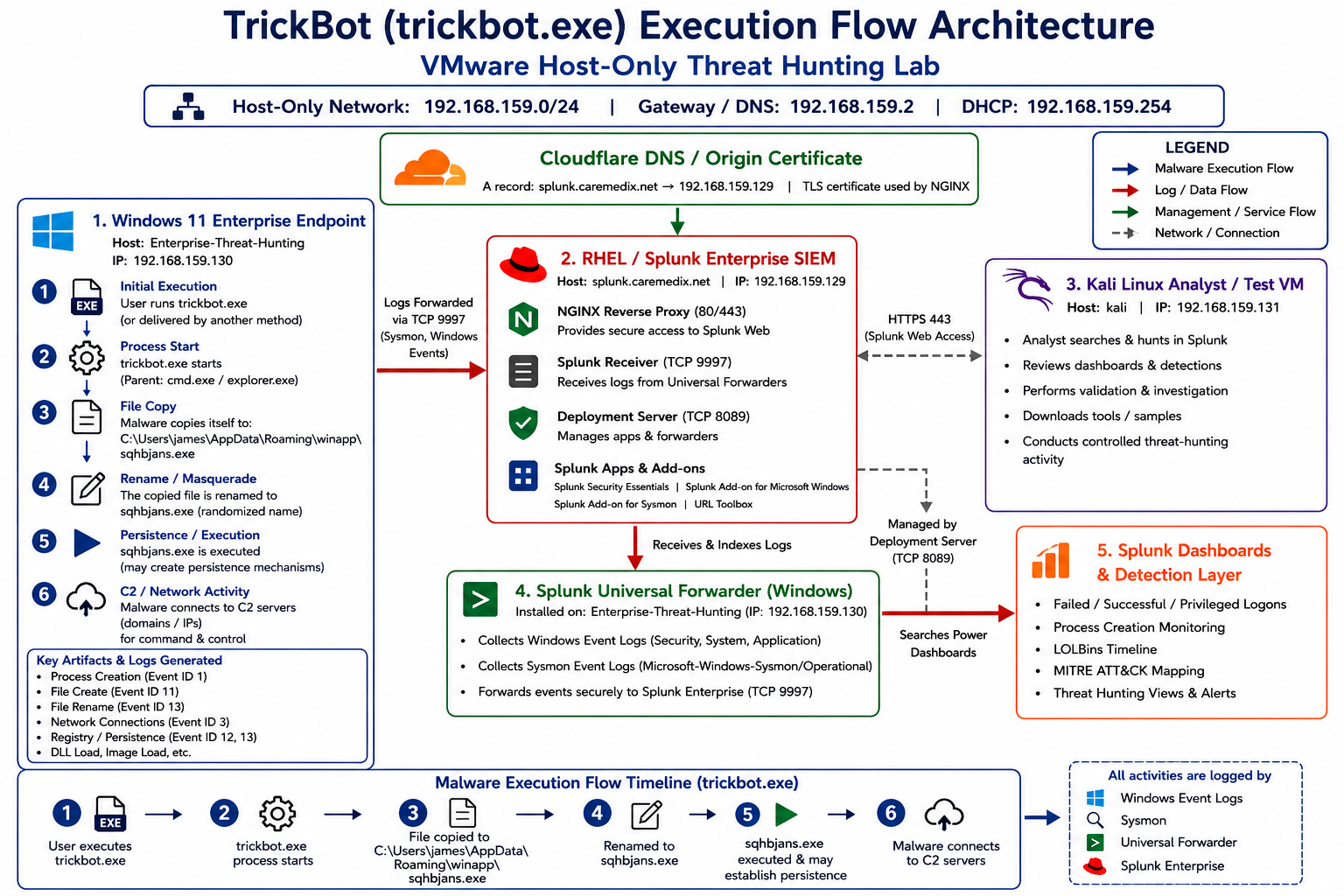
**图 2:** TrickBot 恶意软件执行工作流,展示了进程创建、持久化活动、Sysmon 遥测收集、Splunk 日志转发以及 SOC 威胁检测工作流。
### 📊 Splunk 仪表板
#### 🖼️ 企业威胁狩猎仪表板 01
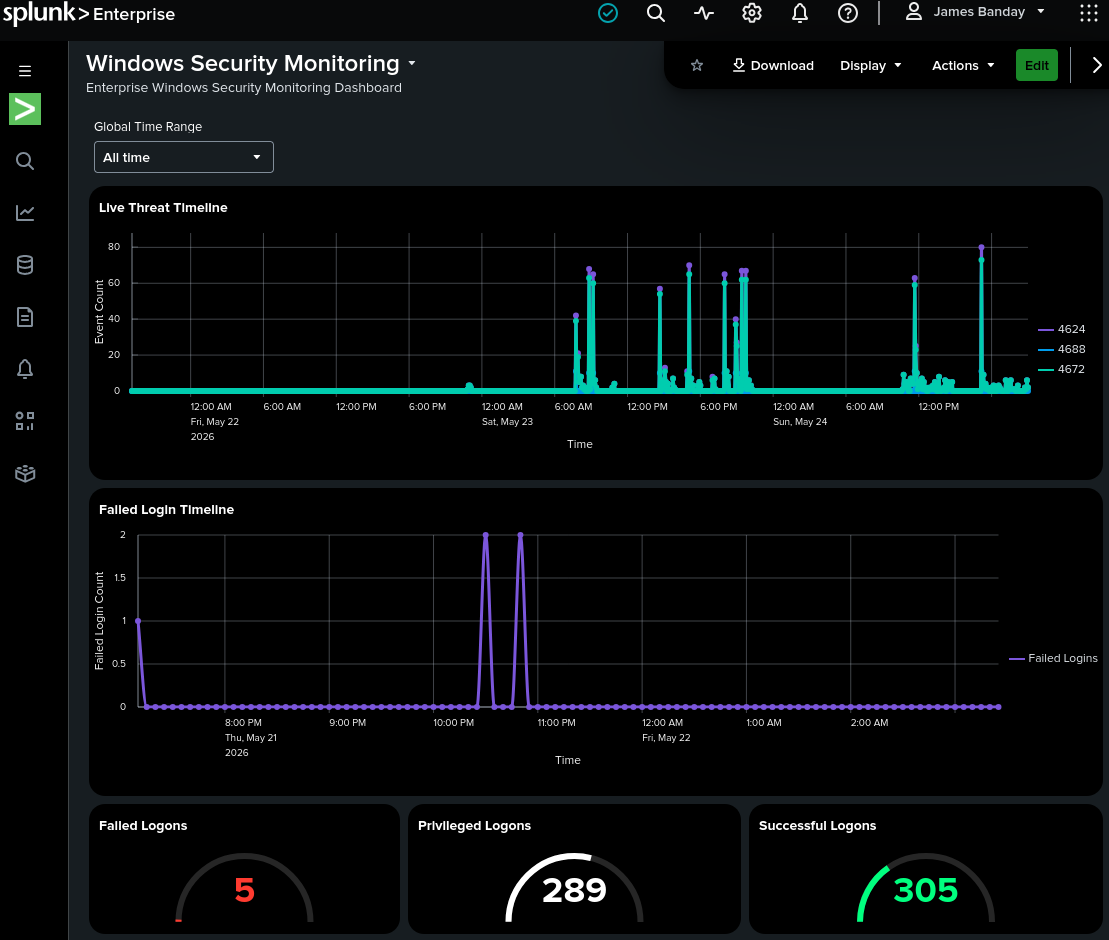
**图 3:** Splunk Enterprise 仪表板,展示威胁狩猎遥测、身份验证事件、进程活动和安全监控面板。
#### 🖼️ 企业威胁狩猎仪表板 02
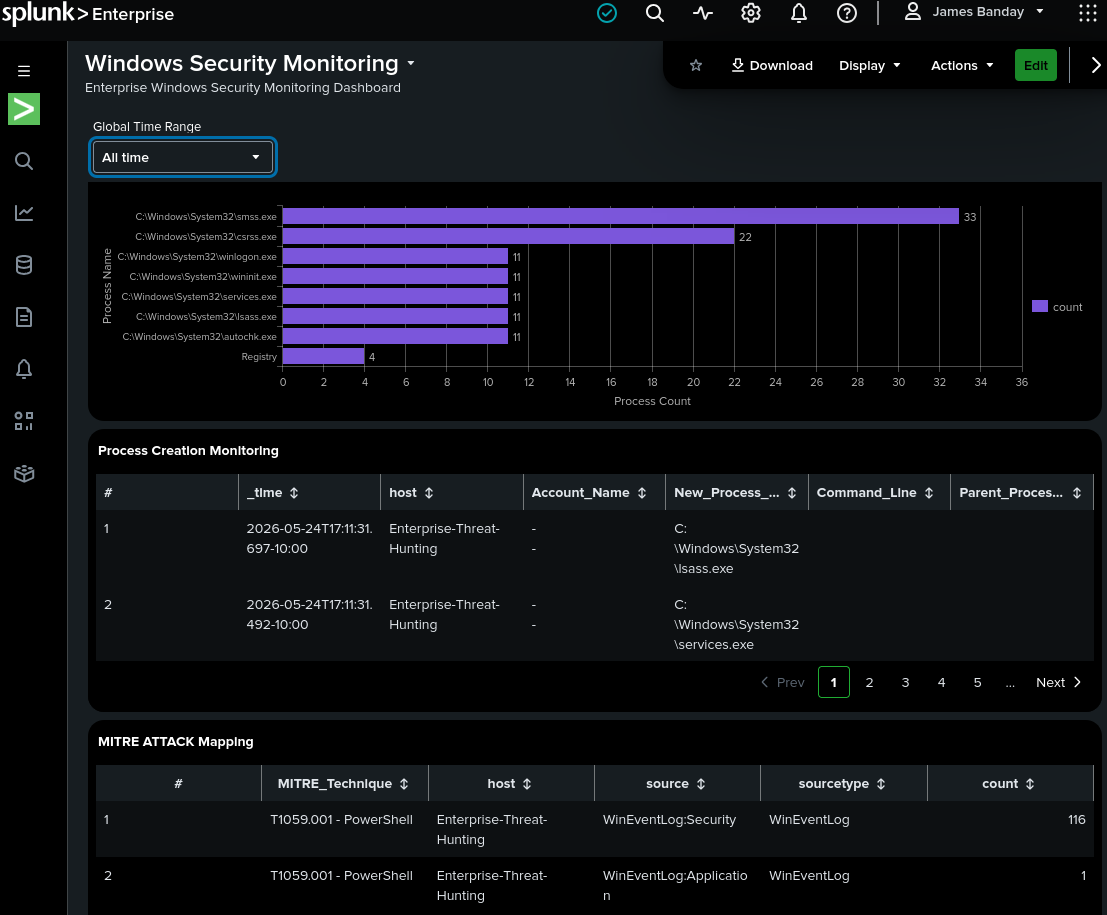
**图 4:** 高级 Splunk 仪表板,展示 MITRE ATT&CK 映射、威胁检测和企业 SOC 可见性。
### 🐉ali Linux 分析师虚拟机
#### 🖼️ Kali 企业网络配置
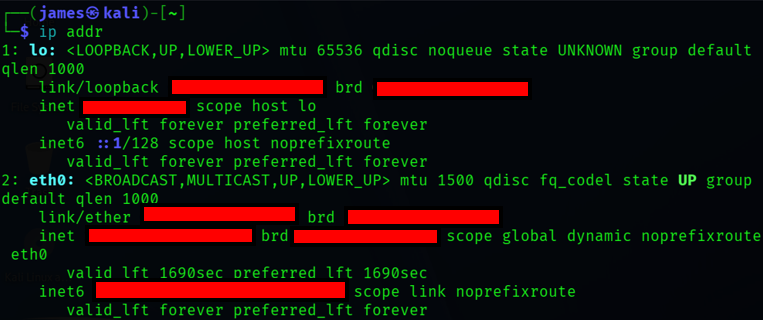
**图 5:** Kali Linux 分析师工作站配置,用于企业威胁狩猎、验证测试和 SOC 调查。
### ⚡ PowerShell 监控
#### 🖼️ Microsoft Defender 状态验证
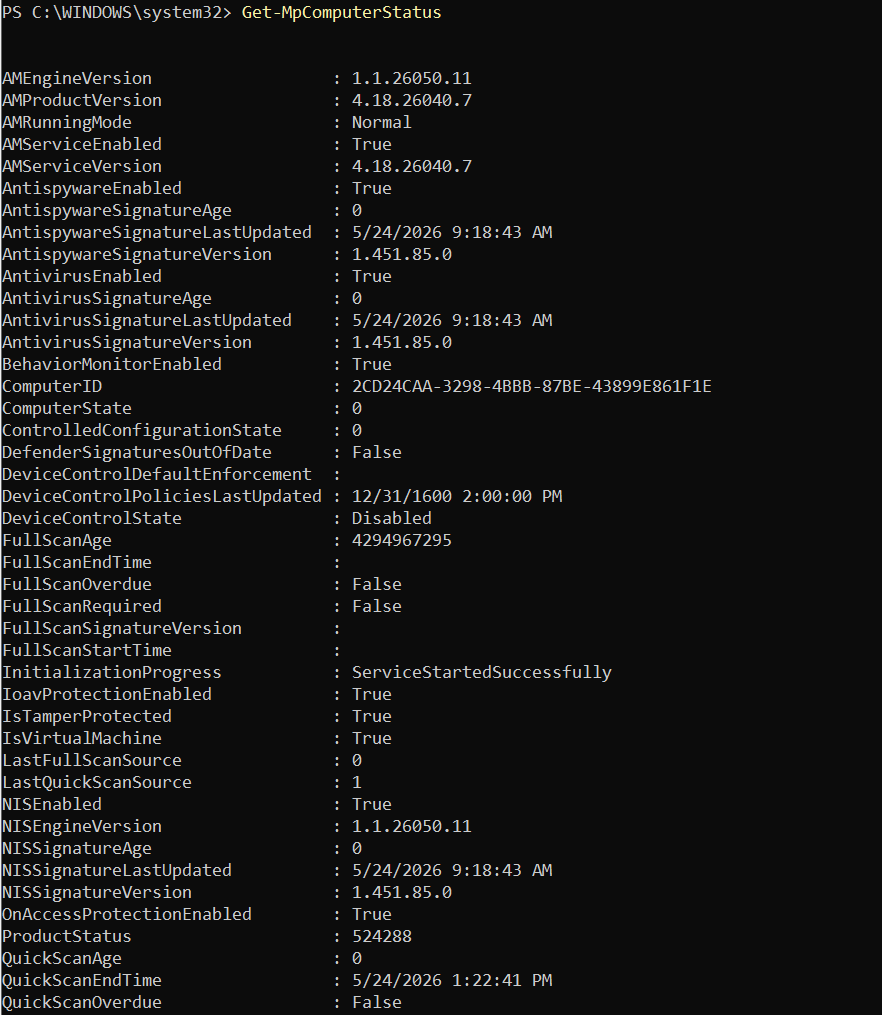
**图 6:** PowerShell 验证 Microsoft Defender 的运行状态和恶意软件防护监控情况。
### 🐧 RHEL 企业 SIEM 服务器
#### 🖼️ RHEL 企业网络配置
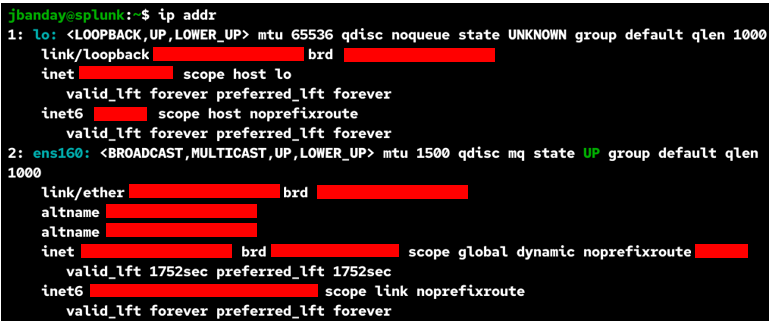
**图 7:** RHEL 10.2 企业 SIEM 服务器网络配置,承载 Splunk Enterprise 和 Suricata IDS。
#### 🖼️ Splunk 故障排除工作流
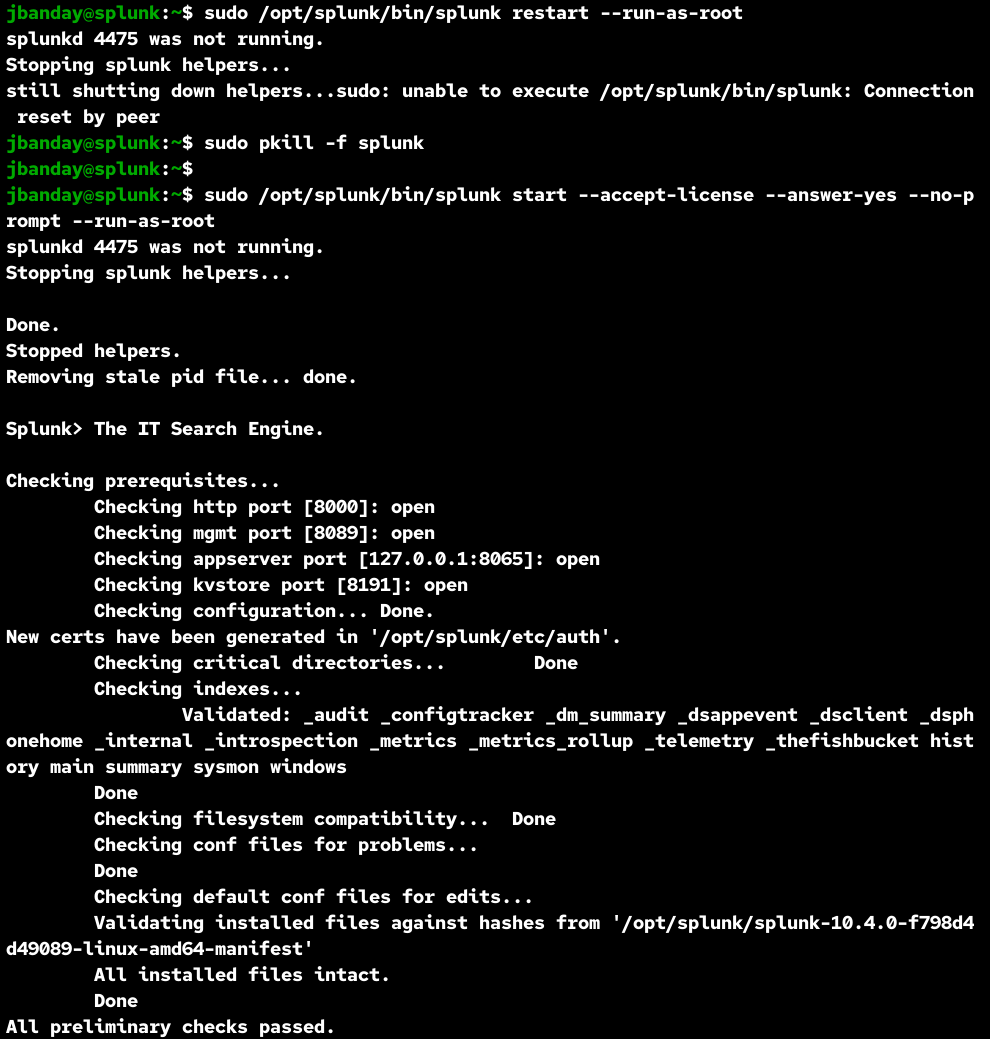
**图 8:** Splunk Enterprise 故障排除工作流,展示失败的重启尝试、进程终止以及成功的 SIEM 恢复程序。
### 🖥️ VMware 虚拟机
#### 🖼️ 企业 SIEM 平台虚拟机
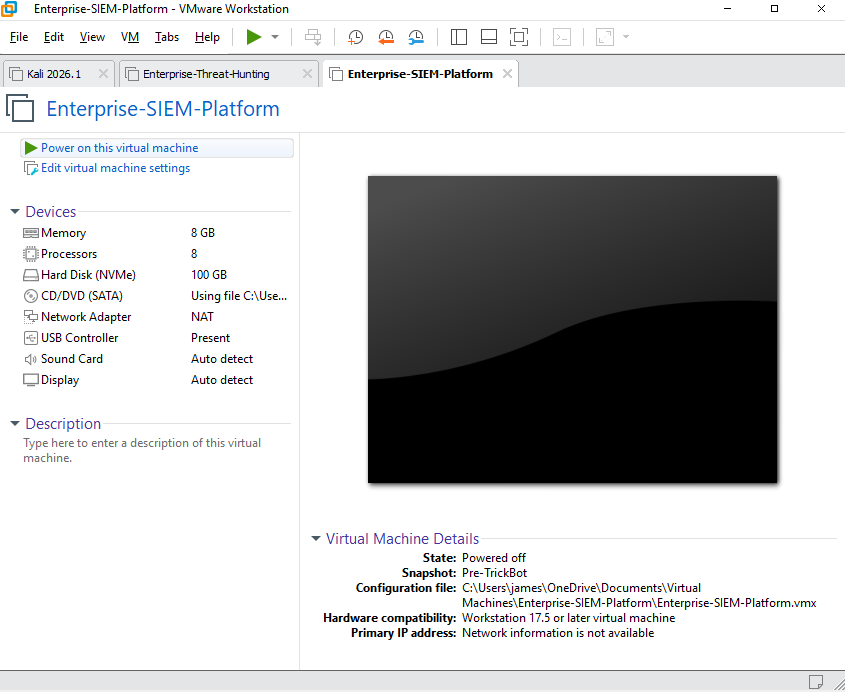
**图 9:** 企业 Splunk SIEM 平台的 VMware 虚拟机配置。
#### 🖼️ 企业威胁狩猎虚拟机
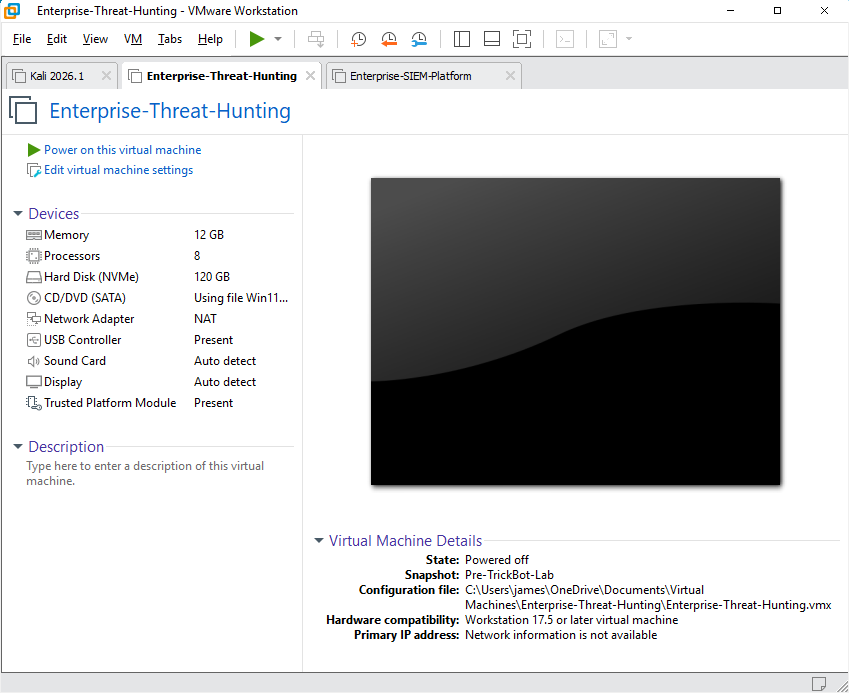
**图 10:** Windows 11 Enterprise 威胁狩猎端点虚拟机,用于恶意软件执行和遥测收集。
#### 🖼️ Kali Linux 虚拟机
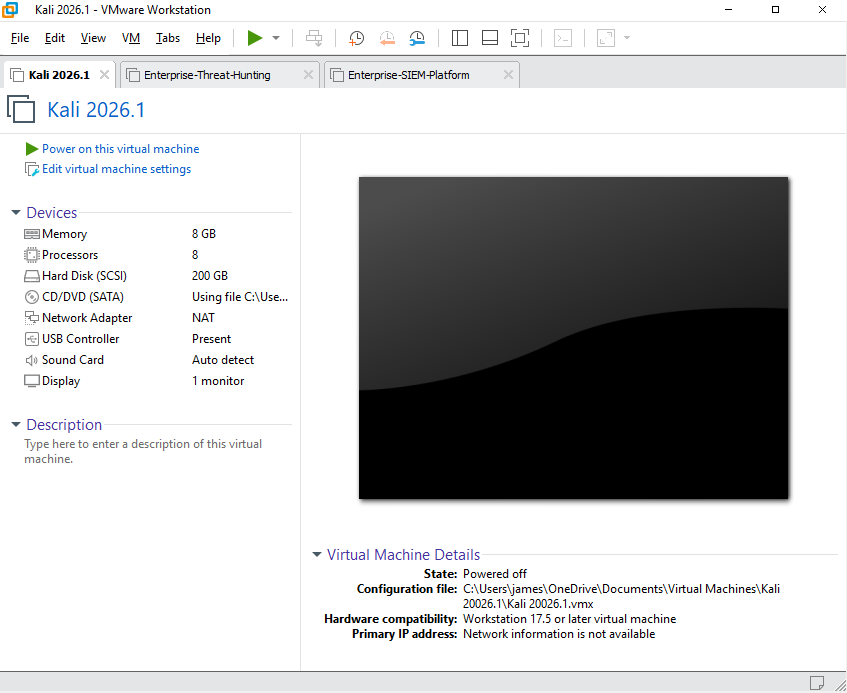
**图 11:** Kali Linux 分析师工作站虚拟机,用于 SOC 分析和受控威胁狩猎活动。
### 🪟 Windows 恶意软件分析
#### 🖼️ TrickBot 恶意软件样本
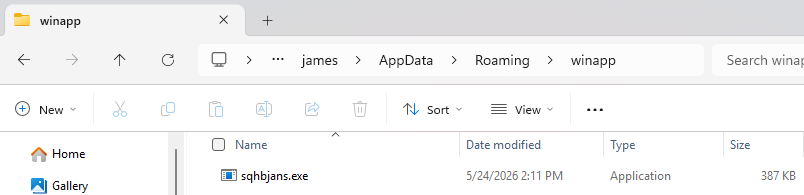
**图 12:** 在隔离的 Windows 11 Enterprise 恶意软件分析环境中执行的 TrickBot 恶意软件样本。
#### 🖼️ Windows 企业网络配置
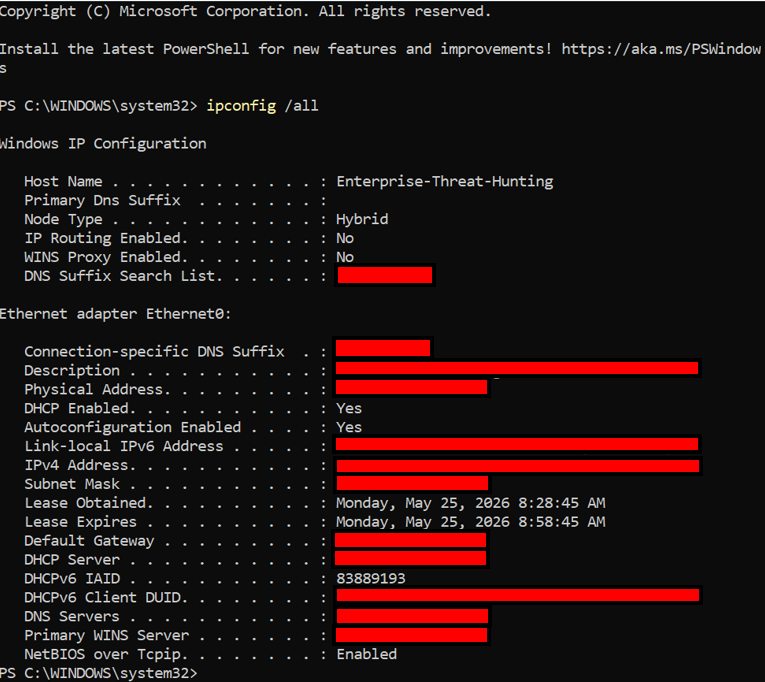
**图 13:** Windows 11 Enterprise 端点网络配置,用于 Sysmon 遥测和 Splunk 日志转发。
### 🧾 YARA 检测规则
#### 🖼️ TrickBot YARA 规则
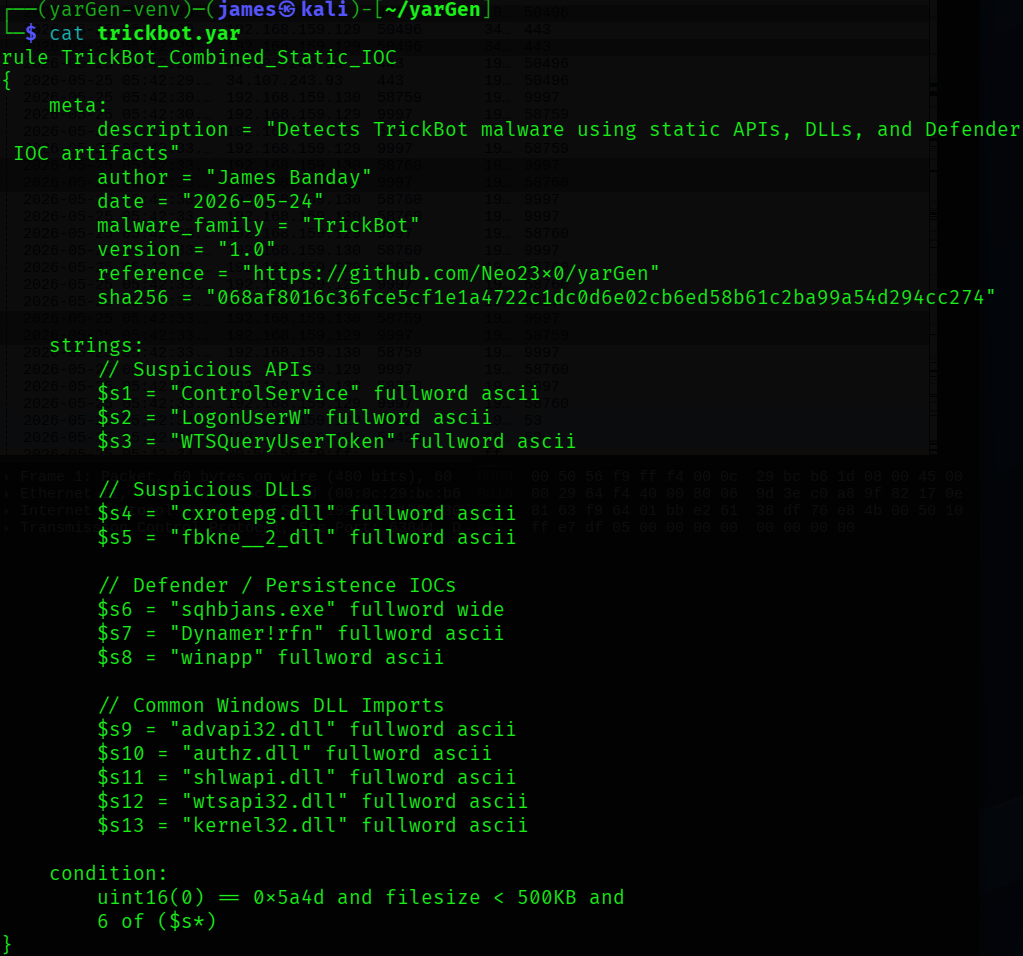
**图 14:** YARA 检测规则,用于识别 TrickBot 恶意软件工件和可疑指标。
## 🧠 关键学习成果
- 构建了企业级的威胁狩猎环境
- 安全地进行了实时恶意软件分析
- 使用 Splunk Enterprise 实施了 SIEM 监控
- 配置了 Sysmon 高级遥测收集
- 集成了 Suricata IDS 监控
- 开发了自定义检测工程规则
- 将恶意软件行为映射到 MITRE ATT&CK
- 调查了恶意 PowerShell 活动
- 检测了 LOLBins 滥用技术
- 进行了恶意软件修复验证
- 执行了端点恢复程序
- 实践了真实环境下的 SOC 调查工作流
- 分析了 Windows 安全事件
- 调查了端点遥测数据
- 监控了恶意软件持久化机制
- 创建了企业安全仪表板
- 调查了恶意网络流量
## 📌 项目亮点
- 🛡️ 企业安全监控
- 🧪 实时恶意软件分析
- 📊 SIEM 仪表板开发
- 🔥 威胁狩猎调查
- 🧬 MITRE ATT&CK 关联
- 🚨 事件响应模拟
- 🧹 恶意软件清理验证
- ♻️ 端点恢复测试
- 🔍 PowerShell 威胁检测
- 🌐 网络流量分析
- 📡 端点遥测收集
- ⚡ 实时安全监控
- 🔐 安全的 Splunk HTTPS 部署
- 🛡️ Suricata IDS 集成
- 📋 威胁情报分析
- 🔥 检测工程工作流
- 🧠 SOC 调查程序
## ⚠️ 安全声明
本项目仅供教育性网络安全研究和威胁狩猎培训目的使用。
### 🚫 请勿上传
- 活跃的恶意软件样本
- 私钥
- 凭据
- API 密钥
- Cloudflare 证书
- 敏感日志
- 个人信息
### ✅ 推荐的安全内容
- 脱敏截图
- 已涂改的日志
- IOC 报告
- 样本哈希
- 检测截图
- 已涂改的配置
## 📚 参考资料
## 🖥️ VMware Workstation Pro
VMware Workstation Pro 文档:
https://docs.vmware.com/en/VMware-Workstation-Pro/index.html
用途:
用于为恶意软件分析和威胁狩猎创建隔离的虚拟机。
## 🪟 Windows 11 企业版
Microsoft Windows 文档:
https://learn.microsoft.com/en-us/windows/
用途:
用作执行恶意软件和收集遥测数据的企业端点。
## 🐧 Red Hat Enterprise Linux (RHEL)
RHEL 文档:
https://access.redhat.com/documentation/en-us/red_hat_enterprise_linux/
用途:
用作承载 Splunk Enterprise 和 Suricata 的 SIEM 服务器平台。
## 📊 Splunk Enterprise
Splunk 文档:
https://docs.splunk.com/Documentation/Splunk
用途:
用于集中式 SIEM 监控和威胁狩猎。
## 📡 Splunk Universal Forwarder
Splunk Forwarder 文档:
https://docs.splunk.com/Documentation/Forwarder
用途:
用于将 Windows 和 Sysmon 日志转发到 Splunk Enterprise。
## 🖥️ Sysmon
Sysmon 文档:
https://learn.microsoft.com/en-us/sysinternals/downloads/sysmon
用途:
用于捕获高级端点遥测数据和进程监控。
## ⚔️ SwiftOnSecurity Sysmon Config
GitHub 仓库:
https://github.com/SwiftOnSecurity/sysmon-config
用途:
提供用于恶意软件检测的高级 Sysmon 配置规则。
## 🛡️ Microsoft Defender
Microsoft Defender 文档:
https://learn.microsoft.com/en-us/microsoft-365/security/defender/
用途:
用于验证恶意软件检测和修复程序。
## ☁️ MalwareBazaar
MalwareBazaar:
https://bazaar.abuse.ch/
用途:
用于下载恶意软件样本进行分析。
## 🎯 MITRE ATT&CK
MITRE ATT&CK 框架:
https://attack.mitre.org/
用途:
用于映射攻击者的战术和技术。
## 🌐 NGINX
NGINX 文档:
https://nginx.org/en/docs/
用途:
用作 Splunk Enterprise 的安全反向代理。
## 🔒 Cloudflare SSL/TLS
Cloudflare 文档:
https://developers.cloudflare.com/ssl/
用途:
用于配置 HTTPS 加密。
## 🌐 Wireshark
Wireshark 文档:
https://www.wireshark.org/docs/
用途:
用于数据包捕获和网络流量分析。
## ⚡ PowerShell
PowerShell 文档:
https://learn.microsoft.com/en-us/powershell/
用途:
用于编写脚本、自动化和恶意软件分析。
## 💻 Visual Studio Code (VS Code)
VS Code 文档:
https://code.visualstudio.com/docs
用途:
用于编辑配置、脚本、仪表板和 Markdown 文档。
## 🛡️ Suricata
Suricata 文档:
https://docs.suricata.io/
用途:
用作检测可疑网络流量和恶意软件通信的 IDS/IPS 平台。
## 📈 Splunk Security Essentials
Splunkbase:
https://splunkbase.splunk.com/app/3435
用途:
提供安全仪表板和 MITRE ATT&CK 检测。
## 🧬 Splunk Add-on for Sysmon
Splunkbase:
https://splunkbase.splunk.com/app/1914/
用途:
用于规范化 Sysmon 日志以供 Splunk 分析。
## 🪟 Splunk Add-on for Microsoft Windows
Splunkbase:
https://splunkbase.splunk.com/app/742/
用途:
用于摄取和解析 Windows 事件日志。
## 🔥 LOLBAS 项目
LOLBAS 文档:
https://lolbas-project.github.io/
用途:
用于识别 Living Off the Land Binaries (LOLBins)。
## 📦 PEStudio
PEStudio 文档:
https://www.winitor.com/
用途:
用于静态恶意软件分析。
## 🧪 Detect It Easy (DIE)
GitHub 仓库:
https://github.com/horsicq/Detect-It-Easy
用途:
用于识别加壳工具和恶意软件签名。
## 🧾 YARA
YARA 文档:
https://yara.readthedocs.io/
用途:
用于创建恶意软件检测规则。
## 📊 VirusTotal
VirusTotal 文档:
https://docs.virustotal.com/
用途:
用于恶意软件情报和哈希信誉分析。
# 👨💻 作者
James Banday
- LinkedIn: https://www.linkedin.com/in/james-allen-morta-banday-62a391128/
- GitHub: https://github.com/jbanday808/Enterprise-Threat-Hunting/tree/main
# 📄 许可证
本项目仅供教育、网络安全研究和威胁狩猎培训目的使用。
标签:AI合规, DAST, Metaprompt, 安全运营, 恶意软件分析, 扫描框架, 终端检测与响应, 负责任AI