FabulaNox/NoxLab
GitHub: FabulaNox/NoxLab
一个单机自托管安全家庭实验室的参考架构,提供网络分段、安全检测、自动化告警分诊和裸机灾备的完整设计与可复用模板。
Stars: 0 | Forks: 0
# NoxLab
**一个自托管的安全家庭实验室 - 包含设计、决策以及构建你自己的工具包。**
分层网络 · 分级 Docker 平台 · 自托管 GitLab,配备具备安全意识的
CI/CD 发布管道 · SIEM + 威胁情报 · 经过测试的
灾难恢复。
[架构](docs/architecture.md) ·
[网络](docs/network.md) ·
[安全技术栈](docs/security-stack.md) ·
[复制构建](#replicate-it)
[](LICENSE)
## 目录
- [这是什么](#what-this-is)
- [组件仓库](#component-repos)
- [架构概览](#architecture-at-a-glance)
- [技术栈](#tech-stack)
- [功能特性](#what-it-does)
- [硬件](#hardware)
- [复制构建](#replicate-it)
- [路线图](#roadmap)
- [相关项目](#related-projects)
- [文档](#documentation)
- [许可证](#license)
## 这是什么
NoxLab 记录了一个单服务器安全家庭实验室,专为网络安全和基础设施的
实践而构建 - 并将可复用的部分打包,
以便你可以构建类似的东西。
它是一个**参考架构,而不是某人机密的副本**:它使用
通用的角色名称和示例地址(RFC 5737, `example.com`)。任何地方都不会出现真实的
主机名、IP、域名或凭据。[`examples/`](examples/) 下的模板
旨在供调整修改,而不是盲目运行。
## 组件仓库
每项功能也都是其独立的仓库,包含真实的(已匿名化处理的)
配置、脚本、预期输出,以及塑造它的那些避坑指南:
| 仓库 | 这是什么 |
|---|---|
| **[homelab-docker-platform](https://github.com/FabulaNox/homelab-docker-platform)** | 单主机上的分级 Docker:systemd 启动排序、自我修复的预检启动,以及一个加固的 Traefik 反向代理。 |
| **[homelab-network](https://github.com/FabulaNox/homelab-network)** | 分段网络:仅限 VPN 的入口、自托管 DNS(Unbound + DoH)、一个自动分发的通配符证书,以及路由器端的 DNS 故障转移。 |
| **[wazuh-suricata-soc](https://github.com/FabulaNox/wazuh-suricata-soc)** | 检测栈:Wazuh SIEM + Suricata IDS,配备自定义 MITRE 映射规则、威胁情报丰富化以及实时告警。 |
| **[agentic-soc-triage](https://github.com/FabulaNox/agentic-soc-triage)** | 本地 LLM SOC 分析师:一个 L1 agent 在夜间对 SIEM 告警进行分诊,并仅将其无法解决的问题升级给 L2 或人类。 |
| **[mcp-vault-ligament](https://github.com/FabulaNox/mcp-vault-ligament)** | 知识库的 MCP 服务器:以强类型的 API(读 / 搜索 / 写)将知识库暴露给 Claude 和夜间 SOC agent,从而使工具能够在文档*内部*工作,而不是被喂入复制粘贴的上下文。 |
| **[homelab-backup-dr](https://github.com/FabulaNox/homelab-backup-dr)** | 裸机灾难恢复:一个 Ansible 重建 playbook 以及经过端到端测试的分层备份。 |
| **[gitlab-secure-publish](https://github.com/FabulaNox/gitlab-secure-publish)** | 负责将这些仓库从 GitLab 发布到公共 GitHub 的出口分离、净化把关的 CI 管道。 |
下方的 [`examples/`](examples/) 模板是快速入门的骨架;
上面的组件仓库则是完整、详细的实现。
## 架构概览
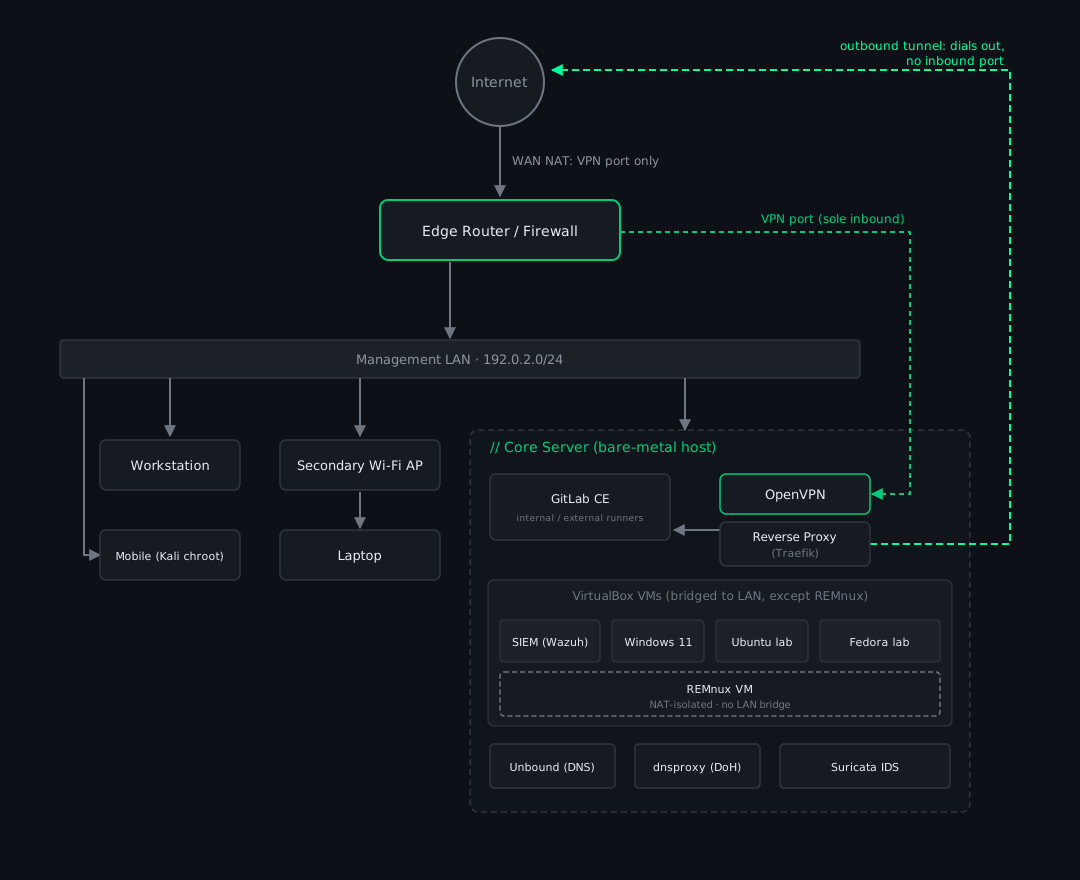
SIEM 和实验室 VM 运行**在**核心服务器**上**(VirtualBox,桥接到
LAN,因此它们获取 LAN 地址);它们不是单独的物理机。唯一的
入站 NAT 是 VPN 端口(转发给主机上的 OpenVPN);选定的
内部服务通过拨出隧道对外发布,因此
它们根本没有入站端口。完整说明:
[docs/architecture.md](docs/architecture.md) 和 [docs/network.md](docs/network.md)。
## 技术栈
| 领域 | 工具 | 作用 |
|---|---|---|
| 反向代理 / 入口 | **Traefik** | 统一的 TLS 终端、通配符 ACME 证书、白名单中间件 |
| Git + CI/CD | **GitLab CE** | 自托管代码平台;两个标记的 runner(DNS 隔离的内部节点 + 具备外部出口的外部节点) |
| SIEM | **Wazuh** | 日志/告警关联、自定义规则、威胁情报 CDB 列表 |
| IDS | **Suricata** | 网络入侵检测 |
| 主机加固 | **auditd, fail2ban, lynis** | 进程审计、暴力破解封禁、CIS 审计 |
| DNS | **Unbound + dnsproxy** | 递归解析器 + DoH 前端、分离 DNS(split-horizon)、黑名单拦截 |
| VPN | **OpenVPN** | 经过身份验证的远程访问(唯一的入站服务) |
| 密钥管理 | **SOPS + age** | 静态加密,每个密钥单一来源 |
| 平台 | **Docker (分级 compose)** | 启动排序的层级、每层隔离的网桥 |
| 灾难恢复 | **Ansible** | 可重复的重建 playbook,分层备份 |
## 功能特性
- [x] 单一 TLS 入口;敏感服务只能通过 LAN/VPN 访问
- [x] 分段网络(管理 / VPN / 分层 Docker 网桥)
- [x] 自托管 GitLab,配备净化的 GitLab→GitHub 发布管道
- [x] 按出口分离的 CI runner:不受信任的构建无法连接回内部网络
- [x] 带有自动化威胁情报源丰富化的 SIEM
- [x] 具有黑名单拦截功能的自托管递归 DNS + DoH
- [x] 分层备份 + 经过测试的 Ansible 重建路径
## 硬件
一台廉价的二手工作站几乎包揽了所有工作;这些“服务器”主要
是运行在上面的 VM。
| 角色 | 硬件 |
|---|---|
| 核心服务器 | **HP Z420** - Xeon E5-1650 v2 (6c/12t), 64 GB DDR3 ECC, GTX 1050 Ti, Ubuntu 24.04 LTS |
| 边缘路由器 | 运行 RouterOS 的 SOHO 路由器 |
| 辅助 AP | Wi-Fi AP + 交换机 + 电力线链路,用于远程房间客户端 |
| 客户端 | 有线 Windows 工作站;工作和个人 Windows 笔记本电脑;运行 Kali chroot 的手机 |
核心服务器托管着 Docker 层**以及** VirtualBox VM(SIEM、
Windows 和 Linux 实验箱),全部桥接到
LAN。选择它的原因只有一个:便宜,*而且*
支持 DDR3 ECC。完整的选择理由(包括操作系统的选择)见
[docs/hardware.md](docs/hardware.md)。
## 复制构建
[`examples/`](examples/) 目录树包含通用的、可复制调整的配置
和脚本。每一个都是一个可供调整的起点,而不是即插即用的部署方案。
| 领域 | 内容 |
|---|---|
| [`examples/ci/`](examples/ci/) | GitLab→GitHub 净化发布管道 + 净化把关 |
| [`examples/docker/`](examples/docker/) | 分级 compose 模板 + 启动排序的 systemd 单元 |
| [`examples/proxy/`](examples/proxy/) | Traefik 动态配置(通过 ACME 实现的通配符 TLS) |
| [`examples/dns/`](examples/dns/) | Unbound + dnsproxy 配置模板 |
| [`examples/cti/`](examples/cti/) | 威胁情报源更新器(abuse.ch → Wazuh CDB) |
| [`examples/backup/`](examples/backup/) | collect-backup-files + Ansible 重建骨架 |
完整的从零开始的演练:**[docs/REPRODUCE.md](docs/REPRODUCE.md)** - 在全新的 Ubuntu 24.04 主机上分阶段重建整个实验室,并链接每个组件各自的复制指南。
## 路线图
按照廉价且低功耗的理念进行阶段化或规划中:
- **Jellyfin 媒体服务器** - 在 1050 Ti 上进行 GPU 硬件转码;媒体库和缓存硬盘已购置
- **Steam 缓存** - 本地缓存游戏下载
- **长期本地存储** - 在计划中的 2.5 英寸笔记本硬盘上(存储套装约 30 欧元,见 [docs/hardware.md](docs/hardware.md#storage-roadmap))
- **Docker 层的完整 IaC** - 将分级的 compose 纳入重建 playbook
## 相关项目
来自该实验室的独立工具,每个都有自己的仓库:
- **[zombie-reaper](https://github.com/FabulaNox/zombie-reaper)** - systemd-timer 僵尸进程清理器
- **[msi-power-profile](https://github.com/FabulaNox/msi-power-profile)** - MSI 笔记本电源配置套件
- (随着项目发布,将会有更多内容)
## 文档
- [硬件](docs/hardware.md) - 这些设备及其选择理由
- [架构](docs/architecture.md) - 整体蓝图与设计原则
- [网络](docs/network.md) - 网段划分、入口、受控出口、DNS
- [核心平台](docs/platform.md) - 分级 Docker、启动顺序、主机服务
- [安全技术栈](docs/security-stack.md) - SIEM、IDS、威胁情报
- [CI/CD 发布](docs/ci-publishing.md) - 双 runner 发布管道
- [备份与灾难恢复](docs/backup-dr.md) - 备份层与重建 playbook
- [复现指南](docs/REPRODUCE.md) - 在全新的 Ubuntu 上分阶段重建整个实验室
## 许可证
[MIT](LICENSE) - 文档、图表和示例模板均可免费调整使用。标签:DevSecOps, Metaprompt, NIDS, 上游代理, 参考架构, 安全实验环境, 家庭实验室, 容器化, 本地大模型, 灾难恢复, 系统提示词, 请求拦截