gaoyu666/infoedge
GitHub: gaoyu666/infoedge
InfoEdge是一款开源的智能工作台,用于趋势发现、数据源跟踪和机会评分。
Stars: 1 | Forks: 0
# 信息边缘
[](https://github.com/gaoyu666/infoedge/actions/workflows/ci.yml)
[](https://github.com/gaoyu666/infoedge/actions/workflows/pages.yml)
[](https://github.com/gaoyu666/infoedge/releases)
[](LICENSE)
[](https://gaoyu666.github.io/infoedge/)
InfoEdge 是一个开源的智能工作台,用于从公共和授权数据源发现趋势信号、评估商业机会和监控风险。
该项目结合了 React/Vite 前端和 FastAPI 后端。它将公共源、基于 API 的可选源、第三方收集器和受限制的数据源占位符组织成一个用于机会研究的单一工作流程。
## 演示
实时演示:
```
https://gaoyu666.github.io/infoedge/
```
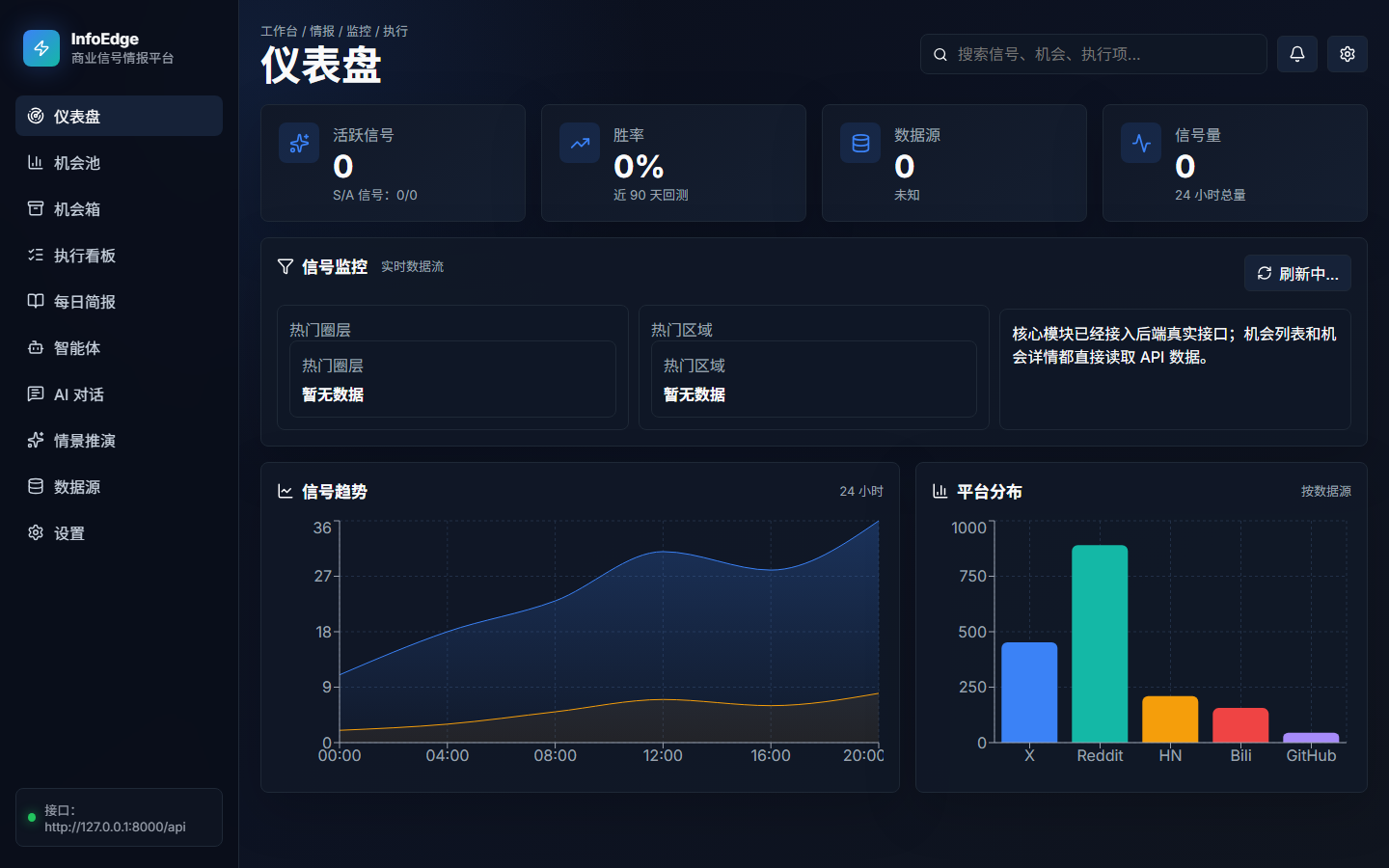
托管演示是一个静态前端预览。它显示了工作台外壳和空状态,无需提供私有凭证或运行后端。
使用以下命令运行本地工作台:
```
npm install
npm run dev
```
然后打开:
```
http://localhost:5173
```
前端可以在后端配置之前运行。预计在 FastAPI 服务和数据连接器运行之前,将显示空状态仪表板。
## 功能
- 公共、门控、第三方和受限制源的数据源仪表板。
- 从新闻、社区、开源项目、金融、地缘政治、供应链、灾难和市场信号生成的机会卡。
- 用于源收集、归一化、评分、缓存和仪表板 API 的 FastAPI 数据管道。
- GLM 和其他 OpenAI 兼容模型提供者的模型设置 UI。
- API 和 UI 行为检查的接受脚本。
## 技术栈
- 前端:React 19,TypeScript,Vite,Recharts,lucide-react
- 后端:Python,FastAPI,SQLAlchemy,Redis,PostgreSQL
- 测试:TypeScript 构建,Python unittest,基于 Playwright 的接受脚本
## 仓库结构
```
.
|-- src/ # React frontend
|-- backend/
| |-- app/ # FastAPI app, APIs, services, data models
| |-- tests/ # Backend tests
| |-- .env.example # Backend environment template
| `-- requirements.txt # Backend dependencies
|-- docs/ # Architecture, deployment, backend, and OSS notes
|-- .github/ # CI, Pages deployment, and collaboration templates
|-- scripts/ # Frontend/API acceptance scripts
|-- package.json # Frontend dependencies and scripts
|-- PRD_CN.md # Chinese product requirements draft
`-- README.md
```
## 快速开始
### 1. 克隆仓库
```
git clone https://github.com/gaoyu666/infoedge.git
cd infoedge
```
### 2. 启动前端
```
npm install
npm run dev
```
前端默认为:
```
http://localhost:5173
```
它将尝试连接到:
```
http://127.0.0.1:8000
http://localhost:8000
```
要覆盖后端 URL,创建一个本地的 `.env.local` 文件:
```
echo VITE_API_BASE_URL=http://127.0.0.1:8000 > .env.local
```
不要提交 `.env.local`。
### 3. 启动后端
```
cd backend
python -m venv .venv
.\.venv\Scripts\Activate.ps1
pip install -r requirements.txt
copy .env.example .env
python -m uvicorn app.main:app --host 0.0.0.0 --port 8000 --reload
```
健康检查:
```
GET http://127.0.0.1:8000/api/health
```
## 环境变量
后端模板位于:
```
backend/.env.example
```
在本地开发之前复制它:
```
cd backend
copy .env.example .env
```
常见设置:
```
PG_USER
PG_PASSWORD
PG_HOST
PG_PORT
PG_DB
REDIS_HOST
REDIS_PORT
REDIS_PASSWORD
REDIS_DB
```
可选的授权数据源和模型设置:
```
APIFY_TOKEN
GLM_API_KEY
GLM_BASE_URL
GLM_MODEL
```
安全注意事项:
- 不要提交 `backend/.env`、`.env.local`、数据库密码、Redis 密码、API 密钥、cookies 或访问令牌。
- 启用门控源时,请使用授权的 API 和提供者条款。
- 受限制的平台源作为占位符进行记录,未经许可不得抓取。
## 数据源
前端源注册表目前跟踪的大致:
```
61 public or pullable candidate sources
59 sources requiring keys, tokens, accounts, or relay configuration
28 third-party or pending integration sources
2 restricted platform sources
```
后端源和管道代码主要在:
```
backend/app/services/real_pipeline.py
backend/app/services/sources/
src/main.tsx
```
## 有用命令
前端构建:
```
npm run build
```
后端源扩展测试:
```
cd backend
python -m unittest tests.test_source_expansion -v
```
API 接受脚本:
```
npm run accept:opportunity-actions:api
npm run accept:buttons:api
```
## 路线图
短期路线图在 [ROADMAP.md](ROADMAP.md) 中跟踪。当前优先事项是连接器覆盖范围、后端可靠性、UI 空状态清晰度和可维护的贡献者工作流程。
有关架构细节,请参阅 [docs/ARCHITECTURE.md](docs/ARCHITECTURE.md)。有关部署细节,请参阅 [docs/DEPLOYMENT.md](docs/DEPLOYMENT.md)。有关本地后端服务,请参阅 [docs/LOCAL_BACKEND.md](docs/LOCAL_BACKEND.md).
## 贡献
欢迎贡献。请提交一个带有清晰描述、相关复现步骤和您运行的测试命令的问题或拉取请求。
有关更多详细信息,请参阅 [CONTRIBUTING.md](CONTRIBUTING.md).
## 许可证
本项目采用 MIT 许可证发布。请参阅 [LICENSE](LICENSE).
标签:API, AV绕过, DNS解析, FastAPI, GLM, OpenAI, React, Syscalls, Vite, 仪表盘, 供应链, 内存规避, 后端开发, 在线演示, 地缘政治, 工作台, 市场信号, 开源项目, 搜索引擎查询, 数据平台, 数据源追踪, 数据管道, 机会评分, 模型设置, 测试用例, 演示, 灾害, 缓存, 许可证, 趋势发现, 软件工程, 逆向工具, 部署, 金融