mohsinnazir967/30-day-soc-analyst-challenge.
GitHub: mohsinnazir967/30-day-soc-analyst-challenge.
一个为期30天的SOC分析师实操挑战赛项目,通过在云环境中构建完整的安全运营实验室来培养从SIEM部署到威胁检测与事件响应的实战技能。
Stars: 0 | Forks: 0
# 🛡️ 30 天 SOC 分析师挑战赛 — MyDFIR






## 📋 关于本次挑战赛
**MyDFIR 30 天 SOC 分析师挑战赛**是一项免费的实操项目,专为持有认证但缺乏真实环境实战经验的网络安全学习者设计。在 30 天的时间里,我在云环境中从零开始构建了一个功能完整的 SOC 家庭实验室——部署 SIEM,接入真实的 endpoint 日志,模拟攻击,在 Kibana 中检测威胁,并运行了端到端的事件调查。
## 📂 仓库结构
```
30-day-soc-analyst-challenge/
├── README.md
├── .gitignore
├── docs/
│ ├── elastic-port-reference.md ← Elastic Stack default port assignments
│ └── soc-student-resources.md ← 10 cybersecurity resources with student discounts
├── images/
│ ├── Network_Diagram.png ← Full lab network diagram
│ ├── Attack_Diagram.png ← Attack simulation diagram
│ └── Server_Proof.png ← Proof of completed lab servers
└── days/
├── week-1/ ← Days 01–10 | ELK Setup & Log Ingestion
├── week-2/ ← Days 11–17 | Brute Force Detection & Dashboards
├── week-3/ ← Days 18–22 | C2 Simulation & Detection
└── week-4/ ← Days 23–30 | Ticketing, IR & Finalisation
```
## 🧰 工具与技术
| 类别 | 工具 |
|----------|-------|
| SIEM | Elasticsearch, Logstash, Kibana (ELK Stack) |
| Endpoint 遥测 | Sysmon, Elastic Agent, Fleet Server |
| Endpoint 防护 | Microsoft Defender, Elastic Defend |
| C2 框架 | Mythic C2 |
| 工单 / 事件响应 | osTicket |
| 云基础设施 | Vultr (Windows Server 2022 + Ubuntu 22.04/24.04) |
| 攻击模拟 | SSH/RDP 暴力破解 (Crowbar), Mythic C2 Agent (Apollo) |
| 图表绘制 | draw.io |
| 攻击机系统 | Kali Linux (VMware) |
## 🗺️ 实验室架构
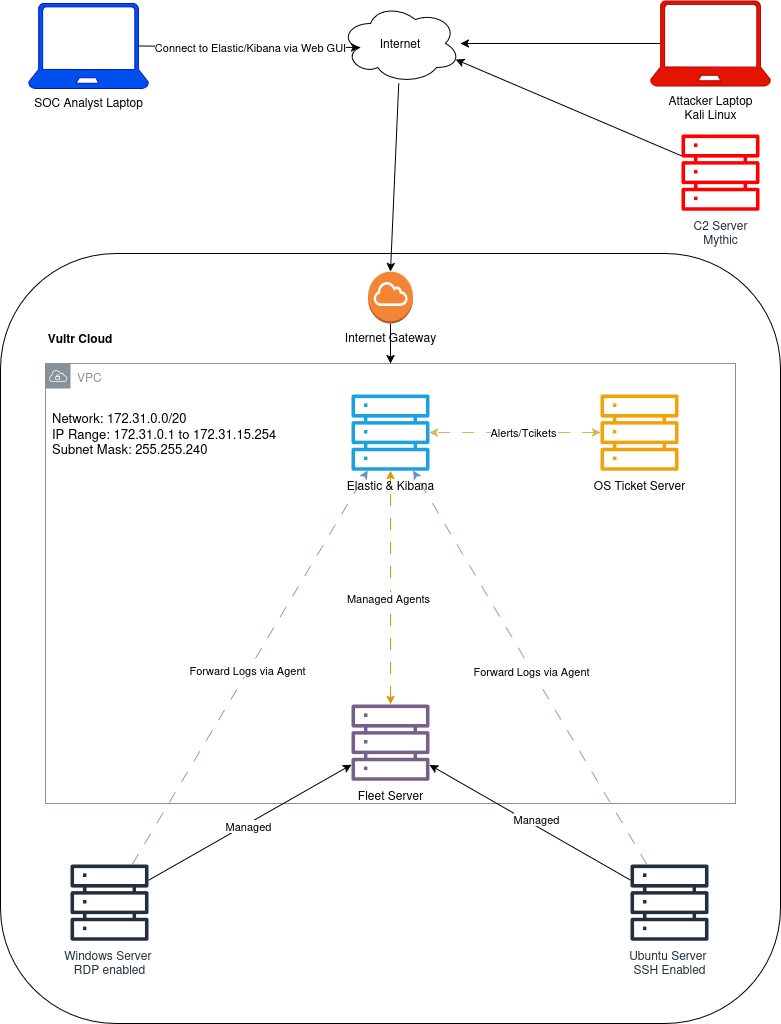
```
┌──────────────────────────────────────────────────────────┐
│ Vultr Cloud │
│ │
│ ┌─────────────────┐ ┌──────────────────────────┐ │
│ │ ELK Stack │◄──────│ Windows Server 2022 │ │
│ │ Elasticsearch │ │ + Sysmon │ │
│ │ Kibana (SIEM) │ │ + Elastic Agent │ │
│ │ Fleet Server │ │ + MS Defender │ │
│ └────────┬────────┘ └──────────────────────────┘ │
│ │ │
│ │ ┌──────────────────────────┐ │
│ └────────────────│ Ubuntu SSH Server │ │
│ │ + Elastic Agent │ │
│ └──────────────────────────┘ │
│ │
│ ┌─────────────────┐ ┌──────────────────────────┐ │
│ │ Mythic C2 │ │ osTicket Server │ │
│ │ (Attack Sim) │ │ (Ticketing / IR) │ │
│ └─────────────────┘ └──────────────────────────┘ │
└──────────────────────────────────────────────────────────┘
▲
│ Attacker Laptop (Kali Linux — local VM)
```
## 📅 每日课程
### ✅ 第 1 周 — ELK Stack 设置与日志接入 (第 01–10 天)
| 天数 | 主题 |
|-----|-------|
| 01 | [简介与网络拓扑图创建](./days/week-1/day-01-introduction-and-network-diagram.md) |
| 02 | [ELK Stack — Elasticsearch, Logstash 与 Kibana](./days/week-1/day-02-elk-stack-overview.md) |
| 03 | [设置 Elasticsearch 实例](./days/week-1/day-03-setting-up-elasticsearch.md) |
| 04 | [安装和配置 Kibana](./days/week-1/day-04-installing-kibana.md) |
| 05 | [在云中设置 Windows Server](./days/week-1/day-05-windows-server-cloud.md) |
| 06 | [了解 Fleet Server 和 Elastic Agent](./days/week-1/day-06-fleet-server-elastic-agent.md) |
| 07 | [设置 Fleet Server 并在 Windows 上安装 Elastic Agent](./days/week-1/day-07-fleet-server-setup.md) |
| 08 | [了解并使用 Sysmon](./days/week-1/day-08-understanding-sysmon.md) |
| 09 | [安装和配置 Sysmon](./days/week-1/day-09-installing-sysmon.md) |
| 10 | [将 Sysmon 和 Microsoft Defender 日志接入 Elasticsearch](./days/week-1/day-10-ingesting-sysmon-defender-logs.md) |
### ✅ 第 2 周 — 暴力破解检测与仪表盘 (第 11–17 天)
| 天数 | 主题 |
|-----|-------|
| 11 | [了解和防御暴力破解攻击](./days/week-2/day-11-brute-force-theory.md) |
| 12 | [设置 SSH 服务器并查看身份验证日志](./days/week-2/day-12-ssh-server-setup.md) |
| 13 | [在 SSH 服务器上安装 Elastic Agent](./days/week-2/day-13-elastic-agent-ssh.md) |
| 14 | [创建 SSH 暴力破解告警和仪表盘](./days/week-2/day-14-ssh-alerts-dashboards.md) |
| 15 | [了解和防范 RDP 滥用](./days/week-2/day-15-rdp-abuse.md) |
| 16 | [创建 RDP 和 SSH 暴力破解检测规则](./days/week-2/day-16-rdp-ssh-rules.md) |
| 17 | [为 RDP 活动创建仪表盘](./days/week-2/day-17-rdp-dashboard.md) |
### ✅ 第 3 周 — C2 模拟与高级检测 (第 18–22 天)
| 天数 | 主题 |
|-----|-------|
| 18 | [网络安全中的命令与控制 (C2)](./days/week-3/day-18-c2-theory.md) |
| 19 | [创建攻击示意图](./days/week-3/day-19-attack-diagram.md) |
| 20 | [设置 Mythic C2 实例](./days/week-3/day-20-mythic-c2-setup.md) |
| 21 | [执行暴力破解攻击并建立 C2 会话](./days/week-3/day-21-brute-force-c2-session.md) |
| 22 | [为 Mythic C2 活动创建告警和仪表盘](./days/week-3/day-22-mythic-alerts-dashboards.md) |
### ✅ 第 4 周 — 工单、事件响应与收尾 (第 23–30 天)
| 天数 | 主题 |
|-----|-------|
| 23 | [工单系统简介](./days/week-4/day-23-ticketing-systems.md) |
| 24 | [设置和配置 osTicket](./days/week-4/day-24-osticket-setup.md) |
| 25 | [将 osTicket 集成到您的技术栈中](./days/week-4/day-25-osticket-integration.md) |
| 26 | [调查 SSH 暴力破解告警](./days/week-4/day-26-investigating-ssh-alert.md) |
| 27 | [调查 RDP 暴力破解告警](./days/week-4/day-27-investigating-rdp-alert.md) |
| 28 | [调查 Mythic C2 框架](./days/week-4/day-28-investigating-mythic-c2.md) |
| 29 | [安装 Elastic Defend](./days/week-4/day-29-elastic-defend.md) |
| 30 | [故障排除与设置收尾](./days/week-4/day-30-troubleshooting-and-finalising.md) |
## 🧠 掌握的技能
- ✅ 在云基础设施上从零开始部署和配置了完整的 **ELK Stack SIEM**
- ✅ 使用 **Sysmon**, **Elastic Agent** 和 **Fleet Server** 接入 endpoint 遥测数据
- ✅ 针对 SSH 和 RDP 暴力破解攻击构建了 **Kibana 检测规则**
- ✅ 创建了 **自定义 Kibana 仪表盘**用于实时威胁可视化
- ✅ 部署和操作 **Mythic C2** 来模拟攻击者在失陷后的真实行为
- ✅ 检测了 **C2 beaconing 活动**并构建了相应的告警规则
- ✅ 设置并集成了 **osTicket**,用于 SOC 告警分类和工单工作流
- ✅ 执行了端到端的 **事件调查**:SSH 暴力破解、RDP 滥用、C2 活动
- ✅ 安装和配置了 **Elastic Defend**,用于 endpoint 检测与响应 (EDR)
- ✅ 构建了 **网络和攻击示意图**以记录完整的实验室架构
## 📚 参考文档
- [Elastic Stack 默认端口参考](./docs/elastic-port-reference.md)
- [提供学生折扣的 10 个网络安全资源](./docs/soc-student-resources.md)
## 🔗 资源
- 🎥 [MyDFIR YouTube 挑战赛播放列表](https://www.youtube.com/playlist?list=PLG6KGSNK4PuBb0OjyDIdACZnb8AoNBeq6)
- ☁️ [Vultr 云平台 — 新账户 $300 免费额度](https://www.vultr.com/?ref=9632889-9J)
- 📖 [Elastic Stack 文档](https://www.elastic.co/guide/index.html)
- 🔧 [Sysmon — Microsoft Sysinternals](https://learn.microsoft.com/en-us/sysinternals/downloads/sysmon)
- 🎯 [Mythic C2 框架](https://github.com/its-a-feature/Mythic)
- 🎫 [osTicket 文档](https://docs.osticket.com)
## 🗂️ 我的其它安全项目
- 🔍 [KC7 KQL 查询仓库](https://github.com/mohsinnazir967/kc7-kql-queries) — 在 4 项调查中记录了 79 条 KQL 查询,并映射到 MITRE ATT&CK
## 👤 关于我
SOC 分析师培训生 — 通过真实的实验环境、结构化的挑战赛和网络安全调查游戏培养实战技能。
- 📍 伊斯兰堡, 巴基斯坦
*作为免费的 MyDFIR 30 天 SOC 分析师挑战赛的一部分完成。所有实验工作均在个人云基础设施上进行,仅供学习之用。*
标签:ELK组件, IP 地址批量处理, SOC分析, 内容过滤, 安全实验环境, 安全运营, 库, 应急响应, 扫描框架