Rakeshu99/rakie-k3s-security2
GitHub: Rakeshu99/rakie-k3s-security2
一个 K3s Kubernetes 集群安全加固项目,涵盖 NetworkPolicy 隔离、CVE 修复、securityContext 加固、凭证管理及 Prometheus + Grafana 可观测性建设。
Stars: 1 | Forks: 0
# 🔐 Rakie K3s — 安全加固、可观测性与受控测试
## CA1 → CA2 进阶过程
CA1 构建了平台。CA2 则对其进行安全加固、监控和验证。
| CA1 交付内容 | CA2 新增内容 |
|---|---|
| 运行在 K3s 上的 5 个微服务 | 识别出 6 个安全弱点,并按 CVSS 进行优先级排序 |
| Traefik ingress NodePort 30080 | NetworkPolicy:扁平信任区 → 最小权限 |
| KEDA HTTP 自动伸缩(已修正 cron 触发器) | 在所有 4 个应用 pod 上加固了 securityContext |
| 带有 PVC 的 PostgreSQL | 在所有 4 个 deployment 上禁用了 SA token |
| 基础健康检查 endpoint | 凭证:明文 stringData → base64 命令式 |
| | CVE-2026-31789 OpenSSL CRITICAL → 已修复 (CRITICAL: 0) |
| | CVE-2026-42033 axios HIGH → 已修复 (axios 1.15.2) |
| | 在所有 4 个服务上实现了结构化 JSON 日志记录 + X-Request-Id |
| | Prometheus + Grafana:13 个 ServiceMonitor,35 条 PrometheusRule |
| | 三态故障场景:在 60 秒内找到根本原因 |
| | 容器渗透测试 CT-1 至 CT-7 |
## 架构 — 当前状态(加固前)
[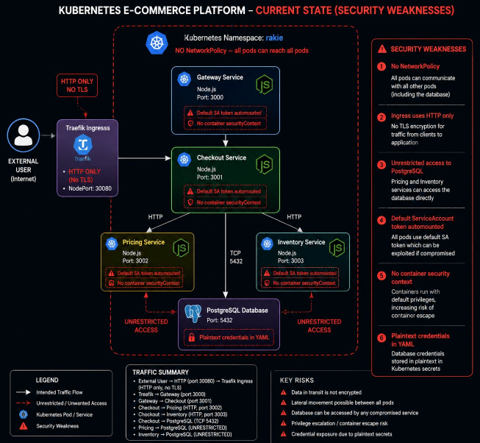](docs/architecture/beforePlatformARchitecture.png)
```
┌─────────────────────────────────────────────┐
│ K3s CLUSTER — namespace: rakie │
│ NO NetworkPolicy — flat trust zone │
External User ───► │ │
(HTTP) │ Traefik (HTTP only, NodePort 30080) │
│ ▼ │
│ Gateway (port 3000) │
│ ⚠ default SA token ⚠ no securityContext │
│ ▼ │
│ Checkout (port 3001) │
│ ⚠ hardcoded DB pwd ⚠ no securityContext │
│ ▼ ▼ ▼ │
│ Pricing Inventory PostgreSQL │
│ (3002) (3003) (5432) │
│ ⚠ any pod can reach postgres directly │
│ ⚠ plaintext POSTGRES_PASSWORD in YAML │
└─────────────────────────────────────────────┘
Security weaknesses:
1. No NetworkPolicy — CVSS 9.8 CRITICAL
2. Plaintext credentials in secret.yaml — CVSS 7.5
3. No securityContext on any pod — CVSS 7.8
4. Default SA token automounted — CVSS 7.5
5. CVE-2026-31789 OpenSSL (CRITICAL) + CVE-2026-42033 axios (HIGH) in all images
6. HTTP-only Traefik ingress — CVSS 5.9
```
## 架构 — 改进状态(加固后)
[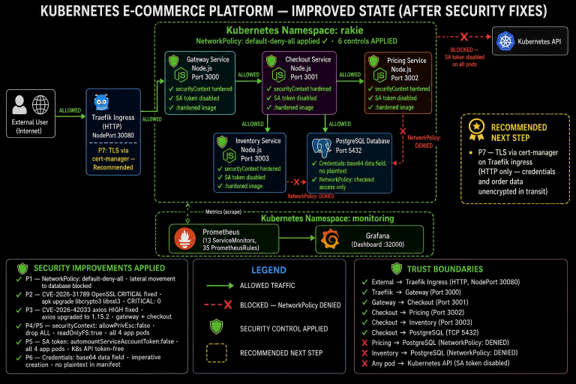](docs/architecture/improvedarchitecture.png)
```
┌─────────────────────────────────────────────────────────┐
│ K3s CLUSTER — namespace: rakie │
│ NetworkPolicy: default-deny-all + 5 scoped allow rules │
│ 6 controls APPLIED │
External User ───► │ │
(HTTP) P7► │ Traefik (HTTP, NodePort 30080) [TLS: Recommended] │
TLS │ │ ALLOWED │
recommended │ ▼ │
│ Gateway (port 3000) ──✗──► Kubernetes API │
│ ✓ securityContext hardened BLOCKED (SA disabled) │
│ ✓ SA token: false │
│ ✓ :hardened image │
│ │ ALLOWED │
│ ▼ │
│ Checkout (port 3001) │
│ ✓ securityContext hardened │
│ ✓ SA token: false │
│ ✓ :hardened image (axios 1.15.2) │
│ │ ALLOWED │ ALLOWED │ ALLOWED │
│ ▼ ▼ ▼ │
│ Pricing Inventory PostgreSQL (5432) │
│ ✓ hardened ✓ hardened ✓ base64 credentials │
│ │ ✓ checkout access only │
│ └──✗──────────────► BLOCKED (NetworkPolicy) │
│ pricing/inventory → postgres: DENIED │
└─────────────────────────────────────────────────────────┘
┌──────────────────────────────────┐
│ namespace: monitoring │
│ Prometheus ──► Grafana (:32000) │
│ 13 ServiceMonitors │
│ 35 PrometheusRules │
└──────────────────────────────────┘
Controls APPLIED (P1-P6):
✅ P1 — NetworkPolicy: default-deny-all + 5 scoped allow rules
✅ P2 — CVE-2026-31789 OpenSSL CRITICAL: fixed (apk upgrade → CRITICAL: 0)
✅ P3 — CVE-2026-42033 axios HIGH: fixed (npm install axios@1.15.2)
✅ P4 — securityContext: allowPrivEsc:false, drop:ALL, readOnlyFS:true
✅ P5 — automountServiceAccountToken: false on all 4 app pods
✅ P6 — Credentials: base64 data field, imperative creation, no plaintext
Recommended (P7):
📋 P7 — TLS via cert-manager on Traefik ingress (HTTP only — unencrypted)
```
## 安全发现 — P1 至 P8
| P# | 发现 | CVSS | 状态 | 报告证据 |
|---|---|---|---|---|
| P1 | 无 NetworkPolicy — 扁平信任区,任何 pod 均可访问 postgres | 9.8 | ✅ 已应用 | FX-1, CT-6, CT-7 |
| P2 | CVE-2026-31789 OpenSSL 堆溢出 — 所有 4 个镜像 | 9.8 | ✅ 已应用 | T2, CVE-1 至 CVE-6 |
| P3 | CVE-2026-42033 axios 原型污染 — gateway + checkout | 8.1 | ✅ 已应用 | T3, CVE-5, CVE-6 |
| P4 | 所有工作负载均设为 allowPrivilegeEscalation:true | 7.8 | ✅ 已应用 | FX-2, FX-3 |
| P5 | readOnlyRootFilesystem:false + SA token 自动挂载 | 5.5/7.5 | ✅ 已应用 | SA-1 至 SA-4 |
| P6 | secret.yaml 的 stringData 中包含明文 POSTGRES_PASSWORD | 7.5 | ✅ 已应用 | SEC-1 至 SEC-5 |
| P7 | 仅限 HTTP 的 Traefik ingress — 无 TLS | 5.9 | 📋 建议执行 | — |
| P8 | — | — | — | — |
## 使用的所有命令(CA2 简报要求)
### 第一部分 — 集群状态验证
```
# 确认 K3s 节点就绪
kubectl get nodes -o wide
# 完整资源清单 — 图 1、图 2
kubectl get pods -n rakie
kubectl get all -n rakie
# 确认修复前无 NetworkPolicy — 图 3
kubectl get networkpolicies -n rakie
# 显示明文凭据 — 图 4
cat /home/eaduser/rakie/k8s/secrets/postgres-secret.yaml
# 仅显示默认 SA — 图 5
kubectl get serviceaccounts -n rakie
# 显示仅 HTTP 的 ingress — 图 6
kubectl get ingress -n rakie -o yaml
```
### 第一部分 — P1 修复:NetworkPolicy (CVSS 9.8 CRITICAL)
```
# 应用 default-deny-all — 阻断 rakie namespace 中的所有 ingress/egress
kubectl apply -f k8s/networkpolicy/00-default-deny-all.yaml
# 应用 5 条限定范围的 allow 规则(仅限最低必需路径)
kubectl apply -f k8s/networkpolicy/01-allow-rules.yaml
# 验证创建了 6 个 NetworkPolicy 对象 — 图 FX-1
kubectl get networkpolicies -n rakie
# 验证 NetworkPolicy 对象详情
kubectl describe networkpolicy -n rakie
```
### 第一部分 — P4/P5 修复:SecurityContext 加固 (CVSS 7.8/5.5)
```
# 对所有 4 个应用 deployment 应用加固的 securityContext — 图 FX-2
kubectl apply -f k8s/securitycontext/all-deployments.yaml
# 验证补丁已应用于 gateway — 图 FX-3
kubectl get deployment gateway -n rakie \
-o jsonpath='{.spec.template.spec.containers[0].securityContext}'
# 确认所有 pod 已重启并正在运行
kubectl get pods -n rakie
# 完整 deployment YAML 确认
kubectl get deployment gateway -n rakie -o yaml | grep -A 15 securityContext
```
### 第一部分 — P5 修复:SA Token 加固 (CVSS 7.5)
```
# 检查修改前状态 — 默认为空等同于 true — 图 SA-1
kubectl get deployment gateway checkout pricing inventory \
-n rakie \
-o jsonpath='{range .items[*]}{.metadata.name}{": "}{.spec.template.spec.automountServiceAccountToken}{"\n"}{end}'
# 修补所有 4 个应用 deployment — 图 SA-2
for svc in gateway checkout pricing inventory; do
kubectl patch deployment $svc -n rakie \
--type='json' \
-p='[{"op":"add","path":"/spec/template/spec/automountServiceAccountToken","value":false}]'
echo "$svc patched"
done
# 验证所有 4 个均为 false — 图 SA-3
kubectl get deployment gateway checkout pricing inventory \
-n rakie \
-o jsonpath='{range .items[*]}{.metadata.name}{": automountServiceAccountToken="}{.spec.template.spec.automountServiceAccountToken}{"\n"}{end}'
# 确认所有 5 个 pod 仍为 Running — 图 SA-4
kubectl get pods -n rakie
```
### 第一部分 — P6 修复:凭证加固 (CVSS 7.5)
```
# 删除不安全的 secret(包含明文 stringData)
kubectl delete secret postgres-secret -n rakie
# 以命令式重建 — 值将进入 base64 data 字段
kubectl create secret generic postgres-secret \
--from-literal=POSTGRES_USER=rakie \
--from-literal=POSTGRES_PASSWORD="$(openssl rand -base64 16)" \
--from-literal=POSTGRES_DB=rakie \
-n rakie
# 验证无明文可见 — 仅显示字节数 — 图 SEC-1
kubectl describe secret postgres-secret -n rakie
# 验证 YAML 中的 base64 data 字段 — 图 SEC-2
kubectl get secret postgres-secret -n rakie -o yaml
# 确认所有 pod 仍在运行 — 图 SEC-3
kubectl get pods -n rakie
# 在运行中的 VM 上验证 — 图 SEC-4
cat /home/eaduser/rakie/k8s/secrets/postgres-secret.yaml
# 确认系统仍然正常运行 — 图 SEC-5
curl -s -X POST http://localhost:30080/api/checkout \
-H "Content-Type: application/json" \
-H "X-Request-Id: ca2-creds-verify" \
-d '{"sku":"SKU-001","qty":1}'
```
### 第一部分 — P2/P3 修复:CVE 补救 (CVSS 9.8 + 8.1)
```
# 查找所有 Dockerfile
find /home/eaduser/rakie -name "Dockerfile" | sort
# 查看修复前的原始 Dockerfile
cat /home/eaduser/rakie/gateway/Dockerfile
# --- 为 DOCKERFILE 添加 CVE 修复 ---
# P2: 在所有 4 个镜像上修复 CVE-2026-31789 OpenSSL CRITICAL
# 将 libcrypto3 从 3.5.5-r0(存在漏洞)升级到 3.5.6-r0(已修复)
sed -i '/^FROM/a RUN apk upgrade --no-cache libcrypto3 libssl3' \
/home/eaduser/rakie/gateway/Dockerfile
sed -i '/^FROM/a RUN apk upgrade --no-cache libcrypto3 libssl3' \
/home/eaduser/rakie/checkout/Dockerfile
sed -i '/^FROM/a RUN apk upgrade --no-cache libcrypto3 libssl3' \
/home/eaduser/rakie/pricing/Dockerfile
sed -i '/^FROM/a RUN apk upgrade --no-cache libcrypto3 libssl3' \
/home/eaduser/rakie/inventory/Dockerfile
# P3: 仅在 gateway 和 checkout 上修复 CVE-2026-42033 axios HIGH
# pricing 和 inventory 不进行外部 HTTP 调用 — 无 axios 依赖
sed -i '/npm ci\|npm install/a RUN npm install axios@1.15.2 --save' \
/home/eaduser/rakie/gateway/Dockerfile
sed -i '/npm ci\|npm install/a RUN npm install axios@1.15.2 --save' \
/home/eaduser/rakie/checkout/Dockerfile
# 验证所有 4 个 Dockerfile 已更新 — 图 CVE-1
grep -A1 "^FROM" /home/eaduser/rakie/gateway/Dockerfile
grep -A1 "^FROM" /home/eaduser/rakie/checkout/Dockerfile
grep -A1 "^FROM" /home/eaduser/rakie/pricing/Dockerfile
grep -A1 "^FROM" /home/eaduser/rakie/inventory/Dockerfile
# --- 构建 :hardened 镜像 ---
cd /home/eaduser/rakie
# 构建所有 4 个镜像 — 图 CVE-2:"全部 4 个构建完成"
docker build -t rakie-gateway:hardened ./gateway/ && \
docker build -t rakie-checkout:hardened ./checkout/ && \
docker build -t rakie-pricing:hardened ./pricing/ && \
docker build -t rakie-inventory:hardened ./inventory/ && \
echo "ALL 4 BUILDS COMPLETE"
# --- 导入 K3s ---
# K3s 不使用 Docker daemon — 必须单独导入
# 图 CVE-3:"所有镜像已导入"
docker save rakie-gateway:hardened | sudo k3s ctr images import -
docker save rakie-checkout:hardened | sudo k3s ctr images import -
docker save rakie-pricing:hardened | sudo k3s ctr images import -
docker save rakie-inventory:hardened | sudo k3s ctr images import -
echo "ALL IMAGES IMPORTED"
# --- 部署 HARDENED 镜像 ---
kubectl set image deployment/gateway gateway=rakie-gateway:hardened -n rakie
kubectl set image deployment/checkout checkout=rakie-checkout:hardened -n rakie
kubectl set image deployment/pricing pricing=rakie-pricing:hardened -n rakie
kubectl set image deployment/inventory inventory=rakie-inventory:hardened -n rakie
# 强制执行 rollout 重启
kubectl rollout restart deployment/gateway -n rakie
kubectl rollout restart deployment/checkout -n rakie
kubectl rollout restart deployment/pricing -n rakie
kubectl rollout restart deployment/inventory -n rakie
# 确认所有 5 个 pod 正在运行 :hardened 镜像 — 图 CVE-4
kubectl get pods -n rakie
kubectl get pods -n rakie \
-o jsonpath='{range .items[*]}{.metadata.name}{": "}{.spec.containers[0].image}{"\n"}{end}'
```
### 第二部分 — Prometheus + Grafana 安装
```
# 添加 Helm repo
helm repo add prometheus-community \
https://prometheus-community.github.io/helm-charts
helm repo update
# 创建隔离的监控 namespace
kubectl create namespace monitoring
# 安装 kube-prometheus-stack — 图 OB-1
helm install monitoring prometheus-community/kube-prometheus-stack \
--namespace monitoring \
--set grafana.service.type=NodePort \
--set grafana.service.nodePort=32000
# 验证所有 6 个监控 pod 正在运行
kubectl get pods -n monitoring
# Grafana 位于 http://10.0.2.15:32000 — 图 OB-2、OB-3、OB-4
# 登录凭据:admin / prom-operator
```
### 第二部分 — 结构化 JSON 日志验证
```
# 发送真实的 checkout 请求并读取日志
curl -s -X POST http://localhost:30080/api/checkout \
-H "Content-Type: application/json" \
-H "X-Request-Id: ca2-json-final" \
-d '{"sku":"SKU-001","qty":1}'
# 读取结构化 JSON 输出 — 图 JSON-1
kubectl logs -n rakie deployment/checkout --tail=5
kubectl logs -n rakie deployment/gateway --tail=5
# 每一行:{"timestamp":"...","level":"info","service":"checkout",
# "requestId":"ca2-json-final","status":200,"durationMs":787}
```
### 第二部分 — 可观测性场景:库存故障(3 种状态)
```
# ── 状态 1:健康基线 ──────────────────────────────
curl -s -X POST http://localhost:30080/api/checkout \
-H "Content-Type: application/json" \
-H "X-Request-Id: ca2-healthy" \
-d '{"sku":"SKU-001","qty":1}'
# 返回:{"status":"confirmed","orderId":128}
kubectl logs -n rakie deploy/gateway --tail=3
kubectl logs -n rakie deploy/checkout --tail=5
# ── 状态 2:故障注入 ────────────────────────────────
# 将 inventory 扩缩容至 0 个副本 — 图 OB-5
kubectl scale deployment inventory --replicas=0 -n rakie
kubectl get pods -n rakie # inventory shows Terminating
# 发送 5 个请求 — 全部返回 503 — 图 OB-6
for i in $(seq 1 5); do
curl -s -X POST http://localhost:30080/api/checkout \
-H "Content-Type: application/json" \
-H "X-Request-Id: ca2-obs-$i" \
-d '{"sku":"SKU-001","qty":1}'
done
# 使用 X-Request-Id 进行 3 步诊断:
# 步骤 1:gateway 显示 503 — 图 OB-8
kubectl logs -n rakie deploy/gateway | grep "ca2-obs-1"
# 步骤 2:checkout 显示对 inventory-svc:3003 的 ECONNREFUSED — 图 OB-7
kubectl logs -n rakie deploy/checkout | grep "ca2-obs-1"
# 步骤 3:pod 列表确认 inventory 为 0/0
kubectl get pods -n rakie | grep inventory
# 根本原因:inventory pod 宕机 — 在 60 秒内查明
# ── 状态 3:恢复 ───────────────────────────────
# 扩缩容回 1 — 图 OB-9
kubectl scale deployment inventory --replicas=1 -n rakie
sleep 15 && kubectl get pods -n rakie # all 5 pods 1/1 Running
# 确认恢复
curl -s -X POST http://localhost:30080/api/checkout \
-H "Content-Type: application/json" \
-H "X-Request-Id: ca2-recover-1" \
-d '{"sku":"SKU-001","qty":1}'
# 返回:{"status":"confirmed"}
```
### 第三部分 — Trivy 镜像扫描
```
# 安装 Trivy(如果尚未安装)
curl -sSfL https://raw.githubusercontent.com/aquasecurity/trivy/main/contrib/install.sh \
| sh -s -- -b /usr/local/bin v0.70.0
trivy --version
# 加固之前 — 确认存在 CRITICAL CVE
# 图 T2:gateway OpenSSL CRITICAL CVE-2026-31789
trivy image rakie-gateway:latest \
--severity CRITICAL,HIGH --no-progress
# 图 T3:gateway axios HIGH CVE-2026-42033
# (相同的扫描输出,不同的部分)
# 图 T4:checkout — 相同的 CVE(每次 POST /checkout 都会触发 axios)
trivy image rakie-checkout:latest \
--severity CRITICAL,HIGH --no-progress
# 图 T5:inventory — 仅 OpenSSL(无 axios)
trivy image rakie-inventory:latest \
--severity CRITICAL,HIGH --no-progress
trivy image rakie-pricing:latest \
--severity CRITICAL,HIGH --no-progress
# 加固之后 — 图 CVE-5、CVE-6
# 确认 CRITICAL: 0, alpine 3.23.4: 0, axios: 0
trivy image rakie-gateway:hardened \
--severity CRITICAL,HIGH --no-progress 2>/dev/null | head -20
trivy image rakie-gateway:hardened \
--severity CRITICAL,HIGH --no-progress 2>/dev/null | grep "^Total:"
# 之后扫描所有 4 个
for img in gateway checkout pricing inventory; do
echo "=== rakie-$img:hardened ==="
trivy image rakie-$img:hardened \
--severity CRITICAL,HIGH --no-progress 2>/dev/null | grep "^Total:"
done
```
### 第三部分 — kubeaudit 安全态势审查
```
# 安装 kubeaudit v0.22.2
curl -sSL \
https://github.com/Shopify/kubeaudit/releases/download/v0.22.2/kubeaudit_linux_amd64.tar.gz \
| tar xz && sudo mv kubeaudit /usr/local/bin/
kubeaudit version
# 修复之前 — 基线:32 个错误 — 图 K2、K3、K4
kubeaudit all --namespace rakie
# 统计修复前的错误数
kubeaudit all --namespace rakie 2>&1 | grep "^ERRO" | wc -l
# 显示发现结果的具体检查项:
# 图 K3:MissingDefaultDenyNetworkPolicy
kubeaudit netpols --namespace rakie
# 图 K4:checkout 6 个错误
kubeaudit all --namespace rakie 2>&1 | grep checkout
# 修复之后 — 19 个错误(-40%)— 图 K1、K5
kubeaudit all --namespace rakie
# 统计修复后的错误数
kubeaudit all --namespace rakie 2>&1 | grep "^ERRO" | wc -l
# 图 K5:gateway 已解决的错误
kubeaudit all --namespace rakie 2>&1 | grep gateway
```
### 第三部分 — 容器渗透测试 (CT-1 至 CT-7)
```
# CT-1:确认非 root 用户 — uid=1000 — 图 CT-1
kubectl exec -n rakie deploy/checkout -- whoami
kubectl exec -n rakie deploy/checkout -- id
# CT-2:K8s API 可达但返回 401 — SA token 已禁用 — 图 CT-2
kubectl exec -n rakie deploy/checkout -- \
wget -qO- --timeout=5 https://kubernetes.default.svc/api 2>&1 | head -3
# CT-3:checkout → postgres 开放 — 正确(唯一的 DB 写入者)— 图 CT-3
kubectl exec -n rakie deploy/checkout -- nc -zv postgres-svc 5432
# CT-4:NetworkPolicy 之前 inventory → postgres — CRITICAL 开放 — 图 CT-4
kubectl exec -n rakie deploy/inventory -- nc -zv postgres-svc 5432
# 无合法需求 — CRITICAL 发现
# CT-5:NetworkPolicy 之前 pricing → postgres — CRITICAL 开放 — 图 CT-5
kubectl exec -n rakie deploy/pricing -- nc -zv postgres-svc 5432
# 无合法需求 — CRITICAL 发现
# CT-6:NetworkPolicy 之后 inventory → postgres — 已阻断 — 图 CT-6
kubectl exec -n rakie deploy/inventory -- nc -zv postgres-svc 5432
# 预期:nc: bad address 'postgres-svc'
# 横向移动已被阻止
# CT-7:NetworkPolicy 之后 pricing → postgres — 已阻断 — 图 CT-7
kubectl exec -n rakie deploy/pricing -- nc -zv postgres-svc 5432
# 预期:nc: bad address 'postgres-svc'
# 两项服务均已确认被阻断
```
### 第四部分 — 最终验证
```
# 所有 5 个 pod 正在运行 :hardened 镜像 — 图 FV-HARD-2
kubectl get pods -n rakie -o wide
kubectl get pods -n rakie \
-o jsonpath='{range .items[*]}{.metadata.name}{": "}{.spec.containers[0].image}{"\n"}{end}'
# 6 个 NetworkPolicy 对象处于活跃状态 — 图 FV-4
kubectl get networkpolicies -n rakie
# securityContext 已确认 — 来自图 FX-3
kubectl get deployment gateway -n rakie \
-o jsonpath='{.spec.template.spec.containers[0].securityContext}' \
| python3 -m json.tool
# 所有 4 个上的 SA token 均为 false — 来自图 SA-3
kubectl get deployment gateway checkout pricing inventory \
-n rakie \
-o jsonpath='{range .items[*]}{.metadata.name}{": automount="}{.spec.template.spec.automountServiceAccountToken}{"\n"}{end}'
# 最终端到端 checkout — 图 FV-HARD (orderId: 141)
curl -s -X POST http://localhost:30080/api/checkout \
-H "Content-Type: application/json" \
-H "X-Request-Id: ca2-hardened-final" \
-d '{"sku":"SKU-001","qty":1}'
# 返回:{"status":"confirmed","orderId":141,"requestId":"ca2-hardened-final"}
```
## 仓库结构
```
rakie-k3s-security2/
│
├── README.md ← All commands (CA2 brief requirement)
│ Architecture diagrams (current + improved)
│
├── k8s/
│ ├── networkpolicy/
│ │ ├── 00-default-deny-all.yaml ← P1: default-deny blocks all rakie traffic
│ │ └── 01-allow-rules.yaml ← P1: 5 scoped allow rules (min required)
│ ├── securitycontext/
│ │ └── all-deployments.yaml ← P4/P5: hardened securityContext all 4 pods
│ └── secrets/
│ └── secret.yaml ← P6: base64 data field template (not plaintext)
│
├── services/
│ ├── gateway/
│ │ ├── Dockerfile ← P2: apk upgrade + P3: axios@1.15.2
│ │ └── logger.js ← Structured JSON logger (requestId, durationMs)
│ ├── checkout/Dockerfile ← P2: apk upgrade + P3: axios@1.15.2
│ ├── pricing/Dockerfile ← P2: apk upgrade only (no axios)
│ └── inventory/Dockerfile ← P2: apk upgrade only (no axios)
│
├── security/
│ ├── trivy/scan-all.sh ← Trivy before/after for all 4 images
│ ├── kubeaudit/audit.sh ← kubeaudit before/after + specific checks
│ └── pentest/pentest.sh ← CT-1 through CT-7 automated script
│
├── monitoring/
│ └── prometheus/values.yaml ← kube-prometheus-stack Helm values
│
├── .github/workflows/
│ └── trivy-scan.yml ← CI: blocks PRs with CRITICAL CVEs
│
└── docs/
├── SECURITY_FINDINGS.md ← P1–P8: CVSS, impact, fix, evidence
├── REMEDIATION_LOG.md ← Chronological: what, how, evidence ref
└── OBSERVABILITY.md ← JSON logging + 3-state failure scenario
```
## 结果
### Trivy — CVE 补救
| 镜像 | 加固前 CRITICAL | 加固后 CRITICAL | 已修复 |
|---|---|---|---|
| rakie-gateway:hardened | 2 | **0** ✅ | CVE-2026-31789 + CVE-2026-42033 |
| rakie-checkout:hardened | 2 | **0** ✅ | CVE-2026-31789 + CVE-2026-42033 |
| rakie-pricing:hardened | 2 | **0** ✅ | 仅 CVE-2026-31789 |
| rakie-inventory:hardened | 2 | **0** ✅ | 仅 CVE-2026-31789 |
### kubeaudit — 安全态势审查
| Deployment | 加固前 | 加固后 | 已解决 |
|---|---|---|---|
| gateway | 6 | 3 | CapabilityMissing, AllowPrivEsc, ReadOnlyRootFS |
| checkout | 6 | 3 | 同 gateway |
| pricing | 6 | 3 | 同 gateway |
| inventory | 6 | 3 | 同 gateway |
| postgres | 7 | 7 | 已接受 — postgres:15-alpine 需要 UID 999 |
| Namespace | 1 | 0 | 已应用 NetworkPolicy |
| **总计** | **32** | **19 (−40%)** | **已解决 13 个错误** |
## 使用的工具
| 工具 | 版本 | 用途 | 报告图表 |
|---|---|---|---|
| [Trivy](https://trivy.dev) | v0.70.0 | 容器镜像 CVE 扫描 (Alpine OS + npm) | T1–T5, CVE-1–CVE-6 |
| [kubeaudit](https://github.com/Shopify/kubeaudit) | v0.22.2 | Kubernetes 集群安全态势审查(实时集群) | K1–K5 |
| kubectl exec (nc, wget) | K3s 原生 | 容器渗透测试 — CT-1 至 CT-7 | CT-1–CT-7 |
| [kube-prometheus-stack](https://github.com/prometheus-community/helm-charts) | Helm 最新版 | Prometheus + Grafana + AlertManager | OB-1–OB-9 |
| K3s | v1.34.6 | 轻量级 Kubernetes 发行版 | 平台 |
| Docker | 最新版 | 镜像构建(K3s 需要通过 k3s ctr 导入) | CVE-2–CVE-4 |
## 建议的后续步骤(未应用)
| 项目 | 未应用的原因 |
|---|---|
| P7 — 通过 cert-manager 在 Traefik 上配置 TLS | 需要更改 ClusterIssuer + IngressRoute — 在提交前存在风险 |
| Bitnami Sealed Secrets | 基础设施变更 — base64 只是编码而非加密 |
| mTLS east-west (Linkerd) | NetworkPolicy 允许访问但不会加密连接 |
| node-tar HIGH CVE | 无上游修复方案 — 仅在构建时存在,非运行时 |
## 相关仓库
**CA1 — 平台构建:** [rakie-k3s_E-commerce](https://github.com/Rakeshu99/rakie-k3s_E-commerce)
CA1:微服务部署、KEDA HTTP 自动伸缩、K3s 集群设置、Traefik ingress、PostgreSQL 持久化。
## 作者
**Rakesh Uday Kumar** · [GitHub @Rakeshu99](https://github.com/Rakeshu99)
云计算与 DevOps 理学硕士 · TU Dublin · 2025/2026
对 **DevOps**、**DevSecOps** 和 **平台工程** 岗位保持开放
标签:API集成, GitHub Advanced Security, K3s, 可观测性, 子域名突变, 安全加固, 测试用例, 漏洞修复, 网络安全培训, 自定义请求头, 请求拦截