dbaafi/Cysa-p01-wazuh-siem
GitHub: dbaafi/Cysa-p01-wazuh-siem
一个 CySA+ 认证备考项目,演示如何在 Apple Silicon 上从零搭建 Wazuh SIEM 实验环境并进行 Linux 端点检测工程。
Stars: 0 | Forks: 0
# Cysa-p01-wazuh-siem
我的 CompTIA CySA+ (CS0-003) 作品集的项目 1:从零开始构建并运行一个 **Wazuh SIEM** 实验环境,然后使用它配合 Linux 端点 agent 进行检测工程。
该项目的目标是搭建一个真实的安全信息和事件管理 (SIEM) 平台,将受监控的端点连接到该平台,并记录构建过程——包括我遇到的问题及其解决方法——就像一名 SOC 分析师所做的那样。
## 我所构建的内容
在 Apple Silicon(M 系列 Mac)上使用 UTM 虚拟化技术运行的双虚拟机 Wazuh 实验环境:
| 角色 | 主机名 | IP | 配置 | 操作系统 |
|------|----------|-----|-------|-----|
| SIEM 服务器(all-in-one:indexer + manager + dashboard) | `wazuh-server` | 192.168.64.2 | 4 vCPU / 6 GB / 60 GB | Ubuntu Server 22.04.5 LTS (ARM64) |
| 受监控端点(Wazuh agent) | `wazuh-linux-agent` | 192.168.64.3 | 2 vCPU / 3 GB / 30 GB | Ubuntu Server 22.04.5 LTS (ARM64) |
agent 将安全遥测数据(文件完整性、日志数据、系统审计)报告回服务器,服务器对其进行分析并在 Wazuh dashboard 中将其显示为警报。
## 结果
**Linux agent 已成功注册,并在 dashboard 中报告为 Active 状态。**
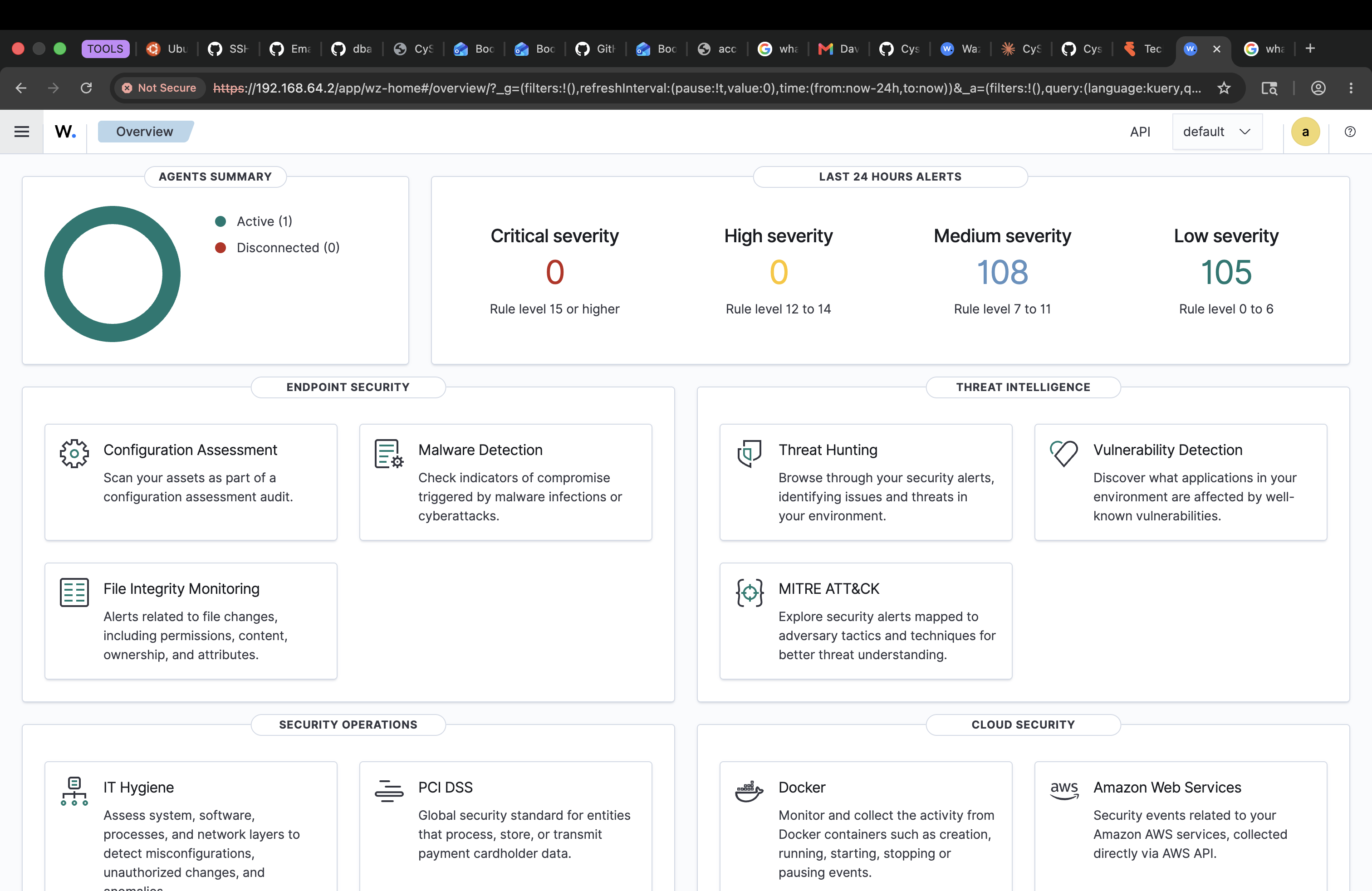
*Dashboard 概览:一个 agent 处于 Active 状态,零个断开连接,并且警报已经开始流入(108 个中等严重级别,105 个低严重级别),这些均来自该 agent 的首次签入——文件完整性基线和系统审计事件。*
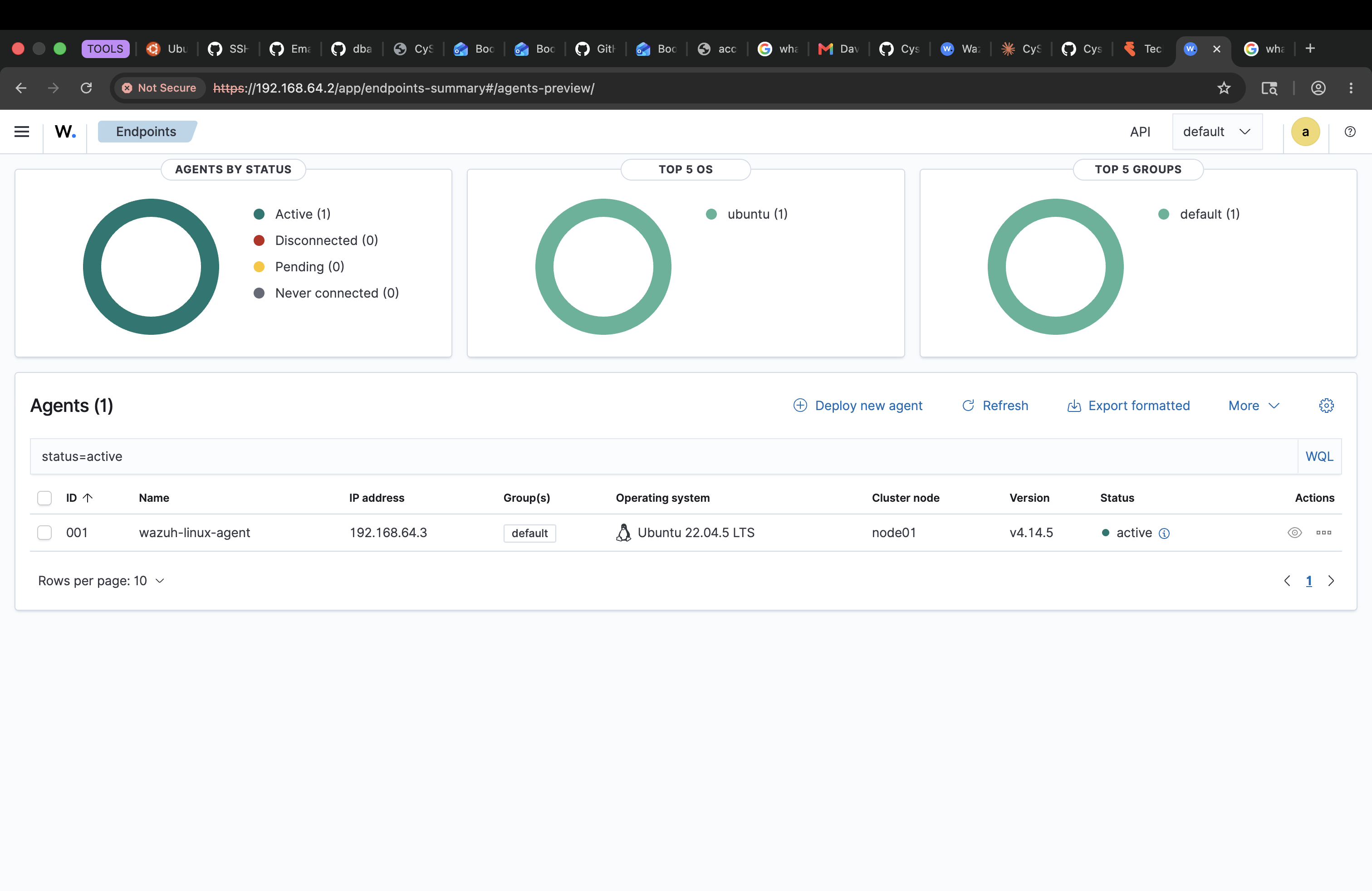
*Agent 详情视图,确认位于 192.168.64.3 的 `wazuh-linux-agent` (ID 001),运行 Ubuntu 22.04.5 LTS,Wazuh v4.14.5,状态为 Active。*
## 构建环境与关键决策
- **虚拟化:** 使用 UTM(QEMU 后端)而不是 VirtualBox,因为构建机器是 Apple Silicon (ARM)。所有 Ubuntu 镜像均使用 **ARM64** (`aarch64`) 构建版本以保持匹配。
- **操作系统版本:** 为了兼容 Wazuh,坚持使用 Ubuntu **22.04 LTS** 而不是 24.04。
- **Wazuh 版本:** 4.14.5,通过 all-in-one 安装脚本进行安装。
## 我遇到(并修复)的问题
记录这些内容是因为故障排除本身就是这项工作的核心。
- **Wazuh 4.9 安装程序拒绝 ARM64。** 旧安装程序的架构检查仅识别 x86,并错误地报告“必须在 64 位系统上运行”。**修复:** 使用了支持 ARM64 的 4.14 安装程序。
- **Manager 和 agent 无法在同一主机上共存。** 我最初尝试在服务器虚拟机上安装 Wazuh agent 进行“自我监控”,但 `wazuh-agent` 包在设计上就与 `wazuh-manager` 冲突。**修复:** 构建了一个单独的虚拟机(`wazuh-linux-agent`)作为受监控端点——这也符合中心服务器加分布式 agent 的标准 SIEM 架构。
- **虚拟机重启进入安装程序。** Ubuntu 安装完成后,虚拟机一直引导回安装程序 ISO。**修复:** 在重启前从虚拟 CD/DVD 驱动器中弹出安装 ISO。
- **LVM 未使用完整磁盘。** Ubuntu 的引导式存储默认情况下仅将大约一半的虚拟磁盘分配给 root。**修复:** 在安装过程中手动扩展逻辑卷以使用完整磁盘。
## 项目结构
- `screenshots/` — 实验环境截图(Wazuh dashboard、agent 注册、警报)
- `configs/` — Wazuh 服务器和 agent 配置文件
- `scripts/` — Python 实用程序,包括 `wazuh-alert-summary.py`
- `docs/` — 设置笔记、故障排除和经验教训
- [`04-ubuntu-install.md`](docs/04-ubuntu-install.md) — Ubuntu Server 安装演示
## 状态
✅ SIEM 服务器已部署 · ✅ Linux agent 已注册并处于 Active 状态
🚧 进行中:检测演示(触发和捕获警报)、警报汇总脚本以及其他文档。
标签:Wazuh, x64dbg, 安全运营, 扫描框架, 逆向工具