#

Quantum
[](https://www.mongodb.com/atlas)
[](https://expressjs.com/)
[](https://react.dev/)
[](https://nodejs.org/)
[](https://www.typescriptlang.org/docs/)
[](https://tailwindcss.com/docs)
[](https://jwt.io/)
[](https://owasp.org/www-community/HttpOnly)
[](https://cheatsheetseries.owasp.org/cheatsheets/Cross-Site_Request_Forgery_Prevention_Cheat_Sheet.html)
[](https://datatracker.ietf.org/doc/html/rfc6238)
[](https://github.com/dcodeIO/bcrypt.js)
[](https://github.com/yeojz/otplib)
[](https://github.com/soldair/node-qrcode)
[](https://vitejs.dev/)
[](https://github.com/expressjs/morgan)
[](https://github.com/expressjs/cors)
[](https://github.com/motdotla/dotenv)
[](https://learning.postman.com/docs/getting-started/overview/)
[](https://www.framer.com/motion/)
[](https://lucide.dev/)
[](https://dndkit.com/)
[](https://resend.com/docs)
[](https://github.com/zstem001hz-droid/quantum/blob/main/LICENSE)
Quantum is a production-deployed, full-stack MERN project management application built for individuals and small teams. Designed around a dark-first aesthetic inspired by quantum physics, it features a responsive Kanban board with real-time drag-and-drop, light/dark/system theme switching, and a polished component library built with React 19, TypeScript, Tailwind CSS, and Framer Motion.
Security is treated as a first-class concern throughout: authentication uses httpOnly, Secure, SameSite cookies rather than localStorage (XSS mitigation), all state-changing requests are CSRF-protected via the double-submit cookie pattern, and two-factor authentication (TOTP) is fully implemented on both frontend and backend. The RESTful API is built on Express 5 with ownership-based authorization, rate limiting, and transactional email via Resend.
## Table of Contents
- [Live Demo](#live-demo)
- [Screenshots](#screenshots)
- [Vision](#vision)
- [Tech Stack](#tech-stack)
- [Key Technical Decisions](#key-technical-decisions)
- [Project Structure](#project-structure)
- [Getting Started](#getting-started)
- [Environment Variables](#environment-variables)
- [Environments](#environments)
- [API Endpoints](#api-endpoints)
- [Auth](#auth)
- [Projects](#projects)
- [Tasks](#tasks)
- [Authentication Flow](#authentication-flow)
- [CSRF Protection](#csrf-protection)
- [Authorization Flow](#authorization-flow)
- [Task Authorization Chain](#task-authorization-chain)
- [Data Model Relationships](#data-model-relationships)
- [Error Responses](#error-responses)
- [Roadmap](#roadmap)
- [Security Features](#security-features)
- [Two-Factor Authentication](#two-factor-authentication)
- [Testing & Development Tools](#testing--development-tools)
- [References](#references)
- [Core Stack — Backend](#core-stack--backend)
- [Core Stack — Frontend](#core-stack--frontend)
- [Standards](#standards)
- [Development Tools](#development-tools)
- [Video References](#video-references)
- [Deployment](#deployment)
- [Authentication & Security](#authentication--security)
- [License](#license)
## Live Demo
🚀 **[Launch Quantum](https://quantum.vitaldosage.com)**
## Screenshots
**Dashboard**
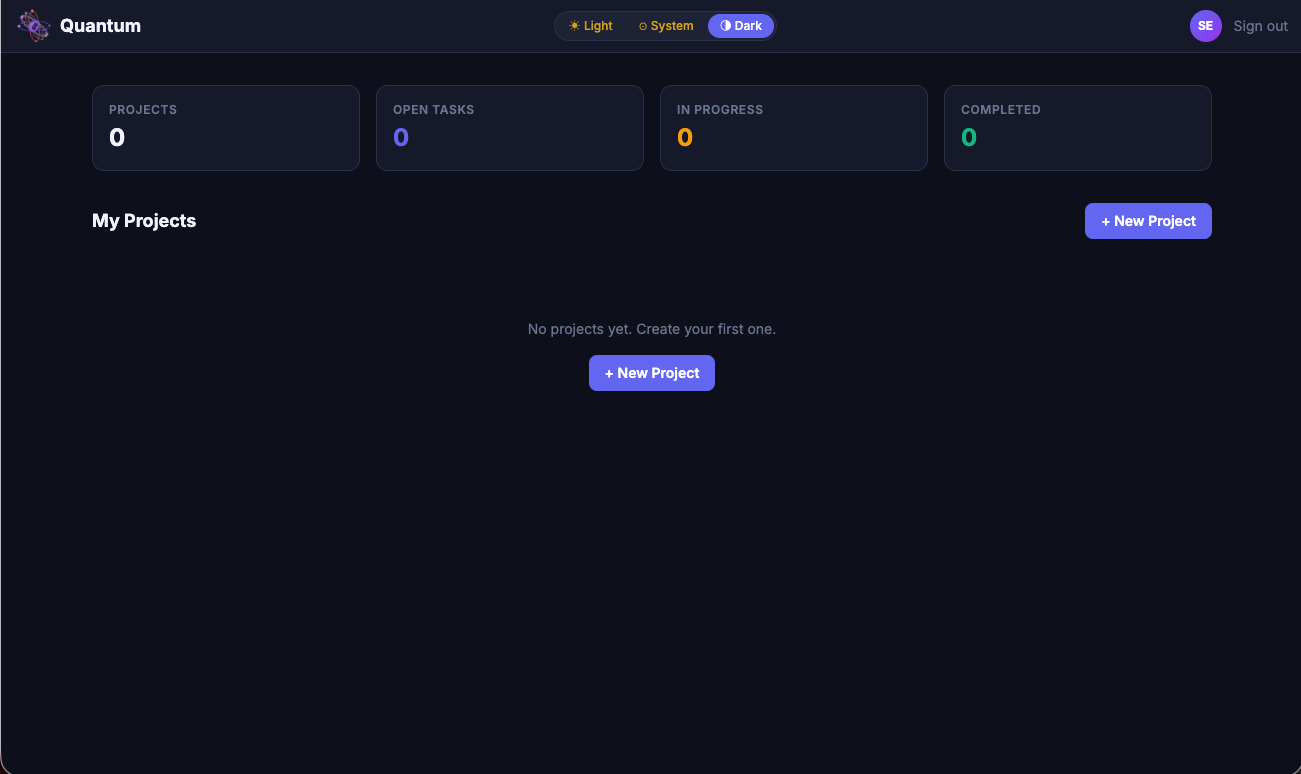 |
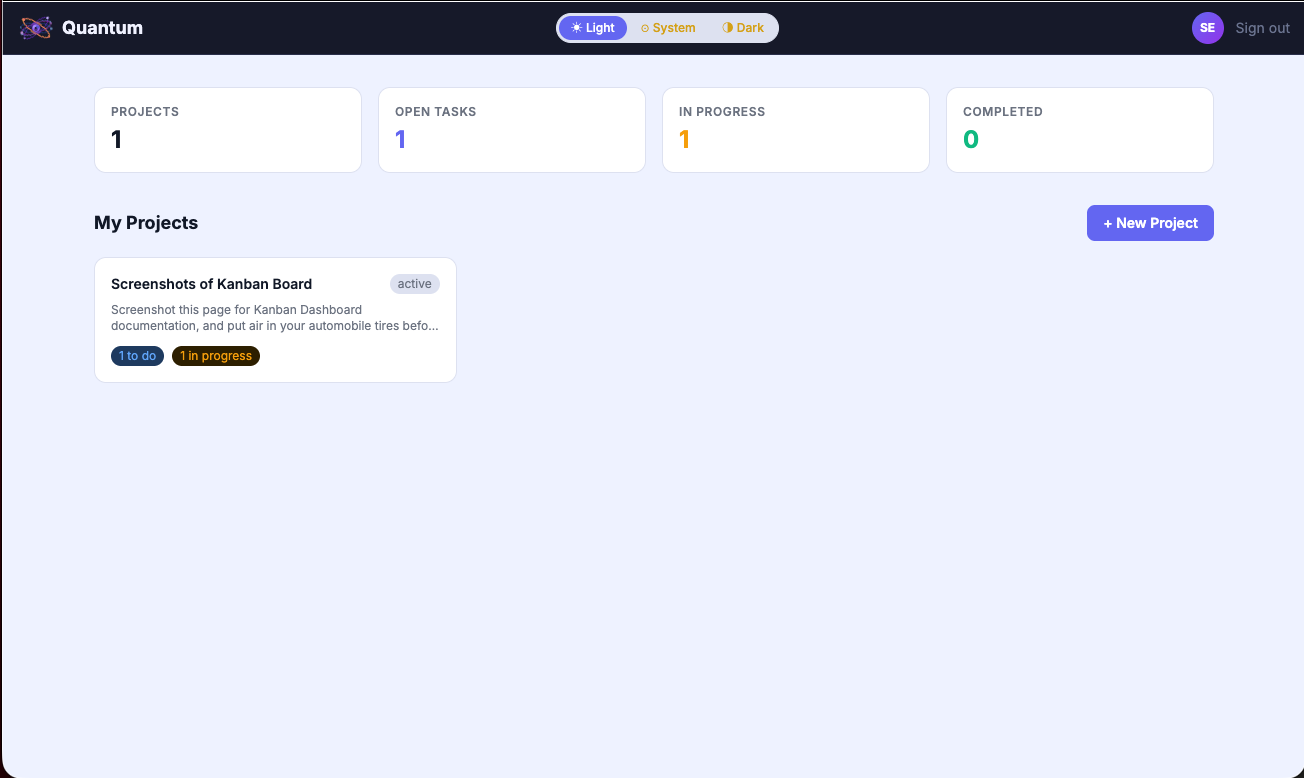 |
| Dark Mode |
Light Mode |
**Kanban Board**
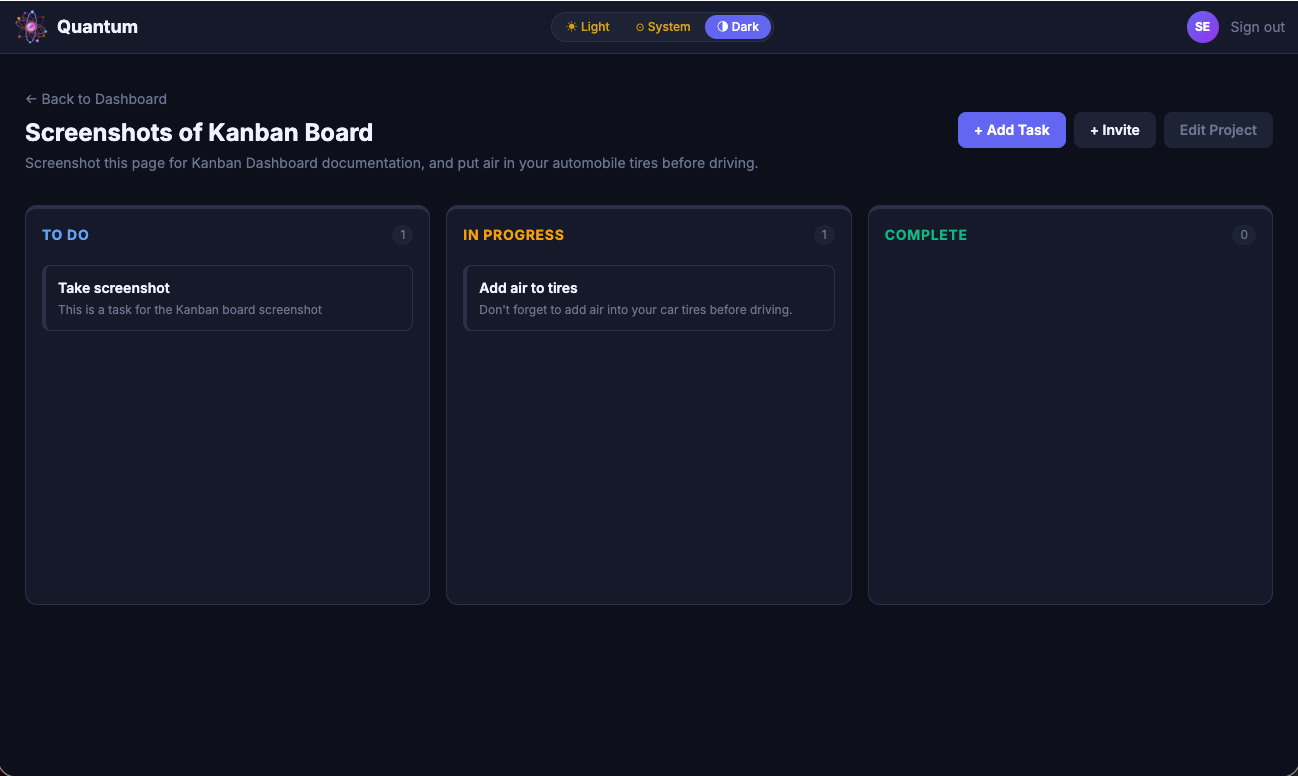 |
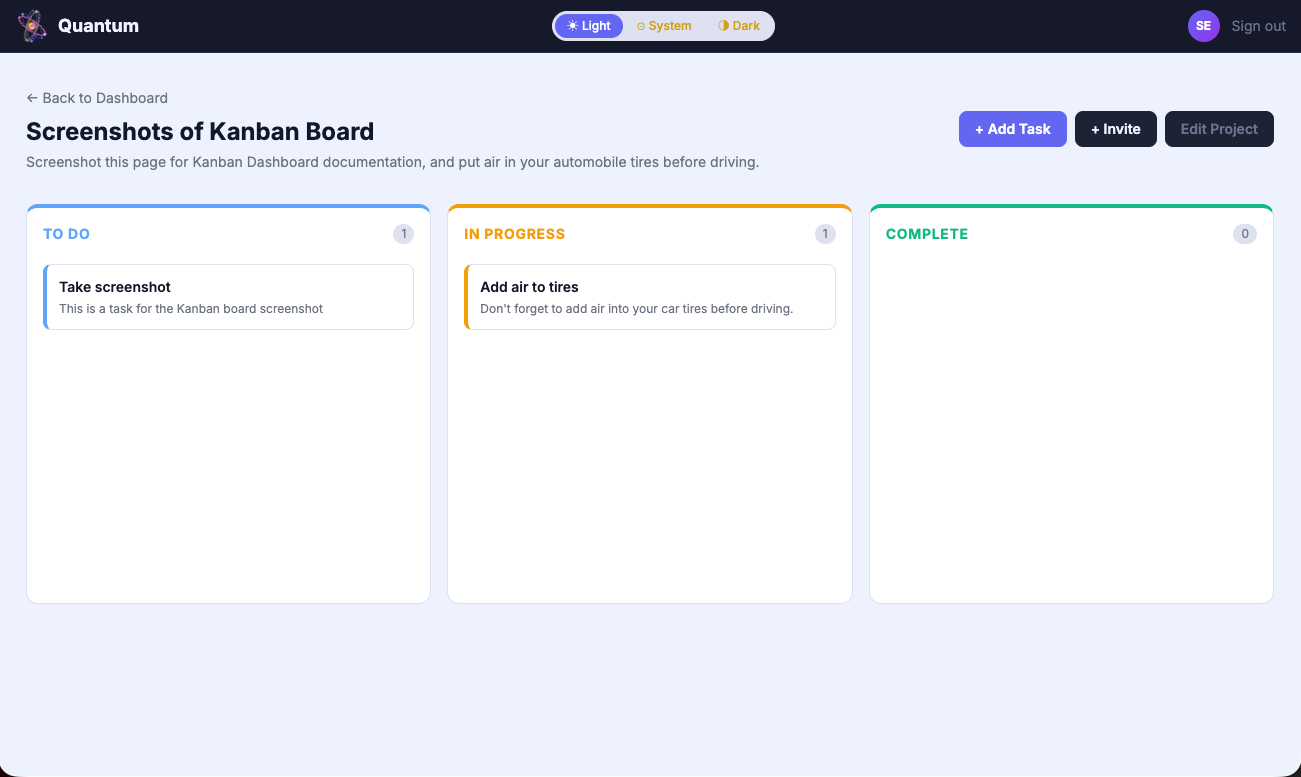 |
| Dark Mode |
Light Mode |
**Mobile**
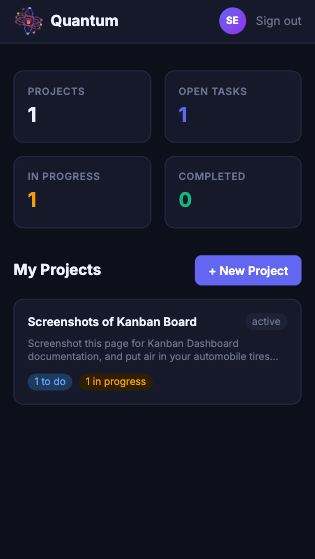 |
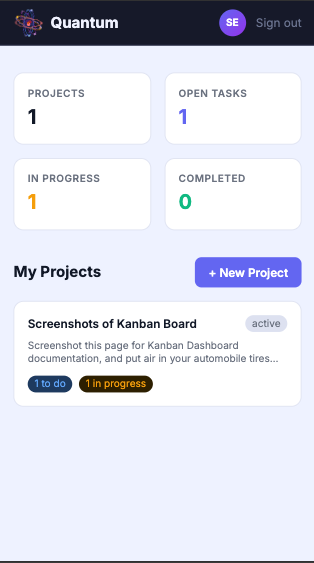 |
| Dark Mode |
Light Mode |
## Vision
Quantum was built to explore what a modern, production-ready project management tool looks like when designed with intention — dark-first UI, collaborative workflows, and quantum physics as a visual language for the complexity of coordinating teams and tasks. Every design decision, from the indigo color palette to the orbital logo animation, reflects a belief that developer tools should feel as polished as the products they help build.
## Tech Stack
**Frontend**
- [React 19](https://react.dev/) — UI library
- [TypeScript](https://www.typescriptlang.org/) — typed JavaScript
- [Vite](https://vitejs.dev/) — build tool and dev server
- [React Router](https://reactrouter.com/) — client-side routing
- [Axios](https://axios-http.com/) — HTTP client for API requests
- [Tailwind CSS](https://tailwindcss.com/) — utility-first styling
- [Framer Motion](https://www.framer.com/motion/) — animations
- [Lucide React](https://lucide.dev/guide/packages/lucide-react) — icon library
- [@dnd-kit](https://dndkit.com/) — drag-and-drop task board
**Backend**
- [Node.js](https://nodejs.org/) — runtime environment
- [Express 5](https://expressjs.com/) — web framework
- [MongoDB](https://www.mongodb.com/) — NoSQL database
- [Mongoose](https://mongoosejs.com/) — MongoDB object modeling
- [dotenv](https://github.com/motdotla/dotenv) — environment variable management
- [cors](https://github.com/expressjs/cors) — cross-origin resource sharing
- [cookie-parser](https://github.com/expressjs/cookie-parser) — cookie parsing middleware; reads httpOnly auth and CSRF cookies from incoming requests
- [JSON Web Tokens](https://jwt.io/) — authentication
- [bcryptjs](https://github.com/dcodeIO/bcrypt.js) — password hashing
- [otplib](https://github.com/yeojz/otplib) — TOTP one-time password generation and verification
- [qrcode](https://github.com/soldair/node-qrcode) — QR code generation for authenticator app setup
- [morgan](https://github.com/expressjs/morgan) — HTTP request logger
- [nodemon](https://nodemon.io/) — development server with auto-restart
- [Resend](https://resend.com) — transactional email API for collaboration invitations and password reset emails
## Key Technical Decisions
**TypeScript over JavaScript** — Type safety across the entire client prevents entire categories of runtime errors. TypeScript's indexed access types (`Task['status']`) and type assertions were particularly valuable for the Kanban board's status management.
**Express 5 over Express 4** — Express 5's async error handling eliminates boilerplate try-catch in route handlers and represents the current direction of the framework.
**@dnd-kit over react-beautiful-dnd** — react-beautiful-dnd is no longer actively maintained. @dnd-kit is actively developed, accessibility-first, and provides fine-grained control over drag behavior through its sensor and modifier system.
**CommonJS over ESM** — The backend uses Node.js `require()` syntax for compatibility with Express 5 and Mongoose 9. ESM is the modern JavaScript module system, but mixing it with TypeScript in a Node.js backend introduces configuration complexity — TypeScript compiles to CommonJS by default, and aligning both systems requires extra setup that adds friction without meaningful benefit for this project's scope.
**Optimistic updates for drag-and-drop** — Task status updates apply immediately to the UI before the API confirms, reverting on failure. This makes the Kanban board feel instant rather than dependent on network latency.
**Custom Tailwind quantum palette** — All brand colors are defined once in `tailwind.config.js` and generate utility classes automatically, enabling consistent theming and instant global color updates across every component.
**httpOnly cookies over localStorage for JWT storage** — storing JWTs in localStorage exposes them to theft via XSS attacks; any injected script can read `localStorage` and exfiltrate the token. httpOnly cookies are inaccessible to JavaScript entirely, eliminating this attack vector. The tradeoff — cookies require CSRF protection for state-changing requests — is addressed via the double-submit cookie pattern, implemented without additional dependencies using Node.js's built-in `crypto` module.
**Cross-subdomain cookie scoping** — deploying the frontend and backend on separate subdomains (`quantum.vitaldosage.com` and `api.quantum.vitaldosage.com`) initially broke cookie-based auth — cookies set by the backend weren't visible to frontend JavaScript despite both sharing `vitaldosage.com`. The fix was scoping cookies to the shared parent domain via the `domain` cookie attribute, making them valid across all `vitaldosage.com` subdomains rather than the exact host that set them.
## Project Structure
quantum/
├── client/ ← React 19 + Vite + TypeScript
│ ├── public/
│ │ └── favicon.svg ← custom atom favicon
│ └── src/
│ ├── components/
│ │ ├── animations/
│ │ │ ├── QuantumLogo.tsx ← animated SVG atom with multi-axis ring rotation
│ │ │ └── TaskCompleteAnimation.tsx ← quantum collapse animation on task completion
│ │ ├── modals/
│ │ │ ├── CreateProjectModal.tsx ← animated modal for new project creation
│ │ │ ├── EditProjectModal.tsx ← edit or delete an existing project
│ │ │ ├── CreateTaskModal.tsx ← animated modal for new task creation
│ │ │ ├── EditTaskModal.tsx ← edit status, title, description or delete task
│ │ │ └── InviteModal.tsx ← invite collaborator to project by email
│ │ │ └── TwoFactorSetupModal.tsx ← multi-step TOTP setup with QR code and verification
│ │ ├── EmptyState.tsx ← empty list state with optional action button
│ │ ├── ErrorMessage.tsx ← error display with optional retry callback
│ │ ├── LoadingSpinner.tsx ← full-screen loading state using QuantumLogo
│ │ ├── Navbar.tsx ← always-dark top bar with logo, theme switcher, avatar
│ │ ├── OTPInput.tsx ← reusable 6-box OTP input with auto-advance and paste support
│ │ ├── ProjectCard.tsx ← dashboard card showing project and task status counts
│ │ ├── ProtectedRoute.tsx ← redirects unauthenticated users to login
│ │ ├── TaskBoard.tsx ← DndContext root; manages drag-and-drop across columns
│ │ ├── TaskCard.tsx ← draggable task card with status stripe and edit modal
│ │ ├── TaskColumn.tsx ← droppable Kanban column for one status lane
│ │ └── ThemeSwitcher.tsx ← Light / System / Dark theme toggle
│ ├── context/
│ │ └── AuthContext.tsx ← auth state, login, logout, httpOnly cookie session management
│ ├── hooks/
│ │ ├── useAuth.ts ← consumes AuthContext; throws if outside provider
│ │ ├── useProjects.ts ← fetches and manages all projects for logged-in user
│ │ ├── useTasks.ts ← fetches tasks for a specific project by ID
│ │ └── useTheme.ts ← manages Light/System/Dark with localStorage persistence
│ ├── pages/
│ │ ├── DashboardPage.tsx ← project grid with aggregate task stats
│ │ ├── ForgotPasswordPage.tsx ← email submission form for password reset requests
│ │ ├── LoginPage.tsx ← JWT login with animated logo entrance
│ │ ├── ProjectDetailPage.tsx ← full Kanban board with project controls
│ │ ├── RegisterPage.tsx ← user registration with validation
│ │ └── ResetPasswordPage.tsx ← tokenized reset link handler with new password form
│ │ ├── SettingsPage.tsx ← user settings hub — security and account preferences
│ │ └── VerifyTwoFactorPage.tsx ← TOTP verification step after password authentication
│ ├── services/
│ │ └── api.ts ← axios instance with CSRF header interceptor and cookie credentials
│ ├── types/
│ │ └── index.ts ← User, Project, Task, AuthContext TypeScript interfaces
│ ├── App.tsx ← router, AuthProvider, protected route wrappers
│ └── main.tsx ← React entry point
├── server/
│ ├── config/
│ │ └── connection.js ← MongoDB Atlas connection
│ ├── middleware/
│ │ └── auth.js ← JWT verification and user attachment
│ ├── models/
│ │ ├── User.js ← user schema with bcrypt pre-save hook
│ │ ├── Project.js ← project schema with owner and members
│ │ └── Task.js ← task schema with project and owner refs
│ ├── routes/
│ ├── services/
│ │ └── emailService.js ← Resend API client, collaboration invite and password reset email senders
│ │ ├── authRoutes.js ← register and login endpoints
│ │ ├── projectRoutes.js ← full CRUD + invite collaborator
│ │ └── taskRoutes.js ← full CRUD with nested routing
│ ├── .env.example
│ ├── package.json
│ ├── requests.http ← REST Client API test requests
│ └── server.js ← Express entry point, middleware, routes
├── assets/
│ └── quantum-logo-read.gif ← animated logo for README header
├── docs/
│ ├── quantum_erd.pdf ← entity relationship diagram
│ └── quantum_wireframes.pdf ← UI wireframes
├── LICENSE
├── .gitignore
├── package.json
└── README.md
## Getting Started
### Prerequisites
- [Node.js](https://nodejs.org/) v20 or higher
- [MongoDB Atlas](https://www.mongodb.com/atlas) account
- [Git](https://git-scm.com/)
### Local Setup
**1. Clone the repository**
git clone https://github.com/zstem001hz-droid/quantum.git
cd quantum
**2. Install server dependencies**
cd server && npm install
**3. Install client dependencies**
cd ../client && npm install
**4. Create environment files**
cp server/.env.example server/.env
cp client/.env.example client/.env
**5. Populate both `.env` files with your values** — see [Environment Variables](#environment-variables) below
**6. Start the backend server**
cd server && npm run dev
Server runs at `http://localhost:3001`
**7. Start the frontend dev server** _(open a second terminal)_
cd client && npm run dev
Frontend runs at `http://localhost:5173`
**8. Confirm backend connection**
curl http://localhost:3001/api/health
## Environment Variables
Create a `.env` file inside `server/` using `.env.example` as a template:
| Variable | Description |
| --------------- | --------------------------------------------------------------- |
| `MONGO_URI` | MongoDB Atlas connection string |
| `JWT_SECRET` | Secret key for signing and verifying JWTs |
| `PORT` | Server port (default: `3001`) |
| `CLIENT_ORIGIN` | Frontend URL allowed by CORS (default: `http://localhost:5173`) |
Create a `.env` file inside `client/` using `.env.example` as a template:
| Variable | Description |
| -------------- | -------------------------------------------------- |
| `VITE_API_URL` | Backend API URL (default: `http://localhost:3001`) |
## Environments
Quantum runs across two isolated environments backed by separate MongoDB databases:
| Environment | Frontend | Backend | Database |
| ----------- | --------------------------------- | ------------------------------------- | -------------- |
| Development | `http://localhost:5173` | `http://localhost:3001` | `quantum-dev` |
| Production | `https://quantum.vitaldosage.com` | `https://api.quantum.vitaldosage.com` | `quantum-prod` |
Local development uses `quantum-dev` — test data, registered users, and projects created locally never affect production. Switch environments by updating `MONGO_URI` in `server/.env`.
## Task Status Values
| Status | Description |
| ----------------------------------------------------------------------------------- | -------------------------------- |
|  | Task has not been started |
|  | Task is actively being worked on |
|  | Task has been finished |
## API Endpoints
### Auth
| Method | Endpoint | Description | Auth Required |
| ------ | --------------------------- | --------------------------------------- | ------------- |
| `POST` | `/api/auth/register` | Register a new user | No |
| `POST` | `/api/auth/login` | Login and receive JWT | No |
| `GET` | `/api/auth/users` | Get all registered users | Yes |
| `POST` | `/api/auth/forgot-password` | Generate and email password reset token | No |
| `POST` | `/api/auth/reset-password` | Validate token and update password | No |
| `POST` | `/api/auth/logout` | Clear auth cookies and end session | No |
### Projects
| Method | Endpoint | Description | Auth Required |
| -------- | -------------------------- | ----------------------------------- | ------------- |
| `GET` | `/api/projects` | Get all projects for logged-in user | Yes |
| `GET` | `/api/projects/:id` | Get single project by ID | Yes |
| `POST` | `/api/projects` | Create new project | Yes |
| `PUT` | `/api/projects/:id` | Update project by ID | Yes |
| `PUT` | `/api/projects/:id/invite` | Invite a collaborator by email | Yes |
| `DELETE` | `/api/projects/:id` | Delete project by ID | Yes |
### Tasks
| Method | Endpoint | Description | Auth Required |
| -------- | ------------------------------------ | --------------------------- | ------------- |
| `GET` | `/api/projects/:projectId/tasks` | Get all tasks for a project | Yes |
| `GET` | `/api/projects/:projectId/tasks/:id` | Get single task by ID | Yes |
| `POST` | `/api/projects/:projectId/tasks` | Create new task | Yes |
| `PUT` | `/api/projects/:projectId/tasks/:id` | Update task by ID | Yes |
| `DELETE` | `/api/projects/:projectId/tasks/:id` | Delete task by ID | Yes |
`POST` and `PUT` accept `title`, `description`, `status`, `dueDate`, and `assignedTo` (user ID) in the request body. Responses populate `owner` and `assignedTo` with user identity (`name`, `username`, `email`).
### Two-Factor Authentication
| Method | Endpoint | Description | Auth Required |
| ------ | ----------------------- | -------------------------------- | ------------- |
| `POST` | `/api/2fa/setup` | Generate TOTP secret and QR code | Yes |
| `POST` | `/api/2fa/verify` | Verify code and enable 2FA | Yes |
| `POST` | `/api/2fa/disable` | Disable 2FA with valid TOTP code | Yes |
| `POST` | `/api/2fa/authenticate` | Validate TOTP during login | No |
## Authentication Flow
1. User registers via `POST /api/auth/register` — password is hashed by bcrypt pre-save hook before storing
2. User logs in via `POST /api/auth/login` — bcrypt compares entered password against stored hash
3. On success, the server issues two cookies:
- `token` — an httpOnly, Secure (production), SameSite cookie containing a signed JWT. Inaccessible to JavaScript, mitigating XSS-based token theft
- `csrfToken` — a non-httpOnly cookie containing a random token, used for CSRF protection
- If 2FA is enabled — server returns `requiresTwoFactor: true` instead of issuing cookies
- Client redirects to `/verify-2fa` — user enters TOTP code from authenticator app
- On successful TOTP verification — cookies are issued via `/api/auth/login-2fa`
- In production, both cookies are scoped to the parent domain (`vitaldosage.com`) rather than the specific subdomain that sets them, since the frontend (`quantum.vitaldosage.com`) and backend (`api.quantum.vitaldosage.com`) are separate hosts. Without this, cookies set by the backend would be invisible to frontend JavaScript and excluded from Chrome's first-party cookie treatment, despite sharing a registrable domain
4. The `token` cookie is sent automatically by the browser on every request to the API (`withCredentials: true`)
5. Auth middleware (`protect`) reads the JWT from `req.cookies.token`, verifies its signature, decodes the user ID, and attaches the user to `req.user`
6. If the token is missing, invalid, or expired — the request is rejected with a 401
7. For state-changing requests (POST/PUT/DELETE), CSRF middleware (`verifyCsrf`) compares the `csrfToken` cookie against the `X-CSRF-Token` request header — see [CSRF Protection](#csrf-protection)
8. Logout via `POST /api/auth/logout` clears both cookies server-side
## CSRF Protection
Quantum implements the **double-submit cookie pattern** to prevent Cross-Site Request Forgery on all state-changing requests.
1. On login/register, the server issues a `csrfToken` cookie — random, non-httpOnly (readable by frontend JavaScript)
2. The frontend reads this cookie and attaches its value as an `X-CSRF-Token` header on every outgoing request
3. The server compares the `csrfToken` cookie against the `X-CSRF-Token` header on all POST/PUT/DELETE routes
4. If the values are missing or don't match, the request is rejected with `403 Forbidden`
This works because a malicious site can trigger requests that include a user's cookies automatically, but cannot read the `csrfToken` cookie's value to replicate it in the header — same-origin policy blocks cross-site cookie reads, while still allowing cross-site cookie _sends_.
## Authorization Flow
1. Every protected route runs the `protect` middleware first — no route logic executes without a valid JWT
2. The protect middleware decodes the token and attaches the user to `req.user`
3. For project routes — the logged-in user's ID is compared against the project's `owner` field
4. If the IDs don't match — the request is rejected with `403 Forbidden`
5. For task routes — authorization runs at the project level first, not the task level
6. A user's access to tasks is determined entirely by whether they own the parent project
7. The `owner` field is always set server-side — the client never sends it
## Task Authorization Chain
When any task operation is requested, the following chain runs in order:
1. JWT verified by `protect` middleware — user identity confirmed
2. Parent project located by `projectId` from the URL
3. Project existence verified — `404` if not found
4. Project ownership verified — `403` if requester is not the owner
5. Task located by `id` from the URL (for single task operations)
6. Task existence verified — `404` if not found
7. Operation executes — create, read, update, or delete
## Data Model Relationships
- A **User** owns many **Projects** — `Project.owner` references `User._id`
- A **Project** contains many **Tasks** — `Task.project` references `Project._id`
- A **Task** is created by a **User** — `Task.owner` references `User._id`
- A **Project** can have many **Members** — `Project.members` is an array of `User._id` references, enabling project-level collaboration
All relationships use Mongoose `ref` and MongoDB ObjectId references, enabling `.populate()` queries to fetch related documents in a single call.
## Error Responses
All errors return a consistent JSON shape:
{
"message": "Description of the error"
}
| Status Code | Meaning | Example Trigger |
| ----------- | --------------------- | -------------------------------------------- |
| `400` | Bad Request | Email already registered |
| `401` | Unauthorized | Missing or invalid JWT |
| `403` | Forbidden | Attempting to modify another user's resource |
| `404` | Not Found | Project or task ID does not exist |
| `500` | Internal Server Error | Database connection failure |
## Roadmap
### Core Features
- [x] User registration and login with JWT authentication
- [x] Full project CRUD with ownership-based authorization
- [x] Full task CRUD with nested routing and parent project authorization
- [x] Kanban-style task board with To Do / In Progress / Complete columns
- [x] Responsive design — mobile, tablet, and desktop
- [x] Deployed on Render — backend Web Service and frontend Static Site
### Stretch Goals
- [x] Collaborator invitations — project owners can invite registered users
- [x] Collaborator permissions — invited users can view and update tasks
- [x] Drag-and-drop task management between Kanban columns
### Future Features
**Polish & Bug Fixes**
- [x] Password visibility toggle — show/hide eye icon on password and confirm password fields
- [x] Inline validation hints — real-time helper text on username and password fields showing requirements before submission
- [x] Mobile theme switcher — compact icon-only toggle replacing the full label switcher on small viewports
- [ ] Modal click-outside behavior — form modals currently close on outside click, discarding unsaved input; needs confirm-before-close or disabled backdrop click when form is dirty
- [ ] Autocomplete attributes — add `current-password` and `new-password` autocomplete attributes to password fields for password manager compatibility
- [ ] Navbar avatar dropdown — clicking the initials circle opens a profile card showing name/username/email
- [ ] Draggable modals — allow users to reposition modal dialogs by dragging, improving usability on smaller viewports
- [ ] Mobile layout optimization — full mobile-first redesign prioritizing app-like experience
- [ ] Mobile Kanban board — optimized drag-and-drop experience for touch devices
- [ ] Dashboard stat card filtering — click a stat to filter projects by task status
**Security & Infrastructure**
- [x] Two-factor authentication (TOTP) — time-based one-time password support via `otplib` with QR code setup and authenticator app integration
- [x] 2FA frontend — QR code setup modal, TOTP login step, enable/disable controls, and manual secret entry for users without camera access
- [x] Transactional email — Resend email API for password reset and collaboration invitation emails
- [x] Forgot password — account recovery flow for users who cannot remember their password
- [x] httpOnly cookie-based JWT storage — migrate authentication tokens from localStorage to httpOnly, Secure, SameSite cookies to prevent XSS-based token theft
- [x] CSRF protection — double-submit cookie pattern with custom header validation for all state-changing requests
- [ ] Account lockout after failed login attempts — temporary lockout following repeated failed authentication
- [ ] Restrict GET /api/auth/users to project-scoped collaborators or admin role
- [ ] Email verification on registration — send confirmation link on signup; account remains pending until email is verified
- [ ] Collaboration invite acceptance flow — invited users receive accept/decline option before being added to a project
- [ ] 2FA authenticate endpoint — accept email or username instead of MongoDB ObjectId for user lookup
- [ ] WebAuthn/Passkeys — biometric and hardware key authentication via the WebAuthn API as a TOTP alternative
- [ ] Configurable session timeout — user-selectable idle timeout in Settings (5 min, 15 min, 30 min, 1 hour, 2 hours, never)
- [ ] Default idle timeout — automatic session expiry after industry-standard inactivity period, implemented towards end of development to avoid disrupting testing
- [ ] Refresh token rotation — enhanced JWT security
- [ ] Rate limit configuration — make per-IP request thresholds configurable via environment variables for different deployment contexts
- [ ] Infrastructure migration — transition from managed hosting to a self-hosted containerized deployment
- [ ] Custom domain transactional email — migrate from Gmail SMTP to a dedicated sending domain for production deliverability
**Features & Functionality**
- [x] Task due dates — deadline tracking with overdue indicators
- [x] Task assignments — assign collaborators to tasks, displayed with avatar and name on task cards
- [ ] Search and filter tasks — search by title or filter by assignee within a project
- [ ] Calendar view — dedicated page showing tasks plotted by due date across all projects
- [ ] Calendar export — iCal (.ics) export of tasks with due dates for import into external calendar apps
- [ ] Project activity log — chronological history of changes to a project
- [ ] User profile and avatar — view and edit profile details, upload custom avatar image by clicking the navbar avatar
- [ ] Real-time updates — WebSocket integration for live task changes
**Creative & Visual**
- [ ] Task completion animation — quantum collapse effect when a task is moved to Complete
- [ ] Quantum wave background — animated SVG wave function background on auth and dashboard pages
- [ ] Quantum decoherence error pages — logo disperses on 401/403/404 states with interactive animated error displays
- [ ] Quantum brand text color spectrum animation on initial page load
## Security Features
- **httpOnly cookie-based JWT storage** — authentication tokens are stored in httpOnly, Secure (production), SameSite cookies rather than localStorage, preventing JavaScript from reading or exfiltrating the token (XSS mitigation)
- **CSRF protection** — double-submit cookie pattern; a non-httpOnly `csrfToken` cookie is issued alongside the auth cookie, and the frontend echoes its value as an `X-CSRF-Token` header on all state-changing requests. The server rejects any request where the header is missing or doesn't match the cookie
- **Two-factor authentication (TOTP)** — users can enable time-based one-time password authentication via any RFC 6238 compliant authenticator app
- **Password hashing** — all passwords hashed and salted with `bcryptjs` before storage; plaintext passwords are never persisted
- **Password field excluded from all queries** by default (`select: false`)
- **JWT tokens expire after 7 days**
- **Generic error messages on failed login** — does not reveal whether email or password was incorrect
- **CORS restricted to `CLIENT_ORIGIN`** — blocks requests from unauthorized origins
- **Rate limiting** — 100 requests per IP per 15-minute window via `express-rate-limit`
- **Passwords require** minimum 8 characters with at least one uppercase letter, number, and special character
- **Secure password reset** — reset tokens are hashed before storage; only the raw token is sent via email and never persisted
## Two-Factor Authentication
### How it works
1. User enables 2FA from the Settings page — a QR code is generated using the **RFC 6238 TOTP standard**
2. User scans the QR code with any compliant authenticator app, or enters the setup key manually
3. On next login, after password verification, the user is directed to a dedicated verification page
4. A time-based 6-digit code is required — codes expire every 30 seconds
5. The verification page supports **authenticator app auto-fill** — codes populate automatically on supported devices without manual entry
### Implementation highlights
- **Zero external dependencies** beyond `otplib` — no third-party auth services, no SMS, no email required
- **Authenticator app auto-fill** via the `autocomplete="one-time-code"` HTML attribute — codes load automatically from iOS, Android, and desktop password managers
- **Auto-submit on completion** — the form submits the moment all 6 digits are entered
- **Paste support** — copy a code from any source and paste it directly into the input
- **Secure disable flow** — disabling 2FA requires a valid live TOTP code, preventing unauthorized deactivation
- **State persistence** — 2FA status survives page refresh via the JWT payload
- **RFC 6238 compliant** — works with Google Authenticator, Authy, 1Password, and any TOTP-compatible app
### Supported authenticator apps
Any RFC 6238 compliant authenticator app works with Quantum — no proprietary integration required.
## Testing & Development Tools
### REST Client (VS Code)
API endpoints are tested using the [REST Client](https://marketplace.visualstudio.com/items?itemName=humao.rest-client) VS Code extension.
### Morgan
HTTP request logging is handled by [morgan](https://github.com/expressjs/morgan) middleware. Every incoming request is logged to the terminal in `dev` format:
POST /api/auth/register 201 45ms
GET /api/projects 401 3ms
### MongoDB Compass
Database state is verified visually using [MongoDB Compass](https://www.mongodb.com/products/compass). Used to confirm documents are created, updated, and deleted correctly during API testing, and to verify relationship fields such as `owner` and `members` arrays.
### Postman
API endpoints are organized in a dedicated Postman workspace. The collection is structured by resource — Auth, Projects, and Tasks. A Postman environment manages the base URL and JWT token automatically between requests.
### TypeScript Compiler Check
Run a full TypeScript check across the codebase without building:
npx tsc --noEmit
Zero errors required before every commit.
## References
### Core Stack — Backend
- [Mongoose Documentation](https://mongoosejs.com/docs/) — MongoDB object modeling library for Node.js
- [Mongoose — Arrays](https://mongoosejs.com/docs/schematypes.html#arrays) — Array schema type; used for `project.members` collaborator references
- [Mongoose — Document.save()](
) — push collaborators to `project.members`
- [Node.js — CommonJS Modules](https://nodejs.org/api/modules.html) — `require()` module system used throughout the Express backend
- [cookie-parser](https://github.com/expressjs/cookie-parser) — cookie parsing middleware; populates `req.cookies` for httpOnly JWT and CSRF token verification
- [nodemon](https://nodemon.io/) — development server with auto-restart on file changes
- [MDN — Array.prototype.some()](https://developer.mozilla.org/en-US/docs/Web/JavaScript/Reference/Global_Objects/Array/some) — `isOwnerOrMember` helper; checks project ownership and membership
### Core Stack — Frontend
- [React Router Documentation](https://reactrouter.com/) — Client-side routing; protected routes and navigation configured in `App.tsx`
- [React Router — useParams](https://reactrouter.com/en/main/hooks/use-params) — Extracts dynamic URL segments; reads project ID from route in `ProjectDetailPage`
- [React Router — useNavigate](https://reactrouter.com/en/main/hooks/use-navigate) — Programmatic navigation; used for back button and post-delete redirect
- [TypeScript Compiler Options](https://www.typescriptlang.org/docs/handbook/compiler-options.html) — `npx tsc --noEmit` type verification
- [TypeScript — Narrowing](https://www.typescriptlang.org/docs/handbook/2/narrowing.html) — `err instanceof Error` for catch blocks
- [TypeScript — Type Assertions](https://www.typescriptlang.org/docs/handbook/2/everyday-types.html#type-assertions) — `as Task['status']` cast on select onChange handler
- [TypeScript — Indexed Access Types](https://www.typescriptlang.org/docs/handbook/2/indexed-access-types.html) — `Task['status']` pattern for accessing union type from interface
- [Axios Documentation](https://axios-http.com/docs/intro) — HTTP client; configured with `withCredentials: true` and a CSRF header interceptor in `src/services/api.ts`
- [Tailwind CSS — Customizing Colors](https://tailwindcss.com/docs/customizing-colors) — Define color object to generate branding utility classes
- [Tailwind CSS — Dark Mode](https://tailwindcss.com/docs/dark-mode) — `darkMode: 'class'` strategy; `useTheme` hook manages the `dark` class on ``
- [Tailwind CSS — Line Clamp](https://tailwindcss.com/docs/line-clamp) — Truncate long descriptions
- [Tailwind CSS — Grid Template Columns](https://tailwindcss.com/docs/grid-template-columns) — Statistics grid columns
- [Framer Motion — Animation](https://www.framer.com/motion/animation/) — `animate` prop
- [Framer Motion — Transition Options](https://www.framer.com/motion/transition/) — `duration`, `repeat`, `ease` options
- [Lucide](https://lucide.dev/) — Icon library; used throughout the UI for navigation, action buttons, and status indicators
- [React — useCallback](https://react.dev/reference/react/useCallback) — Memoizes drag and task update handlers to prevent unnecessary child re-renders
- [DEV Community — Beginner's Guide to dnd-kit in React](https://dev.to/kelseyroche/a-beginners-guide-to-drag-and-drop-with-dnd-kit-in-react-5hfe) — Practical walkthrough of `DndContext`, `useDroppable`, and `onDragEnd` patterns
- [@dnd-kit/core Documentation](https://docs.dndkit.com/) — Drag-and-drop primitives; DndContext and collision detection for the Kanban board
- [@dnd-kit/core — GitHub Source](https://github.com/clauderic/dnd-kit/tree/master/packages/core/src) — TypeScript type definitions including `DragEndEvent`; source of truth when docs don't cover specific types
- [@dnd-kit/sortable Documentation](https://docs.dndkit.com/presets/sortable) — Sortable preset; `useSortable` hook used in `TaskCard` for drag handles and position tracking
- [@dnd-kit/utilities Documentation](https://docs.dndkit.com/utilities) — `CSS.Transform.toString()` converts live transform data to CSS transform strings during drag
- [@dnd-kit/core — useDroppable](https://docs.dndkit.com/api-documentation/droppable) — Registers TaskColumn as a valid drop target; `id` matches status string for drop detection
- [@dnd-kit/sortable — SortableContext](https://docs.dndkit.com/presets/sortable/sortable-context) — Provides shared drag context for all TaskCards within a column
- [@dnd-kit/sortable — verticalListSortingStrategy](https://docs.dndkit.com/presets/sortable/sortable-context#sorting-strategies) — Optimizes drag calculations for vertically arranged task lists
- [@dnd-kit/core — DragOverlay](https://docs.dndkit.com/api-documentation/draggable/drag-overlay) — Renders a floating visual clone of the dragged TaskCard under the cursor during drag operations
### Standards
- [React — Rules of Hooks](https://react.dev/reference/rules/rules-of-hooks) — Never call hooks inside loops or conditions; followed throughout all components and custom hooks
- [React — Rules](https://react.dev/reference/rules) — Core React rules
- [React — useRef](https://react.dev/reference/react/useRef) — stores references to all OTP input DOM elements for programmatic focus control
- [React Router — Link](https://reactrouter.com/en/main/components/link) — Used in `Navbar` and `ProjectCard` for client-side navigation
- [REST API — Nested Resources](https://restfulapi.net/resource-naming/) — Nested route pattern `/api/projects/:id/tasks/:id`
- [MDN — HTTP Response Status Codes](https://developer.mozilla.org/en-US/docs/Web/HTTP/Status) — API return status codes
- [MDN — SVG ellipse](https://developer.mozilla.org/en-US/docs/Web/SVG/Element/ellipse) — SVG orbital rings effect
- [MDN — SVG feGaussianBlur](https://developer.mozilla.org/en-US/docs/Web/SVG/Element/feGaussianBlur) — Creates blur effect used in ring and nucleus glow filters in `QuantumLogo`
- [MDN — SVG viewBox](https://developer.mozilla.org/en-US/docs/Web/SVG/Attribute/viewBox) — Centered coordinate system (`-100 -100 200 200`) enabling rotation around the SVG origin
- [MDN — SVG feMerge](https://developer.mozilla.org/en-US/docs/Web/SVG/Element/feMerge) — Combines blur and source graphic for glow filter output
- [MDN — Window.matchMedia()](https://developer.mozilla.org/en-US/docs/Web/API/Window/matchMedia) — Detects system dark/light preference in `useTheme` hook
- [MDN — Window.confirm()](https://developer.mozilla.org/en-US/docs/Web/API/Window/confirm) — Native browser confirmation dialog
- [MDN — Promise.all()](https://developer.mozilla.org/en-US/docs/Web/JavaScript/Reference/Global_Objects/Promise/all) — Fires parallel API requests simultaneously; fetches project and tasks in one round trip in `ProjectDetailPage`
- [MDN — ARIA — tabIndex](https://developer.mozilla.org/en-US/docs/Web/HTML/Global_attributes/tabindex) — Keyboard accessibility attribute spread onto TaskCard via `useSortable` attributes
- [MDN — ARIA roles](https://developer.mozilla.org/en-US/docs/Web/Accessibility/ARIA/Roles) — Accessibility roles spread onto TaskCard via `useSortable` attributes
- [MDN — ClipboardEvent](https://developer.mozilla.org/en-US/docs/Web/API/ClipboardEvent) — paste event handling in OTPInput for multi-character code distribution
- [MDN — HTMLElement.focus()](https://developer.mozilla.org/en-US/docs/Web/API/HTMLElement/focus) — programmatic focus management for auto-advancing between OTP input boxes
- [MDN — autocomplete attribute](https://developer.mozilla.org/en-US/docs/Web/HTML/Attributes/autocomplete) — `one-time-code` value enables authenticator app auto-fill on the first OTP input
- [Smashing Magazine — Optimistic UI Updates](https://www.smashingmagazine.com/2016/11/true-lies-of-optimistic-user-interfaces/) — Pattern used in TaskBoard to update task status instantly before API confirmation
### Authentication & Security
- [otplib](https://github.com/yeojz/otplib) — TOTP/HOTP one-time password library used for 2FA implementation
- [qrcode](https://github.com/soldair/node-qrcode) — QR code generation for authenticator app setup flow
- [RFC 6238 — TOTP Standard](https://datatracker.ietf.org/doc/html/rfc6238) — the open standard defining time-based one-time passwords
- [RFC 4226 — HOTP Standard](https://datatracker.ietf.org/doc/html/rfc4226) — the HMAC-based OTP standard that TOTP builds upon
- [express-rate-limit](https://www.npmjs.com/package/express-rate-limit) — rate limiting middleware; limits each IP to 100 requests per 15-minute window
- [OWASP — Cross-Site Request Forgery (CSRF) Prevention Cheat Sheet](https://cheatsheetseries.owasp.org/cheatsheets/Cross-Site_Request_Forgery_Prevention_Cheat_Sheet.html) — industry-standard reference for CSRF defense patterns, including the double-submit cookie pattern implemented here
- [OWASP — HttpOnly](https://owasp.org/www-community/HttpOnly) — explains the HttpOnly cookie attribute and its role in mitigating XSS-based session hijacking
- [OWASP — Session Management Cheat Sheet](https://cheatsheetseries.owasp.org/cheatsheets/Session_Management_Cheat_Sheet.html) — broader session security context, including cookie attributes and session fixation
- [MDN — Set-Cookie: HttpOnly, Secure, SameSite](https://developer.mozilla.org/en-US/docs/Web/HTTP/Headers/Set-Cookie) — cookie attribute reference; `httpOnly`, `secure`, and `sameSite` flags used in cookie configuration
- [MDN — SameSite cookies](https://developer.mozilla.org/en-US/docs/Web/HTTP/Headers/Set-Cookie/SameSite) — `SameSite=None; Secure` requirement for cross-domain cookies (Render frontend/backend on different subdomains)
- [Resend](https://resend.com/docs) — transactional email API; collaboration invites and password reset delivery
### Development Tools
- [REST Client — VS Code Extension](https://marketplace.visualstudio.com/items?itemName=humao.rest-client) — API testing via `server/requests.http`
- [Morgan — HTTP Request Logger](https://github.com/expressjs/morgan) — Logs API requests to the terminal
- [Chrome DevTools Documentation](https://developer.chrome.com/docs/devtools/) — Network tab for API inspection, Application tab for cookie verification, Console for runtime errors
- [ExplainShell — Unix Command Reference](https://explainshell.com/) — Reference for terminal commands used throughout development
- [Postman Documentation](https://learning.postman.com/docs/getting-started/overview/) — Quantum workspace with Quantum Local environment; organized by resource for regression testing
- [MongoDB Compass](https://www.mongodb.com/products/compass) — Visual database inspection; used to verify documents, relationships, and collaborator arrays
- [Vite Plugin React — react-refresh/only-export-components](https://github.com/vitejs/vite-plugin-react/tree/main/packages/plugin-react) — ESLint rule requiring `eslint-disable-next-line` comment in `AuthContext.tsx`
- [ESLint — Disabling Rules with Comments](https://eslint.org/docs/latest/use/configure/rules#using-configuration-comments) — Used in `AuthContext.tsx` to disable fast refresh rule for context files
- [Kent C. Dodds — How to use React Context effectively](https://kentcdodds.com/blog/how-to-use-react-context-effectively) — Pattern followed for `AuthContext` provider and consumer design
### Video References
- [Traversy Media — Axios Crash Course](https://www.youtube.com/watch?v=6LyagkoRWYA) — HTTP requests, interceptors, and all Axios methods including PUT and DELETE
- [Tom Is Loading — Advanced Sortable Drag and Drop with React & TailwindCSS](https://www.youtube.com/watch?v=O5lZqqy7VQE) — Advanced @dnd-kit sortable implementation patterns with React and Tailwind CSS
### Deployment
- [Render Documentation](https://render.com/docs) — Deployment platform for backend Web Service and frontend Static Site
- [Render — Deploying a Node.js App](https://render.com/docs/node-express) — Deploying the Express backend as a Web Service
- [Render — Static Site Deployment](https://render.com/docs/static-sites) — Deploying the Vite React frontend as a Static Site
## License
Copyright © 2026 Zac White. All Rights Reserved.