Spica581/Cloud-Native-Threat-Hunting
GitHub: Spica581/Cloud-Native-Threat-Hunting
Stars: 0 | Forks: 0
# Cloud-Native Threat Hunting: Investigating LSASS Credential Dumping in Splunk
## Project Overview
This project demonstrates how to pivot from resource-constrained local environments to a cloud-native SIEM (Splunk Cloud) to ingest, parse, and analyze advanced adversarial tactics. Using real-world telemetry from the Splunk Attack Range dataset, I acted as a SOC Analyst to hunt down credential theft techniques mapped to the **MITRE ATT&CK Framework (T1003.001 - LSASS Memory Dumping)**.
### Skills Demonstrated:
* **Cloud SIEM Administration:** Ingesting and managing data within Splunk Cloud.
* **Advanced SPL (Search Processing Language):** Writing targeted queries to filter noise.
* **Regex Integration (`rex`):** Dynamically extracting hidden fields from unparsed XML string logs on the fly.
* **Threat Forensic Analysis:** Identifying unauthorized process memory access targeting the Windows subsystem.
## Architecture & Data Ingestion
Instead of running heavy Windows and Linux Virtual Machines locally, raw forensic event data (`windows-sysmon.log`) was sourced directly from threat research repositories and ingested into a cloud-hosted Splunk instance.
Because the raw logs were imported as a single-line text data feed, traditional out-of-the-box field extraction was unavailable. This required writing runtime field extractions directly into the search console.
## Threat Hunting Phase & Forensic Investigation
### Phase 1: Initial Log Verification
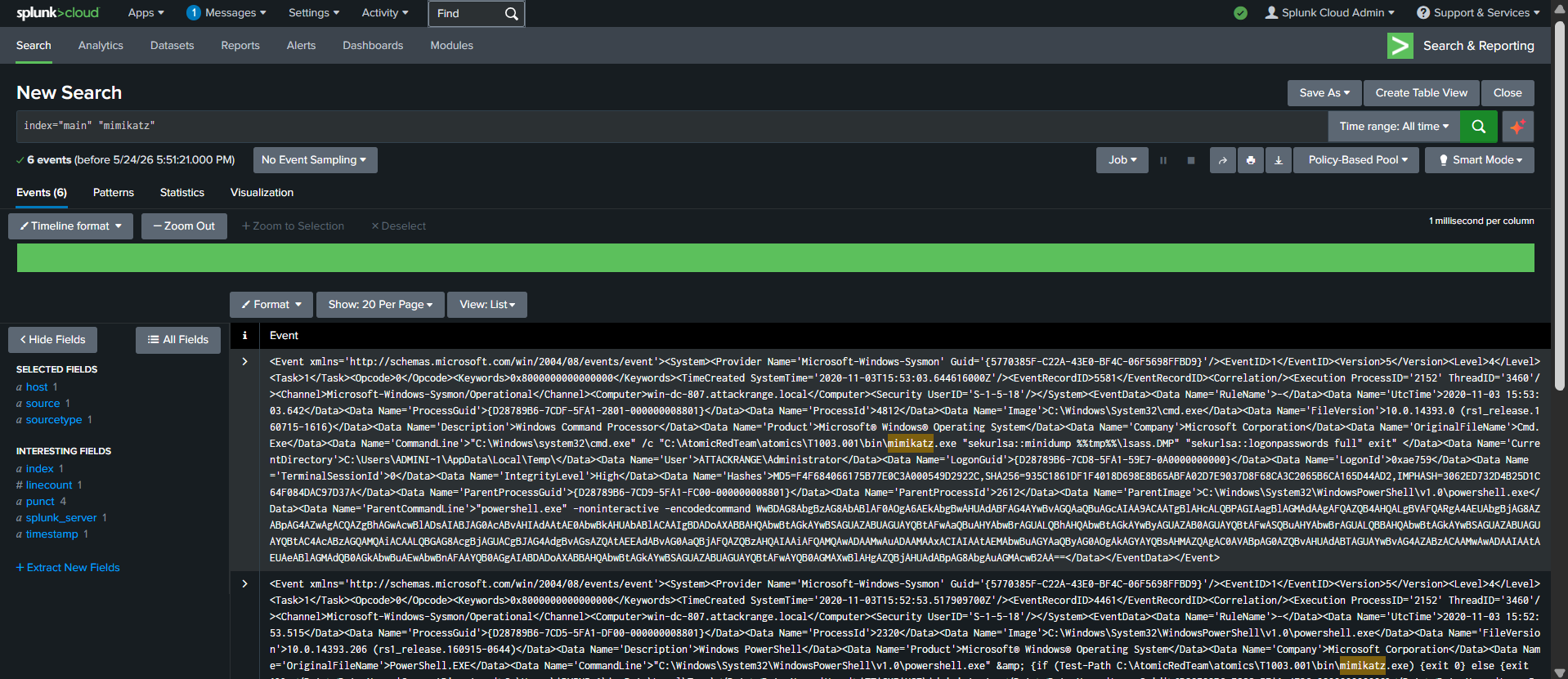
To verify the cloud instance successfully indexed the telemetry, a broad index search was conducted over the dataset.

*Broad search confirming successful data ingestion of the attack range log file into the default index.*
### Phase 2: Overcoming Unparsed Fields via Regex Extraction
The ingested data was stored in an XML database format nested inside a raw string, meaning fields like `EventID` or `SourceImage` were not automatically interactive.
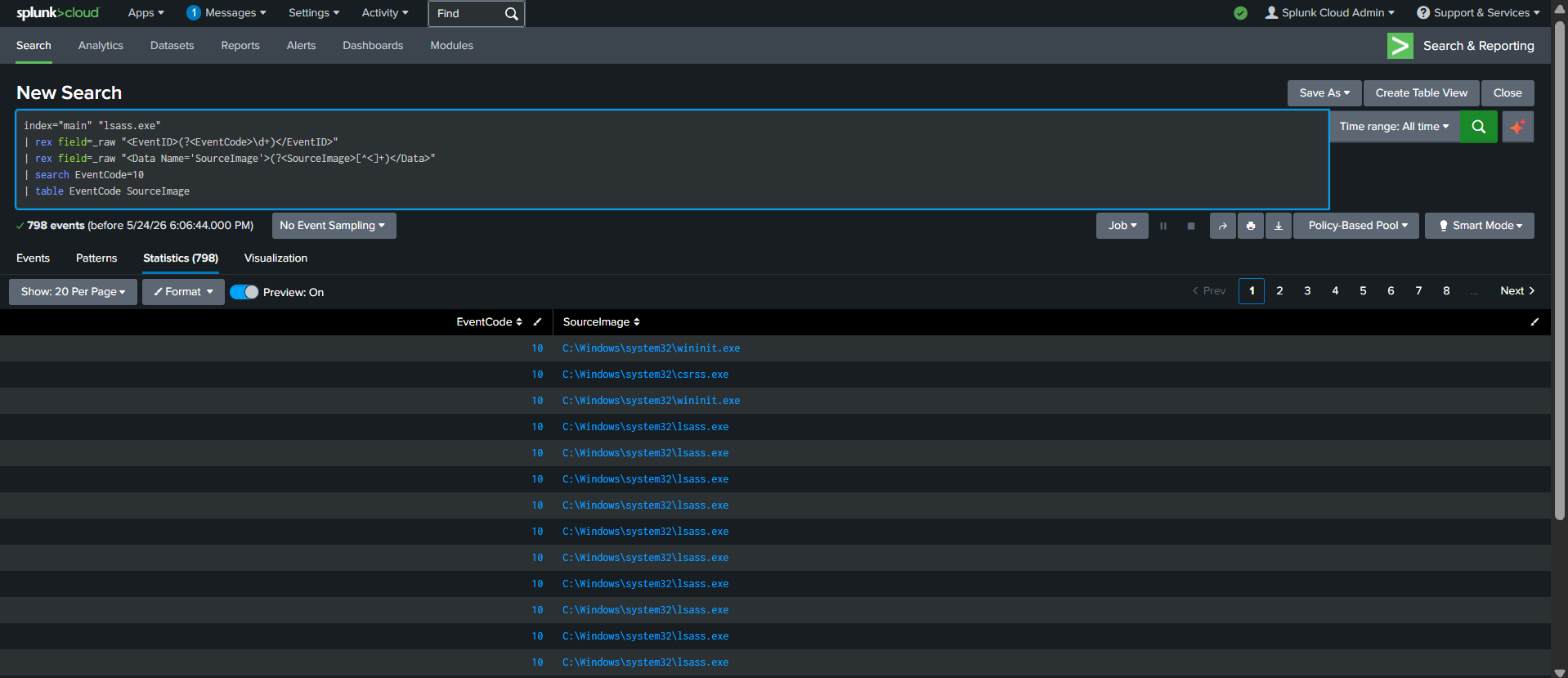
To solve this, I wrote a custom Splunk search query using regular expression extraction (`rex`) to isolate the Sysmon Event Codes and track process actions in real-time:
index="main" "lsass.exe"
| rex field=_raw "(?\d+) "
| rex field=_raw "(?[^<]+) "
| search EventCode=10
| table EventCode SourceImage

*Dynamically parsing the raw data feed into an organized table using regular expressions to reveal automated system activity like WmiPrvSE.exe.*
### Phase 3: Catching the Core Attack (Task Manager Abuse)
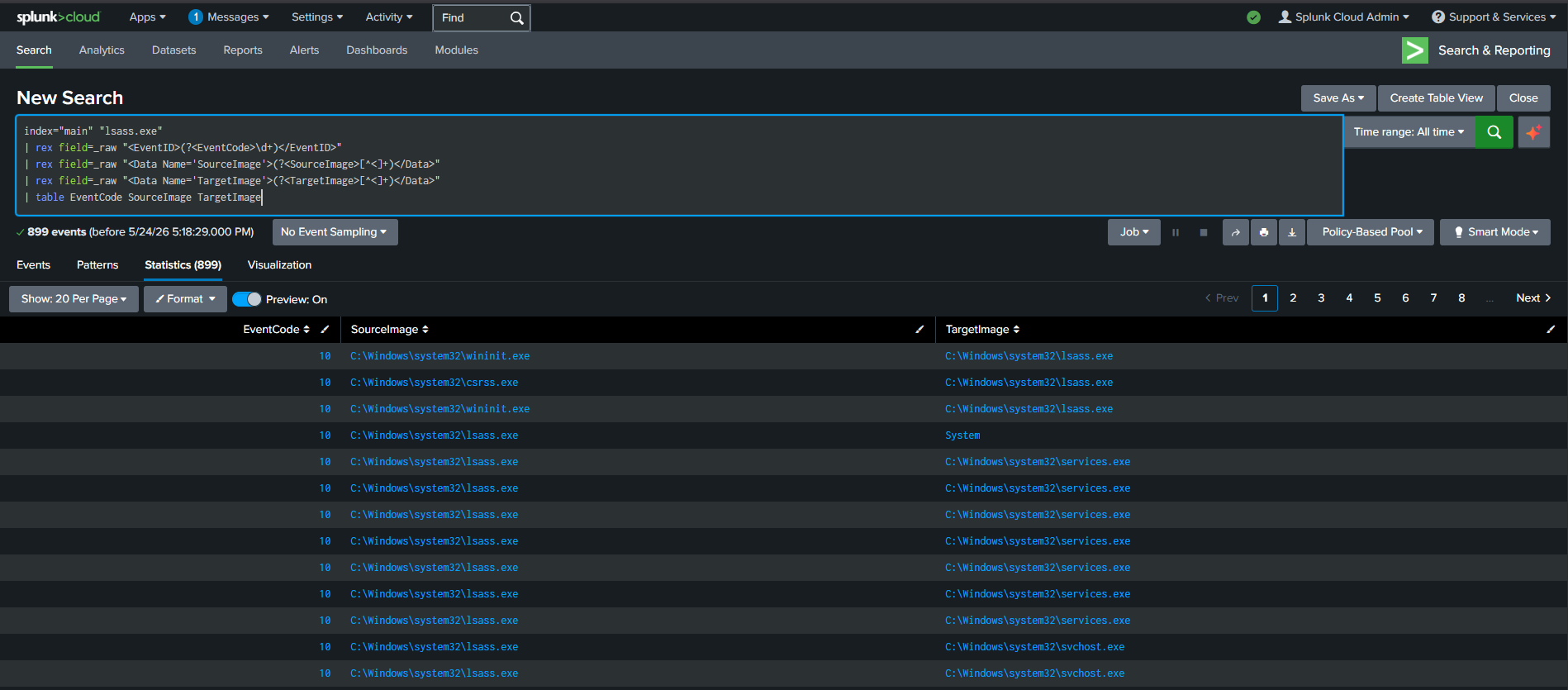
Adversaries frequently exploit trusted Microsoft binaries to bypass security controls. In this phase, the hunt targeted Sysmon Event ID 10 (Process Access) specifically looking at attempts to read the memory space of the Local Security Authority Subsystem Service (lsass.exe).
I executed the final refined hunting query:
index="main" "lsass.exe"
| rex field=_raw "(?\d+) "
| rex field=_raw "(?[^<]+) "
| rex field=_raw "(?[^<]+) "
| table EventCode SourceImage TargetImage

*Splunk explicitly isolates Sysmon Event ID 10 showing taskmgr.exe illegally opening a handle to read the memory space of lsass.exe to dump system hashes.*
## Troubleshooting & Engineering Breakthroughs
When building this project, several infrastructure and data-parsing hurdles were encountered. Below is the documentation of how these engineering challenges were resolved:
### 1. The Storage Constraint Pivot (Local VM Failure)
* **The Problem:** Attempting to build a traditional SOC lab locally using VirtualBox resulted in severe storage exhaustion. The virtual disk images (`.vdi` files) corrupted and shrunk to a baseline of 2 MB due to zero available laptop memory space, halting the deployment of local Windows sensors.
* **The Breakthrough:** Instead of abandoning the project, I pivoted the entire architecture to a **cloud-native model**. By spinning up a cloud-hosted Splunk instance, the heavy processing and multi-gigabyte storage demands were offloaded to cloud architecture, allowing the project to proceed using nothing but a standard web browser.
### 2. Overcoming Unparsed XML-in-JSON Schema Limits
* **The Problem:** Splunk Cloud's data ingestion wizard restricted default Windows Event log parsing templates (`XmlWinEventLog`) on manual text files for this instance. Uploading the dataset blindly caused Splunk to read the logs as unformatted, single-line text string blobs, breaking traditional field dropdown functionality (`EventCode`, `SourceImage`, etc.).
* **The Breakthrough:** Rather than relying on automated GUI wizards, I implemented runtime field definitions inside the search app using **Regular Expression Extractions (`rex`)**. By writing custom regex match patterns dynamically into the SPL pipeline, I forced the SIEM engine to slice into the raw string blocks and map out high-fidelity security data on the fly:
* Captured hidden event types using: `| rex field=_raw "(?\d+) "`
* Exposed malicious execution paths using: `| rex field=_raw "(?[^<]+) "`
This successfully bypassed the ingestion limitations and converted unorganized raw strings into interactive, actionable security tables.
## Key Takeaways & Mitigation
Defensive Visibility: While traditional antivirus programs often ignore Task Manager activity because it is a native Windows tool, Sysmon tracking (Event ID 10) catches memory tampering immediately.
SIEM Flexibility: Security analysts cannot always rely on pre-configured parsers. Knowing how to manipulate raw strings dynamically using SPL allows teams to investigate new or obscure log sources instantly during a live incident response.