Rolex-1905/aysal-shield
GitHub: Rolex-1905/aysal-shield
一个基于 OWASP ZAP 的 CI 原生动态应用安全测试平台,专为 Apache Tomcat 上的 Web 应用提供自动化漏洞扫描与安全加固检查。
Stars: 0 | Forks: 0
# 🛡️ Aysal Shield
### 企业级 Web 应用安全自动化平台
**v0.1.0** | 由 [Neeraj Mudunuru](https://www.linkedin.com/in/neeraj-mudunuru-79130a29a/) 开发
[](https://python.org)
[](https://zaproxy.org)
[](https://adoptium.net)
[](LICENSE)
[](https://github.com)

*一个可重复的、策略驱动的安全 pipeline —— 而不是一次性的扫描工具。*
## 什么是 Aysal Shield?
Aysal Shield 是一个 **CI 原生的应用安全自动化平台**,为运行在 Apache Tomcat 基础设施上的 Web 应用提供持续的安全保障。
它编排了完整的 **动态应用安全测试 (DAST)** 生命周期:
- ✅ 认证和未认证的爬取
- ✅ 通过 ZAP 覆盖 OWASP Top 10 攻击
- ✅ Apache Tomcat 加固基准
- ✅ 结果规范化和去重
- ✅ 多格式报告 (JSON, HTML, CSV)
- ✅ CI/CD pipeline 门控 (在 High/Critical 级别失败)
## 快速开始
### 前置条件
| 要求 | 版本 | 下载 |
|-------------|---------|----------|
| Python | 3.10+ | https://python.org |
| Java | 17+ | https://adoptium.net |
| OWASP ZAP | 2.17.0 | https://zaproxy.org/download |
| Git | 任意 | https://git-scm.com |
### Windows (Powershell)
```
git clone https://github.com/Rolex-1905/aysal-shield.git
cd aysal-shield
python -m venv venv
venv\Scripts\activate
pip install -r requirements.txt
$env:ZAP_HOME="C:\Program Files\ZAP\Zed Attack Proxy"
$env:TEST_USER="your_test_username"
$env:TEST_PASS="your_test_password"
python -m securitytool.cli --help
```
### Linux
```
git clone https://github.com/Rolex-1905/aysal-shield.git
cd aysal-shield
python3 -m venv venv
source venv/bin/activate
pip install -r requirements.txt
export ZAP_HOME="/path/to/ZAP_2.17.0"
export TEST_USER="your_test_username"
export TEST_PASS="your_test_password"
python -m securitytool.cli --help
```
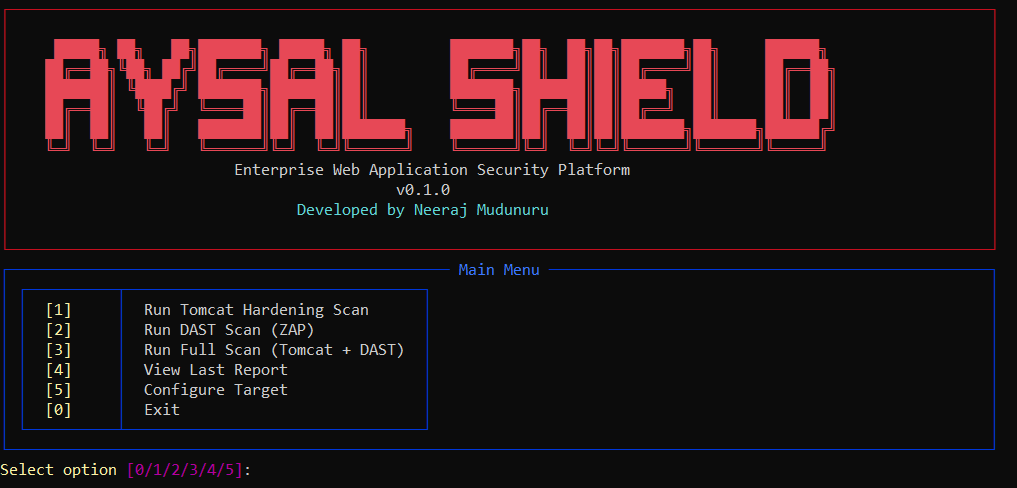
## CLI 预览
### 交互模式
```
python -m securitytool.cli
```
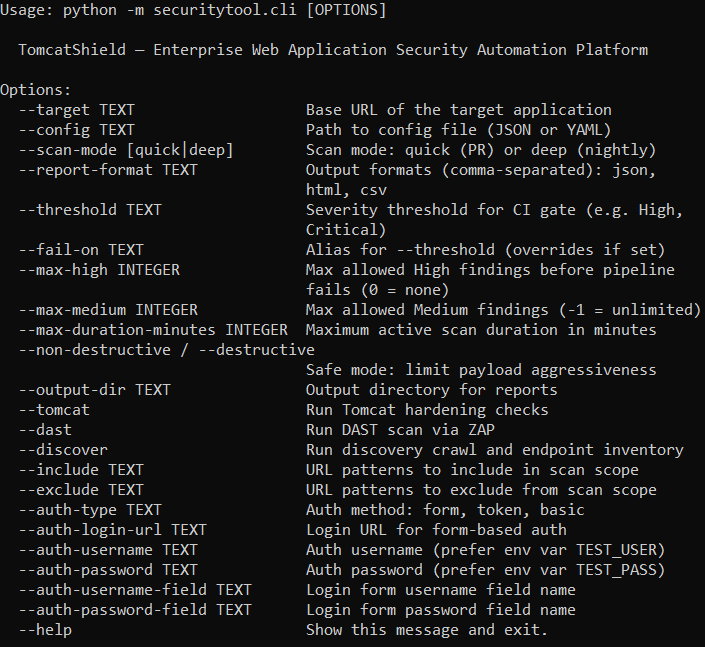
### 帮助输出
```
python -m securitytool.cli --help
```
## 运行扫描
### 仅 Tomcat 加固 *(不需要 ZAP)*
```
python -m securitytool.cli --target https://your-target.com --tomcat --output-dir artifacts
```
### DAST 扫描 — 快速 *(用于 PR 检查)*
```
python -m securitytool.cli `
--target https://your-target.com `
--dast `
--scan-mode quick `
--threshold High `
--output-dir artifacts
```
### DAST 扫描 — 深度 *(用于夜间运行)*
```
python -m securitytool.cli `
--target https://your-target.com `
--dast `
--scan-mode deep `
--threshold High `
--max-high 0 `
--max-medium 3 `
--output-dir artifacts
```
### 完整扫描 *(Tomcat + DAST + 发现)*
```
python -m securitytool.cli `
--target https://your-target.com `
--tomcat `
--dast `
--discover `
--output-dir artifacts
```
### 使用配置文件
```
python -m securitytool.cli --config configs/deep_scan.json --tomcat --dast
```
## CLI 参考
| 参数 | 描述 | 默认值 |
|------|-------------|---------|
| `--target` | 目标应用的 Base URL | — |
| `--config` | JSON/YAML 配置文件的路径 | — |
| `--scan-mode` | `quick` (PR 检查) 或 `deep` (夜间) | `quick` |
| `--threshold` | 导致 CI gate 失败的最低严重级别 | `High` |
| `--fail-on` | `--threshold` 的别名 | — |
| `--max-high` | 允许的最大 High 发现数量 (0 = 无) | `0` |
| `--max-medium` | 最大 Medium 发现数量 (-1 = 无限) | `-1` |
| `--max-duration-minutes` | ZAP 主动扫描时间限制 | `30` |
| `--non-destructive` | 安全模式 — 低风险 payload | `true` |
| `--output-dir` | 报告输出目录 | `artifacts` |
| `--report-format` | 逗号分隔: `json,html,csv` | `json,html,csv` |
| `--tomcat` | 运行 Tomcat 加固检查 | 关 |
| `--dast` | 通过 ZAP 运行 DAST 扫描 | 关 |
| `--discover` | 运行 endpoint 发现爬取 | 关 |
| `--include` | 包含在扫描范围内的 URL 模式 | — |
| `--exclude` | 从扫描范围中排除的 URL 模式 | — |
| `--auth-type` | 认证方法: `form`, `token`, `basic` | — |
| `--auth-login-url` | 用于表单认证的登录 URL | — |
| `--auth-username-field` | 登录表单的用户名字段名称 | `username` |
| `--auth-password-field` | 登录表单的密码字段名称 | `password` |
## 架构
Aysal Shield 是一个模块化的 Python CLI 平台。每个模块都可以独立测试和替换。
```
aysal-shield/
├── .github/
│ └── workflows/
│ └── security-scan.yml ← GitHub Actions pipeline
├── artifacts/ ← scan reports (git ignored, auto-created)
├── configs/
│ ├── dev.json ← quick scan config
│ └── deep_scan.json ← deep scan config
├── docs/
│ ├── images
│ │ ├── cli-help.png
│ │ ├── cli-menu.png
│ │ └── logo.png
│ ├── ARCHITECTURE.md
│ ├── AUTH_SETUP.md
│ ├── CONFIG_REFERENCE.md
│ ├── EXTENSIBILITY.md
│ ├── KNOWN_LIMITATIONS.md
│ ├── RUNBOOK.md
│ └── THREAT_MODEL.md
├── securitytool/
│ ├── ci/
│ │ └── thresholds.py ← CI gate: fail conditions & exit codes
│ ├── dast/
│ │ ├── parsers.py ← normalize ZAP output → internal schema
│ │ └── zaprunner.py ← ZAP daemon lifecycle & scan execution
│ ├── discovery/
│ │ ├── crawler.py ← unauthenticated + authenticated crawl
│ │ └── inventory.py ← endpoint inventory builder
│ ├── reporting/
│ │ ├── csvexport.py ← management summary CSV
│ │ ├── htmlreport.py ← human-readable HTML report
│ │ └── jsonreport.py ← machine-readable JSON report
│ ├── tomcat/
│ │ ├── baselinecheck.py ← default apps, TRACE, TLS, banners
│ │ ├── headerscheck.py ← HTTP security headers
│ │ └── webxmlcheck.py ← session timeout, security constraints
│ │
│ ├── cli.py ← entry point & argument parsing
│ ├── config.py ← config load/validate (YAML/JSON)
│ ├── interactive.py ← interactive menu
│ └── utils.py ← PII redaction, logging utilities
├── .gitignore
├── .pre-commit-config.yml
├── azure-pipelines.yml
├── gitlab-ci.yml
├── LICENSE
├── pyproject.toml
├── README.md
└── requirements.txt
```
### 数据流
```
flowchart TD
A([Target URL]) --> B[Discovery Crawler]
B --> C[DAST Runner - ZAP]
C --> D[Parser & Normalizer - Dedup + Severity Mapping]
D --> E[Reporting - JSON / HTML / CSV]
F[Tomcat Hardening Scanner] --> E
E --> G[CI/CD Gate - Pass / Fail on Threshold]
```
## 报告
所有报告均写入 `artifacts/` 目录(在运行时自动创建):
| 文件 | 格式 | 目标受众 |
|------|--------|----------|
| `security_report_.html` | HTML | 开发人员、安全工程师 |
| `security_report_.json` | JSON | SIEM、下游工具 |
| `security_report_.csv` | 包含执行摘要的 CSV | 管理层、合规人员 |
| `discovery_inventory_.json` | JSON | 安全工程师 |
### 严重级别
| 级别 | 含义 | CI Gate 操作 |
|-------|---------|----------------|
| 🔴 Critical | 确认的高危漏洞 (SQLi, RCE) | 立即失败 |
| 🟠 High | 高风险发现 | pipeline 失败 |
| 🟡 Medium | 中等风险发现 | 警告 (可配置) |
| 🔵 Low | 低风险发现 | 仅供参考 |
| ⚪ Informational | 无直接风险 | 无操作 |
## 测试范围
### DAST 覆盖范围 (通过 OWASP ZAP)
- 跨站脚本攻击 (XSS)
- SQL 注入 (SQLi)
- 路径遍历 (Path Traversal)
- 服务端请求伪造 (SSRF)
- 开放重定向 (Open Redirect)
- 敏感信息泄露
### Tomcat 加固检查
- HTTP 安全标头 (CSP, HSTS, X-Frame-Options, X-Content-Type-Options, Referrer-Policy)
- 默认应用暴露 (`/manager`, `/host-manager`)
- 服务器 Banner 隐藏
- 禁用 TRACE 方法
- TLS 版本和密码套件验证
- 会话 Cookie 标志 (HttpOnly, Secure)
- 安全约束和传输保证
- 错误页面信息泄露
## CI/CD 集成
### GitHub Actions
pipeline 会在每次 PR 时自动运行(快速扫描),并在夜间的 main 分支上运行(深度扫描)。
```
# .github/workflows/security-scan.yml
on:
push:
branches: [main]
pull_request:
schedule:
- cron: '0 2 * * *' # nightly at 2AM
```
Pipeline 行为:
- **PR** → 快速扫描,遇到任何 High/Critical 发现即失败
- **Nightly** → 深度扫描,完整的 OWASP 策略,上传 artifact
### GitLab CI
```
# 包含在 repo 根目录中的 gitlab-ci.yml
```
### Azure DevOps
```
# 包含在 repo 根目录中的 azure-pipelines.yml
```
## 安全与合规
| 规则 | 执行方式 |
|------|-------------|
| 仅扫描授权环境 | 配置级别的范围强制限制 |
| 绝不使用生产环境凭证 | Pre-commit hook 拦截明文密码 |
| 通过环境变量传递密钥 | `${TEST_USER}` / `${TEST_PASS}` 替换 |
| 所有报告均进行 PII 脱敏 | 对所有输出应用 `redact_pii()` |
| Critical/High 发现 → 安全渠道 | 阈值门控 + 非零退出码 |
| 报告为内部机密 | 适用访问控制 |
## 文档
| 文档 | 描述 |
|----------|-------------|
| [ARCHITECTURE.md](docs/ARCHITECTURE.md) | 模块架构、数据流和接口契约 |
| [AUTH_SETUP.md](docs/AUTH_SETUP.md) | 认证设置 (form, token, basic) |
| [CONFIG_REFERENCE.md](docs/CONFIG_REFERENCE.md) | 所有配置参数、类型和默认值 |
| [EXTENSIBILITY.md](docs/EXTENSIBILITY.md) | 如何添加新的检查、解析器和格式 |
| [KNOWN_LIMITATIONS.md](docs/KNOWN_LIMITATIONS.md) | 已知限制和解决方法 |
| [RUNBOOK.md](docs/RUNBOOK.md) | 操作手册 — 扫描、故障排除 |
| [THREAT_MODEL.md](docs/THREAT_MODEL.md) | 威胁模型 — 资产、入口点、风险、缓解措施 |
## 常见错误
| 错误 | 原因 | 修复方法 |
|-------|-------|-----|
| `ZAP not found` | 未设置 ZAP_HOME | 设置 `$env:ZAP_HOME` (Windows) 或 `export ZAP_HOME` (Linux) |
| `ZAP not ready` (重试 24 次后) | 过期的 `.homelock` 文件 | 从你的 ZAP 主目录中删除 `.homelock` |
| `Environment variable not set` | 缺少 TEST_USER 或 TEST_PASS | 在运行任何扫描之前设置环境变量 |
| `Got unexpected extra argument` | URL 中包含空格 | 将 URL 用引号括起来:`--target "https://..."` |
| `ModuleNotFoundError` | 未激活 venv | 运行 `venv\Scripts\activate` (Windows) 或 `source venv/bin/activate` (Linux) |
| `Spider stuck at 0%` | 无法访问目标 | 检查到目标网络连接是否正常 |
## 范围之外
除非明确配置,否则 Aysal Shield **不**涵盖以下内容:
- 完整的静态应用安全测试 (SAST)
- 恶意软件和二进制文件扫描
- 基础设施或网络渗透测试
- 破坏性或影响可用性的测试
- 生产环境扫描 *(需要单独的书面授权)*
**Aysal Shield** — 企业级 Web 应用安全自动化平台
v0.1.0 | 由 [Neeraj Mudunuru](https://www.linkedin.com/in/neeraj-mudunuru-79130a29a/) 开发
标签:CISA项目, DAST, JS文件枚举, OWASP ZAP, Python, Web安全, 安全测试, 恶意软件分析, 攻击性安全, 无后门, 蓝队分析, 逆向工具