Prathameshsci369/ThreatPipe-v2-Autonomous-SIFT-IR-Agent-with-MCP
GitHub: Prathameshsci369/ThreatPipe-v2-Autonomous-SIFT-IR-Agent-with-MCP
一款基于 LangGraph 和 Mistral 的自主事件响应代理,在 SIFT 环境下自动完成日志分流、取证调查和攻击行为预测。
Stars: 0 | Forks: 0
# 🛡️ ThreatPipe v2:具备 MCP 的自主 SIFT IR Agent











AI 驱动的攻击者可以在不到 8 分钟内从初始访问升级到完全控制整个域。与此同时,人类事件响应人员仍在手动查阅命令行参数。**ThreatPipe v2 旨在消除这一差距。**
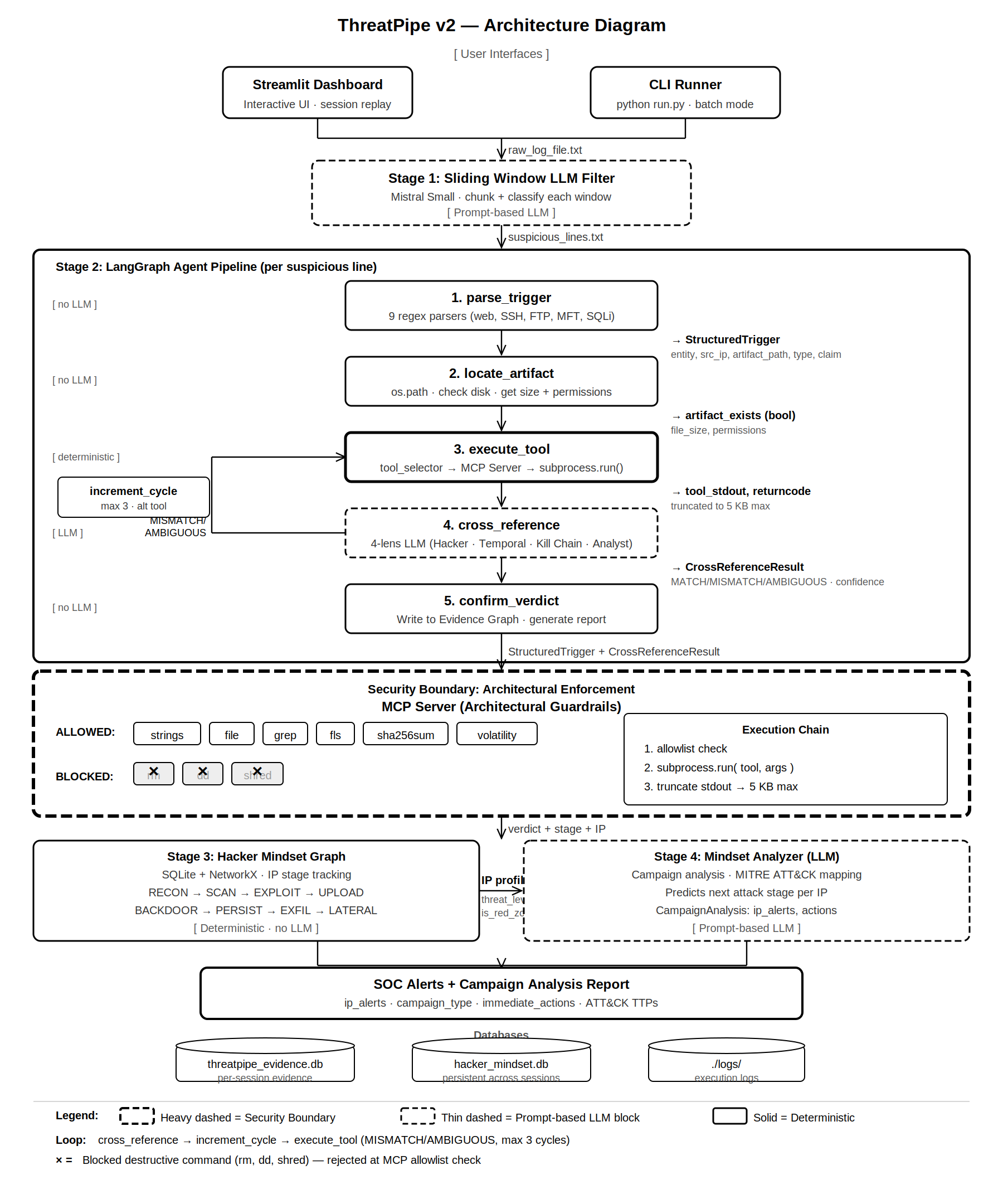
ThreatPipe v2 是一个自主的、原生支持 SIFT 的事件响应 agent,它不仅能建议命令,还能以机器速度安全地执行取证工作流,且不会产生幻觉或破坏证据。它分为四个阶段运行:
1. **LLM 日志分流:** 使用滑动窗口 LLM,从海量嘈杂数据中瞬间识别出可疑日志。
2. **自主 SIFT 调查:** 解析日志、在磁盘上定位文件,并通过定制的 MCP server 执行真实的取证工具(`strings`、`file`、`grep`、`fls`)。
3. **四重维度交叉引用与自我纠错:** 强制 LLM 分别从黑客(Hacker)、时间(Temporal)、攻击杀伤链(Kill Chain)和分析人员(Analyst)四个视角分析证据。如果置信度较低,它会自动使用备用工具进行重试。
4. **持久化攻击者追踪:** 将攻击者行为映射到持久化的“黑客思维图谱”中,计算风险评分并预测他们下一步的 MITRE ATT&CK 动作。
## 📐 架构图
## ✨ 核心特性
- 🧠 **LLM 引导的分流:** 使用 Mistral 从海量嘈杂数据中瞬间识别出可疑日志。
- 🔬 **真实的 SIFT 工具执行:** 通过子进程实际运行标准取证工具(`strings`、`file`、`grep`、`fls`)。
- 🛑 **MCP 架构护栏:** 得益于严格的 MCP 工具白名单,从架构层面上完全杜绝了 agent 执行破坏性命令(`rm`、`dd`)的可能。
- 🔄 **自我纠错循环:** 如果置信度较低,agent 会自动使用替代的 SIFT 工具进行重试(最多 3 个循环)。
- 👁️ **四重维度交叉引用:** 在做出判定之前,强制 LLM 从黑客、时间、攻击杀伤链和分析人员的视角对证据进行多维分析。
- 🕸️ **持久化黑客思维图谱:** 跨会话追踪攻击者 IP,计算风险评分,并预测他们下一步的 MITRE ATT&CK 动作。
- 📊 **交互式 SOC 仪表盘:** 提供 Streamlit UI,用于上传日志、查看判定结果以及探索攻击图谱。
## 🐧 系统要求
**✅ 推荐操作系统:Debian / Ubuntu(原生 SIFT 环境)**
本项目专为在 SANS SIFT Workstation 上运行而设计,后者基于 Ubuntu(属于 Debian 系)构建。只要 SIFT 取证工具在系统的 `PATH` 中可用,它在任何 Debian/Ubuntu 系统上都能流畅运行。
### 前置条件
- Python 3.10+
- Mistral API Key([在此获取](https://console.mistral.ai/))
- Git
## 🚀 快速开始(5 分钟)
### 1. 克隆代码库
```
git clone https://github.com/Prathameshsci369/ThreatPipe-v2-Autonomous-SIFT-IR-Agent-with-MCP.git
cd ThreatPipe-v2-Autonomous-SIFT-IR-Agent-with-MCP/ThreatPipe-v2/
```
### 2. 运行一键安装脚本
此脚本将创建虚拟环境、安装 Python 依赖项、在磁盘上生成取证测试文件,并创建测试用的攻击日志。
```
chmod +x setup.sh
./setup.sh
```
### 3. 设置你的 API Key
```
export MISTRAL_API_KEY='your-mistral-api-key-here'
```
### 4. 启动仪表盘 📊
```
source venv/bin/activate
streamlit run dashboard.py
```
在浏览器中打开 `http://localhost:8501`,上传生成的 `realistic_attack.log`,然后点击 **🚀 Run Analysis**!
## 🛠️ 手动设置(如果 `setup.sh` 失败)
如果一键脚本执行失败,请按照以下步骤手动操作:
```
# 创建并激活虚拟环境
python3 -m venv venv
source venv/bin/activate
# 安装依赖
pip install --upgrade pip
pip install -r requirements.txt
# 在磁盘上创建取证测试文件(The Crime Scene)
python3 setup_test_evidence.py
# 生成攻击日志文件(The Camera Footage)
python3 generate_test_logs.py --size medium
# 设置你的 API key
export MISTRAL_API_KEY='your-mistral-api-key-here'
# 运行 agent!
streamlit run dashboard.py
```
## 💻 CLI 与 MCP Server 使用方法
### 运行 CLI 流水线
要在终端中直接运行完整的流水线:
```
source venv/bin/activate
export MISTRAL_API_KEY='your-mistral-api-key-here'
python stream_run.py realistic_attack.log
```
### 运行 MCP Server 🌐
将 ThreatPipe 作为 REST API 暴露给外部工具(如 Claude Desktop 或 curl):
```
source venv/bin/activate
uvicorn mcp_server:app --host 0.0.0.0 --port 9000 --reload
```
**测试 MCP Server:**
```
curl -X POST http://localhost:9000/investigate \
-H "Content-Type: application/json" \
-d '{"log_line": "192.168.1.55 - - [16/Apr/2026:03:14:25] \"GET /uploads/shell.php?cmd=whoami HTTP/1.1\" 200"}'
```
### 🧪 生成不同的测试数据
```
# 小数据集(快速测试,约30行)
python generate_test_logs.py --size small
# 大数据集(测试 LLM context chunking,约3000行)
python generate_test_logs.py --size large
# 定向测试(仅限 Web Shells 和 SQLi 攻击)
python generate_test_logs.py --attacks webshell,sqli --output sqli_test.log
```
## 🔒 安全性与 MCP 护栏
在事件响应中,证据的完整性至关重要。ThreatPipe 通过**架构级护栏**来强制执行安全性,而不仅仅依赖于提示词指令。
### MCP 工具层如何保护证据
1. **🛑 工具白名单:** agent 只能调用只读的取证工具(`strings`、`file`、`grep`、`fls`、`sha256sum`、`volatility`)。破坏性命令(`rm`、`dd`、`shred`、`mkfs`)在架构上根本无法执行,因为它们未被列入 `ALLOWED_SIFT_TOOLS` 字典中。
2. **✂️ 输出截断:** SIFT 工具可能会输出数兆字节的文本,导致 LLM 的上下文窗口崩溃。MCP 层会在将输出结果返回给 agent 之前将其截断为 5KB。
3. **🛡️ 路径校验:** 在执行前验证工件路径,防止路径遍历攻击。
## 📊 准确率与数据集报告
我们对事件响应的准确性和证据完整性非常重视。ThreatPipe 的评估基于一个正式标注的真实基准数据集,涵盖了 **4 次攻击活动**和 **6 种日志格式**。
| 指标 | 数值 |
|---|---|
| 分析的总行数 | 298 |
| 第一阶段判定的可疑日志 | 45 |
| Agent 总循环次数 | 96 (平均 2.1次/日志) |
| LLM 总消耗成本 | $0.0209 |
| 总运行时间 | 316.1 秒 |
| 误报 | **0** |
| 证据损坏 | **0** |
| **Macro F1 分数** | **~96.0%** |
| 类别 | Precision | Recall | F1 |
|---|---|---|---|
| MALICIOUS | 100% | 94.4% | 97.1% |
| SUSPICIOUS | 100% | 100% | 100% |
| BENIGN | 83.3% | 100% | 90.9% |
| **Macro Avg** | **94.4%** | **98.1%** | **96.0%** |
- 📄 **[准确率报告](ThreatPipe-v2/accuracy_report.md):** 详细的发现结果准确率自评、幻觉检查、证据完整性测试以及迭代 Bug 修复记录。
- 📄 **[数据集文档](ThreatPipe-v2/dataset_documentation.md):** 生成的测试数据集的真实基准文档,涵盖 4 次攻击活动和 6 种日志格式。
- 📊 **[真实基准 Excel 报告](ThreatPipe-v2/ThreatPipe_v2_Ground_Truth.xlsx):** 正式标注的数据集,包含单项发现判定对比、四重维度记录、自我纠错循环次数以及完整的 Precision/Recall/F1 仪表盘。
## 📁 项目结构
```
ThreatPipe-v2/
├── agent.py # 🧠 LangGraph 5-node pipeline + self-correction loop
├── mcp_tools.py # 🛑 MCP Tool Layer (architectural guardrails)
├── mcp_server.py # 🌐 FastAPI MCP Server (REST endpoints)
├── dashboard.py # 📊 Streamlit SOC Dashboard
├── stream_run.py # ⌨️ CLI pipeline orchestrator
├── log_stream.py # 🔍 Stage 1: LLM log classifier
├── trigger_parser.py # ⚙️ Raw log → StructuredTrigger (9 formats)
├── tool_selector.py # 🛠️ Deterministic SIFT tool selection
├── stage_classifier.py # 🎯 Attack stage classification (MITRE-aligned)
├── hacker_mindset_graph.py # 🕸️ Persistent attacker behavior graph
├── mindset_analyzer.py # 🚨 LLM campaign analysis + SOC alerts
├── evidence_graph.py # 🔗 Per-session forensic graph (SQLite + NetworkX)
├── schemas.py # 📋 Pydantic models + LangGraph state
├── config.py # ⚙️ YAML config + LLM factory
├── config.yaml # 📄 Configuration values
├── logger.py # 📝 Structured logging system
├── setup_test_evidence.py # 🏗️ Creates real forensic files on disk
├── generate_test_logs.py # 📝 Generates realistic attack logs
├── setup.sh # 🚀 One-click setup script
├── requirements.txt # 📦 Python dependencies
├── LICENSE # ⚖️ MIT License
├── architecture_diagram.md # 📐 Architecture + security boundaries
├── dataset_documentation.md # 📊 Dataset details
├── accuracy_report.md # 🎯 Accuracy self-assessment
└── ThreatPipe_v2_Ground_Truth.xlsx # 📊 Formal ground truth + F1 dashboard
```
## 📜 许可证
本项目基于 MIT 许可证授权 - 有关详细信息,请参阅 [LICENSE](LICENSE) 文件。
用 ❤️ 为 FIND EVIL! Hackathon 打造
标签:AV绕过, FastAPI, Kubernetes, LangGraph, MCP, SIFT, Streamlit, 人工智能, 库, 应急响应, 数字取证, 特权检测, 用户模式Hook绕过, 自动化脚本, 访问控制, 逆向工具