joeseesun/qiaomu-music-player-web
GitHub: joeseesun/qiaomu-music-player-web
一款自托管的 AI 音乐网页电台播放器,前台提供播放与歌词动效,后台支持上传、编辑、试听和发布管理。
Stars: 11 | Forks: 9
# Qiaomu Music Player Web
[](https://github.com/joeseesun/qiaomu-music-player-web/stargazers)
[](https://github.com/joeseesun/qiaomu-music-player-web/forks)
[](https://github.com/joeseesun/qiaomu-music-player-web/issues)
[](https://github.com/joeseesun/qiaomu-music-player-web/commits/main)
[](LICENSE)
[](https://vercel.com/new/clone?repository-url=https://github.com/joeseesun/qiaomu-music-player-web)
**[中文](#中文) | [English](#english)**
## 中文
你用 Suno、Udio 或其他 AI 音乐工具生成了一堆歌,最后常常散落在下载目录、聊天记录和临时脚本里。
Qiaomu Music Player Web 把它们放进一个可以自托管的网页电台:前台负责播放、队列、歌词和视觉动效,后台负责上传、编辑、试听、发布和下架。
### 核心功能
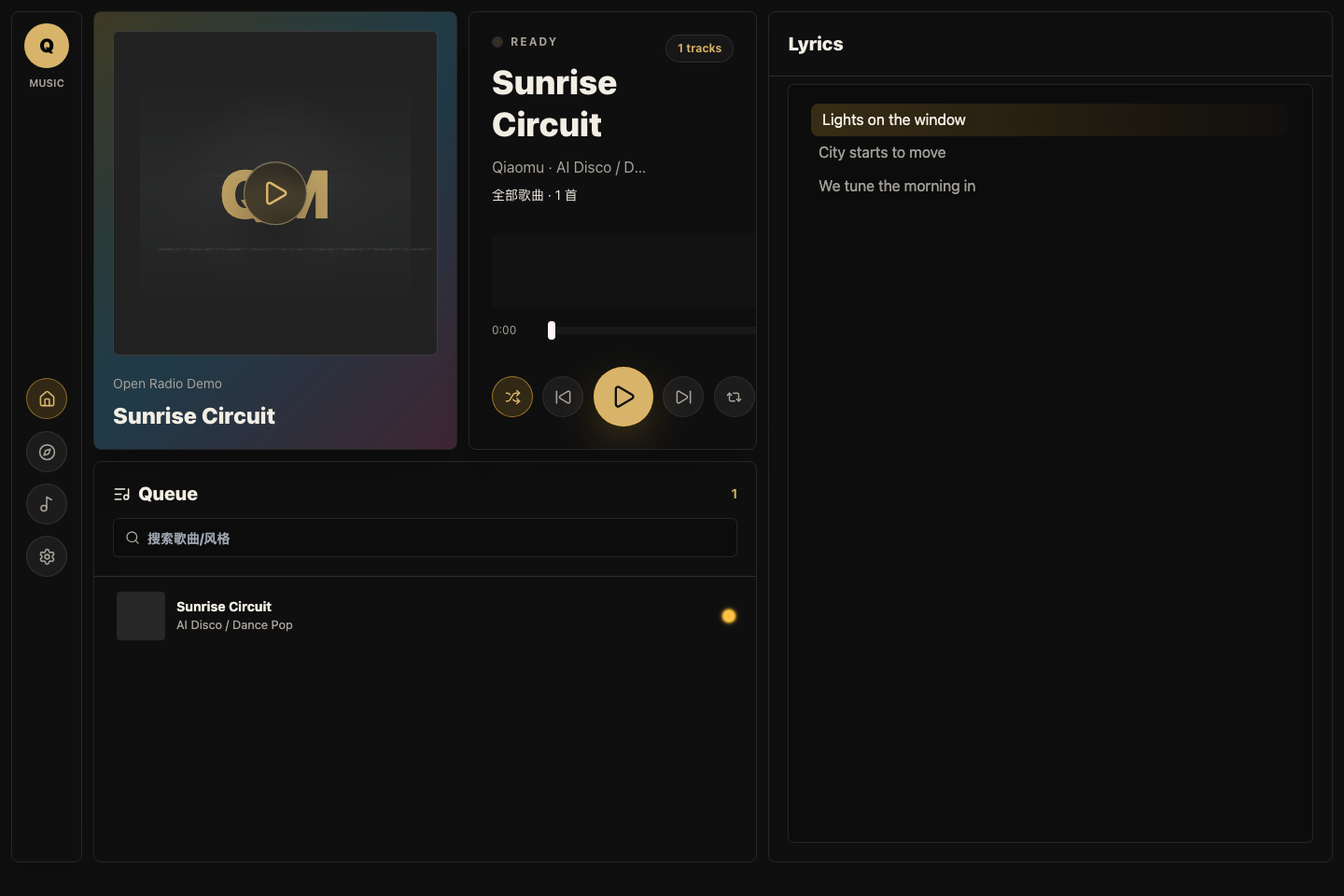
- 电台前台:播放队列、封面、歌词滚动、主题配色和声纹动效。
- 后台曲库:上传音频、封面、歌词和元数据。
- 草稿试听:后台未发布歌曲也可以试听,不影响前台电台。
- 发布控制:一键发布或取消发布,并给出明确反馈。
- 本地存储:音频在 `data/music`,封面在 `data/covers`,元数据在 `data/tracks.json`。
- 自托管友好:Node 服务、Docker Compose 和静态前端构建都在仓库里。
### 快速开始
前置条件:
- [ ] 安装 Node.js 20 或更高版本:`node --version`
- [ ] 安装 npm:`npm --version`
- [ ] 准备一个后台密码,设置为 `ADMIN_PASSWORD`
本地运行:
npm install
ADMIN_PASSWORD="$(openssl rand -base64 24)" npm start
开发模式:
npm install
ADMIN_PASSWORD=replace-with-local-password npm run dev:server
npm run dev
打开 `http://127.0.0.1:5173`。点击设置里的后台入口,用你设置的 `ADMIN_PASSWORD` 登录。
### Docker 部署
export ADMIN_PASSWORD="$(openssl rand -base64 24)"
export SESSION_SECRET="$(openssl rand -base64 32)"
docker compose up -d --build
默认服务监听 `127.0.0.1:3068`。如果你要公开到互联网,建议放在 Caddy、Nginx 或 Cloudflare Tunnel 后面,并启用 HTTPS。
### 环境变量
复制 `.env.example` 作为本地参考,但不要提交真实 `.env`。
| 变量 | 必填 | 说明 |
| --- | --- | --- |
| `ADMIN_PASSWORD` | 是 | 后台登录密码,也用于 legacy upload token。 |
| `SESSION_SECRET` | 否 | Cookie 签名密钥。生产环境建议显式设置。 |
| `PORT` | 否 | HTTP 端口,默认 `3068`。 |
| `DATA_DIR` | 否 | 数据目录,默认 `./data`。 |
| `MAX_UPLOAD_BYTES` | 否 | 最大上传体积,默认 `120MB`。 |
### 截图更新
README 截图使用模拟曲库生成,不会读取你的真实歌曲数据。
npm run dev
SCREENSHOT_URL=http://127.0.0.1:5173 npm run capture:screenshots
输出文件在 `docs/assets/product-screenshot.png`。
### 数据和隐私
公开仓库不会包含上传的歌曲、封面、真实曲库、`.env`、`suno-jobs/` 或 `cover-redesigns/` 生成任务目录。
默认 `.gitignore` 已排除:
- `data/music/*`
- `data/covers/*`
- `data/tracks.json`
- `.env` 和 `.env.*`
- `suno-jobs/`
- `cover-redesigns/`
### Legacy Upload API
旧脚本仍可用:
curl -X PUT \
-H "content-type: audio/mpeg" \
-H "x-upload-token: $ADMIN_PASSWORD" \
--data-binary @song.mp3 \
"http://127.0.0.1:3068/api/upload?title=Demo&artist=Qiaomu"
新项目建议优先用后台页面上传。
### Troubleshooting
| 问题 | 解决方式 |
| --- | --- |
| 登录返回 `admin_not_configured` | 启动服务时没有设置 `ADMIN_PASSWORD`。重新设置环境变量后重启。 |
| 上传后前台看不到歌曲 | 后台确认歌曲处于“已发布”;未发布歌曲只在后台可见。 |
| 音频无法播放 | 检查文件类型是否为 MP3、WAV、M4A、AAC、FLAC 或 OGG,并确认反向代理支持 Range 请求。 |
| Docker 启动失败 | `docker compose` 会要求 `ADMIN_PASSWORD`,请先 `export ADMIN_PASSWORD=...`。 |
## English
AI-generated songs often end up scattered across downloads, chat logs, and one-off scripts.
Qiaomu Music Player Web turns that pile into a self-hosted web radio: a public player for listening, queueing, lyrics, and visual polish, plus an admin shelf for upload, metadata editing, preview, publishing, and unpublishing.
### Features
- Public radio UI with queue, lyrics, cover art, themes, and audio-reactive visuals.
- Admin library for audio, cover art, lyrics, and metadata uploads.
- Draft preview in admin, even when a track is not published.
- Explicit publish and unpublish actions with visible feedback.
- Local filesystem storage for music, covers, and metadata.
- Node server, Docker Compose, and Vite frontend in one small repo.
### Quick Start
Prerequisites:
- [ ] Node.js 20 or newer: `node --version`
- [ ] npm: `npm --version`
- [ ] A strong admin password in `ADMIN_PASSWORD`
Run locally:
npm install
ADMIN_PASSWORD="$(openssl rand -base64 24)" npm start
Development mode:
npm install
ADMIN_PASSWORD=replace-with-local-password npm run dev:server
npm run dev
Open `http://127.0.0.1:5173`, go to settings, then open the admin panel.
### Docker
export ADMIN_PASSWORD="$(openssl rand -base64 24)"
export SESSION_SECRET="$(openssl rand -base64 32)"
docker compose up -d --build
The default bind address is `127.0.0.1:3068`. Put it behind HTTPS before exposing it publicly.
### Environment
Use `.env.example` as a template. Never commit real `.env` files.
| Variable | Required | Notes |
| --- | --- | --- |
| `ADMIN_PASSWORD` | Yes | Admin login password and legacy upload token. |
| `SESSION_SECRET` | No | Cookie signing secret. Recommended in production. |
| `PORT` | No | HTTP port, defaults to `3068`. |
| `DATA_DIR` | No | Data directory, defaults to `./data`. |
| `MAX_UPLOAD_BYTES` | No | Upload limit, defaults to `120MB`. |
### Screenshot
The README screenshot is generated with mocked demo tracks, so it does not read private music data.
npm run dev
SCREENSHOT_URL=http://127.0.0.1:5173 npm run capture:screenshots
### Privacy Notes
The public repository excludes uploaded audio, covers, real metadata, `.env` files, and generated Suno job folders.
### Troubleshooting
| Problem | Fix |
| --- | --- |
| Login returns `admin_not_configured` | Start the server with `ADMIN_PASSWORD` set. |
| Uploaded track does not appear in radio | Publish it from the admin library. Drafts are admin-only. |
| Audio does not play | Check the file type and make sure your proxy supports Range requests. |
| Docker refuses to start | Export `ADMIN_PASSWORD` before running `docker compose up`. |
### Credits
Built with React, Vite, Tailwind CSS, Lucide React, and `@nafr/echo-ui`.
标签:AI音乐, GNU通用公共许可证, MITM代理, Node.js, 后台管理, 安全监控, 版权保护, 自动化攻击, 自托管, 音乐播放器