revolutedigital/haylou-s30-pro-windows
GitHub: revolutedigital/haylou-s30-pro-windows
通过逆向工程 BLE 协议实现的 Windows 桌面应用,让用户无需手机即可在 PC 上完全控制 Haylou S30 Pro 耳机的降噪、游戏模式、电量等功能,并支持基于上下文的智能自动切换。
Stars: 2 | Forks: 1
# Haylou S30 Pro — Windows 桌面应用 🎧
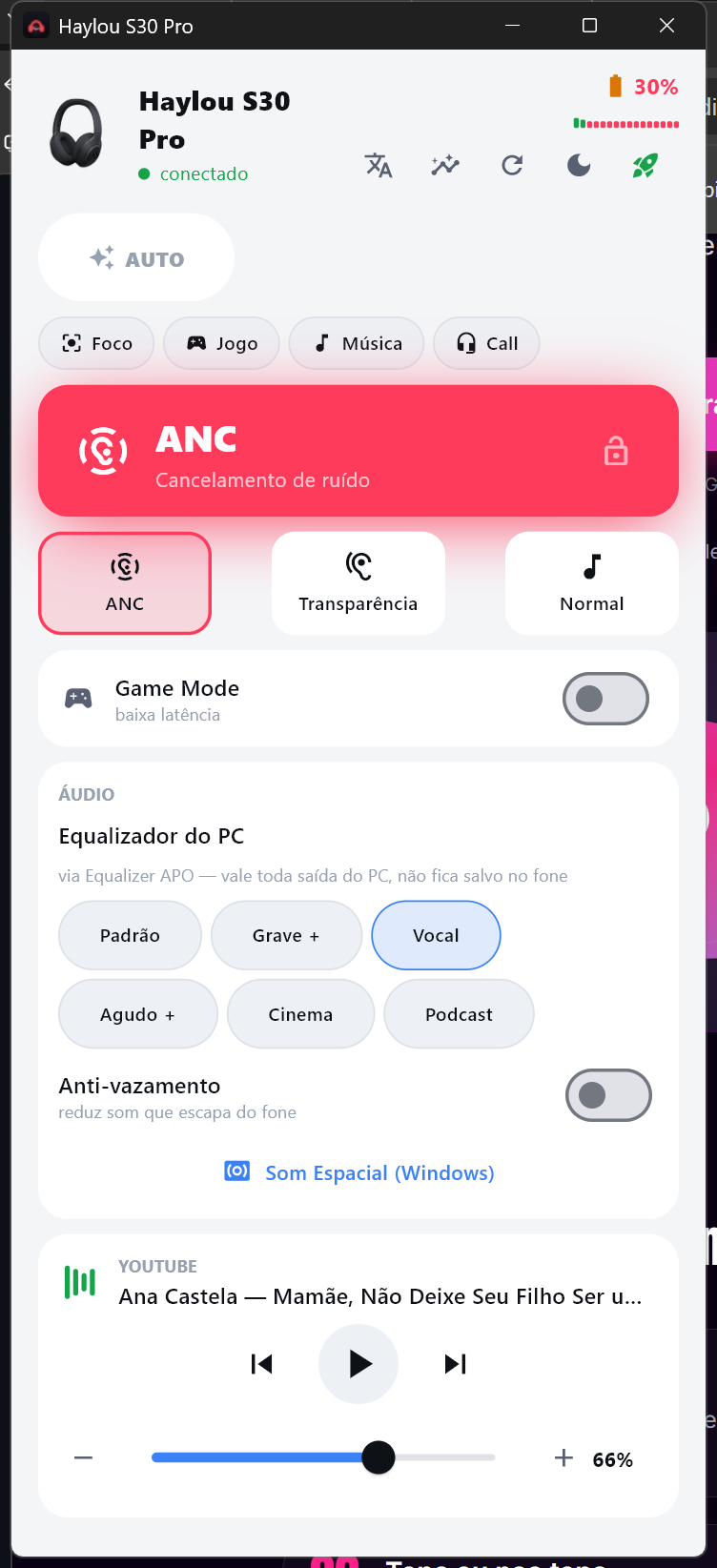
**直接在 Windows 上控制你的 Haylou S30 Pro 的 ANC、通透模式、Game Mode 和防漏音 —— 无需手机,无需移动应用。**
智能自动切换、场景模式、软件 EQ 和媒体控制,尽在一个窗口中。
🇧🇷 [Versão em português](#-portugu%C3%AAs) · 🇺🇸 英文内容见下文




## 为什么开发此应用
官方的 **Haylou Sound** 应用 **仅限移动端**。如果你主要使用 PC,以前根本无法在不拿起手机的情况下切换降噪模式、开关 Game Mode,甚至无法查看电量。
这是一个独立的 **Windows** 应用,通过 **Bluetooth Low Energy** 直接与 **Haylou S30 Pro** 通信 —— 采用与手机应用相同的协议,并通过逆向工程实现互操作性。只需一个窗口和全局热键,即可在桌面端完全掌控你的耳机。
## 功能
- 🎚️ **ANC / 通透模式 / 正常模式** —— 一键切换,或在任何地方使用全局热键:`Ctrl+Alt+A` 循环切换,`Ctrl+Alt+1/2/0` 直接跳转到特定模式,`Ctrl+Alt+G` 开关 Game Mode
- 🎮 **Game Mode**(低延迟)和 **防漏音** 开关 —— 直接控制硬件
- 🎯 **场景模式** —— 一键应用组合预设:**专注**(ANC + 人声 EQ)、**游戏**(Game Mode + 正常模式)、**音乐**(ANC)、**通话**(通透模式 + 人声 EQ)
- 🤖 **AUTO 模式** —— 读取你当前的操作(听音乐 → ANC,通话 → 通透模式,玩游戏 → Game Mode)并自动切换。你可以随时锁定模式,AUTO 就不会再改动它。
- 🧠 **本地学习你的使用习惯** —— 记住你的每一次手动选择(按应用 + 时间段),让 AUTO 变得更聪明。**使用统计**界面会显示你最常用的设置。数据仅存储在你的机器上 —— 不会有任何数据离开你的 PC。
- 🔋 **电量显示与低电量/危急警报**,以及**电量迷你图表**(过去数小时),外加正在播放内容和媒体控制(播放 / 暂停 / 下一首 / 上一首以及音量调节)
- 🎛️ **软件均衡器**(通过 [Equalizer APO](https://sourceforge.net/projects/equalizerapo/))和 **空间音效**(Windows Sonic)—— 耳机硬件不支持的功能,由 PC 为你提供。该 EQ 会应用于**所有 PC 音频**,且不会保存在设备上。
- 🔄 **可靠的连接** —— 自动重连;**重新连接**按钮可强制重连。在多次会话之间记住你上次的模式/EQ。
- 🌐 **英文 / 葡萄牙文** —— 自动检测你的 Windows 语言,一键切换
- 🪟 **系统托盘**,带有指示当前模式的颜色编码图标(点击循环切换 ANC,鼠标悬停查看电量),**关闭时最小化到托盘**,**开机自启**以及**浅色 / 深色主题**
- 💎 高级 UI,汇聚于单一窗口,开箱即用 —— 无需安装 Python
## 下载
➡️ **[下载最新版本](../../releases/latest)** —— 解压并运行 `Haylou S30 Pro.exe`。无需安装程序,无需依赖项。
**“Windows 已保护你的电脑”?** 构建版本未进行代码签名(对于一个免费项目来说,签名证书费用高昂),因此 SmartScreen 会显示警告。运行方法:点击 **更多信息 → 仍要运行**。如果你想确保安全,请根据发布说明中公布的 **SHA-256** 校验下载的文件:
```
Get-FileHash "Haylou S30 Pro.exe" -Algorithm SHA256
```
不想信任二进制文件?可以使用一条命令从源码[自行构建](#build-from-source)。
## 支持的设备
基于 **Haylou S30 Pro**(头戴式耳机)构建并测试。通过 BLE,硬件开放了 **ANC、Game Mode 和防漏音**功能,这些功能可以直接控制。**EQ 和空间音效由 Windows 提供**(Equalizer APO + Windows Sonic),因为 S30 Pro 的芯片组中未实现这些功能。连接层由配置文件驱动,因此无需改动 UI 即可添加其他 Haylou 型号。
## 工作原理
Haylou Sound 应用通过 Bluetooth LE **GATT** service 驱动耳机。该协议存在于原生库中,因此它是从 **实时 BLE 流量**中解码出来的,而不是从应用的 Java 代码中解码的。
- Service `0000cf00` · write `0000cf05` · notify `0000cf06`
- Command frame: `AA BB CC 80 08
02 DD EE FF`
- **ANC** = attribute `0x04` → `0` 正常模式 · `1` ANC · `2` 通透模式
- 电池、运行信息和各项功能状态通过 notify characteristic 回读
完整记录见 [`docs/`](docs/PROTOCOLO-REAL-S30.md)。
## 从源码构建
```
pip install -r requirements.txt
python app/haylou_flet.py
# 打包为独立应用程序 (Windows):
powershell -File app/build_exe.ps1
```
## 技术栈
Python · [Flet](https://flet.dev)(基于 Flutter 的 UI) · [bleak](https://github.com/hbldh/bleak)(Bluetooth LE) · [pycaw](https://github.com/AndreMiras/pycaw)(音量) · WinRT(正在播放) · [pystray](https://github.com/moses-palmer/pystray)(托盘) · [PyInstaller](https://pyinstaller.org)(打包)。
## 隐私
设计上本地优先。该应用**没有分析、没有遥测、没有账户、没有服务器**。所有功能 —— 耳机控制、电量、EQ、主题、AUTO 学习 —— 完全在离线状态下运行。使用模式(你在哪个应用 + 哪个时间段选择了哪种模式)仅作为纯计数存储在 `%APPDATA%\haylou-win\` 中 —— 没有窗口标题,没有音频,没有文本。
## 免责声明
独立且非官方的项目。**未与 Haylou 或其制造商有关联、受其认可或与其有联系。**“Haylou”和“S30 Pro”是其各自所有者的商标,此处仅用于描述兼容性。按“原样”提供,用于个人互操作性 —— 风险自负。
## 许可证
[MIT](LICENSE) © 2026 Igor Silveira
# 🇧🇷 Português
**Controle ANC, Transparência, Game Mode e Anti-vazamento do seu Haylou S30 Pro direto do Windows — sem celular, sem app de telefone.**
Troca automática inteligente, perfis de cenário, equalizador por software e controles de mídia, tudo numa janela.
## 存在原因
O app oficial **Haylou Sound** é **só pra celular**. Quem vive no PC não tinha como trocar o modo de cancelamento de ruído, ligar o Game Mode ou nem ver a bateria sem pegar o telefone.
Este é um app **independente pra Windows** que fala direto com o **Haylou S30 Pro** por **Bluetooth Low Energy** — o mesmo protocolo do app do celular, reverso-engenheirado pra interoperabilidade.
## 功能特性
- 🎚️ **ANC / Transparência / Normal** — um clique, ou atalhos globais: `Ctrl+Alt+A` cicla, `Ctrl+Alt+1/2/0` vão direto num modo, `Ctrl+Alt+G` liga/desliga o Game Mode
- 🎮 **Game Mode** (baixa latência) e **Anti-vazamento** — direto no hardware
- 🎯 **Perfis de cenário** — um clique aplica um combo: **Foco** (ANC + EQ Vocal), **Jogo** (Game Mode + Normal), **Música** (ANC), **Call** (Transparência + EQ Vocal)
- 🤖 **Modo AUTO** — entende o que você está fazendo (música → ANC, call → Transparência, jogo → Game Mode) e troca sozinho. Trave o modo quando quiser que o AUTO pare de mexer.
- 🧠 **Aprende seus hábitos, localmente** — cada escolha manual é lembrada (por app + horário) e o AUTO fica mais esperto. Uma tela de **estatísticas** mostra o que você mais usa. Fica só na sua máquina — nada sai do PC.
- 🔋 **Bateria com alerta de baixa/crítica** e um **gráfico de bateria** (últimas horas), além de tocando-agora e controles de mídia
- 🎛️ **Equalizador por software** (via [Equalizer APO](https://sourceforge.net/projects/equalizerapo/)) e **Som Espacial** (Windows Sonic) — recursos que o fone não tem no hardware, fornecidos pelo PC
- 🔄 **Conexão confiável** — reconecta sozinho; um botão **Reconectar** força. Lembra o último modo/EQ entre sessões.
- 🌐 **Português / Inglês** — detecta o idioma do Windows, troca em um clique
- 🪟 **Bandeja do sistema** com ícone colorido do modo (clique pra ciclar o ANC, passe o mouse pra ver a bateria), **minimiza pra bandeja ao fechar**, **abre no boot** e **tema claro / escuro**
## 下载
➡️ **[Baixe a última versão](../../releases/latest)** — descompacte e rode `Haylou S30 Pro.exe`. Sem instalador, sem dependências.
**"O Windows protegeu o seu PC"?** O app não é assinado (certificado custa caro pra um projeto grátis), então o SmartScreen avisa. Pra rodar: **Mais informações → Executar assim mesmo**.
## 免责声明
Projeto independente e não-oficial. **Sem afiliação, endosso ou conexão com a Haylou ou seu fabricante.** "Haylou" e "S30 Pro" são marcas dos respectivos donos, usadas aqui só pra descrever compatibilidade. Fornecido **como está**, pra interoperabilidade pessoal — use por sua conta e risco.
Keywords: Haylou S30 Pro Windows app · controlar Haylou ANC no PC · Haylou desktop app · Haylou noise cancelling Windows · Haylou S30 Pro PC software · app fone Bluetooth Windows · apps sob encomenda · custom Windows apps developer.标签:AI智能切换, Python, Windows桌面应用, 无后门, 漏洞挖掘, 物联网, 硬件控制, 蓝牙低功耗(BLE), 逆向工具, 逆向工程(协议互操作)