GbengaCyber/MDE-Malware-Analysis---Detection-Investigation-Remediation
GitHub: GbengaCyber/MDE-Malware-Analysis---Detection-Investigation-Remediation
该项目记录了一位安全分析师在 Azure 实验室中对 SalatStealer 恶意软件进行端到端检测、调查与修复的完整实战过程。
Stars: 0 | Forks: 0
# MDE 恶意软件分析:检测 - 调查与修复
**姓名:** Gbenga Abraham
**目标职位:** SOC Analyst | Incident Responder | Security Operations Analyst
**LinkedIn:** [linkedin.com/in/gbenga-abraham-a31a40250](https://www.linkedin.com/in/gbenga-abraham-a31a40250)
## 关于我
我是一名安全分析师,在使用 Microsoft Defender for Endpoint 和 Microsoft Sentinel 进行恶意软件事件响应、威胁检测和调查方面拥有丰富的实战经验。我建立这个作品集是为了展示真实的工作,不是证书,不是课程结业证明,而是我在真实环境中使用真实恶意软件样本亲自进行的一项调查。
我从零开始在 Azure 中配置了实验室环境,获取了真实的恶意软件样本,执行了它,对警报进行了分类,控制了威胁,并记录了所有内容。本页中的截图是调查每个步骤的证据。
## 业务背景
该实验室模拟了真实组织内部每天都会发生的安全事件类型。用户收到一个看起来合法的文件,打开它,几秒钟内,攻击者就能访问其保存的密码,将恶意软件设置为每次重启后自动运行,并开始下载工具以完全远程控制该机器。
对于企业而言,这意味着被盗的凭据可用于访问电子邮件、财务系统、客户数据或内部应用程序。如果攻击者获得了远程控制权,他们就可以移动到网络上的其他机器,窃取文件,或部署勒索软件。感染未被发现的时间越长,造成的损害就越大。
在这个实验室中,我扮演了 SOC 分析师的角色,负责接收警报、调查发生的事情、阻止攻击者造成进一步的损害、移除恶意软件,并记录所有内容,以便下次能更快地检测到相同的攻击。
## 工具和平台
使用 Microsoft Defender for Endpoint 和 Defender XDR 进行警报分类和事件调查。使用 Microsoft Sentinel 配合 KQL 跨原始遥测数据进行威胁狩猎。使用 Azure 构建和强化隔离的恶意软件分析环境。使用 MalwareBazaar 安全地获取真实的恶意软件样本。使用 VirusTotal 获取执行前的样本情报。使用 Microsoft Graph PowerShell 执行控制操作。
## 实验:Azure VM 上的 SalatStealer 信息窃取程序
我在 Azure 中建立了一个隔离的恶意软件分析实验室,将其加入到 Microsoft Defender for Endpoint,从 MalwareBazaar 获取了真实的 SalatStealer 样本,并在受控环境中引爆了它。
该样本在下载时属于零日漏洞,VirusTotal 检测率为零。它使用 UPX 压缩进行打包,以绕过静态防病毒扫描。在执行后的 8 秒内,该恶意软件建立了六个持久化机制,访问了 Chrome 浏览器保存的密码,在其自身目录上禁用了 Windows Defender 扫描,禁用了 UAC,禁用了 Windows 恢复,并试图从 GitLab 下载远程访问工具包。Microsoft Defender for Endpoint 触发了一个严重级别为“高”的事件,优先级得分为 100 分(满分 100 分),并伴有 12 个活动警报。
**恶意软件家族:** SalatStealer:被检测为 Trojan:Win32/SalatStealer!pz
**平台:** 配备 Microsoft Defender for Endpoint 和 Microsoft Sentinel 的 Azure VM
**结论:** 真阳性:主动凭据窃取感染
**观察到的 MITRE ATT&CK 技术:** T1555.003 来自 Web 浏览器的凭据,T1053.005 计划任务,T1547.001 注册表 Run 键,T1562.001 损害防御,T1036.005 伪装匹配合法名称,T1490 抑制系统恢复,T1105 入口工具传输,T1548.002 绕过 UAC
## 步骤 1:在 Azure 中配置实验室
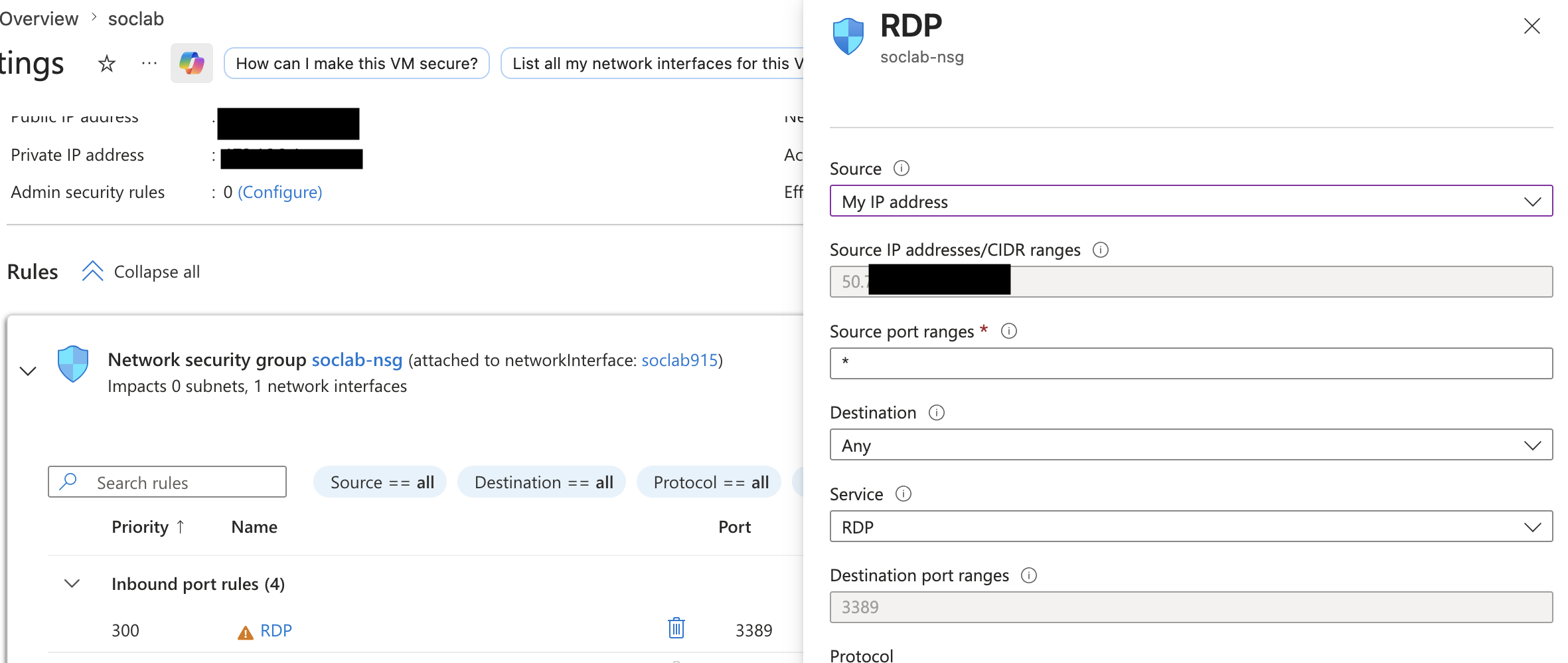
我在 Azure 中一个名为 malware lab rg 的专用资源组内创建了一台 Windows 10 虚拟机。区域是 Canada East。虚拟机命名为 soclab,这与后来在 MDE 中显示为受调查设备的名称相同。在做任何其他事情之前,我通过 NSG 规则将 RDP 访问权限锁定为仅限我的 IP 地址,因此互联网上的任何其他人都无法访问该虚拟机。
 ## 步骤 2:RDP 仅对分析师 IP 开放
此截图显示了 RDP 的 NSG 入站规则。源设置为 My IP address 而不是 Any。这是一个关键的强化步骤,这意味着只有分析师机器才能远程连接到此虚拟机。任何互联网扫描仪或攻击者都无法访问它。此步骤必须在下载或运行任何恶意软件样本之前完成。
## 步骤 2:RDP 仅对分析师 IP 开放
此截图显示了 RDP 的 NSG 入站规则。源设置为 My IP address 而不是 Any。这是一个关键的强化步骤,这意味着只有分析师机器才能远程连接到此虚拟机。任何互联网扫描仪或攻击者都无法访问它。此步骤必须在下载或运行任何恶意软件样本之前完成。
 ## 步骤 3:来自 MalwareBazaar 的样本情报
在执行任何操作之前,我收集了有关该样本的情报。文件名为 Dior fix.exe,这是一个伪装成品牌软件补丁的社会工程学诱饵。首次出现时间与本次实验室同一天,这使其成为零日提交,在任何平台上都没有先前的分析。签名显示为 SalatStealer。TrID 结果显示为 UPX 压缩,这解释了为什么 VirusTotal 的检测计数为零,真正的恶意 payload 隐藏在 UPX 包装器内,只有在运行时才会在内存中解包。
## 步骤 3:来自 MalwareBazaar 的样本情报
在执行任何操作之前,我收集了有关该样本的情报。文件名为 Dior fix.exe,这是一个伪装成品牌软件补丁的社会工程学诱饵。首次出现时间与本次实验室同一天,这使其成为零日提交,在任何平台上都没有先前的分析。签名显示为 SalatStealer。TrID 结果显示为 UPX 压缩,这解释了为什么 VirusTotal 的检测计数为零,真正的恶意 payload 隐藏在 UPX 包装器内,只有在运行时才会在内存中解包。
 ## 步骤 4:在 VM 内部创建 MalwareLab 文件夹
所有样本工作都限制在隔离虚拟机内的 C:\MalwareLab\ 目录中。该文件夹是为本次实验全新创建的。此文件夹中的任何内容都不会接触到分析师的主机。修改日期确认了它是在调查当天设置的。
## 步骤 4:在 VM 内部创建 MalwareLab 文件夹
所有样本工作都限制在隔离虚拟机内的 C:\MalwareLab\ 目录中。该文件夹是为本次实验全新创建的。此文件夹中的任何内容都不会接触到分析师的主机。修改日期确认了它是在调查当天设置的。
 ## 步骤 5:执行恶意软件:SmartScreen 首先触发
在 MDE 甚至发出警报之前,Windows SmartScreen 就作为第一道检测防线触发了。该文件没有数字签名,并显示 Unknown publisher。我将点击 Run anyway 的确切时间记为 T 加零,即 IR 时间线的起点。如果真实用户通过网络钓鱼电子邮件收到此文件并尝试打开它,这正是他们会看到的弹出窗口。
## 步骤 5:执行恶意软件:SmartScreen 首先触发
在 MDE 甚至发出警报之前,Windows SmartScreen 就作为第一道检测防线触发了。该文件没有数字签名,并显示 Unknown publisher。我将点击 Run anyway 的确切时间记为 T 加零,即 IR 时间线的起点。如果真实用户通过网络钓鱼电子邮件收到此文件并尝试打开它,这正是他们会看到的弹出窗口。
 ## 步骤 6:MDE 事件警报触发
在几分钟内,MDE 触发了 Incident 102。名称显示为 Multi stage incident involving Execution and Credentials,这一句话概括了整个攻击。Priority Score 100 是 MDE 可以分配的最高分。严重程度为高。在四个调查流中产生了 12 个活动警报。这就是真正的 SOC 分析师在严重事件触发时在屏幕上看到的内容——一个由许多单独的警报构建的单一关联故事。
## 步骤 6:MDE 事件警报触发
在几分钟内,MDE 触发了 Incident 102。名称显示为 Multi stage incident involving Execution and Credentials,这一句话概括了整个攻击。Priority Score 100 是 MDE 可以分配的最高分。严重程度为高。在四个调查流中产生了 12 个活动警报。这就是真正的 SOC 分析师在严重事件触发时在屏幕上看到的内容——一个由许多单独的警报构建的单一关联故事。
 ## 恶意软件做了什么:8 秒内的全面攻击
下午 2:40:25,恶意软件从 C:\MalwareLab\ 启动。8 秒后,即下午 2:40:33,它已经完成了以下操作。
它将自己复制了三次,并为每个副本赋予了一个真实的 Windows 系统进程名称:SearchIndexer.exe、backgroundTaskHost.exe 和 winlogon.exe。这些都是合法的 Windows 进程名称,但恶意软件将它们放在了完全错误的位置。真正的文件位于 C:\Windows\System32\。伪造的副本被放置在 Program Files、AppData 和其他非系统位置。MDE 立即标记了所有这三个文件,并注明每个文件都是未签名文件,与常见的 Windows 文件同名,并且确认路径不匹配。此技术称为文件伪装,MITRE T1036.005。
## 恶意软件做了什么:8 秒内的全面攻击
下午 2:40:25,恶意软件从 C:\MalwareLab\ 启动。8 秒后,即下午 2:40:33,它已经完成了以下操作。
它将自己复制了三次,并为每个副本赋予了一个真实的 Windows 系统进程名称:SearchIndexer.exe、backgroundTaskHost.exe 和 winlogon.exe。这些都是合法的 Windows 进程名称,但恶意软件将它们放在了完全错误的位置。真正的文件位于 C:\Windows\System32\。伪造的副本被放置在 Program Files、AppData 和其他非系统位置。MDE 立即标记了所有这三个文件,并注明每个文件都是未签名文件,与常见的 Windows 文件同名,并且确认路径不匹配。此技术称为文件伪装,MITRE T1036.005。
 同时,它创建了三个计划任务和三个注册表 Run 键,所有这些都指向这些伪造的二进制文件。这是双重持久化,如果您发现并移除了计划任务,但漏掉了 Run 键,恶意软件仍然会在下次登录时重新启动。8 秒内的六个持久化机制绝非偶然。攻击者设计了冗余,以便部分的补救措施仍会使感染保持活动状态。
下午 2:40:41,伪造的 winlogon.exe 以完全读取权限打开了 Chrome 的 Login Data 文件。Login Data 是一个 SQLite 数据库,Chrome 在其中存储了所有保存的用户名和密码。恶意软件读取了它。用户保存在 Chrome 中的每个密码都可以被攻击者访问。MDE 发出警报:Possible theft of passwords and other sensitive web browser information。
同时,它创建了三个计划任务和三个注册表 Run 键,所有这些都指向这些伪造的二进制文件。这是双重持久化,如果您发现并移除了计划任务,但漏掉了 Run 键,恶意软件仍然会在下次登录时重新启动。8 秒内的六个持久化机制绝非偶然。攻击者设计了冗余,以便部分的补救措施仍会使感染保持活动状态。
下午 2:40:41,伪造的 winlogon.exe 以完全读取权限打开了 Chrome 的 Login Data 文件。Login Data 是一个 SQLite 数据库,Chrome 在其中存储了所有保存的用户名和密码。恶意软件读取了它。用户保存在 Chrome 中的每个密码都可以被攻击者访问。MDE 发出警报:Possible theft of passwords and other sensitive web browser information。
 随后,系统使用 PowerShell 将恶意软件的目录添加到 Windows Defender 的排除列表中,以便 AV 停止扫描这些文件夹。它运行了 ReAgentc.exe 来禁用 Windows 恢复,使得机器无法重置为干净状态。它将 EnableLUA 注册表值设置为零,从而完全禁用了 UAC,任何操作都不再有权限提示。它还试图从 GitLab 下载一个工具包,包括用于文件压缩的 7zip、用于远程控制的 RDP 库以及用于屏幕录制的 ffmpeg。在本实验中,NSG 出站阻止了该下载。在真实的未受保护的网络中,它将会成功,攻击者将获得对机器的完全远程可视化控制。
在整个调查过程中,计划任务继续每三分钟触发一次,分别在下午 2:43、2:46 和 2:49,每次都会重新执行那些伪造的二进制文件。
随后,系统使用 PowerShell 将恶意软件的目录添加到 Windows Defender 的排除列表中,以便 AV 停止扫描这些文件夹。它运行了 ReAgentc.exe 来禁用 Windows 恢复,使得机器无法重置为干净状态。它将 EnableLUA 注册表值设置为零,从而完全禁用了 UAC,任何操作都不再有权限提示。它还试图从 GitLab 下载一个工具包,包括用于文件压缩的 7zip、用于远程控制的 RDP 库以及用于屏幕录制的 ffmpeg。在本实验中,NSG 出站阻止了该下载。在真实的未受保护的网络中,它将会成功,攻击者将获得对机器的完全远程可视化控制。
在整个调查过程中,计划任务继续每三分钟触发一次,分别在下午 2:43、2:46 和 2:49,每次都会重新执行那些伪造的二进制文件。
 ## 步骤 7:在 MDE 中隔离设备
确认真阳性后,通过 MDE 门户隔离了设备。设备页面显示有 12 个活动警报,且 Risk level 为 High。隔离会切断除 MDE 通信通道之外的所有网络访问,该通道保持活动状态以便继续进行调查。攻击者失去了他们的连接。无需对机器进行 RDP 访问,即可发起远程 AV 扫描。
## 步骤 7:在 MDE 中隔离设备
确认真阳性后,通过 MDE 门户隔离了设备。设备页面显示有 12 个活动警报,且 Risk level 为 High。隔离会切断除 MDE 通信通道之外的所有网络访问,该通道保持活动状态以便继续进行调查。攻击者失去了他们的连接。无需对机器进行 RDP 访问,即可发起远程 AV 扫描。
 ## 步骤 8:将 SHA256 哈希作为 MDE Indicator 阻止
最后的控制步骤是在 MDE 中将 SHA256 哈希作为自定义 indicator 进行阻止。该哈希现在显示为托管 indicator。租户中注册的每个设备如果在其他任何地方遇到此文件,都将自动阻止它。相同的 payload 无法在组织中的任何其他机器上执行。
## 步骤 8:将 SHA256 哈希作为 MDE Indicator 阻止
最后的控制步骤是在 MDE 中将 SHA256 哈希作为自定义 indicator 进行阻止。该哈希现在显示为托管 indicator。租户中注册的每个设备如果在其他任何地方遇到此文件,都将自动阻止它。相同的 payload 无法在组织中的任何其他机器上执行。
 ## 调查中使用的 KQL 查询
这些查询在 MDE Advanced Hunting 中运行,以从原始遥测数据中重构完整的攻击链。
**凭据访问确认**
```
DeviceFileEvents
| where DeviceName contains "soclab"
| where Timestamp > datetime(2026-05-23T14:40:00)
| where FolderPath has_any (
"Login Data", "Cookies", "Web Data", "logins.json", "key4.db")
| where InitiatingProcessFileName !in~ (
"chrome.exe","firefox.exe","msedge.exe")
| project Timestamp, ActionType, FileName,
FolderPath, InitiatingProcessFileName
| order by Timestamp asc
```
**持久化注册表写入**
```
DeviceRegistryEvents
| where DeviceName contains "soclab"
| where Timestamp > datetime(2026-05-23T14:40:00)
| where RegistryKey has_any (
"CurrentVersion\\Run", "EnableLUA", "ExclusionPath")
| project Timestamp, ActionType, RegistryKey,
RegistryValueName, RegistryValueData,
InitiatingProcessFileName
| order by Timestamp asc
```
## 调查中使用的 KQL 查询
这些查询在 MDE Advanced Hunting 中运行,以从原始遥测数据中重构完整的攻击链。
**凭据访问确认**
```
DeviceFileEvents
| where DeviceName contains "soclab"
| where Timestamp > datetime(2026-05-23T14:40:00)
| where FolderPath has_any (
"Login Data", "Cookies", "Web Data", "logins.json", "key4.db")
| where InitiatingProcessFileName !in~ (
"chrome.exe","firefox.exe","msedge.exe")
| project Timestamp, ActionType, FileName,
FolderPath, InitiatingProcessFileName
| order by Timestamp asc
```
**持久化注册表写入**
```
DeviceRegistryEvents
| where DeviceName contains "soclab"
| where Timestamp > datetime(2026-05-23T14:40:00)
| where RegistryKey has_any (
"CurrentVersion\\Run", "EnableLUA", "ExclusionPath")
| project Timestamp, ActionType, RegistryKey,
RegistryValueName, RegistryValueData,
InitiatingProcessFileName
| order by Timestamp asc
```

 **计划任务创建**
```
DeviceEvents
| where DeviceName contains "soclab"
| where Timestamp > datetime(2026-05-23T14:40:00)
| where ActionType == "ScheduledTaskCreated"
| project Timestamp, AdditionalFields, InitiatingProcessFileName
| order by Timestamp asc
```
**计划任务创建**
```
DeviceEvents
| where DeviceName contains "soclab"
| where Timestamp > datetime(2026-05-23T14:40:00)
| where ActionType == "ScheduledTaskCreated"
| project Timestamp, AdditionalFields, InitiatingProcessFileName
| order by Timestamp asc
```
 ## IOC
| 类型 | 值 |
|---|---|
| SHA256 | 1963aa0f51baebbc5f9a04bf57e0358dda6c80e16055a9654bf9a4cae08b4415 |
| SHA1 | c3c8ddee1d679cc2d7a6ea93997a199a59c48f33 |
| MD5 | aee4431579b6a0bbabe55e3e5113af39 |
| 文件 | C:\Program Files (x86)\WindowsPowerShell\SearchIndexer.exe |
| 文件 | C:\Users\labuser\AppData\Local\PlaceholderTileLogoFolder\backgroundTaskHost.exe |
| 文件 | C:\Program Files (x86)\Microsoft\winlogon.exe |
| 注册表 | HKCU\...\CurrentVersion\Run .. SearchIndexer |
| 注册表 | HKCU\...\CurrentVersion\Run .. backgroundTaskHost |
| 注册表 | HKCU\...\CurrentVersion\Run .. winlogon |
| 计划任务 | SearchIndexer |
| 计划任务 | backgroundTaskHost |
| 计划任务 | winlogon |
| URL | https://gitlab[.]com/webrat1/importantfiles/ |
| AV 名称 | Trojan:Win32/SalatStealer!pz |
## 我学到了什么
在 VirusTotal 上为 71 个引擎中的 0 个检测到并不意味着干净。这个样本没有被检测到,因为它是 UPX 打包的,当天才首次提交,而且以前从未被分析过。上下文才是真正的指标:社会工程学文件名、零日漏洞、未签名的二进制文件。我现在总是检查 VirusTotal 的 Behaviour 标签页,而不仅仅是检测计数。
持久化在设计上是冗余的。8 秒内的六个机制是故意的。仅移除计划任务会留下活动的 Run 键。仅移除 Run 键会让任务继续触发。在清除期间,您必须检查每个持久化位置:Run 键、RunOnce、计划任务、启动文件夹和服务。
路径是线索。每个伪造的二进制文件都使用真实的 Windows 进程名称,但路径是错误的。winlogon.exe 不属于 Program Files。SearchIndexer.exe 不属于 WindowsPowerShell。如果系统进程名称从 System32 或 Windows 文件夹以外的任何地方运行,这就值得立即进行调查。
AV 是事后触发的。Defender AV 没有在磁盘上检测到 UPX 打包的文件。它是在文件在内存中解包并开始执行后才触发的。MDE 捕获了行为模式——凭据访问、持久化写入、Defender 修改——这些是静态 AV 无法检测到的。这就是防病毒软件和端点检测与响应 (EDR) 之间的真正区别。
*所有恶意软件分析均在隔离的 Azure 实验室环境中进行。未涉及任何真实用户数据或生产系统。*
## IOC
| 类型 | 值 |
|---|---|
| SHA256 | 1963aa0f51baebbc5f9a04bf57e0358dda6c80e16055a9654bf9a4cae08b4415 |
| SHA1 | c3c8ddee1d679cc2d7a6ea93997a199a59c48f33 |
| MD5 | aee4431579b6a0bbabe55e3e5113af39 |
| 文件 | C:\Program Files (x86)\WindowsPowerShell\SearchIndexer.exe |
| 文件 | C:\Users\labuser\AppData\Local\PlaceholderTileLogoFolder\backgroundTaskHost.exe |
| 文件 | C:\Program Files (x86)\Microsoft\winlogon.exe |
| 注册表 | HKCU\...\CurrentVersion\Run .. SearchIndexer |
| 注册表 | HKCU\...\CurrentVersion\Run .. backgroundTaskHost |
| 注册表 | HKCU\...\CurrentVersion\Run .. winlogon |
| 计划任务 | SearchIndexer |
| 计划任务 | backgroundTaskHost |
| 计划任务 | winlogon |
| URL | https://gitlab[.]com/webrat1/importantfiles/ |
| AV 名称 | Trojan:Win32/SalatStealer!pz |
## 我学到了什么
在 VirusTotal 上为 71 个引擎中的 0 个检测到并不意味着干净。这个样本没有被检测到,因为它是 UPX 打包的,当天才首次提交,而且以前从未被分析过。上下文才是真正的指标:社会工程学文件名、零日漏洞、未签名的二进制文件。我现在总是检查 VirusTotal 的 Behaviour 标签页,而不仅仅是检测计数。
持久化在设计上是冗余的。8 秒内的六个机制是故意的。仅移除计划任务会留下活动的 Run 键。仅移除 Run 键会让任务继续触发。在清除期间,您必须检查每个持久化位置:Run 键、RunOnce、计划任务、启动文件夹和服务。
路径是线索。每个伪造的二进制文件都使用真实的 Windows 进程名称,但路径是错误的。winlogon.exe 不属于 Program Files。SearchIndexer.exe 不属于 WindowsPowerShell。如果系统进程名称从 System32 或 Windows 文件夹以外的任何地方运行,这就值得立即进行调查。
AV 是事后触发的。Defender AV 没有在磁盘上检测到 UPX 打包的文件。它是在文件在内存中解包并开始执行后才触发的。MDE 捕获了行为模式——凭据访问、持久化写入、Defender 修改——这些是静态 AV 无法检测到的。这就是防病毒软件和端点检测与响应 (EDR) 之间的真正区别。
*所有恶意软件分析均在隔离的 Azure 实验室环境中进行。未涉及任何真实用户数据或生产系统。*
## 步骤 3:来自 MalwareBazaar 的样本情报
在执行任何操作之前,我收集了有关该样本的情报。文件名为 Dior fix.exe,这是一个伪装成品牌软件补丁的社会工程学诱饵。首次出现时间与本次实验室同一天,这使其成为零日提交,在任何平台上都没有先前的分析。签名显示为 SalatStealer。TrID 结果显示为 UPX 压缩,这解释了为什么 VirusTotal 的检测计数为零,真正的恶意 payload 隐藏在 UPX 包装器内,只有在运行时才会在内存中解包。
## 步骤 5:执行恶意软件:SmartScreen 首先触发
在 MDE 甚至发出警报之前,Windows SmartScreen 就作为第一道检测防线触发了。该文件没有数字签名,并显示 Unknown publisher。我将点击 Run anyway 的确切时间记为 T 加零,即 IR 时间线的起点。如果真实用户通过网络钓鱼电子邮件收到此文件并尝试打开它,这正是他们会看到的弹出窗口。
随后,系统使用 PowerShell 将恶意软件的目录添加到 Windows Defender 的排除列表中,以便 AV 停止扫描这些文件夹。它运行了 ReAgentc.exe 来禁用 Windows 恢复,使得机器无法重置为干净状态。它将 EnableLUA 注册表值设置为零,从而完全禁用了 UAC,任何操作都不再有权限提示。它还试图从 GitLab 下载一个工具包,包括用于文件压缩的 7zip、用于远程控制的 RDP 库以及用于屏幕录制的 ffmpeg。在本实验中,NSG 出站阻止了该下载。在真实的未受保护的网络中,它将会成功,攻击者将获得对机器的完全远程可视化控制。
在整个调查过程中,计划任务继续每三分钟触发一次,分别在下午 2:43、2:46 和 2:49,每次都会重新执行那些伪造的二进制文件。
标签:DAST, Microsoft Defender, 安全实验, 安全运营, 库, 应急响应, 恶意软件分析, 扫描框架