alkait/WhatsKept

GitHub: alkait/WhatsKept

Stars: 3 | Forks: 0

WhatsKept logo

WhatsKept

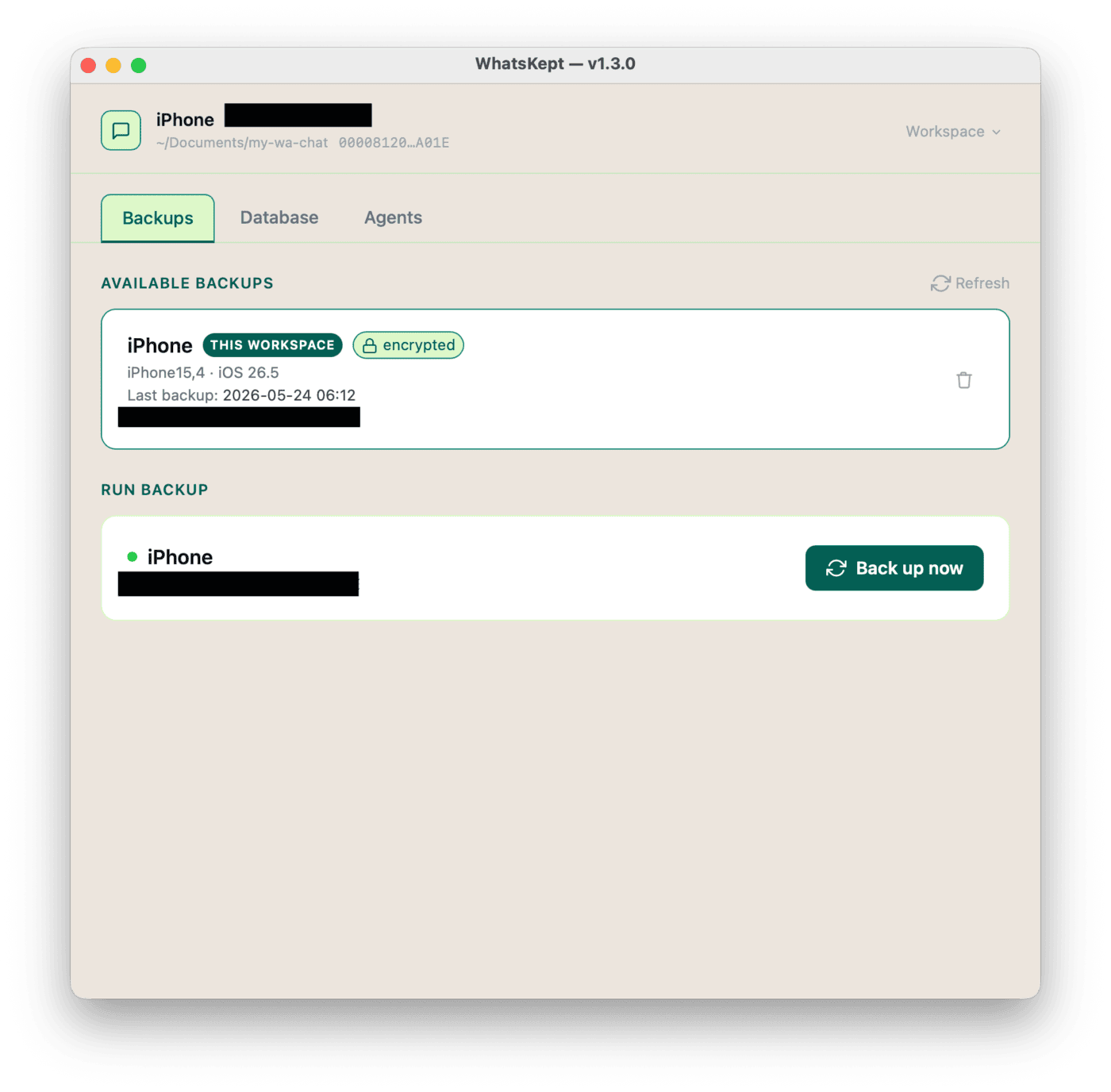
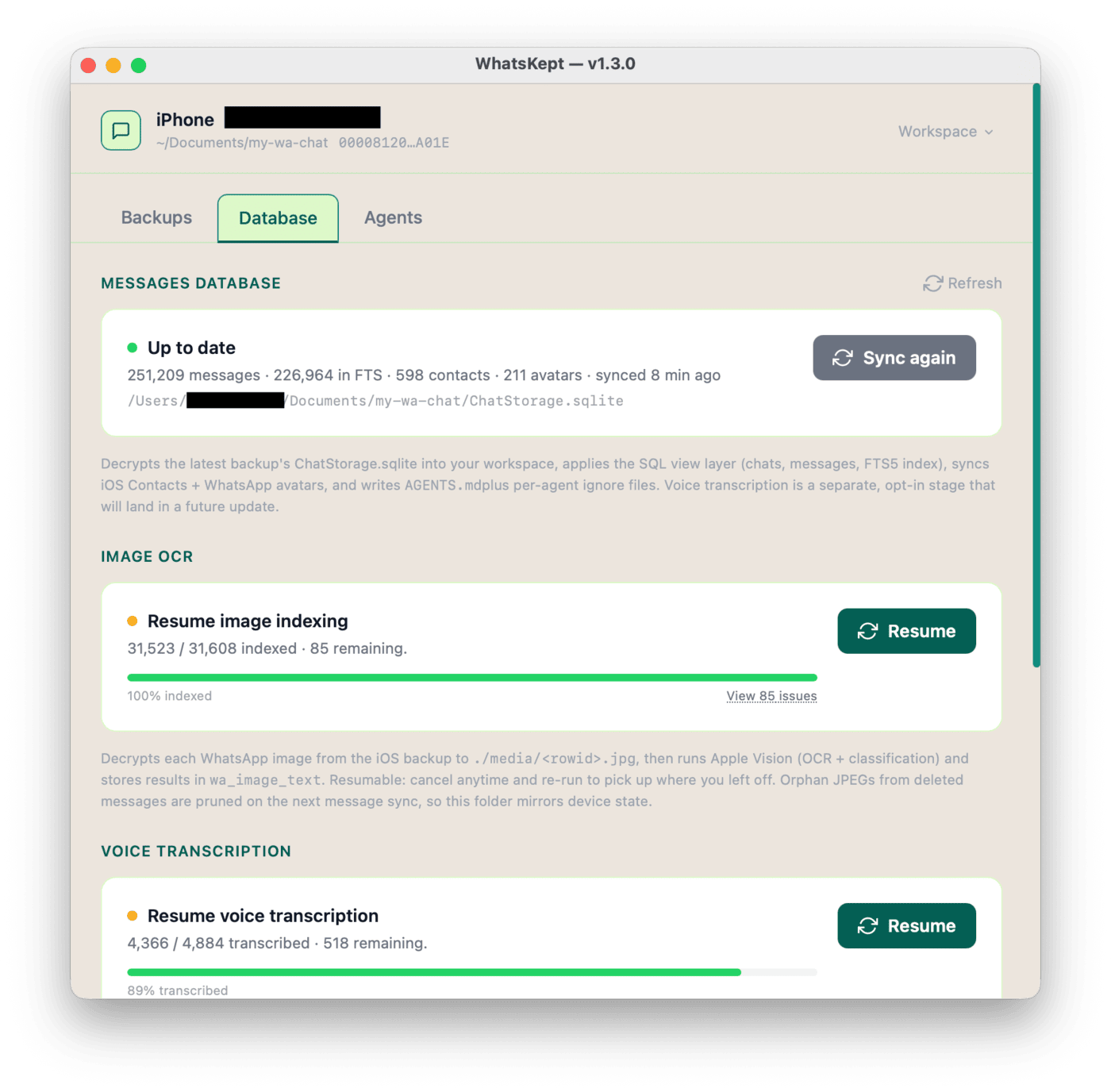
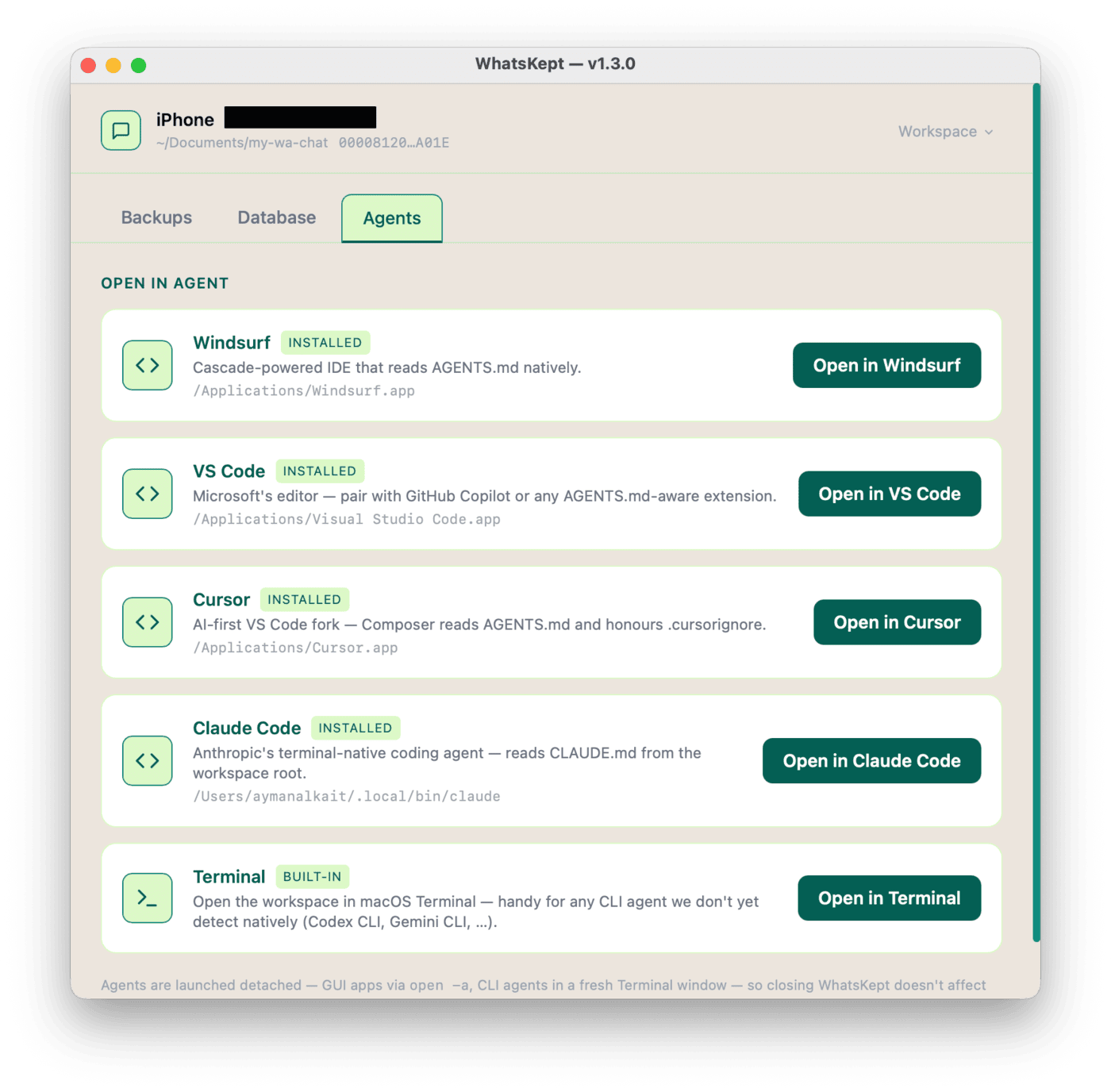
Agent-queryable WhatsApp history from an iOS backup, in Go. A single self-contained binary. Drives iOS backups, decrypts WhatsApp's ChatStorage.sqlite, and (eventually) feeds it into a searchable SQLite + FTS5 workspace that an agent can query directly. ## Contents - [What you can ask](#what-you-can-ask) - [What this is (and what it isn't)](#what-this-is-and-what-it-isnt) - [Screenshots](#screenshots) - [Pipeline](#pipeline) - [Download](#download) - [How this was built](#how-this-was-built) - [System requirements](#system-requirements) - [Privacy](#privacy) - [Build](#build) - [Run](#run) ## What you can ask Once the workspace is built, point an LLM coding agent at the folder (Windsurf, Claude Code, Cursor, VS Code + Copilot,etc …) and ask. A few examples of what becomes possible: | Use case | Example prompt | | --- | --- | | **Find a photo or voice note you only vaguely remember** | *"Find the photo Sara sent of a handwritten recipe — I think it had cardamom in it."* | | **Recover decisions from a busy group chat** | *"Pull every message in the House Reno group about the kitchen budget and tell me what we landed on."* | | **Recall a specific fact someone sent you** | *"What dosage did Dr. Patel say for the antibiotic, and how many days?"* | | **Track receipts, orders, and tracking numbers** | *"List every tracking number anyone sent me in the last 6 months and flag the ones I never confirmed."* | | **Summarize a relationship or thread** | *"Summarize what my brother and I have talked about this year — what's been on his mind?"* | | **Reconstruct a timeline** | *"Build a timeline of my 2023 — major events, trips, life changes — using only what's in WhatsApp."* | | **Index recommendations friends have sent** | *"List every restaurant, book, and movie friends have recommended in the last 2 years, grouped by category."* | ## What this is (and what it isn't) WhatsKept is a **data pipeline**, not an AI assistant. Its entire job is to take an encrypted iOS backup and turn it into a clean, local, agent-friendly workspace on disk. **What it does** - **Drives iOS backups** over USB via `idevicebackup2` so you can refresh the source without leaving the app. - **Decrypts** the WhatsApp `ChatStorage.sqlite` and the media/voice blobs from the encrypted iOS backup, using your backup password. - **Processes media locally**: OCR + image classification through Apple's Vision framework, voice-note transcription through `whisper.cpp` with Metal, and PDF document text extraction through Apple PDFKit (with Vision OCR fallback for scanned pages). - **Optional cloud image descriptions** (opt-in): instead of the on-device Vision OCR, you can describe images with a cloud vision model through [OpenRouter](https://openrouter.ai), using your own API key. This is the **one feature that sends your data off the device** — each described image is uploaded to OpenRouter. It is off by default, lives behind its own button, and is the only cloud alternative to the otherwise fully on-device pipeline. See [Privacy](#privacy). - **Normalizes** everything into a single SQLite database (with FTS5) alongside extracted `media/`, `voice/`, `documents/`, and `profiles/` folders, joined against your macOS Contacts so chats are readable. - **Writes an `AGENTS.md`** and agent-ignore files so an LLM coding agent dropped into the workspace knows the schema and skips the heavy binary trees. **What it does *not* do** - **No built-in chat, no built-in agent runtime.** WhatsKept never sends your messages, transcripts, or contacts to a cloud LLM, and it does not "summarize your chats" or answer questions on its own — that is the agent's job (see below). The one exception is the **opt-in cloud image-description** feature: if you turn it on and supply an OpenRouter API key, your images (and only your images) are uploaded to OpenRouter for OCR + captioning. It is off by default. - **No cloud sync, no account, no telemetry.** WhatsKept makes only these outbound requests, all to well-known hosts: - a version check against the **GitHub** Releases API when the app window opens (so it can offer an Update button) — carries none of your data; - only if you opt into voice transcription, a one-time HTTPS download of the whisper model from **HuggingFace** — carries none of your data; - only if you opt into cloud image descriptions, an API-key validation check and one chat-completion request per image to **OpenRouter** — these **do** carry image content from your backup. Nothing else leaves the machine. There is no account, no analytics, and no background sync. - **No querying for you.** Asking questions like *"what did Alice say about the trip?"* is the **agent's** job — you open the workspace in Windsurf / VS Code + Copilot / Claude Code / Cursor / etc. and let *that* tool read the SQLite database. WhatsKept's responsibility ends when the workspace is ready. - **No modification of the source backup.** The encrypted iOS backup under `~/Library/Application Support/MobileSync/Backup/` is read only; WhatsKept never writes to it. Think of it as the **plumbing between your iPhone and your AI agent**: it turns a locked, encrypted iOS backup into a plain folder of readable text, searchable messages, and transcribed voice notes — then steps out of the way and lets the agent you already trust do the thinking. ## Screenshots Three tabs, in the order you walk through them: | 1. Backups | 2. Database | 3. Agents | | :---: | :---: | :---: | | [![Backups tab](https://static.pigsec.cn/wp-content/uploads/repos/2026/06/246ac872d5022123.png)](docs/screenshots/backup_tab.png) | [![Database tab](https://static.pigsec.cn/wp-content/uploads/repos/2026/06/518a7c344c022124.png)](docs/screenshots/database_tab.png) | [![Agents tab](https://static.pigsec.cn/wp-content/uploads/repos/2026/06/2319e4176d022124.png)](docs/screenshots/agent_tab.png) | | Drive a fresh iOS backup over USB — no need to leave the app. | Decrypt `ChatStorage.sqlite`, OCR images, transcribe voice notes, extract PDFs. Each stage is opt-in and resumable. | Open the prepared workspace in Windsurf, VS Code, Cursor, Claude Code, or Terminal. | ## Pipeline End-to-end data flow, from the encrypted backup on disk to a workspace your agent can `MATCH` against. The four side-car indexers (avatars/contacts, images, voice, documents) are all **opt-in** — each one lives behind its own button in the Database tab and can be skipped, re-run, or resumed independently. The default pipeline runs **on-device**; the only outbound call is the one-time whisper-model download from HuggingFace if you enable voice transcription. The lone exception is the **opt-in cloud image descriptions** path — if you enable it, images are uploaded to OpenRouter instead of being OCR'd locally by Apple Vision. %%{init: {'flowchart': {'subGraphTitleMargin': {'top': 32, 'bottom': 32}}}}%% flowchart TD classDef src fill:#fff7ed,stroke:#fb923c,color:#7c2d12 classDef proc fill:#fef3c7,stroke:#f59e0b,color:#78350f classDef data fill:#ecfdf5,stroke:#10b981,color:#064e3b classDef agent fill:#f5f3ff,stroke:#8b5cf6,color:#4c1d95 IP["iPhone / iPad"]:::src BK["Encrypted iOS backup"]:::src IP -->|USB| BK SYNC{{"Decrypt & extract chat history"}}:::proc BK -->|backup password| SYNC DB[("Chat database")]:::data SYNC --> DB subgraph SIDE["Optional on-device processors"] direction LR PS{{"Sync contacts & avatars"}}:::proc MI{{"Image OCR & classification
(on-device · or opt-in cloud)"}}:::proc VI{{"Voice-note transcription"}}:::proc XI{{"PDF text extraction"}}:::proc end DB -.-> PS DB -.-> MI DB -.-> VI DB -.-> XI PS --> AV[("Contacts & avatars")]:::data MI --> IM[("Image text & labels")]:::data VI --> VC[("Voice transcripts")]:::data XI --> DC[("Document text")]:::data FTS[("Unified search index")]:::data DB --> FTS IM --> FTS VC --> FTS DC --> FTS AGENT(["LLM coding agent
(Windsurf · Cursor · Claude Code · Copilot)"]):::agent FTS --> AGENT AV --> AGENT Each on-device processor is **opt-in** — skip it, run it later, or re-run to resume where it left off. Re-running the top-level sync carries the already-processed work forward and prunes anything tied to messages you've since deleted on the phone. ## Download **Recommended — one Terminal command, zero Gatekeeper friction:** /bin/bash -c "$(curl -fsSL https://github.com/alkait/WhatsKept/releases/latest/download/install.sh)" **Other ways to get it:** - **GUI app via browser** — [`WhatsKept-darwin-arm64.app.zip`](https://github.com/alkait/WhatsKept/releases/latest/download/WhatsKept-darwin-arm64.app.zip). Unzip, then double-click `Install WhatsKept.command` inside the unzipped folder. Right-click → **Open** the first time macOS asks to confirm it. - **CLI binary** — [`whatskept-darwin-arm64.zip`](https://github.com/alkait/WhatsKept/releases/latest/download/whatskept-darwin-arm64.zip). Bare Mach-O for `whatskept extract` / `whatskept list` and scripted use. - **All releases & changelogs** — [github.com/alkait/WhatsKept/releases](https://github.com/alkait/WhatsKept/releases). ## How this was built ## System requirements - **macOS 13.0 Ventura or later** on **Apple Silicon (arm64)** — the bundled Swift Vision helper is arm64-only, the embedded libimobiledevice dylibs come from `/opt/homebrew/*`, and the bundled `whisper-cli` is compiled with `GGML_METAL=ON`. - **Full Disk Access** for WhatsKept.app (or your Terminal, if you launched from a shell) — required to read `~/Library/Application Support/MobileSync/Backup/`. Grant under System Settings → Privacy & Security → Full Disk Access. - **An iOS backup of an iPhone/iPad with WhatsApp installed**, plus its **encryption password**. The extractor reads `$BACKUP_PASSWORD` or a `.env` file in the workspace; it never prompts. - **USB connection to the device** if you want to drive a fresh backup from the Backups tab ## Privacy WhatsKept is designed to keep your WhatsApp history on your machine. **The good** - **No telemetry, no analytics, no accounts.** By default WhatsKept sends none of your data anywhere. Its always-on outbound call is a version check to GitHub when the window opens; the whisper-model download and the cloud image-description feature are both opt-in (all three below). The version check and model download contact a well-known host and carry none of your WhatsApp data. The GUI's HTTP server binds to `127.0.0.1` only — it is not reachable from other devices on your network. - **All processing is on-device.** Image OCR + classification runs through Apple's Vision framework (`whatskept-vision`); voice transcription runs through `whisper.cpp` with Metal acceleration. Neither talks to a cloud service. - **Backup password is never transmitted.** It's read from `$BACKUP_PASSWORD` or a `.env` file in the workspace, held in process memory for the lifetime of the app session, and cleared when you switch workspaces or quit. Not written anywhere by WhatsKept on its own. - **Whisper model: one opt-in download.** The first time you run voice transcription, the ~574 MB whisper model is downloaded from HuggingFace over HTTPS and SHA-256 verified. After that, that feature is fully offline. - **Cloud image descriptions use your own key, held in RAM only.** The opt-in OpenRouter feature (below) uses an API key *you* supply. It is validated against `openrouter.ai`, kept in process memory for the session, and never written to disk by WhatsKept; it is cleared when you switch workspaces or quit. WhatsKept sends no account or identifier of its own — just your key and the image being described. - **Update check on launch.** When the app window opens it asks the GitHub Releases API whether a newer version exists, so it can show the **Update** button in the header. It's a single unauthenticated `GET` to `api.github.com` — no account, no identifiers, none of your data. If GitHub is unreachable the app stays quiet and works normally offline. Clicking Update re-runs the official `install.sh` in Terminal (the same command in the install instructions above). **What to be cautious about** - **Cloud image descriptions send your images off the device.** This is the one feature that breaks the on-device guarantee. When you enable it, each described image is uploaded to OpenRouter (`https://openrouter.ai/api/v1/chat/completions`) along with a fixed OCR + caption prompt; OpenRouter (and the upstream model provider it routes to) sees those image bytes, and they are subject to OpenRouter's data-retention policy, not WhatsKept's. Only images are sent — never your text messages, voice notes, or contacts — and only for the images you choose to run. The feature is **off by default**; if you never enter an API key and never start a cloud run, nothing is ever uploaded. Prefer the on-device Apple Vision OCR if you want zero data to leave the machine. - **The workspace contains *decrypted* WhatsApp data.** `ChatStorage.sqlite`, `media/`, `voice/`, `documents/`, and `profiles/` are plaintext on disk, and the Messages sync also joins your macOS Contacts (names + phone numbers) into the database so chats are readable. Anyone with read access to that folder (other macOS users, Time Machine backups, cloud-sync folders like iCloud Drive / Dropbox / Google Drive) can read every message, contact, photo, and voice note. Pick a workspace path accordingly — `~/Documents` is fine, `~/Dropbox` is not. - **The agent reads the text, but not the raw files.** WhatsKept drops `.windsurfignore`, `.copilotignore`, and similar ignore files so agents stay out of the `media/`, `voice/`, `documents/`, and `profiles/` folders — the actual photos, audio files, PDFs, and profile pictures are off-limits. What the agent *does* see is everything in the SQLite database: every message, every image's OCR'd text and classification labels, every voice-note transcript, and the contact names and numbers joined in. So when you ask a question, chunks of that chat history can be sent to the agent's LLM provider. **Trust the agent's privacy story before pointing it at the workspace.** - **The `.env` file holds your backup password in plaintext.** It lives inside the workspace directory; don't commit it to git, and don't ship the workspace folder anywhere. - **Workspace deletion is permanent.** The Delete button wipes the whole directory tree — there is no recycle bin, no undo. The encrypted iOS backup is untouched, so a fresh sync rebuilds, but any notes/state you kept in the workspace are gone. ## Build make build # → dist/whatskept (always re-signs after build) The Makefile invokes `build/sign.sh` after `go build`. This is **not optional** on Apple Silicon: post-link byte modifications by macOS tooling can silently invalidate the linker-emitted ad-hoc signature, producing a binary the kernel refuses to start (the process freezes with zero CPU time and cannot be killed). Re-signing fixes it unconditionally. ## Run make app
标签:EVTX分析