JoshuaKDev/threat-hunting-scenario-tor
GitHub: JoshuaKDev/threat-hunting-scenario-tor
一个使用 Microsoft Defender for Endpoint 和 KQL 查询在受控实验室中狩猎未经授权 TOR 使用的威胁狩猎实践项目。
Stars: 0 | Forks: 0
# Microsoft Defender 威胁狩猎:未经授权的 TOR 使用
 本项目是在基于 Josh Madakor Cyber Range 的受控实验室环境中进行的。
- [场景创建](https://github.com/JoshuaKDev/threat-hunting-scenario-tor/blob/main/threat-hunting-scenario-tor-event-creation.md)
## 使用的平台和技术
- Microsoft Azure Virtual Machines
- Microsoft Defender for Endpoint (MDE)
- Kusto Query Language (KQL)
- Windows 11
- TOR Browser
## 场景
管理层怀疑员工可能一直在使用 TOR Browser 绕过组织的网络控制,此前在网络遥测数据中观察到了异常的加密流量模式以及与已知 TOR 入口节点的连接。其他匿名报告表明,员工正在讨论在工作时间访问受限网站的方法。
此次威胁狩猎的目的是识别 TOR 安装或使用的证据,确定活动范围,并在确认存在未经授权的使用时建议响应措施。
## 为什么 TOR 的使用至关重要
未经授权使用 TOR 可能会允许用户绕过组织的监控控制、规避 Web 过滤策略,并建立匿名的出站通信,从而降低防御者的可见性。
## 高级 TOR IoC 发现计划
- 调查 `DeviceFileEvents` 以查找与 TOR 相关的文件活动
- 调查 `DeviceProcessEvents` 以查找安装或执行行为
- 调查 `DeviceNetworkEvents` 以查找与 TOR 相关的网络连接
- 关联文件、进程和网络遥测数据以确认使用情况
# 调查步骤
## 1. 调查 `DeviceFileEvents` 以查找与 TOR 相关的文件活动
调查了 `DeviceFileEvents` 中与 endpoint `jkvmedr` 相关的 TOR 文件活动。结果证实,用户账户 `joshlab` 下载了 TOR 安装程序并在系统上生成了多个与 TOR 相关的文件。
其他的文件创建活动包括桌面上一个名为 `tor-shopping-list.txt` 的文件。
### 发现
- TOR 安装程序已下载到 endpoint
- 多个与 TOR 相关的文件已写入磁盘
- 桌面上创建了与 TOR 相关的文本痕迹
### KQL 查询
```
DeviceFileEvents
| where DeviceName == "jkvmedr"
| where InitiatingProcessAccountName == "joshlab"
| where FileName contains "tor"
| where Timestamp >= datetime(2026-08-20T22:14:48.6065231Z)
| order by Timestamp desc
| project Timestamp,
DeviceName,
ActionType,
FileName,
FolderPath,
SHA256,
Account = InitiatingProcessAccountName
```
本项目是在基于 Josh Madakor Cyber Range 的受控实验室环境中进行的。
- [场景创建](https://github.com/JoshuaKDev/threat-hunting-scenario-tor/blob/main/threat-hunting-scenario-tor-event-creation.md)
## 使用的平台和技术
- Microsoft Azure Virtual Machines
- Microsoft Defender for Endpoint (MDE)
- Kusto Query Language (KQL)
- Windows 11
- TOR Browser
## 场景
管理层怀疑员工可能一直在使用 TOR Browser 绕过组织的网络控制,此前在网络遥测数据中观察到了异常的加密流量模式以及与已知 TOR 入口节点的连接。其他匿名报告表明,员工正在讨论在工作时间访问受限网站的方法。
此次威胁狩猎的目的是识别 TOR 安装或使用的证据,确定活动范围,并在确认存在未经授权的使用时建议响应措施。
## 为什么 TOR 的使用至关重要
未经授权使用 TOR 可能会允许用户绕过组织的监控控制、规避 Web 过滤策略,并建立匿名的出站通信,从而降低防御者的可见性。
## 高级 TOR IoC 发现计划
- 调查 `DeviceFileEvents` 以查找与 TOR 相关的文件活动
- 调查 `DeviceProcessEvents` 以查找安装或执行行为
- 调查 `DeviceNetworkEvents` 以查找与 TOR 相关的网络连接
- 关联文件、进程和网络遥测数据以确认使用情况
# 调查步骤
## 1. 调查 `DeviceFileEvents` 以查找与 TOR 相关的文件活动
调查了 `DeviceFileEvents` 中与 endpoint `jkvmedr` 相关的 TOR 文件活动。结果证实,用户账户 `joshlab` 下载了 TOR 安装程序并在系统上生成了多个与 TOR 相关的文件。
其他的文件创建活动包括桌面上一个名为 `tor-shopping-list.txt` 的文件。
### 发现
- TOR 安装程序已下载到 endpoint
- 多个与 TOR 相关的文件已写入磁盘
- 桌面上创建了与 TOR 相关的文本痕迹
### KQL 查询
```
DeviceFileEvents
| where DeviceName == "jkvmedr"
| where InitiatingProcessAccountName == "joshlab"
| where FileName contains "tor"
| where Timestamp >= datetime(2026-08-20T22:14:48.6065231Z)
| order by Timestamp desc
| project Timestamp,
DeviceName,
ActionType,
FileName,
FolderPath,
SHA256,
Account = InitiatingProcessAccountName
```
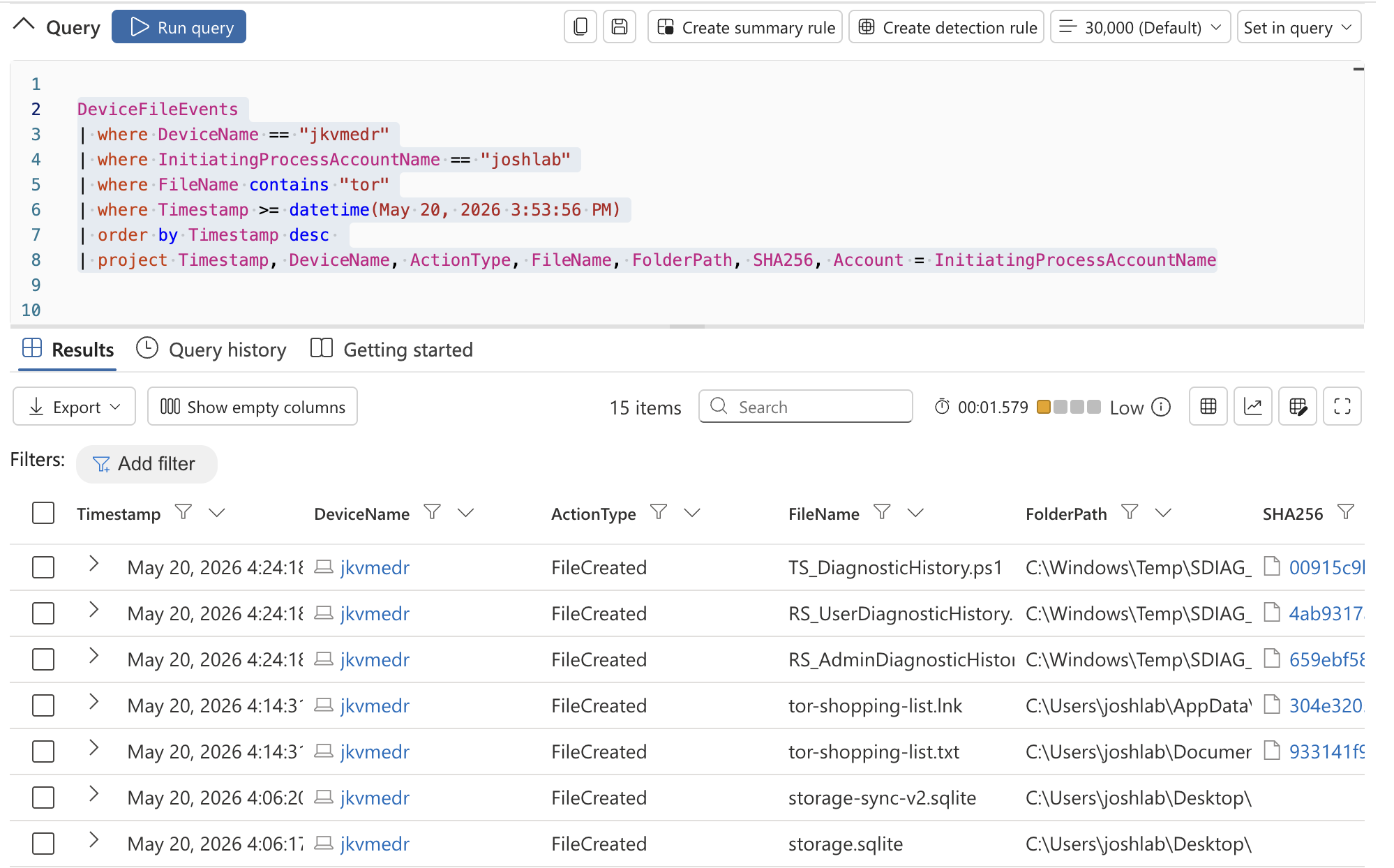 *图 1:在 `DeviceFileEvents` 中观察到的 TOR 安装程序下载和 TOR 相关文件创建活动。*
## 2. 调查 `DeviceProcessEvents` 以查找 TOR 安装程序的执行情况
调查了 `DeviceProcessEvents` 以寻找 TOR 安装程序执行的证据。结果证实,用户账户 `joshlab` 在 endpoint `jkvmedr` 上从 Downloads 目录执行了 TOR 安装程序。
该安装程序以静默模式执行,减少了面向用户的提示和安装过程中的可见性。
### 发现
- 已确认 TOR 安装程序执行
- 观察到静默安装行为
- 安装是从 Downloads 文件夹发起的
- 活动与未经授权的软件安装一致
### KQL 查询
```
DeviceProcessEvents
| where DeviceName == "jkvmedr"
| where ProcessCommandLine contains "tor-browser-windows-x86_64-portable-14.0.1.exe"
| project Timestamp,
DeviceName,
AccountName,
ActionType,
FileName,
FolderPath,
SHA256,
ProcessCommandLine
```
*图 1:在 `DeviceFileEvents` 中观察到的 TOR 安装程序下载和 TOR 相关文件创建活动。*
## 2. 调查 `DeviceProcessEvents` 以查找 TOR 安装程序的执行情况
调查了 `DeviceProcessEvents` 以寻找 TOR 安装程序执行的证据。结果证实,用户账户 `joshlab` 在 endpoint `jkvmedr` 上从 Downloads 目录执行了 TOR 安装程序。
该安装程序以静默模式执行,减少了面向用户的提示和安装过程中的可见性。
### 发现
- 已确认 TOR 安装程序执行
- 观察到静默安装行为
- 安装是从 Downloads 文件夹发起的
- 活动与未经授权的软件安装一致
### KQL 查询
```
DeviceProcessEvents
| where DeviceName == "jkvmedr"
| where ProcessCommandLine contains "tor-browser-windows-x86_64-portable-14.0.1.exe"
| project Timestamp,
DeviceName,
AccountName,
ActionType,
FileName,
FolderPath,
SHA256,
ProcessCommandLine
```
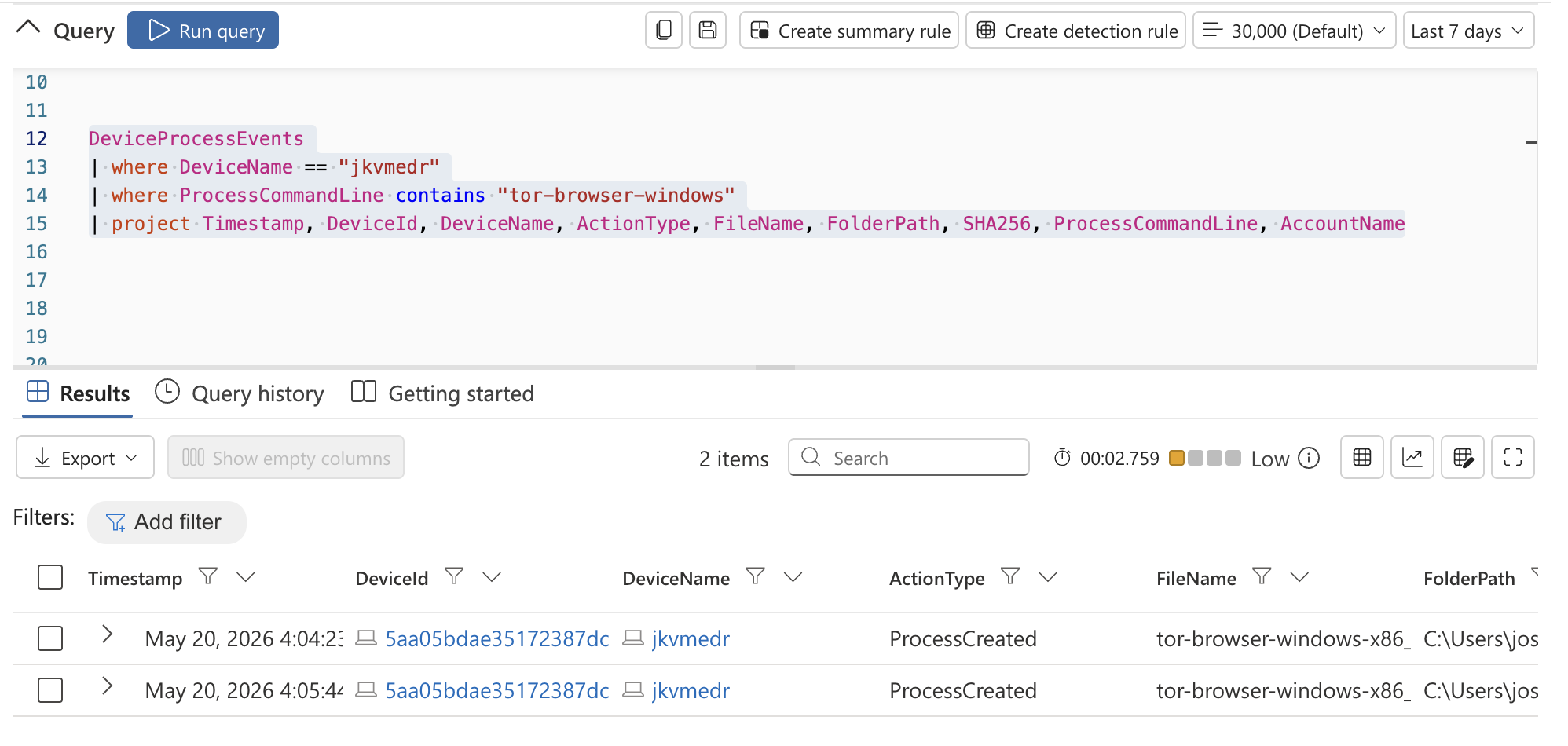 *图 2:在 `DeviceProcessEvents` 中检测到的静默 TOR 安装程序执行。*
## 3. 调查 `DeviceProcessEvents` 以查找 TOR Browser 的执行情况
调查了 `DeviceProcessEvents` 以寻找活跃 TOR Browser 执行的证据。结果证实,用户账户 `joshlab` 成功启动了 TOR Browser。
在执行之后观察到了额外的 `firefox.exe` 和 `tor.exe` 子进程,证实了 TOR Browser 的活跃使用。
### 发现
- 已确认 TOR Browser 启动
- 观察到 `firefox.exe` 和 `tor.exe` 进程
- 产生了多个与 TOR 相关的子进程
- 已确认 endpoint 上存在活跃的 TOR 使用
### KQL 查询
```
DeviceProcessEvents
| where DeviceName == "jkvmedr"
| where FileName has_any ("tor.exe", "firefox.exe", "tor-browser.exe")
| project Timestamp,
DeviceName,
AccountName,
ActionType,
FileName,
FolderPath,
SHA256,
ProcessCommandLine
| order by Timestamp desc
```
*图 2:在 `DeviceProcessEvents` 中检测到的静默 TOR 安装程序执行。*
## 3. 调查 `DeviceProcessEvents` 以查找 TOR Browser 的执行情况
调查了 `DeviceProcessEvents` 以寻找活跃 TOR Browser 执行的证据。结果证实,用户账户 `joshlab` 成功启动了 TOR Browser。
在执行之后观察到了额外的 `firefox.exe` 和 `tor.exe` 子进程,证实了 TOR Browser 的活跃使用。
### 发现
- 已确认 TOR Browser 启动
- 观察到 `firefox.exe` 和 `tor.exe` 进程
- 产生了多个与 TOR 相关的子进程
- 已确认 endpoint 上存在活跃的 TOR 使用
### KQL 查询
```
DeviceProcessEvents
| where DeviceName == "jkvmedr"
| where FileName has_any ("tor.exe", "firefox.exe", "tor-browser.exe")
| project Timestamp,
DeviceName,
AccountName,
ActionType,
FileName,
FolderPath,
SHA256,
ProcessCommandLine
| order by Timestamp desc
```
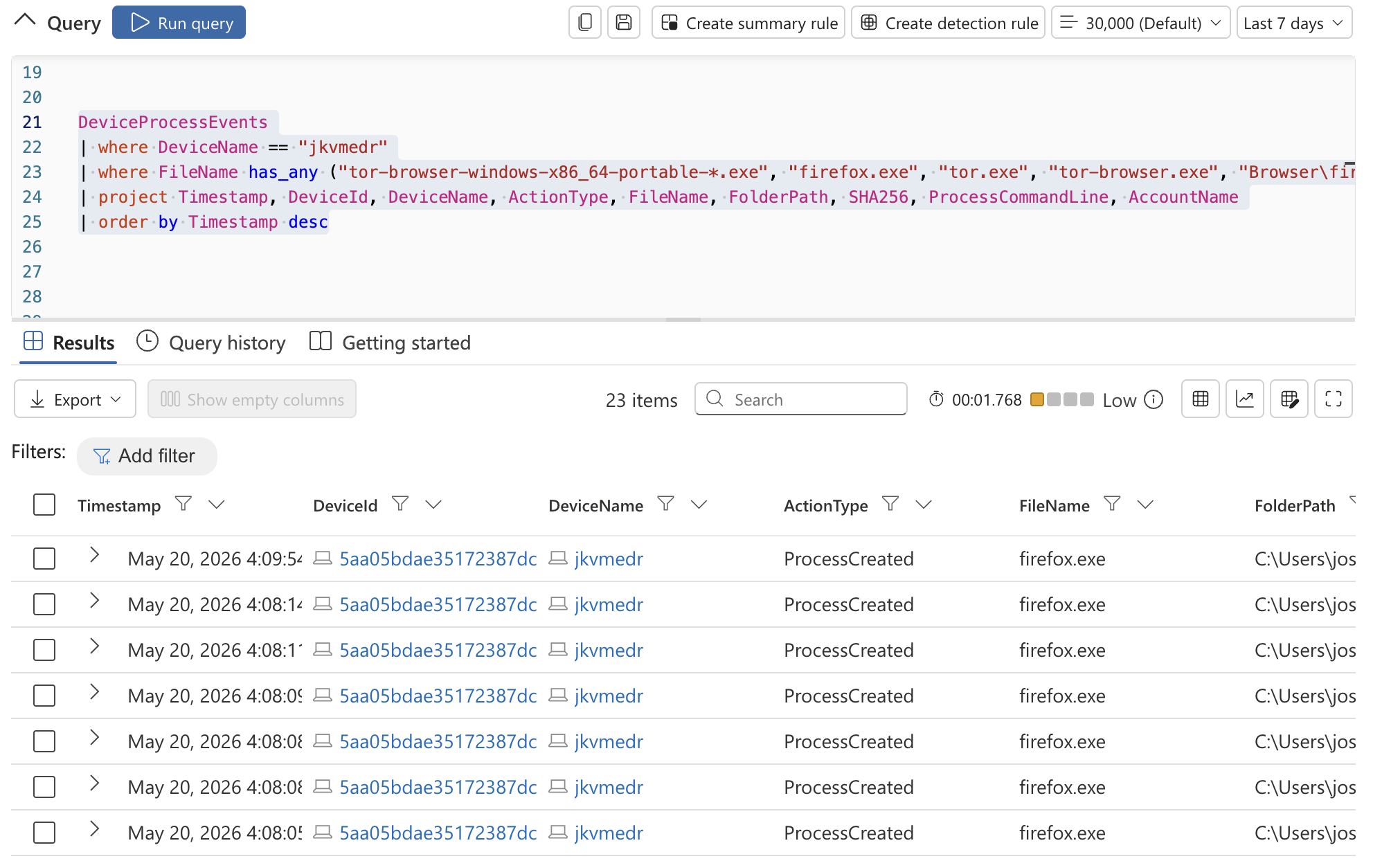 *图 3:观察到的 TOR 相关进程执行,包括 `firefox.exe` 和 `tor.exe`。*
## 4. 调查 `DeviceNetworkEvents` 以查找 TOR 网络连接
调查了 `DeviceNetworkEvents` 以寻找通过已知 TOR 端口进行 TOR 相关网络通信的证据。
结果证实,该 endpoint 建立了与 TOR 基础设施相关的出站连接。观察到由 `tor.exe` 发起的通过端口 `9001` 与远程 IP `176.198.159.33` 的成功连接。
还识别出了通过端口 `443` 的额外加密出站连接以及通过端口 `9150` 的 localhost 通信。
### 发现
- 已确认 TOR 网络通信
- 到已知 TOR 相关端口 `9001` 的出站连接
- 观察到额外的加密出站流量
- 观察到通过端口 `9150` 进行的本地 TOR 代理通信
### KQL 查询
```
DeviceNetworkEvents
| where DeviceName == "jkvmedr"
| where InitiatingProcessAccountName == "joshlab"
| where InitiatingProcessFileName in ("tor.exe", "firefox.exe")
| where RemotePort in ("9001", "9030", "9040", "9050", "9051", "9150", "80", "443")
| project Timestamp,
DeviceName,
InitiatingProcessAccountName,
ActionType,
RemoteIP,
RemotePort,
RemoteUrl,
InitiatingProcessFileName,
InitiatingProcessFolderPath
| order by Timestamp desc
```
*图 4:在 `DeviceNetworkEvents` 中观察到的 TOR 相关出站网络通信。*
## 事件时间线
### 1. TOR 安装程序下载
- **时间戳:** `2026-08-20T22:14:48.6065231Z`
- **事件:** 用户账户 `joshlab` 将 TOR 安装程序下载到了 Downloads 目录。
- **动作:** 检测到文件下载
- **文件路径:** `C:\Users\joshlab\Downloads\tor-browser-windows-x86_64-portable-14.0.1.exe`
### 2. TOR 安装程序执行
- **时间戳:** `2026-08-20T22:16:47.4484567Z`
- **事件:** 用户账户 `joshlab` 以静默模式执行了 TOR 安装程序。
- **动作:** 检测到进程创建
- **命令:** `tor-browser-windows-x86_64-portable-14.0.1.exe /S`
- **文件路径:** `C:\Users\joshlab\Downloads\tor-browser-windows-x86_64-portable-14.0.1.exe`
### 3. TOR Browser 启动
- **时间戳:** `2026-08-20T22:17:21.6357935Z`
- **事件:** 在 endpoint `jkvmedr` 上成功启动了 TOR Browser。
- **动作:** 检测到 TOR 相关的进程执行
- **观察到的进程:** `firefox.exe`, `tor.exe`
- **文件路径:** `C:\Users\joshlab\Desktop\Tor Browser\Browser\TorBrowser\Tor\tor.exe`
### 4. 建立 TOR 网络连接
- **时间戳:** `2026-08-20T22:18:01.1246358Z`
- **事件:** 建立了通过端口 `9001` 到远程 IP `176.198.159.33` 的 TOR 出站网络连接。
- **动作:** 检测到成功的网络连接
- **进程:** `tor.exe`
- **文件路径:** `C:\Users\joshlab\Desktop\Tor Browser\Browser\TorBrowser\Tor\tor.exe`
### 5. 额外的 TOR 网络活动
- **时间戳:** `2026-08-20T22:18:08Z`
- **事件:** 建立了通过端口 `443` 的额外加密出站连接。
- **时间戳:** `2026-08-20T22:18:16Z`
- **事件:** 建立了通过端口 `9150` 的 localhost 通信。
- **动作:** 检测到多个与 TOR 相关的网络连接
### 6. TOR 相关文件创建
- **时间戳:** `2026-08-20T22:27:19.7259964Z`
- **事件:** 用户账户 `joshlab` 在桌面上创建了文件 `tor-shopping-list.txt`。
- **动作:** 检测到文件创建
- **文件路径:** `C:\Users\joshlab\Desktop\tor-shopping-list.txt`
## MITRE ATT&CK 映射
| 技术 | ID |
|---|---|
| Proxy: Multi-hop Proxy | T1090.003 |
| Ingress Tool Transfer | T1105 |
| Command and Scripting Interpreter | T1059 |
| Masquerading | T1036 |
## 检测机会
以下检测改进有助于在未来更早地识别类似活动:
- 为 TOR 相关的进程执行创建 Microsoft Defender 自定义检测规则
- 对到已知 TOR 端口的出站连接发出警报
- 监控静默安装程序的执行行为
- 通过应用程序控制策略阻止未经授权的隐私工具
- 为已知的 TOR 基础设施 IP 地址创建监控列表
## 总结
调查证实了 endpoint `jkvmedr` 上存在未经授权的 TOR Browser 安装和使用。证据包括安装程序下载、静默进程执行、TOR 相关子进程以及与已知 TOR 基础设施相关的出站网络连接。
观察到的活动表明,存在建立能够绕过组织监控和可接受使用策略的匿名出站通信的企图。
## 采取的响应措施
- Endpoint 已与网络隔离
- 已识别出需要移除的 TOR 相关二进制文件
- 用户活动已上报给管理层
- 建议审查应用程序控制策略
- 建议审查 Web 过滤控制
- 建议持续监控是否存在重复行为
## 展示的技能
- 威胁狩猎
- Microsoft Defender for Endpoint (MDE)
- Kusto Query Language (KQL)
- Endpoint 遥测分析
- 进程调查
- 网络连接分析
- IOC 识别
- MITRE ATT&CK 映射
- 事件文档记录
## 经验教训
此次调查强调了在验证可疑活动时关联文件、进程和网络遥测数据的重要性。它还演示了即使存在加密流量,也可以通过行为指标来识别诸如 TOR 之类注重隐私的应用程序。
*图 3:观察到的 TOR 相关进程执行,包括 `firefox.exe` 和 `tor.exe`。*
## 4. 调查 `DeviceNetworkEvents` 以查找 TOR 网络连接
调查了 `DeviceNetworkEvents` 以寻找通过已知 TOR 端口进行 TOR 相关网络通信的证据。
结果证实,该 endpoint 建立了与 TOR 基础设施相关的出站连接。观察到由 `tor.exe` 发起的通过端口 `9001` 与远程 IP `176.198.159.33` 的成功连接。
还识别出了通过端口 `443` 的额外加密出站连接以及通过端口 `9150` 的 localhost 通信。
### 发现
- 已确认 TOR 网络通信
- 到已知 TOR 相关端口 `9001` 的出站连接
- 观察到额外的加密出站流量
- 观察到通过端口 `9150` 进行的本地 TOR 代理通信
### KQL 查询
```
DeviceNetworkEvents
| where DeviceName == "jkvmedr"
| where InitiatingProcessAccountName == "joshlab"
| where InitiatingProcessFileName in ("tor.exe", "firefox.exe")
| where RemotePort in ("9001", "9030", "9040", "9050", "9051", "9150", "80", "443")
| project Timestamp,
DeviceName,
InitiatingProcessAccountName,
ActionType,
RemoteIP,
RemotePort,
RemoteUrl,
InitiatingProcessFileName,
InitiatingProcessFolderPath
| order by Timestamp desc
```
*图 4:在 `DeviceNetworkEvents` 中观察到的 TOR 相关出站网络通信。*
## 事件时间线
### 1. TOR 安装程序下载
- **时间戳:** `2026-08-20T22:14:48.6065231Z`
- **事件:** 用户账户 `joshlab` 将 TOR 安装程序下载到了 Downloads 目录。
- **动作:** 检测到文件下载
- **文件路径:** `C:\Users\joshlab\Downloads\tor-browser-windows-x86_64-portable-14.0.1.exe`
### 2. TOR 安装程序执行
- **时间戳:** `2026-08-20T22:16:47.4484567Z`
- **事件:** 用户账户 `joshlab` 以静默模式执行了 TOR 安装程序。
- **动作:** 检测到进程创建
- **命令:** `tor-browser-windows-x86_64-portable-14.0.1.exe /S`
- **文件路径:** `C:\Users\joshlab\Downloads\tor-browser-windows-x86_64-portable-14.0.1.exe`
### 3. TOR Browser 启动
- **时间戳:** `2026-08-20T22:17:21.6357935Z`
- **事件:** 在 endpoint `jkvmedr` 上成功启动了 TOR Browser。
- **动作:** 检测到 TOR 相关的进程执行
- **观察到的进程:** `firefox.exe`, `tor.exe`
- **文件路径:** `C:\Users\joshlab\Desktop\Tor Browser\Browser\TorBrowser\Tor\tor.exe`
### 4. 建立 TOR 网络连接
- **时间戳:** `2026-08-20T22:18:01.1246358Z`
- **事件:** 建立了通过端口 `9001` 到远程 IP `176.198.159.33` 的 TOR 出站网络连接。
- **动作:** 检测到成功的网络连接
- **进程:** `tor.exe`
- **文件路径:** `C:\Users\joshlab\Desktop\Tor Browser\Browser\TorBrowser\Tor\tor.exe`
### 5. 额外的 TOR 网络活动
- **时间戳:** `2026-08-20T22:18:08Z`
- **事件:** 建立了通过端口 `443` 的额外加密出站连接。
- **时间戳:** `2026-08-20T22:18:16Z`
- **事件:** 建立了通过端口 `9150` 的 localhost 通信。
- **动作:** 检测到多个与 TOR 相关的网络连接
### 6. TOR 相关文件创建
- **时间戳:** `2026-08-20T22:27:19.7259964Z`
- **事件:** 用户账户 `joshlab` 在桌面上创建了文件 `tor-shopping-list.txt`。
- **动作:** 检测到文件创建
- **文件路径:** `C:\Users\joshlab\Desktop\tor-shopping-list.txt`
## MITRE ATT&CK 映射
| 技术 | ID |
|---|---|
| Proxy: Multi-hop Proxy | T1090.003 |
| Ingress Tool Transfer | T1105 |
| Command and Scripting Interpreter | T1059 |
| Masquerading | T1036 |
## 检测机会
以下检测改进有助于在未来更早地识别类似活动:
- 为 TOR 相关的进程执行创建 Microsoft Defender 自定义检测规则
- 对到已知 TOR 端口的出站连接发出警报
- 监控静默安装程序的执行行为
- 通过应用程序控制策略阻止未经授权的隐私工具
- 为已知的 TOR 基础设施 IP 地址创建监控列表
## 总结
调查证实了 endpoint `jkvmedr` 上存在未经授权的 TOR Browser 安装和使用。证据包括安装程序下载、静默进程执行、TOR 相关子进程以及与已知 TOR 基础设施相关的出站网络连接。
观察到的活动表明,存在建立能够绕过组织监控和可接受使用策略的匿名出站通信的企图。
## 采取的响应措施
- Endpoint 已与网络隔离
- 已识别出需要移除的 TOR 相关二进制文件
- 用户活动已上报给管理层
- 建议审查应用程序控制策略
- 建议审查 Web 过滤控制
- 建议持续监控是否存在重复行为
## 展示的技能
- 威胁狩猎
- Microsoft Defender for Endpoint (MDE)
- Kusto Query Language (KQL)
- Endpoint 遥测分析
- 进程调查
- 网络连接分析
- IOC 识别
- MITRE ATT&CK 映射
- 事件文档记录
## 经验教训
此次调查强调了在验证可疑活动时关联文件、进程和网络遥测数据的重要性。它还演示了即使存在加密流量,也可以通过行为指标来识别诸如 TOR 之类注重隐私的应用程序。
本项目是在基于 Josh Madakor Cyber Range 的受控实验室环境中进行的。
- [场景创建](https://github.com/JoshuaKDev/threat-hunting-scenario-tor/blob/main/threat-hunting-scenario-tor-event-creation.md)
## 使用的平台和技术
- Microsoft Azure Virtual Machines
- Microsoft Defender for Endpoint (MDE)
- Kusto Query Language (KQL)
- Windows 11
- TOR Browser
## 场景
管理层怀疑员工可能一直在使用 TOR Browser 绕过组织的网络控制,此前在网络遥测数据中观察到了异常的加密流量模式以及与已知 TOR 入口节点的连接。其他匿名报告表明,员工正在讨论在工作时间访问受限网站的方法。
此次威胁狩猎的目的是识别 TOR 安装或使用的证据,确定活动范围,并在确认存在未经授权的使用时建议响应措施。
## 为什么 TOR 的使用至关重要
未经授权使用 TOR 可能会允许用户绕过组织的监控控制、规避 Web 过滤策略,并建立匿名的出站通信,从而降低防御者的可见性。
## 高级 TOR IoC 发现计划
- 调查 `DeviceFileEvents` 以查找与 TOR 相关的文件活动
- 调查 `DeviceProcessEvents` 以查找安装或执行行为
- 调查 `DeviceNetworkEvents` 以查找与 TOR 相关的网络连接
- 关联文件、进程和网络遥测数据以确认使用情况
# 调查步骤
## 1. 调查 `DeviceFileEvents` 以查找与 TOR 相关的文件活动
调查了 `DeviceFileEvents` 中与 endpoint `jkvmedr` 相关的 TOR 文件活动。结果证实,用户账户 `joshlab` 下载了 TOR 安装程序并在系统上生成了多个与 TOR 相关的文件。
其他的文件创建活动包括桌面上一个名为 `tor-shopping-list.txt` 的文件。
### 发现
- TOR 安装程序已下载到 endpoint
- 多个与 TOR 相关的文件已写入磁盘
- 桌面上创建了与 TOR 相关的文本痕迹
### KQL 查询
```
DeviceFileEvents
| where DeviceName == "jkvmedr"
| where InitiatingProcessAccountName == "joshlab"
| where FileName contains "tor"
| where Timestamp >= datetime(2026-08-20T22:14:48.6065231Z)
| order by Timestamp desc
| project Timestamp,
DeviceName,
ActionType,
FileName,
FolderPath,
SHA256,
Account = InitiatingProcessAccountName
```
*图 1:在 `DeviceFileEvents` 中观察到的 TOR 安装程序下载和 TOR 相关文件创建活动。*
## 2. 调查 `DeviceProcessEvents` 以查找 TOR 安装程序的执行情况
调查了 `DeviceProcessEvents` 以寻找 TOR 安装程序执行的证据。结果证实,用户账户 `joshlab` 在 endpoint `jkvmedr` 上从 Downloads 目录执行了 TOR 安装程序。
该安装程序以静默模式执行,减少了面向用户的提示和安装过程中的可见性。
### 发现
- 已确认 TOR 安装程序执行
- 观察到静默安装行为
- 安装是从 Downloads 文件夹发起的
- 活动与未经授权的软件安装一致
### KQL 查询
```
DeviceProcessEvents
| where DeviceName == "jkvmedr"
| where ProcessCommandLine contains "tor-browser-windows-x86_64-portable-14.0.1.exe"
| project Timestamp,
DeviceName,
AccountName,
ActionType,
FileName,
FolderPath,
SHA256,
ProcessCommandLine
```
*图 2:在 `DeviceProcessEvents` 中检测到的静默 TOR 安装程序执行。*
## 3. 调查 `DeviceProcessEvents` 以查找 TOR Browser 的执行情况
调查了 `DeviceProcessEvents` 以寻找活跃 TOR Browser 执行的证据。结果证实,用户账户 `joshlab` 成功启动了 TOR Browser。
在执行之后观察到了额外的 `firefox.exe` 和 `tor.exe` 子进程,证实了 TOR Browser 的活跃使用。
### 发现
- 已确认 TOR Browser 启动
- 观察到 `firefox.exe` 和 `tor.exe` 进程
- 产生了多个与 TOR 相关的子进程
- 已确认 endpoint 上存在活跃的 TOR 使用
### KQL 查询
```
DeviceProcessEvents
| where DeviceName == "jkvmedr"
| where FileName has_any ("tor.exe", "firefox.exe", "tor-browser.exe")
| project Timestamp,
DeviceName,
AccountName,
ActionType,
FileName,
FolderPath,
SHA256,
ProcessCommandLine
| order by Timestamp desc
```
*图 3:观察到的 TOR 相关进程执行,包括 `firefox.exe` 和 `tor.exe`。*
## 4. 调查 `DeviceNetworkEvents` 以查找 TOR 网络连接
调查了 `DeviceNetworkEvents` 以寻找通过已知 TOR 端口进行 TOR 相关网络通信的证据。
结果证实,该 endpoint 建立了与 TOR 基础设施相关的出站连接。观察到由 `tor.exe` 发起的通过端口 `9001` 与远程 IP `176.198.159.33` 的成功连接。
还识别出了通过端口 `443` 的额外加密出站连接以及通过端口 `9150` 的 localhost 通信。
### 发现
- 已确认 TOR 网络通信
- 到已知 TOR 相关端口 `9001` 的出站连接
- 观察到额外的加密出站流量
- 观察到通过端口 `9150` 进行的本地 TOR 代理通信
### KQL 查询
```
DeviceNetworkEvents
| where DeviceName == "jkvmedr"
| where InitiatingProcessAccountName == "joshlab"
| where InitiatingProcessFileName in ("tor.exe", "firefox.exe")
| where RemotePort in ("9001", "9030", "9040", "9050", "9051", "9150", "80", "443")
| project Timestamp,
DeviceName,
InitiatingProcessAccountName,
ActionType,
RemoteIP,
RemotePort,
RemoteUrl,
InitiatingProcessFileName,
InitiatingProcessFolderPath
| order by Timestamp desc
```
*图 4:在 `DeviceNetworkEvents` 中观察到的 TOR 相关出站网络通信。*
## 事件时间线
### 1. TOR 安装程序下载
- **时间戳:** `2026-08-20T22:14:48.6065231Z`
- **事件:** 用户账户 `joshlab` 将 TOR 安装程序下载到了 Downloads 目录。
- **动作:** 检测到文件下载
- **文件路径:** `C:\Users\joshlab\Downloads\tor-browser-windows-x86_64-portable-14.0.1.exe`
### 2. TOR 安装程序执行
- **时间戳:** `2026-08-20T22:16:47.4484567Z`
- **事件:** 用户账户 `joshlab` 以静默模式执行了 TOR 安装程序。
- **动作:** 检测到进程创建
- **命令:** `tor-browser-windows-x86_64-portable-14.0.1.exe /S`
- **文件路径:** `C:\Users\joshlab\Downloads\tor-browser-windows-x86_64-portable-14.0.1.exe`
### 3. TOR Browser 启动
- **时间戳:** `2026-08-20T22:17:21.6357935Z`
- **事件:** 在 endpoint `jkvmedr` 上成功启动了 TOR Browser。
- **动作:** 检测到 TOR 相关的进程执行
- **观察到的进程:** `firefox.exe`, `tor.exe`
- **文件路径:** `C:\Users\joshlab\Desktop\Tor Browser\Browser\TorBrowser\Tor\tor.exe`
### 4. 建立 TOR 网络连接
- **时间戳:** `2026-08-20T22:18:01.1246358Z`
- **事件:** 建立了通过端口 `9001` 到远程 IP `176.198.159.33` 的 TOR 出站网络连接。
- **动作:** 检测到成功的网络连接
- **进程:** `tor.exe`
- **文件路径:** `C:\Users\joshlab\Desktop\Tor Browser\Browser\TorBrowser\Tor\tor.exe`
### 5. 额外的 TOR 网络活动
- **时间戳:** `2026-08-20T22:18:08Z`
- **事件:** 建立了通过端口 `443` 的额外加密出站连接。
- **时间戳:** `2026-08-20T22:18:16Z`
- **事件:** 建立了通过端口 `9150` 的 localhost 通信。
- **动作:** 检测到多个与 TOR 相关的网络连接
### 6. TOR 相关文件创建
- **时间戳:** `2026-08-20T22:27:19.7259964Z`
- **事件:** 用户账户 `joshlab` 在桌面上创建了文件 `tor-shopping-list.txt`。
- **动作:** 检测到文件创建
- **文件路径:** `C:\Users\joshlab\Desktop\tor-shopping-list.txt`
## MITRE ATT&CK 映射
| 技术 | ID |
|---|---|
| Proxy: Multi-hop Proxy | T1090.003 |
| Ingress Tool Transfer | T1105 |
| Command and Scripting Interpreter | T1059 |
| Masquerading | T1036 |
## 检测机会
以下检测改进有助于在未来更早地识别类似活动:
- 为 TOR 相关的进程执行创建 Microsoft Defender 自定义检测规则
- 对到已知 TOR 端口的出站连接发出警报
- 监控静默安装程序的执行行为
- 通过应用程序控制策略阻止未经授权的隐私工具
- 为已知的 TOR 基础设施 IP 地址创建监控列表
## 总结
调查证实了 endpoint `jkvmedr` 上存在未经授权的 TOR Browser 安装和使用。证据包括安装程序下载、静默进程执行、TOR 相关子进程以及与已知 TOR 基础设施相关的出站网络连接。
观察到的活动表明,存在建立能够绕过组织监控和可接受使用策略的匿名出站通信的企图。
## 采取的响应措施
- Endpoint 已与网络隔离
- 已识别出需要移除的 TOR 相关二进制文件
- 用户活动已上报给管理层
- 建议审查应用程序控制策略
- 建议审查 Web 过滤控制
- 建议持续监控是否存在重复行为
## 展示的技能
- 威胁狩猎
- Microsoft Defender for Endpoint (MDE)
- Kusto Query Language (KQL)
- Endpoint 遥测分析
- 进程调查
- 网络连接分析
- IOC 识别
- MITRE ATT&CK 映射
- 事件文档记录
## 经验教训
此次调查强调了在验证可疑活动时关联文件、进程和网络遥测数据的重要性。它还演示了即使存在加密流量,也可以通过行为指标来识别诸如 TOR 之类注重隐私的应用程序。标签:KQL, 安全运营, 微软Defender, 扫描框架