一个 Model Context Protocol (MCP) server,为 AI 客户端提供实时的网络安全侦察能力。无需在不同的终端中手动运行各种工具,只需告诉 Claude "analyze google.com",即可立即获得完整的安全分析报告。
## 这是什么?
Claude 默认**没有任何原生的网络安全工具**。没有 WHOIS。没有 DNS enumeration。没有端口扫描。没有 SSL inspection。
这个 MCP 服务器解决了这个问题——它通过运行在任意域名或 IP 上的**真实安全工具**来扩展 Claude 的能力。通常需要多种专业工具和 20 多分钟手动操作的侦察工作,现在只需一个 prompt 即可完成。
这是一个**本地 MCP 服务器**——它完全在你的机器上运行。你的数据永远不会离开你的电脑。
它也被列在 glama mcp registry 上。
## 可用工具
## | 工具 | 描述 |
|---|---|
| `whois_lookup` | 域名注册数据 — 所有者、注册商、创建日期、过期时间、域名服务器 |
| `dns_enumeration` | A、AAAA、MX、NS、TXT、CNAME、SOA 记录 + 常见子域名暴力破解 |
| `port_scan` | 由 Nmap 驱动的扫描器,支持服务/版本检测和安全告警 |
| `ssl_inspect` | SSL/TLS 证书 — 颁发者、过期时间、加密强度、SANs、TLS 版本 |
| `tech_stack_detect` | Web 服务器、CMS、JS 框架、CDN、分析工具以及安全 header 评分 |
| `cert_transparency` | 通过 crt.sh Certificate Transparency 日志发现子域名,超时时自动回退至 HackerTarget 被动 DNS |
| `asn_lookup` | Autonomous System Number (ASN) 和网络所有权查询 — 识别域名或 IP 地址的托管提供商、ISP、组织、地理位置和基础设施所有权 |
| `full_recon` | 并行运行所有 7 个核心工具,并返回汇总结果供 Claude 分析 |
| `cve_lookup` | 通过软件名称和版本在 NVD 中搜索已知的 CVE(无需 API 密钥) |
| `ip_reputation` | 通过 AbuseIPDB 检查 IP 是否被标记为恶意(需要 API 密钥) |
## 📸 演示
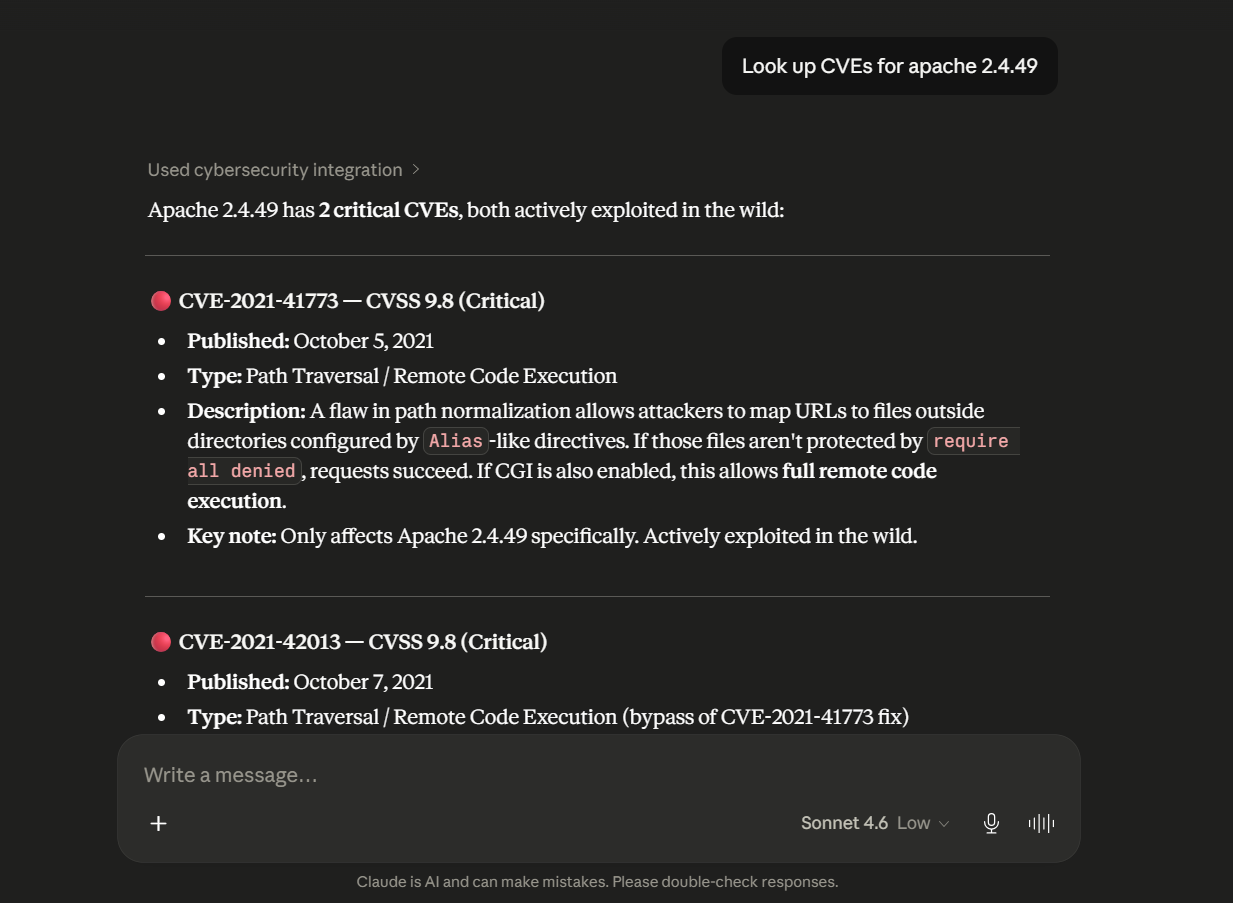
### 单个工具 — CVE 查询
```
You: Look up CVEs for apache 2.4.49
Claude: Found 2 critical CVEs for Apache 2.4.49:
CVE-2021-41773 (Score: 9.8 CRITICAL) — Path traversal vulnerability
allowing remote code execution if CGI is enabled. Actively exploited
in the wild...
```
### 完整侦察
```
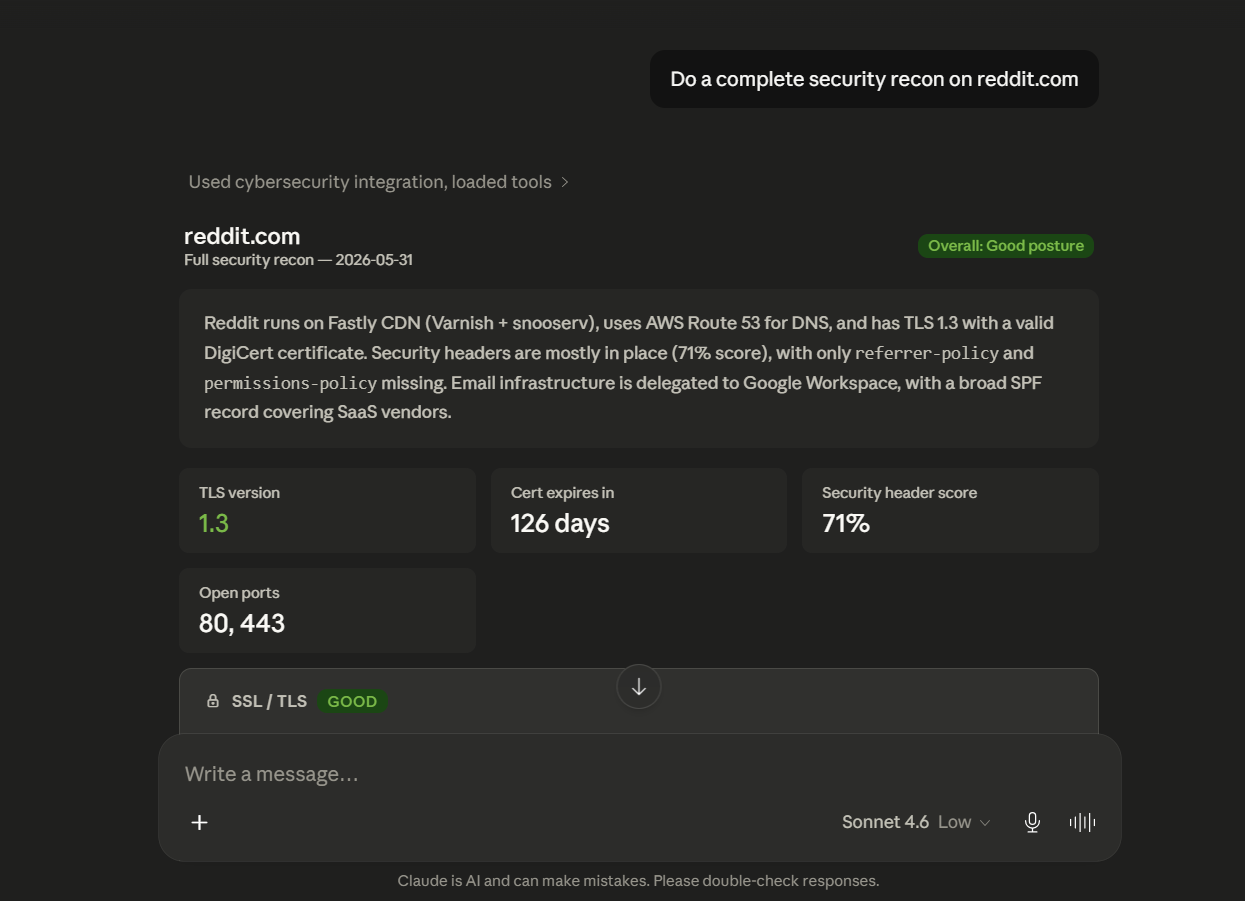
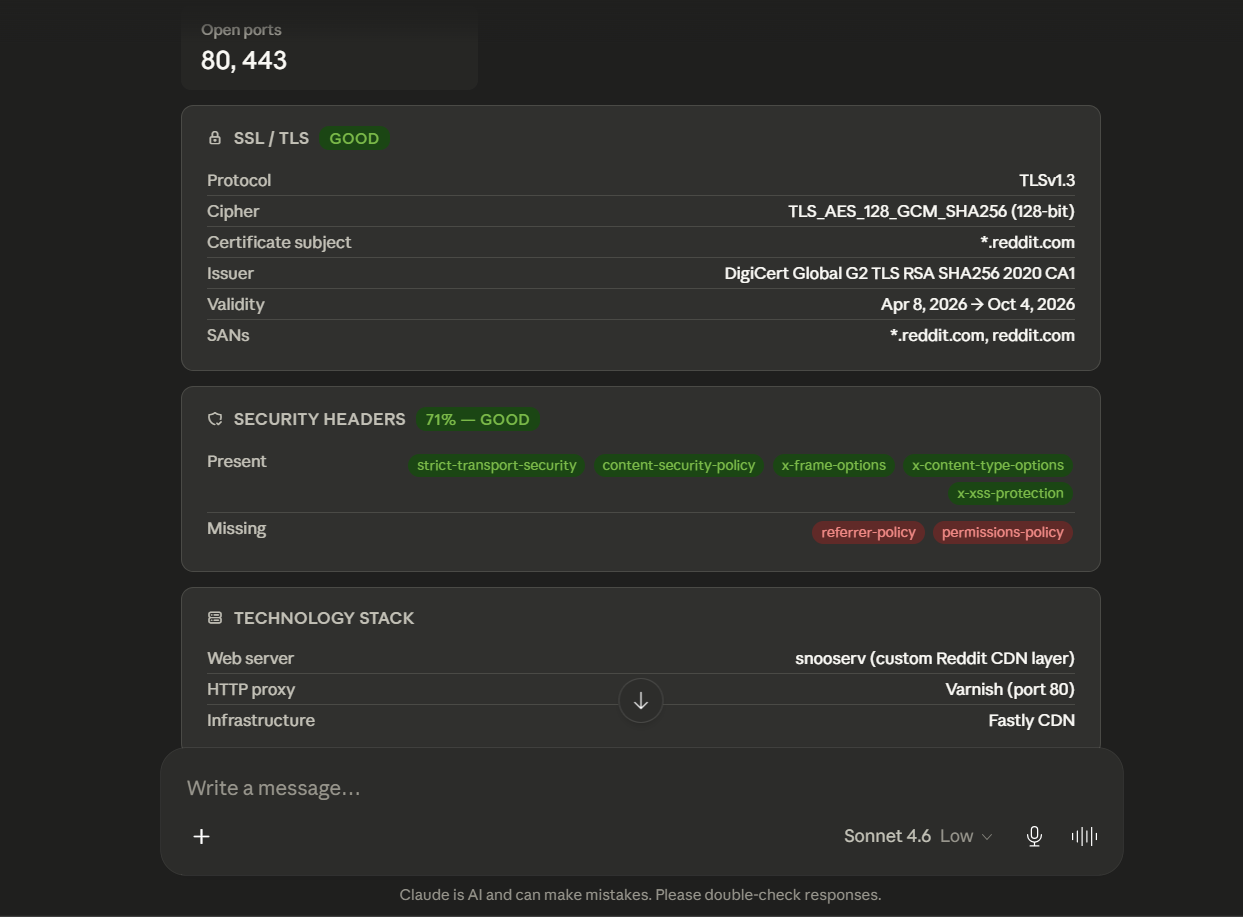
You: Do a complete security recon on reddit.com
Claude: [calls full_recon → runs 6 tools in parallel → delivers full analysis]
```
## 📋 前置条件
- **Python 3.12+** — [下载](https://www.python.org/downloads/)
- **Claude Desktop** — [下载](https://claude.ai/download)
- **Nmap** — 端口扫描必备([下载](https://nmap.org/download.html))
- **Git** — [下载](https://git-scm.com/)
## ⚙️ 安装说明
### 步骤 1 — 克隆代码库
```
git clone https://github.com/AynOps/AynOps
cd AynOps
```
### 步骤 2 — 安装 Python 依赖
```
pip install -r requirements.txt
```
### 步骤 3 — 安装 Nmap
**Windows:**
1. 从 [nmap.org/download.html](https://nmap.org/download.html) 下载并运行安装程序
2. 手动将 Nmap 添加到 PATH:
- 按 `Win + S` → 搜索 **"环境变量"**
- 在**系统变量**下 → 找到 **Path** → 点击**编辑**
- 点击**新建** → 添加 `C:\Program Files (x86)\Nmap`
- 在所有窗口点击确定
3. 重启终端并验证:
```
nmap --version
```
**Mac:**
```
brew install nmap
```
**Linux:**
```
sudo apt install nmap
```
### 步骤 4 — 连接到 Claude Desktop
打开你的 Claude Desktop 配置文件:
| 操作系统 | 路径 |
|---|---|
| Windows | `%APPDATA%\Claude\claude_desktop_config.json` |
| Mac | `~/Library/Application Support/Claude/claude_desktop_config.json` |
| Linux | `~/.config/Claude/claude_desktop_config.json` |
添加以下配置:
**Windows:**
```
{
"mcpServers": {
"AynOps": {
"command": "C:\\full\\path\\to\\AynOps\\.venv\\Scripts\\python.exe",
"args": ["C:\\full\\path\\to\\AynOps\\server.py"],
"env": {
"ABUSEIPDB_API_KEY": "your-api-key-here",
"IP_API_KEY": "your-api-key-here"
}
}
}
}
```
**Mac/Linux:**
```
{
"mcpServers": {
"AynOps": {
"command": "/full/path/to/AynOps/.venv/bin/python3",
"args": ["/full/path/to/AynOps/server.py"],
"env": {
"ABUSEIPDB_API_KEY": "your-api-key-here",
"IP_API_KEY": "your-api-key-here"
}
}
}
}
```
### 步骤 5 — 重启 Claude Desktop
完全退出并重新打开 Claude Desktop —— 仅关闭窗口是不够的。请检查系统任务管理器并从中退出。
通过询问 Claude 来验证工具是否已连接:
```
What cybersecurity tools do you have available?
```
Claude 应该会列出所有工具。
## 📦 收录于
| 注册中心 | 链接 |
|---|---|
| 官方 MCP Registry | [registry.modelcontextprotocol.io](https://registry.modelcontextprotocol.io/v0.1/servers?search=io.github.AynOps/AynOps) |
| Glama | [glama.ai/mcp/servers/...](https://glama.ai/mcp/servers/gaoharimran29-glitch/AynOps) |
## 🚀 用法
### 基本工具用法
```
Do a WHOIS lookup on example.com
Run DNS enumeration on github.com
Scan ports on scanme.nmap.org
Inspect the SSL certificate of stripe.com
Detect the tech stack of wordpress.org
Look up CVEs for apache 2.4.49
Look up CVEs for log4j 2.14.1
Check the reputation of IP 1.2.3.4
ASN Lookup for google.com
```
### 端口扫描类型
| 类型 | 描述 | 速度 |
|---|---|---|
| `basic` | 前 100 个端口 | 快(约 5 秒) |
| `service` | 服务和版本检测 | 中(约 15 秒) |
| `os` | 操作系统检测(需要管理员权限) | 中 |
| `full` | 所有 65535 个端口 | 慢(约 5 分钟) |
| `vuln` | 漏洞脚本 | 慢(约 30 秒) |
```
Scan scanme.nmap.org with service detection
```
### 完整侦察
```
Do a complete security recon on reddit.com
```
Claude 将并行运行所有核心工具,并提供完整的安全分析。
### 后续分析
```
Based on the recon, what are the top security risks?
What do the open ports mean from an attacker's perspective?
Is this SSL configuration strong enough for a financial services company?
Cross-reference the open ports with known CVEs for the detected services.
```
## ⚠️ 合法与道德使用规范
- 所有工具均使用**公开数据** — 对任何域名都是安全的
- 端口扫描应仅针对**你自己的基础设施**或经授权的系统
- 官方允许进行 Nmap 测试的唯一公共主机是 `scanme.nmap.org`
- 未经授权的端口扫描在你的司法管辖区可能是非法的
适用对象:
- 安全研究人员
- 渗透测试人员(针对授权目标)
- 审查自己基础设施的开发者
- 学习网络安全概念的学生
## 🗂️ 项目结构
```
├── .github/ # GitHub Actions workflows and templates
├── tests/ # Unit tests
├── tools/ # MCP tool implementations
├── utils/ # Shared helper utilities
├── server.py # MCP server entry point
├── pyproject.toml # Project metadata and dependencies
├── requirements.txt # Python dependencies
├── mcp.json # MCP server metadata
├── glama.json # Glama MCP metadata
├── Dockerfile # Docker image definition
├── SECURITY.md # Security policy
├── CONTRIBUTING.md # Contribution guidelines
└── README.md # Project documentation
```
## Glama MCP 评分

## PyPI 包
mcp-name: io.github.AynOps/AynOps
链接:- https://pypi.org/project/AynOps/
## 📜 许可证
MIT License — 可免费使用、修改和分发。
## 👤 作者
由 **Gaohar Imran** 开发
- GitHub: [@gaoharimran29-glitch](https://github.com/gaoharimran29-glitch)
- LinkedIn: [Gaohar Imran](https://www.linkedin.com/in/gaohar-imran-5a4063379/)