waltrone1/copyfail-safe-check
GitHub: waltrone1/copyfail-safe-check
一个纯只读的 Shell 安全检测脚本,用于在不运行漏洞利用代码的前提下检查 Linux 系统是否已针对 CVE-2026-31431 / Copy Fail 漏洞完成缓解。
Stars: 2 | Forks: 0
# Copy Fail 安全检查
针对 **CVE-2026-31431 / Copy Fail** 的只读 Linux 安全检查。
此工具用于检查 Linux 系统上已知的基于 `algif_aead` 的 Copy Fail 攻击路径是否已被缓解。
## 安全性
此脚本仅用于防御目的。
它**不会**:
- 运行漏洞利用代码
- 修改系统
- 下载额外的 payload
- 尝试提权
**请勿**在生产系统上运行公开的漏洞利用代码。
## 用法
克隆此仓库:
```
git clone https://github.com/waltrone1/copyfail-safe-check.git
cd copyfail-safe-check
chmod +x copyfail-safe-check.sh
./copyfail-safe-check.sh
```
或仅下载脚本:
```
curl -O https://raw.githubusercontent.com/waltrone1/copyfail-safe-check/main/copyfail-safe-check.sh
chmod +x copyfail-safe-check.sh
./copyfail-safe-check.sh
```
如果 `curl` 不可用:
```
wget https://raw.githubusercontent.com/waltrone1/copyfail-safe-check/main/copyfail-safe-check.sh
chmod +x copyfail-safe-check.sh
./copyfail-safe-check.sh
```
## 结果示例
脚本始终在输出的最后显示明确的最终结果。
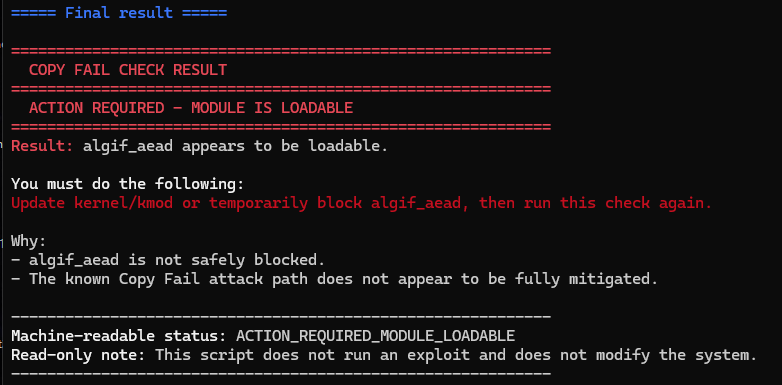
### 严重 / 需要采取行动
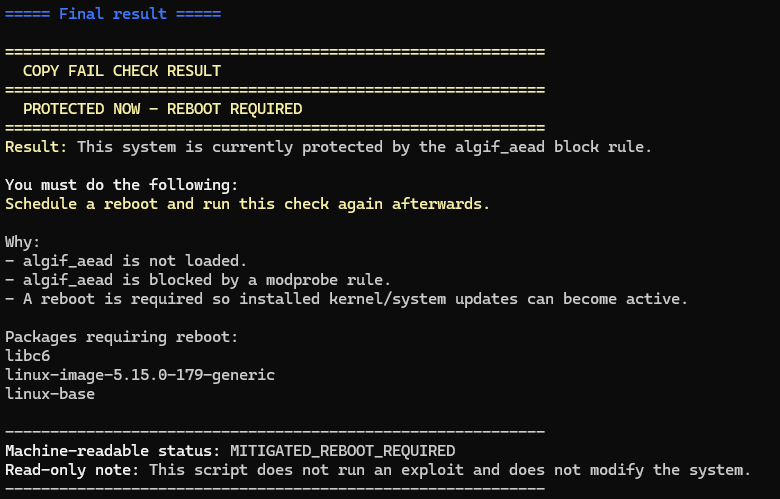
### 已防护,但需要重启
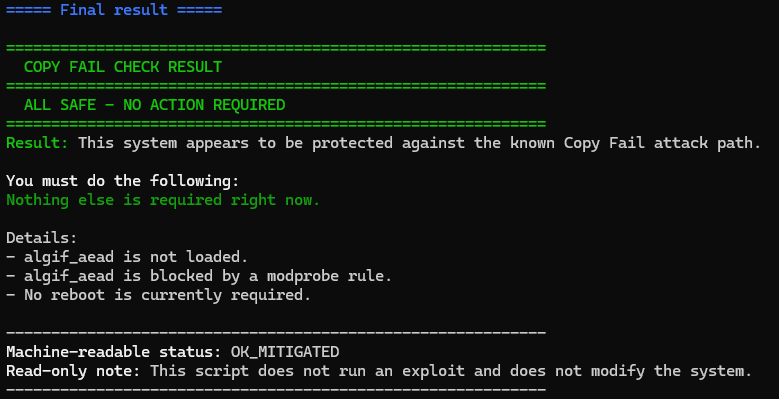
### 全部安全
## 检查后的清理
脚本是只读的,不会更改系统。
如果您只是为了运行检查而克隆了此仓库,可以在检查后将其删除:
```
cd ~
rm -rf copyfail-safe-check
```
如果您仅下载了脚本,可以在检查后将其删除:
```
rm -f ./copyfail-safe-check.sh
```
这仅会删除检查工具本身。它不会撤销系统更新、缓解措施或安全设置。
## 如何解读结果
如果您不确定输出的含义,请重点关注脚本输出末尾的最终结果部分。
### 全部安全
```
ALL SAFE - NO ACTION REQUIRED
Machine-readable status: OK_MITIGATED
```
系统似乎已针对所检查的 Copy Fail 攻击路径进行了防护。
目前无需进一步操作。
### 已防护,但需要重启
```
PROTECTED NOW - REBOOT REQUIRED
Machine-readable status: MITIGATED_REBOOT_REQUIRED
```
系统目前似乎已受到保护,但需要重启才能使已安装的内核或系统更新生效。
建议操作:
```
sudo reboot
```
重启后,再次运行检查:
```
./copyfail-safe-check.sh
```
### 需要采取行动
```
ACTION REQUIRED - MODULE IS LOADED
```
或:
```
ACTION REQUIRED - MODULE IS LOADABLE
```
应对系统进行审查和安全加固。
建议操作:
- 更新内核及相关包
- 如有需要,应用厂商推荐的缓解措施
- 如有需要则重启
- 之后再次运行此检查
### 需要手动审查
```
MANUAL REVIEW REQUIRED
```
脚本无法明确确定防护状态。
请手动审查完整的输出。
## 参考资料
以下链接仅供背景信息参考。
**请勿**在生产系统上运行公开的漏洞利用代码。
- Copy Fail 项目主页:https://copy.fail/
- Ubuntu CVE 页面:https://ubuntu.com/security/CVE-2026-31431
- Debian Security Tracker:https://security-tracker.debian.org/tracker/CVE-2026-31431
- CERT-EU 公告:https://cert.europa.eu/publications/security-advisories/2026-005/
## 免责声明
此工具是为管理员提供的防御性辅助工具。
它不保证系统完全安全。请始终遵循您的 Linux 发行版厂商的官方安全公告和补丁指南。
## 维护者
由 [@waltrone1](https://github.com/waltrone1) 维护。
标签:无线安全, 系统检查