Vith0r/StackSentry
GitHub: Vith0r/StackSentry
StackSentry 是一款 Windows x64 用户态内存扫描研究工具,通过监控调用栈来检测恶意 loader 的 DLL 加载来源、无支撑 shellcode 执行和内存中的 C2 植入物。
Stars: 37 | Forks: 3

## 设计理念 StackSentry 主要专注于对内存中运行的代码进行快速分类分析。其背后的逻辑非常实际:C2、RAT 或无文件 loader 可以隐藏磁盘上的文件、在休眠时自我加密,甚至构建一个看似正常的调用栈,但在某个时刻,它依然需要加载网络 DLL 或通过其进行通信。 在 Windows 上,这通常意味着 `ws2_32.dll`、`wininet.dll`、`winhttp.dll`、`dnsapi.dll` 等文件,或由它们导出的 API。如果这些 DLL 是从异常的来源加载或使用的,那就值得停下脚步仔细排查。 这种模式并非凭空出现。它与行为检测中已有的理念(例如下面这些 Elastic 规则)直接契合: - [`defense_evasion_library_loaded_via_a_callback_function.toml`](https://github.com/elastic/protections-artifacts/blob/6e9ee22c5a7f57b85b0cb063adba9a3c72eca348/behavior/rules/windows/defense_evasion_library_loaded_via_a_callback_function.toml):识别通过 callback 进行的库加载,这可能是为了从调用栈中隐藏 `LoadLibrary` 调用的真实来源。 - [`defense_evasion_network_module_loaded_from_suspicious_unbacked_memory.toml`](https://github.com/elastic/protections-artifacts/blob/6e9ee22c5a7f57b85b0cb063adba9a3c72eca348/behavior/rules/windows/defense_evasion_network_module_loaded_from_suspicious_unbacked_memory.toml):在内存执行常见的场景中,当线程栈包含位于已知可执行镜像之外的栈帧时,识别出网络模块的加载。 - [`defense_evasion_library_loaded_from_a_spoofed_call_stack.toml`](https://github.com/elastic/protections-artifacts/blob/6e9ee22c5a7f57b85b0cb063adba9a3c72eca348/behavior/rules/windows/defense_evasion_library_loaded_from_a_spoofed_call_stack.toml):检测从可能被篡改的调用栈中进行的库加载,用于掩盖调用的真实来源。 由于存在这样的检测机制,一些 loader 现在会避开这种显而易见的方式。它们不再直接从私有内存中调用 `LoadLibrary`,而是尝试利用 callback、合法模块内部的 gadget、线程池链、跨线程调度、从被修改的镜像中执行,甚至是篡改的 unwind 元数据来掩盖其真实来源。 StackSentry 采纳了这个想法,并在实验室环境中将其进一步推进:它不仅会提示加载了敏感 DLL,还会展示其可能的来源、涉及的内存、栈状态、有用的 dump,以及在可能的情况下暴露出 loader 试图隐藏的路径。 ## 检测目标 - 从可疑栈进行的敏感 DLL 加载(`ws2_32`、`wininet`、`winhttp`、`dnsapi`、CLR/.NET 及相关模块)。 - `Unbacked` 栈帧:在不属于已知镜像的 `MEM_PRIVATE` 或 `MEM_MAPPED` 内存中执行。 - `BackedModified` 栈帧:在实时字节与磁盘文件不同的 `MEM_IMAGE` 区域内部执行。 - 通过 proxy/gadget 流程、callback、线程启动、APC、VEH、线程池、跨线程调度或目标 `.text` 内部的早期执行来隐藏的来源。 - 栈欺骗:缺少合理调用点的返回栈帧、被截断的栈、合成栈,或者对于当前事件而言显得过于干净的可见调用者。 - BYOUD/unwind 欺骗:`.pdata`、`.xdata`、`.rdata`、`RUNTIME_FUNCTION` 中的临时变化以及动态 unwind 表。 - 当启用 `/network-use-trace` 时,检测真实的网络 API 使用情况,即使 DLL 已经被加载且没有新的 `LoadLibrary` 可供观察。 - 可疑的 LDR/loader 元数据,包括入口点劫持和模块不一致的情况。 - 内存审计:被修改的镜像、孤立的执行映射、私有执行区域,以及带有针对性 dump 的内存特征。 - 相关性与输出产物:`events.jsonl`、`summary.json`、`memory.json`、`network_trace.json`、`byoud_trace.json`、来源 dump、模块 dump、哈希、熵值以及有用的字符串。 - 更轻量的遥测、完整性检查、可选的 ETW、简洁的控制台输出以及研究/实验室模式。 ## 检测图库 示例命令和预期的调用栈摘要记录在 [samples/README.md](samples/README.md) 中。
友情提示:这些示例是我为本地测试制作的粗糙实验室版本,所以不要指望它们是精美的展示用二进制文件。
以下是 StackSentry 无需内核驱动即可在终端中展示的几种模式。 部分图片仍然展示的是 `v0.8` 阶段捕获的输出。此后我改进了控制台渲染、栈压缩和噪声抑制,但我认为仅仅因为输出变得更干净就将其称为 `v0.9` 是不诚实的。如果格式细节与当前版本略有不同,就是这个原因。 ### SilentMoonwalk 与合成栈 此测试使用了 [klezVirus/SilentMoonwalk](https://github.com/klezVirus/SilentMoonwalk) 的修改变体,以通过合成栈加载网络 DLL。所有可见的栈帧看起来都像是来自合法模块,但调用点验证和来源追踪依然将此 DLL 加载与准备该调用的代码联系了起来。 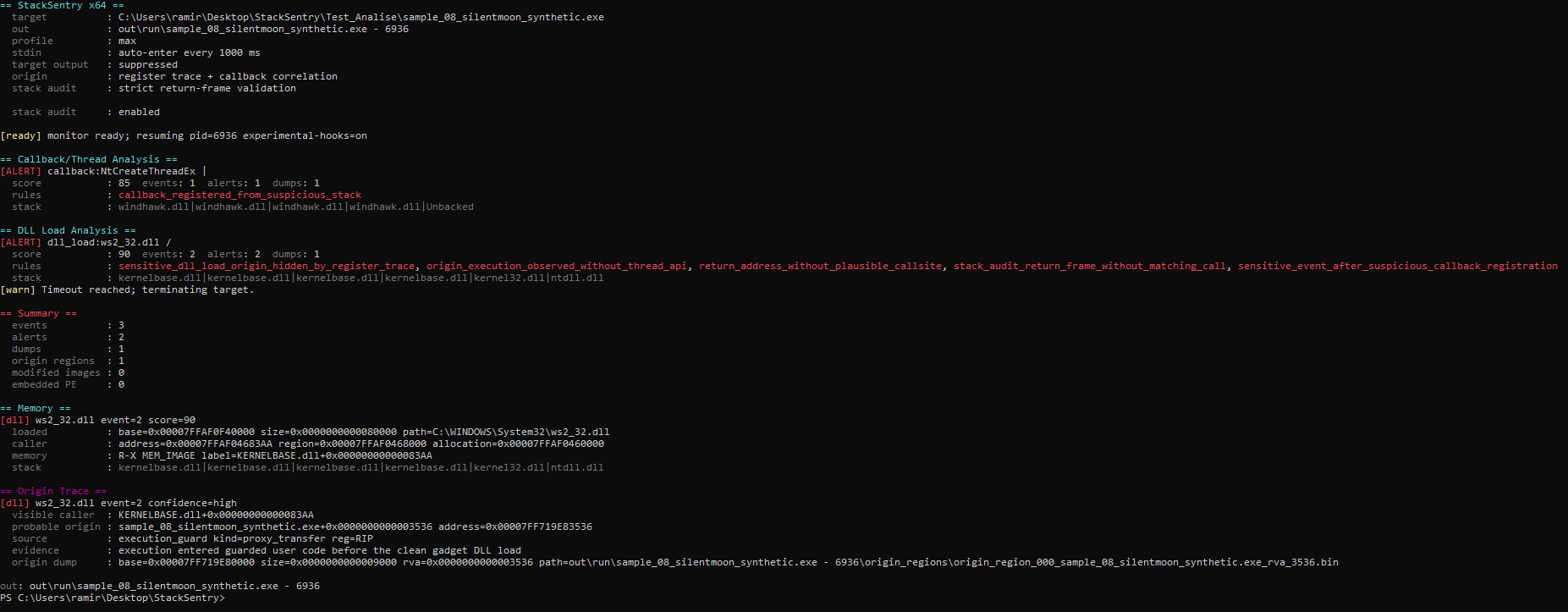 ### BYOUD / Unwind 元数据欺骗 此测试使用了转换为 RDI shellcode 的 [klezVirus/byoud](https://github.com/klezVirus/byoud)。引导程序会加载 `wininet.dll` 和 `mscoree.dll` 等 DLL,但这里关键的阶段是利用 BYOUD 来隐藏 `ws2_32.dll` 的加载:它没有修改返回地址,而是篡改了 Windows unwind 元数据。StackSentry 捕获到了敏感加载之前的临时偏差,并报告了出现异常的表/结构。 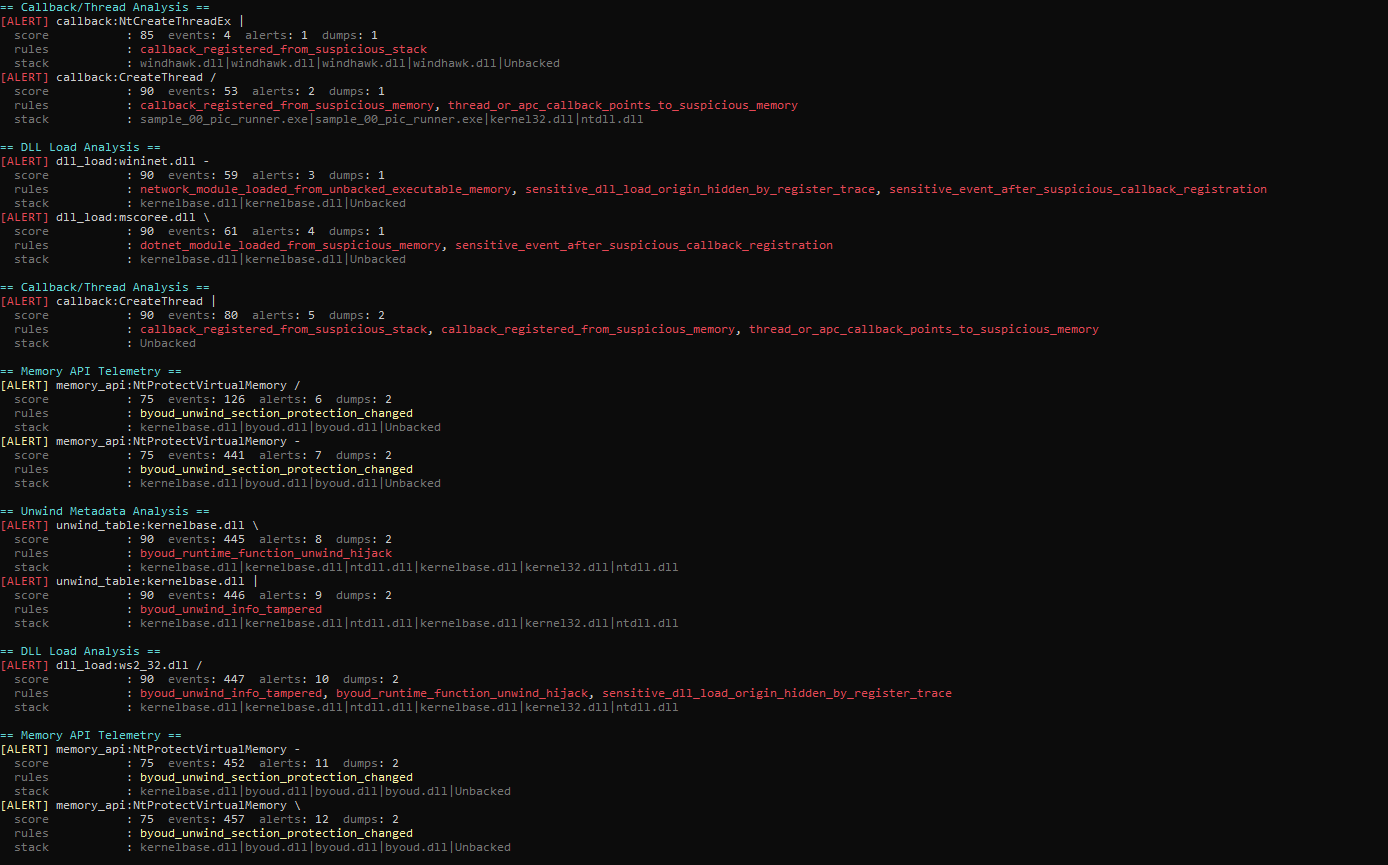 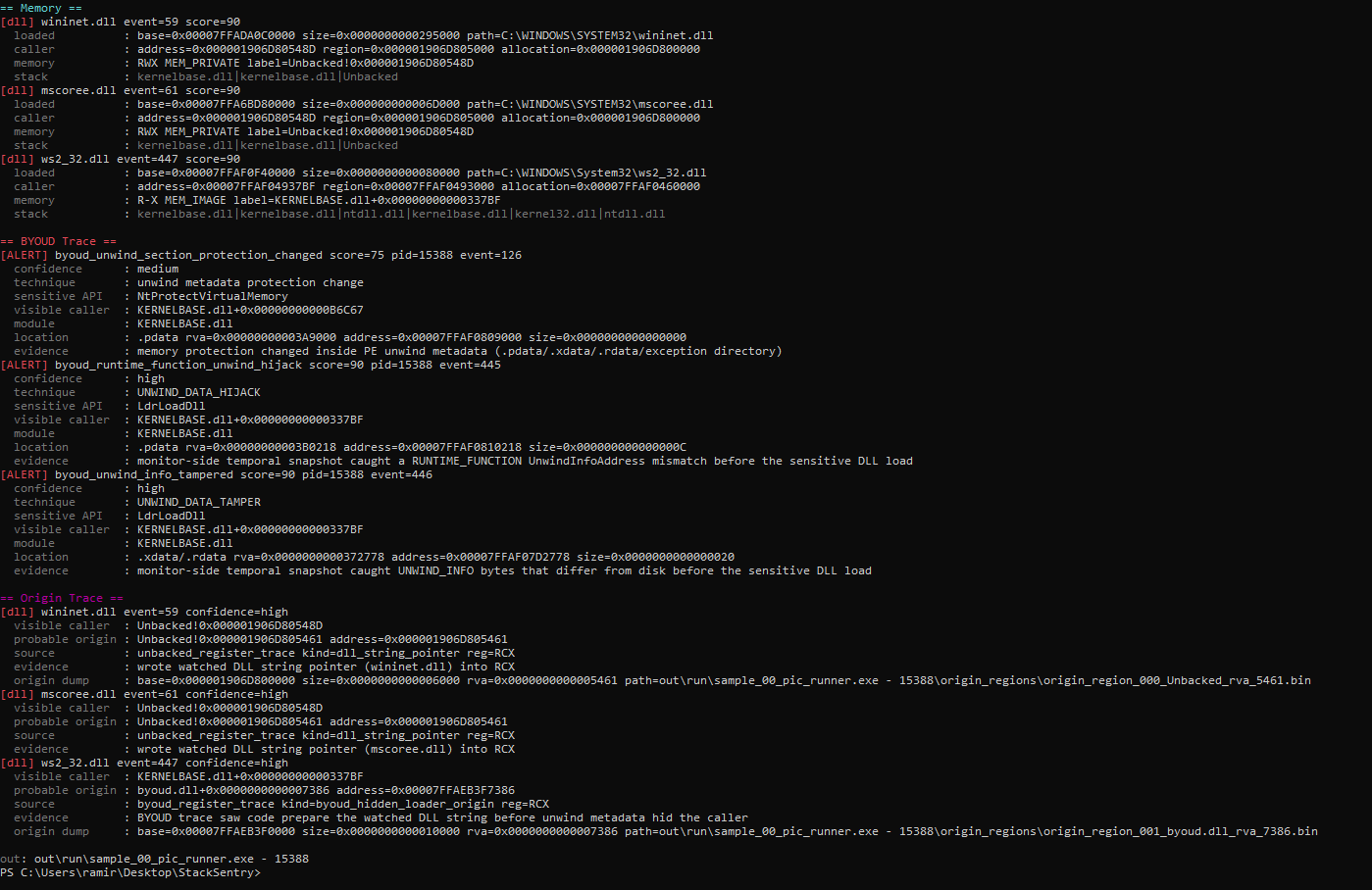 ### 线程池 Callback 链 此示例基于 [klezvirus/ThreadPoolExecChain](https://github.com/klezvirus/ThreadPoolExecChain) 背后的理念:一个 threadpool/proxy 链使得加载过程发生在一个看起来更加自然的上下文中。报告保留了链的上下文,并标记了沿路径出现的被修改的栈帧。 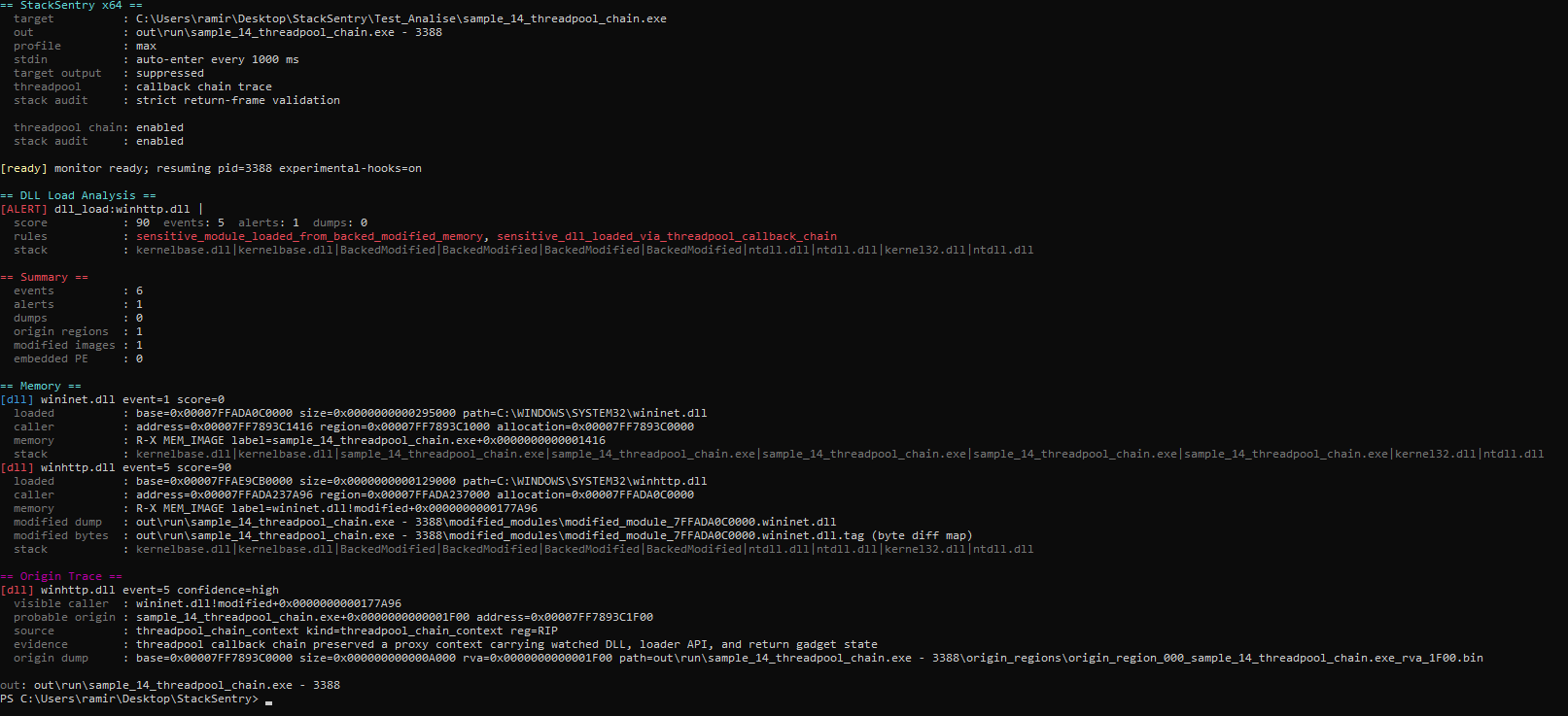 ### 镜像 `.text` 代理 此测试使用了我基于 [LibTPLoadLib](https://github.com/AlmondOffSec/LibTPLoadLib) 从实验性的 [RefinedPool](https://github.com/Vith0r/RefinedPool/tree/main/RefinedPool) 变体构建的 PIC shellcode。该技术遵循了 [paranoidninja](https://0xdarkvortex.dev/hiding-in-plainsight/) 提出的 API 代理思路,并在 [paranoidninja/Proxy-DLL-Loads](https://github.com/paranoidninja/Proxy-DLL-Loads) 中进行了演示。 因为它是 PIC,所以代码可以驻留在 loader 的 `.text` 中,并通过代理调用 `LoadLibrary`,利用 `nvwgf2umx.dll` 中现有的 gadget 增加了另一个栈元素。最终的栈指向一个看似干净的地方,但寄存器/来源追踪将 DLL 加载追溯到了启动该流程的 `.text` 区域。这证明了即使在像这样非常特定的模式下,该检测依然能够站得住脚。 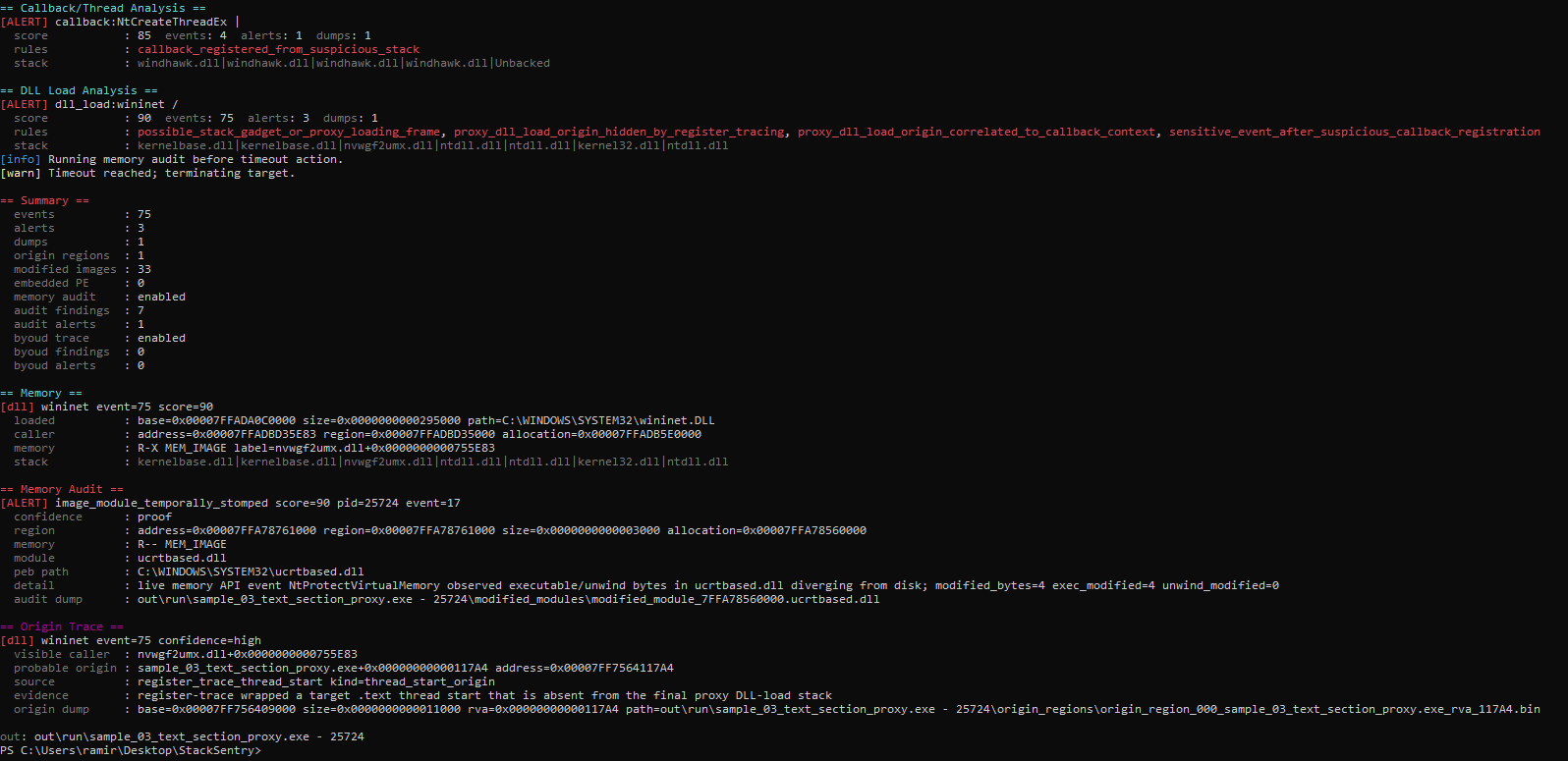 ### Code Cave / 修改的镜像 这种模式也灵感来自于我的 [RefinedPool](https://github.com/Vith0r/RefinedPool/tree/main/RefinedPool) 项目的一个简单实验性变体,并转换为了 PIC shellcode。敏感加载通过了*写入到 image 支持的 code cave 中的字节*。其有价值的地方在于,StackSentry 在 dump 输出中同时保留了被修改的模块和更改字节的映射,我认为这在分类分析中确实非常有价值。 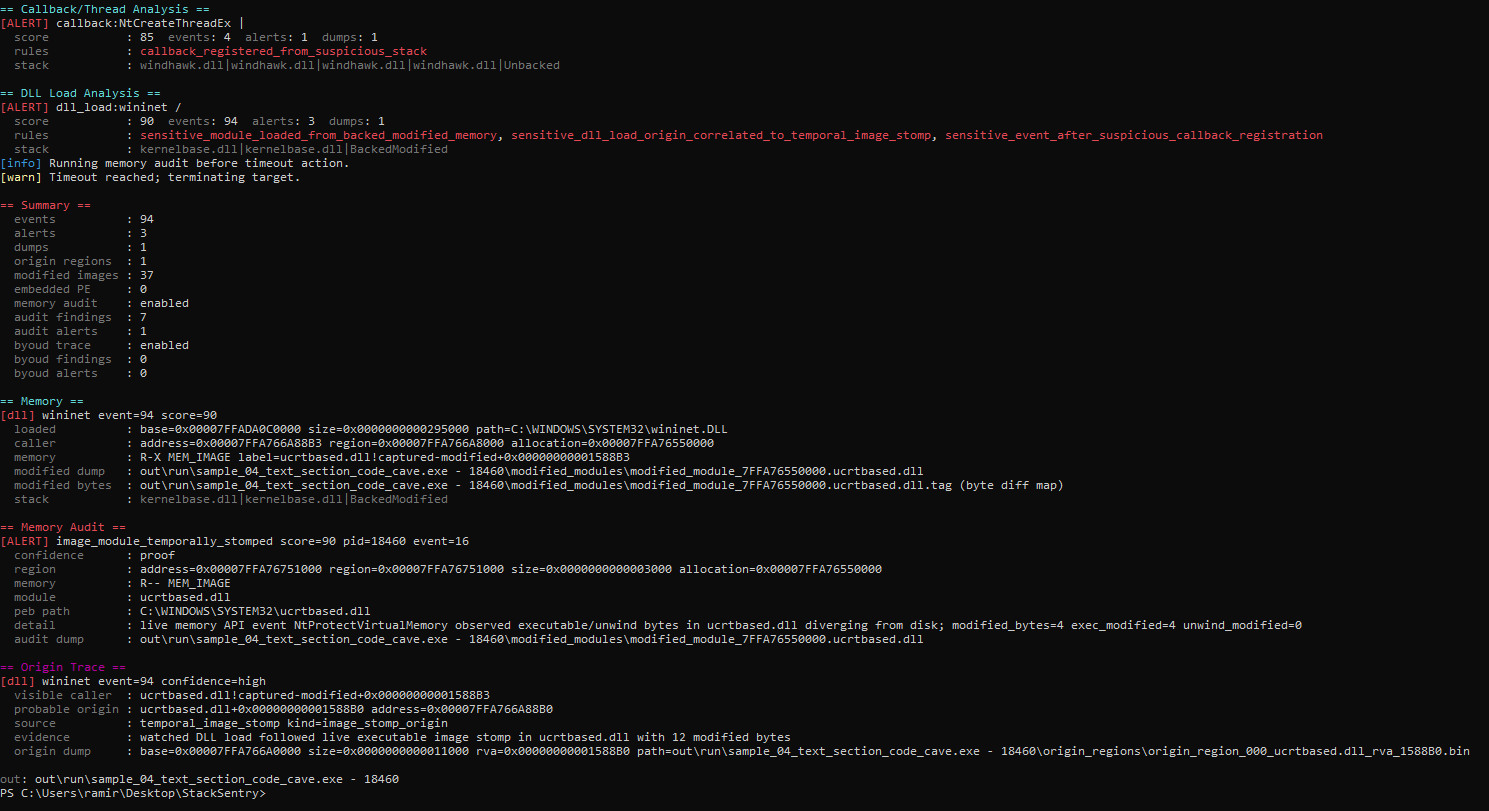 ### SilentMoonwalk RDI 与合成栈 在这里,[klezVirus/SilentMoonwalk](https://github.com/klezVirus/SilentMoonwalk) 变体被打包为 [Donut](https://github.com/TheWover/donut)/RDI payload。引导程序可能会加载 `wininet.dll` 和 `mscoree.dll` 等 DLL,但相关的阶段是带有合成栈的 `ws2_32.dll` 加载。第一张图显示了 DLL 加载警报;第二张图显示了指向“隐藏”可执行区域的可能的来源。 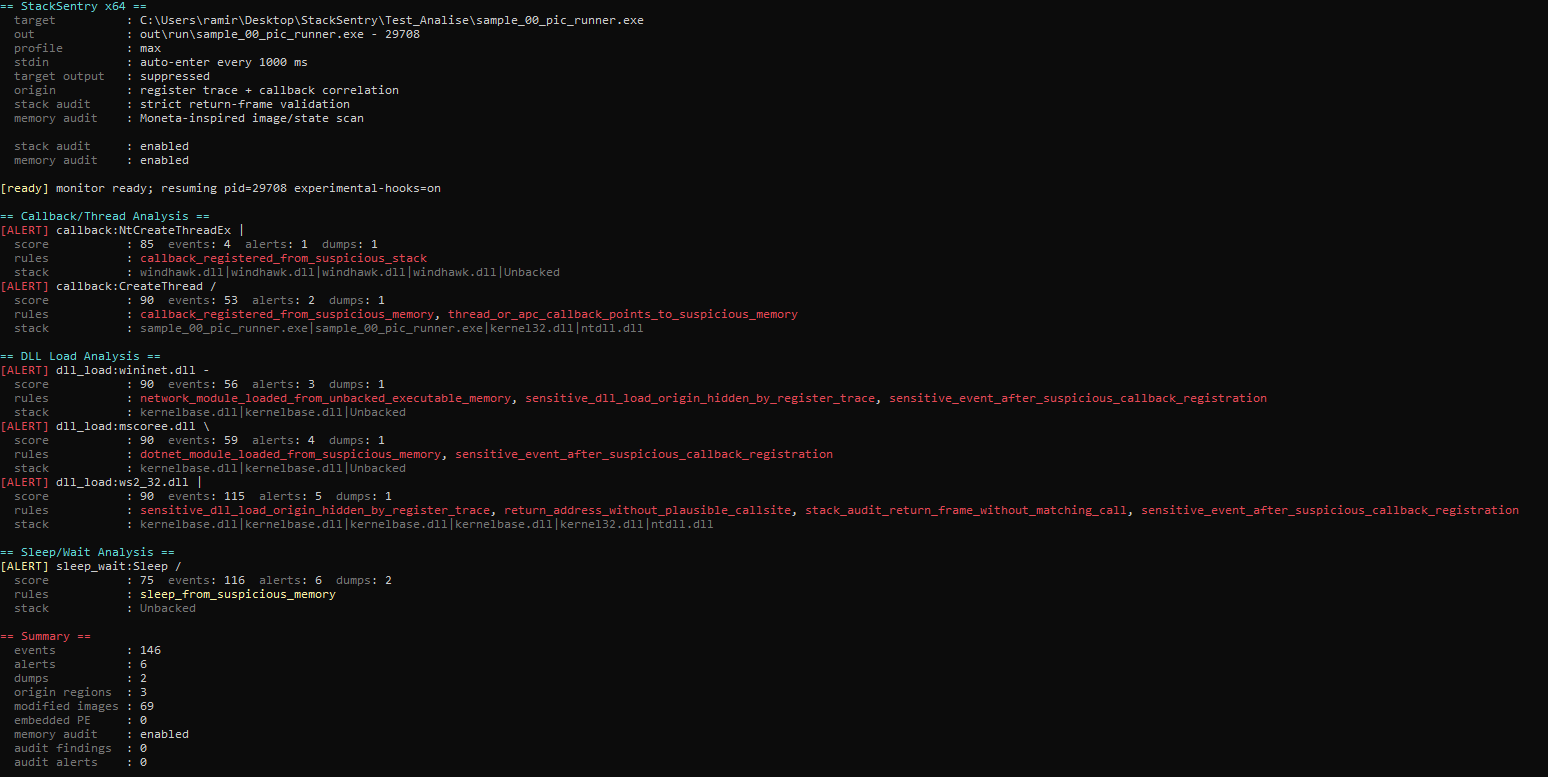 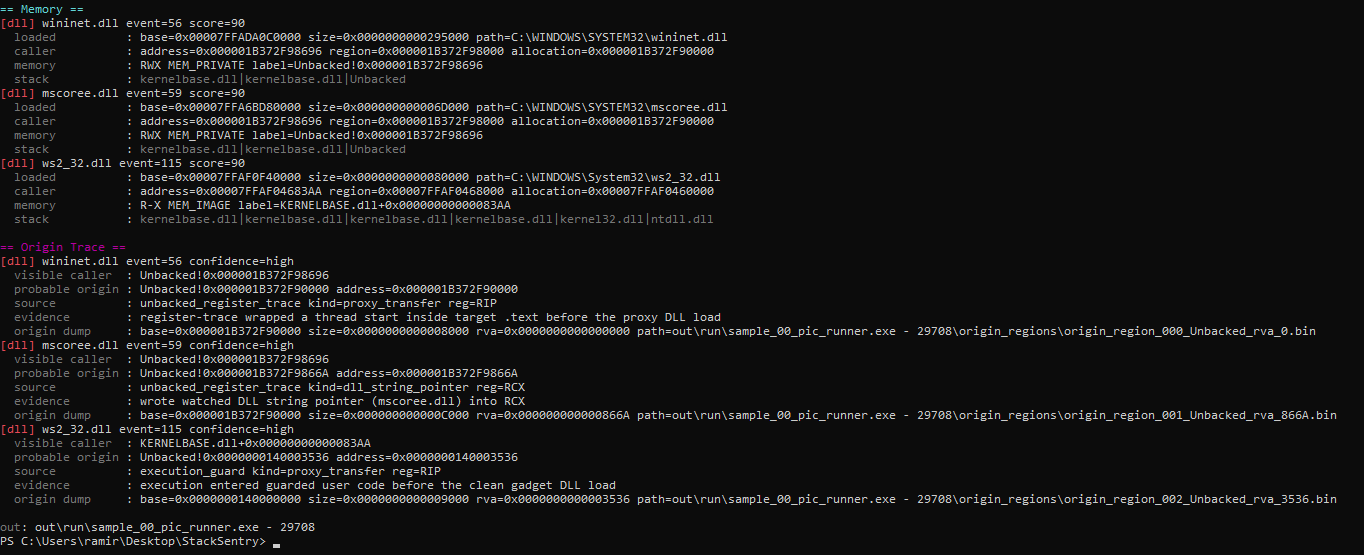 ### MassDriver 风格调度 灵感来自 [Sizeable-Bingus/MassDriver](https://github.com/Sizeable-Bingus/MassDriver) 的调度模式,一个看似干净的工作线程执行了 `LoadLibraryA`。`/dispatch-trace` 将加载追溯回了提交调度结构的请求者。这是一个非常特定的检测,但我认为它足够有趣,所以将其包含在内。 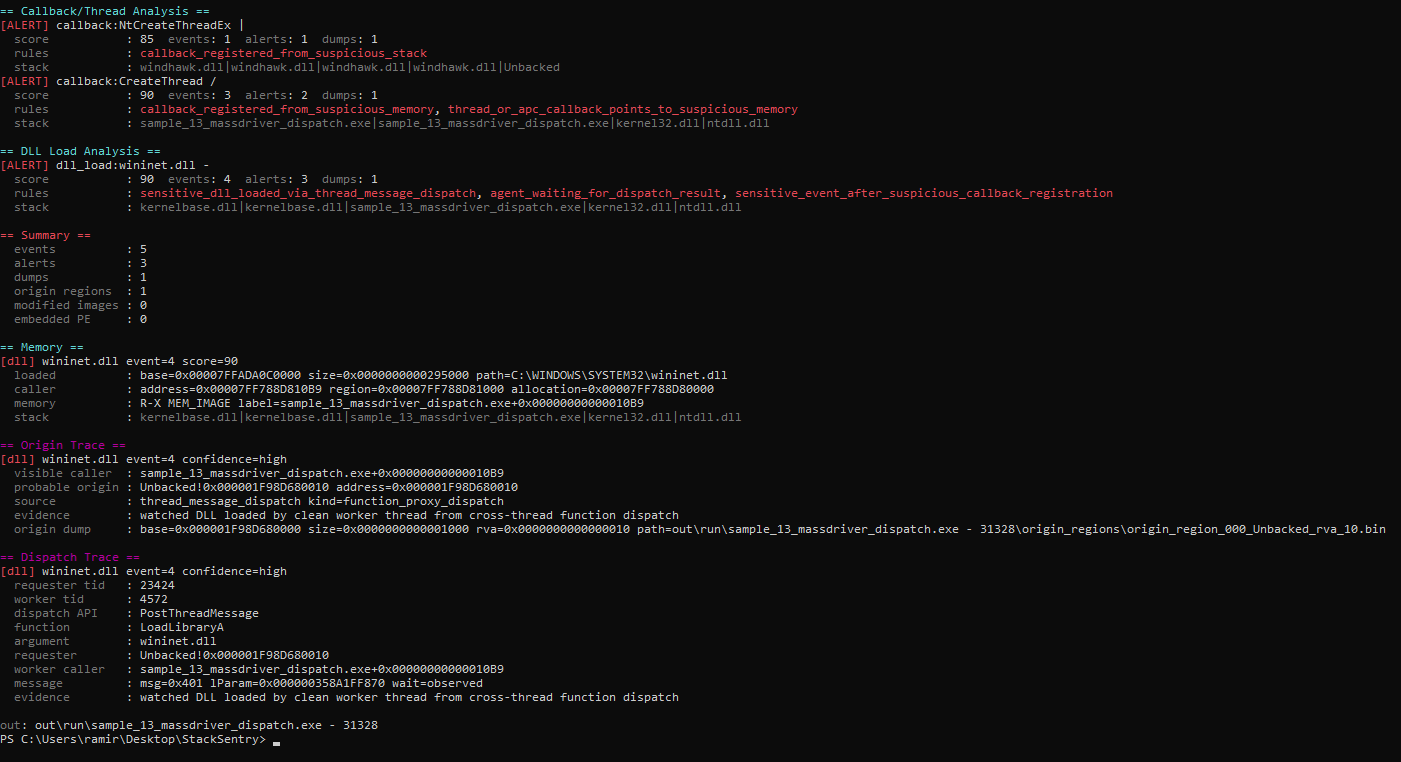 ### C2 Payload 中的网络使用追踪 此示例使用 `/network-use-trace` 来展示这样的情况:加载网络 DLL 并不是唯一有趣的部分。Payload 还需要使用网络 API,而 StackSentry 会尝试归因是谁调用了 `connect`、`WSAConnect`、`send`、`recv`、WinHTTP/WinINet 及相关 API。这很有用,因为输出可能会揭示真实的目的地,例如域名、IP/端口,甚至是流程中使用的第三方服务,如此测试中的 `pastebin.com`。 图中的栈是故意压缩过的,这样它就不会变成一大块重复的 `system.ni.dll` 栈帧。
如果您像在旧的截图中那样更喜欢单行显示的完整栈,请使用 `/inline-stack`;如果您想要带偏移的逐帧输出,请使用 `/full-stack`。 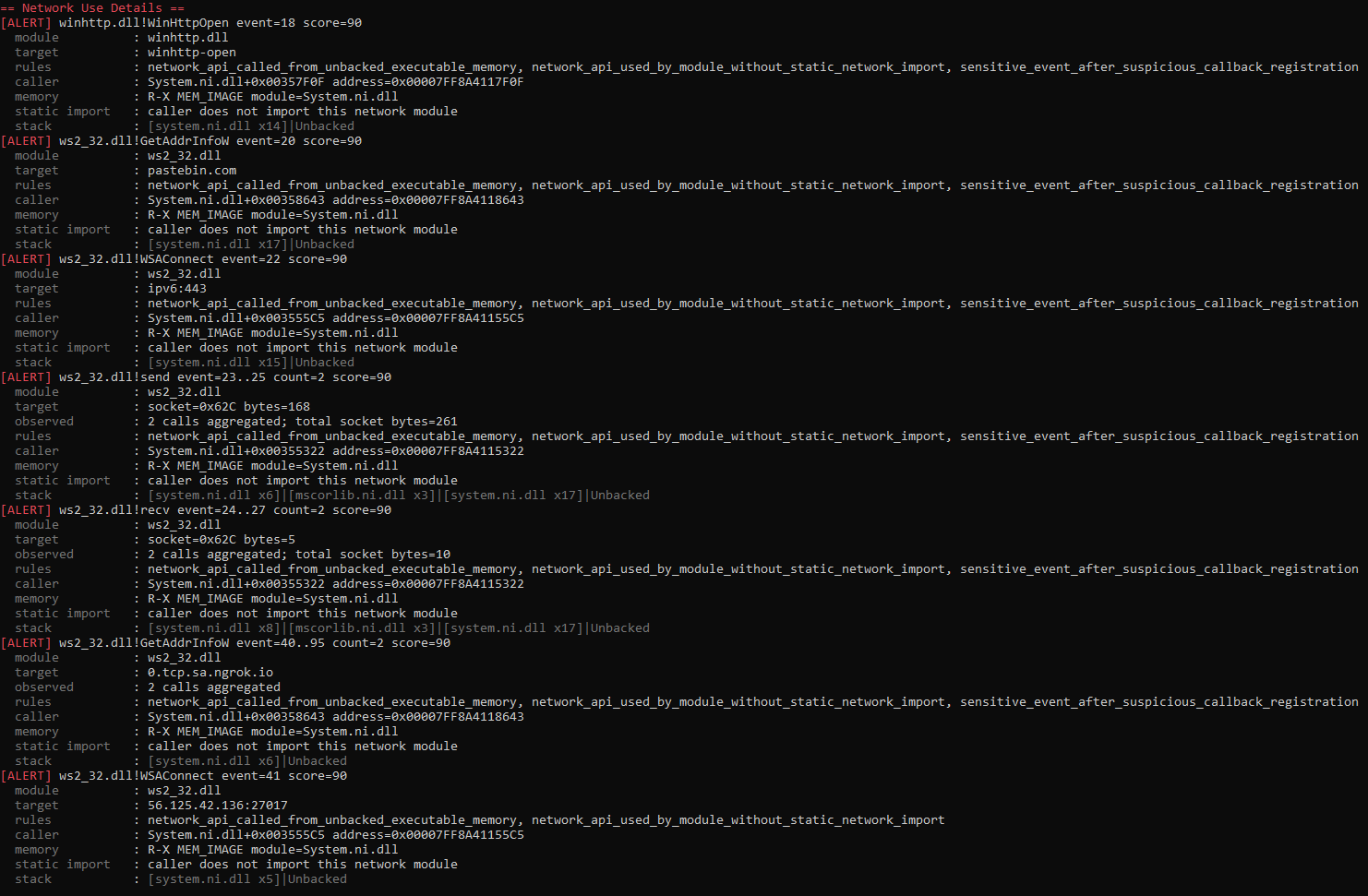 ### 栈视图模式 除了检测功能本身,当前的 StackSentry 控制台还致力于让分析变得不那么疲惫。根据您想要检查的内容,同一个栈可以以不同的方式显示: #### 紧凑栈 这是当前的默认格式。重复的栈帧被分组为 `[module.dll xN]`,这在经过大型 runtime(如 .NET)的 payload 中能减少大量噪声。 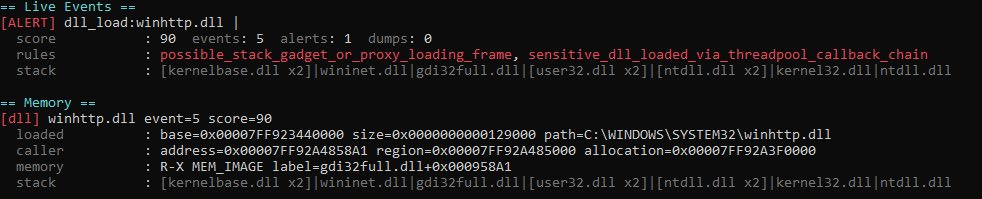 #### 带偏移的完整栈 使用 `/full-stack` 时,每个栈帧都会连同模块偏移量单独打印在一行中。当您想精确审计每个返回栈帧落地位置时,这非常有用。 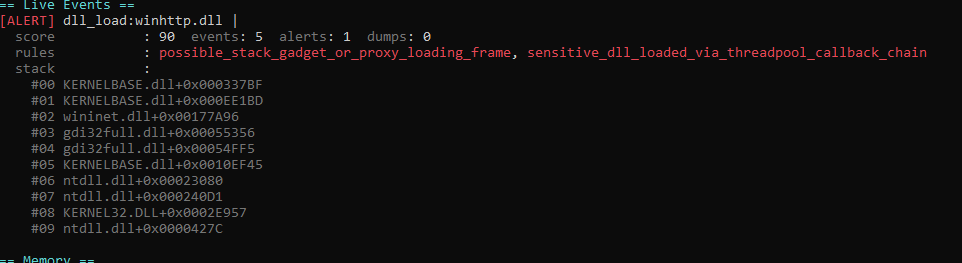 #### 未压缩的内联栈 使用 `/inline` 时,栈会恢复为单行格式,不对重复栈帧进行压缩。  #### Verbose 模式下的干净事件 默认的控制台输出优先显示警报,以免终端被淹没。使用 `/verbose` 时,也会显示 `score=0` 的干净加载;这些事件以蓝色显示。这有助于快速确认已观察并记录到了 DLL 加载,即使它本身并不可疑。即使不使用 `/verbose`,`score=0` 的事件仍会被写入 `events.jsonl` 和 `memory.json`。  #### BackedModified 与内存审计 当返回栈帧落在一个真实的 DLL 内部,但该区域的字节不再与磁盘上的文件匹配时,StackSentry 不会将其视为干净的栈帧。它会将栈标记为 `BackedModified`/`captured-modified`,并且内存审计会记录更改的模块、区域和临时细节。 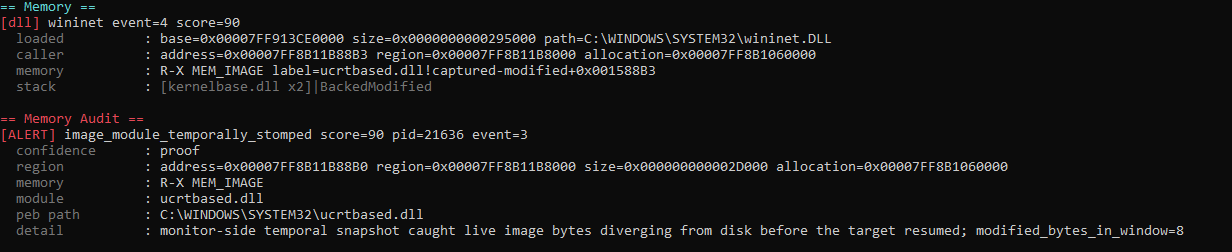 ## 编译 为了让编译变得简单,我包含了 `build.ps1`。它使用 Microsoft Visual Studio/MSVC 进行编译。如果您的环境不完全一样,适配起来应该也不难:脚本很短,阅读它就能清楚所需的编译器调用。 ``` .\build.ps1 ``` 使用该脚本时,编译输出会写入到 `build\`: - `StackSentry64.exe` - `CallstackMonitor.dll` 第三方代码位于 `third_party\` 下。有关鸣谢和许可证说明,请参见 [THIRD_PARTY_NOTICES.md](THIRD_PARTY_NOTICES.md)。 ## 测试命令 推荐的命令和确切的示例命令位于 [samples/README.md](samples/README.md) 中。
如果您不确定从哪里开始,请先看那里;它包含了首轮运行命令、更强大的配置、栈输出模式以及我用来验证图库截图的示例。 ## 主控 Profile - `/quick`:稳定的 DLL 加载分类分析 profile。适合首次运行、良性基线测试和低噪声输出。 - `/deep`:DLL 加载狩猎 profile。启用稳定的 callback/线程启动 hook、unwind 表 hook、LDR 完整性检查、dump、雕刻以及更长的相关性时间窗口。除非传入 `/mem`,否则内存/API 遥测将保持关闭。 - `/max`:最强实用的 DLL 加载 profile。默认启用深度遥测、栈审计、LDR 检查和 `/auto-enter`,但除非明确要求,否则将保持内存/API、wait 和 threadpool hook 禁用。 - `/profile`:按名称选择 profile。
如果您只是想测试一个 loader,而不想过多考虑参数,我会从 `/max` 开始。之后,根据结果添加 `/hunt`、`/network-use-trace` 或特定参数。
显式的 hook 参数是累加的,因此 `/quick /mem`、`/deep /mem` 和 `/max /mem` 都是有效的。
仅在您想要最激进的实验性 hook 集合时,才使用 `/max /tp /wait`。
## 命令分组
如果您想查看所有可用的参数,请使用 `/features`。
完整的 `/features` 输出按意图进行了分组,这样新用户就不必把每个参数都看得同等重要: - `Common options`:输出目录、超时、keep-alive、stdin 自动化和详细程度。 - `Output style`:quiet/plain/live/color 控制、目标输出抑制、`/inline-stack` 和 `/full-stack`。 - `Origin / proxy analysis`:用于隐藏调用者和代理加载情况的 `/regtrace`、`/dispatch-trace` 和 `/threadpool-chain-trace`。 - `Network use analysis`:用于已加载网络 DLL 复用的 `/network-use-trace` 和 `/net-use-trace`。 - `Remote / multi-process`:用于将执行转移到另一个进程的 loader 的 `/follow-remote` 和 `/net-reset`。 - `Extra telemetry / integrity`:`/etw`、`/ldr-integrity`、`/unwind`、`/stack-audit`、`/memory-audit`、`/byoud-trace` 和 `/shadow-stack`。 - `Aggressive / low-level hooks`:`/mem`、`/tp`、`/wait` 和直接的 `/xhooks`。 - `Advanced config`:自定义规则/配置。 ## 来源追踪 代理 DLL 加载技术可以使最终的调用栈看起来很干净,包括在真实的 loader 代码和 `LoadLibrary` 之间放置一个现有的镜像 gadget。StackSentry 保持默认的 profile 专注且低噪声,但针对这些情况增加了可选模式: ``` .\build\StackSentry64.exe /run .\samples\sample_03_text_section_proxy.exe /max /origin-trace /no-target-output /timeout 9000 .\build\StackSentry64.exe /run .\samples\sample_03_text_section_proxy.exe /max /regtrace /no-target-output /timeout 9000 ``` - `/origin-trace`:将后续的 DLL 加载与近期的 callback/thread/APC 上下文相关联。 - `/regtrace`:启用来源追踪,并包装目标 `.text` 线程启动,以便当来源不在最终栈中时,隐藏在代理背后的 DLL 加载依然可以追溯到原始代码。 - `/proxy-trace`:`/regtrace` 的别名。 技术说明:对于大于 32 MB 的非主镜像模块,`/regtrace` 有意避免进行完整的寄存器追踪。私有执行内存、线程启动、动态执行转换和来源相关性仍然会被追踪;这只是避免了对庞大的 gadget 载体镜像进行昂贵的全面插桩。我不得不这样做,因为追踪这些模块对正常分析造成的损害大于帮助。如果您确实需要在实验环境中提高上限,它只是源代码中的一个小常量。 线程池 hook 保持显式启用。仅在您需要 `TpAllocWork/TpPostWork` 遥测时才添加 `/tp`。 当 `/regtrace` 将干净的 gadget 加载关联到可执行的 `MEM_IMAGE` 代码时,StackSentry 会在 `origin_regions\` 下写入一个产物。它独立于 `dumps\`:它不是 unbacked 分配,而是围绕被追踪的 `.text` 来源的一个聚焦的内存窗口,带有一个包含来源 VA/RVA、可见 gadget 调用者、SHA256、熵和选定字符串的伴随 JSON。 `LdrLoadDll` hook 也会记录来自实时 `UNICODE_STRING` 参数和 proxy 参数块的来源证据。这涵盖了在被插桩的 prologue 之后进入 `LoadLibrary*` 但仍能到达 `ntdll!LdrLoadDll` 的简单绕过方式。 ## LDR 完整性 StackSentry 还可以检测 loader 入口点劫持。这涵盖了诸如 LdrShuffle/EPI 等技术,在这些技术中,模块在 PEB loader 列表中看起来仍然合法,但其 `LDR_DATA_TABLE_ENTRY.EntryPoint` 被更改为了攻击者控制的代码。 ``` .\build\StackSentry64.exe /run target.exe /ldr-integrity /timeout 10000 ``` `/deep` 和 `/max` 会启用此检查。`/quick` 则将其保持禁用状态。分析器会报告被劫持的模块、当前入口点、预期的 PE 入口点、当前入口点的内存类型/保护,以及在已存在入口点异常时诸如可疑 `OriginalBase` 之类的上下文。 ## 远程跟随与网络重置 这些是可选的实验模式,默认不属于 `/quick`、`/deep` 或 `/max` 的一部分: ``` .\build\StackSentry64.exe /run loader.exe /max /follow-remote /timeout 15000 .\build\StackSentry64.exe /run loader.exe /max /follow-remote /net-reset /timeout 15000 ``` - `/follow-remote`:监视远程进程句柄,并在即将发生远程执行时将 `CallstackMonitor.dll` 注入到远程进程中。 - `/net-reset`:尝试卸载已加载的受监视网络 DLL,使得 payload 必须重新加载其自己的网络模块,从而让调用者对 StackSentry 可见。它可能有用也可能没用,因此请做好可能失败的心理准备。 远程进程的产物会写入到主运行目录下的 `children\\` 中。`events.jsonl` 仍然会被聚合,并且每个事件都包含产生它的 PID。
## 网络使用追踪
`/network-use-trace` 涵盖了 payload 不需要为受监视的网络 DLL 调用 `LoadLibrary` 的情况,因为宿主、loader 或 runtime 已经加载了它。StackSentry 不再仅仅询问是谁加载了 `wininet.dll`、`ws2_32.dll`、`winhttp.dll` 或 `dnsapi.dll`,而是还会询问是谁正在使用这些模块中的网络 API。它也可以在 loader/shellcode 自行加载网络 DLL 时使用:
```
.\build\StackSentry64.exe /run target.exe /max /network-use-trace /timeout 10000
.\build\StackSentry64.exe /run target.exe /max /hunt /network-use-trace /timeout 15000
```
监控程序会在一组核心 API 上安装 hook,例如 `connect`、`WSAConnect`、`send`、`recv`、`getaddrinfo`、`DnsQuery_*`、`InternetOpenUrl*`、`InternetConnect*`、`HttpOpenRequest*`、`HttpSendRequest*` 以及常见的 WinHTTP 请求/读取/写入调用。然后,分析器会像处理 DLL 加载事件一样对调用者地址和栈进行分类。高信号的情况包括从可执行的 `MEM_PRIVATE`、被修改的 image 支持代码、被篡改的 unwind 元数据或被欺骗/异常的栈中调用网络 API。
诚恳的提示:根据目标的不同,此模式可能会产生错误、大量的事件以及误报。它是为实验室中的 loader 和 payload 构建的,并不能保证在可能已经进行了大量插桩的大型程序上提供完美的体验。
发现结果会出现在 `== Network Use Details ==` 下,并被写入到 `network_trace.json`、`memory.json` 和 `summary.json` 中。此模式默认不属于 `/hunt` 的一部分:它很强大,但可能会非常冗长,因此我更倾向于让分析人员在想要证明真实的网络 API 使用情况时显式启用它。
## 内存审计
`/memory-audit` 是一个受 Forrest Orr 关于恶意内存特征的出色 Moneta 研究启发的可选实时进程内存扫描功能。它通过询问在 StackSentry 终止或从进程分离之前,该进程在内存中的样子是什么,来补充 StackSentry 的事件/调用栈模型:
```
.\build\StackSentry64.exe /run target.exe /max /memory-audit /timeout 10000
.\build\StackSentry64.exe /run target.exe /max /regtrace /memory-audit /timeout 10000
```
此审计会检查是否缺少 loader/模块列表的 `MEM_IMAGE` 区域、没有可用映射文件名的镜像映射、镜像内部的执行私有页、被擦除或严重更改的 PE 头、非可执行段上的执行权限,以及看起来像 payload 的私有或映射的可执行区域。
高置信度的发现会出现在 `== Memory Audit ==` 下,并可能会在 `memory_audit\` 下创建有针对性的 dump。置信度较低的狩猎上下文会保留在 `memory_audit.json` 中,且默认不会引发警报,因为现代 Windows 组件和驻留工具合法地创建私有或被修改的页面是正常的。此模式特意不被 `/quick`、`/deep` 或 `/max` 启用。
## BYOUD 与 Shadow Stack 研究
`/byoud-trace` 是用于处理篡改 Windows x64 unwind 元数据而不是明显返回地址的 DLL 加载情况的实验室模式。它会观察 unwind 表 API、`.pdata`/`.xdata`/`.rdata` 周围的内存保护变化,以及在敏感 loader 调用之前的临时元数据偏差:
```
.\build\StackSentry64.exe /run target.exe /max /byoud-trace /regtrace /timeout 12000
```
`/hunt` 包含 `/byoud-trace`,因为当前的 BYOUD 测试集通过临时的 unwind 元数据偏差提供了可重复的证明,而且我发现这太有用了,不能将其隐藏在一个单独的标志后面。
`/shadow-stack` 则不同。它仅作为 Windows 暴露用户态 CET/HSP shadow-stack 状态的系统的研究/测试开关而公开。它会捕获 CET 返回栈帧,将其与经典栈作为有序序列进行比较,并报告隐藏的、丢失的或乱序的栈帧。它不包含在 `/hunt` 中,不计入成熟覆盖范围,并且当 `XSTATE_CET_U` 不可用时可能不会产生任何发现。老实说,我只在朋友的笔记本电脑上对其进行过有限的测试,所以请预期可能会存在粗糙的边缘情况:
```
.\build\StackSentry64.exe /run target.exe /max /shadow-stack /stack-audit /regtrace /timeout 12000
```
当它正常工作时,发现结果会出现在 `== Shadow Stack Trace ==` 下,并被写入到 `shadow_stack_trace.json` 中。当平台未公开所需的 CET 状态时,常规的 `/regtrace`、`/stack-audit`、`/memory-audit` 和 `/byoud-trace` 层依然会承担检测工作。
## ETW 时间线
`/etw` 是一个可选的实验模式,它会在目标主线程恢复之前启动 krabsetw 内核追踪。它记录主 PID 和父进程已被追踪的子 PID 的进程、线程和镜像加载事件。实事求是地说,这不是项目中最有用的功能,但我认为添加它很有趣:
```
.\build\StackSentry64.exe /run target.exe /max /etw /timeout 10000
.\build\StackSentry64.exe /run loader.exe /max /follow-remote /etw /timeout 15000
```
这并不能替代监控 DLL 的检测。它提供了一个内核支持的时间线,以回答诸如出现了哪个子进程、此时映射了哪个 DLL、以及远程 payload 执行是否与可疑的 loader 阶段相对应等问题。时间线会被写入到 `etw_timeline.json` 中,并在最终的控制台输出中进行总结。内核 ETW 收集可能需要提升权限;如果 Windows 拒绝追踪,StackSentry 会报告 `/etw` 不可用并继续正常分析。
## 单独的 Hook
```
.\build\StackSentry64.exe /run target.exe /xhooks
.\build\StackSentry64.exe /run target.exe /mem /unwind
```
`/xhooks` 启用最稳定的 callback/线程启动 hook(`CreateThread` 和 `QueueUserAPC`)。`/origin-trace` 增加来源相关性,而 `/regtrace` 则增加了更繁重的目标 `.text` 线程追踪路径。`/mem` 启用有噪声的内存/API 栈遥测(`NtAllocateVirtualMemory`、`NtProtectVirtualMemory`、`NtMapViewOfSection`、写入、线程创建和 APC 排队),并且有意地不被任何主 profile 启用。`/etw` 通过 krabsetw 增加内核进程/线程/镜像加载时间线遥测。`/tp` 和 `/wait` 被分开了,因为 `Tp*` 和 `WaitFor*` hook 会使某些目标不稳定。是的,它们确实会使事情变得不稳定,因此请根据目标来使用它们。
旧版参数(`-e`、`--out`、`--rules`、`--timeout-ms` 和 `--experimental-hooks`)仍然有效。
## 控制台输出
控制台输出按分析块分组(`DLL LOAD ANALYSIS`、`MEMORY API TELEMETRY`、`CALLBACK/THREAD ANALYSIS` 及相关部分)。默认情况下,控制台仅显示警报,以防止 DLL 加载发现被常规的遥测淹没。当您还需要非警报事件时,请使用 `/verbose`。`events.jsonl` 仍然会接收完整的事件流。
在实践中,控制台尽量不变得像小说一样长。摘要保持可读性,而原始细节则保留在 JSON 文件中,供以后想要深入挖掘的人使用。
有用的输出参数:
- `/no-target-output`:不将目标的 stdout/stderr 混入到 StackSentry 控制台中。
- `/inline-stack`:将完整栈在一行中打印,不压缩重复的栈帧。
- `/full-stack`:逐行打印栈帧,并附带模块偏移量,禁用 `[module xN]` 压缩。
- `/quiet`:写入产物并减少控制台 UI。
- `/plain`、`/live` 和 `/no-color`:调整动画/颜色,因为终端有各自的意见。
最后,`Memory` 块会列出每个受监视的 DLL 加载,以及加载的模块基地址和从栈中选定的调用者/来源地址。这些地址也会被写入到 `memory.json` 和 `summary.json` 中。
```
.\build\StackSentry64.exe
.\build\StackSentry64.exe /help
.\build\StackSentry64.exe /version
```
```
.\build\StackSentry64.exe /run target.exe /live /verbose
.\build\StackSentry64.exe /run target.exe /plain /no-color
.\build\StackSentry64.exe /run target.exe /quiet
```
## 输出
每次运行都会在选定的 `/out` 路径内创建一个按进程划分的目录:
```
out\loader\loader_binary.exe - 24216\
```
控制台会尝试首先显示最重要的部分,因此您不需要打开每个 JSON 文件来理解一次简单的运行。但是,当您想要验证检测或将 StackSentry 与其他工具进行比较时,这些产物是值得查看的:
- `summary.json`、`memory.json` 和 `events.jsonl` 存储了支持该警报的摘要、事件和决策。
- `origin_regions\` 存储了来源追踪链接到隐藏加载的区域周围的聚焦内存窗口。
- `dumps\`、`memory_audit\`、`modified_modules\` 和 `modified_network_modules\` 存储了保留的字节以供日后分析。
- `network_trace.json`、`byoud_trace.json`、`shadow_stack_trace.json` 和 `etw_timeline.json` 在使用其对应模式时出现。
- 当 `/follow-remote` 跟随执行进入另一个进程时,`children\` 存储按 PID 划分的产物。
有一个细节值得一提:当 StackSentry 保留被修改的模块时,它还会在 dump 旁边写入一个 `.tag` 文件。
该 `.tag` 是一个简单的差异映射表,包含了相对于磁盘文件更改的偏移量/字节。对于 code cave、模块 stomping 或临时修改的镜像,这通常比仅仅拥有完整的模块 dump 更有用。 退出代码: - `0`:无警报。 - `10`:至少生成了一个警报。 - `1`/`2`:runtime 错误、目标崩溃、参数错误或配置错误。 ## 规则 `config\rules.json` 展示了支持的格式: ``` { "schema_version": 3, "network_modules": ["ws2_32.dll", "wininet.dll", "winhttp.dll", "dnsapi.dll", "iphlpapi.dll"], "dotnet_modules": ["clr.dll", "coreclr.dll", "mscoree.dll", "System.Management.Automation.dll"], "alert_on_unbacked_executable": true, "alert_on_backed_modified": true, "dump_suspicious_regions": true, "analyze_dumps": true, "carve_embedded_pe": true, "module_integrity_enabled": true, "enable_sleep_hooks": true, "enable_msgwait_hook": true, "enable_wait_object_hooks": false, "enable_thread_start_hooks": false, "enable_threadpool_hooks": false, "experimental_hooks": false, "memory_api_hooks": false, "unwind_integrity": true, "unwind_table_hooks": false, "origin_trace": false, "register_trace": false, "follow_remote": false, "net_reset": false, "etw_telemetry": false, "ldr_integrity": false, "dispatch_trace": false, "threadpool_chain_trace": false, "stack_audit": false, "memory_audit": false, "byoud_trace": false, "shadow_stack": false, "network_use_trace": false, "callsite_validation": true, "alert_on_unwind_tamper": true, "correlation_window_ms": 5000, "max_dump_bytes": 16777216, "long_sleep_ms": 1000 } ``` 使用 `--rules path\to\rules.json` 来使用另一个文件。 旧的 `watch_dlls` 字段仍然被接受作为兼容性别名。您可能不会看到它在被使用,因为基本上只有我测试过那个路径,为什么不删掉它呢?我累了。 ## 目前的局限性 我可以尝试把这个项目吹嘘成能解决一切问题,但那是不诚实的。经过数百次测试,它显然在其设计目标上表现出色,但它仍然取决于目标。就像该领域的所有工具一样,它有实际的局限性;有些很明显,有些则不那么明显: - 这仍然是用户态的插桩。强大的目标显然可以检测/移除 hook,或者使用监控程序无法观察到的执行路径。 - `WaitForSingleObject/WaitForMultipleObjects` 和 `Tp*` hook 虽然存在,但仍被排除在 `/deep` 和 `/max` 之外,因为它们会使一些测试目标不稳定。 - 在存在良性注入/hook 引擎的环境中,内存 API hook 可能会产生大量噪声,因此它们仅在被传入 `/mem` 时启用。 - `Register tracing`(寄存器追踪)是可选的实验室遥测。它的设计目的是揭示被 proxy/gadget loader 隐藏的来源,而不是产生完整的指令追踪。 - `/follow-remote` 依赖于观察到远程执行设置的用户态 hook。完整的直接/间接 syscall 链仍然可以绕过这些 hook。 - 当 DLL 被静态导入、被引用计数保留或正在被使用时,`/net-reset` 可能会失败。发生这种情况时,StackSentry 会报告重置失败并正常继续运行。 - `/etw` 是上下文遥测,其本身不能作为检测证明。它可能需要提升权限,并且可能会错过在追踪开始之前发生的事件。在这方面能做的只有这么多。 - `/memory-audit` 在目标仍然存活时运行,通常是在超时/keep-alive 时。如果目标在此之前退出,可能就没有剩余的实时地址空间可供扫描了。 - LDR 完整性将模块镜像外部或 `MEM_IMAGE` 外部的 `EntryPoint` 视为主要证据。`OriginalBase` 作为上下文报告,因为该字段在不同 Windows 版本中具有布局敏感性,不应单独信任。我在另一台笔记本电脑上测试时注意到了这一点,所以我保持了这种保守策略。 - Zydis 改进了指令解码,但调用点验证仍然是启发式的,因为单独的返回地址并不能证明真实的控制流历史。 - 模块比较是“受 PE-sieve 启发”的,但明显被简化了:它仅将可执行文件和 unwind 段与磁盘进行比较,并不尝试对每一个合法的重定位/hook 情况进行建模。 - 内存审计受 Moneta 风格的特征类别启发,但在控制台中表现保守:除非与更强的异常情况相关联,否则微弱的私有页证据将被作为狩猎上下文写入。 - `/shadow-stack` 是用于 CET/HSP 实验的研究开关,当目标或平台未公开用户态 shadow-stack 状态时,可能会保持静默。 - 高级的栈欺骗并非不可能在 ring3 中被绕过。该工具通过相关联的 callback、调用点、模块完整性、捕获的调用点字节、unwind 元数据,以及当启用 `/mem` 时可选的内存/API 遥测来提高绕过的门槛。 ## 许可证 本项目基于 MIT 许可证(Modify It Tonight,今晚就改它)分发。使用它、修改它、在实验室里弄坏它、修复它、比较它、发布结果,做你需要做的事。
如果它能为您的分析节省几个小时的时间,我就已经很高兴了。不过,请我喝杯咖啡也是可以接受的。 第三方代码在 [THIRD_PARTY_NOTICES.md](THIRD_PARTY_NOTICES.md) 中保留其各自的许可证和鸣谢。
`English`
•
`日本語` •
`Portuguese` •
`Türkçe`

 

StackSentry 源于一个简单却越发让人执着的想法:如果一个 loader 试图隐藏 `LoadLibrary` 的来源,调用栈很可能依然会在某处留下线索。 本项目是一个 x64 用户态研究工具,用于内存分析、loader 分析和敏感 DLL 加载检测。它会启动目标进程,注入轻量级的监控 DLL,并在重要事件发生时进行监视,试图回答一个直接的问题:**究竟是谁触发了这个 DLL 加载或网络使用?**

StackSentry 源于一个简单却越发让人执着的想法:如果一个 loader 试图隐藏 `LoadLibrary` 的来源,调用栈很可能依然会在某处留下线索。 本项目是一个 x64 用户态研究工具,用于内存分析、loader 分析和敏感 DLL 加载检测。它会启动目标进程,注入轻量级的监控 DLL,并在重要事件发生时进行监视,试图回答一个直接的问题:**究竟是谁触发了这个 DLL 加载或网络使用?**
## 设计理念 StackSentry 主要专注于对内存中运行的代码进行快速分类分析。其背后的逻辑非常实际:C2、RAT 或无文件 loader 可以隐藏磁盘上的文件、在休眠时自我加密,甚至构建一个看似正常的调用栈,但在某个时刻,它依然需要加载网络 DLL 或通过其进行通信。 在 Windows 上,这通常意味着 `ws2_32.dll`、`wininet.dll`、`winhttp.dll`、`dnsapi.dll` 等文件,或由它们导出的 API。如果这些 DLL 是从异常的来源加载或使用的,那就值得停下脚步仔细排查。 这种模式并非凭空出现。它与行为检测中已有的理念(例如下面这些 Elastic 规则)直接契合: - [`defense_evasion_library_loaded_via_a_callback_function.toml`](https://github.com/elastic/protections-artifacts/blob/6e9ee22c5a7f57b85b0cb063adba9a3c72eca348/behavior/rules/windows/defense_evasion_library_loaded_via_a_callback_function.toml):识别通过 callback 进行的库加载,这可能是为了从调用栈中隐藏 `LoadLibrary` 调用的真实来源。 - [`defense_evasion_network_module_loaded_from_suspicious_unbacked_memory.toml`](https://github.com/elastic/protections-artifacts/blob/6e9ee22c5a7f57b85b0cb063adba9a3c72eca348/behavior/rules/windows/defense_evasion_network_module_loaded_from_suspicious_unbacked_memory.toml):在内存执行常见的场景中,当线程栈包含位于已知可执行镜像之外的栈帧时,识别出网络模块的加载。 - [`defense_evasion_library_loaded_from_a_spoofed_call_stack.toml`](https://github.com/elastic/protections-artifacts/blob/6e9ee22c5a7f57b85b0cb063adba9a3c72eca348/behavior/rules/windows/defense_evasion_library_loaded_from_a_spoofed_call_stack.toml):检测从可能被篡改的调用栈中进行的库加载,用于掩盖调用的真实来源。 由于存在这样的检测机制,一些 loader 现在会避开这种显而易见的方式。它们不再直接从私有内存中调用 `LoadLibrary`,而是尝试利用 callback、合法模块内部的 gadget、线程池链、跨线程调度、从被修改的镜像中执行,甚至是篡改的 unwind 元数据来掩盖其真实来源。 StackSentry 采纳了这个想法,并在实验室环境中将其进一步推进:它不仅会提示加载了敏感 DLL,还会展示其可能的来源、涉及的内存、栈状态、有用的 dump,以及在可能的情况下暴露出 loader 试图隐藏的路径。 ## 检测目标 - 从可疑栈进行的敏感 DLL 加载(`ws2_32`、`wininet`、`winhttp`、`dnsapi`、CLR/.NET 及相关模块)。 - `Unbacked` 栈帧:在不属于已知镜像的 `MEM_PRIVATE` 或 `MEM_MAPPED` 内存中执行。 - `BackedModified` 栈帧:在实时字节与磁盘文件不同的 `MEM_IMAGE` 区域内部执行。 - 通过 proxy/gadget 流程、callback、线程启动、APC、VEH、线程池、跨线程调度或目标 `.text` 内部的早期执行来隐藏的来源。 - 栈欺骗:缺少合理调用点的返回栈帧、被截断的栈、合成栈,或者对于当前事件而言显得过于干净的可见调用者。 - BYOUD/unwind 欺骗:`.pdata`、`.xdata`、`.rdata`、`RUNTIME_FUNCTION` 中的临时变化以及动态 unwind 表。 - 当启用 `/network-use-trace` 时,检测真实的网络 API 使用情况,即使 DLL 已经被加载且没有新的 `LoadLibrary` 可供观察。 - 可疑的 LDR/loader 元数据,包括入口点劫持和模块不一致的情况。 - 内存审计:被修改的镜像、孤立的执行映射、私有执行区域,以及带有针对性 dump 的内存特征。 - 相关性与输出产物:`events.jsonl`、`summary.json`、`memory.json`、`network_trace.json`、`byoud_trace.json`、来源 dump、模块 dump、哈希、熵值以及有用的字符串。 - 更轻量的遥测、完整性检查、可选的 ETW、简洁的控制台输出以及研究/实验室模式。 ## 检测图库 示例命令和预期的调用栈摘要记录在 [samples/README.md](samples/README.md) 中。
友情提示:这些示例是我为本地测试制作的粗糙实验室版本,所以不要指望它们是精美的展示用二进制文件。
以下是 StackSentry 无需内核驱动即可在终端中展示的几种模式。 部分图片仍然展示的是 `v0.8` 阶段捕获的输出。此后我改进了控制台渲染、栈压缩和噪声抑制,但我认为仅仅因为输出变得更干净就将其称为 `v0.9` 是不诚实的。如果格式细节与当前版本略有不同,就是这个原因。 ### SilentMoonwalk 与合成栈 此测试使用了 [klezVirus/SilentMoonwalk](https://github.com/klezVirus/SilentMoonwalk) 的修改变体,以通过合成栈加载网络 DLL。所有可见的栈帧看起来都像是来自合法模块,但调用点验证和来源追踪依然将此 DLL 加载与准备该调用的代码联系了起来。  ### BYOUD / Unwind 元数据欺骗 此测试使用了转换为 RDI shellcode 的 [klezVirus/byoud](https://github.com/klezVirus/byoud)。引导程序会加载 `wininet.dll` 和 `mscoree.dll` 等 DLL,但这里关键的阶段是利用 BYOUD 来隐藏 `ws2_32.dll` 的加载:它没有修改返回地址,而是篡改了 Windows unwind 元数据。StackSentry 捕获到了敏感加载之前的临时偏差,并报告了出现异常的表/结构。   ### 线程池 Callback 链 此示例基于 [klezvirus/ThreadPoolExecChain](https://github.com/klezvirus/ThreadPoolExecChain) 背后的理念:一个 threadpool/proxy 链使得加载过程发生在一个看起来更加自然的上下文中。报告保留了链的上下文,并标记了沿路径出现的被修改的栈帧。  ### 镜像 `.text` 代理 此测试使用了我基于 [LibTPLoadLib](https://github.com/AlmondOffSec/LibTPLoadLib) 从实验性的 [RefinedPool](https://github.com/Vith0r/RefinedPool/tree/main/RefinedPool) 变体构建的 PIC shellcode。该技术遵循了 [paranoidninja](https://0xdarkvortex.dev/hiding-in-plainsight/) 提出的 API 代理思路,并在 [paranoidninja/Proxy-DLL-Loads](https://github.com/paranoidninja/Proxy-DLL-Loads) 中进行了演示。 因为它是 PIC,所以代码可以驻留在 loader 的 `.text` 中,并通过代理调用 `LoadLibrary`,利用 `nvwgf2umx.dll` 中现有的 gadget 增加了另一个栈元素。最终的栈指向一个看似干净的地方,但寄存器/来源追踪将 DLL 加载追溯到了启动该流程的 `.text` 区域。这证明了即使在像这样非常特定的模式下,该检测依然能够站得住脚。  ### Code Cave / 修改的镜像 这种模式也灵感来自于我的 [RefinedPool](https://github.com/Vith0r/RefinedPool/tree/main/RefinedPool) 项目的一个简单实验性变体,并转换为了 PIC shellcode。敏感加载通过了*写入到 image 支持的 code cave 中的字节*。其有价值的地方在于,StackSentry 在 dump 输出中同时保留了被修改的模块和更改字节的映射,我认为这在分类分析中确实非常有价值。  ### SilentMoonwalk RDI 与合成栈 在这里,[klezVirus/SilentMoonwalk](https://github.com/klezVirus/SilentMoonwalk) 变体被打包为 [Donut](https://github.com/TheWover/donut)/RDI payload。引导程序可能会加载 `wininet.dll` 和 `mscoree.dll` 等 DLL,但相关的阶段是带有合成栈的 `ws2_32.dll` 加载。第一张图显示了 DLL 加载警报;第二张图显示了指向“隐藏”可执行区域的可能的来源。   ### MassDriver 风格调度 灵感来自 [Sizeable-Bingus/MassDriver](https://github.com/Sizeable-Bingus/MassDriver) 的调度模式,一个看似干净的工作线程执行了 `LoadLibraryA`。`/dispatch-trace` 将加载追溯回了提交调度结构的请求者。这是一个非常特定的检测,但我认为它足够有趣,所以将其包含在内。  ### C2 Payload 中的网络使用追踪 此示例使用 `/network-use-trace` 来展示这样的情况:加载网络 DLL 并不是唯一有趣的部分。Payload 还需要使用网络 API,而 StackSentry 会尝试归因是谁调用了 `connect`、`WSAConnect`、`send`、`recv`、WinHTTP/WinINet 及相关 API。这很有用,因为输出可能会揭示真实的目的地,例如域名、IP/端口,甚至是流程中使用的第三方服务,如此测试中的 `pastebin.com`。 图中的栈是故意压缩过的,这样它就不会变成一大块重复的 `system.ni.dll` 栈帧。
如果您像在旧的截图中那样更喜欢单行显示的完整栈,请使用 `/inline-stack`;如果您想要带偏移的逐帧输出,请使用 `/full-stack`。  ### 栈视图模式 除了检测功能本身,当前的 StackSentry 控制台还致力于让分析变得不那么疲惫。根据您想要检查的内容,同一个栈可以以不同的方式显示: #### 紧凑栈 这是当前的默认格式。重复的栈帧被分组为 `[module.dll xN]`,这在经过大型 runtime(如 .NET)的 payload 中能减少大量噪声。  #### 带偏移的完整栈 使用 `/full-stack` 时,每个栈帧都会连同模块偏移量单独打印在一行中。当您想精确审计每个返回栈帧落地位置时,这非常有用。  #### 未压缩的内联栈 使用 `/inline` 时,栈会恢复为单行格式,不对重复栈帧进行压缩。  #### Verbose 模式下的干净事件 默认的控制台输出优先显示警报,以免终端被淹没。使用 `/verbose` 时,也会显示 `score=0` 的干净加载;这些事件以蓝色显示。这有助于快速确认已观察并记录到了 DLL 加载,即使它本身并不可疑。即使不使用 `/verbose`,`score=0` 的事件仍会被写入 `events.jsonl` 和 `memory.json`。  #### BackedModified 与内存审计 当返回栈帧落在一个真实的 DLL 内部,但该区域的字节不再与磁盘上的文件匹配时,StackSentry 不会将其视为干净的栈帧。它会将栈标记为 `BackedModified`/`captured-modified`,并且内存审计会记录更改的模块、区域和临时细节。  ## 编译 为了让编译变得简单,我包含了 `build.ps1`。它使用 Microsoft Visual Studio/MSVC 进行编译。如果您的环境不完全一样,适配起来应该也不难:脚本很短,阅读它就能清楚所需的编译器调用。 ``` .\build.ps1 ``` 使用该脚本时,编译输出会写入到 `build\`: - `StackSentry64.exe` - `CallstackMonitor.dll` 第三方代码位于 `third_party\` 下。有关鸣谢和许可证说明,请参见 [THIRD_PARTY_NOTICES.md](THIRD_PARTY_NOTICES.md)。 ## 测试命令 推荐的命令和确切的示例命令位于 [samples/README.md](samples/README.md) 中。
如果您不确定从哪里开始,请先看那里;它包含了首轮运行命令、更强大的配置、栈输出模式以及我用来验证图库截图的示例。 ## 主控 Profile - `/quick`:稳定的 DLL 加载分类分析 profile。适合首次运行、良性基线测试和低噪声输出。 - `/deep`:DLL 加载狩猎 profile。启用稳定的 callback/线程启动 hook、unwind 表 hook、LDR 完整性检查、dump、雕刻以及更长的相关性时间窗口。除非传入 `/mem`,否则内存/API 遥测将保持关闭。 - `/max`:最强实用的 DLL 加载 profile。默认启用深度遥测、栈审计、LDR 检查和 `/auto-enter`,但除非明确要求,否则将保持内存/API、wait 和 threadpool hook 禁用。 - `/profile
完整的 `/features` 输出按意图进行了分组,这样新用户就不必把每个参数都看得同等重要: - `Common options`:输出目录、超时、keep-alive、stdin 自动化和详细程度。 - `Output style`:quiet/plain/live/color 控制、目标输出抑制、`/inline-stack` 和 `/full-stack`。 - `Origin / proxy analysis`:用于隐藏调用者和代理加载情况的 `/regtrace`、`/dispatch-trace` 和 `/threadpool-chain-trace`。 - `Network use analysis`:用于已加载网络 DLL 复用的 `/network-use-trace` 和 `/net-use-trace`。 - `Remote / multi-process`:用于将执行转移到另一个进程的 loader 的 `/follow-remote` 和 `/net-reset`。 - `Extra telemetry / integrity`:`/etw`、`/ldr-integrity`、`/unwind`、`/stack-audit`、`/memory-audit`、`/byoud-trace` 和 `/shadow-stack`。 - `Aggressive / low-level hooks`:`/mem`、`/tp`、`/wait` 和直接的 `/xhooks`。 - `Advanced config`:自定义规则/配置。 ## 来源追踪 代理 DLL 加载技术可以使最终的调用栈看起来很干净,包括在真实的 loader 代码和 `LoadLibrary` 之间放置一个现有的镜像 gadget。StackSentry 保持默认的 profile 专注且低噪声,但针对这些情况增加了可选模式: ``` .\build\StackSentry64.exe /run .\samples\sample_03_text_section_proxy.exe /max /origin-trace /no-target-output /timeout 9000 .\build\StackSentry64.exe /run .\samples\sample_03_text_section_proxy.exe /max /regtrace /no-target-output /timeout 9000 ``` - `/origin-trace`:将后续的 DLL 加载与近期的 callback/thread/APC 上下文相关联。 - `/regtrace`:启用来源追踪,并包装目标 `.text` 线程启动,以便当来源不在最终栈中时,隐藏在代理背后的 DLL 加载依然可以追溯到原始代码。 - `/proxy-trace`:`/regtrace` 的别名。 技术说明:对于大于 32 MB 的非主镜像模块,`/regtrace` 有意避免进行完整的寄存器追踪。私有执行内存、线程启动、动态执行转换和来源相关性仍然会被追踪;这只是避免了对庞大的 gadget 载体镜像进行昂贵的全面插桩。我不得不这样做,因为追踪这些模块对正常分析造成的损害大于帮助。如果您确实需要在实验环境中提高上限,它只是源代码中的一个小常量。 线程池 hook 保持显式启用。仅在您需要 `TpAllocWork/TpPostWork` 遥测时才添加 `/tp`。 当 `/regtrace` 将干净的 gadget 加载关联到可执行的 `MEM_IMAGE` 代码时,StackSentry 会在 `origin_regions\` 下写入一个产物。它独立于 `dumps\`:它不是 unbacked 分配,而是围绕被追踪的 `.text` 来源的一个聚焦的内存窗口,带有一个包含来源 VA/RVA、可见 gadget 调用者、SHA256、熵和选定字符串的伴随 JSON。 `LdrLoadDll` hook 也会记录来自实时 `UNICODE_STRING` 参数和 proxy 参数块的来源证据。这涵盖了在被插桩的 prologue 之后进入 `LoadLibrary*` 但仍能到达 `ntdll!LdrLoadDll` 的简单绕过方式。 ## LDR 完整性 StackSentry 还可以检测 loader 入口点劫持。这涵盖了诸如 LdrShuffle/EPI 等技术,在这些技术中,模块在 PEB loader 列表中看起来仍然合法,但其 `LDR_DATA_TABLE_ENTRY.EntryPoint` 被更改为了攻击者控制的代码。 ``` .\build\StackSentry64.exe /run target.exe /ldr-integrity /timeout 10000 ``` `/deep` 和 `/max` 会启用此检查。`/quick` 则将其保持禁用状态。分析器会报告被劫持的模块、当前入口点、预期的 PE 入口点、当前入口点的内存类型/保护,以及在已存在入口点异常时诸如可疑 `OriginalBase` 之类的上下文。 ## 远程跟随与网络重置 这些是可选的实验模式,默认不属于 `/quick`、`/deep` 或 `/max` 的一部分: ``` .\build\StackSentry64.exe /run loader.exe /max /follow-remote /timeout 15000 .\build\StackSentry64.exe /run loader.exe /max /follow-remote /net-reset /timeout 15000 ``` - `/follow-remote`:监视远程进程句柄,并在即将发生远程执行时将 `CallstackMonitor.dll` 注入到远程进程中。 - `/net-reset`:尝试卸载已加载的受监视网络 DLL,使得 payload 必须重新加载其自己的网络模块,从而让调用者对 StackSentry 可见。它可能有用也可能没用,因此请做好可能失败的心理准备。 远程进程的产物会写入到主运行目录下的 `children\
该 `.tag` 是一个简单的差异映射表,包含了相对于磁盘文件更改的偏移量/字节。对于 code cave、模块 stomping 或临时修改的镜像,这通常比仅仅拥有完整的模块 dump 更有用。 退出代码: - `0`:无警报。 - `10`:至少生成了一个警报。 - `1`/`2`:runtime 错误、目标崩溃、参数错误或配置错误。 ## 规则 `config\rules.json` 展示了支持的格式: ``` { "schema_version": 3, "network_modules": ["ws2_32.dll", "wininet.dll", "winhttp.dll", "dnsapi.dll", "iphlpapi.dll"], "dotnet_modules": ["clr.dll", "coreclr.dll", "mscoree.dll", "System.Management.Automation.dll"], "alert_on_unbacked_executable": true, "alert_on_backed_modified": true, "dump_suspicious_regions": true, "analyze_dumps": true, "carve_embedded_pe": true, "module_integrity_enabled": true, "enable_sleep_hooks": true, "enable_msgwait_hook": true, "enable_wait_object_hooks": false, "enable_thread_start_hooks": false, "enable_threadpool_hooks": false, "experimental_hooks": false, "memory_api_hooks": false, "unwind_integrity": true, "unwind_table_hooks": false, "origin_trace": false, "register_trace": false, "follow_remote": false, "net_reset": false, "etw_telemetry": false, "ldr_integrity": false, "dispatch_trace": false, "threadpool_chain_trace": false, "stack_audit": false, "memory_audit": false, "byoud_trace": false, "shadow_stack": false, "network_use_trace": false, "callsite_validation": true, "alert_on_unwind_tamper": true, "correlation_window_ms": 5000, "max_dump_bytes": 16777216, "long_sleep_ms": 1000 } ``` 使用 `--rules path\to\rules.json` 来使用另一个文件。 旧的 `watch_dlls` 字段仍然被接受作为兼容性别名。您可能不会看到它在被使用,因为基本上只有我测试过那个路径,为什么不删掉它呢?我累了。 ## 目前的局限性 我可以尝试把这个项目吹嘘成能解决一切问题,但那是不诚实的。经过数百次测试,它显然在其设计目标上表现出色,但它仍然取决于目标。就像该领域的所有工具一样,它有实际的局限性;有些很明显,有些则不那么明显: - 这仍然是用户态的插桩。强大的目标显然可以检测/移除 hook,或者使用监控程序无法观察到的执行路径。 - `WaitForSingleObject/WaitForMultipleObjects` 和 `Tp*` hook 虽然存在,但仍被排除在 `/deep` 和 `/max` 之外,因为它们会使一些测试目标不稳定。 - 在存在良性注入/hook 引擎的环境中,内存 API hook 可能会产生大量噪声,因此它们仅在被传入 `/mem` 时启用。 - `Register tracing`(寄存器追踪)是可选的实验室遥测。它的设计目的是揭示被 proxy/gadget loader 隐藏的来源,而不是产生完整的指令追踪。 - `/follow-remote` 依赖于观察到远程执行设置的用户态 hook。完整的直接/间接 syscall 链仍然可以绕过这些 hook。 - 当 DLL 被静态导入、被引用计数保留或正在被使用时,`/net-reset` 可能会失败。发生这种情况时,StackSentry 会报告重置失败并正常继续运行。 - `/etw` 是上下文遥测,其本身不能作为检测证明。它可能需要提升权限,并且可能会错过在追踪开始之前发生的事件。在这方面能做的只有这么多。 - `/memory-audit` 在目标仍然存活时运行,通常是在超时/keep-alive 时。如果目标在此之前退出,可能就没有剩余的实时地址空间可供扫描了。 - LDR 完整性将模块镜像外部或 `MEM_IMAGE` 外部的 `EntryPoint` 视为主要证据。`OriginalBase` 作为上下文报告,因为该字段在不同 Windows 版本中具有布局敏感性,不应单独信任。我在另一台笔记本电脑上测试时注意到了这一点,所以我保持了这种保守策略。 - Zydis 改进了指令解码,但调用点验证仍然是启发式的,因为单独的返回地址并不能证明真实的控制流历史。 - 模块比较是“受 PE-sieve 启发”的,但明显被简化了:它仅将可执行文件和 unwind 段与磁盘进行比较,并不尝试对每一个合法的重定位/hook 情况进行建模。 - 内存审计受 Moneta 风格的特征类别启发,但在控制台中表现保守:除非与更强的异常情况相关联,否则微弱的私有页证据将被作为狩猎上下文写入。 - `/shadow-stack` 是用于 CET/HSP 实验的研究开关,当目标或平台未公开用户态 shadow-stack 状态时,可能会保持静默。 - 高级的栈欺骗并非不可能在 ring3 中被绕过。该工具通过相关联的 callback、调用点、模块完整性、捕获的调用点字节、unwind 元数据,以及当启用 `/mem` 时可选的内存/API 遥测来提高绕过的门槛。 ## 许可证 本项目基于 MIT 许可证(Modify It Tonight,今晚就改它)分发。使用它、修改它、在实验室里弄坏它、修复它、比较它、发布结果,做你需要做的事。
如果它能为您的分析节省几个小时的时间,我就已经很高兴了。不过,请我喝杯咖啡也是可以接受的。 第三方代码在 [THIRD_PARTY_NOTICES.md](THIRD_PARTY_NOTICES.md) 中保留其各自的许可证和鸣谢。
标签:AMSI绕过, IP 地址批量处理, UML, 云资产清单, 内存扫描, 威胁检测, 端点可见性, 调用栈分析, 进程注入检测, 逆向工程