🚧 Envexa
Blazing-fast Rust TUI and CLI for monitoring local developer tooling health
Blazing-fast Rust TUI and CLI that monitors developer tooling health, tracks outdated packages, audits security risks, and reclaims valuable local disk space.
## 📚 Table of Contents
- [Highlights](#-highlights)
- [Install](#-install)
- [Usage](#-usage)
- [TUI](#-tui)
- [Project Tooling Sector](#-project-tooling-sector)
- [Toolchains](#-toolchains)
- [CLI Report](#-cli-report)
- [Cache](#-cache)
- [Development](#-development)
- [Architecture](#-architecture)
- [Design Notes](#-design-notes)
- [Release](#-release)
- [Contributing](#-contributing)
- [License](#-license)
## ✨ Highlights
- **Concurrent Engine**: Scans 14+ toolchains in parallel using `tokio::join!`.
- **Interactive TUI**: Implements a highly responsive `ratatui` dashboard featuring custom pie charts, health gauges, real-time activity spinners, and keyboard shortcuts.
- **Project Tooling Sector**: Dedicated checks for project dependencies, security vulnerabilities, environmental alignment, and cache-clearing opportunities.
- **Scriptable CLI**: Generates production-ready Markdown reports with a single `scan` command.
- **Instant Launch**: Utilizes a JSON-backed local cache (`~/.envexa/cache.json`) to render previous scan states instantly.
- **Zero-Friction Updates**: Integrates a self-update pipeline for native macOS binaries directly from GitHub Releases.
## 📦 Install
### One-line install
curl -fsSL https://raw.githubusercontent.com/KurutoDenzeru/envexa/main/scripts/install.sh | bash
### Build from source
Requires Rust and Cargo:
git clone https://github.com/KurutoDenzeru/envexa.git
cd envexa
cargo build --release
cp target/release/envexa ~/.local/bin/
## 🚀 Usage
envexa # Launch the interactive TUI dashboard
envexa scan # Generate and print a comprehensive markdown report
envexa update # Check and install the latest GitHub release
envexa --help # Print command-line options
Run `envexa` inside any local project directory to inspect its tooling status. You can customize the default search path in `~/.envexa/config.json`.
## 🖥️ TUI
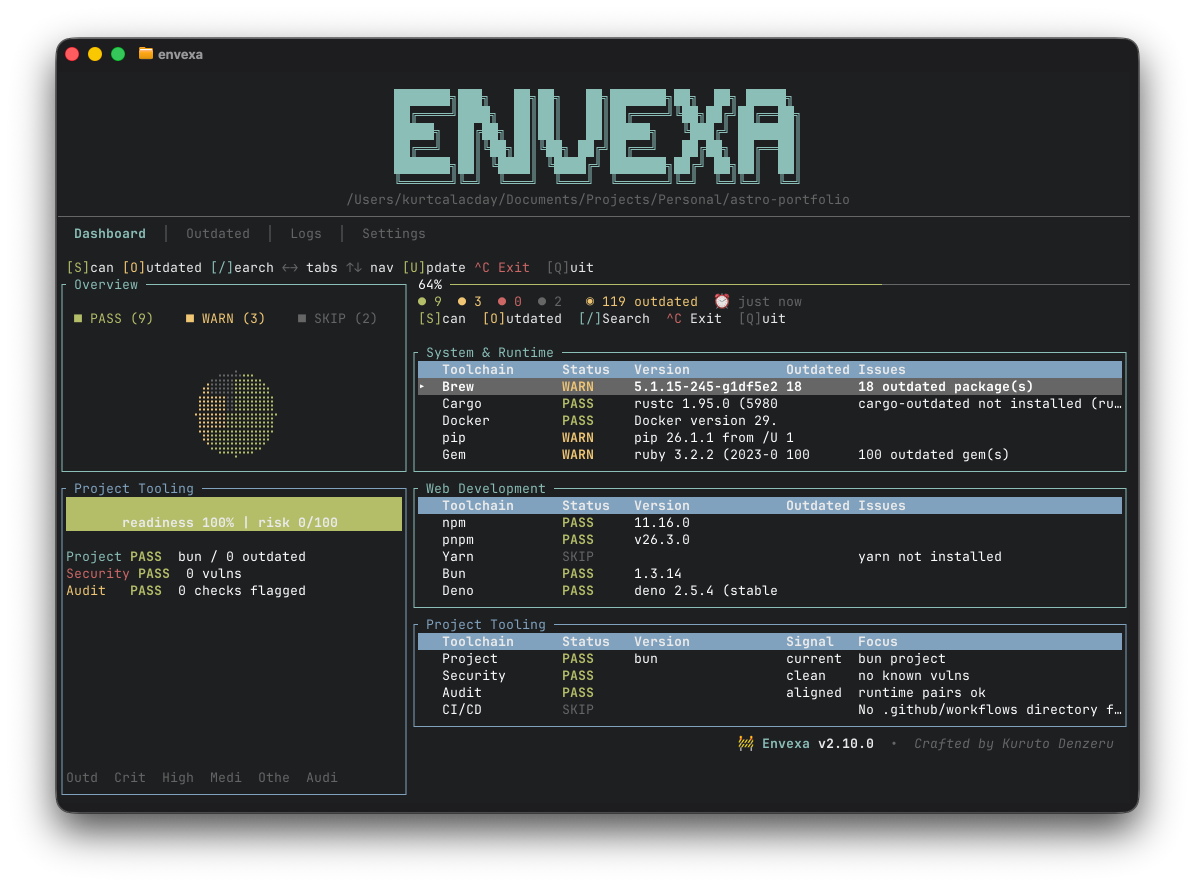
The dashboard features a classic developer-monitoring interface: key metric visualizations on the left, interactive data tables on the right, and shortcut guides at the footer.
| Component | Function |
| :--- | :--- |
| **Overview** | Status distribution (pass/warning/error/skipped) as an interactive pie chart. |
| **Project Tooling** | Live readiness gauge, aggregate risk score, and vulnerability/audit/package distribution. |
| **Health Stats** | Core metrics line displaying system health ratios, outdated package count, and cache age. |
| **Category Tables** | Organized rows for System, Web Development, and Project Tooling packages. |
| **Outdated Tab** | Centralized package update queues supporting individual selection. |
| **Details Pane** | Complete outputs for individual toolchains, security advisories, audits, and cleanup paths. |
### Keybindings
| Key | Action |
| :--- | :--- |
| `S` | Trigger immediate concurrent scan |
| `O` | Switch to the Outdated packages tab |
| `Enter` | Expand detail pane for the selected dashboard row |
| `/` | Initiate active search/filtering on the current view |
| `Left` / `Right` | Navigate between primary tabs |
| `Up` / `Down` | Browse rows in tables |
| `Space` | Toggle selection for packages supporting updates |
| `Y` | Apply updates for selected package in the detail view |
| `U` | Run batch updates for all selected packages on the Outdated tab |
| `Esc` / `H` | Return to the dashboard home view |
| `Q` / `Ctrl+C` | Quit Envexa |
### Search
Press `/` to instantly filter views:
- **Dashboard**: Filter by toolchain or category name.
- **Outdated**: Filter by package name, toolchain source, or type.
Press `Esc` to clear search or `Enter` to lock the filter in place.
## 🧰 Project Tooling Sector
The Project Tooling sector provides a specialized local lens into your active project.
| Scanner | Target Scope |
| :--- | :--- |
| ✨ **Project** | Scans lockfiles (package.json, Cargo.toml, poetry.lock, etc.) and performs dependency drift analysis. |
| 🔐 **Security** | Audits dependencies using language-specific advisory databases (Rust Sec, npm audit, pip-audit). |
| 🧪 **Audit** | Validates runtime parity across toolsets (e.g., verifying Node, npm, Python, pip, and Rust compiler alignment). |
| 🤖 **CI/CD** | Parses GitHub Actions workflows locally (zero-network) to flag outdated CI/CD steps and dependencies. |
| 🧹 **Cleanup** | Identifies local package caches, build artifacts, and Docker caches that can be safely reclaimed. |
Envexa compiles these signals into:
- A dynamic **Readiness Gauge** mapping dependency risk, warning levels, and unpatched security issues.
- A **Signal Bar Chart** categorizing outdated packages and security vulnerabilities by severity.
- Clear, actionable focus logs pointing you to the most critical next remediation step.
## 🛠️ Toolchains
### 🖥️ System & Runtime
| Toolchain | Monitored Metrics |
| :--- | :--- |
| **Homebrew** | Version status, formula counts, and outdated global formulae/casks. |
| **pip** | Python & pip compiler versions along with globally outdated packages. |
| **Gem** | Ruby & gem environment version states and outdated global gems. |
| **Cargo** | rustc/Cargo compiler drift and target-specific outdated binaries. |
| **Docker** | Engine/Daemon availability, storage footprint, and system cleanup opportunities. |
### 🌐 Web Development
| Toolchain | Monitored Metrics |
| :--- | :--- |
| **npm** | Node & npm local execution checks, plus global package drift tracking. |
| **pnpm** | Node & pnpm integration checks, plus global package drift tracking. |
| **Yarn** | Node & Yarn package manager availability and version diagnostics. |
| **Bun** | Bun runtime availability and global npm package alignment. |
| **Deno** | Deno engine versions and outdated package diagnostics. |
## 📄 CLI Report
Run a complete, non-interactive scan directly in standard output:
envexa scan
The CLI prints a structured Markdown document including:
- High-level system health dashboard
- Complete outdated package queue
- Categorized security vulnerabilities
- Core runtime version audit findings
- Actionable disk cleanup suggestions
Perfect for generating PR comments, build logs, and environment documentation in automated environments.
## 🗄️ Cache
Envexa stores scan history to accelerate launch times:
~/.envexa/cache.json
Cached results have a default TTL of 7 days. On startup, Envexa instantly visualizes cached data and schedules non-blocking background checks or manual scans via the `S` key.
## 🧑💻 Development
cargo build # Compile debug build
cargo run # Launch interactive TUI in terminal
cargo run -- scan # Run CLI report mode
cargo run -- --help # Print help instructions
For live reloading check:
cargo install cargo-watch
cargo watch -x check
Before submitting changes:
cargo build
cargo clippy -- -D warnings
cargo fmt --check
*Note: For TUI changes, run `cargo run` in a full-sized terminal to manually verify layouts, detail scrolls, navigation, and exit states.*
## 🏗️ Architecture
envexa/
├── Cargo.toml
├── src/
│ ├── main.rs # Application entrypoint (TUI or CLI router)
│ ├── cli.rs # CLI command parser and runner
│ ├── config.rs # Persistent configurations and cached state
│ ├── scanner/
│ │ └── mod.rs # Formatting utilities and diagnostic extraction
│ ├── tui/
│ │ ├── app.rs # App state management, keyboard events, and scheduler
│ │ ├── mod.rs
│ │ └── ui.rs # Ratatui rendering pipeline and interface structures
│ └── toolchains/
│ ├── mod.rs # ScanResult schema, protocols, and multi-thread runners
│ ├── brew.rs
│ ├── npm.rs / pnpm.rs / yarn.rs / bun.rs / deno.rs
│ ├── pip.rs / gem.rs / cargo.rs / docker.rs
│ └── project.rs / security.rs / audit.rs / ci.rs / cleanup.rs
├── scripts/
│ ├── install.sh
│ └── build-and-upload.sh
└── .github/
└── workflows/
Individual scanner modules are kept highly isolated. Each scanner implements a single `pub async fn scan() -> ScanResult` function, executes in parallel, and handles missing CLI tools gracefully to prevent crashes.
## 🎛️ Design Notes
Envexa maximizes the use of built-in `ratatui` UI widgets (like `Table`, `Tabs`, `Gauge`, `LineGauge`, and `BarChart`) for a cohesive look. High-signal third-party integrations include:
- `tui-piechart`: Renders the high-level category distribution on the dashboard.
- `throbber-widgets-tui`: Powering animated spinners during live scanner activity.
All UI components should prioritize actionability. Only introduce widgets that directly assist a developer in resolving drift, securing packages, or reclaiming disk space.
## 🚢 Release
Binaries for macOS are built and published through GitHub Releases. For details on versioning guidelines and the release logs template, consult [.github/ISSUE_TEMPLATE/RELEASES.md](.github/ISSUE_TEMPLATE/RELEASES.md).
cargo clean
# Bump Cargo.toml version and commit changes
git tag vX.Y.Z && git push origin vX.Y.Z
gh release create vX.Y.Z --title "vX.Y.Z" --notes "..."
scripts/build-and-upload.sh vX.Y.Z
gh release view vX.Y.Z --json assets --jq '.assets[].name'
cargo clean
## ⚖️ License
This project is released under the MIT License, giving you the freedom to use, modify, and distribute the code with minimal restrictions.
For the full legal text, see the [MIT](LICENSE) file.