anasyd/react-inline-markdown-editor
GitHub: anasyd/react-inline-markdown-editor
一个基于 CodeMirror 6 的 React Markdown 编辑器组件,通过在非活动行隐藏语法标记实现「渲染即编辑」的沉浸式写作体验。
Stars: 1 | Forks: 1
# react-inline-markdown-editor
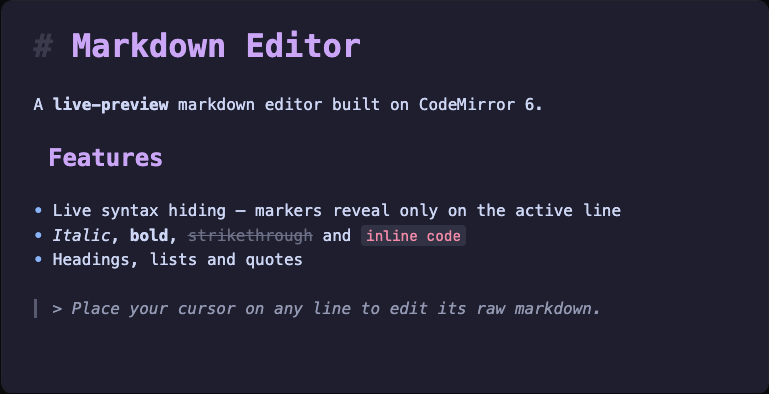
一个带有实时预览的 React markdown 编辑器,基于 [CodeMirror 6](https://codemirror.net/) 构建。在阅读时,语法标记(`**`、`#`、`` ` ``)会保持隐藏,仅在光标所在行才会显示——因此文档看起来就像是已渲染的,但每个字符依然可以直接编辑。
## 功能
- 实时预览 —— 标题、**粗体**、*斜体*、~~删除线~~、`内联代码`、链接、图片、引用、列表和代码块均可在原位渲染
- 语法标记仅在活动行显示,在其他位置隐藏
- 无序列表使用 `•` 标记渲染
- 支持深色和浅色主题,可在运行时切换而无需重新挂载
- 支持 GitHub Flavored Markdown
- 受控组件 —— markdown 字符串完全由你掌控
- CodeMirror 作为同级依赖安装,未直接打包(保持你的构建精简)
## 安装
```
npm i react-inline-markdown-editor
```
同级依赖:`react` 和 `react-dom` (>= 18)。CodeMirror 6 包会自动安装。
## 快速开始
```
import React from "react";
import { InlineMarkdownEditor } from "react-inline-markdown-editor";
export default function App() {
const [value, setValue] = React.useState(`# Heading\n\nSome **bold** text.\n\n- a list item`);
return (