Janiru-Sudasinghe/Blue-Team-Agentic-AI-

GitHub: Janiru-Sudasinghe/Blue-Team-Agentic-AI-

Hermes 是一个AI驱动的检测工程管道,自动化从威胁情报摄取到YARA-L规则生成与部署的完整流程,用于Google SecOps环境。

Stars: 0 | Forks: 0

# 🛡️ Proxmox VE - 智能体AI安全架构
[![Python](https://img.shields.io/badge/Python-3.10%2B-blue?logo=python)](https://www.python.org/) [![Proxmox VE](https://img.shields.io/badge/Proxmox-VE%208.x-E57000?logo=proxmox)](https://www.proxmox.com/) [![Google SecOps](https://img.shields.io/badge/Google-SecOps%20SIEM%2FSOAR-4285F4?logo=google)](https://cloud.google.com/security/products/security-operations) [![MISP](https://img.shields.io/badge/MISP-Threat%20Intelligence-red)](https://www.misp-project.org/) [![状态](https://img.shields.io/badge/Status-Active-brightgreen)]() **一个完全自主、自托管的蓝队实验室,可摄取实时威胁情报,利用AI生成经过验证的YARA-L 2检测规则,并将其直接部署到Google SecOps——全程无需人工干预。**

## 🔍 概述 本项目是一个**自托管、由智能体AI驱动的安全运营实验室**,完全构建在**Proxmox VE虚拟机管理程序**之上。它演示了一个全自动化的蓝队工作流程: 1. **威胁情报摄取** — MISP持续从互联网拉取实时威胁源 2. **智能体AI分析** — *Hermes智能体*(一个基于Python的AI智能体)接收来自MISP的威胁报告,并将其发送到云AI(Grok AI / OpenRouter AI)进行深度上下文分析 3. **YARA-L 2规则生成** — AI将威胁数据综合成适用于Google SecOps的YARA-L 2检测规则 4. **自动化验证循环** — 将规则提交给Google SecOps进行语法和逻辑验证;如果发现错误,智能体会自主地重新提交给AI进行修正,直到规则无误 5. **自动化部署** — 规则验证通过后,通过API实时部署到Google SecOps环境中 6. **日志关联** — 通过BindPlane收集来自宿主PC的Windows系统日志,并将其作为标准化日志转发到Google SecOps SIEM,以便与部署的规则进行关联 ## 🏗️ 架构图
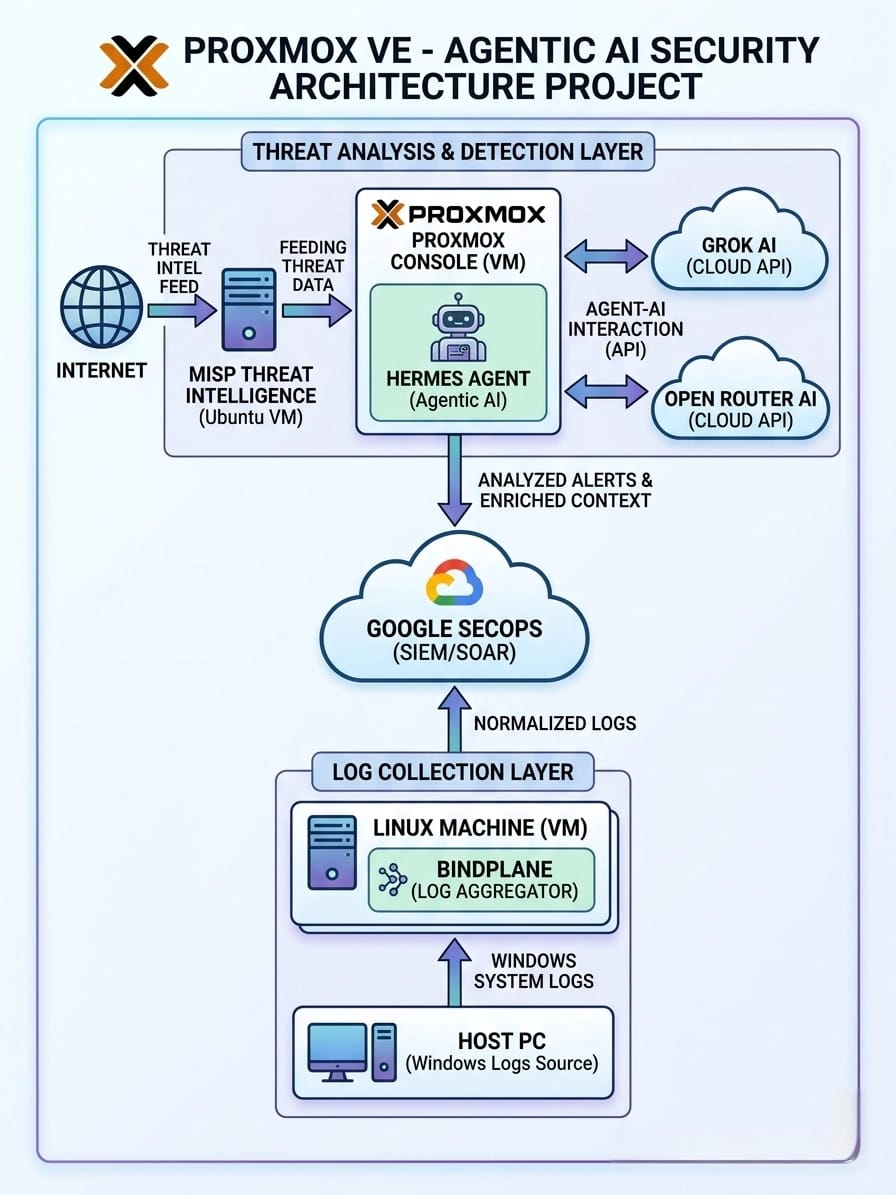

Network Topology Diagram

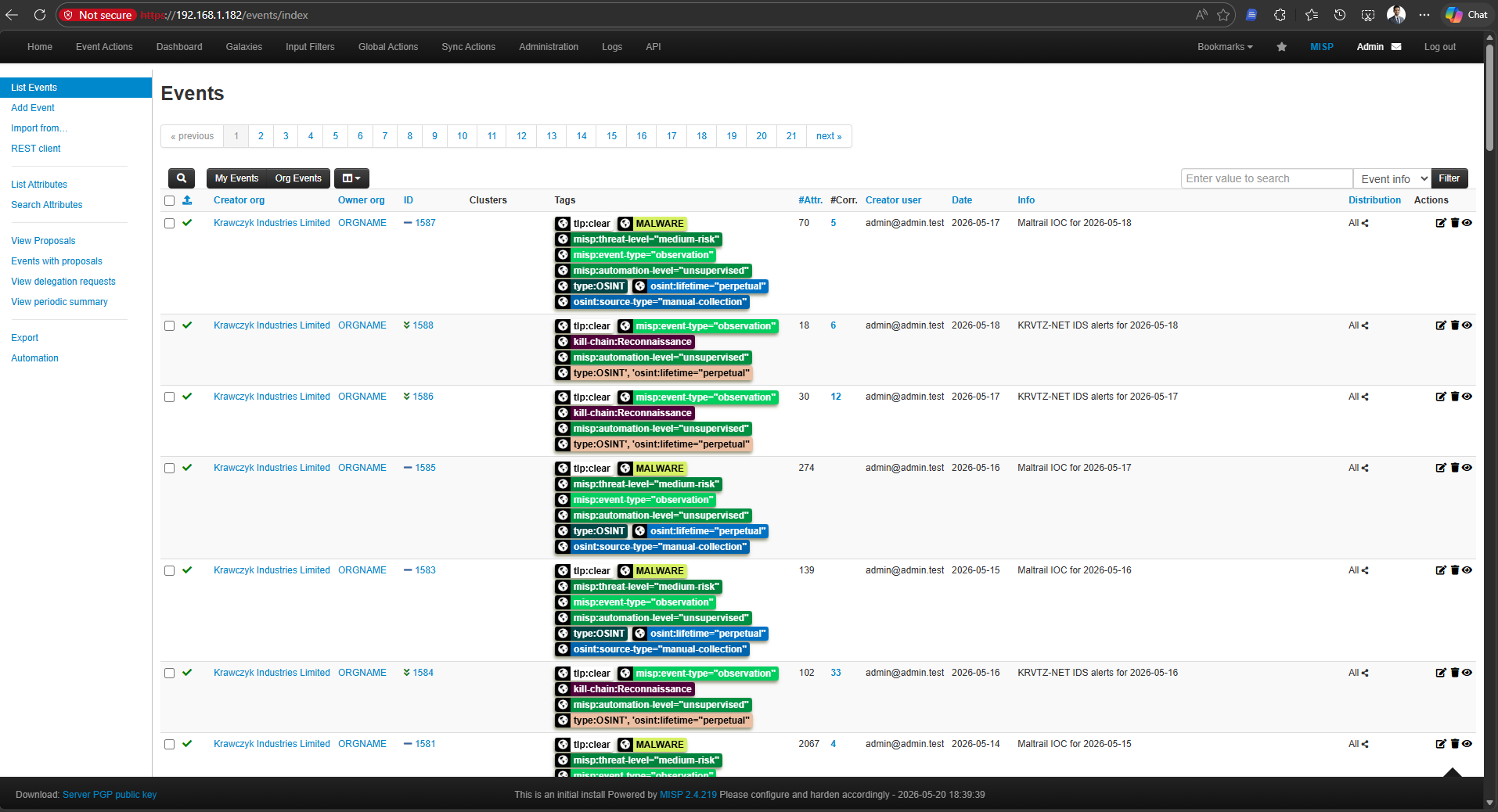
--- ## ⚙️ 工作原理 ### 分步流程 ``` [1] MISP pulls threat intel from public/private feeds (OSINT, CIRCL, etc.) │ ▼ [2] MISP generates a Threat Intel Report (IOCs, TTPs, malware hashes, IPs) │ ▼ [3] Hermes Agent (hermes.py) fetches the report from MISP via REST API │ ▼ [4] Hermes sends the enriched threat context to Grok AI / OpenRouter AI │ ▼ [5] AI performs deep analysis and generates a YARA-L 2 detection rule │ ▼ [6] Hermes submits the rule to Google SecOps Validation API │ ├── ✅ Valid Rule ──► Deploy to SecOps via API ──► [DONE] │ └── ❌ Syntax/Logic Error ──► Re-send to AI with error feedback └──► Loop back to [5] ``` ### 日志收集(并行流程) ``` Host PC (Windows) └── Windows Event Logs / Sysmon └── BindPlane Agent (Linux VM) └── Normalized Logs ──► Google SecOps SIEM └── Correlated against deployed YARA-L 2 rules ``` ## 🏗️ MISP 仪表板 威胁情报管理:MISP 集成


Network Topology Diagram

--- ## 🛠️ 技术栈 | 组件 | 技术 | 作用 | |---|---|---| | **虚拟机管理程序** | Proxmox VE 8.x | 在隔离的实验室中托管所有虚拟机 | | **威胁情报平台** | MISP (Ubuntu 虚拟机) | 实时威胁源聚合 | | **AI 智能体** | Python 3.10+ (`hermes.py`) | 智能体编排核心 | | **AI 分析** | Grok AI / OpenRouter AI | YARA-L 2 规则生成与验证 | | **SIEM/SOAR** | Google SecOps (Chronicle) | 规则部署与日志关联 | | **日志聚合器** | BindPlane (Linux 虚拟机) | Windows 日志收集与规范化 | | **日志来源** | Windows 宿主 PC | Sysmon / 事件日志 | | **API** | MISP REST API, Google SecOps API, Grok/OpenRouter API | 组件间通信 | ## 🖥️ 实验室环境 所有组件均作为**隔离的虚拟机**,运行在物理实验室环境中专用的**Proxmox VE服务器**内。 | 虚拟机名称 | 操作系统 | 作用 | 资源(推荐) | |---|---|---|---| | `misp-vm` | Ubuntu 22.04 LTS | MISP 威胁情报 | 4 vCPU / 8 GB RAM / 100 GB | | `hermes-vm` | Ubuntu 22.04 LTS | Hermes 智能体AI | 2 vCPU / 4 GB RAM / 50 GB | | `bindplane-vm` | Ubuntu 22.04 LTS | BindPlane 日志聚合器 | 2 vCPU / 4 GB RAM / 50 GB | | 宿主 PC | Windows 10/11 | 日志来源 (Sysmon) | 物理主机 | ## 📁 项目结构 ``` proxmox-agentic-ai-security/ │ ├── 📄 README.md # This file │ ├── 🤖 hermes_agent/ │ ├── run_script │ └── hermes.py # Main Hermes Agent script (core) │ ├── 🖥️ infrastructure/ │ ├── bindplane/ │ │ ├── bindplane-install.sh # BindPlane install script │ │ └── bindplane-config.yaml # BindPlane collector config │ └── windows/ │ └── sysmon-config.xml # Sysmon configuration for Host PC │ └── 📊 assets/ ├── MISP dashboard.png └── architecture-diagram.jpeg # Project architecture diagram ``` ## 🚀 安装与配置 ### 前置条件 - Proxmox VE 8.x 服务器(物理或嵌套) - 拥有API访问权限的 Google SecOps (Chronicle) 账户 - Grok AI API 密钥 **和/或** OpenRouter AI API 密钥 - Hermes 虚拟机上安装 Python 3.10+ - 可访问互联网以获取 MISP 源和云AI API ### 1. MISP 设置(Ubuntu 虚拟机) ``` # 克隆 MISP 安装程序 git clone https://github.com/MISP/MISP.git /opt/MISP # 运行自动安装(Ubuntu 22.04) cd /opt/MISP/INSTALL bash INSTALL.sh # 安装后,通过 MISP 网页界面配置数据源: # 管理 > 数据源 > 添加默认数据源 # 启用:CIRCL、Botvrij、ESET、Abuse.ch 等。 ``` ### 2. BindPlane 日志聚合器设置(Linux 虚拟机) ``` # 安装 BindPlane 代理 curl -fsSlL https://github.com/observIQ/bindplane-agent/releases/latest/download/install_unix.sh | bash # 复制配置文件 cp infrastructure/bindplane/bindplane-config.yaml /etc/bindplane/config.yaml # 启用并启动服务 systemctl enable --now bindplane-agent ``` 使用提供的配置文件为 Windows 宿主 PC 配置 **Sysmon**: ``` # 在 Windows 主机电脑上(以管理员身份运行) sysmon64.exe -accepteula -i infrastructure\windows\sysmon-config.xml ``` ## 🤖 Hermes 智能体 — 核心脚本 `hermes.py` 是**整个流程的核心**。它自主编排所有组件: ``` # hermes.py 简化流程 while True: # 1. Poll MISP for new threat events threat_reports = misp_client.get_new_events() for report in threat_reports: # 2. Enrich and send to AI for YARA-L 2 rule generation yara_rule = ai_client.generate_yara_rule(report) # 3. Validate rule — retry loop with AI correction max_retries = 5 for attempt in range(max_retries): validation = secops_client.validate_rule(yara_rule) if validation.is_valid: # 4. Deploy the rule to Google SecOps secops_client.deploy_rule(yara_rule) logger.info(f"Rule deployed successfully: {yara_rule.name}") break else: # 5. Send error feedback back to AI for correction yara_rule = ai_client.fix_rule(yara_rule, validation.errors) time.sleep(config.POLL_INTERVAL) ``` ## 🔄 AI 规则生成流程 发送给 Grok / OpenRouter 的 AI 提示经过精心设计,以生成有效的 YARA-L 2 规则: ``` System Prompt: You are an expert Google SecOps detection engineer. Given a MISP threat intelligence report, generate a syntactically correct YARA-L 2 rule for Google SecOps Chronicle SIEM. The rule must: - Use proper YARA-L 2 syntax - Target the relevant UDM (Unified Data Model) fields - Include meaningful metadata (author, severity, reference) - Be optimized for performance Return ONLY the rule. No explanation. No markdown fences. User Prompt: Threat Report: {misp_event_json} ``` 如果验证失败,修正提示会包含确切的错误信息: ``` The following YARA-L 2 rule has a validation error: Rule: {rule_text} Error: {validation_error_message} Fix the rule and return only the corrected version. ``` ## 🔑 环境变量 将 `.env.example` 复制为 `.env` 并填入你的值: ``` # MISP 配置 MISP_URL=https:// MISP_API_KEY= MISP_VERIFY_SSL=false # AI 提供商 — 选择一个或两者(Hermes 将使用后备方案) GROK_API_KEY= GROK_API_URL=https://api.x.ai/v1 OPENROUTER_API_KEY= OPENROUTER_API_URL=https://openrouter.ai/api/v1 AI_MODEL=anthropic/claude-3.5-sonnet # or any OpenRouter model # Google SecOps(Chronicle) SECOPS_PROJECT_ID= SECOPS_CUSTOMER_ID= SECOPS_SERVICE_ACCOUNT_JSON=config/secops-service-account.json # Hermes 代理设置 POLL_INTERVAL_SECONDS=300 MAX_RULE_RETRY_ATTEMPTS=5 LOG_LEVEL=INFO ``` ### 示例输出 ``` /root/hermes-agent/hermes-env/bin/python3 /root/hermes-agent/hermes.py ``` ``` 2026-05-21 00:16:20 INFO hermes — ══════════ HERMES AUTONOMOUS SOC AGENT — START ══════════ 2026-05-21 00:16:20 INFO hermes — Stage 1 — Fetching detection data from Chronicle SIEM (log_type=FORTINET_FORTIANALYZER) 2026-05-21 00:16:20 INFO hermes — Selected rule match: 'fortinet_configuration_change' | Severity: MEDIUM | Priority: Medium | Phase: Testing 2026-05-21 00:16:20 DEBUG hermes — Detection summary: Rule: fortinet_configuration_change Author: Hermes Autonomous SOC | Version: 1.0 | Tags: T1543 Description: Detects configuration changes on a FortiGate device such as firewall policy edits. Match Window: 30 minutes Event Type: STATUS_UPDATE Log Source: FORTINET_FORTIANALYZER Matched Events: - [event_type] STATUS_UPDATE - [description] Configuration changed - [description] Object attribute configured - [user] admin@corp.local - [hostname] FGT-CORE-01.internal.corp Outcome Values: - [principal_user] ["admin@corp.local"] - [principal_hostname] ["FGT-CORE-01.internal.corp"] - [change_count] 7 False Positive Likelihood: Medium MITRE ATT&CK Reference: T1543 — Create or Modify System Process ============================================================ rule fortinet_configuration_change { meta: author = "Hermes Autonomous SOC" version = "1.0" description = "Detects configuration changes on a FortiGate device such as firewall policy edits." created = "2026-05-21" severity = "MEDIUM" priority = "Medium" false_positives = "Medium" tags = "T1543" phase = "Testing" events: $e.metadata.log_type = "FORTINET_FORTIANALYZER" $e.metadata.event_type = "STATUS_UPDATE" ( $e.metadata.description = "Configuration changed" or $e.metadata.description = "Object attribute configured" ) $e.principal.user.userid = $user $e.principal.hostname = $hostname match: $user, $hostname over 30m outcome: $principal_user = array_distinct($user) $principal_hostname = array_distinct($hostname) $change_count = count($e.metadata.id) condition: $e } ============================================================ ``` ## 🗺️ 发展路线图 - [x] MISP 威胁情报摄取 - [x] Hermes 智能体AI 编排 (hermes.py) - [x] 通过 Grok AI / OpenRouter AI 生成 YARA-L 2 规则 - [x] 带有自动修正的 Google SecOps 验证循环 - [x] 将规则自动部署到 Google SecOps - [x] BindPlane 日志收集 (Windows → SecOps) ## 🤝 贡献指南 欢迎贡献、提出问题和功能请求! 1. 复刻仓库 2. 创建功能分支:`git checkout -b feature/your-feature` 3. 提交更改:`git commit -m 'feat: add your feature'` 4. 推送到分支:`git push origin feature/your-feature` 5. 开启一个 Pull Request ## ⚠️ 免责声明 本项目仅用于**教育和授权的蓝队实验室用途**。所有威胁情报处理和规则部署应仅在您拥有或获得明确书面许可进行测试的系统上执行。作者对本项目的任何误用不承担责任。