TamarFeuer/dotnet-weather-app
GitHub: TamarFeuer/dotnet-weather-app
一个基于 .NET 和 Angular 的全栈天气查询应用,旨在演示分层后端架构、NgRx 响应式状态管理以及 Azure DevOps 持续集成实践。
Stars: 0 | Forks: 0
# WeatherAPI
这是一个小型全栈项目,旨在学习分层后端架构(ASP.NET Core)和响应式前端状态管理(Angular + NgRx)。它包含两个功能:
- **某个月的典型天气**:包括温度范围、典型(平均)值和简短描述,从 JSON 文件或 SQLite 数据库读取(只需修改一行代码即可切换)。
- **荷兰城市的 5 天预报**:从免费的 [Open-Meteo](https://open-meteo.com/) API 获取实时数据,采用与月份功能相同的可切换驱动模式。
```
GET /api/weather/typical?month=January
-> { "minTemp": 1, "maxTemp": 6, "average": 3, "description": "Freezing" }
GET /api/weather/cities
-> ["Amsterdam", "Rotterdam", "The Hague", ...]
GET /api/weather/forecast?city=Amsterdam
-> [ { "date": "2026-07-03", "minTemp": 13, "maxTemp": 21, "condition": "Cloudy" }, ... ]
```
## 目录
- [背后的设计理念](#the-ideas-behind-it)
- [仓库结构](#repository-layout)
- [前端](#frontend)
- [后端结构](#backend-structure)
- [预报请求的流转方式](#how-a-forecast-request-flows)
- [切换存储方式(JSON 或 SQLite)](#swapping-storage-json-or-sqlite)
- [运行项目](#running-it)
- [持续集成](#continuous-integration)
- [检查数据库](#inspecting-the-database)
- [备注](#notes)
## 背后的设计理念
本项目主要由两种模式塑造。
**Clean Architecture** - 依赖关系向内指向:外层关注点(Web、数据库)依赖于内层关注点(业务规则),反之则不然。后端采用了一种简化的实现方式:请求流经三个层(Controller → Service → Repository),并传递纯数据模型(Temperature、City、ForecastDay、TypicalInfo)。这些模型并不是第四个步骤,而是数据本身——即最内层的环,也就是下面经典模型中心的“Entities”:
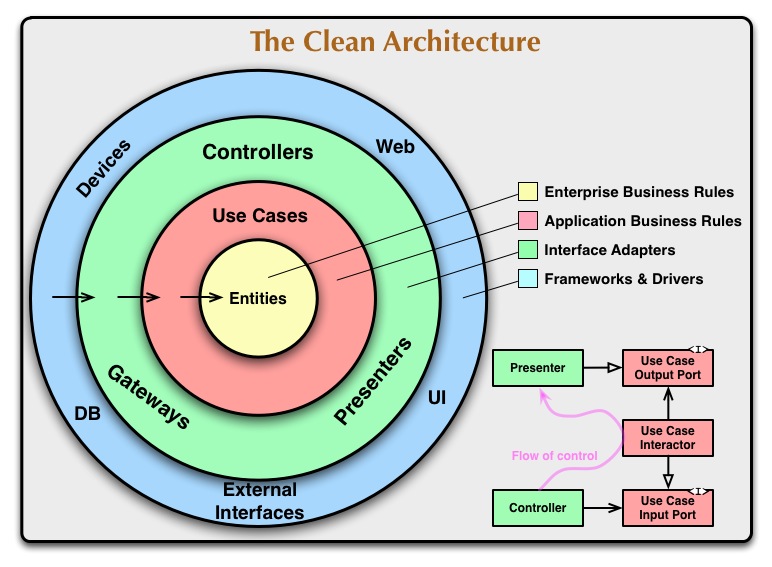
*来源:Robert C. Martin, "The Clean Architecture"
(blog.cleancoder.com/uncle-bob/2012/08/13/the-clean-architecture.html)*
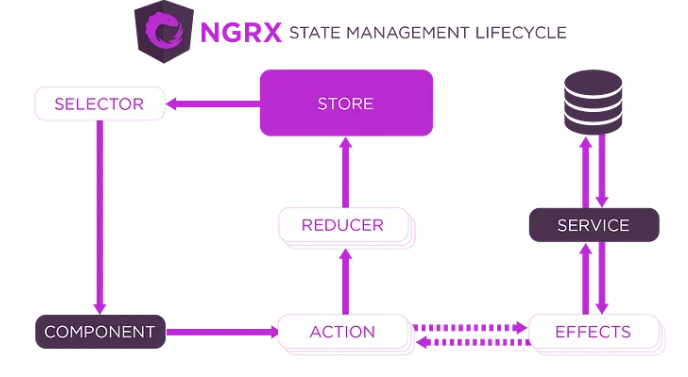
**单向数据流** - 前端从不直接修改共享状态。组件派发一个 action,effect 处理异步工作,reducer 生成新的状态,selectors 再将其反馈给组件:一个循环,一个方向。
## 仓库结构
本仓库包含两个并排的应用:
- `weather-backend/` - ASP.NET Core API(本 README 会对此进行介绍;以下所有后端路径均相对于此文件夹)
- `weather-frontend/` - Angular 应用:包含本月的典型天气以及城市预报网格,实时更新且无需刷新页面
## 前端
`weather-frontend/` 是一个 Angular 应用。状态存在于 **NgRx** store 中(Redux 模式:actions、reducers、selectors、effects)——这是项目在它所考虑的两个选项(Signals 和 NgRx)之间做出的选择。
该 store 包含两个 slice,每个功能对应一个:
- **`weather`** - 本月的典型天气。
- **`forecast`** - 城市列表以及所选城市的 5 天预报。
各个组件独立与 store 进行通信;根组件 `App` 只是承载它们的容器:
- **`TypicalWeather`** - 加载时自动派发当前月份(无下拉菜单),保持月份功能在使用中。通过 `TemperatureDisplay` 显示结果。
- **`TemperatureDisplay`** - 从 store 读取月份信息,并显示范围、平均值和描述。
- **`CityPicker`** - 一个下拉菜单,其选项来自后端:加载时会派发一个 action 来获取城市列表,更改时会派发所选的城市。
- **`ForecastGrid`** - 一个容器:读取 forecast slice 并为每一天渲染一个 **`DayCard`**。
- **`DayCard`** - 展示型组件:不包含 store 逻辑;一天的数据通过 input 传入,它仅负责将其渲染出来。
## 后端结构
在 `weather-backend/` 内部,按照职责组织了四个文件夹,每个请求都遵循 Controller → Service → Repository 的流程(Models 包含共享的数据类型):
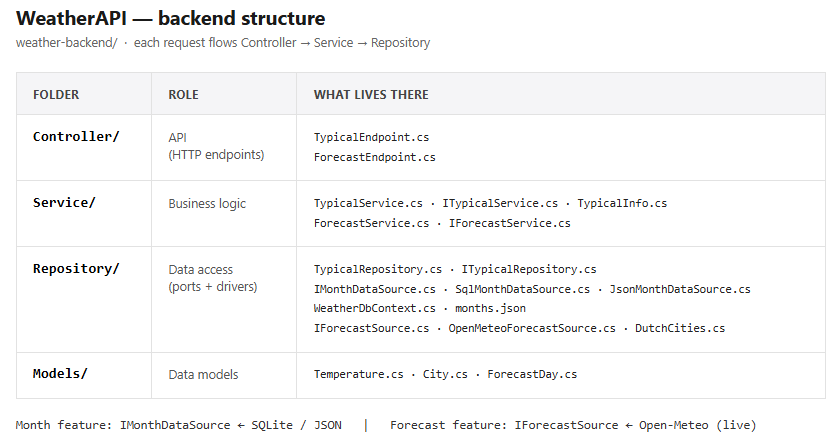
这两个功能都采用了相同的结构:controller 调用 service,service 调用接口背后的内容(一个“端口”),并由具体的驱动程序填充该端口。月份功能的端口是 `IMonthDataSource`(由 SQLite 或 JSON 填充);预报功能的端口是 `IForecastSource`(由 Open-Meteo 驱动程序填充)。在 `Program.cs` 中只需修改一行代码即可切换驱动程序,应用中的其他部分完全不知情。
## 预报请求的流转方式
一个请求从选择城市到访问实时 API 并返回的完整路径,贯穿整个 NgRx 生命周期(action → effect → reducer → selector):
```
1. User picks a city in the dropdown
2.
标签:Angular, DevSecOps, EF Core, Grype, SQLite, Web API, 上游代理, 自动化攻击