Ati-byte/socscope-siem
GitHub: Ati-byte/socscope-siem
SocScope SIEM 是一个基于 Python 的迷你 SIEM 工具,用于日志监控、威胁检测和安全事件可视化。
Stars: 1 | Forks: 0
# nly the parts that are not technical terms, but in these cases, there might be no translatable words. For "SocScope SIEM", it might be entirely proper, so no translation needed, but the output must be in Simplified Chinese characters. I need to output something in Chinese.
SocScope SIEM 是一个基于 Python 的迷你 SIEM 仪表板,专为 SOC 风格的日志分析、威胁监控和安全事件可视化设计。它解析 Apache/Nginx 访问日志和 Linux 认证日志,检测可疑活动,将事件存储在 SQLite 中,并通过现代化的暗色仪表板展示发现结果。
## 功能特性
- Apache/Nginx 访问日志分析
- Linux 失败登录检测
- 基于时间窗口聚合的暴力破解检测
- 可疑 IP 画像和风险评分
- SQL 注入模式检测
- XSS 攻击尝试检测
- 敏感路径探测检测
- 过多 404 响应检测
- 速率限制滥用分析
- 低、中、高三级事件严重性模型
- 威胁时间线与事件流仪表板
- 攻击者 IP 排名榜
- 提供事件、摘要、指标和导出的 REST API
- JSON 导出和 CSV 报告生成
- 用于导入日志、扫描和报告的 CLI 命令
- 支持 Docker 和 Docker Compose
## 安装
### 本地安装
```
python -m venv .venv
source .venv/bin/activate
pip install -r requirements.txt
flask --app run.py init-db
flask --app run.py import-log logs/demo_access.log
flask --app run.py import-log logs/demo_auth.log
python run.py
```
仪表板访问地址:
```
http://127.0.0.1:5000
```
### Perhaps I should transliterate or use Chinese equivalents where appropriate.
```
python -m venv .venv
.\.venv\Scripts\Activate.ps1
pip install -r requirements.txt
flask --app run.py init-db
flask --app run.py import-log logs/demo_access.log
flask --app run.py import-log logs/demo_auth.log
python run.py
```
### Let's look at the examples again: 'Running Naabu' -> '运行 Naabu'. Here, "Running" is translated to "运行", and "Naabu" is kept. So, for noun phrases, I should translate any common words.
```
docker compose up --build
```
仪表板访问地址:
```
http://localhost:5000
```
## 使用方法
### CLI 命令
```
flask --app run.py init-db
flask --app run.py import-log logs/demo_access.log
flask --app run.py scan --path logs/demo_auth.log
flask --app run.py report --format json --output reports/threat-report.json
flask --app run.py report --format csv --output reports/events.csv
```
### For "SocScope SIEM", if we consider "SIEM" as an acronym, it might stand for Security Information and Event Management, but in Chinese, it's often left as SIEM. I think for this exercise, I should keep all terms as per the instruction.
```
curl http://127.0.0.1:5000/api/health
curl http://127.0.0.1:5000/api/summary
curl "http://127.0.0.1:5000/api/events?severity=High&limit=20"
curl http://127.0.0.1:5000/api/indicators
```
导入日志文件:
```
curl -X POST http://127.0.0.1:5000/api/import \
-H "Content-Type: application/json" \
-d '{"path":"logs/demo_access.log"}'
```
导出端点:
```
GET /api/export/json
GET /api/export/csv
```
## 截图
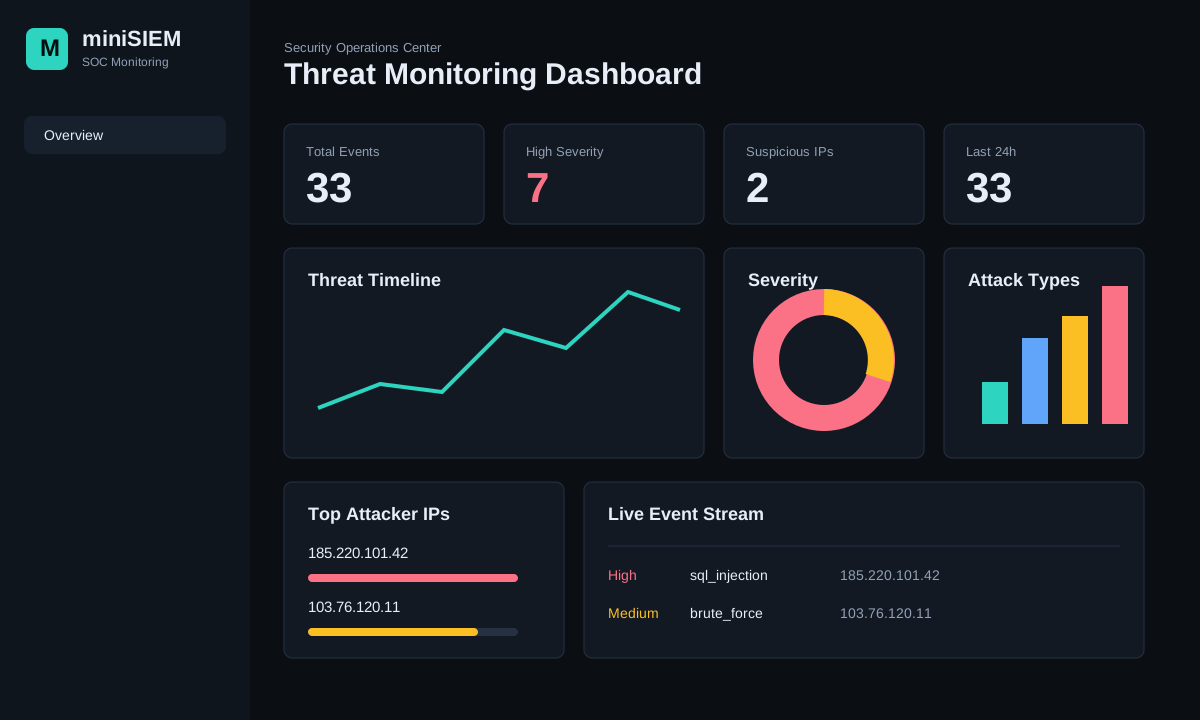
## 技术栈
- Python
- Flask
- SQLite
- SQLAlchemy
- Pandas
- Bootstrap
- Chart.js
- Docker
## 输出示例
导入示例日志后的 `/api/summary` 响应示例:
```
{
"total_events": 33,
"high_events": 7,
"unique_ips": 2,
"events_24h": 33,
"severity": {
"High": 7,
"Medium": 18,
"Low": 8
},
"event_types": {
"sql_injection": 2,
"xss_attempt": 1,
"brute_force": 4,
"not_found": 8,
"access_denied": 7
}
}
```
CLI 报告示例:
```
flask --app run.py report --format json --output reports/threat-report.json
```
```
{
"executive_findings": [
"7 high severity events detected.",
"2 unique suspicious IPs tracked.",
"Highest risk IP: 185.220.101.42 (100/100)."
]
}
```
## 项目结构
```
README.md
requirements.txt
screenshots/
dashboard-preview.svg
docs/
architecture.md
src/
minisiem/
app.py
background.py
cli.py
config.py
db.py
detectors.py
models.py
parsers.py
services.py
static/
templates/
logs/
demo_access.log
demo_auth.log
Dockerfile
docker-compose.yml
run.py
wsgi.py
```
## 架构
```
flowchart LR
A["Log Files
Apache, Nginx, auth.log"] --> B["Parsing Engine"] B --> C["Detection Engine"] C --> D["SQLite Event Store"] D --> E["Flask REST API"] E --> F["SOC Dashboard"] D --> G["JSON / CSV Reports"] ``` 更多详情可在 [架构文档](docs/architecture.md) 中找到。 ## 检测规则 - **SQL 注入:** 检测布尔注入、`UNION SELECT`、SQL 注释、`sleep` 载荷以及对 `information_schema` 的探测。 - **XSS:** 检测脚本标签、`javascript:` 载荷、事件处理器以及编码后的脚本尝试。 - **暴力破解:** 标记 10 分钟时间窗口内重复出现的认证失败事件。 - **过多 404:** 标记产生大量资源未找到响应的 IP。 - **速率限制滥用:** 标记在短时间内来自同一 IP 的高请求量。 ## 生产环境说明 默认数据库路径为 `instance/minisiem.db`。对于 Linux 部署,请使用环境变量配置持久化路径: ``` export MINISIEM_DB=/var/lib/socscope/minisiem.db export MINISIEM_LOG_PATH=/var/log/nginx/access.log export MINISIEM_ENABLE_WATCHER=1 gunicorn --bind 0.0.0.0:5000 wsgi:app ```
Apache, Nginx, auth.log"] --> B["Parsing Engine"] B --> C["Detection Engine"] C --> D["SQLite Event Store"] D --> E["Flask REST API"] E --> F["SOC Dashboard"] D --> G["JSON / CSV Reports"] ``` 更多详情可在 [架构文档](docs/architecture.md) 中找到。 ## 检测规则 - **SQL 注入:** 检测布尔注入、`UNION SELECT`、SQL 注释、`sleep` 载荷以及对 `information_schema` 的探测。 - **XSS:** 检测脚本标签、`javascript:` 载荷、事件处理器以及编码后的脚本尝试。 - **暴力破解:** 标记 10 分钟时间窗口内重复出现的认证失败事件。 - **过多 404:** 标记产生大量资源未找到响应的 IP。 - **速率限制滥用:** 标记在短时间内来自同一 IP 的高请求量。 ## 生产环境说明 默认数据库路径为 `instance/minisiem.db`。对于 Linux 部署,请使用环境变量配置持久化路径: ``` export MINISIEM_DB=/var/lib/socscope/minisiem.db export MINISIEM_LOG_PATH=/var/log/nginx/access.log export MINISIEM_ENABLE_WATCHER=1 gunicorn --bind 0.0.0.0:5000 wsgi:app ```
标签:BurpSuite集成, DInvoke, DOE合作, 红队行动, 网络测绘, 请求拦截, 逆向工具, 速率限制