PurrSh3ll/purrsh3ll
GitHub: PurrSh3ll/purrsh3ll
PurrSh3ll 是一款专为安全测试人员打造的离线 AI 驱动终端环境,集成了多标签终端、本地 AI 助手、RAG 知识库与语音交互,帮助用户高效完成渗透测试工作。
Stars: 4 | Forks: 0
# PurrSh3ll
**专为渗透测试人员、CTF 选手和安全学习者打造的 AI 驱动终端环境。**
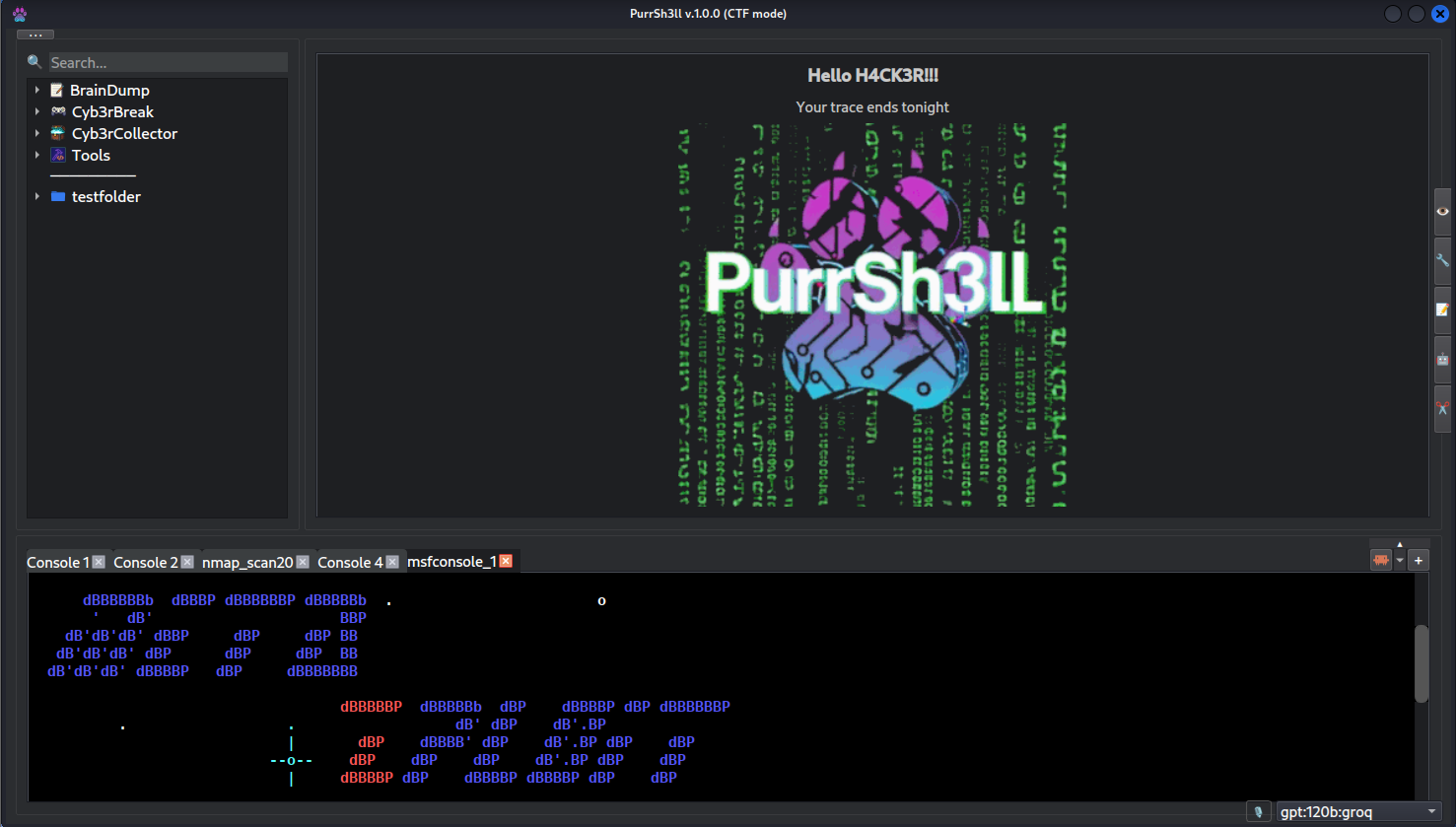
PurrSh3ll 是一款基于 Kali Linux 构建的桌面应用程序,将多标签终端、本地 AI 助手、RAG 知识库、语音界面以及一套 AI 驱动的 CLI 工具集成于一处,且完全支持离线使用。
 ## 演示
[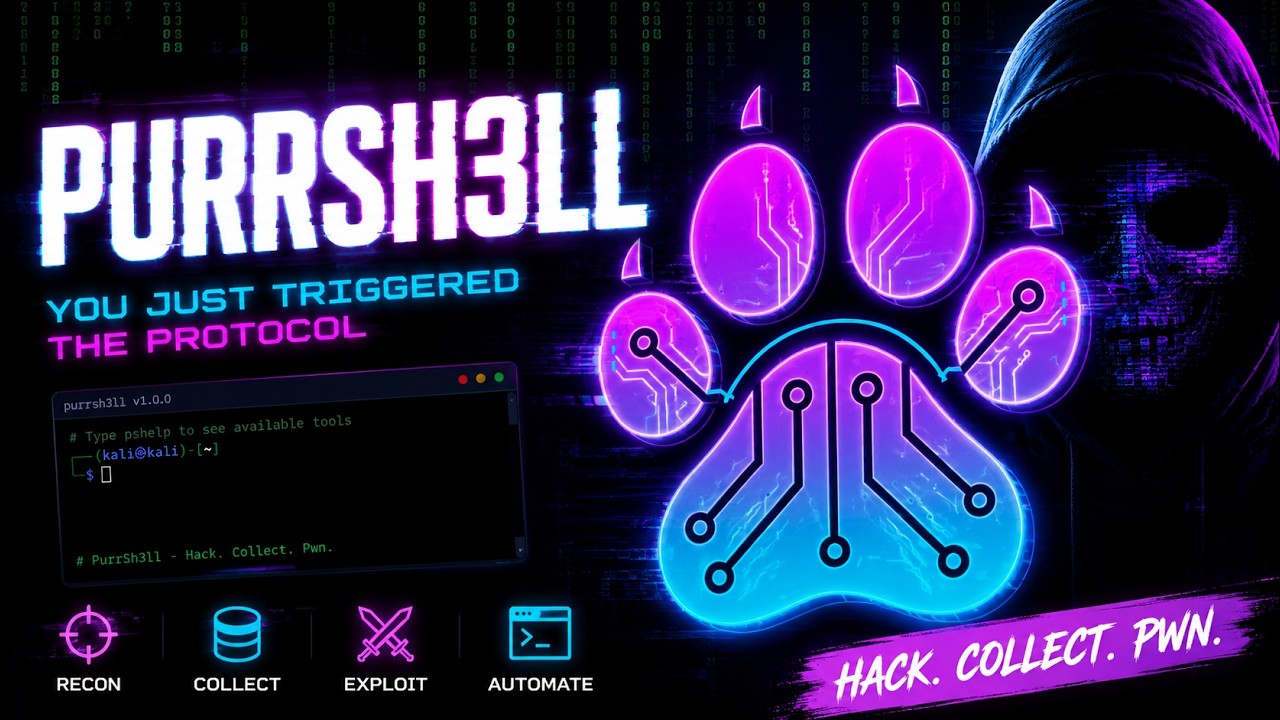](https://www.youtube.com/watch?v=kpUUVxBdFqE)
https://www.youtube.com/watch?v=kpUUVxBdFqE
## 为什么选择 PurrSh3ll?
安全专业人员在进行长时间的测试任务时,往往需要同时兼顾数十种工具、笔记和上下文。PurrSh3ll 将所有内容集中在一个窗口中,并提供 AI 辅助功能,且无需将敏感数据发送到云端。
- **本地优先** — 您的数据永远不会离开您的设备
- **上下文感知 AI** — 助手了解您的终端历史和笔记
- **专为终端打造** — 它不是浏览器,不是 IDE,也不是聊天应用
## 功能特性
### 终端
- 多标签 Zsh 终端,支持标签重命名、缩放和自定义环境变量
- 完整的命令历史记录至 JSONL,包含时间戳和退出码
- 针对失败命令的错误覆盖层,提供由 AI 驱动的解释 / 修复 / 分析功能
### AI 助手 (CLI)
直接在终端中可用的 AI 工具 — 无需 GUI:
| 命令 | 描述 |
|---------|-------------|
| `psask` | 直接向当前活动的 AI 配置文件提问 |
| `pschat` | 带有对话历史的持久化聊天会话 |
| `pscmd` | 根据自然语言描述生成 shell 命令 |
| `psfix` | 解释并修复上一次终端错误 |
| `psnext` | 根据终端历史建议下一步渗透测试步骤 |
| `pstldr` | 总结上一次命令的输出 (TL;DR) |
| `psreport` | 根据终端历史生成渗透测试报告 |
| `psrag` | 查询您的 RAG 知识库 |
| `psview` | 使用 AI 视觉分析截图或图像 |
| `pshelp` | 列出所有可用工具 |
开箱即用支持 7 种 AI 提供商:**Ollama、OpenAI、Anthropic、Groq、Gemini、OpenRouter、HuggingFace**。无需离开应用即可在它们之间切换。
### RAG 知识库
- 索引您自己的笔记、writeup、文档和 PDF 文件
- 由 ChromaDB + fastembed 驱动 — 完全离线运行
- 从按类别(英语、多语言、特定语言、代码和视觉/多模态)分组的 30 多个 embedding 模型中进行选择
- 可选的重排序功能,提供 6 种 reranker 模型以提高结果精度
- 可配置的文件扩展名过滤器(PDF、TXT、MD、RST、CSV、JSON、XML、YAML、代码文件等)
- 按文件进行包含/排除管理 — 有选择地禁用特定文件的索引
- 查询会自动利用您知识库中的相关上下文进行丰富
- 文件更改通过 watchdog 自动跟踪并重新建立索引
- 主 UI 状态栏中会显示索引进度
- AI 设置中提供专用的 RAG 标签页以进行完整配置
### 语音界面
- 唤醒词检测 — 说出 **"Hey Jarvis"** 即可激活
- 通过 Faster-Whisper 进行语音转文本转录(tiny 模型,CPU,约 75 MB)
- AI 根据您的语音生成命令
- 语音确认循环 — 说出“接受”或“取消”
- 针对虚拟机进行了优化(基于队列的音频缓冲,无 xruns)
### 脚本管理器
- 从 GUI 启动、组织和记录 Python 脚本
- 自动提取帮助/docstring
- 单个脚本的执行历史、备注和收藏
- 依赖检测,支持应用内安装包
### 文件查看器
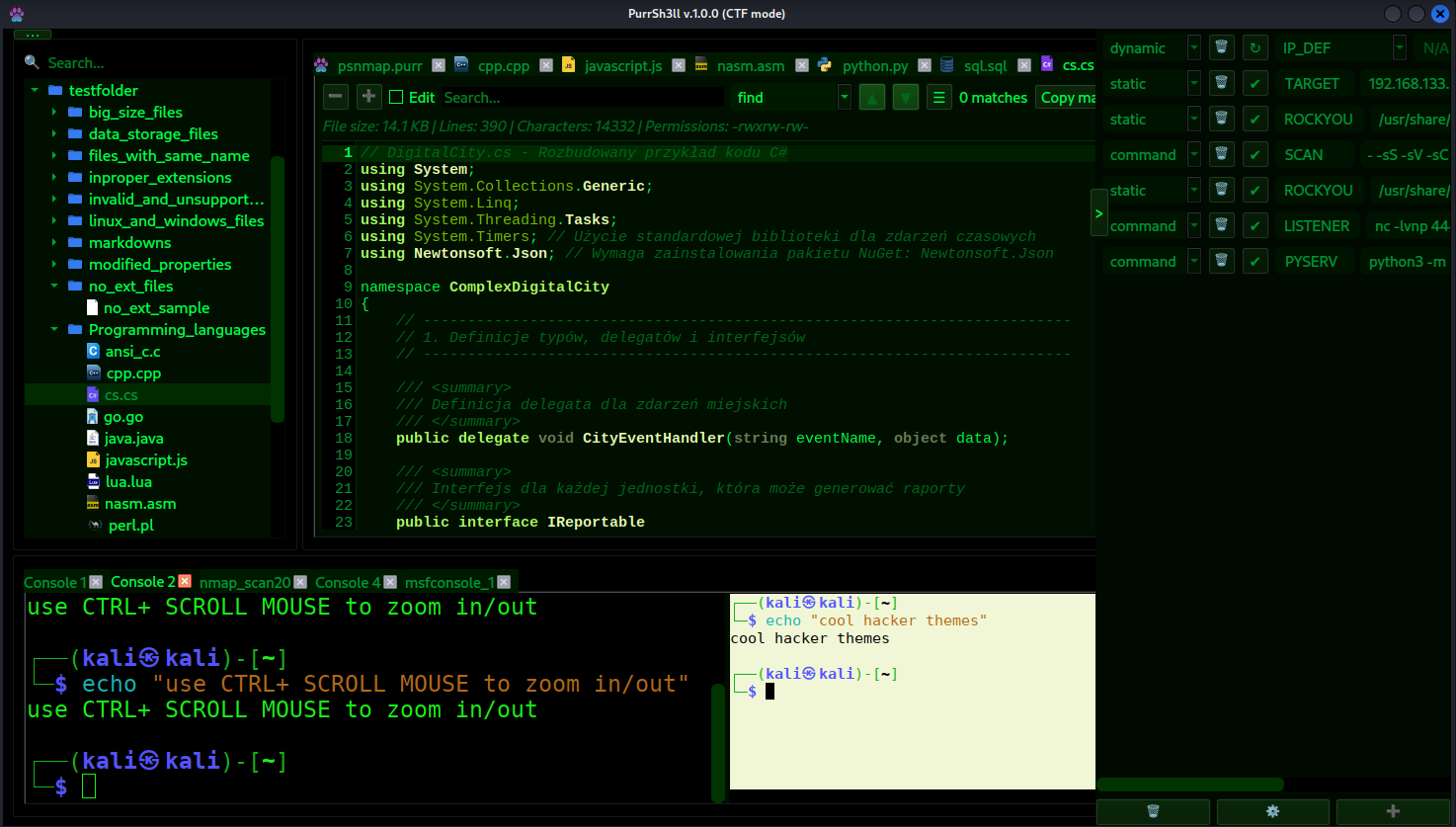
- 通过 Pygments 为 500 多种语言提供语法高亮
- 将 CSV 和 TSV 文件渲染为交互式可排序表格
- 渲染 PDF 文件并支持页面导航
- 支持在应用内直接播放音频和视频文件
- 通过 exiftool 提取元数据和 EXIF(GPS、编解码器信息、相机数据)
- 专用查看器支持游戏文件 (`.game`)
- 对大文件进行分块加载
- 支持正则表达式的内置搜索
### Nmap 集成
- 保存和重用扫描配置文件(`.psnmap` 格式)
- 包含时间戳的完整扫描历史
- 通过 Docker 进行 WebMap 可视化
### AI 聊天面板
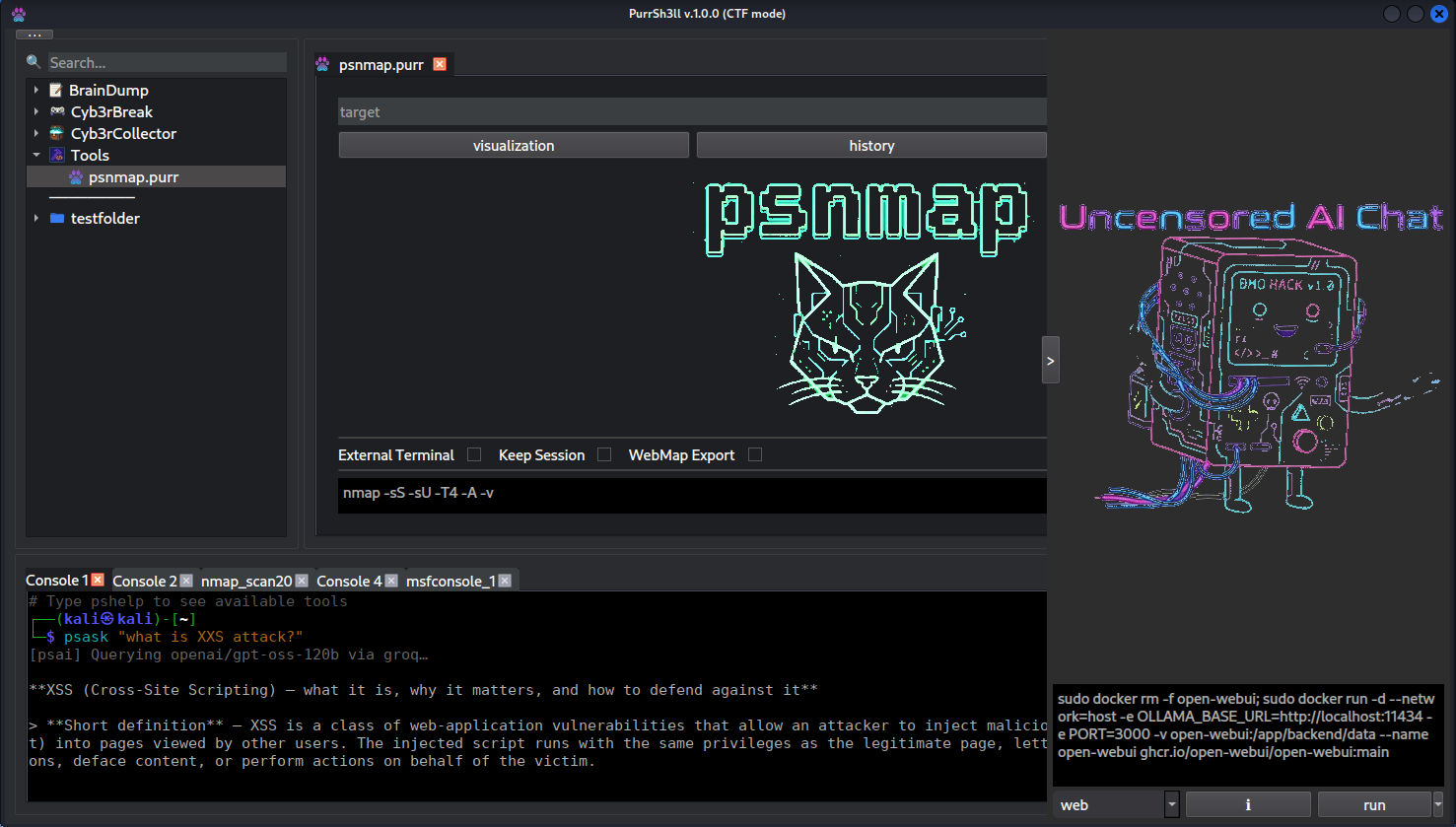
- 用于 Open WebUI 或任何兼容 OpenAI 的前端的嵌入式 Web 面板
- 从应用中运行和管理基于 Docker 的 LLM 容器
- 支持带自定义参数的 Ollama CLI 配置文件
### 附加面板
- **笔记** — 持久化的侧边笔记,自动保存
- **代码片段** — 可重用的代码/命令片段
- **可观察变量** — 实时显示被追踪的 shell 变量
- **模式配置** — 针对不同任务的终端环境预设
### 主题与自定义
PurrSh3ll 附带了大量内置颜色主题,并允许进行全面的视觉自定义 — 颜色、字体和布局。欢迎界面(文本、图像、背景)可以直接在 UI 中双击进行编辑。
## 演示
[](https://www.youtube.com/watch?v=kpUUVxBdFqE)
https://www.youtube.com/watch?v=kpUUVxBdFqE
## 为什么选择 PurrSh3ll?
安全专业人员在进行长时间的测试任务时,往往需要同时兼顾数十种工具、笔记和上下文。PurrSh3ll 将所有内容集中在一个窗口中,并提供 AI 辅助功能,且无需将敏感数据发送到云端。
- **本地优先** — 您的数据永远不会离开您的设备
- **上下文感知 AI** — 助手了解您的终端历史和笔记
- **专为终端打造** — 它不是浏览器,不是 IDE,也不是聊天应用
## 功能特性
### 终端
- 多标签 Zsh 终端,支持标签重命名、缩放和自定义环境变量
- 完整的命令历史记录至 JSONL,包含时间戳和退出码
- 针对失败命令的错误覆盖层,提供由 AI 驱动的解释 / 修复 / 分析功能
### AI 助手 (CLI)
直接在终端中可用的 AI 工具 — 无需 GUI:
| 命令 | 描述 |
|---------|-------------|
| `psask` | 直接向当前活动的 AI 配置文件提问 |
| `pschat` | 带有对话历史的持久化聊天会话 |
| `pscmd` | 根据自然语言描述生成 shell 命令 |
| `psfix` | 解释并修复上一次终端错误 |
| `psnext` | 根据终端历史建议下一步渗透测试步骤 |
| `pstldr` | 总结上一次命令的输出 (TL;DR) |
| `psreport` | 根据终端历史生成渗透测试报告 |
| `psrag` | 查询您的 RAG 知识库 |
| `psview` | 使用 AI 视觉分析截图或图像 |
| `pshelp` | 列出所有可用工具 |
开箱即用支持 7 种 AI 提供商:**Ollama、OpenAI、Anthropic、Groq、Gemini、OpenRouter、HuggingFace**。无需离开应用即可在它们之间切换。
### RAG 知识库
- 索引您自己的笔记、writeup、文档和 PDF 文件
- 由 ChromaDB + fastembed 驱动 — 完全离线运行
- 从按类别(英语、多语言、特定语言、代码和视觉/多模态)分组的 30 多个 embedding 模型中进行选择
- 可选的重排序功能,提供 6 种 reranker 模型以提高结果精度
- 可配置的文件扩展名过滤器(PDF、TXT、MD、RST、CSV、JSON、XML、YAML、代码文件等)
- 按文件进行包含/排除管理 — 有选择地禁用特定文件的索引
- 查询会自动利用您知识库中的相关上下文进行丰富
- 文件更改通过 watchdog 自动跟踪并重新建立索引
- 主 UI 状态栏中会显示索引进度
- AI 设置中提供专用的 RAG 标签页以进行完整配置
### 语音界面
- 唤醒词检测 — 说出 **"Hey Jarvis"** 即可激活
- 通过 Faster-Whisper 进行语音转文本转录(tiny 模型,CPU,约 75 MB)
- AI 根据您的语音生成命令
- 语音确认循环 — 说出“接受”或“取消”
- 针对虚拟机进行了优化(基于队列的音频缓冲,无 xruns)
### 脚本管理器
- 从 GUI 启动、组织和记录 Python 脚本
- 自动提取帮助/docstring
- 单个脚本的执行历史、备注和收藏
- 依赖检测,支持应用内安装包
### 文件查看器
- 通过 Pygments 为 500 多种语言提供语法高亮
- 将 CSV 和 TSV 文件渲染为交互式可排序表格
- 渲染 PDF 文件并支持页面导航
- 支持在应用内直接播放音频和视频文件
- 通过 exiftool 提取元数据和 EXIF(GPS、编解码器信息、相机数据)
- 专用查看器支持游戏文件 (`.game`)
- 对大文件进行分块加载
- 支持正则表达式的内置搜索
### Nmap 集成
- 保存和重用扫描配置文件(`.psnmap` 格式)
- 包含时间戳的完整扫描历史
- 通过 Docker 进行 WebMap 可视化
### AI 聊天面板
- 用于 Open WebUI 或任何兼容 OpenAI 的前端的嵌入式 Web 面板
- 从应用中运行和管理基于 Docker 的 LLM 容器
- 支持带自定义参数的 Ollama CLI 配置文件
### 附加面板
- **笔记** — 持久化的侧边笔记,自动保存
- **代码片段** — 可重用的代码/命令片段
- **可观察变量** — 实时显示被追踪的 shell 变量
- **模式配置** — 针对不同任务的终端环境预设
### 主题与自定义
PurrSh3ll 附带了大量内置颜色主题,并允许进行全面的视觉自定义 — 颜色、字体和布局。欢迎界面(文本、图像、背景)可以直接在 UI 中双击进行编辑。
 ## 适用人群?
| 受众 | 核心价值 |
|----------|-----------|
| **渗透测试人员** | 本地 AI、渗透测试报告生成、基于任务笔记的 RAG |
| **CTF 选手** | `psnext`、`pscmd`、终端历史感知、嵌入式 CTF 游戏 |
| **安全学生** | `psask`、`pschat`、与您共同成长的知识库 |
| **Bug bounty 猎人** | 有条理的笔记、`psreport`、多提供商 AI |
PurrSh3ll 旨在与您一起成长 — 从学习阶段到专业测试任务。
## 系统要求
- **操作系统:** Kali Linux(推荐),Debian/Ubuntu
- **Python:** 3.10+
- **语音(可选硬件):** 麦克风
所有其他依赖项(PyQt6、QTermWidget、Ollama、Docker 等)均由 `install.sh` 安装。
**内存使用情况:**
| 配置 | 内存 |
|---------------|-----|
| 仅应用(空闲到多标签 + 浏览器) | 200 MB – 1 GB |
| + RAG embedding 模型(索引期间) | +90 MB – 2.3 GB(取决于模型) |
| + RAG 重排序模型(重排序期间) | +100 – 400 MB(取决于模型) |
| + 语音(识别期间) | +300 – 600 MB |
| + Open WebUI (Docker) | +500 MB – 1 GB |
| + WebMap (Docker) | +200 – 400 MB |
| 带有大型 LLM 模型(~8B)的完整堆栈 | ~12 GB+ |
## 安装说明
PurrSh3ll 附带了一个交互式安装程序,可让您准确选择要安装的组件。
```
bash install.sh # interactive — pick components via checklist
bash install.sh --auto # non-interactive — install everything
```
核心应用、Python 包和 QTermWidget 始终会被安装。您可以选择的可选组件:
| 组件 | 描述 |
|-----------|-------------|
| **Ollama** | 本地 LLM 推理服务器 |
| **aichat** | 用于 LLM 的 CLI 前端(多提供商) |
| **Docker** | 容器 runtime |
| **Open WebUI** | 用于 Ollama 的 Web UI(Docker 镜像) |
| **WebMap** | Nmap 结果可视化工具(Docker 镜像) |
| **语音支持** | 麦克风、portaudio、Faster-Whisper |
| **AI 技能** | `awesome-claude-skills-security` + `claude-code-pentest` |
### 磁盘空间要求
| 变体 | 预估大小 |
|---------|-------------|
| 仅核心(无语音) | ~1.8 GB |
| 核心 + 语音 | ~1.9 GB |
| 核心 + embedding 模型 | ~2.0 GB |
| 完整(无语音,无 embedding 模型) | ~5.3 GB |
| 完整(无语音) | ~5.5 GB |
| 完整 + 语音 | ~5.6 GB |
### 安装完成后
```
# 启动 Ollama(仅限 Full 版本)
ollama serve
# 拉取模型(仅限 Full 版本)
ollama pull llama3.2
# 启动 PurrSh3ll
purrsh3ll
```
## 快速开始
```
# 直接从终端向 AI 提问
psask "what is a SSRF vulnerability?"
# 从自然语言生成命令
pscmd "find all SUID binaries on the system"
# 获取下一步 pentest 的 AI 建议
psnext
# 总结上一次命令输出
pstldr
# 查询你的知识库
psrag "how to enumerate SMB shares"
# 查看所有可用工具
pshelp
```
## 项目结构
```
purrsh3ll/
├── main.py # Entry point
├── core/
│ ├── controller.py # Central singleton controller
│ ├── mixins/ # UI and terminal logic mixins
│ ├── rag/ # RAG engine (chunker, embedder, indexer)
│ ├── voice/ # Voice pipeline (wake word → STT → AI)
│ └── stylesheets/ # Modular QSS theme system
├── gui/
│ ├── builders/ # UI builder functions
│ ├── widgets/ # Custom Qt widgets
│ └── panels/ # Side panel widgets
├── file_loaders/ # Polymorphic file viewer (50+ formats)
├── appdata/
│ ├── terminal_modules/ # AI CLI tools (psask, pscmd, psrag…)
│ ├── agent_modes/ # Pentest and CTF agent skill sets
│ └── themes.json # Theme definitions
└── appmodules/
├── BrainDump/ # Default RAG knowledge base
├── Cyb3rBreak/ # Embedded CTF games (8 games)
└── Cyb3rCollector/ # Organized data collection (listeners, stagers, reports)
```
## 适用人群?
| 受众 | 核心价值 |
|----------|-----------|
| **渗透测试人员** | 本地 AI、渗透测试报告生成、基于任务笔记的 RAG |
| **CTF 选手** | `psnext`、`pscmd`、终端历史感知、嵌入式 CTF 游戏 |
| **安全学生** | `psask`、`pschat`、与您共同成长的知识库 |
| **Bug bounty 猎人** | 有条理的笔记、`psreport`、多提供商 AI |
PurrSh3ll 旨在与您一起成长 — 从学习阶段到专业测试任务。
## 系统要求
- **操作系统:** Kali Linux(推荐),Debian/Ubuntu
- **Python:** 3.10+
- **语音(可选硬件):** 麦克风
所有其他依赖项(PyQt6、QTermWidget、Ollama、Docker 等)均由 `install.sh` 安装。
**内存使用情况:**
| 配置 | 内存 |
|---------------|-----|
| 仅应用(空闲到多标签 + 浏览器) | 200 MB – 1 GB |
| + RAG embedding 模型(索引期间) | +90 MB – 2.3 GB(取决于模型) |
| + RAG 重排序模型(重排序期间) | +100 – 400 MB(取决于模型) |
| + 语音(识别期间) | +300 – 600 MB |
| + Open WebUI (Docker) | +500 MB – 1 GB |
| + WebMap (Docker) | +200 – 400 MB |
| 带有大型 LLM 模型(~8B)的完整堆栈 | ~12 GB+ |
## 安装说明
PurrSh3ll 附带了一个交互式安装程序,可让您准确选择要安装的组件。
```
bash install.sh # interactive — pick components via checklist
bash install.sh --auto # non-interactive — install everything
```
核心应用、Python 包和 QTermWidget 始终会被安装。您可以选择的可选组件:
| 组件 | 描述 |
|-----------|-------------|
| **Ollama** | 本地 LLM 推理服务器 |
| **aichat** | 用于 LLM 的 CLI 前端(多提供商) |
| **Docker** | 容器 runtime |
| **Open WebUI** | 用于 Ollama 的 Web UI(Docker 镜像) |
| **WebMap** | Nmap 结果可视化工具(Docker 镜像) |
| **语音支持** | 麦克风、portaudio、Faster-Whisper |
| **AI 技能** | `awesome-claude-skills-security` + `claude-code-pentest` |
### 磁盘空间要求
| 变体 | 预估大小 |
|---------|-------------|
| 仅核心(无语音) | ~1.8 GB |
| 核心 + 语音 | ~1.9 GB |
| 核心 + embedding 模型 | ~2.0 GB |
| 完整(无语音,无 embedding 模型) | ~5.3 GB |
| 完整(无语音) | ~5.5 GB |
| 完整 + 语音 | ~5.6 GB |
### 安装完成后
```
# 启动 Ollama(仅限 Full 版本)
ollama serve
# 拉取模型(仅限 Full 版本)
ollama pull llama3.2
# 启动 PurrSh3ll
purrsh3ll
```
## 快速开始
```
# 直接从终端向 AI 提问
psask "what is a SSRF vulnerability?"
# 从自然语言生成命令
pscmd "find all SUID binaries on the system"
# 获取下一步 pentest 的 AI 建议
psnext
# 总结上一次命令输出
pstldr
# 查询你的知识库
psrag "how to enumerate SMB shares"
# 查看所有可用工具
pshelp
```
## 项目结构
```
purrsh3ll/
├── main.py # Entry point
├── core/
│ ├── controller.py # Central singleton controller
│ ├── mixins/ # UI and terminal logic mixins
│ ├── rag/ # RAG engine (chunker, embedder, indexer)
│ ├── voice/ # Voice pipeline (wake word → STT → AI)
│ └── stylesheets/ # Modular QSS theme system
├── gui/
│ ├── builders/ # UI builder functions
│ ├── widgets/ # Custom Qt widgets
│ └── panels/ # Side panel widgets
├── file_loaders/ # Polymorphic file viewer (50+ formats)
├── appdata/
│ ├── terminal_modules/ # AI CLI tools (psask, pscmd, psrag…)
│ ├── agent_modes/ # Pentest and CTF agent skill sets
│ └── themes.json # Theme definitions
└── appmodules/
├── BrainDump/ # Default RAG knowledge base
├── Cyb3rBreak/ # Embedded CTF games (8 games)
└── Cyb3rCollector/ # Organized data collection (listeners, stagers, reports)
```
 ## 技术栈
| 层级 | 技术 |
|-------|-----------|
| GUI | PyQt6, QTermWidget |
| 向量数据库 | ChromaDB |
| Embeddings | fastembed(30 多种模型:英语、多语言、代码、视觉) |
| 语音转文本 (STT) | Faster-Whisper(tiny, CPU int8) |
| 唤醒词 | OpenWakeWord |
| 音频 | sounddevice, scipy, mutagen |
| PDF | PyMuPDF (fitz) |
| AI 推理 | ctranslate2, onnxruntime |
| 文件监视 | watchdog |
| Web 面板 | PyQt6-WebEngine |
## 路线图
PurrSh3ll 正在积极开发中。这不是它的最终形态。
我的想法比时间还多 — 在全职工作之余独自开发这个项目意味着进展是稳健的,但并非立竿见影。即将推出:
- **函数调用与 agentic loops** — 真正执行操作而不仅仅是提供建议的 AI
- **MCP 客户端支持** — 连接到不断增长的 Model Context Protocol 服务器生态系统
- **更深度的渗透测试自动化** — 用于侦察、枚举和报告的多步 AI agents
- **更好的多 agent 工作流** — 专业 agents 协作处理复杂任务
我知道还有一些地方需要改进,例如组件颜色、一些未经测试的工具以及部分 UI。我会将这些铭记在心,并随着时间的推移逐步解决它们。
## 许可证
本项目基于 **GNU General Public License v3.0** 授权。
有关全文,请参阅 [LICENSE](LICENSE)。
因为 PurrSh3ll 使用了 PyQt6 (GPL v3),任何分发行为都必须遵守 GPL v3。
如果您需要将 PurrSh3ll 嵌入到专有产品中,请与我们联系以商讨商业许可安排。
## 贡献
欢迎提交 Pull requests。对于重大更改,请先开启一个 issue 进行讨论,说明您想要更改的内容。
## 致谢
- [PyQt6](https://www.riverbankcomputing.com/software/pyqt/) — Python 的 Qt6 绑定 (GPL v3)
- [QTermWidget](https://github.com/lxqt/qtermwidget) — Qt 的终端模拟器组件
- [Ollama](https://github.com/ollama/ollama) — 本地 LLM runtime
- [Open WebUI](https://github.com/open-webui/open-webui) — 本地模型的 Web 前端
- [OpenWakeWord](https://github.com/dscripka/openWakeWord) — 唤醒词检测
- [Faster-Whisper](https://github.com/SYSTRAN/faster-whisper) — 高效的 Whisper 实现
- [ChromaDB](https://github.com/chroma-core/chroma) — 向量数据库
- [WebMap](https://github.com/SabyasachiRana/WebMap) — Nmap 结果可视化
- [fastembed](https://github.com/qdrant/fastembed) — 轻量、快速的 embedding 库
- [Pygments](https://github.com/pygments/pygments) — 支持 500 多种语言的语法高亮
## 技术栈
| 层级 | 技术 |
|-------|-----------|
| GUI | PyQt6, QTermWidget |
| 向量数据库 | ChromaDB |
| Embeddings | fastembed(30 多种模型:英语、多语言、代码、视觉) |
| 语音转文本 (STT) | Faster-Whisper(tiny, CPU int8) |
| 唤醒词 | OpenWakeWord |
| 音频 | sounddevice, scipy, mutagen |
| PDF | PyMuPDF (fitz) |
| AI 推理 | ctranslate2, onnxruntime |
| 文件监视 | watchdog |
| Web 面板 | PyQt6-WebEngine |
## 路线图
PurrSh3ll 正在积极开发中。这不是它的最终形态。
我的想法比时间还多 — 在全职工作之余独自开发这个项目意味着进展是稳健的,但并非立竿见影。即将推出:
- **函数调用与 agentic loops** — 真正执行操作而不仅仅是提供建议的 AI
- **MCP 客户端支持** — 连接到不断增长的 Model Context Protocol 服务器生态系统
- **更深度的渗透测试自动化** — 用于侦察、枚举和报告的多步 AI agents
- **更好的多 agent 工作流** — 专业 agents 协作处理复杂任务
我知道还有一些地方需要改进,例如组件颜色、一些未经测试的工具以及部分 UI。我会将这些铭记在心,并随着时间的推移逐步解决它们。
## 许可证
本项目基于 **GNU General Public License v3.0** 授权。
有关全文,请参阅 [LICENSE](LICENSE)。
因为 PurrSh3ll 使用了 PyQt6 (GPL v3),任何分发行为都必须遵守 GPL v3。
如果您需要将 PurrSh3ll 嵌入到专有产品中,请与我们联系以商讨商业许可安排。
## 贡献
欢迎提交 Pull requests。对于重大更改,请先开启一个 issue 进行讨论,说明您想要更改的内容。
## 致谢
- [PyQt6](https://www.riverbankcomputing.com/software/pyqt/) — Python 的 Qt6 绑定 (GPL v3)
- [QTermWidget](https://github.com/lxqt/qtermwidget) — Qt 的终端模拟器组件
- [Ollama](https://github.com/ollama/ollama) — 本地 LLM runtime
- [Open WebUI](https://github.com/open-webui/open-webui) — 本地模型的 Web 前端
- [OpenWakeWord](https://github.com/dscripka/openWakeWord) — 唤醒词检测
- [Faster-Whisper](https://github.com/SYSTRAN/faster-whisper) — 高效的 Whisper 实现
- [ChromaDB](https://github.com/chroma-core/chroma) — 向量数据库
- [WebMap](https://github.com/SabyasachiRana/WebMap) — Nmap 结果可视化
- [fastembed](https://github.com/qdrant/fastembed) — 轻量、快速的 embedding 库
- [Pygments](https://github.com/pygments/pygments) — 支持 500 多种语言的语法高亮
## 演示
[](https://www.youtube.com/watch?v=kpUUVxBdFqE)
https://www.youtube.com/watch?v=kpUUVxBdFqE
## 为什么选择 PurrSh3ll?
安全专业人员在进行长时间的测试任务时,往往需要同时兼顾数十种工具、笔记和上下文。PurrSh3ll 将所有内容集中在一个窗口中,并提供 AI 辅助功能,且无需将敏感数据发送到云端。
- **本地优先** — 您的数据永远不会离开您的设备
- **上下文感知 AI** — 助手了解您的终端历史和笔记
- **专为终端打造** — 它不是浏览器,不是 IDE,也不是聊天应用
## 功能特性
### 终端
- 多标签 Zsh 终端,支持标签重命名、缩放和自定义环境变量
- 完整的命令历史记录至 JSONL,包含时间戳和退出码
- 针对失败命令的错误覆盖层,提供由 AI 驱动的解释 / 修复 / 分析功能
### AI 助手 (CLI)
直接在终端中可用的 AI 工具 — 无需 GUI:
| 命令 | 描述 |
|---------|-------------|
| `psask` | 直接向当前活动的 AI 配置文件提问 |
| `pschat` | 带有对话历史的持久化聊天会话 |
| `pscmd` | 根据自然语言描述生成 shell 命令 |
| `psfix` | 解释并修复上一次终端错误 |
| `psnext` | 根据终端历史建议下一步渗透测试步骤 |
| `pstldr` | 总结上一次命令的输出 (TL;DR) |
| `psreport` | 根据终端历史生成渗透测试报告 |
| `psrag` | 查询您的 RAG 知识库 |
| `psview` | 使用 AI 视觉分析截图或图像 |
| `pshelp` | 列出所有可用工具 |
开箱即用支持 7 种 AI 提供商:**Ollama、OpenAI、Anthropic、Groq、Gemini、OpenRouter、HuggingFace**。无需离开应用即可在它们之间切换。
### RAG 知识库
- 索引您自己的笔记、writeup、文档和 PDF 文件
- 由 ChromaDB + fastembed 驱动 — 完全离线运行
- 从按类别(英语、多语言、特定语言、代码和视觉/多模态)分组的 30 多个 embedding 模型中进行选择
- 可选的重排序功能,提供 6 种 reranker 模型以提高结果精度
- 可配置的文件扩展名过滤器(PDF、TXT、MD、RST、CSV、JSON、XML、YAML、代码文件等)
- 按文件进行包含/排除管理 — 有选择地禁用特定文件的索引
- 查询会自动利用您知识库中的相关上下文进行丰富
- 文件更改通过 watchdog 自动跟踪并重新建立索引
- 主 UI 状态栏中会显示索引进度
- AI 设置中提供专用的 RAG 标签页以进行完整配置
### 语音界面
- 唤醒词检测 — 说出 **"Hey Jarvis"** 即可激活
- 通过 Faster-Whisper 进行语音转文本转录(tiny 模型,CPU,约 75 MB)
- AI 根据您的语音生成命令
- 语音确认循环 — 说出“接受”或“取消”
- 针对虚拟机进行了优化(基于队列的音频缓冲,无 xruns)
### 脚本管理器
- 从 GUI 启动、组织和记录 Python 脚本
- 自动提取帮助/docstring
- 单个脚本的执行历史、备注和收藏
- 依赖检测,支持应用内安装包
### 文件查看器
- 通过 Pygments 为 500 多种语言提供语法高亮
- 将 CSV 和 TSV 文件渲染为交互式可排序表格
- 渲染 PDF 文件并支持页面导航
- 支持在应用内直接播放音频和视频文件
- 通过 exiftool 提取元数据和 EXIF(GPS、编解码器信息、相机数据)
- 专用查看器支持游戏文件 (`.game`)
- 对大文件进行分块加载
- 支持正则表达式的内置搜索
### Nmap 集成
- 保存和重用扫描配置文件(`.psnmap` 格式)
- 包含时间戳的完整扫描历史
- 通过 Docker 进行 WebMap 可视化
### AI 聊天面板
- 用于 Open WebUI 或任何兼容 OpenAI 的前端的嵌入式 Web 面板
- 从应用中运行和管理基于 Docker 的 LLM 容器
- 支持带自定义参数的 Ollama CLI 配置文件
### 附加面板
- **笔记** — 持久化的侧边笔记,自动保存
- **代码片段** — 可重用的代码/命令片段
- **可观察变量** — 实时显示被追踪的 shell 变量
- **模式配置** — 针对不同任务的终端环境预设
### 主题与自定义
PurrSh3ll 附带了大量内置颜色主题,并允许进行全面的视觉自定义 — 颜色、字体和布局。欢迎界面(文本、图像、背景)可以直接在 UI 中双击进行编辑。
## 适用人群?
| 受众 | 核心价值 |
|----------|-----------|
| **渗透测试人员** | 本地 AI、渗透测试报告生成、基于任务笔记的 RAG |
| **CTF 选手** | `psnext`、`pscmd`、终端历史感知、嵌入式 CTF 游戏 |
| **安全学生** | `psask`、`pschat`、与您共同成长的知识库 |
| **Bug bounty 猎人** | 有条理的笔记、`psreport`、多提供商 AI |
PurrSh3ll 旨在与您一起成长 — 从学习阶段到专业测试任务。
## 系统要求
- **操作系统:** Kali Linux(推荐),Debian/Ubuntu
- **Python:** 3.10+
- **语音(可选硬件):** 麦克风
所有其他依赖项(PyQt6、QTermWidget、Ollama、Docker 等)均由 `install.sh` 安装。
**内存使用情况:**
| 配置 | 内存 |
|---------------|-----|
| 仅应用(空闲到多标签 + 浏览器) | 200 MB – 1 GB |
| + RAG embedding 模型(索引期间) | +90 MB – 2.3 GB(取决于模型) |
| + RAG 重排序模型(重排序期间) | +100 – 400 MB(取决于模型) |
| + 语音(识别期间) | +300 – 600 MB |
| + Open WebUI (Docker) | +500 MB – 1 GB |
| + WebMap (Docker) | +200 – 400 MB |
| 带有大型 LLM 模型(~8B)的完整堆栈 | ~12 GB+ |
## 安装说明
PurrSh3ll 附带了一个交互式安装程序,可让您准确选择要安装的组件。
```
bash install.sh # interactive — pick components via checklist
bash install.sh --auto # non-interactive — install everything
```
核心应用、Python 包和 QTermWidget 始终会被安装。您可以选择的可选组件:
| 组件 | 描述 |
|-----------|-------------|
| **Ollama** | 本地 LLM 推理服务器 |
| **aichat** | 用于 LLM 的 CLI 前端(多提供商) |
| **Docker** | 容器 runtime |
| **Open WebUI** | 用于 Ollama 的 Web UI(Docker 镜像) |
| **WebMap** | Nmap 结果可视化工具(Docker 镜像) |
| **语音支持** | 麦克风、portaudio、Faster-Whisper |
| **AI 技能** | `awesome-claude-skills-security` + `claude-code-pentest` |
### 磁盘空间要求
| 变体 | 预估大小 |
|---------|-------------|
| 仅核心(无语音) | ~1.8 GB |
| 核心 + 语音 | ~1.9 GB |
| 核心 + embedding 模型 | ~2.0 GB |
| 完整(无语音,无 embedding 模型) | ~5.3 GB |
| 完整(无语音) | ~5.5 GB |
| 完整 + 语音 | ~5.6 GB |
### 安装完成后
```
# 启动 Ollama(仅限 Full 版本)
ollama serve
# 拉取模型(仅限 Full 版本)
ollama pull llama3.2
# 启动 PurrSh3ll
purrsh3ll
```
## 快速开始
```
# 直接从终端向 AI 提问
psask "what is a SSRF vulnerability?"
# 从自然语言生成命令
pscmd "find all SUID binaries on the system"
# 获取下一步 pentest 的 AI 建议
psnext
# 总结上一次命令输出
pstldr
# 查询你的知识库
psrag "how to enumerate SMB shares"
# 查看所有可用工具
pshelp
```
## 项目结构
```
purrsh3ll/
├── main.py # Entry point
├── core/
│ ├── controller.py # Central singleton controller
│ ├── mixins/ # UI and terminal logic mixins
│ ├── rag/ # RAG engine (chunker, embedder, indexer)
│ ├── voice/ # Voice pipeline (wake word → STT → AI)
│ └── stylesheets/ # Modular QSS theme system
├── gui/
│ ├── builders/ # UI builder functions
│ ├── widgets/ # Custom Qt widgets
│ └── panels/ # Side panel widgets
├── file_loaders/ # Polymorphic file viewer (50+ formats)
├── appdata/
│ ├── terminal_modules/ # AI CLI tools (psask, pscmd, psrag…)
│ ├── agent_modes/ # Pentest and CTF agent skill sets
│ └── themes.json # Theme definitions
└── appmodules/
├── BrainDump/ # Default RAG knowledge base
├── Cyb3rBreak/ # Embedded CTF games (8 games)
└── Cyb3rCollector/ # Organized data collection (listeners, stagers, reports)
```
## 技术栈
| 层级 | 技术 |
|-------|-----------|
| GUI | PyQt6, QTermWidget |
| 向量数据库 | ChromaDB |
| Embeddings | fastembed(30 多种模型:英语、多语言、代码、视觉) |
| 语音转文本 (STT) | Faster-Whisper(tiny, CPU int8) |
| 唤醒词 | OpenWakeWord |
| 音频 | sounddevice, scipy, mutagen |
| PDF | PyMuPDF (fitz) |
| AI 推理 | ctranslate2, onnxruntime |
| 文件监视 | watchdog |
| Web 面板 | PyQt6-WebEngine |
## 路线图
PurrSh3ll 正在积极开发中。这不是它的最终形态。
我的想法比时间还多 — 在全职工作之余独自开发这个项目意味着进展是稳健的,但并非立竿见影。即将推出:
- **函数调用与 agentic loops** — 真正执行操作而不仅仅是提供建议的 AI
- **MCP 客户端支持** — 连接到不断增长的 Model Context Protocol 服务器生态系统
- **更深度的渗透测试自动化** — 用于侦察、枚举和报告的多步 AI agents
- **更好的多 agent 工作流** — 专业 agents 协作处理复杂任务
我知道还有一些地方需要改进,例如组件颜色、一些未经测试的工具以及部分 UI。我会将这些铭记在心,并随着时间的推移逐步解决它们。
## 许可证
本项目基于 **GNU General Public License v3.0** 授权。
有关全文,请参阅 [LICENSE](LICENSE)。
因为 PurrSh3ll 使用了 PyQt6 (GPL v3),任何分发行为都必须遵守 GPL v3。
如果您需要将 PurrSh3ll 嵌入到专有产品中,请与我们联系以商讨商业许可安排。
## 贡献
欢迎提交 Pull requests。对于重大更改,请先开启一个 issue 进行讨论,说明您想要更改的内容。
## 致谢
- [PyQt6](https://www.riverbankcomputing.com/software/pyqt/) — Python 的 Qt6 绑定 (GPL v3)
- [QTermWidget](https://github.com/lxqt/qtermwidget) — Qt 的终端模拟器组件
- [Ollama](https://github.com/ollama/ollama) — 本地 LLM runtime
- [Open WebUI](https://github.com/open-webui/open-webui) — 本地模型的 Web 前端
- [OpenWakeWord](https://github.com/dscripka/openWakeWord) — 唤醒词检测
- [Faster-Whisper](https://github.com/SYSTRAN/faster-whisper) — 高效的 Whisper 实现
- [ChromaDB](https://github.com/chroma-core/chroma) — 向量数据库
- [WebMap](https://github.com/SabyasachiRana/WebMap) — Nmap 结果可视化
- [fastembed](https://github.com/qdrant/fastembed) — 轻量、快速的 embedding 库
- [Pygments](https://github.com/pygments/pygments) — 支持 500 多种语言的语法高亮标签:AI风险缓解, DLL 劫持, 人工智能, 大语言模型, 桌面应用, 用户模式Hook绕过, 终端环境, 请求拦截, 逆向工具