llc141525/BurpMcpEnhance
GitHub: llc141525/BurpMcpEnhance
基于 Burp Suite 的增强版 MCP 服务器扩展,通过 Streamable HTTP 通信和 SQLite 缓存机制解决 AI 客户端断连与 Burp 卡死问题。
Stars: 0 | Forks: 0
# Burp Suite MCP Server -- 魔改增强版
[中文](#中文) | [English](#english)
# Burp Suite MCP Server -- 魔改增强版
**给 Burp 装上一个真正能长期稳定工作的 MCP 服务。**
如果你遇到过这些问题,这个版本就是为你准备的:
- AI 客户端隔几分钟就断开,反复重连
- Burp 历史记录一多就卡,甚至直接假死
- 大响应、大量历史、扫描结果根本不好查
- 官方版能跑 demo,但扛不住真实渗透测试场景
这个仓库是基于 PortSwigger 官方 [mcp-server](https://github.com/PortSwigger/mcp-server) 的深度增强版,核心目标很直接:
1. 先让它稳定可用
2. 再让它适合真实工作流
3. 最后把使用门槛降到足够低
## 先看怎么用
### 1. 构建
前提:
- Java 21+
- 本机可用 `jar`
git clone https://github.com/llc141525/burp-mcp-enhance.git
cd burp-mcp-enhance
./gradlew embedProxyJar
构建完成后,产物在:
build/libs/burp-mcp-all.jar
### 2. 加载到 Burp
1. 打开 Burp Suite
2. 进入 `Extensions`
3. `Add` -> `Extension Type = Java`
4. 选择 `build/libs/burp-mcp-all.jar`
5. 加载后,在 Burp 的 MCP 面板启用服务
### 3. 连接你的 AI 客户端
服务默认监听:
http://127.0.0.1:9876/mcp
推荐使用 Streamable HTTP:
{
"mcpServers": {
"burp": {
"type": "http",
"url": "http://127.0.0.1:9876/mcp"
}
}
}
适用于 Claude Desktop、Cursor 以及其他支持 Streamable HTTP 的 MCP 客户端。
### 4. 如果客户端只支持 stdio
这个项目内置 `mcp-proxy-all.jar`,可以桥接 stdio:
{
"mcpServers": {
"burp": {
"command": "java",
"args": [
"-jar",
"/path/to/mcp-proxy-all.jar",
"--sse-url",
"http://127.0.0.1:9876/sse"
]
}
}
}
## 为什么这个版本值得用
### 1. 不再依赖脆弱的 SSE 长连接
官方版主要依赖 SSE。问题是 SSE 本来就不适合高频、长时间、工具型请求响应场景,实际表现就是:
- 心跳超时
- 长调用阻塞
- 连接被打断
- AI 端频繁重连
这个版本把主通道换成了 **Streamable HTTP(MCP 2025-03-26)**:
原版: SSE ----- 保活 ----- 保活 ----- 断开
本版: POST -> 结束 POST -> 结束 POST -> 结束
没有长连接,自然也就没有“用着用着掉线”这个老问题。
### 2. 查询不再实时打 Burp API,Burp 不再被拖死
官方版每次查询都直接调用 Burp API。真实使用里,只要代理历史一多:
- 查历史卡
- 查细节卡
- Burp UI 卡
- 严重点直接无响应
这个版本改成了 **后台增量导出 + SQLite 本地缓存**:
原版: AI 查询 -> Burp API(实时)-> Burp 卡死
本版: AI 查询 -> SQLite 缓存 -> 毫秒返回
^
后台导出器(增量同步)
^
Burp API
这样做的结果很直接:
- MCP 查询速度更稳定
- Burp 不会因为 AI 查询而持续卡顿
- 历史、扫描结果、详情查看都更适合长期会话
## 一眼看懂的核心能力
### 稳定性
- 默认推荐 Streamable HTTP,显著降低断连问题
- 保留 SSE 兼容模式,兼容旧客户端
- 支持重启服务,不需要反复重载扩展
### 性能
- Burp 数据后台增量同步到 SQLite
- HTTP 历史和扫描结果可分页读取
- 自动去重、自动裁剪、自动清理旧数据
### 更适合渗透测试工作流
- 支持按 ID 查看完整请求/响应详情
- 支持对比两条响应差异 `diff_proxy_responses`
- 支持 GraphQL introspection / 类型查询 / schema 缓存
- 支持范围管理、站点地图、主动扫描
### 更适合 AI 使用
- 大响应支持异步任务和文件分块读取
- `get_burp_info` 可让 AI 先理解当前 Burp 能力
- 自动审批目标支持统一管理
- 处理了常见的 `20.0` / `20` 这类类型不匹配问题
## 项目展示
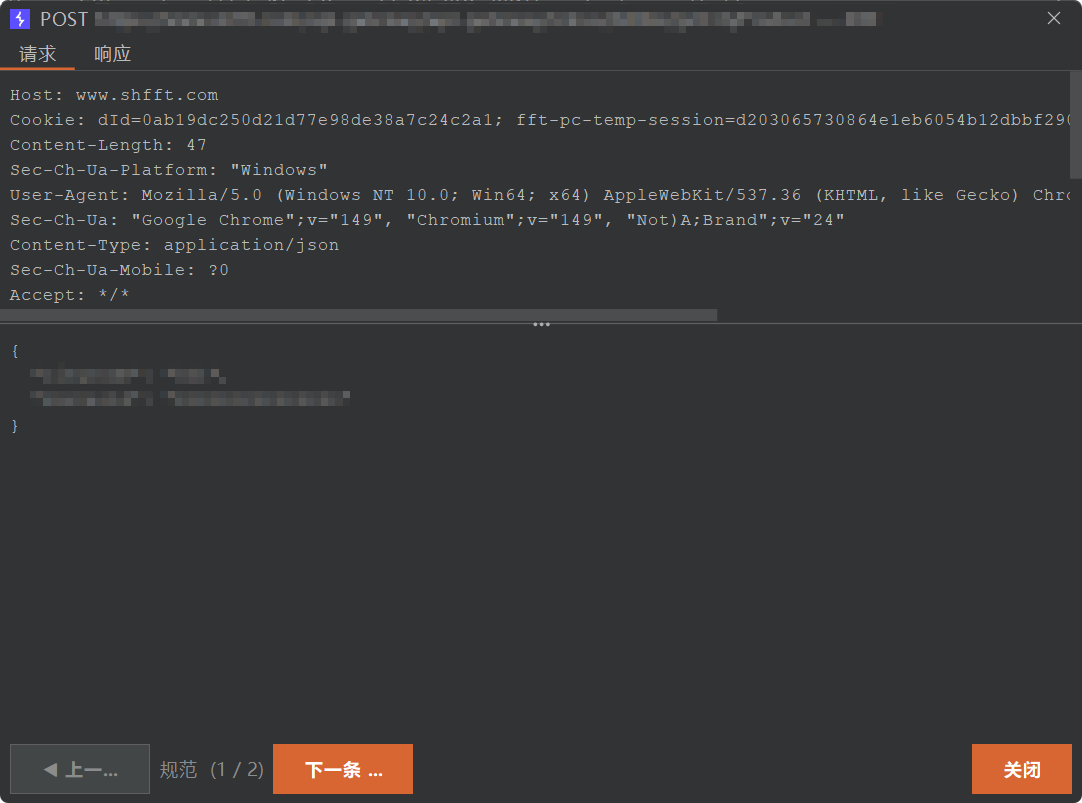
### 请求详情查看
可以直接在界面里查看单条请求的请求头、请求体和结构化内容。
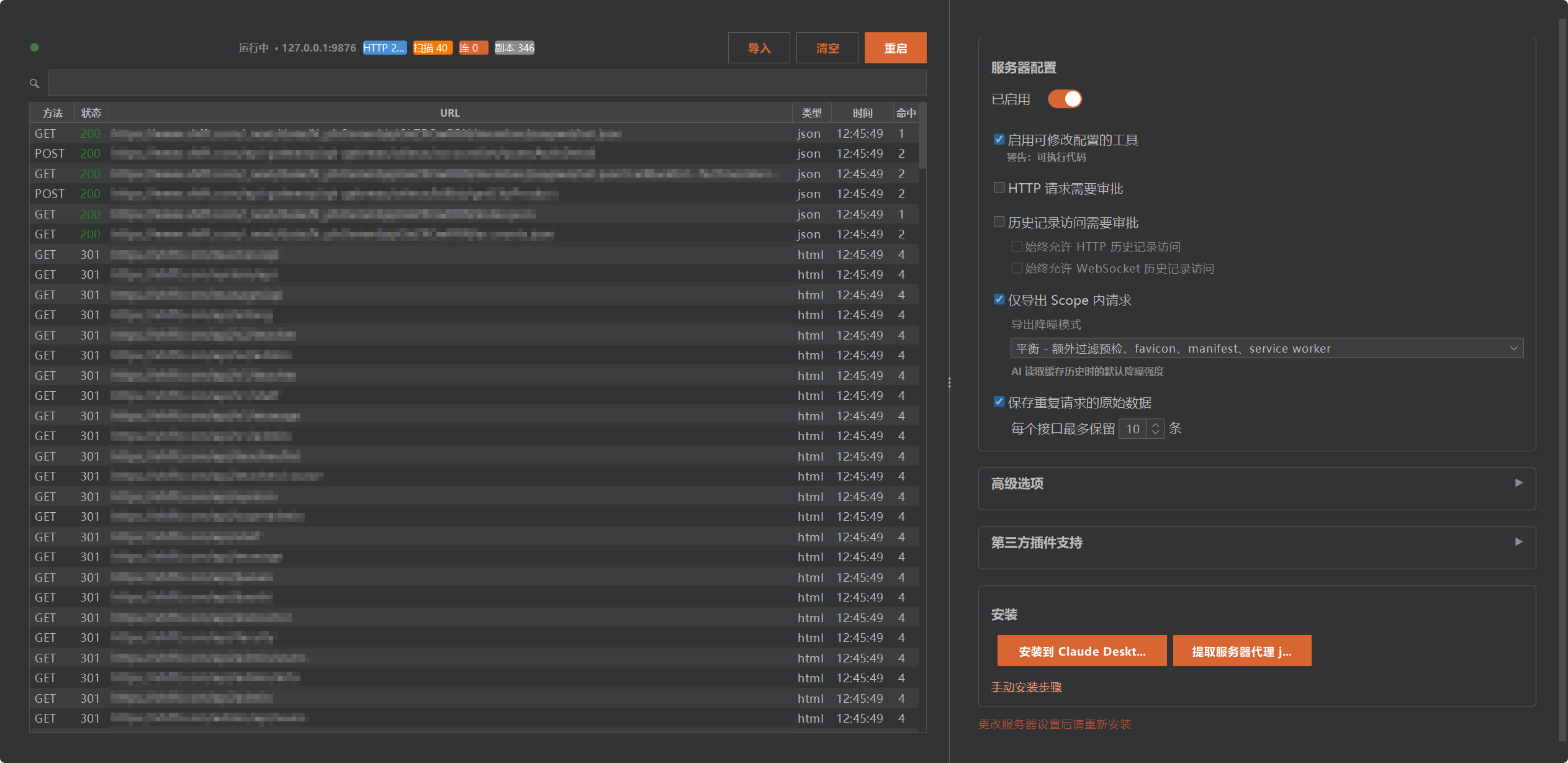
### 仪表板与服务配置
可以实时查看服务状态、缓存情况,并调整导出和审批行为。
## 常见使用场景
### 让 AI 查 Burp 历史
- `get_proxy_http_history`
- `get_proxy_http_detail`
- `get_proxy_websocket_history`
### 让 AI 做目标侦察
- `manage_scope`
- `get_site_map`
- `graphql_introspect`
- `graphql_list_types`
- `graphql_describe_type`
### 让 AI 帮你分析请求差异
- `diff_proxy_responses`
### 让 AI 发请求但不把 Burp 弄卡
- `send_http1_request`
- `send_http2_request`
- `submit_task`
- `get_task_result`
## MCP 工具重点速览
### HTTP 与请求操作
- `send_http1_request`
- `send_http2_request`
- `create_repeater_tab`
- `send_to_intruder`
### 代理历史与缓存
- `get_proxy_http_history`
- `get_proxy_websocket_history`
- `list_proxy_http_history`
- `get_proxy_http_detail`
- `exporter_stats`
### 范围、站点与扫描
- `manage_scope`
- `get_site_map`
- `start_active_scan`(Burp Pro)
- `list_scanner_issues`
- `get_scanner_issue_detail`
### GraphQL
- `graphql_introspect`
- `graphql_list_types`
- `graphql_describe_type`
- `graphql_query`
### 差异分析
- `diff_proxy_responses`
### 配置与辅助
- `manage_auto_approve_targets`
- `set_task_execution_engine_state`
- `set_proxy_intercept_state`
- `clear_database`
- `get_burp_info`
## 配置说明
| 选项 | 说明 | 默认值 |
|------|------|--------|
| 服务器主机 | 监听地址 | `127.0.0.1` |
| 服务器端口 | 监听端口 | `9876` |
| 严格 localhost 模式 | WSL/远程环境需关闭 | 开启 |
| 启用保活心跳 | SSE 连接保活 | 开启 |
| 保活间隔 | 心跳间隔(秒) | 30s |
| 最大响应大小 | 单次响应上限(KB) | 100KB |
| HTTP 请求审批 | 发送 HTTP 前需确认 | 开启 |
| 历史记录访问审批 | 读取历史前需确认 | 开启 |
## 详细能力说明
### SQLite 缓存层
- 代理 HTTP 历史和扫描问题自动缓存到本地 SQLite
- 支持分页查询、详情查看和按 ID 检索
- SHA-256 去重(`method + URL`),5 分钟窗口合并
- 自动清理:10 万 HTTP 记录、1 万扫描问题
### 后台导出器
- 协程驱动后台轮询,默认每 5 秒同步一次
- 游标增量同步,只拉取新数据
- 支持仅导出 Scope 内请求
- 支持导出噪音过滤策略
### 异步任务系统
- `submit_task` 提交后台任务,立即返回 ID
- `get_task_result` 轮询结果
- `read_file` / `delete_file` 管理大响应文件
- 适合大响应、长任务和低 token 压力场景
## 架构说明
+---------------------------------------------------+
| Burp Suite |
| +----------------------------------------------+ |
| | MCP Server Extension | |
| | +------------------+ +-------------------+ | |
| | | POST /mcp | | GET+POST /sse | | |
| | | (Streamable HTTP)| | (SSE 兼容模式) | | |
| | +------------------+ +-------------------+ | |
| | +-------------+ +-----------------------+ | |
| | | Exporter |->| SQLite Database | | |
| | | (后台同步) | | (本地缓存) | | |
| | +-------------+ +-----------------------+ | |
| +----------------------------------------------+ |
| ^ ^ |
| HTTP POST /mcp SSE GET /sse |
+----------+------------------+---------------------+
| |
+------+------+ +------+------+
| MCP Client | | MCP Client |
| (Claude等) | | (旧版/代理) |
+-------------+ +-------------+
## 构建命令
| 命令 | 说明 |
|------|------|
| `./gradlew embedProxyJar` | 构建最终可分发 JAR(推荐) |
| `./gradlew test` | 运行测试 |
| `./gradlew shadowJar` | 仅构建主 JAR |
## 自动发布
仓库内置了两条 GitHub Actions 流水线:
- `CI`
每次 push 到 `master` 时自动测试、构建,并上传构建产物 Artifact
- `Release`
推送 tag `v*` 时自动正式发布 GitHub Release
也支持在 GitHub Actions 页面手动触发
推荐发布流程:
git push origin master
git tag v1.2.2
git push origin v1.2.2
CI 会自动:
- 使用 Java 21 构建
- 执行测试
- 执行 `./gradlew embedProxyJar`
- 上传 `build/libs/burp-mcp-all.jar` 作为 Actions Artifact
Release 会自动:
- 使用 Java 21 构建
- 执行测试
- 执行 `./gradlew embedProxyJar`
- 上传 `build/libs/burp-mcp-all.jar`
- 创建或更新对应版本 Release
- 基于 GitHub 提交记录自动生成 Release notes
## 开发
工具定义主要位于:
src/main/kotlin/net/portswigger/mcp/tools/
新增工具时,创建 `@Serializable` 参数类并在 `Tools.kt` 注册即可:
@Serializable
data class MyToolArgs(val param: String)
mcpTool("工具描述") {
// your logic
}
# Burp Suite MCP Server -- Enhanced Edition
**A Burp MCP server that is built for real workloads, not just demos.**
This fork exists for one reason: the official server is hard to use in long-running, real penetration testing sessions.
Typical failure modes in the official build:
- AI clients disconnect repeatedly
- Burp slows down or freezes when history grows
- Large responses are painful to inspect
- Scanner results and cached data are not easy to work with
This fork fixes those issues at the architecture level.
## Quick Start
### Build
Requirements:
- Java 21+
- `jar` available on your machine
git clone https://github.com/llc141525/burp-mcp-enhance.git
cd burp-mcp-enhance
./gradlew embedProxyJar
Artifact:
build/libs/burp-mcp-all.jar
### Load Into Burp
1. Open Burp Suite
2. Go to `Extensions`
3. Click `Add`
4. Choose `Extension Type = Java`
5. Select `build/libs/burp-mcp-all.jar`
6. Enable the MCP server in Burp
### Configure Your MCP Client
Recommended:
{
"mcpServers": {
"burp": {
"type": "http",
"url": "http://127.0.0.1:9876/mcp"
}
}
}
For stdio-only clients:
{
"mcpServers": {
"burp": {
"command": "java",
"args": [
"-jar",
"/path/to/mcp-proxy-all.jar",
"--sse-url",
"http://127.0.0.1:9876/sse"
]
}
}
}
## Why This Fork Matters
### Streamable HTTP instead of fragile SSE-first behavior
The official server relies on SSE for a workload that behaves much more like request-response tooling than streaming UI updates. Under load, that tends to break.
This fork makes Streamable HTTP the primary path:
Official: SSE ----- keep alive ----- keep alive ----- drop
This fork: POST -> done POST -> done POST -> done
### SQLite cache instead of live-querying Burp on every request
The official design asks Burp for data in real time on every query. That becomes painful once history grows.
This fork uses a background exporter plus SQLite cache:
Official: AI query -> Burp API (real-time) -> Burp freezes
This fork: AI query -> SQLite cache -> instant
^
Background exporter
^
Burp API
## Key Capabilities
- Streamable HTTP MCP endpoint
- SSE compatibility mode
- SQLite-backed cached proxy/scanner history
- Background incremental exporter
- GraphQL introspection and schema caching
- Response diffing by history ID
- Scope management and site map queries
- Async task queue for large responses
- Chinese UI and built-in control dashboard
## Screenshots
### Request Detail Review
Inspect request headers and body content in a focused detail view.

### Dashboard & Server Settings
Monitor server/cache state and adjust runtime behavior from the built-in dashboard.

## Important Tools
### HTTP
- `send_http1_request`
- `send_http2_request`
- `create_repeater_tab`
- `send_to_intruder`
### History & Cache
- `get_proxy_http_history`
- `get_proxy_websocket_history`
- `list_proxy_http_history`
- `get_proxy_http_detail`
- `exporter_stats`
### Scope & Scanning
- `manage_scope`
- `get_site_map`
- `start_active_scan`
### GraphQL
- `graphql_introspect`
- `graphql_list_types`
- `graphql_describe_type`
- `graphql_query`
### Analysis & Utilities
- `diff_proxy_responses`
- `manage_auto_approve_targets`
- `get_burp_info`
## Build Commands
| Command | Description |
|---------|-------------|
| `./gradlew embedProxyJar` | Build the distributable JAR |
| `./gradlew test` | Run tests |
| `./gradlew shadowJar` | Build the main JAR only |
## Automated Releases
This repository includes two GitHub Actions workflows:
- `CI`
builds and uploads an artifact on every push to `master`
- `Release`
creates a formal GitHub Release when you push a `v*` tag
and can also be triggered manually from the Actions tab
Recommended flow:
git push origin master
git tag v1.2.2
git push origin v1.2.2
CI will:
- build with Java 21
- run tests
- run `./gradlew embedProxyJar`
- upload `build/libs/burp-mcp-all.jar` as an Actions artifact
Release will:
- build with Java 21
- run tests
- run `./gradlew embedProxyJar`
- upload `build/libs/burp-mcp-all.jar`
- create or update the matching GitHub Release
- generate Release notes automatically from GitHub commit history
标签:AI辅助, Burp Suite, MCP, 后台面板检测, 网络安全, 隐私保护