bomly-dev/bomly-guard
GitHub: bomly-dev/bomly-guard
一款 GitHub Action,在 pull request 中自动审查依赖变更并评估漏洞、许可证及策略风险,让团队在合入前把控依赖漂移。
Stars: 0 | Forks: 0

在依赖漂移合入前进行审查。




`bomly-guard` 会安装 Bomly CLI,并为 pull request、合并队列或显式指定的 refs 运行 `bomly diff`。
该 action 是 CLI 的组合包装器。依赖分析和 Markdown 摘要渲染由 `bomly diff` 完成;该 action 负责处理 GitHub Actions 的底层逻辑,例如 CLI 安装、PR merge-base 推断、输出、作业摘要、可选的 pull request 评论以及可选的 SARIF 上传。
## 用法
```
name: Bomly Guard
# 当有人打开或更新 pull request 时运行 Bomly Guard。
on:
pull_request:
permissions:
# Read workflow metadata before trying to upload SARIF results.
actions: read
# Read repository contents so Bomly can compare dependency files.
contents: read
# Needed only when comment-summary-in-pr is always or on-failure.
pull-requests: write
# Lets the action update an existing PR comment through the Issues API.
issues: write
# Needed only when upload-sarif is true or auto and code scanning is available.
security-events: write
jobs:
dependency-review:
runs-on: ubuntu-latest
steps:
- uses: actions/checkout@v5
with:
# Bomly compares two git refs, so it needs enough history to find
# the PR merge base instead of only seeing the latest commit.
fetch-depth: 0
- uses: bomly-dev/bomly-guard@v1
with:
# Fail the job when the PR introduces high-risk findings.
fail-on: high
# Leave a PR comment only when the dependency review finds something.
comment-summary-in-pr: on-failure
```
在处理 pull request 时,除非设置了 `base-ref`,否则该 action 会将 PR head 与 PR merge base 进行比较。这样可以使审查专注于该 PR 引入的依赖项变更,而不是目标分支上已存在的变更。
为了确保 Marketplace 和 CI 的稳定性,请固定到主版本标签(例如 `@v1`)或确切的发布标签(例如 `@v1.2.3`)。
默认情况下,Bomly Guard 会在没有 token 的情况下下载公共的 Bomly CLI 版本。如果您的工作流在解析或下载 CLI 版本时达到了 GitHub 的公共速率限制,请传递一个可选的 token:
```
- uses: bomly-dev/bomly-guard@v1
with:
cli-token: ${{ github.token }}
```
## 包管理器设置
Bomly Guard 不会为您安装项目的包管理器。该 action 会安装 Bomly CLI,然后运行 `bomly diff`;当您的代码仓库需要时,npm、pnpm、Yarn、Dart pub、SwiftPM、SBT、Composer、Bundler 和 Conan 等包管理器工具应由先前的步骤安装。
`install-first` 输入会传递给 `bomly diff --install-first`。它会要求支持 install-first 行为的 CLI 检测器在解析依赖图之前安装项目依赖。它本身并不安装包管理器的二进制文件。
许多代码仓库只需通过已提交的 lockfile 即可进行审查。当存在相应的构建工具时,某些生态系统可以生成更丰富的依赖图,当前支持构建工具的检测器包括 Dart pub、SwiftPM 和 SBT。当 lockfile 解析不够用或启用了 `install-first` 时,任何检测器也可能需要其相应的包管理器。
在 Bomly Guard 之前,为您的生态系统使用常规的设置 action:
```
steps:
- uses: actions/checkout@v5
with:
fetch-depth: 0
# Node.js, npm, pnpm, and Yarn
- uses: actions/setup-node@v6
with:
node-version: 22
cache: npm
- run: corepack enable
# Java, Maven, Gradle, Scala, and SBT
- uses: actions/setup-java@v5
with:
distribution: temurin
java-version: 21
# Go modules
- uses: actions/setup-go@v6
with:
go-version: stable
# Python, pip, pipenv, poetry, and uv
- uses: actions/setup-python@v6
with:
python-version: "3.12"
# Ruby Bundler
- uses: ruby/setup-ruby@v1
with:
ruby-version: "3.3"
# .NET NuGet
- uses: actions/setup-dotnet@v5
with:
dotnet-version: "9.0.x"
# Rust Cargo
- uses: dtolnay/rust-toolchain@stable
# Dart pub
- uses: dart-lang/setup-dart@v1
# PHP Composer
- uses: shivammathur/setup-php@v2
with:
php-version: "8.3"
tools: composer
# Elixir Mix
- uses: erlef/setup-beam@v1
with:
otp-version: "27"
elixir-version: "1.17"
# C++ Conan
- uses: actions/setup-python@v6
with:
python-version: "3.12"
- run: python -m pip install conan
# SwiftPM and CocoaPods usually belong on a macOS runner.
- run: swift --version
- run: gem install cocoapods
- uses: bomly-dev/bomly-guard@v1
with:
fail-on: high
```
## 查看结果
Bomly Guard 会在几个地方写入相同的审查摘要,以便团队选择适合自己的工作流:
- GitHub Actions 作业摘要会在每次运行后显示依赖审查表。
- Pull request 检查面板会显示策略发现是否阻止了该 PR。
- 可以通过 `comment-summary-in-pr` 启用 Pull request 评论。
- SARIF 上传可以将支持的发现发送到 GitHub 代码扫描。
- 对于需要检查依赖差异的后续作业,可以使用 JSON 输出。
**Pull request 检查结果**

Bomly Guard 将策略结果作为常规的 GitHub 检查进行报告,因此团队可以将依赖策略作为分支保护的一部分。
当没有任何适用的内容需要评估时(例如,`ecosystems`/`detectors` 过滤器与代码仓库中的任何内容都不匹配),Bomly Guard 会以中性的通知(“未找到适用的清单”)通过检查,而不是失败。真正的错误(格式错误的清单、checkout 失败)仍然会导致检查失败。
**Pull request 评论摘要**
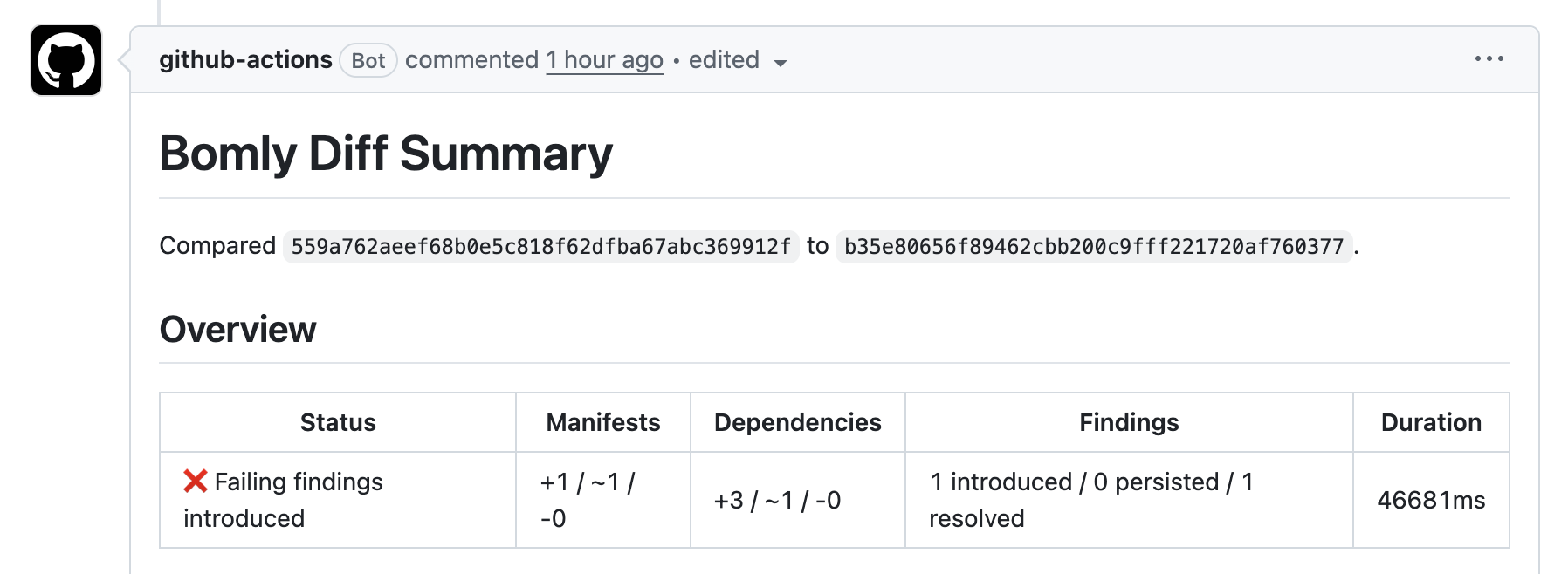
启用 `comment-summary-in-pr` 后,审查者无需打开 Actions 运行即可查看依赖审查。
**依赖变更**
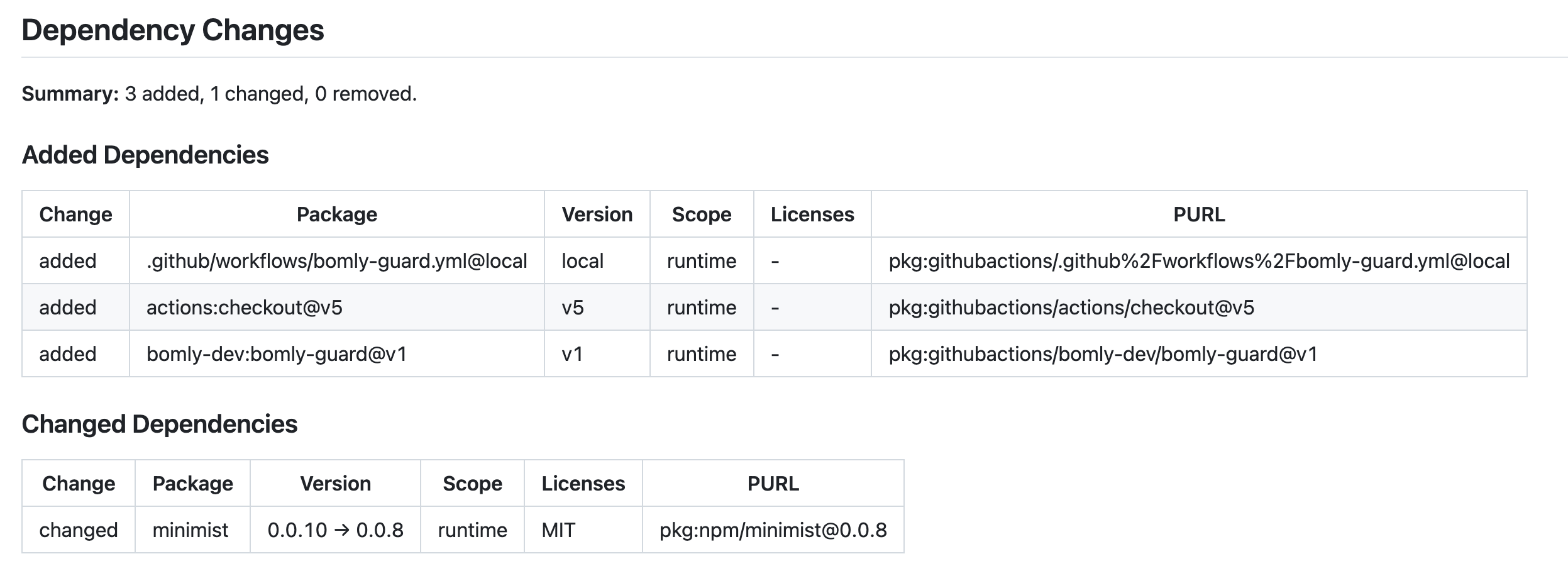
依赖表将添加、更改和删除的包区分开来,并包含包 URL,以便对每项变更进行追踪。
**策略发现**
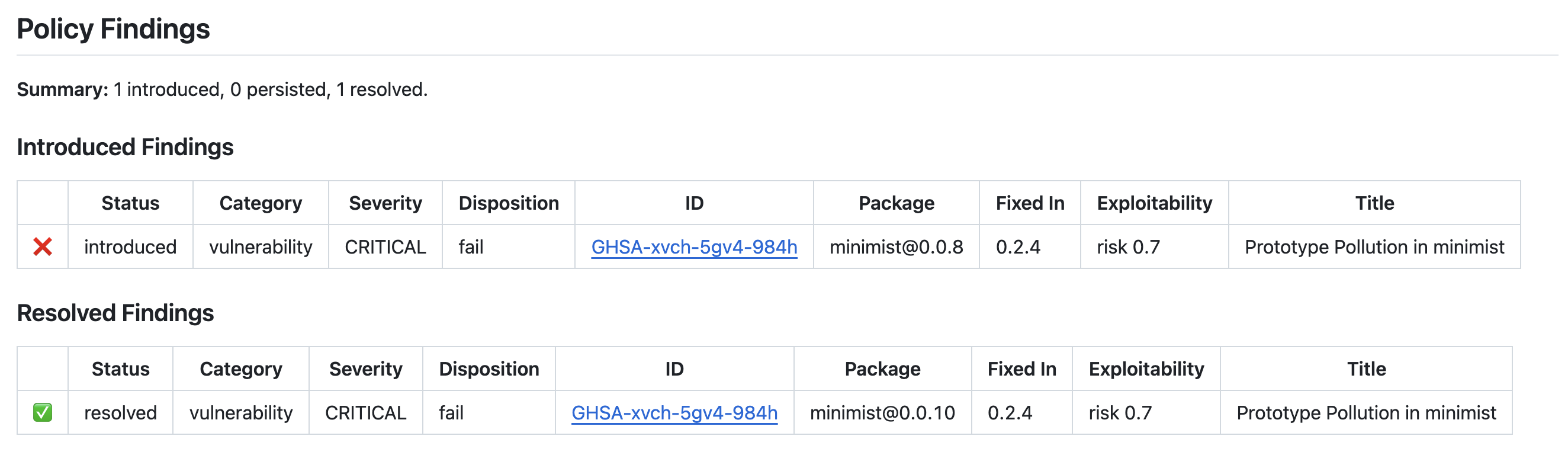
策略发现区分了新问题和已解决的问题,这有助于审查者专注于该 pull request 实际引入的内容。
## 输入
| 输入 | 默认值 | 描述 |
| --- | --- | --- |
| `version` | `latest` | 要安装的 Bomly CLI 版本,例如 `latest`、`v0.4.6` 或 `0.4.6`。 |
| `cli-token` | | 用于 Bomly CLI 发布 API 和下载请求的可选 token,如果遇到 GitHub 公共速率限制时很有用。 |
| `repo-token` | `${{ github.token }}` | 用于当前代码仓库 API 访问、pull request 评论和代码仓库安全检查的 token。 |
| `log-level` | `verbose` | Bomly CLI 日志级别:`quiet`、`verbose` 或 `debug`。 |
| `base-ref` | 推断 | 要比较的 Base git ref。未设置时,pull request 使用 PR merge base。 |
| `head-ref` | 推断 | 要比较的 Head git ref。未设置时,pull request 使用 PR head SHA。 |
| `config-file` | | 本地 Bomly 配置路径或 `owner/repo/path@ref` 外部配置引用。 |
| `external-repo-token` | `repo-token` | 用于私有外部配置仓库的 token。 |
| `enrich` | `true` | 在评估策略之前查找额外的包元数据(例如漏洞和许可证详情)。 |
| `audit` | `true` | 评估漏洞和策略发现。仅在启用 audit 时才会生成 SARIF 输出。 |
| `analyze` | `false` | 对支持的生态系统运行可达性分析,以便发现结果可以包含易受攻击的代码是否可达。 |
| `fail-on` | | 应导致作业失败的逗号分隔的发现严重性或策略类别。 |
| `allow-licenses` | | 策略允许的逗号分隔的 SPDX 许可证 ID。 |
| `deny-licenses` | | 策略应阻止的逗号分隔的 SPDX 许可证 ID。 |
| `license-exempt-packages` | | 许可证策略应忽略的逗号分隔的包 URL。 |
| `allow-vulnerability-ids` | | 不应导致审查失败的逗号分隔的漏洞 ID。 |
| `deny-packages` | | 引入或更改时应阻止的逗号分隔的包 URL。 |
| `deny-groups` | | 应阻止的逗号分隔的包 URL 命名空间,例如包作用域或组。 |
| `protected-packages` | | Bomly 应监视其域名抢注(typosquatting)相似包的逗号分隔的包名称。 |
| `typosquat-threshold` | | 可疑包名称匹配的相似度阈值。值越低越严格。 |
| `typosquat-mode` | | 域名抢注发现如何影响运行:`warn` 报告它们,`fail` 阻止作业。 |
| `warn-only` | `false` | 将失败的发现报告为警告,而不会导致 GitHub Actions 作业失败。 |
| `ecosystems` | | 将依赖检测限制为选定的生态系统。留空让 Bomly 自动检测支持的生态系统。 |
| `detectors` | | 限制运行的依赖文件检测器。适用于只需要特定 lockfile 或 manifest 检测器的高级工作流。 |
| `matchers` | | 当 Bomly 跨 base 和 head refs 比较包时,限制运行的依赖匹配器。 |
| `auditors` | | 限制审查期间运行的策略或漏洞审计器。 |
| `analyzers` | | 启用 `analyze` 时,限制运行的可达性分析器。 |
| `install-first` | `false` | 要求支持 install-first 行为的 CLI 检测器在解析依赖图之前安装项目依赖。这不会安装包管理器二进制文件。 |
| `install-args` | | 启用 `install-first` 时,传递给特定于检测器的安装步骤的逗号分隔参数。 |
| `comment-summary-in-pr` | `never` | Pull request 评论模式:`never`、`always` 或 `on-failure`。需要 `pull-requests: write` 和 `issues: write`。 |
| `upload-sarif` | `auto` | SARIF 上传模式:`auto`、`true` 或 `false`。当代码扫描不可用时,`auto` 会干净地跳过上传。 |
该 action 始终拥有 `bomly diff --format json` 及其 Markdown/SARIF 附带输出,以确保 GitHub 输出、作业摘要、PR 评论和代码扫描上传保持稳定。CLI 标志 `--format`、`--json`、`--output` 和 `--interactive` 特意不作为 action 输入。
## 输出
- `comment-content`:Markdown 摘要内容。
- `dependency-changes`:JSON 依赖差异。
- `vulnerable-changes`:引入的漏洞发现。
- `invalid-license-changes`:引入的许可证发现。
- `denied-changes`:引入的拒绝包发现。
- `suspicious-package-changes`:引入的可疑包发现。
- `sarif-file`:启用 audit 时生成的 SARIF 文件的路径。
## SARIF 上传
SARIF 上传在支持时使用 `github/codeql-action/upload-sarif`。GitHub 需要 `security-events: write`,并且私有代码仓库还需要 `actions: read` 以及启用 GitHub Code Security。默认的 `upload-sarif: auto` 会在不满足这些要求时干净地跳过上传;Bomly 策略评估仍然控制着最终的 action 结果。
### 代码扫描如何显示 Bomly 警报
您在 pull request 上看到的内联注释来自 GitHub 代码扫描对上传的 SARIF 的摄取——Bomly Guard 不会发布自己的内联审查评论。有两种 GitHub 行为值得了解:
- **严重性**:对于漏洞,会渲染为低 / 中 / 高 / 严重,因为 SARIF 带有数字形式的 `security-severity`。许可证和其他非 CVSS 发现则使用其级别(错误 / 警告 / 注意)进行渲染。
- **对于漏洞,内联注释徽章(失败/警告/注意)跟踪的是 `security-severity`,而不是策略。** 无论严重程度如何,Bomly 的 SARIF `level` 对于失败的发现始终为 `error`(它反映的是 `--fail-on`,而不是问题的严重程度)。但是,对于任何标记为 `security` 的规则,GitHub 会根据 `security-severity` 重新计算“检查”选项卡中的注释颜色:大致上,高/严重 (≥ 7.0) 渲染为失败注释,中 (4.0–6.9) 渲染为警告,低 (< 4.0) 渲染为注意——这与我们声明的 `level` 无关。这仅影响每个警报的徽章颜色;检查运行的整体通过/失败结论仍由 Bomly 的策略结果设置,因此即使 `fail-on: any` 下的中等发现的注释显示为“警告”,它仍然会导致作业失败。许可证/其他非 CVSS 发现不携带 `security-severity`,因此它们的注释确实直接跟踪 `level`。
- **注释仅出现在“更改的文件”选项卡中 PR 实际更改的行的警报上。** 依赖建议锚定在 lockfile/manifest 中声明包的位置,这通常*不是* PR 编辑的行(例如,一行上的 Maven 版本属性与另一行上的 `
` 元素)。当它们不同时,即使警报是真实的,GitHub 也可能会报告 **“此 pull request 更改的代码中没有新警报”**——它仍然在代码仓库的 **Security › Code scanning(安全 › 代码扫描)** 选项卡、Bomly 作业摘要和 PR 评论中可见。请使用这些界面查看全貌。
## 配置
对于简短的策略,请将选项直接放在您的工作流中:
```
- uses: bomly-dev/bomly-guard@v1
with:
fail-on: high,critical
deny-licenses: GPL-3.0-only,AGPL-3.0-only
comment-summary-in-pr: on-failure
```
对于较长的策略,或者在多个代码仓库之间共享的策略,请使用 `config-file`:
```
- uses: bomly-dev/bomly-guard@v1
with:
config-file: .github/bomly.yml
```
`config-file` 可以指向检出(checked-out)代码仓库中的本地文件,也可以指向另一个代码仓库中格式为 `owner/repo/path@ref` 的文件:
```
- uses: bomly-dev/bomly-guard@v1
with:
config-file: bomly-dev/security-policy/bomly.yml@main
external-repo-token: ${{ secrets.BOMLY_POLICY_TOKEN }}
```
当外部配置代码仓库是私有时,请使用 `external-repo-token`。如果未设置,Bomly Guard 将使用 `repo-token`。
有关完整的 Bomly CLI 配置参考,请参见 [Bomly CLI 文档](https://github.com/bomly-dev/bomly-cli)。
## 示例
每个片段仅为 `bomly-guard` 步骤。请从上方的[用法](#usage)块中重用 `on:`、`permissions:` 和 `actions/checkout`(带有 `fetch-depth: 0`),并添加您的代码仓库所需的任何生态系统设置。
`fail-on` 是将发现转化为失败作业的开关。漏洞发现通过严重性(`high`、`critical` 等)进行匹配;许可证、拒绝包和抢注发现不携带严重性,因此它们匹配 `fail-on: any`。当您希望某个策略由其自己的审计器进行控制时,请使用 `auditors` 将其范围限定在其自身。
**阻止高严重性发现并在失败时发表评论**
```
- uses: bomly-dev/bomly-guard@v1
with:
fail-on: high
comment-summary-in-pr: on-failure
```
**执行许可证策略**
```
- uses: bomly-dev/bomly-guard@v1
with:
auditors: license
allow-licenses: MIT,Apache-2.0,BSD-3-Clause,ISC
deny-licenses: GPL-3.0-only,AGPL-3.0-only
fail-on: any
```
**监视域名抢注和被阻止的包**
```
- uses: bomly-dev/bomly-guard@v1
with:
auditors: package
deny-packages: pkg:npm/event-stream
protected-packages: react,react-dom,lodash
typosquat-mode: fail
fail-on: any
```
**先在不阻止合并的情况下进行尝试**
```
- uses: bomly-dev/bomly-guard@v1
with:
fail-on: high
warn-only: true
comment-summary-in-pr: always
```
**将发现发送到 GitHub 代码扫描**
```
# 需要 security-events: write(并且在私有 repos 上需要 actions: read)。
- uses: bomly-dev/bomly-guard@v1
with:
fail-on: high
upload-sarif: true
```
**将审查限制为一个生态系统**
```
- uses: bomly-dev/bomly-guard@v1
with:
fail-on: high
ecosystems: npm
```
有关每个选项,请参见[输入](#inputs)表。
## 问题
如有问题、想法和常规支持,请使用 [Bomly Discussions](https://github.com/orgs/bomly-dev/discussions)。
仅当遇到已确认的错误、回归或可执行的实现工作时,才使用此代码仓库的 issues。
## 支持
Bomly 是一个开源项目。如果您觉得它有用,您可以通过给代码仓库加星、分享反馈、开启 issue、贡献改进或赞助持续的维护来支持该项目。
请参见[支持 Bomly](https://bomly.dev/support)。
## 许可证
Bomly CLI 基于 [Apache License 2.0](LICENSE) 获得许可。标签:GitHub Action, 代码审查, 依赖管理, 自定义脚本, 跌倒检测, 软件物料清单