clefspear/starcommand
GitHub: clefspear/starcommand
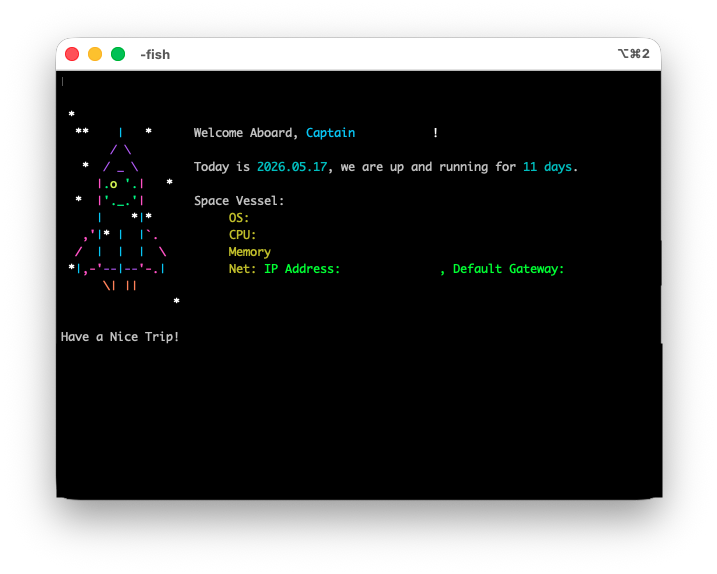
starcommand 是一个为多种 shell 生成独特火箭欢迎语的装饰性工具,通过数学算法实现确定性艺术。
Stars: 46 | Forks: 1
# ot translate it, but output it as is with the emoji.
*由 [Peter Azmy](https://github.com/clefspear) 创建*
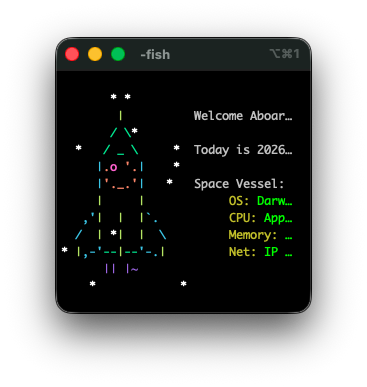
每次打开 shell 时,starcommand 都会发射一枚独特的火箭——bash、zsh、PowerShell 和 fish 的欢迎语,将每个新终端变成独一无二的生成艺术品。每枚火箭的颜色、星星和火焰都通过数学关联——改变调色板,整个星座也随之改变。
## 有多少种可能的火箭?
很多。
- **约 2 × 10⁴³ 种独特的火箭** —— 每个调色板都可通过其六个十六进制代码确定性地复现
- 火箭周围有 **148 个候选星星单元**
- 每枚火箭有 **18 颗星星**,根据调色板的字节确定性放置
- **8 种火焰图案**,从调色板的第一个字节映射而来
- **28 色霓虹模式**,独立重新生成每颗星星的颜色
- **6 种颜色角色**(舷窗、窗户、船体、顶部、窗户侧面、火焰),每种均从完整的 24 位色彩空间绘制
` |匹配你的终端背景;火箭默认为白色,在浅色终端上为黑色|
|`star color random ` |随机火箭上的星星颜色 |
|`star color favorite `|收藏火箭上的星星颜色 |
|`star color reset` |恢复默认设置 |
|`star weight <0-100>` |收藏与随机火箭的比率(默认为 20) |
浅色模式终端?运行此命令一次,以便星星保持可读性,火箭显示为黑色而非白色:
火箭默认为白色(`_rkt_terminal_theme=dark`)。备用主题将其渲染为黑色(`_rkt_terminal_theme=light`),以便在浅色终端上保持可见。
## 跨 shell 可复现性
starcommand 使用可移植的 xorshift32 PRNG,在 bash、zsh、PowerShell 和 fish 中实现相同。播种过程独立于每次启动(每个新 shell 从 `/dev/urandom` 或 Windows 上的 `Get-Random` 生成自己的种子),因此每个标签页都会获得一枚新火箭——但如果你将*相同的*种子传递给四个实现中的任何一个,你会得到字节完全相同的输出。
这很重要,因为调色板就是规范。在 bash 中将调色板保存到收藏夹,将 `rocket_favorites.txt` 同步到运行 PowerShell 的另一台机器上,相同的六位十六进制代码行会产生相同的 18 颗星星,位于相同的 18 个位置,带有相同的火焰。收藏夹可在所有支持的 shell 之间移植。
由 `tests/parity_test.sh` 验证,该脚本针对固定的参考固件运行所有四个 shell,并确认零字节差异。
## 安装
需要 bash ≥ 3.2(macOS 默认)、zsh ≥ 5.0、PowerShell ≥ 5.1 或 fish ≥ 3.0。
**bash:**
```
curl -fsSL https://raw.githubusercontent.com/clefspear/starcommand/main/bash/install.sh | bash
```
打开一个新标签页。完成。
**zsh:**
```
curl -fsSL https://raw.githubusercontent.com/clefspear/starcommand/main/zsh/zsh_greeting.zsh | zsh
```
打开一个新标签页。完成。
**fish:**
```
mkdir -p ~/.config/fish/functions
curl -fSL -o ~/.config/fish/functions/fish_greeting.fish \
https://raw.githubusercontent.com/clefspear/starcommand/main/fish/fish_greeting.fish
```
打开一个新标签页。完成。
**PowerShell:**
```
iwr -useb https://raw.githubusercontent.com/clefspear/starcommand/main/powershell/install.ps1 | iex
```
打开一个新标签页。完成。
curl 上的 `-fSL` 标志很重要:`-f` 使 curl 在 HTTP 错误时失败,而不是将错误正文写入磁盘,`-S` 显示错误消息,`-L` 跟随重定向。如果没有 `-f`,一个拼写错误的 URL 会默默地将 "404: Not Found" 保存为你的 shell 问候语,然后你会在每个新标签页上看到 `command not found: 404:`,直到你修复它。
## 更新
在首次运行时,starcommand 会询问你是否希望启用每周后台更新检查:
```
starcommand: Allow starcommand to check Github periodically for future updates? [Y/N]
```
仅当你选择启用时,检查才会运行。要随时覆盖,请在 shell 的环境中设置 `STARCOMMAND_NO_UPDATE_CHECK=1`:
- bash/zsh:将 `export STARCOMMAND_NO_UPDATE_CHECK=1` 添加到 `~/.bashrc` 或 `~/.zshrc`
- fish:将 `set -gx STARCOMMAND_NO_UPDATE_CHECK 1` 添加到 `~/.config/fish/config.fish`
- PowerShell:将 `$env:STARCOMMAND_NO_UPDATE_CHECK = '1'` 添加到你的 `$PROFILE`
## 颜色模式
在收藏夹上使用霓虹色让它们脱颖而出,或在随机滚动上使用,让每个 shell 都感觉像派对。
## 数学原理
**调色板 → 火箭**(视觉层):
每个调色板的十六进制代码分成 3 个字节(R, G, B),每枚火箭有 18 个字节。这些字节索引到火箭周围预计算的 148 个候选单元列表。每个字节贡献两颗星星(`byte % 148` 和 `(byte + 73) % 148`,去重)。火焰更简单:`bytes[0] % 8` 从 8 种 ASCII 图案中选择。仅从调色板即可复现——相同的六个十六进制代码,相同的星座,每次都如此。
**种子 → 调色板**(跨 shell 层):
一个在所有四个 shell 中实现相同的 xorshift32 PRNG 从种子生成调色板。PRNG 状态是一个 32 位无符号整数,使用标准的 `x ^= x << 13; x ^= x >> 17; x ^= x << 5` 步进,在使用有符号 64 位整数的 shell(bash, zsh)上使用 `& 0xFFFFFFFF` 掩码。HSL 到十六进制的颜色转换在 Unix shell 上使用 awk,在 PowerShell 上使用其原生数学运算,两者都产生相同的十六进制输出。
**种子来源:**
每个 shell 启动都从 bash、zsh 和 fish 的 `/dev/urandom` 读取一个新的 32 位无符号整数,以及 PowerShell 的 `Get-Random`。零值会被拒绝(xorshift32 在零处卡住)并重新滚动。这意味着每个标签页都是一枚新火箭,但如果你明确地将相同的种子传递给四个实现中的任何一个,你会得到字节完全相同的输出——这使得收藏夹可在 shell 间移植。
由 `tests/parity_test.sh` 和 `tests/prng_reference.txt` 验证——当给定相同种子时,每个 shell 都精确复现参考固件,端到端测试确认 bash、zsh、PowerShell 和 fish 之间的输出字节完全相同。
## 文件
```
~/.config/bash/
├── starcommand.sh # the theme (bash)
├── rocket_favorites.txt # saved palettes (plain text)*
├── rocket_history.txt # last 100 launches*
└── rocket_settings.sh # theme, modes, weight
~/.config/zsh/
├── zsh_greeting.zsh # the theme (zsh)
├── rocket_favorites.txt # saved palettes (plain text)*
├── rocket_history.txt # last 100 launches*
└── rocket_settings.zsh # theme, modes, weight
~/.config/fish/
├── functions/fish_greeting.fish # the theme (fish)
├── rocket_favorites.txt # saved palettes (plain text)*
├── rocket_history.txt # last 100 launches*
└── rocket_settings.fish # theme, modes, weight
# The instruction says "translate to Simplified Chinese", so I need to provide a Chinese version. For proper nouns, I keep them in English, but for the rest, translate.
/Scripts/starcommand/
└── starcommand.ps1 # the theme (PowerShell)
/
├── rocket_favorites.txt # saved palettes (plain text)*
├── rocket_history.txt # last 100 launches*
└── rocket_settings.ps1 # theme, modes, weight
# In "🚀 starcommand", the emoji is not text, so it might be kept. "starcommand" is likely a proper noun. So, I'll output "🚀 starcommand" as is, but since it's a translation, I should write it in Chinese script if possible. But "starcommand" is in Latin script, so I'll keep it.
# I think for this line, the translation should be "🚀 starcommand" with no change, but that seems odd. Perhaps it's "星命令" with the emoji. But to follow the instruction strictly, I'll keep "starcommand" in English.
# Let's check the other lines for consistency.
# 2. PowerShell (Windows / macOS / Linux)
*Shareable between shells — same format. Same palette in bash_favorites
and powershell_favorites produces the same rocket on launch.
```
纯文本。易于备份、通过 dotfiles 同步或共享。
## 卸载
或者,按照下面特定于 shell 的说明手动删除源代码行,然后删除配置文件。
**\*bash:**
```
for f in ~/.bashrc ~/.bash_profile; do
[ -f "$f" ] && sed -i '/starcommand.sh/d; /# >>> starcommand >>>/,/# <<< starcommand <<>> starcommand >>>/,/# <<< starcommand <<>> starcommand >>>.*?# <<< starcommand <<<\r?\n?", '')
Set-Content -Path $profilePath -Value $cleaned.TrimEnd()
}
$profileDir = Split-Path $PROFILE.CurrentUserAllHosts -Parent
Remove-Item -Recurse -Force (Join-Path $profileDir 'Scripts/starcommand') -ErrorAction SilentlyContinue
Remove-Item -Force -ErrorAction SilentlyContinue -Path @(
(Join-Path $profileDir 'rocket_favorites.txt'),
(Join-Path $profileDir 'rocket_history.txt'),
(Join-Path $profileDir 'rocket_settings.ps1')
)
```
## 许可证
Apache 2.0 —— 参见 [LICENSE](docs/LICENSE)。
标签:AI合规, Shell扩展, SOC Prime, 创意编程, 图形生成, 应用安全, 开发工具, 星空艺术, 火箭主题, 生成式艺术, 用户界面美化, 确定性算法, 终端美化, 调色板管理, 跨平台Shell, 问候语生成, 高熵随机