startekenterprises-ai/agent-shield
GitHub: startekenterprises-ai/agent-shield
开源本地隐私网关,用于防止AI代理的间接提示注入和敏感数据泄露。
Stars: 0 | Forks: 0
# 'Kubernetes Setup' is translated to 'Kubernetes 设置', so "Kubernetes" is kept, but "Setup" is translated to "设置". Similarly, 'API Reference' to 'API 参考', where "API" is kept, "Reference" is translated.
一个开源、**本地优先**的**隐私网关、安全网格与注入防火墙**,旨在保护自主AI代理、开发者IDE和浏览器自动化框架免受**间接提示注入**和**出站数据泄漏(DLP)**。
Agent-Shield 作为一个代理屏障,位于您的AI代理工作区(`Cursor`、`Claude Code`、`OpenClaw`、`Open WebUI`、`AnythingLLM`)与互联网之间——*在传入*时清除来自网络爬取的恶意注入,并阻止您的API密钥和源代码*外泄*。
[](https://hub.docker.com/r/startekenterprises/agent-shield)
[](https://hub.docker.com/r/startekenterprises/agent-shield)
[](LICENSE)
[](https://github.com/startekenterprises-ai/agent-shield)
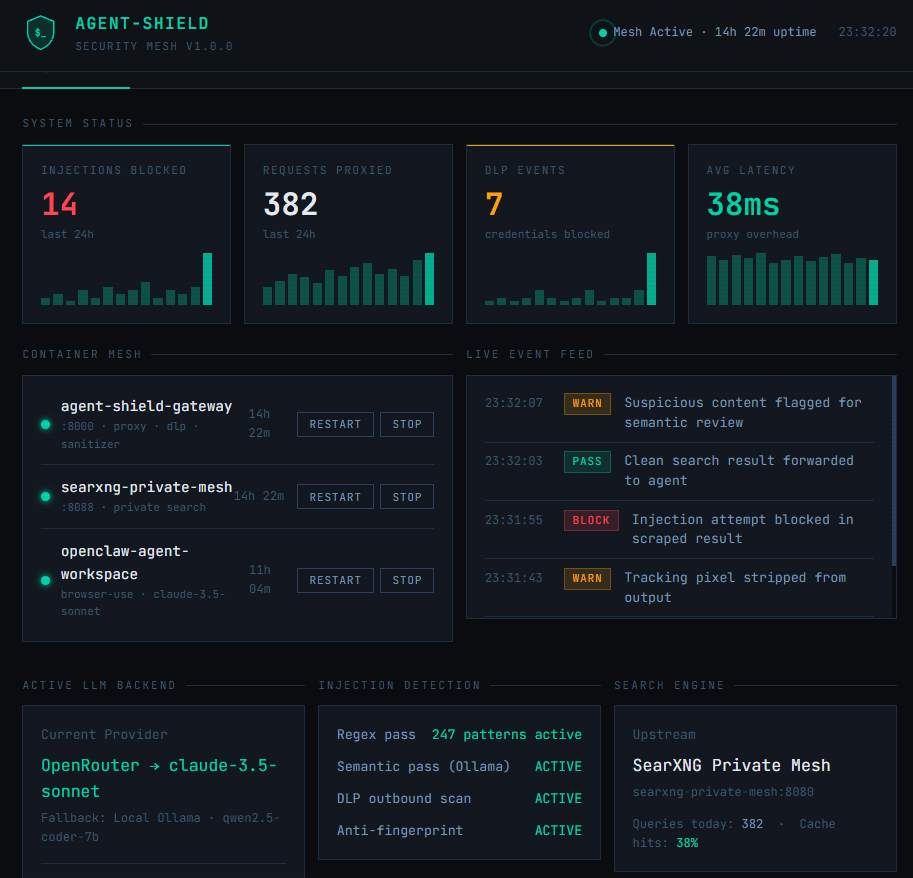
## 🖥️ 仪表盘预览
[](https://htmlpreview.github.io/?https://github.com/startekenterprises-ai/agent-shield/blob/main/docs/dashboard-demo.html)
## 🎯 问题所在:您的AI代理是一个数据泄漏点
当AI代理搜索网络或抓取文档时,它会将原始网页直接摄入其上下文窗口。即使是像 Claude 3.5 或 GPT-4o 这样的前沿模型,也**无法检测到数据中嵌入的提示注入**。
一个包含如下隐藏文本的抓取页面:
...将会被您的代理盲目执行。
**Agent-Shield 会拦截、清理并净化所有传入内容,*然后*才将其送入您代理的上下文窗口。**
## 🚀 核心功能
- **通用即插即用代理** — 兼容 SearXNG 和 OpenAI 兼容的端点。只需更改一个环境变量,即可重新路由您的代理工作区。
- **双重传入净化** — 多线程正则表达式过滤器加上通过 Ollama (`qwen2.5-coder`) 进行的异步本地语义扫描,在注入命中上下文窗口之前将其捕获。
- **出站 DLP 防火墙** — 阻止 AWS 密钥、GitHub 令牌、`.env` 变量和跟踪像素离开您的机器。
- **反指纹识别** — 从搜索字符串中剥离本地文件路径和配置标识符,并用随机填充替换,以防止上游分析。
- **私有搜索引擎** — 内置容器化的 SearXNG 实例,确保您的查询永远不会直接触及 Google、Bing 或任何云搜索提供商。
- **超融合代理沙盒** — 包含一个可选的 OpenClaw 浏览器使用代理工作区,用于即时、受防火墙保护的AI编码任务。
- **多提供商LLM故障转移** — 当达到速率限制时,自动循环切换您注册的API密钥,并以本地 Ollama 作为最终后备。
## 📦 安装说明
Agent-Shield 使用一个**交互式安装程序**,可在几分钟内自动配置您的整个技术栈。
### 前置条件
- 已安装并运行 Docker
- (可选)本地运行的 [Ollama](https://ollama.com),用于GPU加速的设备端模型
- (可选)一个或多个免费LLM API密钥 — 详见下文
### 免费LLM API密钥
安装程序支持多个提供商,并在达到速率限制时自动在它们之间循环切换。以下所有提供商都提供**无需信用卡的免费层级**:
| 提供商 | 免费额度 | 注册链接 |
|---|---|---|
| **OpenRouter** | 通过一个密钥访问30+免费模型 | [openrouter.ai/sign-up](https://openrouter.ai/sign-up) |
| **Google AI Studio** | 每日1,500次请求 · Gemini Flash | [aistudio.google.com/apikey](https://aistudio.google.com/apikey) |
| **Groq** | 最快的免费推理 · Llama 70B | [console.groq.com](https://console.groq.com) |
| **Mistral** | 每月1B令牌 · 所有Mistral模型 | [console.mistral.ai](https://console.mistral.ai) |
| **Cerebras** | 每日1M令牌 · 超快 | [cloud.cerebras.ai](https://cloud.cerebras.ai) |
### 选项 A — Docker Hub(推荐)
```
docker pull startekenterprises/agent-shield:latest
git clone https://github.com/startekenterprises-ai/agent-shield.git
cd agent-shield
chmod +x install.sh
./install.sh
```
### 选项 B — 从源码构建
```
git clone https://github.com/startekenterprises-ai/agent-shield.git
cd agent-shield
chmod +x install.sh
./install.sh --build
```
## ⚙️ 交互式安装程序使用指南
### 步骤 1 — LLM后端注册
安装程序会引导您注册每个拥有密钥的提供商:
```
❓ Do you run a local Ollama instance on this host system? (y/N):
🔑 Paste your OpenRouter API Key (or Enter to skip):
🔑 Paste your Google Gemini API Key (or Enter to skip):
🔑 Paste your Groq API Key (or Enter to skip):
🔑 Paste your Mistral API Key (or Enter to skip):
```
OpenClaw 会自动配置为按优先级顺序循环使用所有已注册的提供商,最后才回退到本地 Ollama。
### 步骤 2 — SearXNG 私有搜索引擎(模块 1)
```
❓ Deploy local SearXNG private search container on port 8088? (Y/n):
```
在端口 `8088` 上部署一个私有、容器化的 SearXNG 实例。所有代理的网络搜索都通过此路由——您的查询永远不会直接触及云搜索提供商。
- 已经在运行?安装程序会检测到它并询问您是否要重新安装。
- 有自己的SearXNG实例?输入您的外部URL并跳过部署。
### 步骤 3 — Agent-Shield 防火墙核心(模块 2)
```
❓ Deploy Agent-Shield Security Firewall on port 8000? (Y/n):
```
在端口 `8000` 上部署 Agent-Shield 网关容器。这是核心代理,它:
- 接收来自您代理的所有搜索请求
- 净化传入内容中的注入
- 阻止出站数据泄漏
- 将干净的结果转发回您的代理
- 在 `http://localhost:8000/dashboard` 提供管理仪表盘
### 步骤 4 — OpenClaw 代理工作区(模块 3,可选)
```
❓ Bundle in a containerized OpenClaw Agent Workspace? (y/N):
```
部署一个沙盒化的 OpenClaw 浏览器使用代理,该代理已预配置为通过 Agent-Shield 路由所有流量。安装时从本地源码构建 OpenClaw,并内置了您完整的提供商故障转移配置。
```
{
"search": { "api_base": "http://agent-shield-gateway:8000/search" },
"llm": {
"provider": "openai_compatible",
"model": "anthropic/claude-3.5-sonnet",
"failover_providers": ["google", "groq", "mistral", "ollama"]
}
}
```
## 🖥️ 管理仪表盘
启动后,打开浏览器并导航至:
```
http://localhost:8000/dashboard
```
该仪表盘让您全面了解和控制您的 Agent-Shield 网格:
- **概览** — 实时统计:已阻止的注入、已代理的请求、DLP事件、延迟
- **容器网格** — 从UI启动、停止和重启每个容器
- **事件日志** — 可过滤的实时安全事件流
- **代理运行器** — 直接向OpenClaw发送任务并通过代理观察执行
- **DLP规则** — 添加、切换和监控您的正则表达式检测模式
- **设置** — 切换LLM后端、更新API密钥、切换安全层
## 🔌 连接您的AI工具
### So, I should translate the common words but keep the technical terms in English.
```
SEARXNG_URL=http://localhost:8000
```
### 5. Run the firewalled task runner
- **基础URL**:`http://localhost:8000/v1`
- **API密钥**:`sk-agent-shield-secured-token`
## 🔬 验证您的安装
```
# - "Run" translate to "运行". "firewalled task runner" – "firewalled" might be "防火墙保护的" or kept as "firewalled" if it's a term. "task runner" as "任务运行器". But in the examples, 'Running Naabu' has "Naabu" kept, so perhaps "task runner" is a tool name, so keep it in English.
docker exec -it openclaw-agent-workspace bash
# Now, for the first one: 🛡️ Agent-Shield (v1.0.0)
python workspace/agent_vibe_runner.py
```
### 预期输出
```
🤖 [OpenClaw Workspace]: Initializing task loop...
🌐 [OpenClaw Workspace]: Fetching documentation via Agent-Shield proxy...
📥 [Data Ingested]: To write files, use os.write. [SECURITY SANITIZATION TRIGGERED]
🔐 [OpenClaw Workspace]: Validating git push payload for credential exposure...
📤 [DLP Firewall Action]: BLOCK
🚨 [Agent Network Status]: ISOLATED
```
## 🛠️ 本地开发与测试
```
python -m venv .venv
source .venv/bin/activate
pip install -r requirements.txt
pytest tests/test_core.py
```
## 🐳 容器摘要
| 容器 | 镜像 | 端口 | 来源 |
|---|---|---|---|
| agent-shield-gateway | `startekenterprises/agent-shield:latest` | 8000 | Docker Hub |
| searxng-private-mesh | `searxng/searxng:latest` | 8088 | Docker Hub |
| openclaw-agent-workspace | 从 `./containers/openclaw/` 构建 | — | 本地 (最新) |
## 🗺️ 路线图
### v1.x(当前)
- [x] 支持多提供商LLM故障转移的交互式安装程序
- [x] SearXNG私有搜索容器
- [x] Agent-Shield DLP + 注入防火墙代理
- [x] OpenClaw浏览器使用代理沙盒
- [x] 正则表达式 + 语义双重净化
- [x] 位于 `/dashboard` 的Web管理仪表盘
- [x] Docker Hub 分发
### v2.0(计划中)
## 📄 许可证
MIT
*由 [STARTEK Enterprises AI](https://github.com/startekenterprises-ai) 构建*
标签:AI代理防护, AI安全, AI风险缓解, API密钥保护, Chat Copilot, Docker, IDE安全, 二进制发布, 代理屏障, 代理技术, 代理防护, 企业安全, 内容清洗, 后端开发, 多线程清洗, 安全代理, 安全网格, 安全防御评估, 工作流安全, 开源工具, 提示注入防护, 提示过滤, 数据泄漏防护, 数据隐私, 本地优先, 本地网关, 泄漏防护, 注入防火墙, 浏览器自动化安全, 源代码保护, 环境变量配置, 网络安全, 网络资产管理, 网页内容清洗, 请求响应过滤, 请求拦截, 逆向工具, 隐私保护, 隐私网关