
# NetSentinel
### 面向非技术用户的网络安全分析器:扫描您的网络,检测漏洞,并以通俗易懂的语言提供诊断结果和针对每个问题的解决指南。
[](../../actions)
[](../../releases)
[](#requisitos-previos)
[](#stack)
[](#stack)
[**下载安装程序**](https://github.com/FaridDevU/NetSentinel/releases/tag/v0.1.0) · [**架构**](#arquitectura) · [**报告 bug**](../../issues)
## 快速开始
对于最终用户,无需使用任何命令。完整流程如下:
1. 从 [release](https://github.com/FaridDevU/NetSentinel/releases/tag/v0.1.0) 下载 `NetSentinel.Setup.0.1.0.exe`。
2. 双击进行安装并打开应用程序。
3. 点击 **完成安装** 并批准 UAC。安装程序将以向导方式启用 WSL2,安装 Kali Linux、相关工具、数据库、backend 以及 sandbox。
4. 点击 **分析我的网络** 并阅读诊断报告。
backend 会在 `http://localhost:8080` 暴露一个本地的 REST API。启动扫描的方式如下:
```
curl -X POST http://localhost:8080/api/scan/start \
-H "Content-Type: application/json" \
-d '{"target": "192.168.1.0/24", "parameters": ["ESTANDAR"]}'
```
```
{ "id": "a1b2c3d4-0000-0000-0000-000000000000", "target": "192.168.1.0/24", "status": "PENDING" }
```
## 目录
- [为什么选择这个项目](#por-que-este-proyecto)
- [功能](#caracteristicas)
- [架构](#arquitectura)
- [技术栈](#stack)
- [安装说明](#instalacion)
- [使用说明](#uso)
- [API](#api)
- [测试](#tests)
- [项目结构](#estructura-del-proyecto)
- [路线图](#roadmap)
- [许可证](#licencia)
## 为什么选择这个项目
大多数网络安全工具(如 Nmap、Nikto、Gobuster、Metasploit)功能强大,但需要专业技术知识:需要解读端口、服务、版本和 CVE。NetSentinel 旨在弥合这一鸿沟。它将一个完整的 Kali Linux 环境打包到 Windows 桌面应用程序中,在受控的 sandbox 中运行这些工具,并将结果转化为可操作的西班牙语诊断报告。我们的目标是让任何人都能通过一键操作审计自己的网络,无需打开终端或手动安装依赖项。
该项目包含两个互补的部分:
- **第一部分 — 独立应用。** 实现扫描、漏洞检测和确定性诊断。不需要 API key,也不需要连接到外部的 AI 服务。
- **第二部分 — Claude 代理。** 一个对话式的安全顾问,通过 tool use 编排整个系统:启动扫描、读取结果、交叉比对不同主机的信息,并逐步指导用户。
## 功能
- **一键向导式安装** — 自动启用 WSL2 并安装 Kali Linux、相关工具、PostgreSQL、backend 和 sandbox,无需手动输入命令。
- **在隔离的 sandbox 中扫描** — 一个 Rust 服务会在 Kali 中执行每个命令和工具之前对其进行验证,并通过 token 进行身份验证。
- **通俗易懂的诊断报告** — 确定性分析引擎会计算出 0 到 10 的风险等级,并提供具体的西班牙语建议,无需依赖外部 AI。
- **CVE 关联** — 针对检测到的每个服务和版本查询 NIST 的 NVD 数据库。
- **可选的 AI 代理** — 基于 Claude API 的对话式顾问,支持 tool use 和 SSE 流式传输。
- **报告导出** — 支持 PDF、JSON 和 CSV;支持扫描之间的对比以及历史记录。
- **扫描配置** — `RAPIDO`(快速)、`ESTANDAR`(标准)和 `COMPLETO`(完全)。
- **CI** — GitHub Actions 会在每次 push 时执行 backend、sandbox 和 frontend 的测试。
## 架构
NetSentinel 由五个层级组成。Electron 作为桌面进程;Angular 作为用户界面;Spring Boot 协调业务逻辑;基于 Rust 的 sandbox 在 WSL2 中的 Kali 内执行工具;PostgreSQL 用于持久化数据。
```
flowchart LR
UI[Angular 21
renderer] -->|IPC| EL[Electron 42
main process]
EL -->|HTTP/JSON :8080| API[Spring Boot 3.3.5
Java 21]
API --> AN[AnalysisService
riesgo deterministico]
API --> SB[Sandbox Rust
Axum :7878]
SB -->|comandos validados| KALI[Kali Linux
WSL2]
KALI --> TOOLS[Nmap · Gobuster · Nikto]
API --> DB[(PostgreSQL 18)]
API --> NVD[NVD NIST
CVEs]
API -. tool use + SSE .-> CLAUDE[Agente Claude]
```
查看扫描流程
```
sequenceDiagram
participant C as Angular
participant E as Electron
participant A as Spring Boot
participant S as Sandbox Rust
participant K as Kali WSL2
participant D as PostgreSQL
C->>E: Analizar mi red (IPC)
E->>A: POST /api/scan/start
A->>A: valida objetivo y perfil
A->>S: ejecutar (header X-Sandbox-Auth)
S->>K: nmap -sV -oX - / gobuster / nikto
K-->>S: XML y texto
S-->>A: resultados crudos
A->>A: parseo, correlacion NVD, analisis
A->>D: persiste hosts, puertos, CVEs, findings
C->>A: GET /api/scan/{id}/status (polling)
A-->>C: COMPLETED + diagnostico
```
## 技术栈
| 层级 | 技术 |
|---|---|
| 桌面应用 | Electron 42 |
| 用户界面 | Angular 21 + TypeScript |
| Backend | Spring Boot 3.3.5 + Java 21 |
| Sandbox | Rust (Axum 0.7 + Tokio) |
| 嵌入式 Linux | WSL2 + Kali Linux |
| 工具 | Nmap, Gobuster, Nikto |
| 数据库 | PostgreSQL 18 (使用 Flyway 进行迁移) |
| 安装程序 | NSIS + PowerShell (`setup.ps1`) |
| AI 代理 | Claude API (`claude-sonnet-4-6`, tool use + SSE) |
| CVE 数据源 | NVD NIST |
| CI | GitHub Actions |
## 安装说明
### 前置条件
- Windows 10 / 11 且已启用虚拟化(用于 WSL2)。
- 开发环境需求:Java 21 (JDK)、Node 20+、Rust(稳定版 toolchain)以及 PostgreSQL 18。
### 最终用户
从 [release](https://github.com/FaridDevU/NetSentinel/releases/tag/v0.1.0) 下载并安装 `NetSentinel.Setup.0.1.0.exe`。安装程序会以向导方式处理 WSL2、Kali 及所有相关依赖。
从源码构建
```
git clone https://github.com/FaridDevU/NetSentinel.git
cd NetSentinel
cd backend
mvn clean package
cd ../sandbox
cargo build --release
cd ../frontend
npm install
npm run electron:build
```
生成的安装程序会放在 `frontend/dist-installer/` 目录下。
## 使用说明
在应用程序中:打开应用,点击 **分析我的网络**,等待扫描状态变为 `COMPLETED`,然后查看仪表盘、按严重程度划分的发现以及建议。结果可以导出为 PDF、JSON 或 CSV,与之前的扫描进行对比,并在历史记录中查看。
针对本地 API,一个完整的扫描周期如下:
```
curl -X POST http://localhost:8080/api/scan/start \
-H "Content-Type: application/json" \
-d '{"target": "127.0.0.1", "parameters": ["RAPIDO"]}'
curl http://localhost:8080/api/scan/{id}/status
curl http://localhost:8080/api/scan/{id}/results
```
## API
由 backend 在 `http://localhost:8080` 提供的本地 REST API。主要 endpoint:
| 方法 | 路径 | 描述 |
|---|---|---|
| GET | /api/health | backend、数据库和 sandbox 的状态 |
| POST | /api/scan/start | 启动扫描(目标 + 配置) |
| GET | /api/scan/{id}/status | 扫描状态 |
| GET | /api/scan/{id}/results | 完整结果 |
| POST | /api/scan/{id}/cancel | 取消正在进行的扫描 |
| DELETE | /api/scan/{id} | 删除扫描 |
| GET | /api/scan/{id}/logs | 扫描日志 |
| GET | /api/scan/{id}/export/pdf | 导出 PDF 报告 |
| GET | /api/scan/{id}/export/json | 导出 JSON 报告 |
| GET | /api/scan/{id}/export/csv | 导出 CSV 报告 |
| GET | /api/scan/compare | 对比两次扫描 |
| GET | /api/history | 分页的扫描历史记录 |
| GET | /api/network/local | 检测到的本地网络 |
| GET | /api/dashboard | 仪表盘摘要 |
| GET | /api/assets | 检测到的资产清单 |
| GET | /api/scan/{scanId}/findings/statuses | 发现的状态 |
| PUT | /api/scan/{scanId}/findings/status | 更新某个发现的状态 |
| POST | /api/agent/chat | 与 Claude 代理聊天 (SSE) |
## 测试
```
cd backend && mvn test
cd sandbox && cargo test
cd frontend && npm test -- --no-watch
```
当前测试覆盖率:backend 包含单元测试和集成测试(使用 Testcontainers 的 `ScanServiceIntegrationTest`),sandbox 包含命令和目标验证测试,以及 frontend 的测试套件。CI 会在每次 push 时执行它们。
## 项目结构
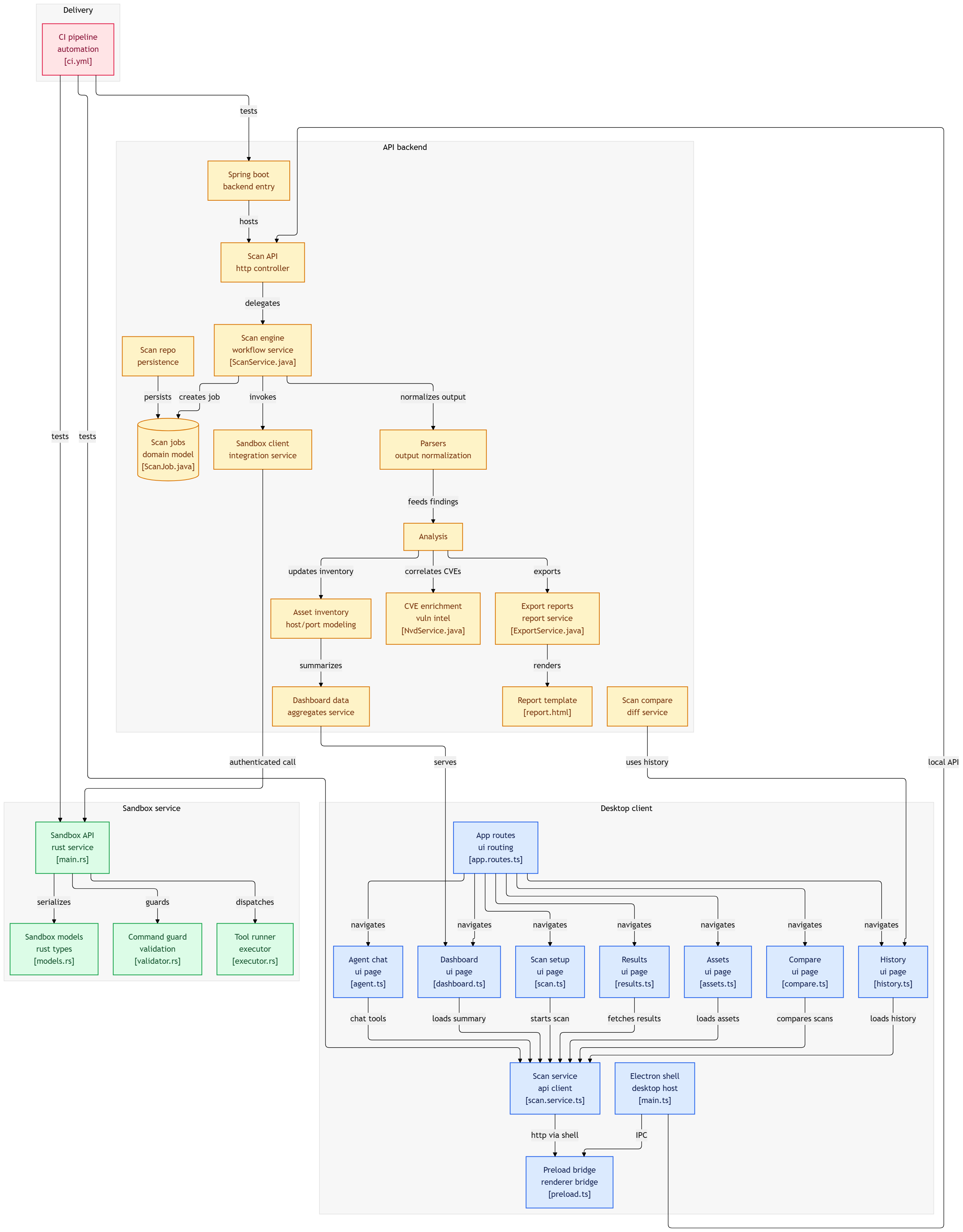
## 路线图
- [x] 扫描、解析和确定性分析
- [x] 带有验证和身份验证 token 的 Rust sandbox
- [x] 与 NVD 进行 CVE 关联
- [x] 向导式安装程序 (NSIS + setup.ps1)
- [x] 支持 tool use 和 SSE 的 Claude 代理
- [x] 导出 PDF / JSON / CSV 及历史记录
- [ ] 在干净的机器/VM 上验证安装程序,并将 release 提升为稳定版
- [ ] 网络拓扑图 (Cytoscape.js)
- [ ] 加强操作系统级别的 sandbox (Landlock / Job Objects)
- [ ] 使用 Redis 的任务队列
详情请查看[待处理的 issues](../../issues)。
## 许可证
基于 MIT 许可证分发。详见 [`LICENSE`](LICENSE)。
[](LICENSE)