aws-samples/sample-serverless-image-editing-agent-bedrock-agentcore-harness
GitHub: aws-samples/sample-serverless-image-editing-agent-bedrock-agentcore-harness
基于 Amazon Bedrock AgentCore 构建的全托管自然语言图像编辑 Agent,通过配置驱动的无编排代码方式实现多种 AI 图像编辑能力的自动调用。
Stars: 0 | Forks: 0
# 使用 Amazon Bedrock AgentCore harness 构建无服务器图像编辑 Agent
构建一个基于自然语言编辑图像的 AI Agent,需要编排循环、工具路由、内存管理以及运行这一切的计算环境。[Amazon Bedrock AgentCore harness](https://docs.aws.amazon.com/bedrock-agentcore/latest/devguide/harness.html) 通过配置即可处理整个技术栈。你只需声明 Agent 的功能,harness 就会在一个具有内置内存、工具路由和可观测性的有状态、隔离的 microVM 中运行它。
这篇文章将带你逐步构建一个无服务器图像编辑器,用户可以上传照片,用纯英文描述编辑需求,并在几秒钟内收到结果。该 Agent 运行在 AgentCore harness 上,无需自定义编排代码。我们只需一条部署命令,即可部署完整的解决方案,包括身份验证、加密存储、三个图像编辑工具以及一个 React 前端。基础设施使用 [AWS Cloud Development Kit (AWS CDK)](https://aws.amazon.com/cdk/) 定义。
## 图像编辑应用程序
该应用程序接受诸如“将汽车颜色改为蓝色”或“将图像向右扩展 200 像素”之类的提示。由 [Claude Sonnet 4.6](https://docs.aws.amazon.com/bedrock/latest/userguide/model-card-anthropic-claude-sonnet-4-6.html) 驱动的 Agent 将需求分解为一系列步骤,并编排工具调用,每个步骤关联不同的 [Stability AI](https://docs.aws.amazon.com/bedrock/latest/userguide/model-cards-stability-ai.html) 模型。然后它执行编辑,在 microVM 上使用 shell 命令应用水印(无需 token 成本),并返回结果。
此应用程序演示了以下 AgentCore harness 功能:
- **配置驱动的 Agent 创建。** Agent 完全通过 API 参数定义。没有 Python 编排代码,没有框架,没有容器。
- **单次调用模型切换。** 前端将基础聊天路由到 [Claude Haiku 4.5](https://docs.aws.amazon.com/bedrock/latest/userguide/model-card-anthropic-claude-haiku-4-5.html),将编辑路由到 Claude Sonnet 4.6。Agent 在模型切换期间保留对话上下文。
- **单次调用角色覆盖。** 用户选择行业角色(房地产、零售、汽车),这些角色会注入特定领域的系统提示,而无需重新部署。
- **AgentCore Memory** 将对话历史记录存储在 AgentCore 服务中 30 天。Agent 在会话内的各个轮次中保留完整的上下文,因此它可以引用先前的编辑,而无需前端重新发送历史记录。此示例将 session ID 持久化存储在 `localStorage` 中,因此对话在浏览器刷新后依然存在。清除浏览器数据会在前端启动一个新会话,但对话历史记录仍然可以通过 `ListEvents` API 在 AgentCore 中可用。
- **带有 MCP 的 [AgentCore Gateway](https://docs.aws.amazon.com/bedrock-agentcore/latest/devguide/gateway.html)。** 三个由 AWS Lambda 支持的工具通过具有语义路由的模型上下文协议 (MCP) 公开。Agent 会根据提示选择正确的工具。
- **InvokeAgentRuntimeCommand。** 每次编辑后,直接在 AgentCore 运行时 microVM 上运行 Python 脚本以添加水印。无需模型推理,也不消耗 token。
## 解决方案概述
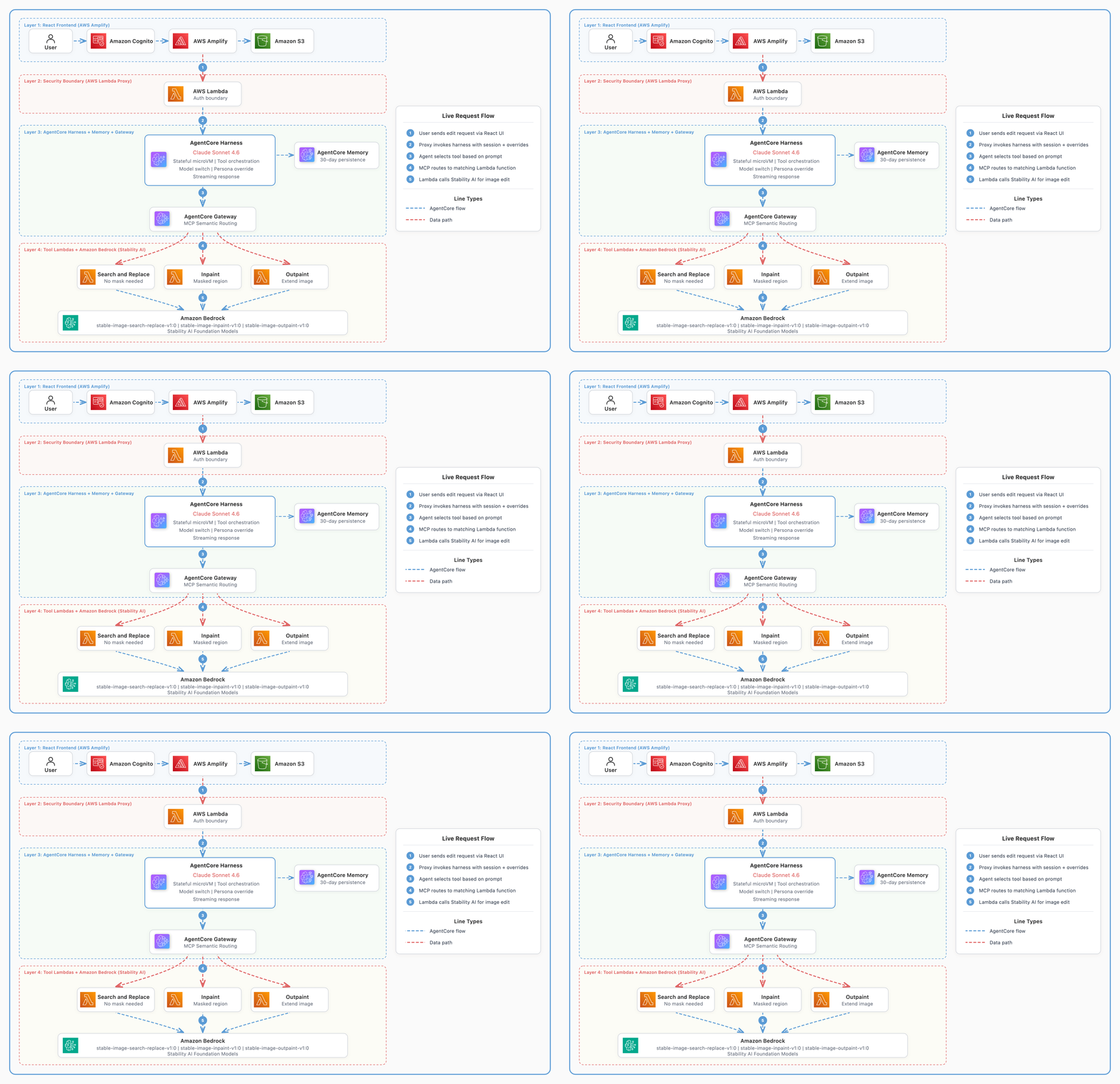
图像编辑应用程序的架构包含四个层级。
1. 托管在 [AWS Amplify](https://aws.amazon.com/amplify/) 上的 React 前端,用户可以在其中上传图像、绘制蒙版并输入编辑指令。
2. 一个 [AWS Lambda](https://aws.amazon.com/lambda/) 代理,充当浏览器凭证与 harness API 之间的安全边界,并控制允许哪些系统提示。
3. 一个带有 [AgentCore Memory](https://docs.aws.amazon.com/bedrock-agentcore/latest/devguide/harness-memory.html) 的 [Amazon Bedrock AgentCore](https://aws.amazon.com/bedrock/agentcore/) harness Agent,用于实现对话持久化。
4. 三个工具 Lambda 函数,通过 [Amazon Bedrock](https://aws.amazon.com/bedrock/) 调用 Stability AI 基础模型进行图像生成。
 ## 使用配置创建 Agent
使用 AgentCore harness 时,Agent 定义是传递给 `create_harness` API 的一组参数。以下是我们在 `cdk deploy` 期间创建 Agent 的核心配置代码。
```
harness_params = {
'harnessName': 'img_editor',
'executionRoleArn': execution_role_arn,
'model': {'bedrockModelConfig': {'modelId': 'us.anthropic.claude-sonnet-4-6'}},
'systemPrompt': [{'text': system_prompt}],
'tools': [{'type': 'agentcore_gateway', 'name': 'gateway',
'config': {'agentCoreGateway': {'gatewayArn': gateway_arn}}}],
# Scope the agent to exactly the three tools the gateway exposes
# rather than allowing every tool with a wildcard.
'allowedTools': [
'inpaint-target___inpaint',
'outpaint-target___outpaint',
'search-replace-target___search_and_replace',
],
'maxIterations': 10,
'timeoutSeconds': 300,
}
# 为对话持久化附加 memory
```
这就是 Agent 的全部内容。没有编排循环,没有工具执行逻辑,没有流式处理程序,也没有错误重试代码。AgentCore harness 负责处理所有这一切。
## 通过 AgentCore Gateway 声明工具
通常,要让 Agent 访问工具需要编写代码,以接收来自模型的工具调用、解析参数、调用目标函数、处理错误并传回结果。使用 harness,你可以跳过所有这些步骤。你只需在 [AgentCore Gateway](https://docs.aws.amazon.com/bedrock-agentcore/latest/devguide/gateway.html) 上声明工具 schema,并将其指向一个 Lambda 函数。harness 会发现这些工具,在推理期间将它们呈现给模型,通过 Gateway 调用选定的工具,并自动将结果反馈到对话中。
以下是我们在 CDK stack 中声明 search-and-replace 工具的方法。
```
this.gateway.addLambdaTarget('SearchReplaceTarget', {
gatewayTargetName: 'search-replace-target',
lambdaFunction: this.searchReplaceLambda,
toolSchema: agentcore.ToolSchema.fromInline([{
name: 'search_and_replace',
description: 'Find an object in the image by description and replace it. '
+ 'Does NOT require a mask. Use when the user wants to replace a specific object',
inputSchema: {
type: agentcore.SchemaDefinitionType.OBJECT,
properties: {
source_image_key: { type: agentcore.SchemaDefinitionType.STRING },
search_prompt: { type: agentcore.SchemaDefinitionType.STRING },
prompt: { type: agentcore.SchemaDefinitionType.STRING },
},
required: ['source_image_key', 'search_prompt', 'prompt'],
},
}]),
});
```
## 单次调用的模型与角色切换
Lambda 代理使用此功能将基础聊天路由到 Haiku,将图像编辑路由到 Sonnet。
```
invoke_params = {
'harnessArn': harness_arn,
'runtimeSessionId': session_id,
'messages': [{'role': 'user', 'content': [{'text': input_text}]}],
'actorId': actor_id,
}
# 按调用切换 model(聊天使用 Haiku,编辑使用 Sonnet)
if model_override:
invoke_params['model'] = {
'bedrockModelConfig': {'modelId': model_override}
}
# 按调用切换 persona(Real Estate、Retail、Automotive)
if persona_text:
invoke_params['systemPrompt'] = [{'text': persona_text}]
response = client.invoke_harness(**invoke_params)
```
前端根据提示是否包含编辑关键词来决定使用哪个模型。诸如“hi”或“what can you do”之类的简短消息会发送给 Haiku,以降低延迟。编辑操作则发送给 Sonnet,以获得更高质量的工具选择。用户也可以从菜单中手动选择模型。
无论 harness 中配置的模型如何更改,AgentCore Memory 都会保留完整的对话历史记录。当 Sonnet 处理完“将汽车改为黑色”后,Haiku 接收到“换成蓝色怎么样?”时,它知道“蓝色”指的是汽车,因为 Memory 会将完整的历史记录提供给当前处于活动状态的任何模型。
## 使用 shell 命令进行后处理(无 token 成本)
Agent 生成图像后,我们直接在 harness microVM 上运行 Python 脚本来添加水印。这使用了 InvokeAgentRuntimeCommand,它让你可以在不经过模型的情况下直接 shell 访问 Agent 的环境。
```
# 编写 Python 脚本并进行 base64 编码,以避免 shell 转义问题
script = '\n'.join([
'from PIL import Image, ImageDraw, ImageFont',
'import boto3, io',
's3 = boto3.client("s3")',
f'obj = s3.get_object(Bucket="{bucket_name}", Key="{result_key}")',
'img = Image.open(io.BytesIO(obj["Body"].read())).convert("RGBA")',
'# ... tile watermark text across the image ...',
's3.put_object(Bucket=bucket, Key=key, Body=buf.getvalue())',
])
encoded_script = base64.b64encode(script.encode()).decode()
# 在 microVM 上运行:无 model 推理,不消耗 token
client.invoke_agent_runtime_command(
agentRuntimeArn=harness_arn,
runtimeSessionId=session_id,
body={'command': f'echo {encoded_script} | base64 -d | python3'},
)
```
这种模式对于确定性的后处理非常有用。例如在发送给模型之前调整图像大小(节省输入 token)、对 Agent 输出运行验证、提取结构化数据或应用业务逻辑。microVM 默认提供 Python 和 bash,你还可以在运行时安装其他包。
由于 harness 是纯配置的,因此没有可以添加自定义逻辑的 Agent 脚本。InvokeAgentRuntimeCommand 是一种在运行 Agent 的同一个 microVM 上运行你自己的代码的方法,但它位于 Agent 循环之外。Lambda 代理在 Agent 完成其轮次后调用它。命令执行完毕,完成工作并返回。Agent 并不知道发生了这一切。
## 前置条件
要部署此解决方案,你需要以下条件。
- 一个 [AWS 账户](https://signin.aws.amazon.com/signin?redirect_uri=https%3A%2F%2Fportal.aws.amazon.com%2Fbilling%2Fsignup%2Fresume&client_id=signup),拥有创建 AWS Identity and Access Management (IAM) 角色、Lambda 函数、Amazon Simple Storage Service (Amazon S3) 存储桶、Amazon Cognito 池和 AgentCore 资源的权限。
- [Node.js](https://nodejs.org/) 20.x 或更高版本。
- [Python 3.13](https://www.python.org/downloads/) 或更高版本(用于 Lambda 函数运行时)。
- [AWS Command Line Interface (AWS CLI)](https://docs.aws.amazon.com/cli/latest/userguide/getting-started-install.html) 2.x,并已配置好凭证。
- 在 Amazon Bedrock 中拥有对 Anthropic Claude 模型(Sonnet、Haiku)的访问权限。
- 在 Amazon Bedrock 中拥有对 Stability AI 模型的访问权限。
预计部署时间为 3 到 5 分钟。
## 部署解决方案
克隆 [GitHub 仓库](https://github.com/aws-samples/sample-serverless-image-editing-agent-bedrock-agentcore-harness) 并导航至项目目录。
```
git clone https://github.com/aws-samples/sample-serverless-image-editing-agent-bedrock-agentcore-harness.git
cd sample-serverless-image-editing-agent-bedrock-agentcore-harness
```
运行部署脚本。
```
./deploy.sh
```
最后,它会打印出在线 URL 和登录凭证。
CDK stack 会在单个 [AWS CloudFormation](https://aws.amazon.com/cloudformation/) stack 中创建所有资源。该解决方案使用具有用户池和身份池的 Amazon Cognito 来处理身份验证。图像存储在受 AWS Key Management Service (AWS KMS) 加密保护的 Amazon S3 存储桶中。图像编辑功能由三个 Lambda 函数提供支持,这些函数通过 AgentCore Gateway 作为 MCP 工具公开。这些工具由配备了记忆功能的 AgentCore harness Agent 进行编排,并通过 Lambda 代理进行访问。在前端,AWS Amplify 应用程序提供基于 React 的用户界面。
## 演练
登录后,编辑器会在左侧呈现一个画布,并在右侧呈现一个聊天界面。
https://github.com/user-attachments/assets/eff61cba-aad8-49f8-a5ae-20ad274341ab
## Harness 针对此项目具体减少了哪些工作
该解决方案不需要编写多行 Agent 编排代码。没有模型调用循环,没有工具执行处理程序,没有流式解析器,没有错误重试逻辑,也没有容器镜像。
我们实际编写的代码:
- 一个 Lambda 代理(80 行),作为安全边界并控制哪些系统提示能到达 harness。
- 三个工具 Lambda 函数(每个 Stability AI 模型一个),用于执行实际的图像处理。
- 一个在部署期间调用 `create_harness` API 的配置脚本(AgentCore harness 处于预览阶段,尚无原生的 CDK construct)。
Agent 本身就是配置。更改其行为(不同的模型、新工具、更新的指令)只需一次 API 调用,而无需进行代码部署。
## 何时改用 AgentCore Runtime
AgentCore harness 适用于具有直接工具调用模式的 Agent。Agent 接收提示,选择工具,调用它并返回结果。如果你的 Agent 需要自定义编排逻辑,例如在轮次之间预处理输入、运行 LangGraph 状态机,或在每次模型调用前后执行任意 Python 代码,[AgentCore Runtime](https://docs.aws.amazon.com/bedrock-agentcore/latest/devguide/runtime.html) 可为你提供完全的控制权。
harness 和 AgentCore Runtime 都运行在相同的基础架构(microVM、Memory、Gateway、可观测性)上。你可以从 harness 开始,然后随着复杂性的增加迁移到 AgentCore Runtime。
## 清理
运行销毁脚本将永久删除所有资源,包括 S3 存储桶和上传的图像。在继续操作之前,请备份你要保留的任何数据。
删除 stack:
```
./destroy.sh
```
## 结论
AgentCore harness 让我们能够构建一个生产就绪的图像编辑 Agent,而无需编写编排代码。该 Agent 通过配置和单次调用参数来处理工具选择、模型切换、角色自定义、对话持久化以及确定性的后处理。每个会话都在隔离的 microVM 中运行,我们可以在其中执行 shell 命令来完成水印等任务,且无需消耗 token。
对于具有直接工具调用模式的 Agent,harness 消除了运维开销,你可以按照配置更改的速度来迭代行为。完整的源代码和单命令部署脚本可在 [GitHub](https://github.com/aws-samples/sample-serverless-image-editing-agent-bedrock-agentcore-harness) 上获取。
要开始使用 AgentCore harness,请访问 [AgentCore harness 文档](https://docs.aws.amazon.com/bedrock-agentcore/latest/devguide/harness.html)或浏览 [Amazon Bedrock AgentCore 产品页面](https://aws.amazon.com/bedrock/agentcore/)以获取定价和可用性详细信息。
## 关于作者
**Salman Ahmed** 是 AWS 的一名高级技术客户经理(Senior Technical Account Manager),专长于帮助客户设计、实施和优化其 AWS 环境。他将深厚的网络专业知识与对探索新兴技术的热情相结合,帮助组织充分利用其云投资。工作之余,他喜欢摄影、旅行以及观看他最喜欢的运动队比赛。
**Sergio Barraza** 是 AWS 的一名高级技术客户经理,致力于帮助客户设计和优化云解决方案。凭借在软件开发领域超过 25 年的经验,他指导客户采用 AWS 服务。工作之余,Sergio 是一位演奏吉他、钢琴和架子鼓的多乐器音乐家,此外他还练习咏春拳。
## 安全性
## 许可证
本库基于 MIT-0 许可证授权。详见 [LICENSE](LICENSE) 文件。
## 使用配置创建 Agent
使用 AgentCore harness 时,Agent 定义是传递给 `create_harness` API 的一组参数。以下是我们在 `cdk deploy` 期间创建 Agent 的核心配置代码。
```
harness_params = {
'harnessName': 'img_editor',
'executionRoleArn': execution_role_arn,
'model': {'bedrockModelConfig': {'modelId': 'us.anthropic.claude-sonnet-4-6'}},
'systemPrompt': [{'text': system_prompt}],
'tools': [{'type': 'agentcore_gateway', 'name': 'gateway',
'config': {'agentCoreGateway': {'gatewayArn': gateway_arn}}}],
# Scope the agent to exactly the three tools the gateway exposes
# rather than allowing every tool with a wildcard.
'allowedTools': [
'inpaint-target___inpaint',
'outpaint-target___outpaint',
'search-replace-target___search_and_replace',
],
'maxIterations': 10,
'timeoutSeconds': 300,
}
# 为对话持久化附加 memory
```
这就是 Agent 的全部内容。没有编排循环,没有工具执行逻辑,没有流式处理程序,也没有错误重试代码。AgentCore harness 负责处理所有这一切。
## 通过 AgentCore Gateway 声明工具
通常,要让 Agent 访问工具需要编写代码,以接收来自模型的工具调用、解析参数、调用目标函数、处理错误并传回结果。使用 harness,你可以跳过所有这些步骤。你只需在 [AgentCore Gateway](https://docs.aws.amazon.com/bedrock-agentcore/latest/devguide/gateway.html) 上声明工具 schema,并将其指向一个 Lambda 函数。harness 会发现这些工具,在推理期间将它们呈现给模型,通过 Gateway 调用选定的工具,并自动将结果反馈到对话中。
以下是我们在 CDK stack 中声明 search-and-replace 工具的方法。
```
this.gateway.addLambdaTarget('SearchReplaceTarget', {
gatewayTargetName: 'search-replace-target',
lambdaFunction: this.searchReplaceLambda,
toolSchema: agentcore.ToolSchema.fromInline([{
name: 'search_and_replace',
description: 'Find an object in the image by description and replace it. '
+ 'Does NOT require a mask. Use when the user wants to replace a specific object',
inputSchema: {
type: agentcore.SchemaDefinitionType.OBJECT,
properties: {
source_image_key: { type: agentcore.SchemaDefinitionType.STRING },
search_prompt: { type: agentcore.SchemaDefinitionType.STRING },
prompt: { type: agentcore.SchemaDefinitionType.STRING },
},
required: ['source_image_key', 'search_prompt', 'prompt'],
},
}]),
});
```
## 单次调用的模型与角色切换
Lambda 代理使用此功能将基础聊天路由到 Haiku,将图像编辑路由到 Sonnet。
```
invoke_params = {
'harnessArn': harness_arn,
'runtimeSessionId': session_id,
'messages': [{'role': 'user', 'content': [{'text': input_text}]}],
'actorId': actor_id,
}
# 按调用切换 model(聊天使用 Haiku,编辑使用 Sonnet)
if model_override:
invoke_params['model'] = {
'bedrockModelConfig': {'modelId': model_override}
}
# 按调用切换 persona(Real Estate、Retail、Automotive)
if persona_text:
invoke_params['systemPrompt'] = [{'text': persona_text}]
response = client.invoke_harness(**invoke_params)
```
前端根据提示是否包含编辑关键词来决定使用哪个模型。诸如“hi”或“what can you do”之类的简短消息会发送给 Haiku,以降低延迟。编辑操作则发送给 Sonnet,以获得更高质量的工具选择。用户也可以从菜单中手动选择模型。
无论 harness 中配置的模型如何更改,AgentCore Memory 都会保留完整的对话历史记录。当 Sonnet 处理完“将汽车改为黑色”后,Haiku 接收到“换成蓝色怎么样?”时,它知道“蓝色”指的是汽车,因为 Memory 会将完整的历史记录提供给当前处于活动状态的任何模型。
## 使用 shell 命令进行后处理(无 token 成本)
Agent 生成图像后,我们直接在 harness microVM 上运行 Python 脚本来添加水印。这使用了 InvokeAgentRuntimeCommand,它让你可以在不经过模型的情况下直接 shell 访问 Agent 的环境。
```
# 编写 Python 脚本并进行 base64 编码,以避免 shell 转义问题
script = '\n'.join([
'from PIL import Image, ImageDraw, ImageFont',
'import boto3, io',
's3 = boto3.client("s3")',
f'obj = s3.get_object(Bucket="{bucket_name}", Key="{result_key}")',
'img = Image.open(io.BytesIO(obj["Body"].read())).convert("RGBA")',
'# ... tile watermark text across the image ...',
's3.put_object(Bucket=bucket, Key=key, Body=buf.getvalue())',
])
encoded_script = base64.b64encode(script.encode()).decode()
# 在 microVM 上运行:无 model 推理,不消耗 token
client.invoke_agent_runtime_command(
agentRuntimeArn=harness_arn,
runtimeSessionId=session_id,
body={'command': f'echo {encoded_script} | base64 -d | python3'},
)
```
这种模式对于确定性的后处理非常有用。例如在发送给模型之前调整图像大小(节省输入 token)、对 Agent 输出运行验证、提取结构化数据或应用业务逻辑。microVM 默认提供 Python 和 bash,你还可以在运行时安装其他包。
由于 harness 是纯配置的,因此没有可以添加自定义逻辑的 Agent 脚本。InvokeAgentRuntimeCommand 是一种在运行 Agent 的同一个 microVM 上运行你自己的代码的方法,但它位于 Agent 循环之外。Lambda 代理在 Agent 完成其轮次后调用它。命令执行完毕,完成工作并返回。Agent 并不知道发生了这一切。
## 前置条件
要部署此解决方案,你需要以下条件。
- 一个 [AWS 账户](https://signin.aws.amazon.com/signin?redirect_uri=https%3A%2F%2Fportal.aws.amazon.com%2Fbilling%2Fsignup%2Fresume&client_id=signup),拥有创建 AWS Identity and Access Management (IAM) 角色、Lambda 函数、Amazon Simple Storage Service (Amazon S3) 存储桶、Amazon Cognito 池和 AgentCore 资源的权限。
- [Node.js](https://nodejs.org/) 20.x 或更高版本。
- [Python 3.13](https://www.python.org/downloads/) 或更高版本(用于 Lambda 函数运行时)。
- [AWS Command Line Interface (AWS CLI)](https://docs.aws.amazon.com/cli/latest/userguide/getting-started-install.html) 2.x,并已配置好凭证。
- 在 Amazon Bedrock 中拥有对 Anthropic Claude 模型(Sonnet、Haiku)的访问权限。
- 在 Amazon Bedrock 中拥有对 Stability AI 模型的访问权限。
预计部署时间为 3 到 5 分钟。
## 部署解决方案
克隆 [GitHub 仓库](https://github.com/aws-samples/sample-serverless-image-editing-agent-bedrock-agentcore-harness) 并导航至项目目录。
```
git clone https://github.com/aws-samples/sample-serverless-image-editing-agent-bedrock-agentcore-harness.git
cd sample-serverless-image-editing-agent-bedrock-agentcore-harness
```
运行部署脚本。
```
./deploy.sh
```
最后,它会打印出在线 URL 和登录凭证。
CDK stack 会在单个 [AWS CloudFormation](https://aws.amazon.com/cloudformation/) stack 中创建所有资源。该解决方案使用具有用户池和身份池的 Amazon Cognito 来处理身份验证。图像存储在受 AWS Key Management Service (AWS KMS) 加密保护的 Amazon S3 存储桶中。图像编辑功能由三个 Lambda 函数提供支持,这些函数通过 AgentCore Gateway 作为 MCP 工具公开。这些工具由配备了记忆功能的 AgentCore harness Agent 进行编排,并通过 Lambda 代理进行访问。在前端,AWS Amplify 应用程序提供基于 React 的用户界面。
## 演练
登录后,编辑器会在左侧呈现一个画布,并在右侧呈现一个聊天界面。
https://github.com/user-attachments/assets/eff61cba-aad8-49f8-a5ae-20ad274341ab
## Harness 针对此项目具体减少了哪些工作
该解决方案不需要编写多行 Agent 编排代码。没有模型调用循环,没有工具执行处理程序,没有流式解析器,没有错误重试逻辑,也没有容器镜像。
我们实际编写的代码:
- 一个 Lambda 代理(80 行),作为安全边界并控制哪些系统提示能到达 harness。
- 三个工具 Lambda 函数(每个 Stability AI 模型一个),用于执行实际的图像处理。
- 一个在部署期间调用 `create_harness` API 的配置脚本(AgentCore harness 处于预览阶段,尚无原生的 CDK construct)。
Agent 本身就是配置。更改其行为(不同的模型、新工具、更新的指令)只需一次 API 调用,而无需进行代码部署。
## 何时改用 AgentCore Runtime
AgentCore harness 适用于具有直接工具调用模式的 Agent。Agent 接收提示,选择工具,调用它并返回结果。如果你的 Agent 需要自定义编排逻辑,例如在轮次之间预处理输入、运行 LangGraph 状态机,或在每次模型调用前后执行任意 Python 代码,[AgentCore Runtime](https://docs.aws.amazon.com/bedrock-agentcore/latest/devguide/runtime.html) 可为你提供完全的控制权。
harness 和 AgentCore Runtime 都运行在相同的基础架构(microVM、Memory、Gateway、可观测性)上。你可以从 harness 开始,然后随着复杂性的增加迁移到 AgentCore Runtime。
## 清理
运行销毁脚本将永久删除所有资源,包括 S3 存储桶和上传的图像。在继续操作之前,请备份你要保留的任何数据。
删除 stack:
```
./destroy.sh
```
## 结论
AgentCore harness 让我们能够构建一个生产就绪的图像编辑 Agent,而无需编写编排代码。该 Agent 通过配置和单次调用参数来处理工具选择、模型切换、角色自定义、对话持久化以及确定性的后处理。每个会话都在隔离的 microVM 中运行,我们可以在其中执行 shell 命令来完成水印等任务,且无需消耗 token。
对于具有直接工具调用模式的 Agent,harness 消除了运维开销,你可以按照配置更改的速度来迭代行为。完整的源代码和单命令部署脚本可在 [GitHub](https://github.com/aws-samples/sample-serverless-image-editing-agent-bedrock-agentcore-harness) 上获取。
要开始使用 AgentCore harness,请访问 [AgentCore harness 文档](https://docs.aws.amazon.com/bedrock-agentcore/latest/devguide/harness.html)或浏览 [Amazon Bedrock AgentCore 产品页面](https://aws.amazon.com/bedrock/agentcore/)以获取定价和可用性详细信息。
## 关于作者
**Salman Ahmed** 是 AWS 的一名高级技术客户经理(Senior Technical Account Manager),专长于帮助客户设计、实施和优化其 AWS 环境。他将深厚的网络专业知识与对探索新兴技术的热情相结合,帮助组织充分利用其云投资。工作之余,他喜欢摄影、旅行以及观看他最喜欢的运动队比赛。
**Sergio Barraza** 是 AWS 的一名高级技术客户经理,致力于帮助客户设计和优化云解决方案。凭借在软件开发领域超过 25 年的经验,他指导客户采用 AWS 服务。工作之余,Sergio 是一位演奏吉他、钢琴和架子鼓的多乐器音乐家,此外他还练习咏春拳。
## 安全性
## 许可证
本库基于 MIT-0 许可证授权。详见 [LICENSE](LICENSE) 文件。
## 使用配置创建 Agent
使用 AgentCore harness 时,Agent 定义是传递给 `create_harness` API 的一组参数。以下是我们在 `cdk deploy` 期间创建 Agent 的核心配置代码。
```
harness_params = {
'harnessName': 'img_editor',
'executionRoleArn': execution_role_arn,
'model': {'bedrockModelConfig': {'modelId': 'us.anthropic.claude-sonnet-4-6'}},
'systemPrompt': [{'text': system_prompt}],
'tools': [{'type': 'agentcore_gateway', 'name': 'gateway',
'config': {'agentCoreGateway': {'gatewayArn': gateway_arn}}}],
# Scope the agent to exactly the three tools the gateway exposes
# rather than allowing every tool with a wildcard.
'allowedTools': [
'inpaint-target___inpaint',
'outpaint-target___outpaint',
'search-replace-target___search_and_replace',
],
'maxIterations': 10,
'timeoutSeconds': 300,
}
# 为对话持久化附加 memory
```
这就是 Agent 的全部内容。没有编排循环,没有工具执行逻辑,没有流式处理程序,也没有错误重试代码。AgentCore harness 负责处理所有这一切。
## 通过 AgentCore Gateway 声明工具
通常,要让 Agent 访问工具需要编写代码,以接收来自模型的工具调用、解析参数、调用目标函数、处理错误并传回结果。使用 harness,你可以跳过所有这些步骤。你只需在 [AgentCore Gateway](https://docs.aws.amazon.com/bedrock-agentcore/latest/devguide/gateway.html) 上声明工具 schema,并将其指向一个 Lambda 函数。harness 会发现这些工具,在推理期间将它们呈现给模型,通过 Gateway 调用选定的工具,并自动将结果反馈到对话中。
以下是我们在 CDK stack 中声明 search-and-replace 工具的方法。
```
this.gateway.addLambdaTarget('SearchReplaceTarget', {
gatewayTargetName: 'search-replace-target',
lambdaFunction: this.searchReplaceLambda,
toolSchema: agentcore.ToolSchema.fromInline([{
name: 'search_and_replace',
description: 'Find an object in the image by description and replace it. '
+ 'Does NOT require a mask. Use when the user wants to replace a specific object',
inputSchema: {
type: agentcore.SchemaDefinitionType.OBJECT,
properties: {
source_image_key: { type: agentcore.SchemaDefinitionType.STRING },
search_prompt: { type: agentcore.SchemaDefinitionType.STRING },
prompt: { type: agentcore.SchemaDefinitionType.STRING },
},
required: ['source_image_key', 'search_prompt', 'prompt'],
},
}]),
});
```
## 单次调用的模型与角色切换
Lambda 代理使用此功能将基础聊天路由到 Haiku,将图像编辑路由到 Sonnet。
```
invoke_params = {
'harnessArn': harness_arn,
'runtimeSessionId': session_id,
'messages': [{'role': 'user', 'content': [{'text': input_text}]}],
'actorId': actor_id,
}
# 按调用切换 model(聊天使用 Haiku,编辑使用 Sonnet)
if model_override:
invoke_params['model'] = {
'bedrockModelConfig': {'modelId': model_override}
}
# 按调用切换 persona(Real Estate、Retail、Automotive)
if persona_text:
invoke_params['systemPrompt'] = [{'text': persona_text}]
response = client.invoke_harness(**invoke_params)
```
前端根据提示是否包含编辑关键词来决定使用哪个模型。诸如“hi”或“what can you do”之类的简短消息会发送给 Haiku,以降低延迟。编辑操作则发送给 Sonnet,以获得更高质量的工具选择。用户也可以从菜单中手动选择模型。
无论 harness 中配置的模型如何更改,AgentCore Memory 都会保留完整的对话历史记录。当 Sonnet 处理完“将汽车改为黑色”后,Haiku 接收到“换成蓝色怎么样?”时,它知道“蓝色”指的是汽车,因为 Memory 会将完整的历史记录提供给当前处于活动状态的任何模型。
## 使用 shell 命令进行后处理(无 token 成本)
Agent 生成图像后,我们直接在 harness microVM 上运行 Python 脚本来添加水印。这使用了 InvokeAgentRuntimeCommand,它让你可以在不经过模型的情况下直接 shell 访问 Agent 的环境。
```
# 编写 Python 脚本并进行 base64 编码,以避免 shell 转义问题
script = '\n'.join([
'from PIL import Image, ImageDraw, ImageFont',
'import boto3, io',
's3 = boto3.client("s3")',
f'obj = s3.get_object(Bucket="{bucket_name}", Key="{result_key}")',
'img = Image.open(io.BytesIO(obj["Body"].read())).convert("RGBA")',
'# ... tile watermark text across the image ...',
's3.put_object(Bucket=bucket, Key=key, Body=buf.getvalue())',
])
encoded_script = base64.b64encode(script.encode()).decode()
# 在 microVM 上运行:无 model 推理,不消耗 token
client.invoke_agent_runtime_command(
agentRuntimeArn=harness_arn,
runtimeSessionId=session_id,
body={'command': f'echo {encoded_script} | base64 -d | python3'},
)
```
这种模式对于确定性的后处理非常有用。例如在发送给模型之前调整图像大小(节省输入 token)、对 Agent 输出运行验证、提取结构化数据或应用业务逻辑。microVM 默认提供 Python 和 bash,你还可以在运行时安装其他包。
由于 harness 是纯配置的,因此没有可以添加自定义逻辑的 Agent 脚本。InvokeAgentRuntimeCommand 是一种在运行 Agent 的同一个 microVM 上运行你自己的代码的方法,但它位于 Agent 循环之外。Lambda 代理在 Agent 完成其轮次后调用它。命令执行完毕,完成工作并返回。Agent 并不知道发生了这一切。
## 前置条件
要部署此解决方案,你需要以下条件。
- 一个 [AWS 账户](https://signin.aws.amazon.com/signin?redirect_uri=https%3A%2F%2Fportal.aws.amazon.com%2Fbilling%2Fsignup%2Fresume&client_id=signup),拥有创建 AWS Identity and Access Management (IAM) 角色、Lambda 函数、Amazon Simple Storage Service (Amazon S3) 存储桶、Amazon Cognito 池和 AgentCore 资源的权限。
- [Node.js](https://nodejs.org/) 20.x 或更高版本。
- [Python 3.13](https://www.python.org/downloads/) 或更高版本(用于 Lambda 函数运行时)。
- [AWS Command Line Interface (AWS CLI)](https://docs.aws.amazon.com/cli/latest/userguide/getting-started-install.html) 2.x,并已配置好凭证。
- 在 Amazon Bedrock 中拥有对 Anthropic Claude 模型(Sonnet、Haiku)的访问权限。
- 在 Amazon Bedrock 中拥有对 Stability AI 模型的访问权限。
预计部署时间为 3 到 5 分钟。
## 部署解决方案
克隆 [GitHub 仓库](https://github.com/aws-samples/sample-serverless-image-editing-agent-bedrock-agentcore-harness) 并导航至项目目录。
```
git clone https://github.com/aws-samples/sample-serverless-image-editing-agent-bedrock-agentcore-harness.git
cd sample-serverless-image-editing-agent-bedrock-agentcore-harness
```
运行部署脚本。
```
./deploy.sh
```
最后,它会打印出在线 URL 和登录凭证。
CDK stack 会在单个 [AWS CloudFormation](https://aws.amazon.com/cloudformation/) stack 中创建所有资源。该解决方案使用具有用户池和身份池的 Amazon Cognito 来处理身份验证。图像存储在受 AWS Key Management Service (AWS KMS) 加密保护的 Amazon S3 存储桶中。图像编辑功能由三个 Lambda 函数提供支持,这些函数通过 AgentCore Gateway 作为 MCP 工具公开。这些工具由配备了记忆功能的 AgentCore harness Agent 进行编排,并通过 Lambda 代理进行访问。在前端,AWS Amplify 应用程序提供基于 React 的用户界面。
## 演练
登录后,编辑器会在左侧呈现一个画布,并在右侧呈现一个聊天界面。
https://github.com/user-attachments/assets/eff61cba-aad8-49f8-a5ae-20ad274341ab
## Harness 针对此项目具体减少了哪些工作
该解决方案不需要编写多行 Agent 编排代码。没有模型调用循环,没有工具执行处理程序,没有流式解析器,没有错误重试逻辑,也没有容器镜像。
我们实际编写的代码:
- 一个 Lambda 代理(80 行),作为安全边界并控制哪些系统提示能到达 harness。
- 三个工具 Lambda 函数(每个 Stability AI 模型一个),用于执行实际的图像处理。
- 一个在部署期间调用 `create_harness` API 的配置脚本(AgentCore harness 处于预览阶段,尚无原生的 CDK construct)。
Agent 本身就是配置。更改其行为(不同的模型、新工具、更新的指令)只需一次 API 调用,而无需进行代码部署。
## 何时改用 AgentCore Runtime
AgentCore harness 适用于具有直接工具调用模式的 Agent。Agent 接收提示,选择工具,调用它并返回结果。如果你的 Agent 需要自定义编排逻辑,例如在轮次之间预处理输入、运行 LangGraph 状态机,或在每次模型调用前后执行任意 Python 代码,[AgentCore Runtime](https://docs.aws.amazon.com/bedrock-agentcore/latest/devguide/runtime.html) 可为你提供完全的控制权。
harness 和 AgentCore Runtime 都运行在相同的基础架构(microVM、Memory、Gateway、可观测性)上。你可以从 harness 开始,然后随着复杂性的增加迁移到 AgentCore Runtime。
## 清理
运行销毁脚本将永久删除所有资源,包括 S3 存储桶和上传的图像。在继续操作之前,请备份你要保留的任何数据。
删除 stack:
```
./destroy.sh
```
## 结论
AgentCore harness 让我们能够构建一个生产就绪的图像编辑 Agent,而无需编写编排代码。该 Agent 通过配置和单次调用参数来处理工具选择、模型切换、角色自定义、对话持久化以及确定性的后处理。每个会话都在隔离的 microVM 中运行,我们可以在其中执行 shell 命令来完成水印等任务,且无需消耗 token。
对于具有直接工具调用模式的 Agent,harness 消除了运维开销,你可以按照配置更改的速度来迭代行为。完整的源代码和单命令部署脚本可在 [GitHub](https://github.com/aws-samples/sample-serverless-image-editing-agent-bedrock-agentcore-harness) 上获取。
要开始使用 AgentCore harness,请访问 [AgentCore harness 文档](https://docs.aws.amazon.com/bedrock-agentcore/latest/devguide/harness.html)或浏览 [Amazon Bedrock AgentCore 产品页面](https://aws.amazon.com/bedrock/agentcore/)以获取定价和可用性详细信息。
## 关于作者
**Salman Ahmed** 是 AWS 的一名高级技术客户经理(Senior Technical Account Manager),专长于帮助客户设计、实施和优化其 AWS 环境。他将深厚的网络专业知识与对探索新兴技术的热情相结合,帮助组织充分利用其云投资。工作之余,他喜欢摄影、旅行以及观看他最喜欢的运动队比赛。
**Sergio Barraza** 是 AWS 的一名高级技术客户经理,致力于帮助客户设计和优化云解决方案。凭借在软件开发领域超过 25 年的经验,他指导客户采用 AWS 服务。工作之余,Sergio 是一位演奏吉他、钢琴和架子鼓的多乐器音乐家,此外他还练习咏春拳。
## 安全性
## 许可证
本库基于 MIT-0 许可证授权。详见 [LICENSE](LICENSE) 文件。标签:AI智能体, Amazon Bedrock, AWS CDK, React, Stability AI, Syscalls, 图像编辑, 自动化攻击, 逆向工具