0x4161/active-directory-lab
GitHub: 0x4161/active-directory-lab
一个完全自动化的 Active Directory 攻击实验室,通过预置 36 个真实攻击场景帮助安全人员从零开始练习域内渗透与提权技术。
Stars: 10 | Forks: 2
# Active Directory 枚举与攻击实验室
**一个完全自动化、独立的 Active Directory 实验室,用于练习真实世界的攻击技术**





## 概述
该实验室模拟了一个真实的企业 Active Directory 环境,其中包含涵盖了广泛 AD 攻击技术的故意配置错误——从基础枚举到高级持久化和跨域提权。
**一条命令。完整实验室。开始黑客之旅。**
```
git clone https://github.com/0x4161/active-directory-lab.git
cd active-directory-lab
vagrant plugin install vagrant-reload
vagrant up
```
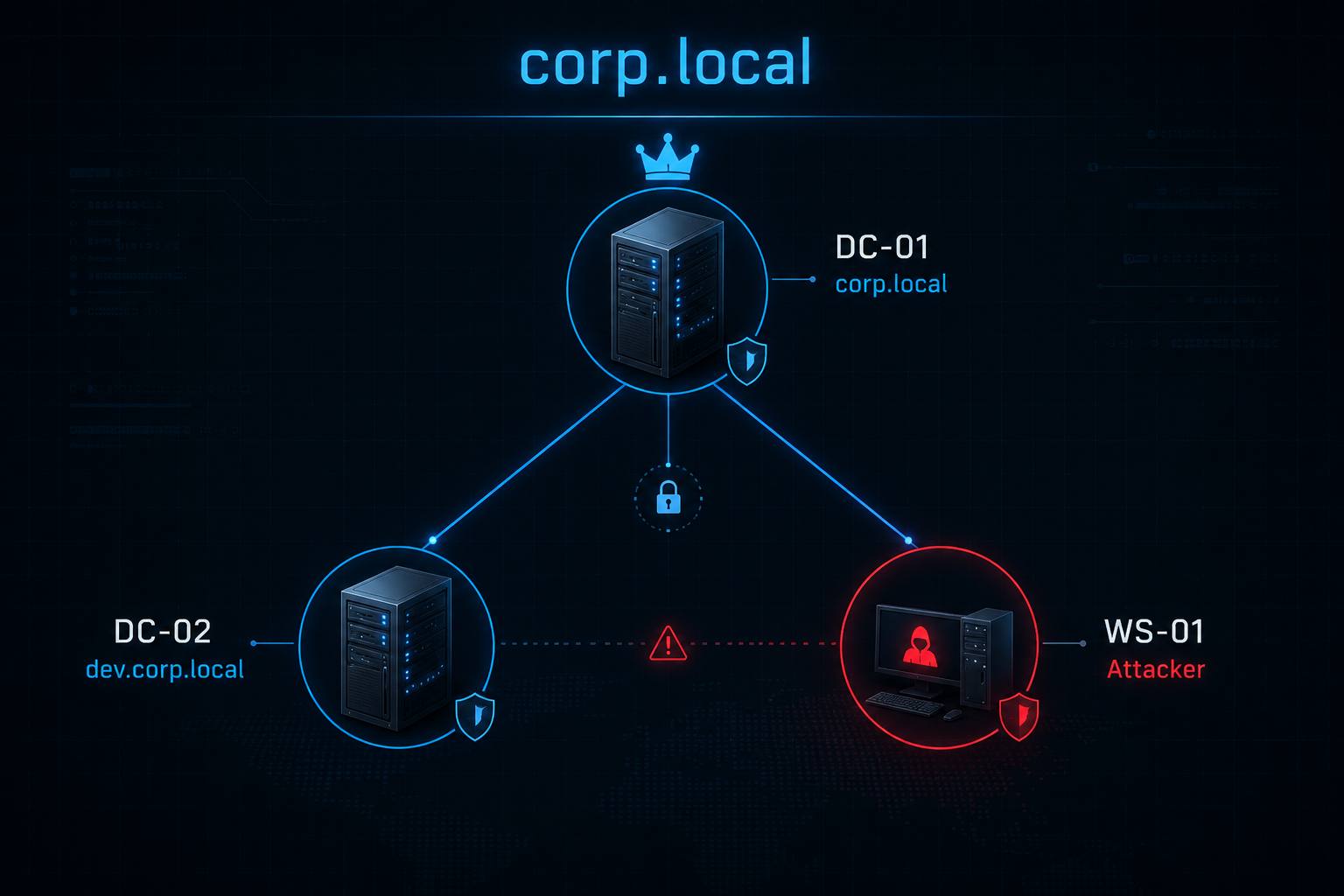
## 实验室拓扑
```
DC-01 192.168.56.10 — corp.local (Forest Root DC + CA)
DC-02 192.168.56.20 — dev.corp.local (Child Domain DC)
WS-01 192.168.56.30 — Attacker Workstation
Network : Host-Only (192.168.56.0/24)
Internet: NAT (separate adapter)
```
## 虚拟机规格
| 虚拟机 | 角色 | 操作系统 | 内存 | CPU | 硬盘 | IP |
|-------|-----------------------|-------------------------|------|-----|-------|----------------|
| DC-01 | Forest Root DC + CA | Windows Server 2019 | 4 GB | 2 | 60 GB | 192.168.56.10 |
| DC-02 | Child Domain DC | Windows Server 2019 | 4 GB | 2 | 60 GB | 192.168.56.20 |
| WS-01 | Attacker Workstation | Windows 10/11 | 4 GB | 2 | 60 GB | 192.168.56.30 |
**所需总内存:最低 12 GB(推荐 16 GB)**
## 快速开始
### 选项 A — Vagrant(推荐)
**一条命令即可自动构建整个实验室。**
```
# 要求:VirtualBox + Vagrant
git clone https://github.com/0x4161/active-directory-lab.git
cd active-directory-lab
vagrant plugin install vagrant-reload
vagrant up
```
Vagrant 会下载 Windows 基础 box(总计约 12 GB),配置所有 3 个虚拟机,提升 DC,并自动运行所有设置脚本。首次运行大约需要 45-60 分钟。
### 选项 B — 从头开始构建(手动)
```
git clone https://github.com/0x4161/active-directory-lab.git
cd active-directory-lab
```
1. 在 VirtualBox 中创建 Host-Only 网络 `vboxnet0` (`192.168.56.1`) — 禁用 DHCP
2. 创建 3 个虚拟机:每个都包含 **Adapter 1: Host-Only** + **Adapter 2: NAT**
3. 在 DC-01 和 DC-02 上安装 Windows Server 2019,在 WS-01 上安装 Windows 10/11
4. **DC-01** → 静态 IP `192.168.56.10` → 运行 `setup/promote-dc01.ps1` → 运行 `scripts/Setup-CorpLocal.ps1`
5. **DC-02** → 静态 IP `192.168.56.20`,DNS `192.168.56.10` → 运行 `setup/promote-dc02.ps1` → 运行 `scripts/Setup-DevCorpLocal.ps1`
6. **WS-01** → 静态 IP `192.168.56.30`,DNS `192.168.56.10` → 运行 `setup/join-ws01.ps1`
## 默认凭据
| 账户 | 域 | 密码 | 角色 |
|-------------------|-----------------|------------|---------------------------------------|
| Administrator | corp.local | p@ssw0rd | Domain Admin |
| admin1 | corp.local | p@ssw0rd | Domain Admin |
| **attacker.01** | corp.local | p@ssw0rd | **你的起点(低权限)** |
| ahmad.ali | corp.local | p@ssw0rd | IT Admin |
| fahad.salem | corp.local | p@ssw0rd | Helpdesk Lead |
| sara.khalid | corp.local | p@ssw0rd | HR Manager |
| faisal.omar | corp.local | p@ssw0rd | Finance Director |
| walid.saeed | corp.local | p@ssw0rd | Finance Analyst [AS-REP Roastable] |
| svc_sql | corp.local | p@ssw0rd | Service Account [Kerberoastable] |
| svc_backup | corp.local | p@ssw0rd | Service Account [DCSync Rights] |
| faris.admin | dev.corp.local | p@ssw0rd | Child Domain Admin |
| **attacker.dev** | dev.corp.local | p@ssw0rd | 子域起点 |
## 额外攻击面(可选)
基础实验室运行后,你可以使用一个脚本添加 **14 个额外的攻击面**:
```
# 在 DC-01 上 — 在 Setup-CorpLocal.ps1 完成后运行
cd C:\vagrant\scripts # or wherever you copied the repo
.\Setup-ExtraAttacks.ps1
```
**它启用以下内容:**
| # | 错误配置 | 攻击技术 |
|---|-----------------|-----------------|
| 1 | 启用 WDigest | `sekurlsa::wdigest` → 在 LSASS 中获取明文密码 |
| 2 | 允许 NTLMv1 | 降级 NTLM → 更易于破解 / 中继 |
| 3 | RunAsPPL = 0 | Skeleton Key (`misc::skeleton`) — 任意密码均可生效 |
| 4 | 禁用 UAC token 过滤 | 通过 SMB/WinRM 对本地管理员进行 Pass-the-Hash |
| 5 | 运行 Print Spooler | PrinterBug (MS-RPRN) 强制认证 → 中继/捕获 DC 哈希 |
| 6 | 运行 WebClient 服务 | WebDAV 强制认证 → 通过 HTTP 进行 NTLM 中继 |
| 7 | khalid.nasser → DnsAdmins | 通过 DNS 服务进行 DLL 注入(以 SYSTEM 权限运行) |
| 8 | dana.rashid → Backup Operators | 复制 NTDS.dit → 离线转储所有域哈希 |
| 9 | nasser.web → Account Operators | 在大多数 OU 中创建/修改用户 |
| 10 | noura.ahmed → DCSync rights | 第二条独立的 DCSync 路径 |
| 11 | maryam.hassan → reem.sultan 上的 WriteSPN | 通过 WriteSPN ACE 进行定向 Kerberoasting |
| 12 | hessa.jaber → AS-REP roastable | 额外的 AS-REP Roasting 目标 |
| 13 | 启用 Remote Registry | 远程读取 SAM/SYSTEM hive |
| 14 | 禁用 Windows 防火墙 | 不受限的横向移动 |
**各技术的攻击指南:** [`attacks/09`](attacks/09-silver-ticket.md) · [`10`](attacks/10-pass-the-hash.md) · [`11`](attacks/11-skeleton-key.md) · [`12`](attacks/12-coercion.md) · [`13`](attacks/13-dns-admins.md) · [`14`](attacks/14-backup-operators.md)
## 包含的攻击场景
| # | 攻击 | 难度 | 路径 |
|----|-------------------------------------|------------|-----------------------------------|
| 1 | 域枚举 | 简单 | BloodHound / PowerView |
| 2 | Kerberoasting | 简单 | 6 个服务账户 |
| 3 | AS-REP Roasting | 简单 | 4 个用户(包含 hessa.jaber) |
| 4 | 密码喷射 | 简单 | 弱密码 |
| 5 | AD 属性中的凭据 | 简单 | LDAP 枚举 |
| 6 | GPP / SYSVOL 密码 | 简单 | Groups.xml |
| 7 | WDigest — 明文凭据 | 简单 | Mimikatz sekurlsa::wdigest |
| 8 | Pass-the-Hash | 简单 | LocalAccountTokenFilterPolicy=1 |
| 9 | ACL — GenericAll | 中等 | noura.ahmed -> faisal.omar |
| 10 | ACL — WriteDACL | 中等 | ahmad.ali -> Finance Users |
| 11 | ACL — ForceChangePassword | 中等 | fahad.salem -> faisal.omar |
| 12 | ACL — DCSync Rights | 中等 | svc_backup -> domain |
| 13 | ACL — WriteOwner | 中等 | Helpdesk -> IT Admins |
| 14 | ACL — WriteSPN (定向 Kerberoast)| 中等 | maryam.hassan -> reem.sultan |
| 15 | Shadow Credentials | 中等 | omar.coder -> WEB-SRV-01 |
| 16 | 非约束委派 | 中等 | WEB-SRV-01 / svc_web |
| 17 | PrinterBug / PetitPotam 强制认证 | 中等 | 强制 DC-01 认证 -> 中继/捕获|
| 18 | DnsAdmins DLL 注入 | 中等 | khalid.nasser -> SYSTEM on DC-01 |
| 19 | Backup Operators — NTDS 转储 | 中等 | dana.rashid -> 所有域哈希 |
| 20 | Account Operators — 账户滥用 | 中等 | nasser.web -> 创建/修改用户 |
| 21 | Silver Ticket | 困难 | svc_sql hash -> 伪造 TGS |
| 22 | Skeleton Key | 困难 | RunAsPPL=0 -> misc::skeleton |
| 23 | 约束委派 (KCD) | 困难 | svc_iis -> CIFS/DC-01 |
| 24 | 基于资源的约束委派 (RBCD) | 困难 | tariq.dev -> WEB-SRV-02 |
| 25 | DCSync(第二条路径) | 困难 | noura.ahmed -> 复制权限 |
| 26 | AdminSDHolder 持久化 | 困难 | svc_backup -> 所有 DAs |
| 27 | DSRM 滥用 | 困难 | DC 上的本地管理员 |
| 28 | ADCS ESC1 | 困难 | 伪造管理员证书 |
| 29 | ADCS ESC4 | 困难 | 修改可写模板 |
| 30 | ADCS ESC6 | 困难 | 任意模板中的 SAN |
| 31 | ADCS ESC7 | 困难 | CA Manager 滥用 |
| 32 | ADCS ESC8 | 困难 | NTLM 中继至 ADCS |
| 33 | Golden Ticket | 专家 | krbtgt 转储后 |
| 34 | 子域到父域 (ExtraSids) | 专家 | dev -> corp.local EA |
| 35 | 信任票据 | 专家 | 跨域 TGT 伪造 |
| 36 | SID History 滥用 | 专家 | dev.backdoor -> EA 权限 |
## 网络配置
```
VirtualBox Network Setup:
Adapter 1 (Host-Only): vboxnet0 — 192.168.56.0/24
Purpose : VM-to-VM communication + host access
DC-01 : 192.168.56.10 (static)
DC-02 : 192.168.56.20 (static)
WS-01 : 192.168.56.30 (static or DHCP)
Adapter 2 (NAT):
Purpose : Internet access for downloading tools
All VMs : DHCP (10.0.x.x)
```
## 支持的 Hypervisor
| Hypervisor | Vagrant 支持 | 手动构建 | 备注 |
|-----------------------|-----------------|--------------|--------------------------------|
| VirtualBox 7.x | ✅ 已测试 | ✅ 已测试 | 推荐 |
| VMware Workstation 17 | ⚠️ 部分 | ✅ 兼容| vagrant-vmware-desktop 插件 |
| VMware ESXi | ❌ | ✅ 兼容| 仅限手动安装 |
| Hyper-V | ❌ | ⚠️ 部分 | 手动安装,支持有限 |
## 截图
```
screenshots/
├── 01-lab-topology.png
├── 02-bloodhound-graph.png
├── 03-kerberoast.png
├── 04-adcs-esc1.png
└── 05-golden-ticket.png
```
## 仓库结构
```
ad-lab/
├── README.md # This file
├── LICENSE # MIT License
├── .gitignore
├── INSTALL.md # Quick installation guide
├── docs/
│ ├── LAB-SETUP.md # Detailed setup from scratch
│ ├── ATTACK-PATHS.md # All attack paths with commands
│ ├── TROUBLESHOOTING.md # Common issues and fixes
│ ├── REQUIREMENTS.md # Hardware and software requirements
│ ├── VM-EXPORT.md # How to export/import VMs
│ └── NETWORK-SETUP.md # Network configuration guide
├── scripts/
│ ├── Setup-CorpLocal.ps1 # corp.local full setup
│ ├── Setup-DevCorpLocal.ps1 # dev.corp.local setup
│ ├── Setup-ExtraAttacks.ps1 # Extra attack surfaces (optional)
│ ├── Reset-AllPasswords.ps1 # Reset all lab passwords
│ ├── lab-start.sh # Start all VMs
│ ├── lab-stop.sh # Stop all VMs
│ ├── lab-reset.sh # Reset snapshots
│ ├── lab-status.sh # Check VM status
│ └── verify-lab.ps1 # Verify AD services
├── setup/
│ ├── promote-dc01.ps1 # Promote DC-01 to forest root
│ ├── promote-dc02.ps1 # Promote DC-02 to child domain
│ └── join-ws01.ps1 # Join WS-01 to domain
├── attacks/
│ ├── 01-enumeration.md
│ ├── 02-kerberoasting.md
│ ├── 03-asrep-roasting.md
│ ├── 04-delegation.md
│ ├── 05-acl-attacks.md
│ ├── 06-adcs.md
│ ├── 07-persistence.md
│ ├── 08-cross-domain.md
│ ├── 09-silver-ticket.md
│ ├── 10-pass-the-hash.md
│ ├── 11-skeleton-key.md
│ ├── 12-coercion.md
│ ├── 13-dns-admins.md
│ └── 14-backup-operators.md
├── enumeration/
│ ├── bloodhound-queries.md
│ ├── powerview-cheatsheet.md
│ └── ldap-enum.md
├── vm-export/
│ └── README.md
├── screenshots/
│ └── .gitkeep
├── wordlists/
│ ├── lab-users.txt
│ ├── lab-passwords.txt
│ └── README.md
└── tools/
└── README.md
```
## 许可证
MIT 许可证 — 见 [LICENSE](LICENSE)
为安全教育而构建。请负责任地使用。
标签:Active Directory, AI合规, IPv6, Libemu, Plaso, PowerShell, Vagrant, 数据展示, 模拟器, 红队, 足迹探测, 配置修复, 靶场环境