thenamanshukla/gaussianguard
GitHub: thenamanshukla/Gaussian-Guard
基于高斯过程回归的贝叶斯异常检测引擎,通过自适应概率安全走廊对实时时间序列信号进行异常标记。
Stars: 0 | Forks: 0
# Gaussian Guard
一个贝叶斯监控系统,利用高斯过程回归在时间序列数据周围构建自适应安全走廊。该引擎学习信号的统计流形,建立概率基线,并将落在预期方差之外的观测值标记为异常。
## 概述
该架构经历了两个阶段:使用受控正弦波进行合成信号验证,以及通过滑动窗口推理循环针对 Linux CPU 遥测数据进行实时部署。
## 仓库结构
```
gaussianguard/
core/
sentry_engine.py GP regression engine and kernel configuration
examples/
detector_demo.py Synthetic signal validation and corridor visualization
utils/
signal_gen.py Noisy sine wave generator for baseline testing
live_monitor.py Live CPU telemetry guard with sliding window inference
requirements.txt
README.md
gp_verification.png GP posterior fit over synthetic sine signal
live_guard_terminal.png Active guard terminal output with baseline calibration
system_monitor.png Linux system monitor showing per-core CPU activity
distill_reference.png Distill.pub GP reference
```
## 截图
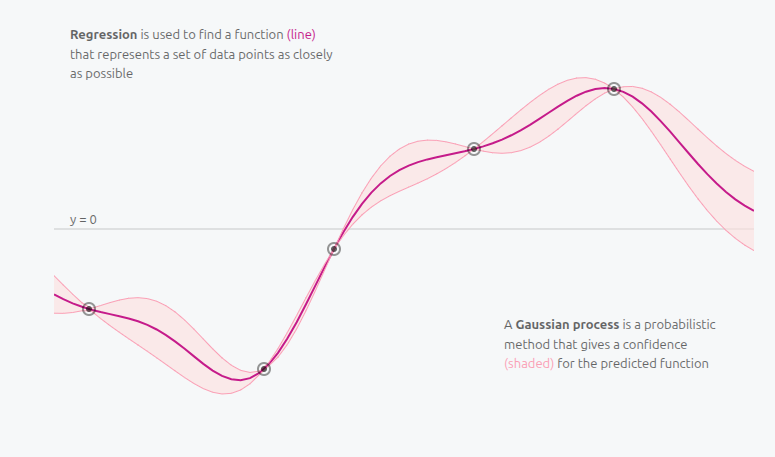
### 参考:高斯过程直觉
此架构的概念基础。高斯过程是一种概率方法,它在预测函数周围生成一个置信区域(阴影带),而不仅仅是一条单线。
### GP 后验拟合:合成验证
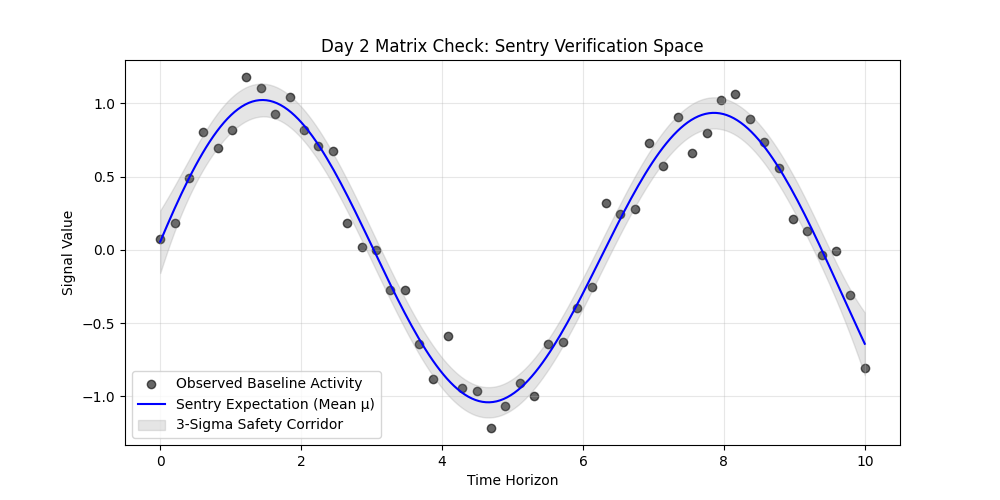
GP 从 60 个带噪声的锚点中正确学习到了一条平滑的潜在路径,并在 200 个预测位置对其进行了重构。灰色带为 3-sigma 安全走廊。
### 系统监控器:硬件上下文
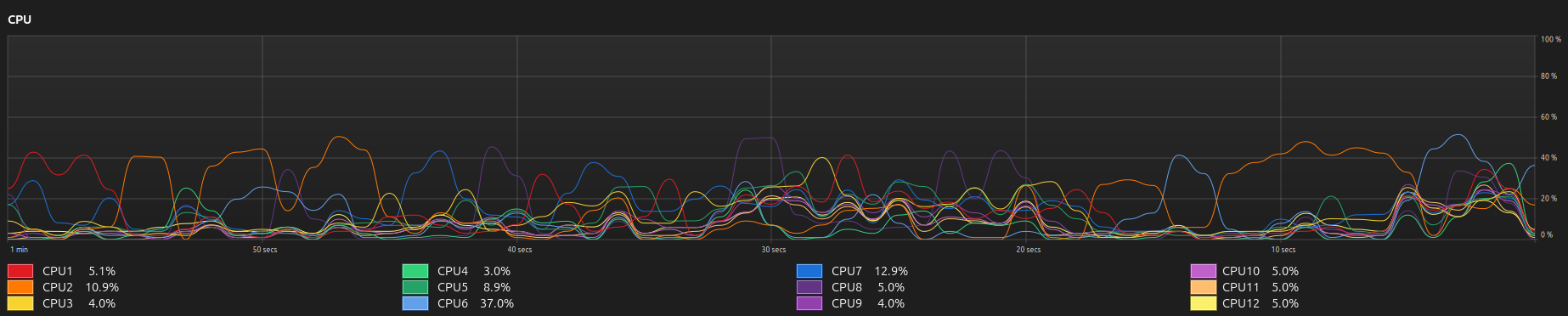
守护程序跟踪跨越所有 12 个核心的系统范围平均值。下方的逐核心视图展示了输入到复合 kernel 的原始利用率。
## 数学基础
### Kernel
任意两个时间点之间的协方差由径向基函数定义:
$$k(x, x') = \sigma_f^2 \exp\left( -\frac{\|x - x'\|^2}{2l^2} \right)$$
- **Signal variance** 控制概率边界的垂直范围。
- **Length-scale** 控制模型的时间记忆,即过去多长时间内的数据点会影响当前预测。
### 预测推理
给定一个新的时间点,引擎会计算:
**预测均值:**
$$\mu_* = K_*^\top [K + \sigma_n^2 I]^{-1} y$$
**预测方差:**
```
\sigma^2_{*} = K(X_{*}, X_{*}) - K_{*}^\top [K + \sigma_n^2 I]^{-1} K_{*}
```
方差在靠近训练观测值的地方收缩,在未观测区域中扩大。3-sigma 走廊覆盖了 99.7% 的概率质量。
## 阶段 1:合成信号验证
第一阶段针对带有高斯噪声的受控正弦波验证引擎。这确认了 GP 能够在引入任何实时数据之前正确重构潜在路径,并绘制出校准良好的置信走廊。
**信号生成器** (`utils/signal_gen.py`):
```
import numpy as np
def generate_signal(n_samples=60, noise_level=0.15):
np.random.seed(42)
X = np.linspace(0, 10, n_samples).reshape(-1, 1)
y_clean = np.sin(X).ravel()
noise = np.random.normal(0, noise_level, n_samples)
return X, y_clean + noise
```
**哨兵引擎** (`core/sentry_engine.py`):
```
from sklearn.gaussian_process import GaussianProcessRegressor
from sklearn.gaussian_process.kernels import RBF, ConstantKernel as C
class KernelSentry:
def __init__(self, length_scale=1.0, noise_level=0.1):
self.kernel = C(1.0, (1e-2, 1e2)) * RBF(
length_scale=length_scale,
length_scale_bounds=(1e-1, 1e2)
)
self.gp = GaussianProcessRegressor(
kernel=self.kernel,
alpha=noise_level**2,
n_restarts_optimizer=10,
random_state=42
)
def learn(self, X, y):
self.gp.fit(X, y)
def check_integrity(self, X_new):
return self.gp.predict(X_new, return_std=True)
```
## 阶段 2:实时 CPU 遥测
第二阶段针对实时的 Linux 系统数据部署引擎。该模型以 CPU 利用率为目标,通过 `psutil` 每秒采样一次,并在 60 秒的滑动窗口上运行。
### 复合 Kernel
CPU 利用率包含三个结构组件,单一 RBF kernel 无法准确表示它们:
| 组件 | Kernel | 用途 |
|---|---|---|
| 空闲基线偏移 | `ConstantKernel` | 处理非零基准(空闲机器上约为 6-12%) |
| 应用负载趋势 | `RBF` | 随着进程的打开和关闭,对平滑的工作负载爬升进行建模 |
| 中断抖动 | `WhiteKernel` | 吸收高频噪声,因此短暂的峰值不会被标记 |
### 自校准阶段
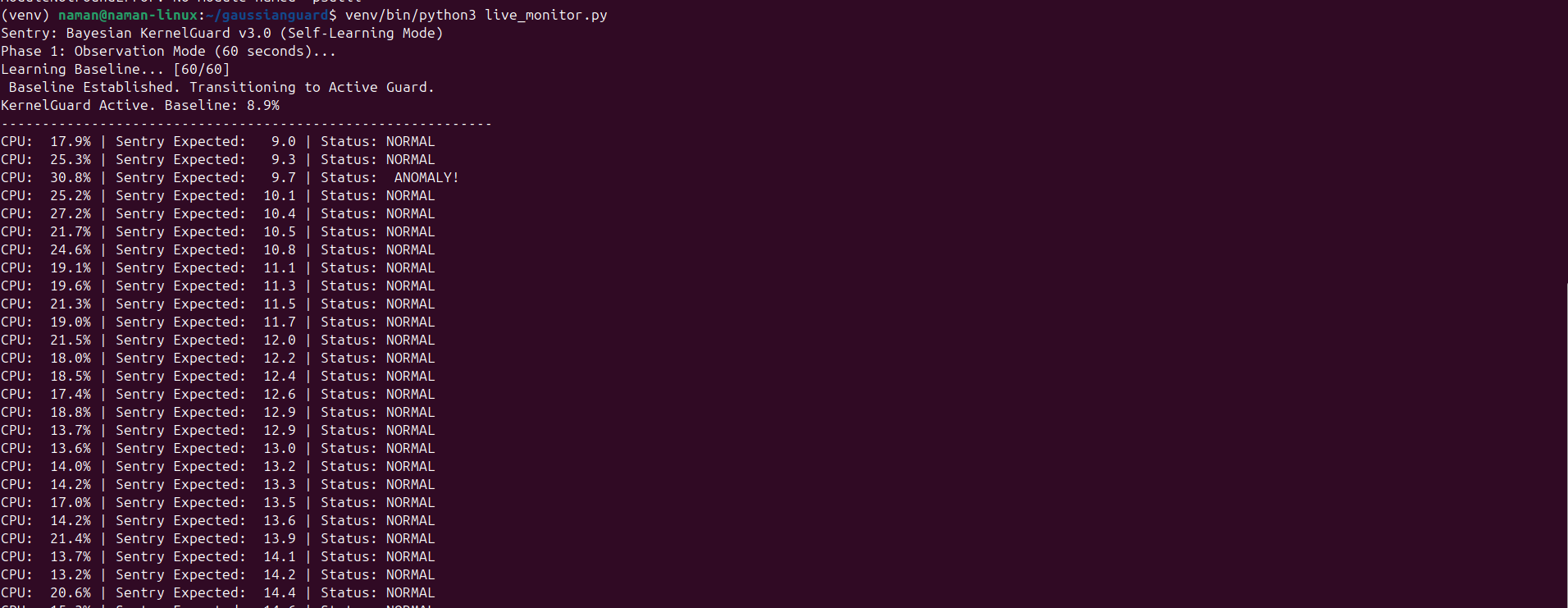
系统在激活异常检测之前,会运行一个强制性的 60 秒观测阶段。在此窗口期间,它会收集基线遥测数据并拟合初始模型。校准完成后,它将进入主动守护模式。
### 实时监控器 (`live_monitor.py`):
```
import psutil
import numpy as np
from sklearn.gaussian_process import GaussianProcessRegressor
from sklearn.gaussian_process.kernels import RBF, WhiteKernel, ConstantKernel
# 观察阶段
history_x = np.atleast_2d(np.linspace(0, 59, 60)).T
history_y = []
while len(history_y) < 60:
history_y.append(psutil.cpu_percent(interval=1))
history_y = np.array(history_y)
initial_baseline = np.mean(history_y)
kernel = ConstantKernel(constant_value=initial_baseline) \
+ 1.0 * RBF(length_scale=10.0) \
+ WhiteKernel(noise_level=1.0)
gp = GaussianProcessRegressor(kernel=kernel)
# 主动 guard loop
while True:
current_usage = psutil.cpu_percent(interval=1)
history_y = np.roll(history_y, -1)
history_y[-1] = current_usage
gp.fit(history_x, history_y)
mu, sigma = gp.predict(np.atleast_2d([60]).T, return_std=True)
upper = mu[0] + 3 * sigma[0]
lower = mu[0] - 3 * sigma[0]
status = "ANOMALY" if current_usage > upper or current_usage < lower else "NORMAL"
print(f"CPU: {current_usage:5.1f}% | Expected: {mu[0]:5.1f} | Status: {status}")
```
### 观测到的行为
- 在校准期间学习到了 6.8% 的初始空闲基线。
- 当负载攀升至 13.4% 然后达到 19.6% 时,模型更新了其预期均值,并未触发误报;工作负载的偏移足够平缓,落在滑动窗口学习到的趋势范围内。
- 旨在标记违反概率安全走廊的突发非相关峰值。
## 关键设计决策
**在线滑动窗口优于批量重新训练。** GP 每秒在固定的 60 个数据点窗口上重新拟合,而不是无限制地增加数据集。这保持了恒定的推理延迟,并确保模型跟踪当前行为而不是历史平均值。
**矩阵维度。** 所有时间数组在传递给 kernel 之前都被重塑为 `(-1, 1)`。线性代数后端在构建协方差矩阵时需要二维列矩阵。
**分辨率不对称。** 训练使用 60 个锚点。预测在 200 个位置运行。这产生了一个平滑、高分辨率的流形,而无需密集的训练数据。
**超参数优化。** RBF 的 length-scale 和 signal variance 通过在 `fit()` 期间最大化对数边际似然进行优化。初始 kernel 选择后无需手动调参。
## 安装和使用
```
# Clone the repository
git clone https://github.com/thenamanshukla/gaussianguard.git
cd gaussianguard
# Create and activate virtual environment
python -m venv venv
source venv/bin/activate
# Install dependencies
pip install -r requirements.txt
```
**运行合成验证:**
```
python examples/detector_demo.py
```
输出:`gp_verification.png` — 针对带噪声正弦信号的后验拟合图。
**运行实时 CPU 守护程序:**
```
python live_monitor.py
```
终端将显示 60 秒的校准进度,然后切换到实时异常报告。
## 依赖要求
```
numpy
scikit-learn
matplotlib
psutil
```
## 参考文献
Rasmussen, C. E., and Williams, C. K. I. *Gaussian Processes for Machine Learning*. MIT Press, 2006.
Distill.pub. *A Visual Exploration of Gaussian Processes*. 2019. https://distill.pub/2019/visual-exploration-gaussian-processes/
标签:Apex, 异常检测, 时间序列分析, 机器学习, 贝叶斯推断, 逆向工具, 高斯过程回归