alatticeio/lattice
GitHub: alatticeio/lattice
Lattice 是一个自托管AI原生平台,通过WireGuard加密网络和gVisor沙箱解决AI代理的网络隔离与零信任访问控制问题。
Stars: 3 | Forks: 1
# nt token" in English. So, "创建 enrollment token".
**自托管 WireGuard 网状网络 · AI 代理沙箱**
[](LICENSE)
[](https://goreportcard.com/report/github.com/alatticeio/lattice)
[](https://github.com/alatticeio/lattice/releases/latest)
[](https://github.com/alatticeio/lattice/pkgs/container/lattice)
[](CONTRIBUTING.md)
[](https://github.com/alatticeio/lattice/actions/workflows/bench.yml)
[](https://github.com/alatticeio/lattice/actions/workflows/bench.yml)
[](https://github.com/alatticeio/lattice/actions/workflows/bench.yml)
Lattice 是一个自托管平台,围绕**两大核心支柱**构建:一个**网络编排引擎**,可将任何设备 — 服务器、容器、物联网、Kubernetes Pod — 连接到加密的 WireGuard 叠加层网状网络;以及一个 **AI 代理沙箱**,为每个 AI 代理提供一个零信任的 WireGuard 身份,具备内核级隔离和自然语言策略管理能力。
[**网站**](https://alattice.io) · [**文档**](https://alattice.io/docs) · [**问题反馈**](https://github.com/alatticeio/lattice/issues)
## 为什么是现在:AI 安全的迫切性
Google 的 [安全 AI 框架 (SAIF)](https://safety.google/cybersecurity-advancements/saif/) 定义了企业 AI 部署的安全基线。在其六个核心要素中,SAIF 明确将**网络/端点安全**、**访问管理**和**供应链隔离**列为任何生产环境 AI 系统的基本要求。
Lattice 专为满足这些要求而构建:
| SAIF 要求 | Lattice 能力 |
|---|---|
| 网络/端点安全 | WireGuard 加密网状网络 — 所有代理流量均端到端加密隔离 |
| 缓解供应链攻击 | gVisor 用户空间内核 — 受损代理无法逃逸到主机 |
| 访问管理 | 策略层控制每个代理身份可访问哪些资源 |
| 统一的平台控制 | 单一 K8s 原生控制平面,管理代理、隧道和网络策略 |
随着企业采用 AI 并开始实施 SAIF,AI 代理的网络隔离从“锦上添花”转变为**合规性要求**。Lattice 提供了满足此要求的基础设施层 — 自托管、可审计、开放核心。
## 两大核心支柱
### 网络编排
将任何设备连接到加密的叠加层网络 — 无需更改防火墙,无需暴露公网 IP。
| 能力 | 描述 |
|------------|-------------|
| **WireGuard 隧道自动化** | 密钥分发、轮换和对等点发现完全自动化;首次握手时间 (TTFH) 可观测 |
| **NAT 穿越** | 双栈 ICE/STUN (IPv4 + IPv6),并发 LRP 中继回退,可穿透对称型 NAT |
| **内置 IPAM** | 两级分配(全局池 → 子网 → 对等点 IP),乐观锁,自动孔洞重用 |
| **策略引擎** | 默认拒绝 + 标签选择器 + 端口级别入口/出口;基于 TTL 的过期机制;双后端:iptables (社区版) / eBPF TC (专业版) |
| **多工作空间与 RBAC** | 命名空间隔离 + 跨工作空间对等连接 + 跨集群对等连接 + 邀请 |
| **LRP 中继** | 自定义中继协议,支持 TCP + QUIC 双传输,当 P2P 不可用时自动故障转移 |
| **K8s Operator** | 13 个 CRD(Network, Peer, Policy, IPPool, Relay, Peering 等)用于声明式生命周期管理 |
| **Web 仪表板** | 可视化拓扑、策略编辑器、监控仪表板、工作空间管理 |
| **遥测** | 专业版:VictoriaMetrics 推送(系统指标、每个对等点的 WireGuard 流量/延迟/丢包率) |
| **一体化部署** | 嵌入式 NATS + SQLite,零外部依赖,一个 `docker run` 命令即可启动 |
### AI 代理沙箱
为每个 AI 代理赋予安全的网络身份 — 内核级隔离,由自然语言驱动策略变更。
| 能力 | 描述 |
|------------|-------------|
| **AgentIdentity CRD** | 将 AI 代理绑定到 WireGuard Peer 并配置 RBAC (AllowedTools, AllowedNamespaces);四种沙箱模式 (none/pod/gvisor/microvm) 和三种执行模式 (disabled/audit/enforce) |
| **零信任注册** | 一次性注册令牌 (TTL + 使用次数限制) → 自动创建 LatticePeer + AgentIdentity → 签发 JWT — 无需手动配置密钥 |
| **代理隔离执行** | `ExecuteTool()` 路径执行检查:身份是否过期/撤销?命名空间是否在白名单?工具是否在白名单?审计模式记录违规;执行模式阻止违规 |
| **代理 JWT 认证中间件** | HS256 签名,365 天有效期,注入 Gin 上下文;用户和代理共享同一 API,上下文自动检测调用方 |
| **gVisor 沙箱** | `lattice sandbox start` CLI + `internal/agent/gvisor/` 运行时:用户空间网络栈 (pkg/tcpip),零特权,无需 TUN 设备,无需 eBPF;与常规代理共享完整的 ICE/LRP 对等点连接;社区版:网络隔离 + 本地审计;专业版:增加出口策略、端口转发、HTTP 代理、集中式 NATS 审计 |
| **MCP 服务器** | 用于 Claude Desktop / Cursor 的 `lattice-mcp` 二进制文件;14 个工具(读:list_peers, list_policies, check_connectivity 等;写:create_policy, delete_peer 等,需人工批准) |
| **意图引擎 (专业版)** | 自然语言 → LLM 提取 CRD 变更计划 → Markdown 差异预览 → 批准 → 应用 — 完整的人在回路工作流 |
| **工具调用审计与追踪** | 每个代理工具调用记录一个 `tool_spans` 条目 (traceID, agentID, tool, status, durationMs);通过 `GET /api/v1/agent-isolation/audit/traces` 查询;专业版:gVisor 流事件关联到追踪 |
| **子代理委派** | 父代理调用 `POST /api/v1/agent-isolation/delegate` 生成具有作用域工具权限的子代理;子代理使用自己的 WireGuard 身份独立注册;调用树可通过 API 查询 |
## 对比
### 网络编排
| 能力 | Lattice | Tailscale | Netbird | ZeroTier |
|------------|---------|-----------|---------|----------|
| 自托管控制平面 | ✅ | ❌ (仅限 SaaS) | ✅ | ✅ |
| Web 仪表板 | ✅ | ✅ | ✅ | ✅ |
| K8s CRD Operator | ✅ (13 个 CRD) | ✅ (有限) | ❌ | ❌ |
| eBPF 策略执行 | ✅ (专业版) | ❌ | ❌ | ❌ |
| 策略 TTL 过期 | ✅ | ❌ | ❌ | ❌ |
| 跨工作空间对等连接 | ✅ | ❌ | ❌ | ❌ |
| 内置 IPAM | ✅ | ✅ | ❌ | ❌ |
### AI 代理沙箱
| 能力 | Lattice | Tailscale | Netbird | ZeroTier |
|------------|---------|-----------|---------|----------|
| 代理零信任注册 (TTL + 网络隔离预设) | ✅ | ❌ | ❌ | ❌ |
| AgentIdentity CRD + RBAC | ✅ | ❌ | ❌ | ❌ |
| gVisor 用户空间内核沙箱 | ✅ (社区版 + 专业版) | ❌ | ❌ | ❌ |
| MCP 服务器 (AI 助手通过自然语言管理网络) | ✅ | ❌ | ❌ | ❌ |
| 意图引擎 (自然语言 → CRD → 批准 → 应用) | ✅ (专业版) | ❌ | ❌ | ❌ |
| 工具调用审计日志 | ✅ | ❌ | ❌ | ❌ |
| 写操作批准工作流 | ✅ | 不适用 | 不适用 | 不适用 |
| Sidecar 意图拦截 (seccomp 通知) | 🔜 | ❌ | ❌ | ❌ |
| eBPF PID ↔ TUN 流量绑定 | 🔜 | ❌ | ❌ | ❌ |
## 架构
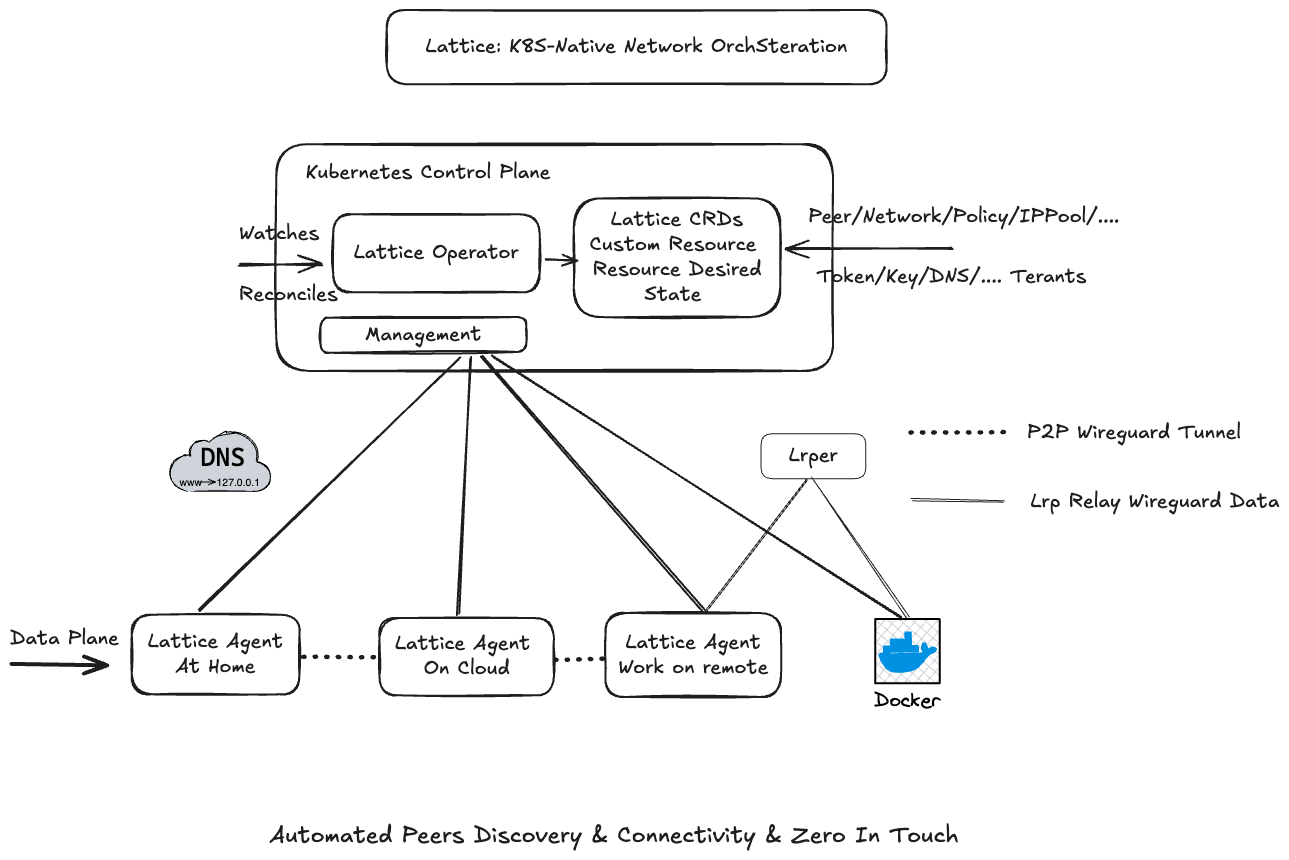
Lattice 由四个平面组成:
- **控制平面** — K8s Operator 或一体化独立模式 (`latticed`),声明式地管理网络拓扑、密钥、IP 分配和对等点关系
- **数据平面** — 轻量级代理 (~12 MB),部署在任何设备上,通过 ICE/STUN NAT 穿越建立加密的 WireGuard 隧道
- **中继平面** — 自定义 LRP 中继协议,当直接 P2P 不可用时自动回退
- **沙箱平面** — gVisor 用户空间内核 + 代理 JWT + 工具级 RBAC,为 AI 代理提供零特权执行环境
## 快速开始
### 部署控制平面
Lattice 控制平面运行在 Kubernetes 内。选择以下方式之一:
**Docker** (内置 k3s — 无需现有集群):
```
docker run -d \
--name lattice-k3s \
--privileged \
-p 8080:8080 \
ghcr.io/alatticeio/lattice-k3s:latest
```
容器运行后(约 30 秒),控制平面即准备就绪。访问 `http://localhost:8080`。
**现有 Kubernetes 集群:**
```
kubectl apply -k https://github.com/alatticeio/lattice/config/lattice/overlays/all-in-one
```
### 安装代理 CLI
在想要连接到网格的每个设备上安装 `lattice` CLI:
```
curl -fsSL https://raw.githubusercontent.com/alatticeio/lattice/master/docs/public/install.sh | bash
```
支持 Linux (amd64 / arm64) 和 macOS (amd64 / Apple Silicon)。有关 Homebrew、APT、YUM 及其他安装方式,请参阅[安装指南](https://alattice.io/docs/guide/installation)。
## 连接设备
### 1. 一次性设置
```
lattice init
```
### 2. 创建工作空间
```
lattice workspace add dev --display-name "Development"
```
### 3. 创建注册令牌
```
lattice token create dev-team -n 标签:AI代理沙箱, Docker镜像, EVTX分析, NIDS, WireGuard, 人工智能, 企业安全, 内核隔离, 加密通信, 子域名突变, 容器化, 开源, 日志审计, 物联网, 用户模式Hook绕过, 网络安全, 网络编排, 网络覆盖, 网络资产管理, 自托管, 自然语言策略, 请求拦截, 隐私保护, 零信任安全