ArrialVictor/DimFort
GitHub: ArrialVictor/DimFort
DimFort 是一个 Fortran 静态量纲一致性检查器,通过注释标注变量物理单位并自动验证代码中赋值与运算的单位匹配,帮助科学计算项目在编码阶段及早发现量纲错误。
Stars: 0 | Forks: 0
# DimFort

[](https://github.com/ArrialVictor/DimFort/actions/workflows/ci.yml)
[](https://github.com/ArrialVictor/DimFort/blob/main/LICENSE)
[](https://github.com/ArrialVictor/DimFort/blob/main/pyproject.toml)
Fortran 的静态单位一致性检查器。您在声明中注释其应具有的
量纲,DimFort 会验证赋值、算术运算、
内建函数和过程调用是否全部一致。注释以
自定义的 Doxygen 命令编写,因此单一事实来源可同时供给检查器和
您生成的文档。
```
real :: velocity !< @unit{m/s}
real :: mass !< @unit{kg}
real :: force !< @unit{kg*m/s^2}
force = mass * velocity ! diagnosed: force unit is kg, expected kg*m/s^2
```
## 在现有代码库中采用
许多现实世界的 Fortran 项目已经在行内
注释中记录了单位 —— `! [m/s]`、`! horizontal wind speed [m/s]`、
`! tracer ratio [m^2: Andreas 1989]`。DimFort 可以读取您
项目自身的约定,因此您无需为了启用功能而重写每个声明。
只需在 `dimfort.toml` 中添加几行:
```
[parser.unit_comments]
unit = [
{ open = "@unit{", close = "}" },
{ open = "[", close = "]" },
]
```
现在 `! [m/s]` 成为了第一类单位注释,其检查方式与
`@unit{m/s}` 完全相同。同一个表处理 `unit_assume`、
`unit_affine` 及其 `nonunit` / `nonunit_assume` /
`nonunit_affine` 过滤器列表 —— 每个都位于其自身的键上,
并有其独立的启用选项。完整方案见
[将 DimFort 引入现有代码库](docs/quickstart/bringing-to-existing-codebase.md)。
## 快速浏览
想先动手看看吗?[`demos/tour.f90`](https://github.com/ArrialVictor/DimFort/blob/main/demos/tour.f90)
是一个简短、独立的文件,它在教科书级别的湿热力学例程上
演示了最常见的 DimFort 诊断。
```
dimfort check --scale demos/tour.f90
```
[`demos/README.md`](https://github.com/ArrialVictor/DimFort/blob/main/demos/README.md)
逐行讲解了输出结果。
在编辑器中,相同的分析会呈现在始终可见的侧边栏中,
并跟随光标 —— 每个位置都会显示当前表达式的单位代数树,
以及该行的诊断、作用域内的变量和作用域内的模块:
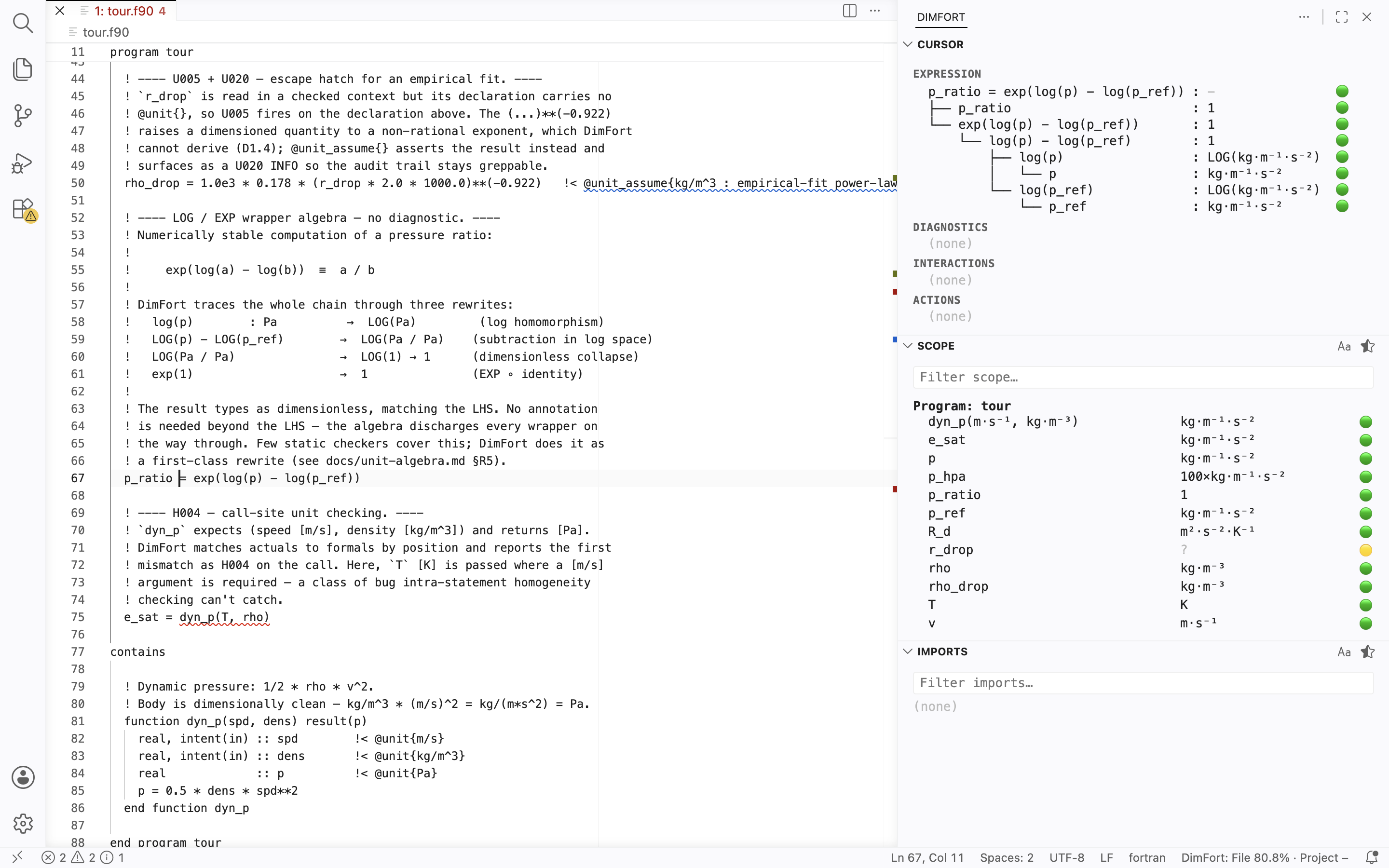
底部栏显示每个文件和整个项目的覆盖率等级
(已验证 / 未验证 / 违规 / 未解析),并在您编辑时实时更新。请参阅下文的[编辑器集成](#editor-integrations)。
## 安装
DimFort 以 `dimfort` 的名称发布在 PyPI 上。它是一个带有
入口点的 CLI 工具 —— 使用 [`pipx`](https://pipx.pypa.io/) 进行隔离安装:
```
pipx install 'dimfort[lsp]' # includes the LSP server extra
dimfort --version
```
`[lsp]` 额外依赖会引入 `pygls`;如果您只需要 CLI 而从不需要语言服务器,则可以省略它。
### 从源码安装(贡献者)
标准工作流使用 [`uv`](https://docs.astral.sh/uv/) 和
已提交的 `uv.lock`:
```
git clone https://github.com/ArrialVictor/DimFort.git
cd DimFort
uv sync --extra dev --extra lsp
```
普通的 `pip` 等效命令也可以使用 —— 有关这两种
方式的说明请参阅 `CONTRIBUTING.md`。
### 环境要求
Python ≥ 3.11。Fortran 解析器
([tree-sitter-fortran](https://pypi.org/project/tree-sitter-fortran/))
是一个运行时依赖,会自动安装 —— 解析不需要外部
编译器或子进程。对于使用
CPP `#`-指令的 `.F90` 文件,如果在
`dimfort.toml` 中设置了 `[parser] cpp_defines` 或 `[parser] include_paths`,
DimFort 会调用系统的 `cpp`。
## 使用方法
```
dimfort init -t climate # generate dimfort.toml from a discipline template
dimfort check path/to/file.f90 # check a single file
dimfort check path/to/project/ # walk a directory recursively
dimfort check path/... --summary # also print a per-file H/U count table
dimfort interactions path/... # cross-site unit report for one variable
dimfort lsp # start the language server (stdio)
```
`dimfort init` 会生成一个项目的 `dimfort.toml` 文件,它以 SI 核心
(继承自已发布的默认设置)开始,并包含所有五个学科
模板 —— 选定的模板已取消注释并可直接使用,其余的则在同一文件中被注释掉,
以便在文件内直接发现。传入 `-t climate,astronomy`
以激活多个模板,传入 `--bare` 以完全跳过模板,或传入 `--dry-run`
以在不写入的情况下打印结果。
`interactions` 是一个按需查询:对于单个变量,它会列出整个工作集中读取或写入该变量的每个位置 —— 并按 Declaration / Write / Read / Undetermined 进行分组,每个位置都附带其所暗示的单位 —— 当两个位置对单位*声明*存在冲突时,它会发出 `X001`(由于它甚至会在未注释的变量上触发,因此单语句 `check` 无法发现此问题)。
如果没有错误,退出代码为 `0`,如果生成了任何错误严重级别的诊断,则为 `1`,如果出现用法 / 文件 / 配置错误,则为 `2`。仅有警告不会导致运行失败。
诊断按代码前缀分组:**H** 代表同质性,
**U** 代表注释管道问题,**S** 代表选定的
缩放系列,**X** 代表来自 `dimfort
interactions` 的跨位置发现,而 **P** 代表解析器跳过的区域。完整
参考(每个代码、严重性和触发条件)位于
[docs/reference/diagnostic-codes.md](https://github.com/ArrialVictor/DimFort/blob/main/docs/reference/diagnostic-codes.md)。
对同质性诊断触发*原因*进行分类的单位代数规则分类法(`D1.1`–`D1.7`)位于
[docs/reference/unit-algebra.md](https://github.com/ArrialVictor/DimFort/blob/main/docs/reference/unit-algebra.md)。
## Doxygen 集成
注释从 Doxygen 注释中读取(声明前的 `!>` / `!!`,或尾随其后的 `!<`),并应用于声明列表中的每个变量。要使 Doxygen 原生渲染它们,请在您的 `Doxyfile` 中添加一行:
```
ALIASES += "unit{1}=\par Unit:^^\1"
```
模块级常量遵循相同的表示法:
```
!> @brief Gravitational acceleration.
!> @unit{m/s^2}
real, parameter :: g = 9.81
```
对于存在于 log 或 exp 空间中的量,请使用 `LOG(...)` 或 `EXP(...)` 包装内部单位:
```
real :: lp !< @unit{LOG(Pa)}
real :: tau !< @unit{EXP(K)}
```
DimFort 会通过算术运算跟踪包装器:`LOG(psol) + LOG(pref)`
类型化为 `LOG(Pa²)`,`LOG(p1) − LOG(p2)` 通过压力比规则折叠为无量纲,
而 `EXP(LOG(psol) − ...)` 会抵消回
`Pa`。完整的规则集位于
[docs/reference/unit-algebra.md](https://github.com/ArrialVictor/DimFort/blob/main/docs/reference/unit-algebra.md)。
### Trace 模式
传入 `--trace` 以查看每个诊断背后的规则链:
```
dimfort check --trace src/my_module.f90
```
每个错误 / 警告都会在消息下方打印触发的规则 ID(`R3.1`、`R5.6` 等)。VSCode 扩展在悬停时显示相同的 trace,并允许您通过 `DimFort: Hover` 设置为每个展示面(调用、子例程、表达式)选择深度(`Short` 用于单行摘要,`Detailed` 用于带有每行 🟢/🟡/🔴 标记的完整单位代数树)。
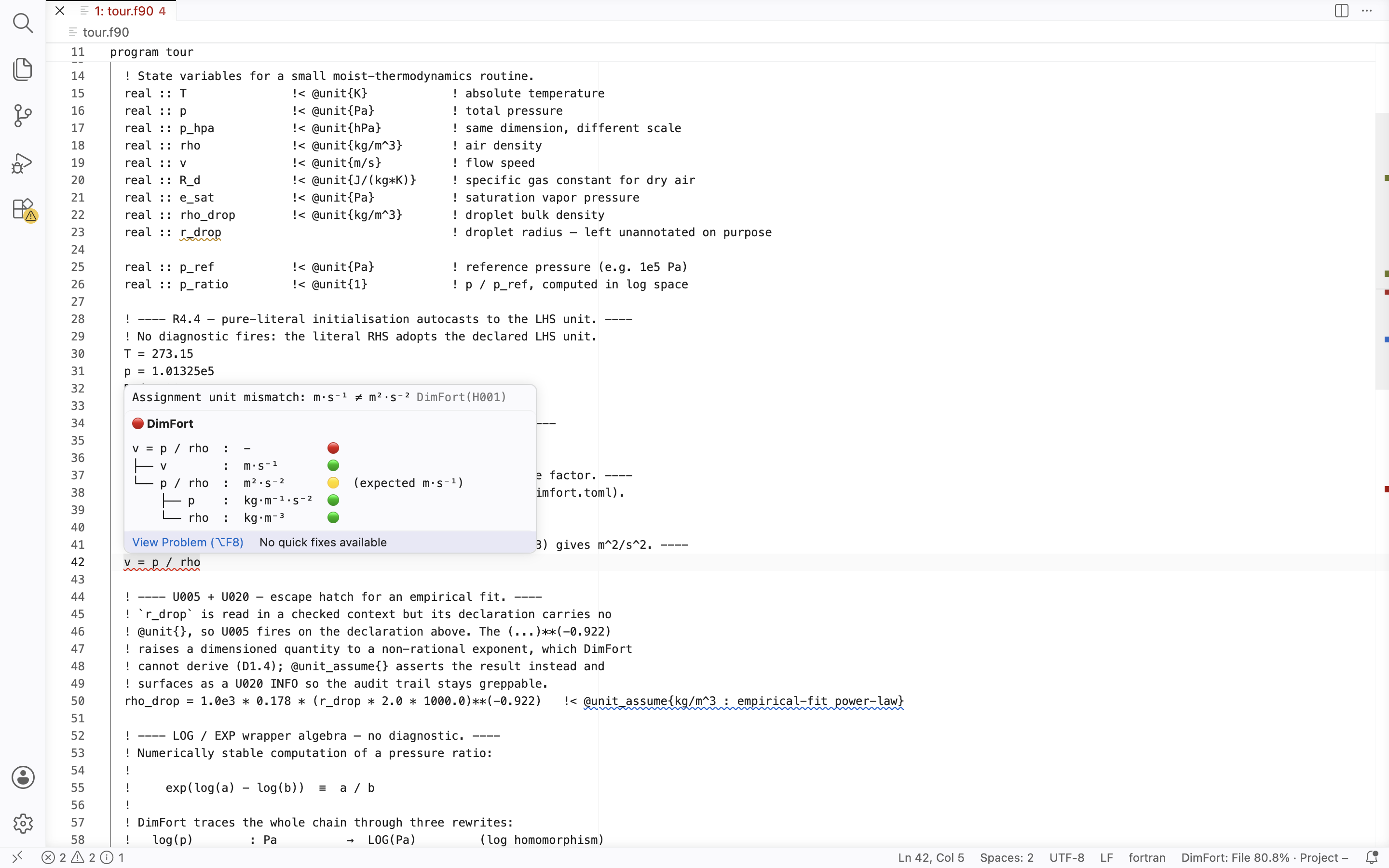
有关布局规范,请参阅
[docs/editor-integration/hover-ui.md](https://github.com/ArrialVictor/DimFort/blob/main/docs/editor-integration/hover-ui.md)。
有关完整参考,请参阅
[docs/reference/annotations.md](https://github.com/ArrialVictor/DimFort/blob/main/docs/reference/annotations.md)
:单位表达式语法、续行形式、声明列表以及扫描器可以发出的诊断代码。
## 文档
- [注释](https://github.com/ArrialVictor/DimFort/blob/main/docs/reference/annotations.md)
- [使用详情](https://github.com/ArrialVictor/DimFort/blob/main/docs/usage.md)
—— 以及[将 DimFort 引入现有代码库](https://github.com/ArrialVictor/DimFort/blob/main/docs/quickstart/bringing-to-existing-codebase.md)
指南(可配置的注释分隔符,在 0.2.2 中添加)。
- [语言服务器](https://github.com/ArrialVictor/DimFort/blob/main/docs/editor-integration/lsp-protocol.md)
- [发布版本](https://github.com/ArrialVictor/DimFort/blob/main/docs/release-process.md)
## 编辑器集成
轻量级的 LSP 客户端可将 `dimfort lsp` 接入常见的编辑器中。每个
客户端都位于其独立的存储库中,按自身的节奏发布,并共享
相同的功能面 —— 诊断、悬停、inlay hints、
转到定义、代码操作、自动补全,以及 0.2.4–0.2.5 版本引入的**侧边栏**
(跟随光标的单位代数树 + 作用域 / 导入表)和**覆盖率层**:显示 DimFort 对每行内容的了解情况的逐行侧边栏 / 色调,以及带有文件 + 工作区覆盖率统计信息的底部栏。
- **[VSCode](https://github.com/ArrialVictor/DimFort-VSCompanion)** —
可在 [Visual Studio Marketplace](https://marketplace.visualstudio.com/items?itemName=arrialvictor.dimfort-vscode)
(`ext install arrialvictor.dimfort-vscode`)和
[Open VSX](https://open-vsx.org/extension/dimfort/dimfort-vscode)
上获取,适用于 VSCodium / Cursor / Theia / code-server。
- **[Neovim](https://github.com/ArrialVictor/DimFort-NvimCompanion)**
(≥ 0.11) —— 通过任何指向该存储库的插件管理器进行安装。
- **[Emacs](https://github.com/ArrialVictor/DimFort-EmacsCompanion)** —
通过 straight.el / use-package 或手动 `require` 安装。同时兼容 eglot(Emacs 29+)和 lsp-mode。
## 许可证
请参阅 [LICENSE](https://github.com/ArrialVictor/DimFort/blob/main/LICENSE)。


标签:Fortran, LSP, Python安全, SOC Prime, 云安全监控, 代码质量检查, 开发工具, 逆向工具, 量纲分析, 静态分析