OpenMOSS/MOSS-Transcribe-Diarize
GitHub: OpenMOSS/MOSS-Transcribe-Diarize
一个端到端的开源音频理解模型,将多说话人语音转写、说话人分离、时间戳生成和声学事件感知整合为单步推理。
Stars: 728 | Forks: 43
# MOSS-Transcribe-Diarize




## 快速开始
### 环境配置
使用干净的 Python 环境。该项目已在 Python 3.12 和 Transformers 5.x 下测试。
```
git clone https://github.com/OpenMOSS/MOSS-Transcribe-Diarize.git
cd MOSS-Transcribe-Diarize
uv venv --python 3.12 .venv
source .venv/bin/activate
uv pip install -e ".[torch-runtime]" --torch-backend=auto
```
如需微调,请参阅 [FINETUNING.md](FINETUNING.md)。
### Python 用法
```
import torch
from transformers import AutoModelForCausalLM, AutoProcessor
from moss_transcribe_diarize import parse_transcript
from moss_transcribe_diarize.inference_utils import (
build_transcription_messages,
generate_transcription,
resolve_device,
)
model_id = "OpenMOSS-Team/MOSS-Transcribe-Diarize"
audio_path = "audio.wav"
device = resolve_device("auto")
dtype = torch.bfloat16 if device.type == "cuda" else torch.float32
model = AutoModelForCausalLM.from_pretrained(
model_id,
trust_remote_code=True,
dtype="auto",
).to(dtype=dtype).to(device).eval()
processor = AutoProcessor.from_pretrained(model_id, trust_remote_code=True)
messages = build_transcription_messages(audio_path)
result = generate_transcription(
model,
processor,
messages,
max_new_tokens=2048,
do_sample=False,
device=device,
dtype=dtype,
)
print(result["text"])
for segment in parse_transcript(result["text"]):
print(segment.start, segment.end, segment.speaker, segment.text)
```
消息流遵循通用的 Qwen 多模态模式。chat template 由 `AutoProcessor` 从模型中加载:
1. `processor.apply_chat_template(messages, tokenize=False)` 渲染带有音频占位符的文本。
2. `process_audio_info(messages, sampling_rate)` 从相同的消息中加载音频波形。
3. `processor(text=text, audio=audios)` 计算 Whisper 输入特征并扩展音频占位符。
4. `model.generate(...)` 生成带有时间戳的转录和 diarization 文本。
### 使用 SGLang Omni 部署
[SGLang Omni](https://github.com/sgl-project/sglang-omni) 是推荐的 MOSS-Transcribe-Diarize 服务后端,通过兼容 OpenAI 的 `/v1/audio/transcriptions` endpoint 提供优化的长音频推理。
SGLang Omni 目前针对 CUDA 13 环境。请遵循官方[安装指南](https://github.com/sgl-project/sglang-omni/blob/main/docs/get_started/installation.md)进行支持的设置。对于 CUDA 12 环境,下方也提供了 vLLM 工作流。
下载模型:
```
hf download OpenMOSS-Team/MOSS-Transcribe-Diarize
```
服务模型:
```
sgl-omni serve \
--model-path OpenMOSS-Team/MOSS-Transcribe-Diarize \
--port 8000 \
--max-running-requests 16 \
--cuda-graph-max-bs 16 \
--mem-fraction-static 0.80
```
当您需要解析的说话人片段时,请使用 `response_format=verbose_json`。`json` 仅返回原始转录文本。
```
curl -X POST http://localhost:8000/v1/audio/transcriptions \
-F model=OpenMOSS-Team/MOSS-Transcribe-Diarize \
-F file=@audio.wav \
-F response_format=verbose_json
```
```
import requests
with open("audio.wav", "rb") as f:
resp = requests.post(
"http://localhost:8000/v1/audio/transcriptions",
data={
"model": "OpenMOSS-Team/MOSS-Transcribe-Diarize",
"response_format": "verbose_json",
},
files={"file": ("audio.wav", f, "audio/wav")},
timeout=300,
)
resp.raise_for_status()
payload = resp.json()
print(payload["text"])
for segment in payload.get("segments", []):
print(f"[{segment['start']:.2f}-{segment['end']:.2f}] {segment['text']}")
```
对于较长的多说话人音频,请提高 `max_new_tokens`,以便解码器能够完成完整的带有 diarization 的转录:
```
curl -X POST http://localhost:8000/v1/audio/transcriptions \
-F model=OpenMOSS-Team/MOSS-Transcribe-Diarize \
-F file=@audio.wav \
-F response_format=verbose_json \
-F max_new_tokens=65536
```
| 参数 | 类型 | 默认值 | 描述 |
|---|---|---|---|
| `file` | 文件 | 必填 | 作为 multipart form data 上传的音频文件 |
| `model` | 字符串 | 服务器默认值 | 模型标识符 |
| `language` | 字符串 | 未设置 | 可选的语言提示 |
| `response_format` | 字符串 | `json` | `json`、`verbose_json` 或 `text` |
| `temperature` | 浮点数 | 模型默认值 (`0.0`) | 采样 temperature |
| `max_new_tokens` | 整数 | `5120` | 最大生成 token 数;对于长音频请提高该值,例如 `65536` |
| `prompt` | 字符串 | 未设置 | 可选的指令覆盖;省略此项以使用内置的 transcribe+diarize prompt |
如需基准测试、性能数据和实现细节,请参阅 [SGLang Omni cookbook](https://github.com/sgl-project/sglang-omni/blob/main/docs/cookbook/moss_transcribe_diarize.md)。以下单张 H100 的结果针对短序列和长序列多说话人 ASR 任务进行报告。
`movies` 短序列 ASR:
| 并发数 | 吞吐量 (req/s) | 平均延迟 (s) | RTF 平均值 | audio_s/s |
|---:|---:|---:|---:|---:|
| 1 | 2.57 | 0.388 | 0.0612 | 29.76 |
| 2 | 4.89 | 0.409 | 0.0659 | 56.55 |
| 4 | 6.62 | 0.513 | 0.0790 | 76.64 |
| 8 | 6.80 | 0.533 | 0.0810 | 78.70 |
| 16 | 7.08 | 0.659 | 0.092 | 81.98 |
`aishell4_long` 长序列 ASR:
| 并发数 | 吞吐量 (req/s) | 平均延迟 (s) | RTF 平均值 | audio_s/s |
|---:|---:|---:|---:|---:|
| 1 | 0.022 | 45.2 | 0.0197 | 50.64 |
| 2 | 0.032 | 60.7 | 0.0265 | 74.25 |
| 4 | 0.036 | 105.6 | 0.0461 | 81.64 |
| 8 | 0.040 | 172.6 | 0.0754 | 90.62 |
| 16 | 0.043 | 282.8 | 0.1237 | 98.83 |
### 使用 vLLM 部署
MOSS-Transcribe-Diarize 支持通过兼容 OpenAI 的转写 API 进行 vLLM 部署。请使用包含 MOSS-Transcribe-Diarize 模型注册的指定 vLLM 每日构建版本。选择以下命令之一:对于 CUDA 12 环境,请使用 `cu129`;对于 CUDA 13 环境,请使用 `cu130`。
```
uv pip install -U vllm \
--torch-backend=auto \
--extra-index-url https://wheels.vllm.ai/68b4a1d582818e67adc903bf1b8fc5a5447da2fa/cu129
```
或者:
```
uv pip install -U vllm \
--torch-backend=auto \
--extra-index-url https://wheels.vllm.ai/68b4a1d582818e67adc903bf1b8fc5a5447da2fa/cu130
```
```
vllm serve OpenMOSS-Team/MOSS-Transcribe-Diarize --trust-remote-code
```
```
curl http://localhost:8000/v1/audio/transcriptions \
-F model="OpenMOSS-Team/MOSS-Transcribe-Diarize" \
-F file=@"audio.wav" \
-F response_format="json" \
-F temperature="0"
```
### 自定义 Prompt 和热词
默认 prompt 已针对带时间戳的转写和说话人 diarization 进行了优化:
```
请将音频转写为文本,每一段需以起始时间戳和说话人编号([S01]、[S02]、[S03]…)开头,正文为对应的语音内容,并在段末标注结束时间戳,以清晰标明该段语音范围。
```
要添加热词,请在默认 prompt 后面附加一段简短的提示:
```
请将音频转写为文本,每一段需以起始时间戳和说话人编号([S01]、[S02]、[S03]…)开头,正文为对应的语音内容,并在段末标注结束时间戳,以清晰标明该段语音范围。热词提示:热词1, 热词2, 热词3
```
更多 prompt 配方可在 [examples/prompts.md](examples/prompts.md) 中找到。相同的 prompt 可以传递给 `build_transcription_messages`、`mtd-subtitle` 和 `mtd-subtitle-web`。
### 字幕 Web 应用
该包还包含一个本地字幕工作流,用于上传、审查、字幕导出以及可选的 FFmpeg 烧录:
```
mtd-subtitle-web \
--model OpenMOSS-Team/MOSS-Transcribe-Diarize \
--host 127.0.0.1 \
--port 7860
```
打开 `http://127.0.0.1:7860`,上传音频/视频文件,审查解析后的字幕片段,然后下载 JSON/SRT/ASS;如果 `PATH` 中包含 `ffmpeg` 和 `ffprobe`,还可以将字幕烧录到 MP4 中。
对于批处理:
```
mtd-subtitle /path/to/input.mp4 \
--model OpenMOSS-Team/MOSS-Transcribe-Diarize \
--out-dir runs/example \
--render
```
## 引用
如果您使用了 MOSS-Transcribe-Diarize,请引用该技术报告:
```
@misc{moss_transcribe_diarize_2026,
title={MOSS Transcribe Diarize Technical Report},
author={{MOSI.AI}},
year={2026},
eprint={2601.01554},
archivePrefix={arXiv},
primaryClass={cs.SD},
url={https://arxiv.org/abs/2601.01554}
}
```
## Star 历史



English | 中文
MOSS-Transcribe-Diarize 0.9B 是一个开源的 SOTA 端到端音频理解模型,专为长音频多说话人转写、diarization、时间戳和声学事件感知而设计。MOSS-Transcribe-Diarize Pro 是一个具有更高整体性能的更强模型,将很快通过 API 访问提供。 ## 新闻 * 2026-07-14: 🏆 MOSS-Transcribe-Diarize 荣获 INTERSPEECH 2026 第二届 MLC-SLM 挑战赛第一名,涵盖 14 种语言。 * 2026-07-09: 开源 MOSS-Transcribe-Diarize 0.9B。 ## 目录 - [简介](#introduction) - [模型架构](#model-architecture) - [评估](#evaluation) - [客观评估](#objective-evaluation) - [快速开始](#quickstart) - [环境配置](#environment-setup) - [Python 用法](#python-usage) - [使用 SGLang Omni 部署](#serve-with-sglang-omni) - [使用 vLLM 部署](#serve-with-vllm) - [自定义 Prompt 和热词](#custom-prompt-and-hotwords) - [字幕 Web 应用](#subtitle-web-app) - [引用](#citation) - [Star 历史](#star-history) ## 简介 MOSS-Transcribe-Diarize 是我们旗舰的 SOTA 模型系列,能够一步将真实场景的长音频转换为结构化且具备说话人感知的转写文本。这些模型无需拼接独立的 ASR 和 diarization 系统,而是联合执行语音转写和说话人 diarization,生成带有精确时间戳和一致说话人标签(例如 `[S01]`、`[S02]` 等)的时间对齐文本。 MOSS-Transcribe-Diarize 专为会议、通话、播客、访谈、讲座和视频内容而构建,旨在处理可靠性至关重要的冗长、杂乱、多说话人录音。它还可以输出可选的声学事件注释,让下游系统能够更丰富地了解发生了什么、谁在说话以及何时说话。 MOSS-Transcribe-Diarize 支持 50 多种语言。 该模型接收原始音频并输出简洁的带时间戳的转写文本。标准的输出格式如下: ``` [start_time][Sxx]transcribed speech[end_time] ``` 时间戳以秒为单位表示,相邻的片段会被拼接成一个单一的流,例如: ``` [0.48][S01]Welcome everyone[1.66][12.26][S02]The new transcription pipeline is ready for evaluation[13.81][14.36][S01]Great, include the diarization results in the report[18.76] ``` ## 模型架构
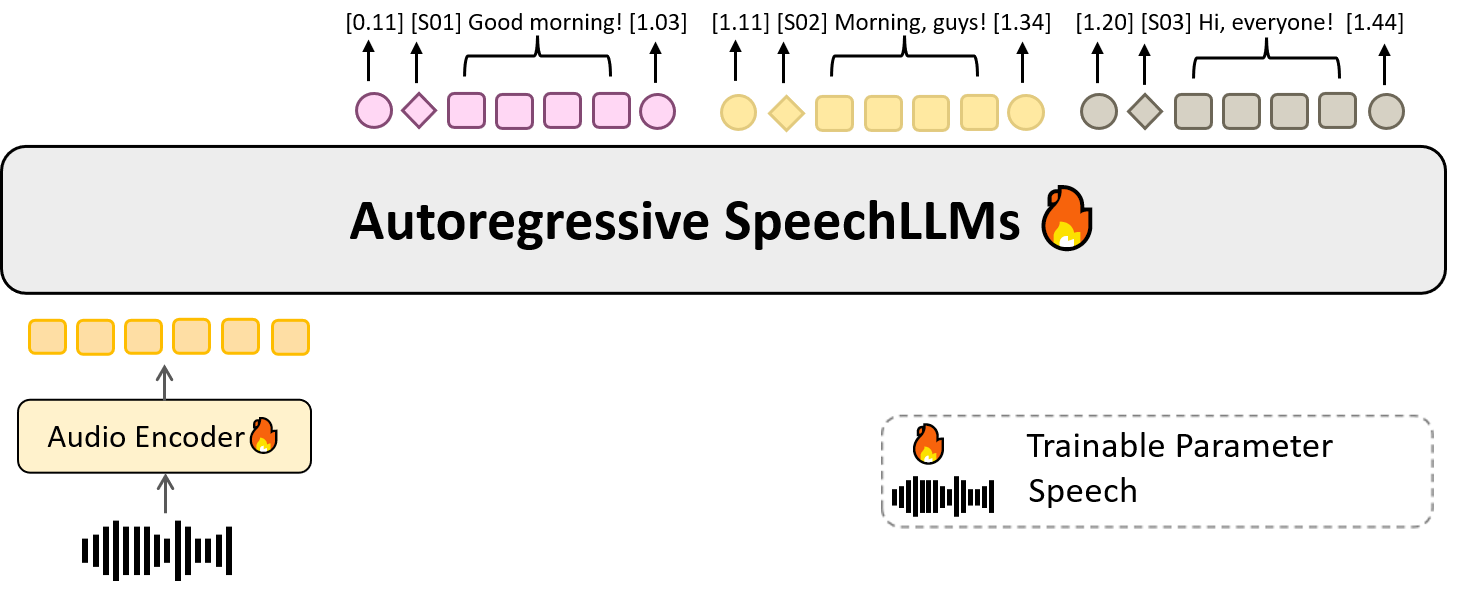
<|audio_pad|> embeddings |
| 输出格式 | 带有说话人标签(如 `[S01]`)的简洁 `[start][Sxx]text[end]` 转录格式 |
## 评估
### 客观评估
我们使用三个客观指标来评估 MOSS-Transcribe-Diarize:字符错误率 (CER)、拼接最小排列字符错误率 (cpCER) 和 Δcp。所有指标都是越低越好。最佳结果加粗显示,次佳结果加下划线显示。破折号 (`-`) 表示结果不可用。
| 模型 | AISHELL‑4 | Alimeeting | Podcast | Movies | ||||||||
|---|---|---|---|---|---|---|---|---|---|---|---|---|
| CER↓ | cpCER↓ | Δcp↓ | CER↓ | cpCER↓ | Δcp↓ | CER↓ | cpCER↓ | Δcp↓ | CER↓ | cpCER↓ | Δcp↓ | |
| Doubao | 18.18 | 27.86 | 9.68 | 25.25 | 37.57 | 12.31 | 7.93 | 10.54 | 2.61 | 9.94 | 30.88 | 20.94 |
| ElevenLabs | 19.58 | 37.95 | 18.36 | 25.70 | 36.69 | 10.99 | 8.50 | 11.34 | 2.85 | 11.49 | 17.85 | 6.37 |
| GPT-4o | - | - | - | - | - | - | - | - | - | 14.37 | 23.67 | 9.31 |
| Gemini 2.5 Pro | 42.70 | 53.42 | 10.72 | 27.43 | 41.64 | 14.21 | 7.38 | 10.23 | 2.85 | 15.46 | 24.15 | 8.69 |
| Gemini 3 Pro | 22.75 | 27.43 | 4.68 | 26.75 | 32.84 | 6.09 | - | - | - | 8.62 | 14.73 | 6.11 |
| VIBEVOICE ASR | 21.40 | 24.99 | 3.59 | 27.40 | 29.33 | 1.93 | 27.94 | 48.30 | 20.36 | 14.59 | 42.54 | 27.94 |
| MOSS Transcribe Diarize 0.9B | 14.84 | 15.83 | 0.99 | 24.86 | 22.17 | -2.69 | 5.97 | 7.37 | 1.40 | 6.36 | 12.76 | 6.40 |
| MOSS Transcribe Diarize Pro | 13.78 | 14.02 | 0.24 | 18.22 | 13.94 | -4.27 | 4.46 | 6.97 | 2.51 | 5.86 | 11.78 | 5.92 |
标签:人工智能, 凭据扫描, 多语言处理, 开源模型, 用户模式Hook绕过, 系统调用监控, 语音识别, 说话人分离, 逆向工具, 音频理解