aws-samples/sample-building-a-conversational-ai-agent-for-aws-waf-analysis-with-agentcore
GitHub: aws-samples/sample-building-a-conversational-ai-agent-for-aws-waf-analysis-with-agentcore
基于 Amazon Bedrock AgentCore 和 Strands Agents SDK 构建的 AI 驱动型 AWS WAF 分析助手,用于自动化安全事件调查、绕过检测及报告生成。
Stars: 3 | Forks: 0
# WAF Agent
English | [中文](README_zh.md)
一个由 AI 驱动的 AWS WAF 分析 agent,用于调查安全事件、检测绕过行为,并为管理层生成每周摘要。基于 [Amazon Bedrock AgentCore](https://docs.aws.amazon.com/bedrock-agentcore/) + [Strands Agents SDK](https://github.com/strands-agents/sdk-python) 构建。
## 它的功能
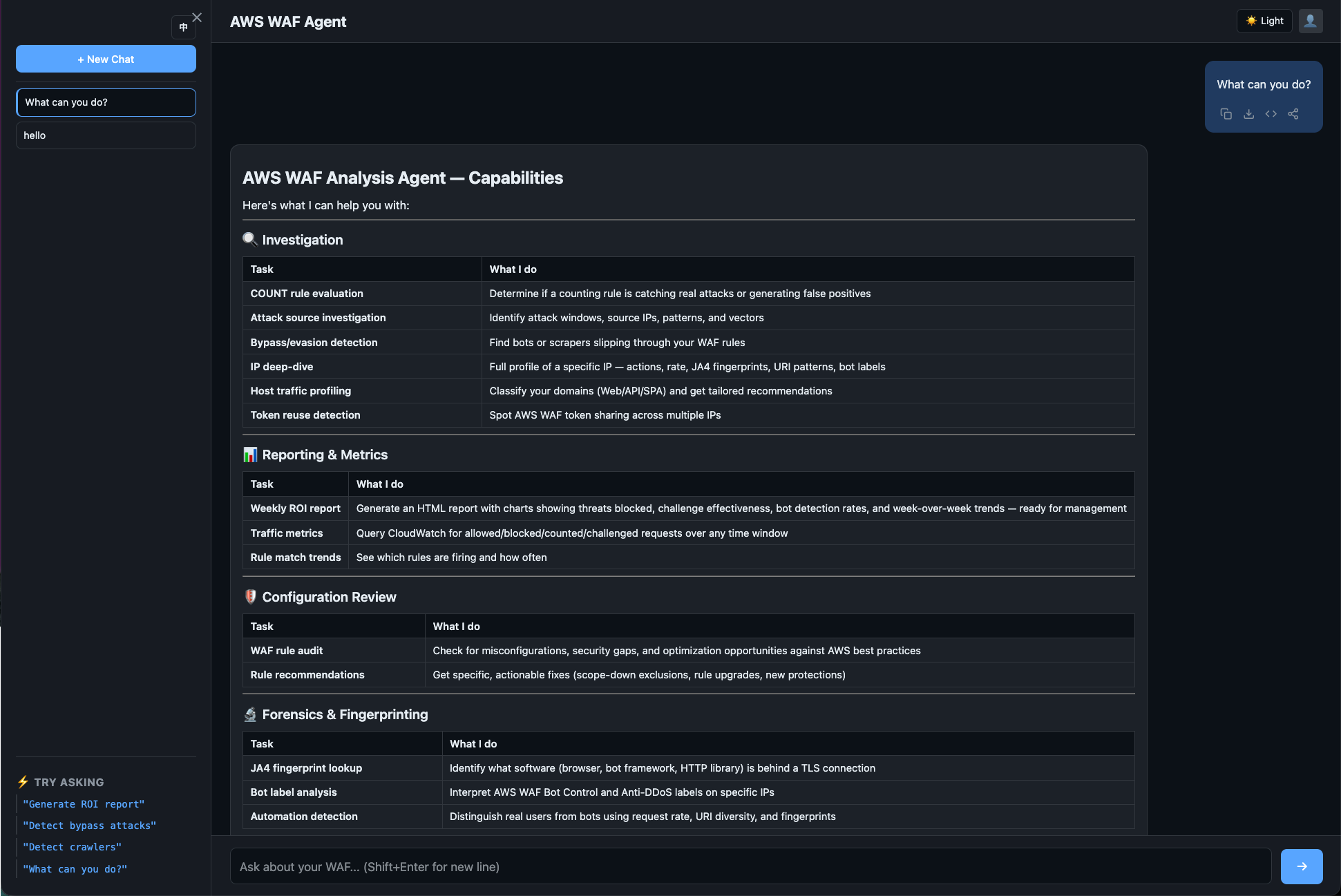
- **主动安全检查** — 扫描绕过行为,评估 COUNT 规则,审计 WAF 配置
- **事件调查** — 误报分析,攻击源识别,IP 画像
- **绕过检测** — 查找规避 WAF 规则的爬虫、bot 和 DDoS 流量
- **报告** — 安全巡检、每周摘要、深度规则审查(均可下载为 HTML)
- **最佳实践指南** — 基于 AWS 文档的 WAF 配置建议
- **隐私感知** — 在显示检查的请求内容时掩盖敏感值(cookie、auth/session token、API key);它不会显示或判断这些敏感信息内部包含的攻击。请参阅[数据隐私](docs/data-privacy.md)。
详情和示例问题请参阅 [docs/capabilities.md](docs/capabilities.md)。
## 快速开始
### 前置条件
- 配置了 AWS WAF 并启用了日志记录的 AWS 账户
- 带有 buildx 的 [Docker](https://docs.docker.com/get-docker/)(用于 ARM64 镜像)
- 配置了适当权限的 AWS CLI v2
### 部署(3 步)
```
# 1. 构建并推送 ARM64 镜像到 ECR
aws ecr create-repository --repository-name waf-agent --region $REGION
ECR_URI=$ACCOUNT_ID.dkr.ecr.$REGION.amazonaws.com/waf-agent
aws ecr get-login-password --region $REGION | docker login --username AWS --password-stdin $ECR_URI
docker buildx build --platform linux/arm64 -t $ECR_URI:latest --push .
# 2. 部署后端(Cognito + AgentCore)
aws cloudformation deploy --template-file deploy/backend.yaml --stack-name waf-agent \
--region $REGION --parameter-overrides AgentContainerUri=$ECR_URI:latest \
--capabilities CAPABILITY_NAMED_IAM
# 3. 部署前端(CloudFront + WAF)— 必须是 us-east-1
aws cloudformation deploy --template-file deploy/frontend.yaml \
--stack-name waf-agent-frontend --region us-east-1
```
关于区域选择、前端配置和故障排除,请参阅[部署指南](docs/deployment.md)。
## 架构
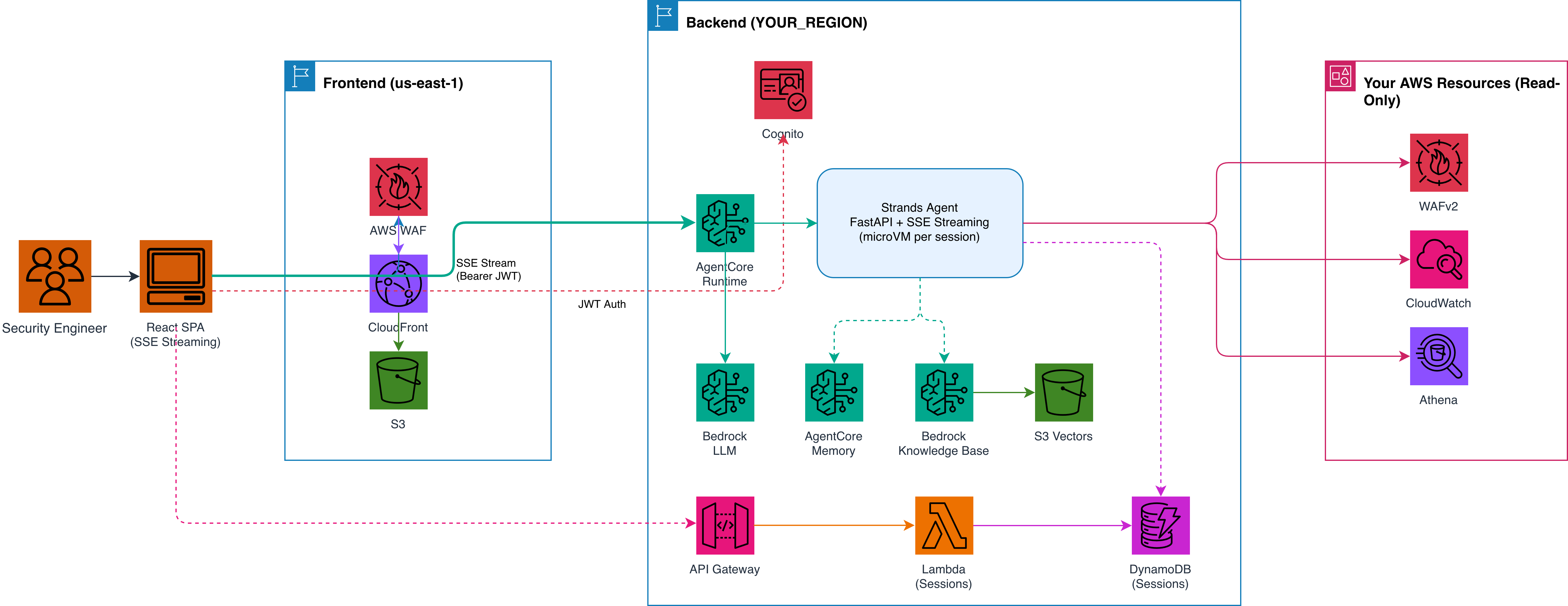
(SSE Streaming)"] end subgraph CF["us-east-1"] CloudFront["CloudFront Distribution"] WAF_FE["WAF WebACL
Anti-DDoS · IP Rep · Rate-limit"] S3["S3 Bucket
(Static Assets)"] end subgraph Backend["ap-northeast-1 (or your region)"] Cognito["Cognito User Pool"] AC["AgentCore Runtime
(microVM per session)"] subgraph Agent["Strands Agent"] FastAPI["FastAPI + SSE Streaming"] end Bedrock["Bedrock
Bedrock LLM"] Memory["AgentCore Memory
(cross-session LTM)"] KB["Bedrock
Knowledge Base"] S3Vec["S3 Vectors"] DDB["DynamoDB
(session history)"] APIGW["API Gateway
(sessions)"] Lambda["Lambda
(sessions)"] end subgraph AWS["Your AWS Resources (Read-Only)"] WAFv2["WAFv2 API"] CW["CloudWatch
Metrics + Logs"] Athena["Athena
(S3 logs)"] end SPA -->|"HTTPS GET"| WAF_FE WAF_FE --> CloudFront --> S3 SPA -->|"① Auth (SRP)"| Cognito Cognito -->|"② JWT Token"| SPA SPA -->|"③ POST /invocations
Bearer JWT · SSE"| AC SPA -->|"④ GET /sessions
Bearer JWT"| APIGW APIGW --> Lambda AC --> FastAPI FastAPI --> Bedrock FastAPI --> Memory FastAPI --> KB KB --> S3Vec FastAPI --> DDB APIGW --> Lambda --> DDB FastAPI --> WAFv2 FastAPI --> CW FastAPI --> Athena ```
- **Frontend**: 部署在 CloudFront + S3 上的 React SPA,受 AWS WAF 保护。支持实时流式传输(工具调用 + 文本 token)、单条消息复制/导出、多消息分享/导出、深色/浅色主题以及会话历史侧边栏。
- **Auth**: Cognito JWT → AgentCore customJWTAuthorizer(无需 API Gateway)。在服务端根据 JWT claims 获取用户身份。
- **Agent**: FastAPI + Strands SDK,通过 callback_handler + asyncio.Queue 实时流式传输工具调用和分析结果
- **Session**: 每个用户隔离的 microVM,15 分钟空闲超时,最长 8 小时生命周期。历史记录持久化到 DynamoDB(30 天 TTL)。
- **Memory**: 使用 AgentCore Memory 实现跨会话的 LTM(事实、偏好、摘要)。使用 DynamoDB 存储完整的消息历史。
请参阅 [部署指南](docs/deployment.md) | [用户指南](docs/user-guide.md) | [IAM 权限](docs/iam-permissions.md) | [成本估算](docs/cost-estimation.md) | [数据隐私](docs/data-privacy.md) | [为什么选择 WAF Agent?](docs/why-waf-agent.md) | [Firehose 优化](docs/firehose-minute-partitioning.md) | [Athena 表检测](docs/athena-table-detection.md)
## 支持的区域
AgentCore + CloudFormation 部署适用于:us-east-1, us-east-2, us-west-2, ap-northeast-1, ap-southeast-1, ap-southeast-2, ap-south-1, eu-west-1, eu-central-1。
关于选择合适的区域,请参阅[区域指南](docs/deployment.md#region-selection)。
## 本地开发
```
# 安装依赖(仅 CLI 模式,不需要 AG-UI 包)
pip install -e .
# 本地运行
export AWS_PROFILE=your-profile
python agent.py "List all WebACLs"
python agent.py "Any traffic bypassing my-webacl?"
```
## 自定义
前端 agent 名称可以通过环境变量进行自定义——无需更改代码:
```
# 在 frontend/.env 中
VITE_BRAND_NAME=My Company WAF Agent
```
这会更改页眉、浏览器标签页标题和对话导出。如果未设置,则默认为 "AWS WAF Agent"。
## 项目结构
```
├── agent.py # Agent entry point (FastAPI + AG-UI + CLI dual mode)
├── tools/ # All agent tools (deterministic, no LLM in tools)
│ ├── waf_config.py # WebACL discovery + capabilities detection
│ ├── waf_metrics.py # CloudWatch Metrics (free, fast)
│ ├── waf_overview.py # Quick overview (top rules, bots, attacks)
│ ├── waf_logs.py # Log queries (36 templates + analyze_ip, CWL + Athena)
│ ├── waf_query.py # Unified query layer (auto-routes CWL or Athena)
│ ├── waf_count_eval.py # COUNT-to-Block evaluation workflow
│ ├── waf_block_fp.py # False positive investigation + proactive scan
│ ├── waf_bypass.py # Bypass/evasion detection (scan + volume + IP)
│ ├── waf_challenge_check.py # Challenge/CAPTCHA compatibility check
│ ├── waf_review_deep.py # Comprehensive rules audit pipeline
│ ├── waf_patrol.py # Security patrol (deterministic HTML report)
│ ├── report.py # Weekly summary HTML generation
│ ├── waf_knowledge.py # Bedrock Knowledge Base search
│ ├── ja4.py # JA4 TLS fingerprint analysis
│ ├── session_state.py # Per-session state (WebACL context, timezone)
│ ├── finding.py # Investigation findings accumulator
│ └── ask_user.py # Human-in-the-loop (CLI input / AG-UI event)
├── deploy/
│ ├── backend.yaml # CloudFormation: Cognito + AgentCore + IAM
│ ├── frontend.yaml # CloudFormation: CloudFront + S3 + WAF
│ └── kb.yaml # CloudFormation: Bedrock KB + S3 Vectors
├── frontend/ # React SPA (Vite + AG-UI streaming client)
├── Dockerfile # ARM64 container for AgentCore
└── docs/
├── deployment.md # Full deployment guide
├── capabilities.md # What you can ask (with examples)
└── capabilities_zh.md
```
## 许可证
本库基于 [MIT-0](LICENSE) 许可证授权。
Mermaid (文本版本)
``` graph TB subgraph User["User Browser"] SPA["React SPA(SSE Streaming)"] end subgraph CF["us-east-1"] CloudFront["CloudFront Distribution"] WAF_FE["WAF WebACL
Anti-DDoS · IP Rep · Rate-limit"] S3["S3 Bucket
(Static Assets)"] end subgraph Backend["ap-northeast-1 (or your region)"] Cognito["Cognito User Pool"] AC["AgentCore Runtime
(microVM per session)"] subgraph Agent["Strands Agent"] FastAPI["FastAPI + SSE Streaming"] end Bedrock["Bedrock
Bedrock LLM"] Memory["AgentCore Memory
(cross-session LTM)"] KB["Bedrock
Knowledge Base"] S3Vec["S3 Vectors"] DDB["DynamoDB
(session history)"] APIGW["API Gateway
(sessions)"] Lambda["Lambda
(sessions)"] end subgraph AWS["Your AWS Resources (Read-Only)"] WAFv2["WAFv2 API"] CW["CloudWatch
Metrics + Logs"] Athena["Athena
(S3 logs)"] end SPA -->|"HTTPS GET"| WAF_FE WAF_FE --> CloudFront --> S3 SPA -->|"① Auth (SRP)"| Cognito Cognito -->|"② JWT Token"| SPA SPA -->|"③ POST /invocations
Bearer JWT · SSE"| AC SPA -->|"④ GET /sessions
Bearer JWT"| APIGW APIGW --> Lambda AC --> FastAPI FastAPI --> Bedrock FastAPI --> Memory FastAPI --> KB KB --> S3Vec FastAPI --> DDB APIGW --> Lambda --> DDB FastAPI --> WAFv2 FastAPI --> CW FastAPI --> Athena ```
标签:AI智能体, AppImage, AWS, C语言, DPI, Web应用防火墙, 安全运营, 扫描框架, 自动化报告, 请求拦截