Chrisstoute/PwnCrypt-Ransomware-Threat-Hunt
GitHub: Chrisstoute/PwnCrypt-Ransomware-Threat-Hunt
一份基于 Microsoft Defender for Endpoint 的 PwnCrypt 勒索软件模拟威胁狩猎完整报告,涵盖 KQL 查询、多维度遥测分析和 MITRE ATT&CK 映射的系统化调查方法论。
Stars: 0 | Forks: 0

# 零日 PwnCrypt 勒索软件威胁狩猎
### Microsoft Defender for Endpoint | Advanced Hunting | KQL | MITRE ATT&CK




## 概述
本项目记录了在涉及 PwnCrypt 的模拟零日勒索软件场景中,使用 Microsoft Defender for Endpoint 执行威胁狩猎的过程。
🛡️ 网络靶场场景致谢 🛡️
此威胁狩猎场景由 The Cyber Range 的首席执行官 Josh Madakor 提供。

|
本次调查重点关注识别勒索软件类型的文件活动、可疑的 PowerShell 执行、脚本行为、受影响的文件、设备范围、网络活动、Defender 遥测数据以及 MITRE ATT&CK 映射。
## 场景
报告了一种名为 PwnCrypt 的新型勒索软件威胁。已知的威胁指标是包含以下字符串的文件活动:
```
pwncrypt
```
本次狩猎的目的是确定环境中的任何设备是否显示出与 PwnCrypt 相关的活动迹象,以及该活动是否表明存在勒索软件执行、文件受到影响或潜在的数据窃取。
## 假设
如果 PwnCrypt 勒索软件在环境中执行,那么受影响的设备可能会显示:
- 包含 `pwncrypt` 的文件创建、修改或重命名事件
- 可疑的 PowerShell 执行
- 使用了 `ExecutionPolicy Bypass`
- 从异常位置(如 `C:\ProgramData`)执行脚本
- 业务相关文件被重命名并带有勒索软件标记
- 工具下载或暂存行为
- 执行前后可能的网络活动
## 使用的工具
| 工具 | 用途 |
|---|---|
| Microsoft Defender for Endpoint | 端点检测与响应 |
| Advanced Hunting | 查询端点遥测数据 |
| KQL | 威胁狩猎查询语言 |
| PowerShell | 观察到的攻击者/脚本执行行为 |
| MITRE ATT&CK | TTP 映射 |
| GitHub | 文档与作品集发布 |
## 主要发现
- 在端点上观察到了 `pwncrypt.ps1`。
- 业务相关文件被重命名并带有 `pwncrypt` 标记。
- `cmd.exe` 启动了 `powershell.exe`。
- PowerShell 使用了 `-ExecutionPolicy Bypass`。
- PowerShell 执行了 `C:\ProgramData\pwncrypt.ps1`。
- PowerShell 遥测数据显示了工具/脚本下载行为。
- 7-Zip 被下载并静默安装。
- 员工数据被写入临时文件。
- 在审查的网络时间窗口内,没有确凿证据表明存在成功的外部数据窃取。
## 调查步骤
### 步骤 1 - 准备工作与假设
狩猎从场景中已知的一个指标开始:包含 `pwncrypt` 的文件活动。工作假设是,受 PwnCrypt 影响的设备将显示出可疑的文件活动、PowerShell 执行以及勒索软件式的文件影响。
由于这是计划阶段,因此未截取屏幕截图。
### 步骤 2 - 针对 PwnCrypt 文件名的初始 IOC 搜索
我在 `DeviceFileEvents` 中搜索了包含已知 IOC 字符串 `pwncrypt` 的文件名。
```
DeviceFileEvents
| where FileName contains "pwncrypt"
| summarize EventCount = count() by DeviceName, FileName
| order by EventCount
```
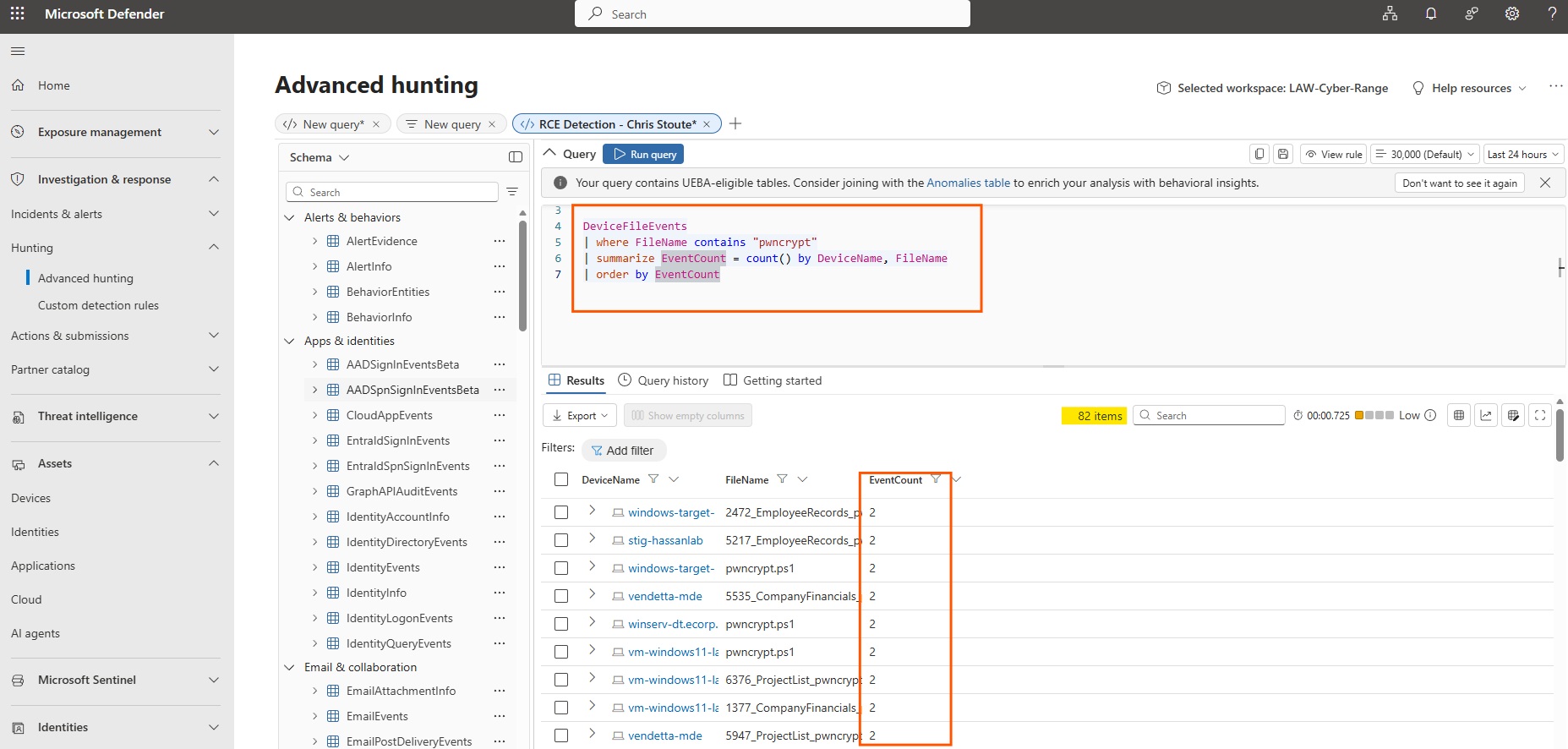
**发现:** 多台设备显示了包含 `pwncrypt` 的文件活动,包括 `pwncrypt.ps1` 和被重命名并带有 PwnCrypt 标记的业务相关 CSV 文件。
### 步骤 3 - 原始文件事件时间线
识别出 IOC 后,我移除了汇总视图并审查了原始文件事件时间线。
```
DeviceFileEvents
| where FileName contains "pwncrypt"
| project Timestamp, DeviceName, ActionType, FileName, FolderPath, InitiatingProcessFileName, InitiatingProcessCommandLine
| order by Timestamp asc
```
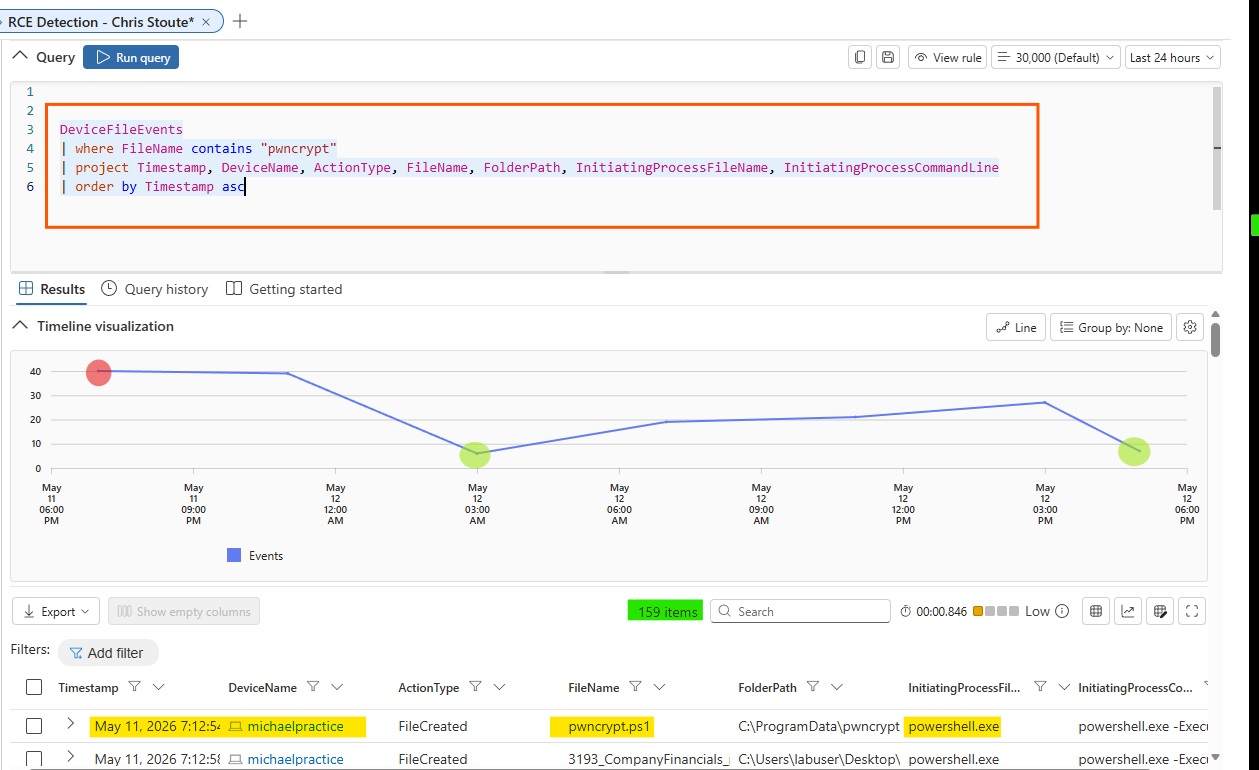
**发现:** 原始时间线显示 `pwncrypt.ps1` 和几个重命名的文件出现在多台设备上。该活动与 PowerShell 执行有关。
### 步骤 4 - 将调查范围限定到我的虚拟机
由于这是一个共享的网络靶场环境,我将深入调查和响应操作限定在我自己的虚拟机 `vendetta-mde` 上,而不是对其他同学的设备采取操作。
```
DeviceFileEvents
| where DeviceName == "vendetta-mde"
| where FileName contains "pwncrypt"
| project Timestamp, DeviceName, ActionType, FileName, FolderPath, InitiatingProcessFileName, InitiatingProcessCommandLine
| order by Timestamp asc
```
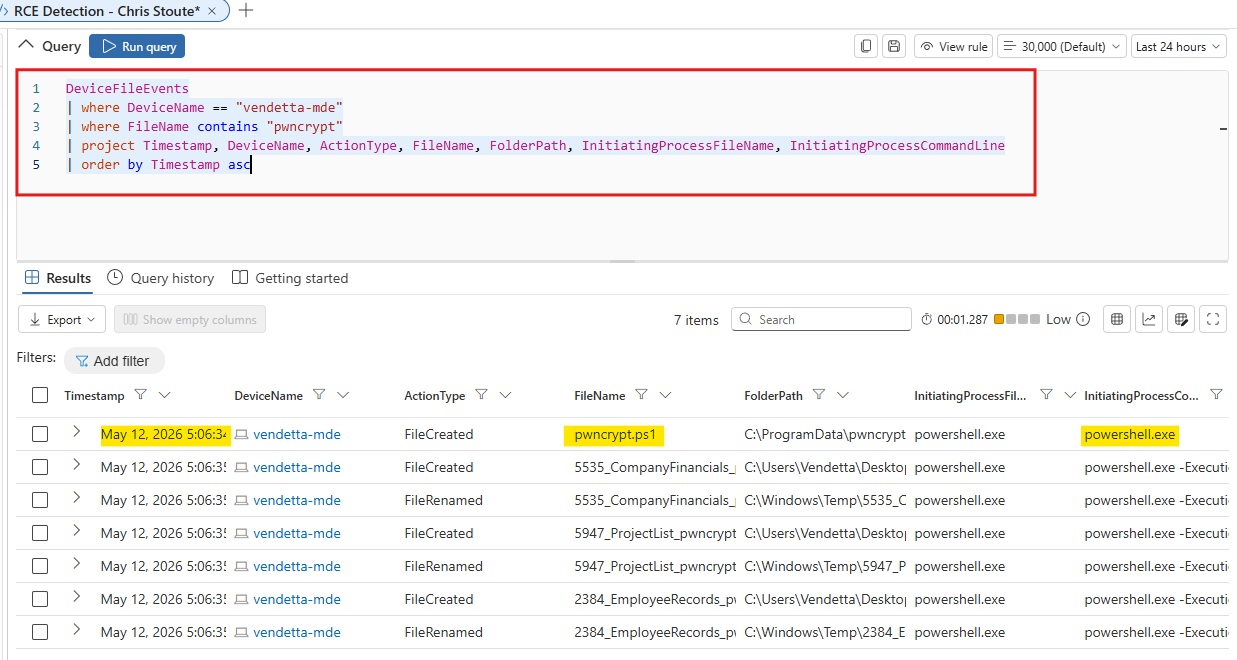
**发现:** `vendetta-mde` 设备显示了与 PwnCrypt 相关的文件活动,包括 `pwncrypt.ps1` 和被重命名的业务文件。
### 步骤 5 - 转向进程活动
确认文件活动后,我将视线转向可疑时间戳前后的 `DeviceProcessEvents`,以识别负责的进程。
```
let TargetDevice = "vendetta-mde";
let SuspiciousTime = datetime(2026-05-12T22:06:34.7444598Z);
DeviceProcessEvents
| where DeviceName == TargetDevice
| where Timestamp between ((SuspiciousTime - 10m) .. (SuspiciousTime + 10m))
| project Timestamp, DeviceName, AccountName, FileName, ProcessCommandLine, InitiatingProcessFileName, InitiatingProcessCommandLine
| order by Timestamp asc
```
**发现:** 进程遥测数据显示,在出现 PwnCrypt 文件活动的同一时间,出现了涉及 `cmd.exe` 和 `powershell.exe` 的可疑命令行活动。
### 步骤 6 - 确认 PowerShell ExecutionPolicy Bypass
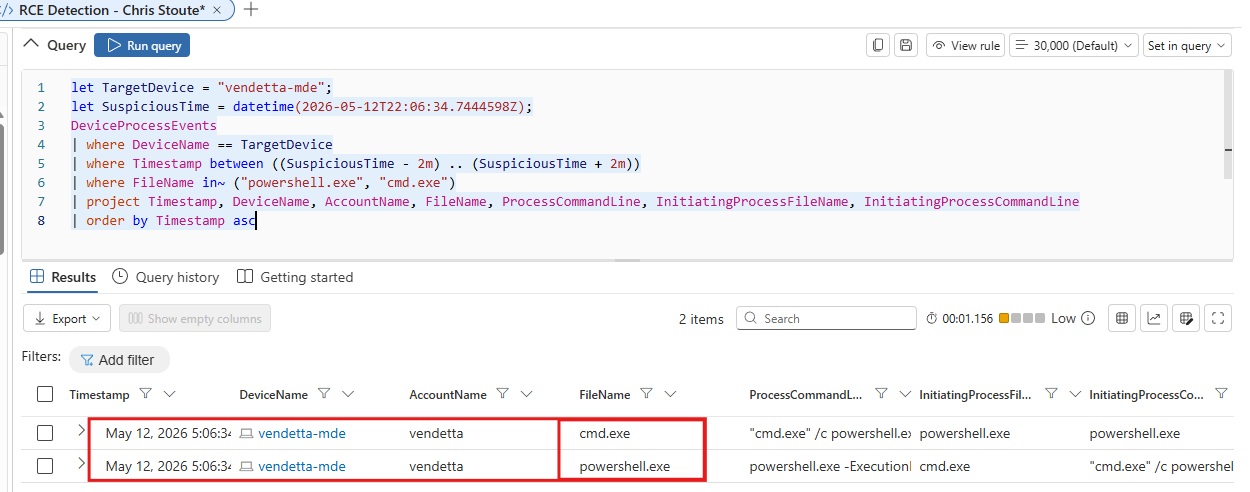
我缩小了进程查询的范围,专注于 `cmd.exe` 和 `powershell.exe`。
```
let TargetDevice = "vendetta-mde";
let SuspiciousTime = datetime(2026-05-12T22:06:34.7444598Z);
DeviceProcessEvents
| where DeviceName == TargetDevice
| where Timestamp between ((SuspiciousTime - 2m) .. (SuspiciousTime + 2m))
| where FileName in~ ("powershell.exe", "cmd.exe")
| project Timestamp, DeviceName, AccountName, FileName, ProcessCommandLine, InitiatingProcessFileName, InitiatingProcessCommandLine
| order by Timestamp asc
```
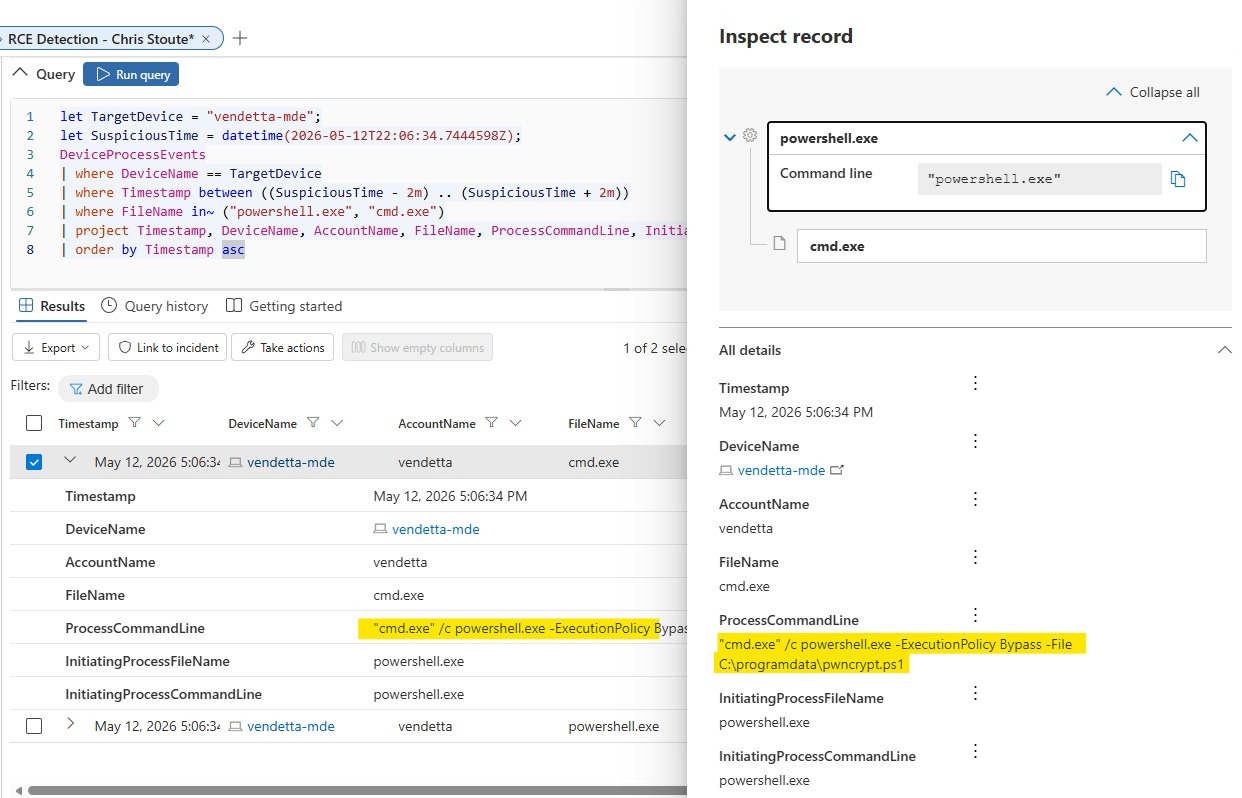
**发现:** 进程记录显示 `cmd.exe` 启动 PowerShell 时绕过了执行策略:
```
cmd.exe /c powershell.exe -ExecutionPolicy Bypass -File C:\ProgramData\pwncrypt.ps1
```
这证实了从以下位置执行的可疑脚本:
```
C:\ProgramData\pwncrypt.ps1
```
### 步骤 7 - 识别脚本执行后受影响的文件
确认执行后,我审查了可疑 PowerShell 命令运行后立即发生的文件活动。
```
let TargetDevice = "vendetta-mde";
let SuspiciousTime = datetime(2026-05-12T22:06:34.7444598Z);
DeviceFileEvents
| where DeviceName == TargetDevice
| where Timestamp between ((SuspiciousTime - 2m) .. (SuspiciousTime + 5m))
| where FileName contains "pwncrypt"
| project Timestamp, DeviceName, ActionType, FileName, FolderPath, InitiatingProcessFileName, InitiatingProcessCommandLine
| order by Timestamp asc
```
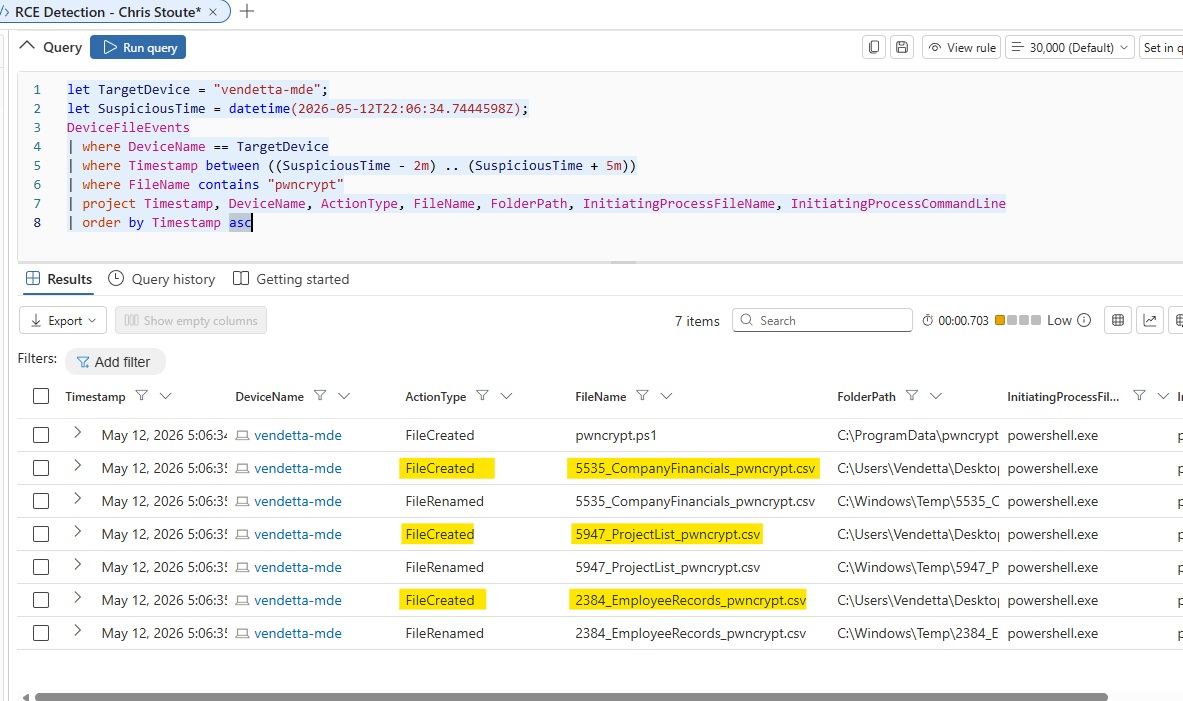
**发现:** 脚本执行后,业务相关文件被创建或重命名并带有 `pwncrypt` 标记。
示例:
```
CompanyFinancials_pwncrypt.csv
ProjectList_pwncrypt.csv
EmployeeRecords_pwncrypt.csv
```
### 步骤 8 - 审查文件重命名证据
为了确定原始文件是否被重命名,我审查了涉及受影响的业务文件名的活动。
```
let TargetDevice = "vendetta-mde";
let SuspiciousTime = datetime(2026-05-12T22:06:34.7444598Z);
DeviceFileEvents
| where DeviceName == TargetDevice
| where Timestamp between ((SuspiciousTime - 2m) .. (SuspiciousTime + 5m))
| where FolderPath has_any ("CompanyFinancials", "ProjectList", "EmployeeRecords", "pwncrypt")
or FileName has_any ("CompanyFinancials", "ProjectList", "EmployeeRecords", "pwncrypt")
| project Timestamp, DeviceName, ActionType, FileName, PreviousFolderPath, FolderPath, InitiatingProcessFileName, InitiatingProcessCommandLine
| order by Timestamp asc
```
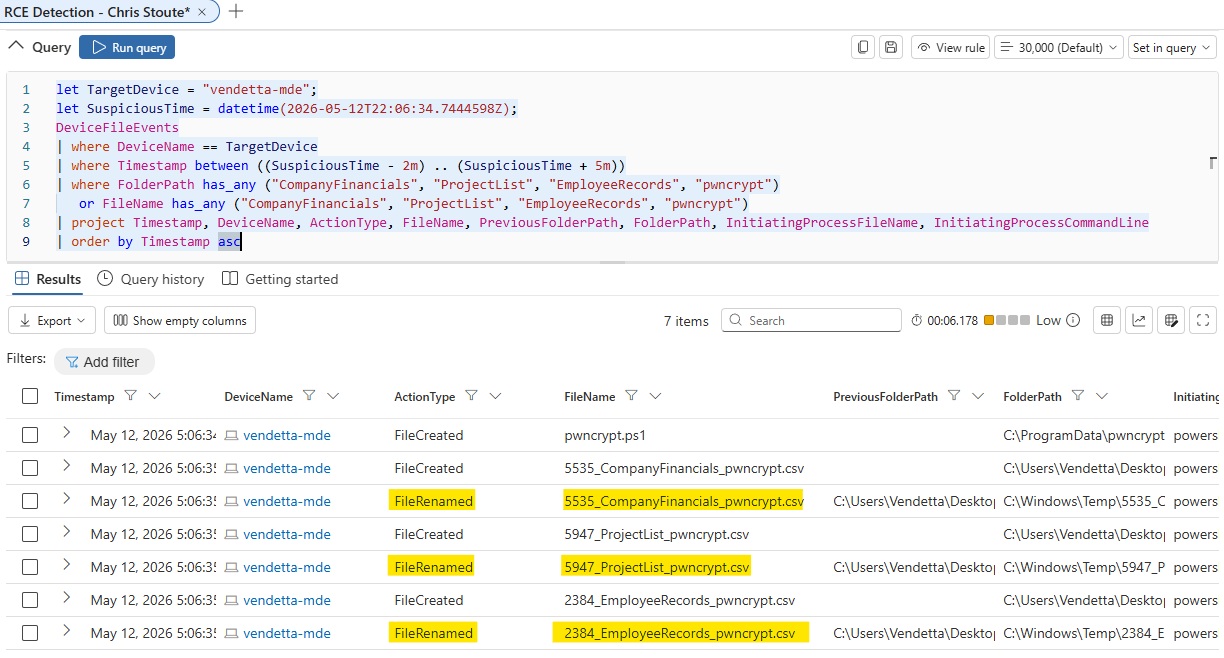
**发现:** 文件活动显示了勒索软件式的影响,其中业务相关文件与 `pwncrypt` 标记相关联。
### 步骤 9 - 确定跨设备的 PwnCrypt 活动范围
在确认 `vendetta-mde` 上的活动后,我确定了所有设备的 IOC 范围,以了解更广泛的影响。
```
DeviceFileEvents
| where FileName contains "pwncrypt"
| summarize PwnCryptEvents = count(),
FirstSeen = min(Timestamp),
LastSeen = max(Timestamp),
AffectedFiles = make_set(FileName, 10)
by DeviceName
| order by PwnCryptEvents desc
```
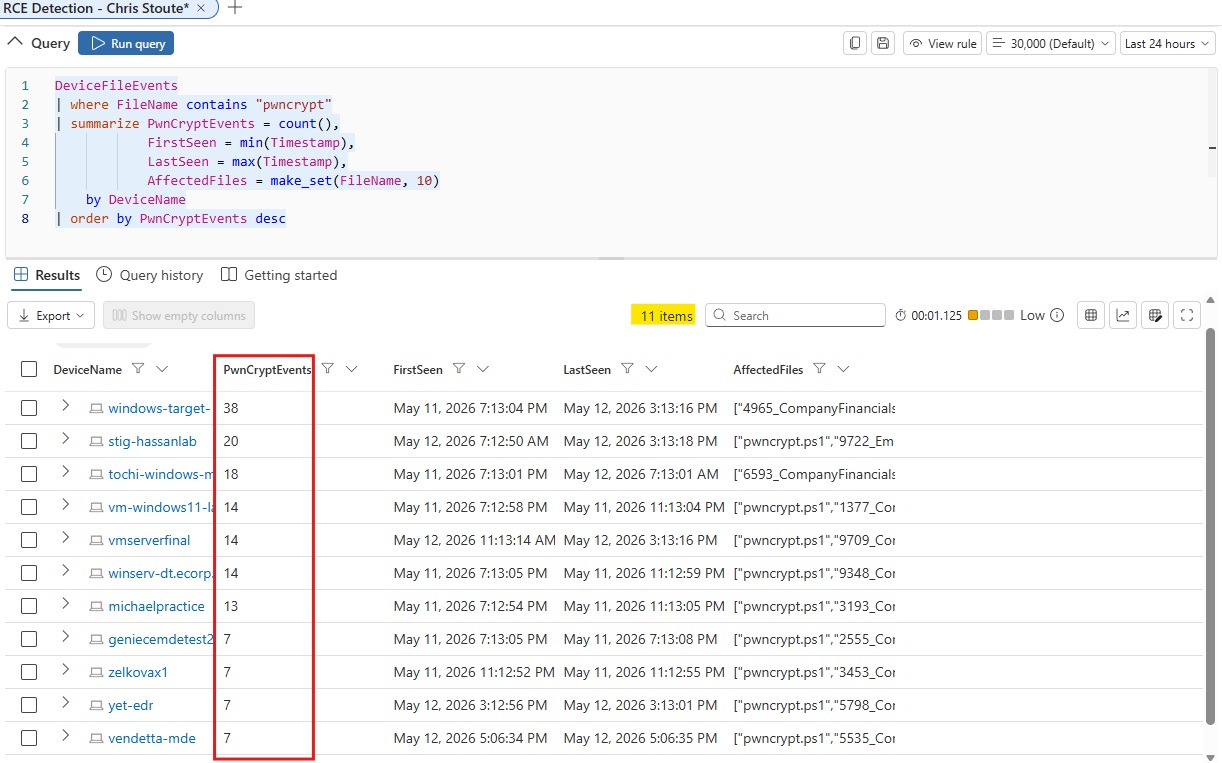
**发现:** 实验室环境中的多台设备出现了与 PwnCrypt 相关的活动。`vendetta-mde` 已确认有相关活动,但响应操作仅限于我自己的虚拟机。
### 步骤 10 - 审查执行前后的网络活动
我检查了可疑执行时间前后的网络活动,以确定是否存在明显的命令与控制 (C2) 或数据窃取活动。
```
let TargetDevice = "vendetta-mde";
let SuspiciousTime = datetime(2026-05-12T22:06:34.7444598Z);
DeviceNetworkEvents
| where DeviceName == TargetDevice
| where Timestamp between ((SuspiciousTime - 5m) .. (SuspiciousTime + 10m))
| project Timestamp, DeviceName, InitiatingProcessFileName, InitiatingProcessCommandLine, RemoteIP, RemoteUrl, RemotePort, RemoteIPType, ActionType
| order by Timestamp asc
```
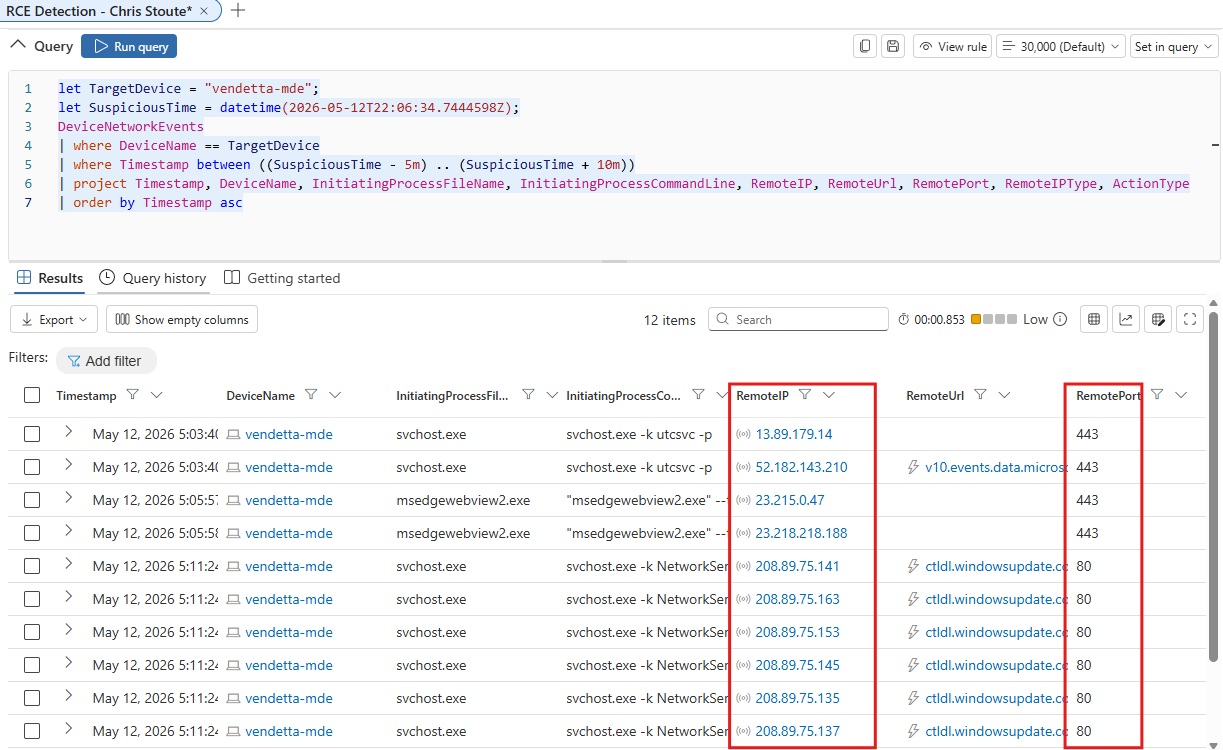
**发现:** 观察到了网络活动,主要涉及通过端口 `80` 和 `443` 的常见 Windows/Microsoft 相关流量。在此窗口期间,没有确凿证据表明存在成功的外部数据窃取。
### 步骤 11 - 审查 Defender 警报证据
我审查了可疑时间段前后的 Defender 警报证据。
```
let TargetDevice = "vendetta-mde";
let SuspiciousTime = datetime(2026-05-12T22:06:34.7444598Z);
AlertEvidence
| where DeviceName == TargetDevice
| where Timestamp between ((SuspiciousTime - 30m) .. (SuspiciousTime + 30m))
| project Timestamp, DeviceName, Title, Categories, AttackTechniques, EntityType, EvidenceRole
| order by Timestamp asc
```
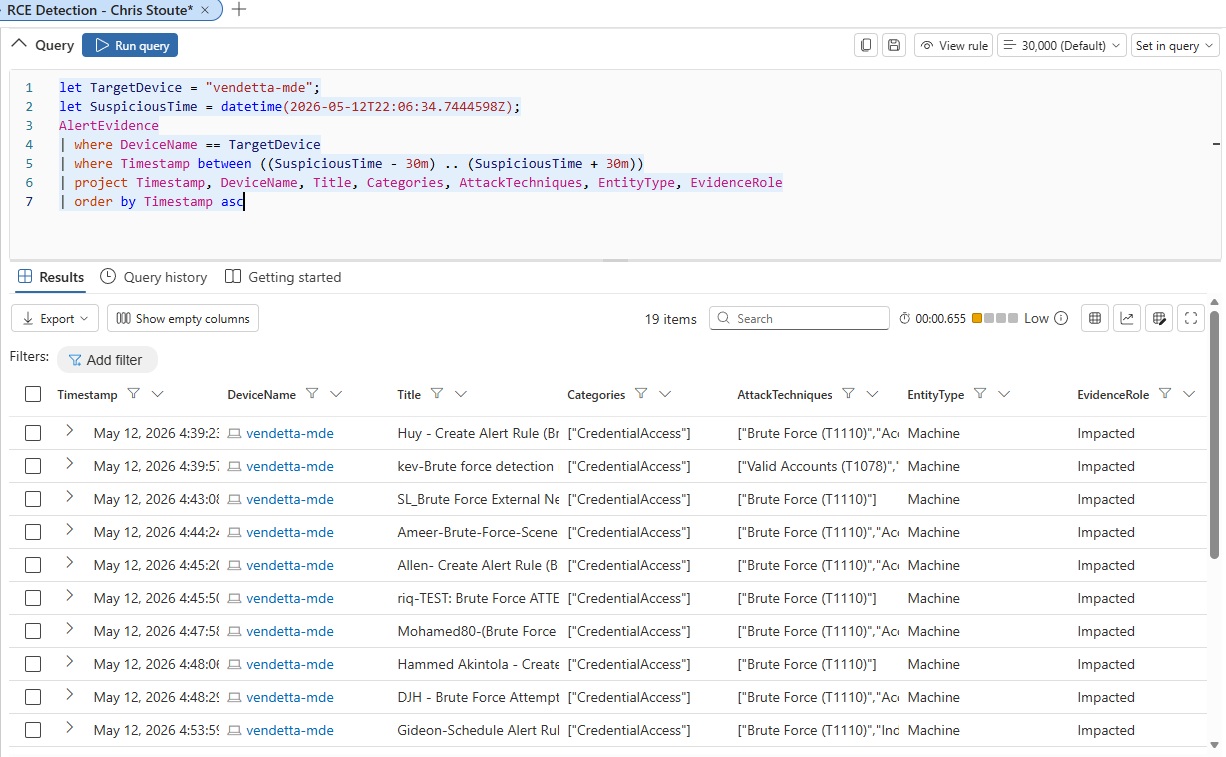
**发现:** Defender 显示了与暴力破解活动相关的现有警报证据,但在审查的时间窗口内,没有直接与 PwnCrypt 勒索软件执行相关的明显警报。
### 步骤 12 - 审查 AV 或威胁检测遥测数据
我搜索了与 PwnCrypt 相关的直接防病毒或恶意软件检测事件。
```
let TargetDevice = "vendetta-mde";
let SuspiciousTime = datetime(2026-05-12T22:06:34.7444598Z);
DeviceEvents
| where DeviceName == TargetDevice
| where Timestamp between ((SuspiciousTime - 30m) .. (SuspiciousTime + 30m))
| where ActionType has_any ("AntivirusDetection", "MalwareDetected", "ThreatDetected", "ExploitGuard")
or FileName contains "pwncrypt"
or AdditionalFields contains "pwncrypt"
| project Timestamp, DeviceName, ActionType, FileName, FolderPath, AdditionalFields
| order by Timestamp asc
```
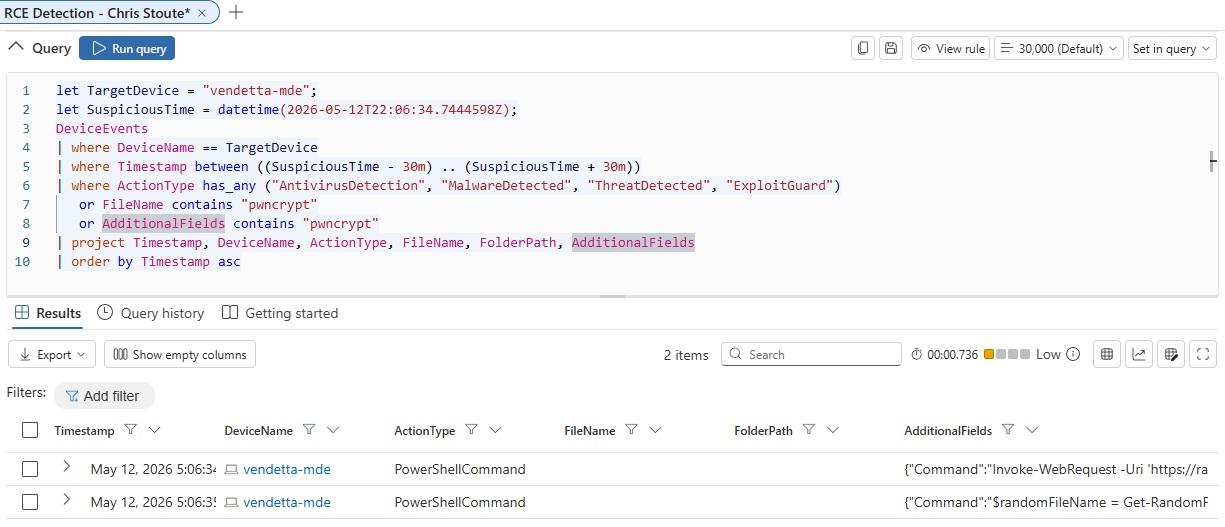
**发现:** 没有显示直接的恶意软件检测事件,但存在相关的 PowerShell 遥测数据。
### 步骤 13 - 提取 PowerShell 命令遥测数据
最后,我扩展了 PowerShell 命令遥测数据,以更好地了解执行了哪些命令。
```
let TargetDevice = "vendetta-mde";
let SuspiciousTime = datetime(2026-05-12T22:06:34.7444598Z);
DeviceEvents
| where DeviceName == TargetDevice
| where Timestamp between ((SuspiciousTime - 30m) .. (SuspiciousTime + 30m))
| where ActionType == "PowerShellCommand"
| extend Command = tostring(parse_json(AdditionalFields).Command)
| project Timestamp, DeviceName, ActionType, Command
| order by Timestamp asc
```
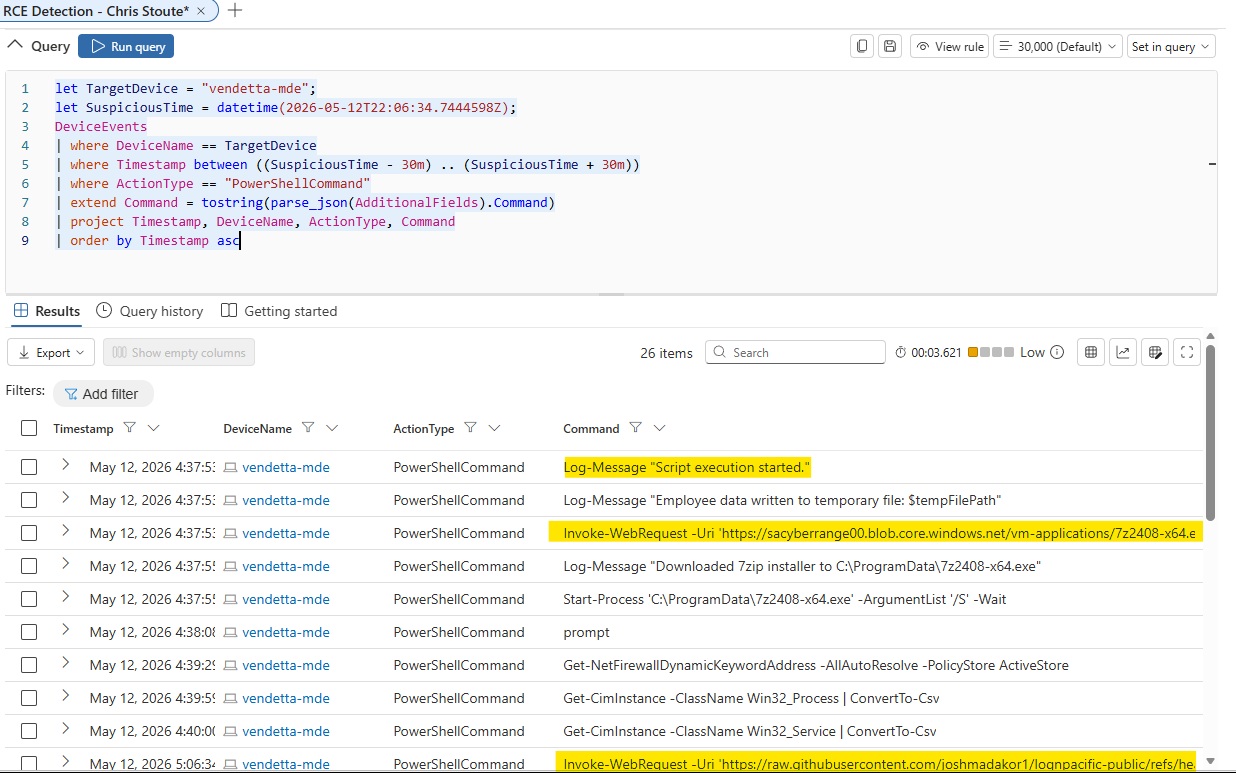
**发现:** PowerShell 遥测数据显示了脚本执行、工具下载行为和暂存活动。
观察到的活动包括:
```
Invoke-WebRequest
Download of 7-Zip installer
Silent installation using Start-Process
Employee data written to a temporary file
Additional PowerShell commands executed
```
## 时间线摘要
| 时间 | 事件 |
|---|---|
| 2026 年 5 月 12 日 下午 5:06 | 在 `vendetta-mde` 上观察到可疑 PowerShell 活动 |
| 2026 年 5 月 12 日 下午 5:06 | `cmd.exe` 启动了 `powershell.exe` |
| 2026 年 5 月 12 日 下午 5:06 | PowerShell 执行了 `C:\ProgramData\pwncrypt.ps1` |
| 2026 年 5 月 12 日 下午 5:06 | 设备上出现了包含 `pwncrypt` 的文件 |
| 2026 年 5 月 12 日 下午 5:06 | PowerShell 遥测数据显示了下载和暂存行为 |
| 2026 年 5 月 12 日 下午 5:06 | 在审查的网络时间窗口内未确认存在明显的外部数据窃取 |
## MITRE ATT&CK 映射
| 技术 | ID | 证据 |
|---|---|---|
| PowerShell | T1059.001 | PowerShell 使用 `ExecutionPolicy Bypass` 执行了 `pwncrypt.ps1` |
| 入站工具传输 | T1105 | PowerShell 使用 `Invoke-WebRequest` 下载工具/脚本 |
| 数据暂存:本地数据暂存 | T1074.001 | PowerShell 遥测数据显示员工数据被写入临时文件 |
| 归档收集的数据:通过实用工具归档 | T1560.001 | 7-Zip 被下载并静默安装 |
| 为影响而加密数据 | T1486 | 业务文件被重命名并带有 `pwncrypt` 标记 |
| 用户执行:恶意文件 | T1204.002 | 脚本执行发生在 `vendetta` 用户上下文中 |
## 最终结论
本次狩猎确认了 `vendetta-mde` 上存在 PwnCrypt 勒索软件样式的活动。文件遥测数据显示了 `pwncrypt.ps1` 和多个被重命名并带有 `pwncrypt` 标记的业务相关文件。进程遥测数据确认 `cmd.exe` 使用 `-ExecutionPolicy Bypass` 启动了 `powershell.exe` 以执行:
```
C:\ProgramData\pwncrypt.ps1
```
PowerShell 命令遥测数据显示了可疑行为,包括工具下载、静默安装和数据暂存活动。执行窗口前后的网络活动并未提供成功进行外部数据窃取的确凿证据,但确认了本地勒索软件式的文件影响和可疑的 PowerShell 自动化行为。
## 响应建议
建议的响应措施:
1. 将 `vendetta-mde` 从网络中隔离。
2. 保留证据、屏幕截图和相关的 KQL 结果。
3. 审查受影响的文件并确定可恢复性。
4. 确定所有设备中 `pwncrypt` IOC 的范围。
5. 审查 PowerShell 执行策略和日志记录配置。
6. 在企业环境中阻止已确认的恶意下载源。
7. 如果实验室政策要求,请重置镜像或重建受影响的虚拟机。
8. 创建或微调针对未来 `pwncrypt` 活动的检测规则。
## 经验教训
此场景演示了如何使用 Microsoft Defender for Endpoint 执行以勒索软件为重点的威胁狩猎。调查强化了以下重要性:从广泛的 IOC 发现转向集中的设备级分析,然后跨文件、进程、网络、警报和 PowerShell 遥测数据进行调查。
主要收获:
- 从已知的 IOC 广泛开始。
- 使用原始事件时间线来识别首次出现的活动。
- 从文件事件转向进程事件。
- 检查命令行执行细节。
- 使用 PowerShell 遥测数据确认脚本行为。
- 确定跨设备的影响范围。
- 验证活动是否支持窃取行为。
- 将发现映射到 MITRE ATT&CK 以进行专业报告。

标签:Advanced Hunting, AI合规, ATT&CK框架, Cloudflare, Cyber Range, DNS 反向解析, EDR, IoC, IPv6, IP 地址批量处理, KQL, Kusto查询语言, Microsoft Defender for Endpoint, MITRE ATT&CK, OpenCanary, PB级数据处理, PowerShell, PwnCrypt, 勒索软件, 妥协指标, 威胁情报, 安全模拟, 安全运维, 开发者工具, 微软Defender, 搜索语句(dork), 文件加密, 模拟演练, 端点安全, 网络安全, 网络安全审计, 网络靶场, 脆弱性评估, 补丁管理, 隐私保护, 零日漏洞, 高级威胁狩猎