jordibrouwer/nextdash
GitHub: jordibrouwer/nextdash
nextDash 是一个无需账号和云服务的自托管书签仪表板,用键盘驱动的方式帮助用户高效管理和导航个人链接集合。
Stars: 21 | Forks: 1
# 🚀 nextDash
**A keyboard-first, self-hosted bookmark dashboard. No accounts, no cloud, no noise.**
Self-host on any machine or container. Open it in your browser, organise bookmarks across multiple pages, and navigate everything from your keyboard. Based on [ThinkDashboard](https://github.com/MatiasDesuu/ThinkDashboard) by MatiasDesuu.
📖 **[Full user manual (MANUAL.md)](MANUAL.md)** — step-by-step guide for new users: concepts, keyboard workflow, config, import/backup, health, extension, and efficient daily use.
📋 **[Changelog (CHANGELOG.md)](CHANGELOG.md)** — complete release history (new / fix).
🗂️ **[Cheat sheet (PDF)](nextDash-cheatsheet.pdf?raw=true)** — one-page printable reference of the keyboard shortcuts and command palette for quick lookup.
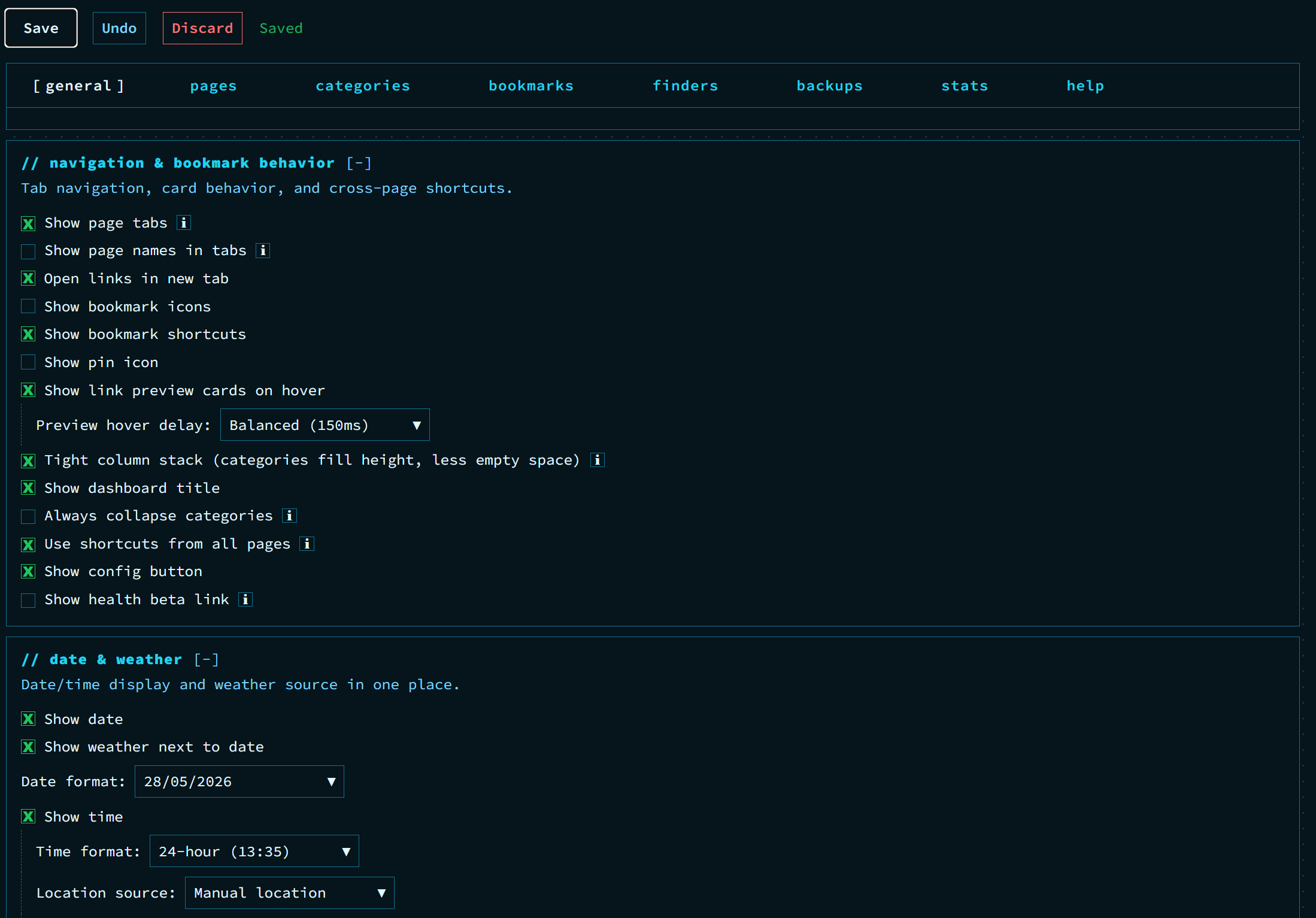
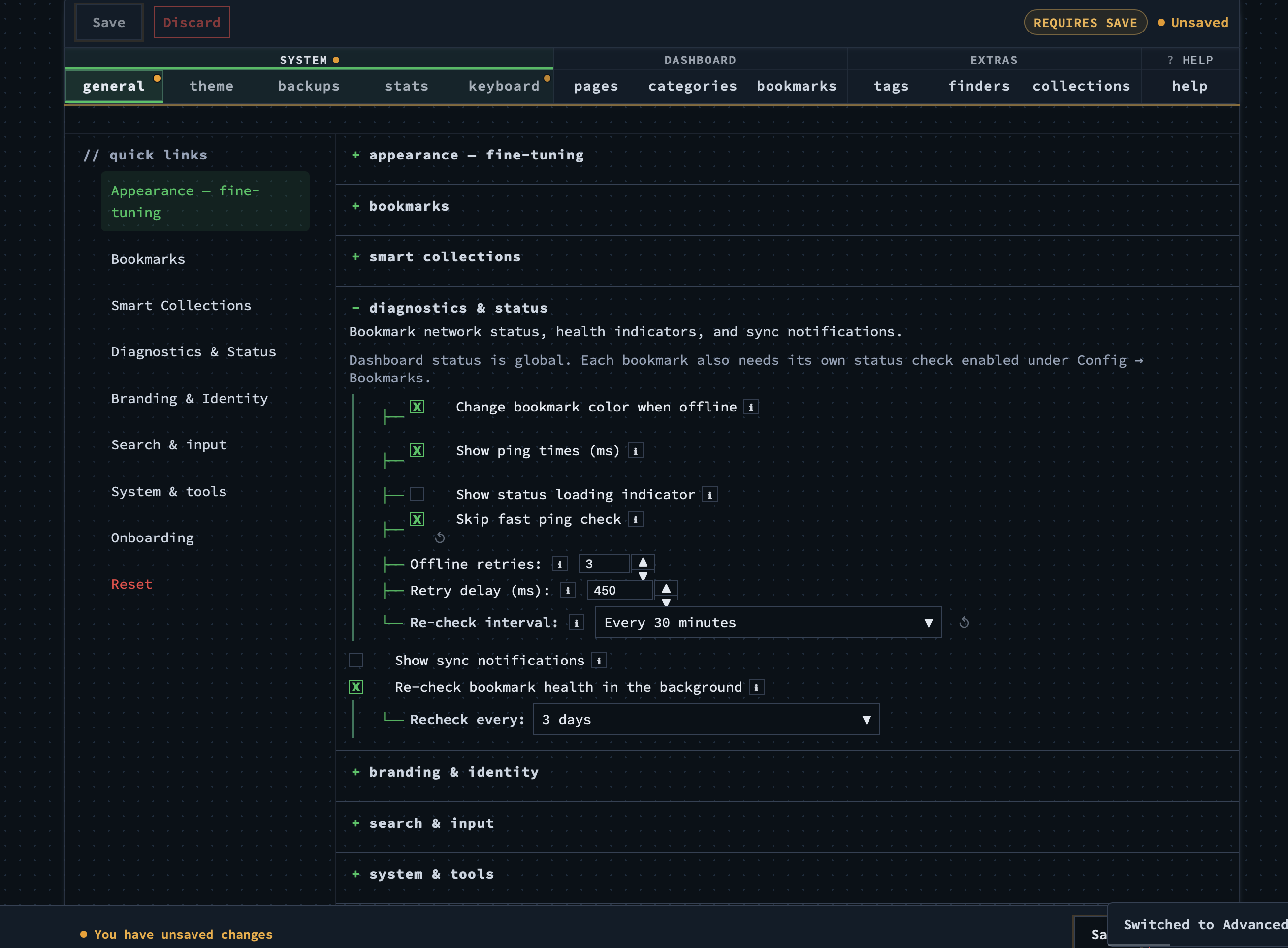
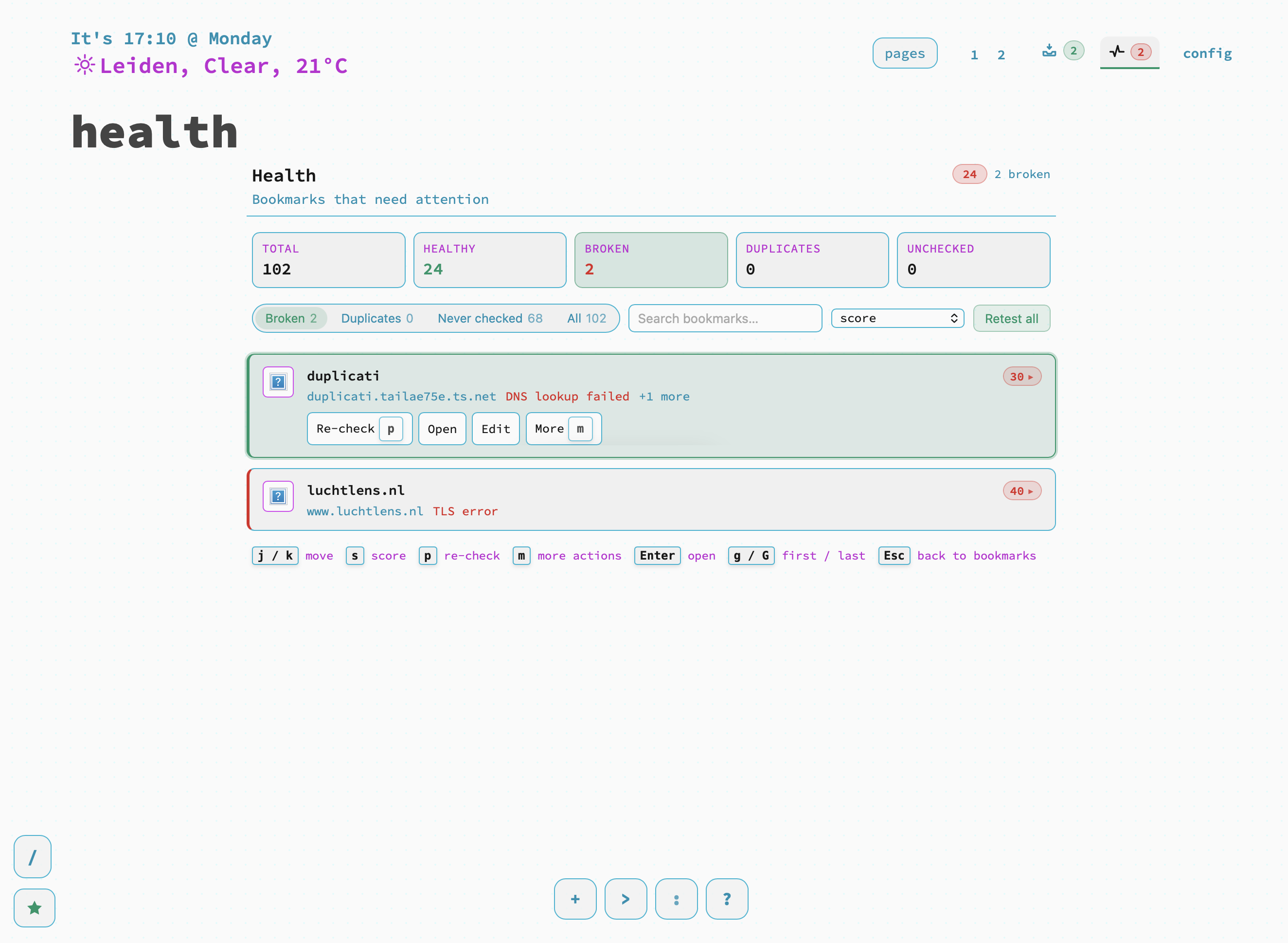
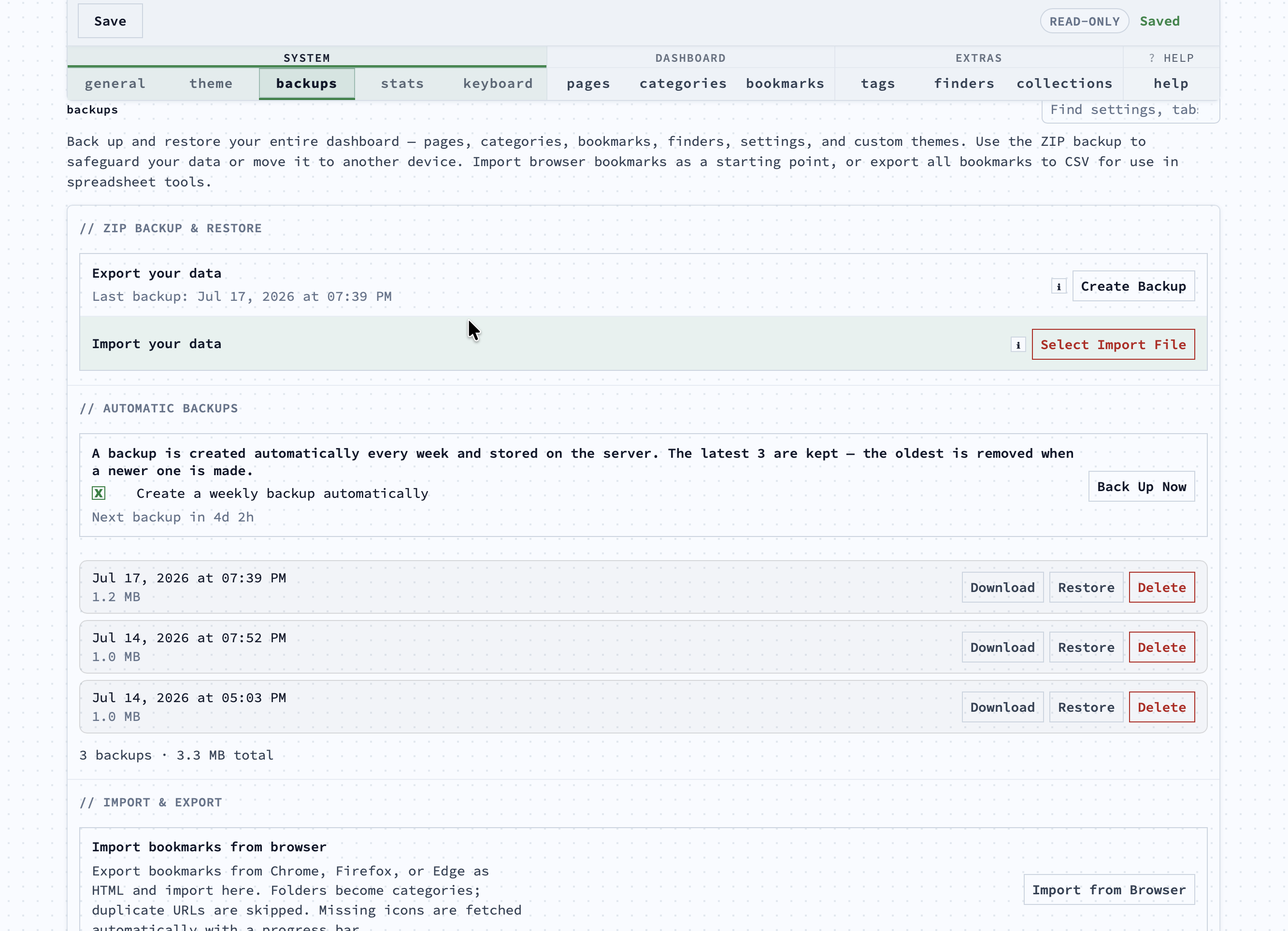
## Screenshots
| 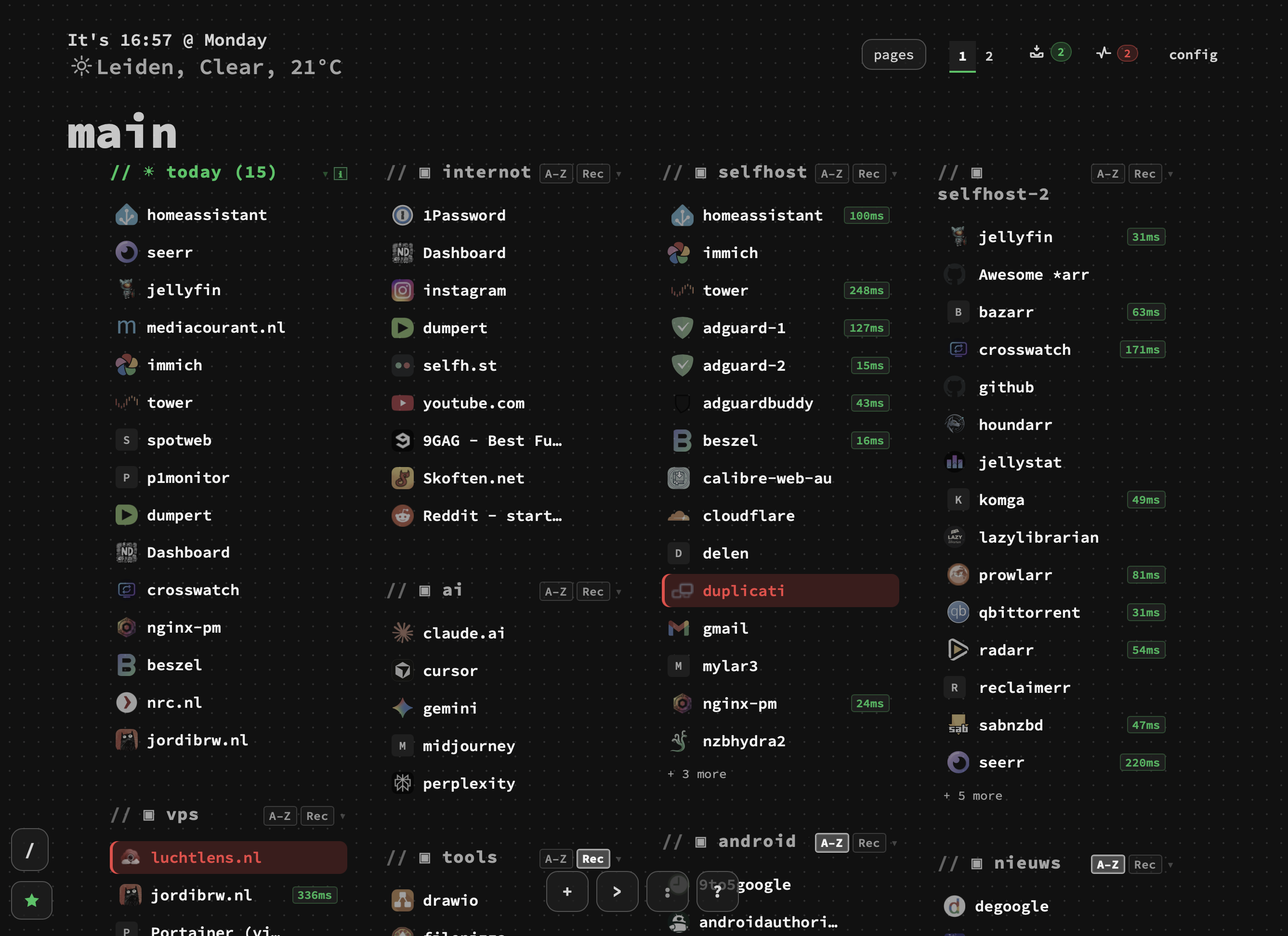 | 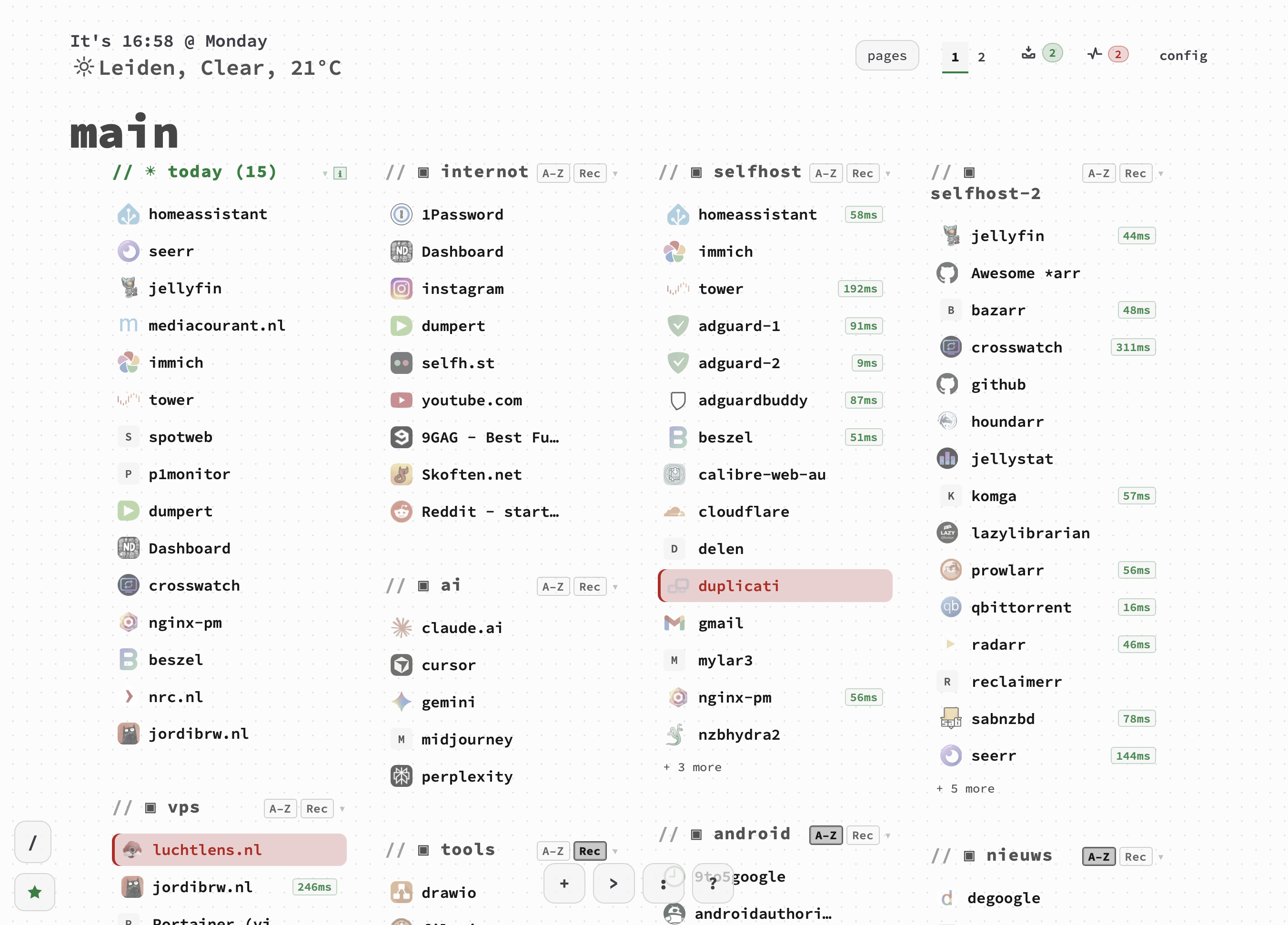 |
|:---:|:---:|
| 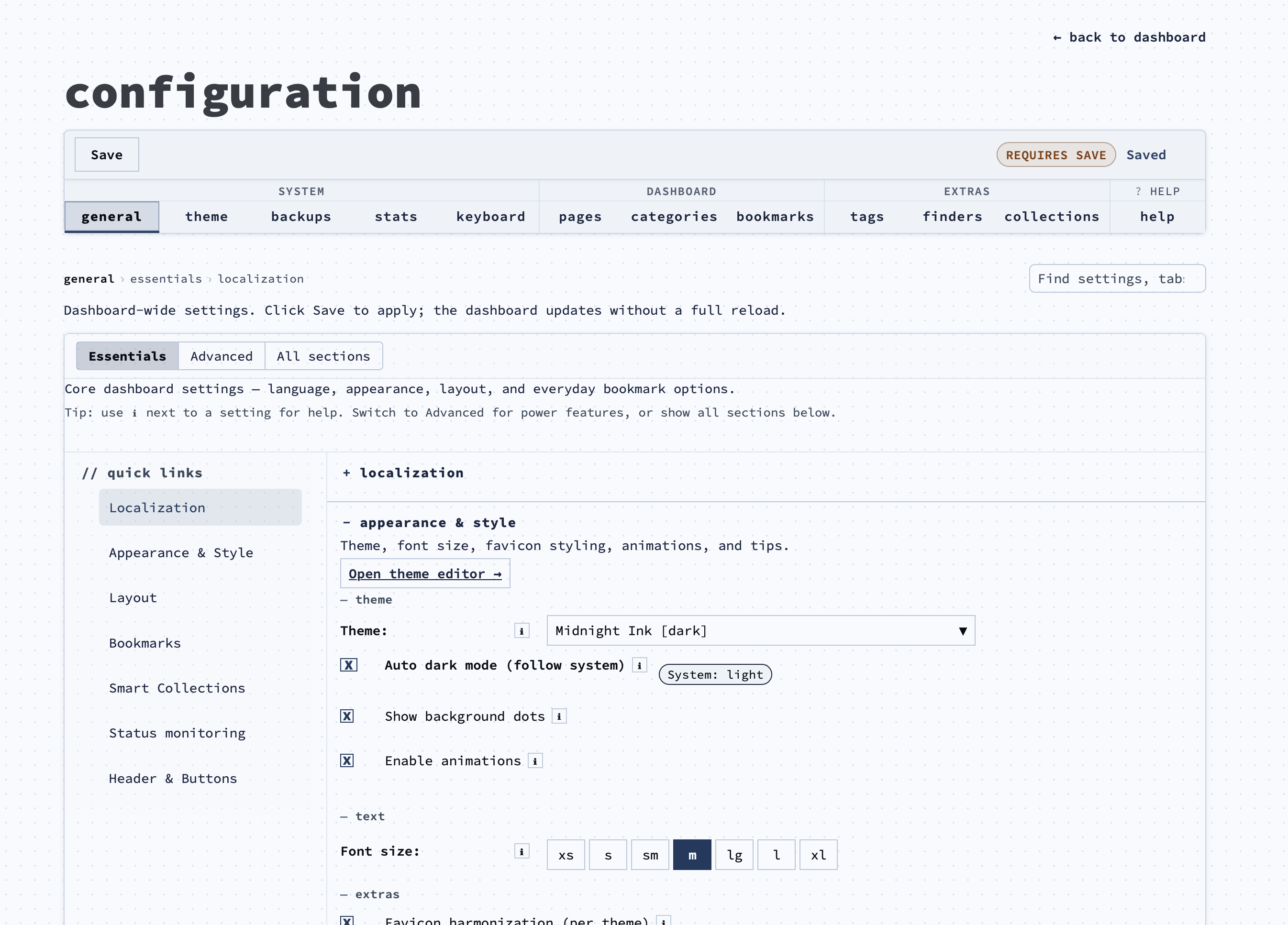 | 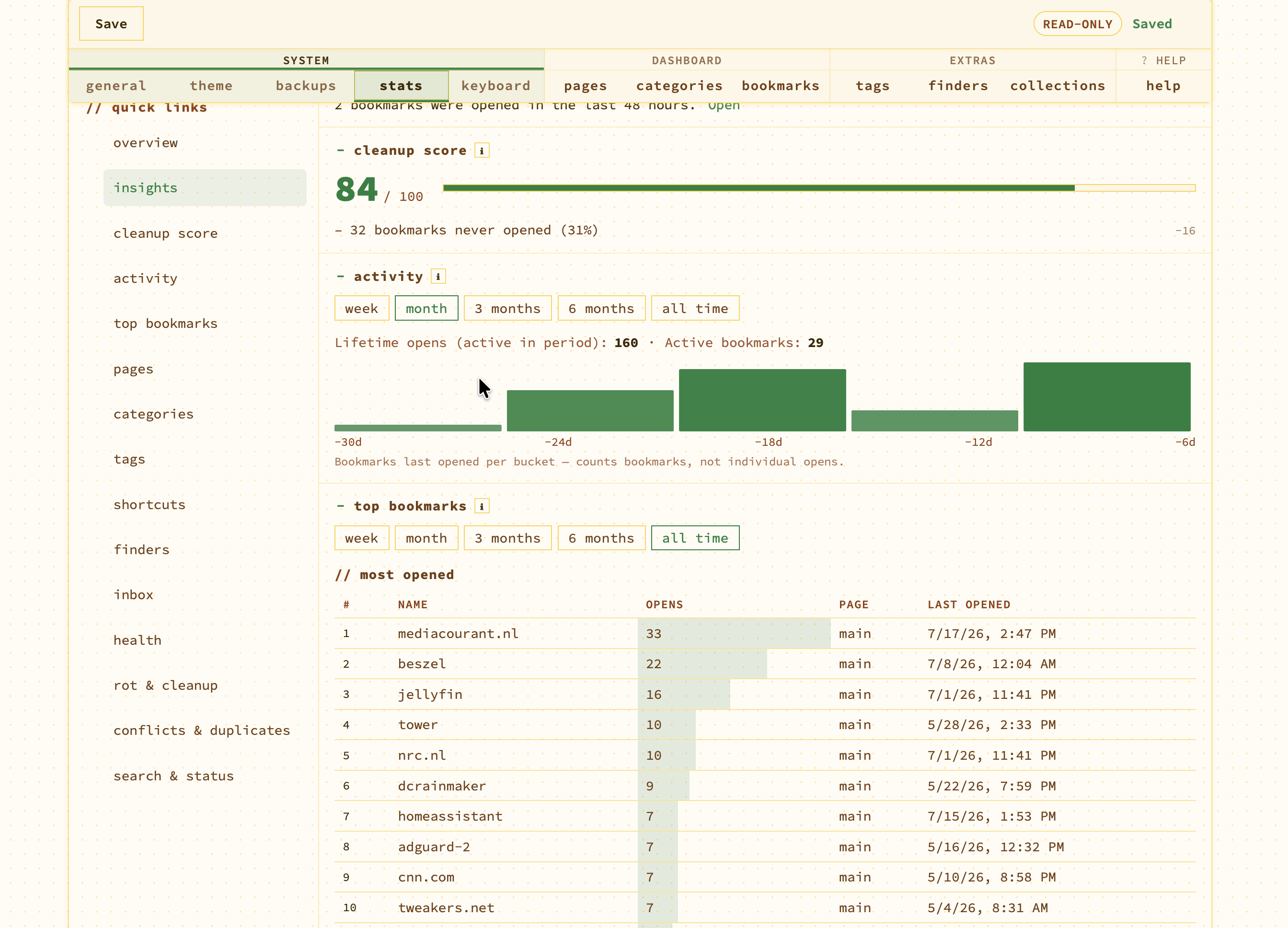 |
|:---:|:---:|
|  |  |
|:---:|:---:|
|  |  |
|:---:|:---:|
## Quick Start
### Docker Compose (recommended)
services:
nextDash:
image: ghcr.io/jordibrouwer/nextdash:latest
container_name: nextDash
ports:
- "8080:8080"
volumes:
- ./data:/app/data
environment:
- PORT=8080
# Optional on LAN/VPS — require X-NextDash-Token on destructive API calls (see Security):
# - NEXTDASH_WRITE_TOKEN=change-me-to-a-long-random-string
restart: unless-stopped
docker compose up -d
**Build from a git checkout:** use `docker-compose.prod.yml` for production (only `./data` is mounted; CSS/JS come from the image). Use `docker-compose.yml` for development (mounts `./static` and `./templates` so changes apply without rebuild).
docker compose -f docker-compose.prod.yml up -d --build
### Build from source
go build -o nextDash && ./nextDash
By default, data is stored in `./data`. Override with `NEXTDASH_DATA_DIR` (absolute or relative path) when you need a separate data location.
## Security
nextDash is built for **personal or small-team use on a trusted network**. There are no user accounts — anyone who can reach the URL can read and change data unless you add protection.
**Do not expose nextDash directly to the public internet.** Recommended setups:
- **Private overlay network** — [Tailscale](https://tailscale.com/) or another mesh VPN so nextDash never gets a public listener.
- **Reverse proxy with auth** — Traefik, Caddy, or nginx inside your home/lab/VPC, with HTTP basic auth, OAuth2 Proxy, or SSO in front.
- **Local-only** — bind to `127.0.0.1` and use SSH port forwarding or a same-machine browser.
### Optional write token (LAN / VPS)
Set environment variable `NEXTDASH_WRITE_TOKEN` to a long random string. Protected endpoints then require header `X-NextDash-Token` with that value. The dashboard and config pages inject the token automatically when you open them in a browser.
Protected actions include: **reset all data** (also requires `{"confirm":true}`), **download or import backup**, **delete page**, **bookmark preview fetch**, **bookmark ping** (`/api/ping`), **search-index build**, **health delete / retest / merge / auto-heal / open-broken / cache-scan / update-status**, **clear or refresh all bookmark previews**, **bookmark/page/category/finder/settings saves**, **uploads** (favicon, font, icon), and **reset theme colours**.
When the token is **not** set, behaviour is unchanged — everything stays open for local dev. When it **is** set, the dashboard and config pages inject the token automatically so normal browser use is unaffected. The browser extension can store the same write token in **Settings → Write token**.
Outbound fetches (preview, ping, icons, auto-heal) use dial-time IP validation to block DNS-rebinding to private networks unless **allow localhost bookmarks** is enabled in settings.
### Optional CORS allowlist (LAN / VPS / extension)
By default, bookmark API responses send `Access-Control-Allow-Origin: *` so the browser extension and cross-origin tools work without extra config.
Set `NEXTDASH_CORS_ORIGINS` to a comma-separated allowlist when you want to restrict cross-origin reads/writes, for example:
NEXTDASH_CORS_ORIGINS=https://dash.example.com,chrome-extension://your-extension-id
Only matching `Origin` headers receive `Access-Control-Allow-Origin` in the response. Unset or empty keeps the default `*`.
### Activity log (bookmark events)
Structured JSON activity lines are written to the server log for bookmark mutations and status checks by default. Opens are off unless enabled.
# Default: mutate + status (opens off)
NEXTDASH_ACTIVITY_LOG=mutate,status,open # include opens
NEXTDASH_ACTIVITY_LOG=off # disable all activity logs
# Optional rotating file under the data directory
NEXTDASH_ACTIVITY_LOG_PERSIST=1
NEXTDASH_ACTIVITY_LOG_FILE=/path/to/activity.log # optional; default data/activity.log
# Optional security events (auth denied, rate limits)
NEXTDASH_ACTIVITY_LOG=mutate,status,security
Example log line:
activity: {"ts":"2026-07-03T12:00:00Z","event":"bookmark.add","pageId":1,"name":"GitHub","url":"https://github.com","source":"dashboard"}
Status pings are deduplicated for the same URL + result for 10 minutes unless `refresh=1` is passed to `/api/ping`. URLs appear in logs — treat log files as sensitive on shared hosts.
### Rate limits (outbound & SSRF APIs)
Optional per-IP limits on server-initiated fetches and user-triggered SSRF-sensitive endpoints:
NEXTDASH_OUTBOUND_REQUESTS_PER_MIN=120 # preview, ping, favicon, auto-heal (default 120)
NEXTDASH_SSRF_API_RATE_PER_MIN=60 # /api/bookmark-preview, /api/ping, icon uploads (default 60)
When exceeded, the API returns **429** and (if enabled) logs a `security` activity event.
### Content-Security-Policy
nextDash sends a restrictive CSP on HTML pages by default. Set `NEXTDASH_CSP=off` only when a reverse proxy or custom integration requires it.
### Analytics & privacy
nextDash can record **anonymous, privacy-friendly usage statistics** through a self-hosted [Umami](https://umami.is) instance at `stats.nextdash.cc`. It is **opt-in**: off until you turn it on, and nothing is measured before then.
On a fresh install a card offers **Turn on**, **What is recorded?**, or **No thanks**. Upgrading does not change a setting you already made — if you had analytics on, it stays on.
#### Turn it on or off
**Config → General → Advanced → Privacy** → tick or clear **Privacy-friendly analytics**. It applies after the page reloads.
From the keyboard: press : and run **`:telemetry on`** (or `:telemetry off`). Typing `:telemetry` on its own shows the current state. It writes the same setting and reloads the page for you.
#### Disable it for the whole instance
Set the environment variable **`DISABLE_TELEMETRY=true`** to switch analytics off server-wide, regardless of what any user has configured:
environment:
- DISABLE_TELEMETRY=true
The tracker is then never emitted, the setting cannot be turned back on through the API or the `:telemetry` command, and the **Privacy** checkbox in config renders disabled with a note explaining why. `:telemetry` shows a single row saying it is off for this server, rather than an **on** option that could not take effect. Accepts `true`, `1`, `yes`, or `on`; unset or `false` leaves analytics under user control.
Each user's own preference is left stored and untouched, so it returns exactly as it was if you ever unset the variable.
When it is off, the tracker script is **not emitted into the page at all** — it is never even downloaded, and **no request leaves your machine**. There is no client-side flag quietly suppressing calls; the code simply is not there. The choice is stored per user in `settings.json` as `analyticsOptIn`, so it follows you across devices.
#### Why it exists
nextDash was built without any picture of how it is actually used. Which views do people open? Does anyone use finders, the tag cloud, or the inbox? Where do people abandon the add-bookmark form? Without answers, every decision about what to build, fix, or remove is guesswork.
These statistics exist to answer exactly that — **which features get used, and what can be improved** — and nothing else. They are explicitly **not** for following individual users. The measurement is abstract and technical: flow through the app and feature usage, aggregated across everyone.
#### What is measured
- **Page views** — the dashboard, config, health, and colors pages.
- **Views and navigation** — opening the health and inbox views, switching dashboard pages (by position, never by name), which config tab you land on, and use of the `<` dashboard↔config shortcut.
- **Overlays** — opening search, commands, finders, the cheat sheet, the tag cloud, what's-new, and the add-bookmark form.
- **Bookmark opens** — the fact that one was opened and where from (`dashboard`, `search`, or `recent`).
- **Commands** — which command palette command was run, by its name (`theme`, `config`, `density`, …). Only names from the built-in command list are recorded; anything else you typed is discarded.
- **Bookmark maintenance** — starting an edit and saving it (with whether that was on the dashboard or in config), deleting, moving to another category (with a bucketed count, so a bulk move counts once), and reordering by drag.
- **Outcomes** — whether adding a bookmark succeeded, or hit a duplicate, shortcut conflict, validation error, or failure. This shows where the form trips people up.
- **Inbox and health actions** — snooze, mark-read, wake, promote, delete, and bulk clean-ups; health rechecks, retest-all, redirect detection, title refresh, and delete.
- **A settings snapshot** — once per page load, which features you have switched on (theme, layout preset, columns, packed columns, inbox, health view, status checks, smart collections, weather, and similar), as plain booleans and small enums.
#### What is never measured
No bookmark names, URLs, search queries, page or category names, notes, or tags. No cookies are set, no personal profile is built, and there is no tracking across other websites. Counts that could identify a specific setup are bucketed (for example `2-5` rather than an exact number), and the instance is self-hosted, so nothing is shared with an advertising network.
The tracker loads from `stats.nextdash.cc`, which is allow-listed in the CSP (`script-src` and `connect-src`).
### DNS rebinding (IP pinning)
Outbound HTTP(S) dials pin resolved public IPs for ~2 minutes so a hostname cannot switch to a private address between the safety check and the connection (unless **allow localhost bookmarks** is enabled).
### Startup validation
On boot, nextDash validates `PORT` (1–65535, default `8080`) and ensures `NEXTDASH_DATA_DIR` exists and is writable. Invalid config exits with a clear error before listening.
### Production Docker example
`docker-compose.prod.yml` serves CSS/JS from the image (only `./data` is mounted). Recommended LAN/VPS environment block:
environment:
- PORT=8080
- NEXTDASH_WRITE_TOKEN=change-me-to-a-long-random-string
- NEXTDASH_CORS_ORIGINS=https://dash.example.com,chrome-extension://your-extension-id
- NEXTDASH_ACTIVITY_LOG=mutate,status,security
- NEXTDASH_ACTIVITY_LOG_PERSIST=1
# Optional tuning:
# - NEXTDASH_OUTBOUND_REQUESTS_PER_MIN=120
# - NEXTDASH_SSRF_API_RATE_PER_MIN=60
# - NEXTDASH_CSP=off
# - NEXTDASH_DISABLE_PREFETCH=1
`GET /version` returns build metadata (version, commit). `GET /api/data-revision` returns a hash so open dashboard tabs detect bookmark/settings changes without a full reload.
### Environment variables (reference)
| Variable | Default | Purpose |
|----------|---------|---------|
| `PORT` | `8080` | HTTP listen port (validated 1–65535) |
| `NEXTDASH_DATA_DIR` | `./data` | Pages, bookmarks, settings, uploads |
| `NEXTDASH_WRITE_TOKEN` | *(unset)* | Require `X-NextDash-Token` on write/destructive APIs |
| `NEXTDASH_CORS_ORIGINS` | `*` | Comma-separated `Origin` allowlist for API CORS |
| `NEXTDASH_ACTIVITY_LOG` | `mutate,status` | `off`, `mutate`, `status`, `open`, `security` (comma-separated) |
| `NEXTDASH_ACTIVITY_LOG_PERSIST` | off | `1` = rotate `activity.log` under data dir |
| `NEXTDASH_ACTIVITY_LOG_FILE` | `data/activity.log` | Custom activity log path |
| `NEXTDASH_OUTBOUND_REQUESTS_PER_MIN` | `120` | Rate limit for server outbound fetches |
| `NEXTDASH_SSRF_API_RATE_PER_MIN` | `60` | Rate limit for preview/ping/icon APIs |
| `NEXTDASH_CSP` | on | Set `off` to disable Content-Security-Policy headers |
| `NEXTDASH_DISABLE_PREFETCH` | off | `1` = skip background favicon prefetch on startup |
## Features
### Keyboard-first workflow
**Navigation**
- `0` — open **Inbox** (when search is closed)
- `Shift + I` — open **Inbox** view directly (recommended; `0` still works)
- `1–9` — jump directly to a bookmark page tab
- `Shift + ←/→` — cycle between page tabs (plain arrows move bookmarks only, not pages)
- `Shift + H` — open **Health** view directly (inside dashboard)
- `,` — page overview: all pages with bookmark counts (`Tab` / `Shift+Tab` move between rows; arrow keys do not affect bookmarks behind the overlay)
- `<` — open **config** (`<` is `Shift+,`); in config, `<` returns to the dashboard, confirming first if there are unsaved changes (**v2026.07.17.2**)
- `↑/↓/←/→` — move bookmark selection (first arrow key starts navigation); `1–9` page switch also selects the first visible bookmark; mouse hover softens the stale keyboard highlight until your next keypress; on **Modern** and **Glass**, keyboard-selected rows use a full-row accent fill (**v2026.07.01.2**)
- `Tab` / `Shift+Tab` — step linearly through all bookmarks when one is already selected
- `G + 1–9` — jump to the nth category or smart collection and select its first bookmark (hold `G` ~300 ms, or press `G` then a digit; a **quick tap** on `G` opens bookmark shortcuts starting with `G` instead)
- `G + P` — jump to the first pinned bookmark on the page (hold `G` or `G` then `P`)
- `GG` — jump to the very first bookmark (second `G` while the chord is pending)
- `Ctrl + Home` / `Ctrl + End` — first / last bookmark on the page (`Cmd` on Mac)
- `Enter` / `Space` — open the focused bookmark (middle-click also counts toward open stats and smart collections)
- `Esc` — clear selection, close overlay, or undo an unsaved drag reorder (before the 1s save completes)
**Blocking overlays** — While search (`>`), the cheat sheet (`!` / `F1`), recent bookmarks (`*`), tag cloud (`/`), page overview (`,`), quick-add omnibox (`&`), quick-move/delete/tag popovers (`Shift+M` / `Shift+D` / `Shift+T`), inline edit (`;`), or an app modal is open, keyboard focus stays inside that overlay (`Tab` cycles within it) and the bookmark grid behind it is `inert` (not clickable). With an **active tag filter**, only the filtered bookmark list is `inert` — the filter banner and bulk toolbar stay interactive while the tag cloud is open. Closing the overlay restores mouse and keyboard access to the grid; quick-move/delete/tag popovers also restore the keyboard highlight on the same bookmark row.
**Bookmarks**
- `+` — open the full new-bookmark modal (dashboard only, when no input is focused)
- `&` — quick-add omnibox: type `name | url | shortcut` in one line
- `Ctrl + Shift + A` — same full new-bookmark modal from anywhere
- `Ctrl + V` — paste a URL on the dashboard: choose **Save to Inbox** or open the new-bookmark modal (blocked while inline edit or the tag word cloud is open; default under General → *Paste URL default*)
- `;` — inline-edit the focused bookmark
- `Shift + M` — *Move to…* quick-move popover: choose a category or page with arrow keys
- `Shift + T` — *Quick tag* popover beside the focused bookmark: `↑`/`↓` navigate ranked tags; `Enter`/`Space` toggle a tag and advance to the next; `✓` shows tags already on the bookmark
- `Shift + D` — quick-delete popover with undo in the toast
- `Shift + C` — *Checking* popover beside the focused bookmark: choose **Off**, **Periodic**, or **Monitor** with `o` / `p` / `m`, or arrow to one and press `Enter` (**v2026.07.20**)
- `Ctrl + C` / `Cmd + C` — copy the URL of the focused bookmark (row flashes green)
- `[` — toggle the hover preview card on the focused bookmark
- `Delete` — delete the focused bookmark
**Search & commands**
- `>` — open search; empty state shows recent queries and saved searches as chips; `←`/`→` select a chip, `Enter` applies it
- `/` — fuzzy search; ranked by prefix → word-boundary → substring; also matches URL domain, tags, and note text
- `:` — command palette (lone `:` from the dashboard); **5 collapsible groups** (**Bookmarks**, **Search & navigate**, **Look & layout**, **Smart collections**, **Settings & tools**) — click a header to expand; **recent commands** appear at the top when you reopen lone `:`; toggles refresh in place with `(on)`/`(off)` or `✓` after `Enter` (no toasts). In an open `>` search with text already typed, `:` inserts filter syntax (`category:`, `tag:`, …) instead of switching modes
- `?` — finders (e.g. `?g query` to search Google)
- `*` — recent bookmarks panel
- `! or F1` — keyboard cheat sheet (filterable with a type-to-search input; blocked while page overview `,` is open)
- `category:` / `tag:` / `page:` / `status:` — filter directly in the search bar; autocomplete suggests values after each prefix (single **Filters** group)
- `:goto ` — navigate to a URL or bare domain (e.g. `:goto github.com`); `:goto config` / `stats` / `health` for quick navigation
- `:new` — open new-bookmark modal (same as `+` / `Ctrl+Shift+A`)
- `:add` — quick-add omnibox (same as `&`)
- `:note` — edit the note of the focused bookmark
- `:move` / `:edit` / `:copy` / `:quicktag` (`:qt`) — move, inline edit, copy URL, or open quick-tag popover (`Shift+T`) on the keyboard-selected bookmark
- `:pin` / `:unpin` — toggle pin on the keyboard-selected bookmark
- `:tag` — list tags; `:tag ` or `:tag:` browse bookmarks by tag in the command palette only (dashboard unchanged); `:tag +name` / `:tag -name` add or remove on the keyboard-selected bookmark
- `:category` / `:cat` — jump to a category or smart collection by number or name
- `:filter ` / `:filter clear` — apply or clear dashboard tag filter (OR logic, same as tag cloud)
- `/` (desktop, tag cloud on) — open tag word cloud on dashboard; toggle one or more tags (OR match); bulk toolbar stays clickable while the cloud is open; filtered bookmarks stack vertically; with an active filter the cloud anchors beside the `/` FAB
- `:open all` — open all bookmarks on the current page in new tabs
- `:open pinned` — open pinned bookmarks on the current page
- `:open tag ` / `:open category ` — open bookmarks matching tag or category on the current page
- `:open last [n]` — open the N most recently opened bookmarks on the current page (default 5, max 50; same 15-tab safe cap as `:open all`)
- `:page` — switch page by name or number (palette stays open, `✓` on current)
- `:recent` / `:overview` / `:cheat` / `:whatsnew` / `:reload` — recent modal (`*`), page overview (`,`), cheat sheet, what's new, reload dashboard
- `:inbox` / `:inbox triage` — open Inbox page (`Shift + I`) or start triage on unread items
- `:config [section]` — open config or a tab (`bookmarks`, `backups`, `stats`, …)
- `:remove` — delete the focused bookmark
- `:sort ` — per focused category: `order` / `az` / `recent` (palette shows the category name)
- `:stale [days]` — list stale bookmarks; optional day window (e.g. `:stale 7`)
- `:duplicate` / `:duplicates` — list bookmarks with duplicate URLs (opens health duplicates view)
- `:health [filter]` — open health view — `broken`, `duplicate`, `stale`, `refresh`, …; `:health page [n]` opens health with a page context
- `:monitor` — how many bookmarks are being checked; `:monitor off` stops checking all of them, `:monitor on` opens the never-checked list where the bulk enable lives (**v2026.07.20**)
- `:dark` / `:title` / `:lang` / `:animations` / `:status` / `:opacity` — display and theme toggles
- `:collections` — toggle smart collections (today, recent, stale, most used)
- `:backup` / `:export` — open config backups or download a ZIP backup
- `:metadata` — health missing previews or config bookmarks
- `:layout ` — `default` / `compact` / `cards` / `masonry` / `list` / `launcher` …
- `:theme ` — switch colour theme
- `:density ` — `comfortable` / `compact` / `dense`
- `:columns ` — set column count (1–6)
- `@` — global search across all pages at once; each result shows the page name as context
- `:find ` — hide tiles whose name or URL don't match; `:find clear` removes the filter
- `:buttonbar ` — move the button bar: `bottom` / `bottom-left` / `bottom-right` / `side-left`
- `:save` / `:saved` — save current query / show saved searches
**Config page**
- `1–9` — jump to the Nth visible config tab (order follows tab groups: **System** → **Dashboard** → **Extras** → **Help**)
- `←`/`→` — previous/next config tab; crosses into the next tab group at group edges (when focus is not in an input or modal)
- `Alt` + `←`/`→` — jump to the first tab of the previous/next tab group
- `S` — save changes
- `<` — back to the dashboard (`Shift+,`); confirms first if there are unsaved changes
- `Alt + ↑/↓` — reorder the selected bookmark on the Bookmarks tab
- `Ctrl/Cmd + K` — open the config command palette
- `Ctrl/Cmd + Shift + K` — find settings, tabs, and help sections
**A deleted bookmark leaves everywhere at once, and a down monitor stands out in the header (v2026.07.22.2)** — deleting a bookmark from the health view left it on the dashboard until the next page reload: the health view deletes through its own endpoint and never touched the dashboard's live copies, so the grid and any smart collection it matched kept showing it. It now drops from every in-memory copy immediately — grid, collections and health list update together, no reload. In the header, a **monitored bookmark that is down** is now counted apart from an ordinary broken link and carries its own badge; when the number of down monitors **rises** the health icon pulses once to catch your eye — only on a rise (a reload onto an existing outage, or a recovery, stays quiet), and behind a **10-minute cooldown** so a monitor that flaps up and down cannot pulse the header on every check. It shares the broken red and is told apart by the movement; clicking it opens the monitored list. Reduced-motion and the no-animations setting are respected.
**Monitoring from the moment you add a bookmark (v2026.07.22.1)** — the add-bookmark modal offered a single *Status check* box, which could not express the three-way choice the rest of the app had moved to: Monitor is a superset of Periodic, so *monitored* was unreachable at exactly the moment you are most likely to want it. It now carries the same **Off / Periodic / Monitor** control as the bookmark editor in Config, with the interval picker and the same explanation behind the **(i)**, sitting above the *More options* fold beside **Shortcut** and **Pinned** — all three of which used to be hidden below it. In the health view, a **Monitored** tile joins the summary row directly after *Healthy*: the whole tile turns **red** the moment a monitored bookmark stops responding and reads **green** while they all answer, with a click going straight to the monitored list. Also fixed: the **(i)** explanation opened *behind* the modal that asked for it, the modal cut its own form in half so the fields between *Tags* and *More options* could not be seen, and the **Healthy** tile read green even at zero — a dashboard with nothing healthy looked as reassuring as one with everything healthy.
**A working inbox and a health view you can take with you (v2026.07.22)** — the **inbox** could not be sorted, linked to, or acted on a few rows at a time; all three of which the health view had solved long ago. It can now be sorted by **newest, oldest, title or site** — *oldest first* being the one that matters, because an inbox is worked from the bottom and a backlog was previously only reachable by scrolling past everything newer. Filter, sort and search now live in the **address bar**, so *my snoozed items* or a saved search can be bookmarked and shared, and both come back on your next visit (a shared link still wins, or it would not describe what the recipient sees). **Tick rows** with their checkbox or `x` and act on just those — mark read, snooze, delete — instead of the all-or-nothing bulk buttons; changing filter clears the ticks so nothing hidden gets caught up, and a bulk delete names the count first. **Snooze** gained a date field for anything further out than *next week*.
In the **health view**, an **Export** button downloads the current filter and search as **CSV** — the findings were readable only inside the view, with no way to work through them beside a spreadsheet or hand someone the list. The **Monitored** filter no longer hides until it is already in use, which had made the feature invisible to exactly the people who had not found it; an empty Monitored list now explains what monitoring does instead of reporting a clean bill of health. Filter and sort are remembered between visits. The enlarged **response-time chart** is readable point by point: click or hover anywhere in a measurement's slice and a readout under the chart names the response time, when it was measured, how many checks it folds together and whether it was up or down — with `←`/`→` walking the series and the whole chart staying a single `Tab` stop. And **uptime history now travels with your backups**: restoring one previously reset every monitored bookmark to *waiting for its first check*, and a 30-day figure takes 30 days to earn back.
**Monitoring statistics at full size (v2026.07.21.1)** — a monitored bookmark's row in the health view had space for a 24-hour uptime figure and one response time, while the rest was already measured and never shown. The **⤢** button at the end of that row — or `i` — now opens the lot: a **large response-time chart** with min, average and max marked and a tooltip on every point, **uptime for 24 hours / 7 days / 30 days side by side** with the number of checks behind each, a taller heartbeat bar, the check interval and last check, and the **full outage list**. It opens instantly because it shows the report already on screen rather than fetching anything, and `Esc` closes it without losing your place in the list. A window with no samples yet reads *no data* instead of 0%, so a monitor switched on an hour ago is not misread as a day of downtime. Also fixed: every finished outage reported its length as **0s** — a twelve-minute outage now reads `12m`.
**Usage analytics is now opt-in (v2026.07.21)** — analytics used to be on by default with an opt-out. It is now **off until you turn it on**: nothing is measured before you say yes, and while it is off the tracker script is never even put into the page. **If you already had it on, it stays on** — upgrading does not silently switch off a working install, and an explicit *off* stays off too. The first-run card now *asks* rather than announcing, offering **Turn on**, **What is recorded?**, or **No thanks**, with the confirm button inside the explanation turning it on directly. Not deciding is not treated as a no: closing the card or reading the detail without choosing puts the question away for a few days and then longer each time, and simply seeing the card quiets it for a day, so a reload does not put it straight back in front of you. Anyone who never actually answered — including those who dismissed the old announcement — gets asked exactly once. Also fixed: turning analytics off in **Config → General** no longer brought the card back asking you to enable what you just switched off; a settings save that the server had accepted could report **"Failed to save settings"** when the browser-storage mirror failed; with **device-specific settings** on, config could report saves it never made (worst of all, the toggle confirming settings were stored locally when nothing was stored — it now reverts itself and says why); and `:save` answered a storage failure with "No active search to save" instead of naming the real problem.
**Uptime monitoring for bookmarks (v2026.07.20)** — a bookmark can now be **monitored**: checked on its own interval (**from 5 minutes**, up to once a day) with every result kept for **30 days**, instead of the single daily check whose result was overwritten each time. The health view shows a **heartbeat bar** of recent checks, an **uptime percentage** over 24 hours / 7 days / 30 days, a response-time **sparkline**, and — when you open a row — the **outage history**: when each one started, how long it lasted, and what went wrong. Set an **alert webhook** under **Config → General** and nextDash posts when a monitored bookmark goes down and again when it recovers, waiting for **3 failed checks in a row** by default so a single hiccup stays quiet (ntfy, Discord, Slack, or anything that takes a webhook; local addresses only when *Allow local bookmarks* is on). Availability checking itself is now **one choice of three** — **Off**, **Periodic**, **Monitor** — rather than two switches that could contradict each other; Monitor does everything Periodic does and keeps the history, and existing bookmarks behave exactly as before. Set it wherever you happen to be: **right-click a bookmark** on the dashboard, press `Shift+C` on the selected one, or click the mode button on a health-view row (`c` from the keyboard) — each option has its own letter, `o` / `p` / `m`. On a **filtered** health list a bulk button offers to switch just those rows to Periodic or Monitor, confirming the exact count first; it is never offered on the unfiltered **All** list. Also: **Config → General** starts collapsed and remembers which sections you opened, on the server, so it follows you across devices.
**Privacy-friendly analytics & a desktop-layout fix (v2026.07.19)** — nextDash now records **anonymous** usage statistics so it is visible which features are actually used and where the app can be improved. It is never about following you personally: no bookmark names, URLs, search queries, page names, notes or tags are sent, no cookies are set, and there is no cross-site tracking — purely abstract, technical measurement of flow and feature usage, aggregated across everyone. *(Since v2026.07.21 this is opt-in — off unless you turn it on under **Config → General → Advanced → Privacy**; when off the tracker is not even downloaded and no request leaves your machine.)* See [Analytics & privacy](#analytics--privacy) for the full list of what is and is not measured. Also in this release: **right-click a bookmark** for open in new tab, copy URL, edit, tags, move, and delete — everything the command palette could already do, where you would look for it first; the **+ N more** toggle on long categories can now be reached with the arrow keys and opened with `Enter`, landing the selection back on the last bookmark above it (and keyboard selection no longer disappears onto rows hidden behind that toggle); `:favicons fetch` re-downloads every bookmark icon across all pages in one run (replacing stale ones, with a progress bar); the dashboard now shows an **occasional keyboard tip** as a toast (the same list as Config → Help → Tips & tricks, at most one every few days, never twice the same, switchable off under Config → General → Advanced → Onboarding & tips), and the What's new modal opens with a **New shortcuts** section listing the keys a release added; fresh installs start on the new **Moss & Stone** theme with **favicon harmonisation** on, so clashing site icons are toned down to match (existing dashboards keep theirs); the first-run setup card now asks whether to **start with the example bookmarks or from scratch**, and its checklist no longer shows items as done before you have done them; **Config → General → Reset** gained a **Delete all bookmarks only** button that keeps your pages, categories, and settings; an empty dashboard shows a friendly empty state instead of failing to load; and narrowing a desktop browser window no longer flips nextDash into the mobile layout — that now requires an actual touch device.
**Tidier long categories & aligned config (v2026.07.18)** — a category now shows only its first **15** bookmarks by default, with the rest behind a per-category **+ N more** / **show less** toggle, so one big category no longer towers over the others; change the limit or turn it off under **Config → General → Layout** (smart collections are never capped, and expanding a category is remembered). The **Configuration** page now uses the same top bar and title size as the dashboard, inbox, and health views, so switching between them no longer makes the page jump, and its save row and tabs read as one seamless bar. New installs start on the near-black **Midnight Ink** theme (following your system light/dark) and no longer seed the Tech category or its Unraid/Phoronix bookmarks — existing dashboards keep their theme and bookmarks.
**Dashboard ↔ config shortcut** (**v2026.07.17.2**) — `<` (which is `Shift+,`) jumps from the dashboard to config, and from config back to the dashboard — confirming first if there are unsaved config changes. It accepts both the `<` character and the physical comma key with Shift, so it works regardless of keyboard layout. On the same release, a fresh first visit to Config → General opens compact — **Essentials** with only **Localisation** expanded — until you set your own section layout.
**Quick-start card** (first run only, any window width) — a compact three-step card walks through language & auto dark mode, column layout, and weather, then becomes a short checklist (add a bookmark, tag one, open Config → General, see the keyboard cheat sheet). Skip or dismiss any time; every setting it touches stays reachable in Config afterwards. Progress is stored server-side in `settings.quickStart`, so it holds across devices (**v2026.07.17**, replacing the onboarding wizard, config-tab guided tours, and dashboard feature tour).
**Tips & tricks** (Config → Help, always available) — 30 tips grouped by task (Everyday, Adding bookmarks, Editing and organising, Finding things, Keeping it healthy, Making it yours), searchable via the Help filter and settings search like any other section (**v2026.07.17**, replacing the rotating footer tips).
**Settings search promo** (desktop config, once until dismissed) — first visit may highlight **Search settings…** in the breadcrumb row with a **New** badge and speech balloon beside the field (`Ctrl/Cmd+Shift+K` for settings navigation vs `Ctrl/Cmd+K` quick actions). This is the only one-time promo balloon left; the ~20 dashboard discoverability promos and all guided tours were removed in **v2026.07.17** — everything they taught is documented in the keyboard cheat sheet (`!` / `F1`).
**Inbox snooze, keyboard triage & Health always-on (v2026.07.16)** — Inbox can **snooze** links (3h / tomorrow / weekend / next week) with a **Snoozed** filter and **`z`**, gains Health-style keyboard navigation (`j`/`k`/`g`/`G`, `Enter`/`p`/`r`/`n`/`z`/`d`), per-row **notes**, mark-read + bulk **Mark all read** / **Clear read**, and a preview loading pulse for fresh links. Promoting an Inbox item with status checks on immediately health-checks that URL. **Health** is always available in the header (the old hide toggle is gone), can optionally **re-check in the background** under Config → General → Status monitoring, opens **Edit** in the dashboard inline editor, and deep-link filters (stale / unused / missing preview / …) match the right rows again.
**Health dashboard view + quick shortcuts (v2026.07.15)** — the heartbeat icon opens **Health** inside the dashboard shell (like Inbox), so issue triage stays in one place; old `/health` links now redirect to this view. Keyboard entry points are mnemonic: **`Shift+H`** opens Health and **`Shift+I`** opens Inbox (legacy `0` still works). Config header navigation is cleaner too: only **back to dashboard** remains. All new Health-view labels and related cheat-sheet entries are localized consistently across **EN / NL / DE / FR**.
**Health repairs & score breakdown (v2026.07.14.2)** — fixing a bookmark in the **health view** now sticks: a re-checked link turns green immediately instead of staying broken for up to three minutes, **Retest statuses** no longer skips the very bookmarks flagged as broken (and says so when there is nothing to test), and an applied redirect is verified against the new address before the row counts as healthy. Click any score badge — or press **`s`** — to unfold what the score is made of: every bookmark starts at 100, and each issue shows what it costs. The view is keyboard-first: **`Tab`** steps row by row instead of through every control, with **`s`** score, **`p`** re-check, **`f`** favicon, **`x`** select, **`m`** more actions and **`g`**/**`G`** for first/last, all listed in the legend under the feed.
**Glass layout retired (v2026.07.14.2)** — the **Glass** layout is gone; **Classic** and **Modern** remain. Dashboards set to Glass switch to **Classic** automatically and show a one-time note. Change layout in **config → general → Basics**.
**Drag feedback for sorted categories (v2026.07.14.1)** — a category sorted **A–Z** or **Recent** can't have its bookmarks dragged to reorder (the sort would just undo it). Instead of nothing happening, the category now shows a hover tooltip, a not-allowed cursor, and a brief note when you try to drag — a reminder to switch that category back to manual order first. A plain click still opens the bookmark.
**Dashboard organising (v2026.07.14)** — drag a bookmark from **anywhere on its row** to reorder it within a category or move it to another one (a single click still opens it; a long press still opens the inline editor), and dragging across columns no longer makes the columns flicker. Press **`.`** anywhere on the dashboard — or the new toolbar button — to **collapse or expand every category at once** (remembered per page), and the **`//`** in front of a category title is a **drag handle** again for reordering whole sections across columns. The add-bookmark form's **Page** and **Category** dropdowns each gain a **+ New…** option that creates and saves a page or category inline, without adding a bookmark first.
**Backup restore & polish (v2026.07.13.1)** — each stored automatic backup now has a **Restore** button beside Download and Delete, so you can roll back to it in one click (it replaces all current data after a confirmation, then reloads) without downloading and re-importing the ZIP. The *Automatic Backups* section also shows a totals line (count and combined size), **Back Up Now** refreshes the *Last backup* date, and several backups made within the same second are saved as separate files instead of overwriting one.
**Automatic weekly backups (v2026.07.13)** — nextDash now creates a full ZIP backup of your data once a week and keeps it on the server under **Config → Backup → Automatic Backups**. The latest **3** are kept — when a new one is made, the oldest is removed automatically. Each stored backup shows its date and size with **Download** and **Delete** buttons, there's a **Back Up Now** button for on-demand copies, and a countdown shows when the next automatic backup is due. The weekly backup can be turned off with a single toggle (on by default); turning it off never affects **Back Up Now** or your existing backups. Scheduling is robust across container restarts (it runs whenever the newest backup is older than 7 days). This release also fixes health-dashboard bulk delete removing the wrong bookmark and health favicons with unusual filenames failing to load.
**Fresh defaults & dashboard polish (v2026.07.12)** — new installs now open on the **Kelp Drift (dark)** theme with **auto dark mode** on, so the dashboard follows your system light/dark preference out of the box, and the starter bookmarks seed a *Tech* category (Unraid, Phoronix) and a *Social* category (Bluesky) instead of Facebook/Instagram. The `&` quick-add omnibox is restyled to match the search/commands/finders overlays (rounded, blurred glass, spring animation), *Config → Bookmarks* now opens on your first page each fresh load while remembering the page you switch to for the session, and bookmark/category icons with unusual filenames load reliably. Existing dashboards keep their current theme and bookmarks.
**Smoother dialogs (v2026.07.11.4)** — dialog windows now hand keyboard and screen-reader focus back cleanly when they close (focus returns to the control that opened them before the dialog is hidden), and the browser console no longer warns about focus being trapped in a hidden element.
**Bulk tags (v2026.07.11.3)** — select several bookmarks in *Config → Bookmarks* and the bulk toolbar now has a **Tags** control: type one or more comma-separated tags, choose **Add**, **Replace**, or **Remove**, and apply them to every selected bookmark at once. The field suggests tags you already use as you type.
**Tags within reach & collection autocomplete (v2026.07.11.2)** — the **Tags** field moves above the fold in both bookmark forms (out of *More options*, right under Page/Category), and the dashboard inline editor is reordered to match (Page → Category → Tags → Note). Building a **custom collection** now autocompletes each rule's value from the tags, categories, and shortcuts already in use (shortcut suggestions keep their casing). The dashboard and config pages no longer opt out of the browser's back/forward cache, so returning to a page you just left is instant again.
**Clearer General settings (v2026.07.11)** — the busiest General config sections are split into small labelled sub-groups so related options sit together: Localization into *language* / *date & time*, Appearance & Style into *theme* / *text* / *extras*, and Layout into *grid* / *spacing* / *extras*. Same settings and tabs — just easier to scan (classic layout). The Stats, Pages, Tags and Theme config tours no longer auto-start — run any of them from Config → General → Tours & onboarding. Accessibility polish: config number spinners now announce a name to screen readers, the health page gained a skip-to-content link, and the dashboard shows a clear "JavaScript required" message instead of a stuck skeleton when JS is off.
**Faster loads & quieter health borders (v2026.07.10.2)** — the server now gzip-compresses HTML/JS/CSS/JSON responses, so pages transfer 70-90% smaller (e.g. the main search script drops from ~98 KB to ~19 KB), and non-essential scripts no longer block first paint (config guided tours ~374 KB, plus ~107 KB of on-demand dashboard features like weather, tag cloud, and drag-reorder). The dashboard inbox tab gets a monochrome line-style icon matching the health icon. The health page also gets the same border cleanup as config: softer borders on the stat tiles and panels, the intro frame dropped, and sections separated by spacing and headings (classic layout).
**Quieter config borders (v2026.07.10.1)** — the config page reduced a pile-up of nested frames (save bar, tab bar, group labels, intro, quick-links sidebar, per-row lines). Borders are now reserved for the outer tab surface and real dividers; sections and topics are separated by spacing and headings instead, so the page reads calmer while staying easy to scan. Classic layout only (modern/glass early beta unchanged).
**Self-hosted font & faster first paint (v2026.07.10)** — the default **Source Code Pro** font is now bundled with nextDash instead of loaded from Google Fonts, so there's no third-party request, the app works fully offline, and no font call leaves your machine. Non-essential discovery/tour promo scripts no longer block the dashboard from rendering (they load after the page is interactive), so bookmarks appear sooner.
**Per-theme browser colour (v2026.07.10)** — the mobile browser bar and installed-app (PWA) chrome now match the background of whatever theme you pick, including every built-in and custom theme (previously only light/dark were correct and everything else fell back to blue).
**Longer What's new history (v2026.07.10)** — the What's new modal now shows the **25 most recent** releases instead of 7; the newest loads first and the rest still load on demand as you scroll, so opening it stays fast.
**Health icon & counter (v2026.07.09)** — the dashboard header **health** link is now a heartbeat icon with an inline counter pill (broken/warning count; red for broken, amber for warnings, hidden when healthy), styled like the inbox tab. Always on for all users (**v2026.07.16** removed the Header & buttons hide toggle).
**Dashboard margins & status rows (v2026.07.09)** — side margins are a fixed clamped buffer instead of a fixed percentage, so narrowing the window shrinks the whitespace before the columns; roomier margins on wide screens keep the columns closer together. Config and health pages share the dashboard's content box (including above 1600px), so their header and nav links line up across pages. Online/offline/checking status rows get a consistent left inset, rounded corners, and extra space so the status border does not crowd favicons.
**Config header icon parity (v2026.07.09)** — on the config page, the header now uses the same heartbeat health icon + inline counter pill styling as the dashboard and keeps only the health icon plus a back-to-dashboard link (the config inbox pill was removed).
**Stats inbox insights (v2026.07.09)** — a new **Inbox** section in Config → Stats shows current inbox health and lifetime triage throughput (added / converted / discarded, average time to triage, conversion bar, added-vs-triaged trend, source/domain tables), backed by `data/inbox-stats.json` and `/api/inbox-stats`. Stats and Help gain **Expand all / Collapse all**, and Stats sections remember their open/collapsed state across visits.
**Config tab consistency (v2026.06.31)** — list tabs share intro copy, toolbars, filters, and empty states; on **Classic** layout, toolbar + list fuse into one surface card. The breadcrumb row shows tab save mode (**Requires save** / **Auto-save** / **Read-only**) and sub-context on Bookmarks and Categories. **Config → Bookmarks** uses a collapsible **Context** panel (page/category switcher; structure edits on Pages/Categories tabs) that remembers open/closed state. Unified save status beside **Save** replaces the old unsaved badge. Opening `#bookmarks` on a phone shows a desktop-only card instead of a broken editor.
**Config tab bar v5 (v2026.07.01)** — tabs are grouped as **System**, **Dashboard**, **Extras**, and **Help** (Keyboard lives in System). Compact save strip with save-mode pill and dirty-only **Undo**/**Discard**; proportional group widths; tab scroll hint when the bar overflows. On **Modern** and **Glass**, the header + save row + tabs fuse into one chrome card and list tabs use a single fused surface. On **Classic** (**v2026.07.01.3**), the configuration title and header links stay separate from the save row and grouped tabs — each in its own bordered card with spacing between them. `←`/`→` cross tab groups; `Alt+←`/`→` jump between groups. Compact breadcrumb (`tab › context`).
**Config surface parity (v2026.07.01.1)** — **Keyboard**, **Bookmarks**, **Stats**, **Backups**, and **Help** tabs use the shared `config-tab-surface` list-shell: toolbar + content in one card with divided rows (no nested floating cards). Bookmarks search matches other list-tab filter styling; Stats moves **Refresh**/**Export CSV** into the in-surface toolbar. Health links show a compact count-only badge pill. Dismissed discoverability promos and What's new progress sync via `settings.discoverabilityState` in `settings.json` across browsers.
**Config polish (v2026.07.01.4)** — **Pages** and **Categories** list tabs show a **Usage** column (Tags-style popularity bar + bookmark count). Unsaved changes show a dot on the tab group label (e.g. **System ●**). Config tab chrome respects `prefers-reduced-motion`. The Stats guided tour is temporarily disabled.
**Config surface polish (v2026.07.01.5)** — **Bookmarks** Context and **Collections** editor fused into tab surfaces; list tabs share the `config-list-tab` shell; breadcrumb shows Tags filter, Stats period, and Collections edit context; **Skip tour** always persists completion on the server. **Health** redirect check no longer freezes the app.
**Config polish continued (v2026.07.01.8)** — unsaved dot on **Extras ●** when only **Collections** changes (C14); broader `prefers-reduced-motion` coverage for tag cloud, keyboard pulse, health shimmer, and settings-search promo (C15).
**General Advanced toolbar (v2026.07.01.9)** — Essentials / Advanced buttons align flush with the fused General surface; no gap or overlap with Expand/Collapse bulk actions on the Advanced layer.
**Security & self-hosting (v2026.07.03)** — activity log (`NEXTDASH_ACTIVITY_LOG`), CSP headers, outbound/SSRF rate limits, DNS IP pinning, startup validation for `PORT` and `NEXTDASH_DATA_DIR`. README, MANUAL, and Config → Help document write token, CORS, and production Docker.
**Activity log (v2026.07.03)** — structured JSON lines for bookmark mutations, status checks, optional opens, and security events; optional rotating `activity.log` under the data directory.
**Extension shortcuts (v2026.07.03)** — optional shortcut when saving a tab; auto-suggest from bookmark name; **409** when the shortcut is already taken on that page.
**Dashboard sync hardening (v2026.07.03)** — hash-based `GET /api/data-revision`; stale-cache detection for name, URL, and shortcut; preview metadata cache flushes periodically; shared cache-bust tokens across dashboard, config, and health.
**What's new modal (v2026.07.03)** — scroll to load up to the **7 most recent** releases (lazy per-version JSON).
**General layer scroll (v2026.07.03)** — Essentials/Advanced toggle preserves the General layer toolbar viewport position when scroll is within both layers.
**Playwright E2E (v2026.07.03)** — full test suite green with isolated temp data per run; config, tags, finders, and layout-nudge tests aligned with current behaviour.
**Inbox (v2026.07.06)** — lightweight link capture page separate from bookmark pages: save via paste (`Ctrl+V`), browser extension, or API; filter unread, triage one-by-one (`J`/`K`/`O`/`P`/`R`/`D`), promote to a full bookmark; shortcuts `0`, `:inbox`, `:inbox triage`; one-time intro modal; EN/NL/DE/FR. **v2026.07.16** adds snooze, list keyboard navigation, notes, mark-read / bulk clear, and promote-time health checks.
**Page overview & tips (v2026.07.06)** — pages button opens a centered `AppModal` with card-style rows; rotating footer tips off by default (`:tips on` to enable); `:quicktag` removed from the command palette.
**What's new hotfixes (v2026.07.05.1)** — ★ corner FAB below `/` tag cloud again (not in the centre dock toolbar); Config → Help *Show what's new* with dashboard-matching modal chrome; status-row hover/selection and config save-indicator fixes; merge-regression restores for config load and dashboard assets.
**Config shell & polish (v2026.07.05)** — Help split-shell with chip nav (B5); Tags/Backups divided rows; Theme Colors toolbar matches General chrome; Theme dirty state via save row only (B10); broader `prefers-reduced-motion` (C15).
**Dashboard chrome (v2026.07.05)** — unified header chips and toolbar hierarchy; theme surface tokens on footer buttons; lighter card rows; shared toolbar modal chrome; polished empty states, search overlay anchoring, and layout radii; page overview icons and tag-filter recovery.
**Recent modal & status rows (v2026.07.05)** — rank, recency badge, and open count in recent bookmarks (D8); status-row hover/selection via shared bookmark-row tokens (D12).
**Fresh-install toolbar (v2026.07.05)** — new installs show Search, Commands, Finders, and + Add bookmark in the centre dock only; Recent and cheat sheet off until enabled in Config → General → Header & buttons (★ What's new is a separate corner FAB — see **v2026.07.05.1**).
**Status loading default (v2026.07.05)** — show status loading indicator is off unless explicitly enabled.
**Classic layout default (v2026.07.05)** — onboarding keeps Classic; Modern/Glass show a one-time early-beta notice. Classic config header stays separate from save row and tabs (**v2026.07.01.3** — C10 reverted).
**Config surface polish (v2026.07.04)** — General layer switcher (Essentials / Advanced / Show all in one row); stronger active tab group styling; list tabs share `config-list-tab` intro shell; button visibility as divided rows.
**Bookmarks master/detail (v2026.07.04)** — filters and bulk actions above a split view: bookmark list (master) + detail editor (pane) inside one fused surface.
**Stats split-layout (v2026.07.04)** — chip navigation and sidebar index inside one fused Stats surface (Help-style split shell).
**Theme colors divided list (v2026.07.04)** — color rows, custom themes, and preview use divided-list rhythm inside the fused Theme surface (no nested cards on Modern, Glass, or Classic).
**Bookmark category sync (v2026.07.02)** — new bookmarks and category changes appear in the correct dashboard column right away; `GET /api/data-revision` keeps open tabs in sync after saves and server restarts.
**Bookmark tag sync (v2026.07.02)** — tag edits re-render smart collections and the tag-filter view; stale-cache detection includes tags.
**Config polish (v2026.07.02)** — Stats guided tour re-enabled; General spacing (B6), shared tab intro (B7), uniform label width (A8), keyboard row rhythm (A10), persistent empty hints (B11), broader reduced-motion (C15).
**Inline edit focus (v2026.07.01.8)** — long-press inline editor uses a nearly opaque panel and tour-like full-page blur so labels and fields stay readable on glass and launcher layouts.
**General split-shell (v2026.07.07)** — Config → General uses the same sticky-sidebar layout as Stats and Help: a **quick links** column lists every section and stays in view while you scroll, highlighting the section currently on screen. Opening a section — from the sidebar or by clicking its own title — collapses whichever other section was open (single-section accordion); a second click on an already-open, in-view section closes it again, and clicking the link for an open section scrolled out of view scrolls back to it instead of closing it invisibly. **Advanced** splits into smaller cards — **Search & input** and **System & tools** — instead of one long block (the **Tours & onboarding** card was removed in **v2026.07.17** along with everything it controlled). *Offline retries*, *Retry delay*, and *Minimum bookmarks per tag* number inputs now use the same themed styling as other fields.
**Help rework & shell polish (v2026.07.08, hotfixed in v2026.07.08.1)** — Config → Help's topics are consolidated into fewer, reordered sections (*Getting started, Configuring nextDash, Keyboard shortcuts, Search/commands/toolbar, Finders, Appearance & display, Organizing bookmarks, Pages/categories/bulk editing, Tags & collections, Inbox, Health & status, Data & backups, Self-hosting & troubleshooting*) and now shares General's sticky **quick links** sidebar and single-section accordion. Quick-link clicks always land on the section title instead of scrolling partway in. The **Support me on Ko-fi** button gets the same twinkling-star glow animation as the What's New modal's donate CTA, centered on its own row; the **jordibrw.nl** signature link is larger and accent-themed. General's sections now have a dividing border between them like Help's, and the vertical divider between the quick-links sidebar and content now runs the full height of the page on both tabs instead of stopping partway down. **v2026.07.08.1** fixes the same scroll-offset issue on General's own quick links, which still landed a few lines past the section title.
The quick-start card and the settings search promo do not run on the mobile layout.
#### Config → General (for self-hosters)
**Essentials vs Advanced** — On `config#general`, everyday options (language, appearance, layout, bookmarks, smart collections summary, status overview) live under **Essentials**. Power features (full status tuning, branding, search behaviour, backups) are under **Advanced**. **First visit** always opens **Essentials**; your Essentials / Advanced / **Show all** choice is remembered only after you pick a layer explicitly (toolbar buttons, **Advanced settings →** links, or settings-search navigation). A sticky **quick links** sidebar (**v2026.07.07**) lists every section next to the settings and stays in view while you scroll. Click a section title, or its quick link, to expand or collapse it — opening one collapses whichever other section was open, so only one stays expanded at a time. **Show all sections on one page** flattens everything with **Expand all** / **Collapse all**. Hash links (`#general/advanced/…`) restore layer and open collapsed panels once a preference exists. Save row and main tab bar use a solid background so scrolling content does not show through.
**Phone vs tablet** — Only phones (≤768px width) limit config to **General** + **Help** with language, theme, and layout panels, and use the reduced dashboard footer (**Search** + **+ Bookmark** only). Portrait tablets and wider touch layouts keep the full config, Essentials/Advanced layers, and the desktop dashboard toolbar.
**↺ Reset** — per-control reset buttons beside many General fields restore defaults (marks dirty until **Save**). Advanced **Reset to defaults** card requires expanding before the destructive button is enabled.
**Search settings…** — `Ctrl+Shift+K` / `Cmd+Shift+K` in the breadcrumb row finds tabs, General panels, labels, stats sections, theme groups, keyboard bindings, and Help blocks; matching panels expand before scroll. On mobile, a subset search lives inside the General tab. `Ctrl+K` / `Cmd+K` opens quick actions only (save, open dashboard).
**ℹ info buttons** — Click the small ℹ next to any setting label for a short explanation in your current language (EN / NL / DE / FR). No need to leave the page or search the README for what a toggle does.
**Branding & PWA** — Custom title and favicon under Advanced → Branding apply to the browser tab, the web app manifest (`/manifest.webmanifest`), and “Add to Home Screen” / installed PWA name and icon. **Advanced → HyprMode** includes an **Add to home screen** panel with platform steps and a browser install button when available.
In-app help: Config → Help tab → *General settings* (same content, translated).
#### Config → Keyboard
Open **`config#keyboard`** (link from Help → Keyboard shortcuts or the footer tip). **Fixed defaults** at the top match the cheat sheet — add bookmark (`&`, `+` / `Ctrl+Shift+A`, `:new`, `Ctrl+V`), **quick actions** on a selected row (`Shift+M`, `Shift+T`, `Shift+D`, `Ctrl+C`, `[`, `Delete`), **grid navigation** chords (`G+1–9`, `G+P`, `G G`, `Shift+←/→`, Home/End, Tab, `F1`), and a **Config tab bar** section (`1–9`, `←/→` with group wrap, `Alt+←/→` between groups, `S`, `Ctrl/Cmd+K`, `Ctrl/Cmd+Shift+K`, `Alt+↑/↓` on Bookmarks). **Rebindable** keys below include search (`>`), command palette (`:`), page overview (`,`), global search (`@`), tag cloud (`/`), inline edit (`;`), arrows, Enter, and page tabs `1`–`9`. Click **Rebind**, press a key, then **Save** — conflicts with fixed or existing bindings show a warning. **Export** / **import** your rebindable preset as JSON from the toolbar; fixed shortcuts stay on the cheat sheet.
### Search filters
Type these directly in the search bar (`>` mode, or after opening search). Expand **Filters** in the empty state or start typing a prefix for autocomplete:
- `category:` — filter by category name
- `status:online` / `status:offline` / `status:broken` / `status:ok`
- `status:pinned` / `status:unpinned` / `status:checked` / `status:unchecked`
- `page:current` / `page:all` / `page:2`
- `tag:name` — filter by tag
Partial values (e.g. `status:on`) keep showing suggestions until the filter is complete. `status:online` uses persisted reachability on monitored bookmarks, not only the live status cache.
### Organisation
- Unlimited pages and categories
- Drag-and-drop reorder within and between categories (drag strip on the left); saves debounce 1s with a success toast on the dashboard; bulk tag-filter move/delete groups rapid toasts into one message
- **Per-category sort** — **A–Z** and **Rec** chips in each category header (including *Other* and unknown-category blocks); click an active chip again for manual order; `:sort` in the command palette; legacy global sort removed from Config → General
- **Config → pages** and **config → categories** — drag or **↑/↓** to reorder; auto-save after ~600 ms with a localized sync toast; pages support **archive** (hide without deleting bookmarks); **Usage** column with popularity bar + bookmark count (Tags-style tier styling)
- **Config → tags** (desktop) — popularity-scaled word cloud (dashboard-style), structured list with usage bars, sorted by bookmark count; scrolls with the page; global rename/merge/delete; drill-down with **Open**; filter + clear; auto-save with undo; **↑/↓** moves focus between tag rows
- **Config → finders** (desktop) — filter list; drag or **↑/↓** reorder with auto-save; usage stats on tab open; stable ids + duplicate shortcut guard
- Long-press a bookmark row (~500 ms) to open inline edit — nearly opaque panel with a full-page blur behind it (including the launcher preset); **Save** / **Ctrl+Enter** persists immediately on the dashboard; **Esc** cancels; edits and deletes from **smart-collection** rows sync to the category column and global bookmark store; page switches confirm before discarding unsaved edits; swipe and **Ctrl+V** paste are blocked while the editor is open
- Press and hold a category header (~500 ms, not on sort buttons) to rename it — double-click still works
- Double-click a page tab to rename it — also set an emoji icon and a colour dot per page
- Collapsible categories with optional always-collapsed default
- Tags on bookmarks with autocomplete; filter by tag in search and collections
### Smart collections
Dynamic bookmark groups that appear automatically:
- **Today** — bookmarks matching your work/evening/weekend keyword sets
- **Recently opened** — bookmarks you've opened lately
- **Most used** — your highest open-count bookmarks
- **Stale** — bookmarks you haven't visited in a while
- **Tag collections** — one group per tag, shown when a tag has enough entries
### Appearance
- 37+ built-in theme families, dark and light variants (including Terminal Amber, Dusk Horizon, Moss & Stone, Candy Pop, Midnight Ink)
- Custom theme editor (`config#colors`) — dark/light default palettes, **packaged themes** subtab (edit built-in families), custom theme list with **export/import** and **undo**; live preview on palette cards with contrast warnings; on mobile the editor is read-only (viewer mode)
- Auto dark mode — follows system light/dark without overwriting your saved theme palette id
- Layout presets: Default, Compact, Cards, Terminal-ish, Masonry, Detailed List, **Launcher** (large favicon tiles)
- **Show favicons** — toggle bookmark favicons in **Config → General → Bookmarks** or with `:favicons on/off` on the dashboard
- Launcher layout preset — switch via **Config → General → Layout** or `:layout launcher` in search; icon size configurable (small / normal / large)
- Button bar position: center-bottom (default) or corner dock (bottom-left / bottom-right) via Config or `:buttonbar`
- ★ What's New star button in the corner opposite the button bar — always visible; latest release loads first; scroll for up to **25 recent versions** (each loads on demand)
- Font presets: Source Code Pro, JetBrains Mono, IBM Plex Mono, Inter, IBM Plex Sans, DM Sans, System UI
- Adjustable columns (1–6), font size, font weight, background opacity, and density
- Optional hover preview cards (off by default) — enable in **Config → General → Advanced → Bookmarks**; configurable hover delay
- Background image or gradient support
- Clickable date/time header showing a week-overview popover; optional calendar URL link
### Monitoring & health
- Real-time online/offline status with ping timings per bookmark
- **Health view** (`/#health`) — dashboard-first health triage with summary tiles, quick filters, search, sort, retest, row score breakdown, and keyboard-first navigation (`j`/`k`, `Tab`, `g`/`G`, `s`, `p`, `f`, `x`, `m`, `c`, `Enter`, `o`). Per-row overflow actions include **detect redirect**, **refresh title**, **archive**, and delete. Edit opens the dashboard inline editor. Optional server-side background rechecks under Config → General → Status monitoring. Legacy `/health` URLs now redirect into this view. The header Health entry is always available.
- **Uptime monitoring** (**v2026.07.20**) — set a bookmark to **Monitor** and it is checked on its own interval (5 minutes to 24 hours, default 15) with 30 days of history behind it, giving an uptime percentage over 24h / 7d / 30d, a heartbeat bar, a response-time sparkline, and an outage list with durations and causes. Open the whole picture at full size with **⤢** on the row or `i` (**v2026.07.21.1**) — a large response-time chart with min/average/max, the three uptime windows side by side, interval, last check, and the complete outage list. Change a row's mode from the health view (`c`), the dashboard right-click menu, or `Shift + C`; a filtered list can be switched in bulk after confirming the count. Optional downtime webhook under Config → General, alerting after N consecutive failures (default 3) and again on recovery. History lives in `data/health-history.json`, pruned to 30 days and 2000 samples per URL.
- Health badge on the dashboard and config headers: compact count-only pill (e.g. `3`) with theme accent colours for broken vs warnings; screen readers get a full `aria-label` (**v2026.07.01.1**); bulk open broken links asks for confirmation with a per-batch limit
- Filter, sort, and search state in the health view persists across page refreshes (sessionStorage) and syncs to URL query parameters (`hv_filter`, `hv_sort`, `hv_q`)
- Favicon display and refresh from the health view (per row)
- **Config → stats** (desktop) — insights block, finder usage, period filters with honest lifetime-open labels, **week-over-week** comparison on Activity when the week period is selected, **Refresh** / **Export CSV**, global table filter, row click opens bookmark editor, mobile chip-nav, formatted **Last backup** on overview; conflicts link to health
### Bookmarks
- Metadata auto-fetch (title, description, preview image) when adding a URL
- Hover preview card (opt-in) shows full URL, open count, and last-opened date when enabled in config
- Flash animation on bookmark open — subtle ripple confirms the action was registered
- Plain-text notes per bookmark — visible on the dashboard, in hover previews, and editable via command bar (`:note`), inline edit, or the config detail panel
- Open-count badge tracking usage per bookmark
- Pin bookmarks to keep them at the top of their category (no pin badge on dashboard rows; use `:pin` / inline edit)
- Import from browser HTML export (Chrome, Firefox, Edge) — folders become categories, duplicate URLs skipped; **missing icons are batch-fetched with a progress bar**
- Export all bookmarks to CSV (localized headers: Name, URL, Category, Page, Shortcut, Tags, Notes)
- Full ZIP backup and restore (pages, bookmarks, categories, **finders**, settings, themes, `data/icons/`, custom favicon/font); atomic import with orphan cleanup — **finders preserved** when omitted from ZIP; **last backup date** shown in Config → Backups; after restore, missing bookmark icons are prefetched the same way
- Settings-only **export/import** of `settings.json` (migration-safe) from Config → Backups
- Bookmark icons: upload, URL fetch, link-preview fetch; re-upload **overwrites** same filename
### Notifications
- Toast notifications with undo support
- Configurable toast duration
### Localisation
Full UI translations available for English, Dutch, German, and French.
## Mouse gestures
| Gesture | Action |
|---|---|
| Drag the left strip of a bookmark | Reorder within category or move to another category |
| Long press a bookmark row (~500 ms) | Open inline edit (save with **Save** or **Ctrl+Enter**) |
| Hover over a bookmark | Show preview card when enabled (Config → General → Advanced → Bookmarks) |
| Long press a category header (~500 ms) | Rename the category (not on sort buttons; double-click still works) |
| Double-click a page tab | Rename the page |
## Browser Extension
The **nextDash Bookmark Saver** extension (`extension/`) lets you save the current browser tab directly to a nextDash page.
### Install (Chrome / Chromium)
1. Open `chrome://extensions/`
2. Enable **Developer mode** (top right)
3. Click **Load unpacked**
4. Select the `extension/` folder from this repository
### First-time setup
1. Click the extension icon
2. Open the **Settings** tab
3. Enter your nextDash server URL (e.g. `http://localhost:8080`)
4. If the server uses `NEXTDASH_WRITE_TOKEN`, paste the same value under **Write token (optional)**
5. Choose a default page and save
### Save tab
- Pre-filled title and URL; optional **shortcut** (auto-suggested from the name when left empty)
- Pick page/category, tags, and note — or **Save to Inbox** for a quick capture without choosing a page
- Duplicate URL warning; **409** when the shortcut is already taken on that page
- If a dashboard tab is open on the same server, it may toast and refresh
When you restrict CORS with `NEXTDASH_CORS_ORIGINS`, include your extension origin (`chrome-extension://…` from `chrome://extensions`).
See `extension/README.md` for full usage and development notes.
## Contributing
Issues and pull requests are welcome — bugs, features, and translations alike.
### Branch workflow
| Branch | Purpose |
|--------|---------|
| **`dev`** | Day-to-day development (tests, CI, scripts) |
| **`main`** | Published release for Docker and the public repo page |
1. Branch from **`dev`**, make changes, and open pull requests **into `dev`**.
2. CI runs on pushes and PRs to **`dev`**.
3. When a release is ready, merge **`dev` → `main`** with:
git checkout dev
./scripts/release-to-main.sh v2026.07.02
That script merges, strips dev-only files from `main` (tests, Playwright, internal scripts), tags the release, pushes, and publishes a **GitHub Release** (sidebar “Latest”) via [`gh`](https://cli.github.com/).
**One-time setup:** `brew install gh` and `gh auth login`.
Do **not** merge `dev` into `main` manually on GitHub — the compare banner after pushing to `dev` is informational only until you run the release script.
**Clone for development:** `git clone` then `git checkout dev`.
**Clone for Docker / stable use:** stay on the default **`main`** branch.
## License
MIT
标签:Docker, Go, Ruby工具, 书签管理, 仪表盘, 内核驱动漏洞利用, 多模态安全, 安全监控, 安全防御评估, 数据可视化, 日志审计, 版权保护, 自定义脚本, 自托管, 请求拦截, 键盘快捷键